warning CHEVROLET TAHOE 2020 Owners Manual
[x] Cancel search | Manufacturer: CHEVROLET, Model Year: 2020, Model line: TAHOE, Model: CHEVROLET TAHOE 2020Pages: 438, PDF Size: 6.71 MB
Page 269 of 438
Chevrolet Tahoe/Suburban Owner Manual (GMNA-Localizing-U.S./Canada/
Mexico-13566622) - 2020 - CRC - 4/24/19
268 Driving and Operating
The only way to be sure the weight
is not exceeding any of these
ratings is to weigh the tow vehicle
and trailer combination, fully loaded
for the trip, getting individual
weights for each of these items.
{Warning
You and others could be seriously
injured or killed if the trailer is too
heavy or the trailer brakes are
inadequate for the load. The
vehicle may be damaged, and the
repairs would not be covered by
the vehicle warranty.
Only tow a trailer if all the steps in
this section have been followed.
Ask your dealer for advice and
information about towing a trailer.
Gross Combined Weight
Rating (GCWR)
GCWR is the total allowable weight
of the completely loaded vehicle
and trailer including any fuel,
passengers, cargo, equipment, and
accessories. Do not exceed theGCWR for your vehicle. The GCWR
for the vehicle is on the Tow Rating
Chart following.
To check that the weight of the
vehicle and trailer are within the
GCWR for the vehicle, follow these
steps:
.
Start with the "curb weight" from
the trailering information label
. Add the weight of the trailer
loaded with cargo and ready for
the trip
. Add the weight of all passengers
. Add the weight of all cargo in the
vehicle
. Add the weight of hitch hardware
such as a draw bar, ball, load
equalizer bars, or sway bars
. Add the weight of any
accessories or aftermarket
equipment added to the vehicle
The resulting weight cannot exceed
the GCWR value shown on the
Trailering Information Label. The gross combined weight can
also be confirmed by weighing the
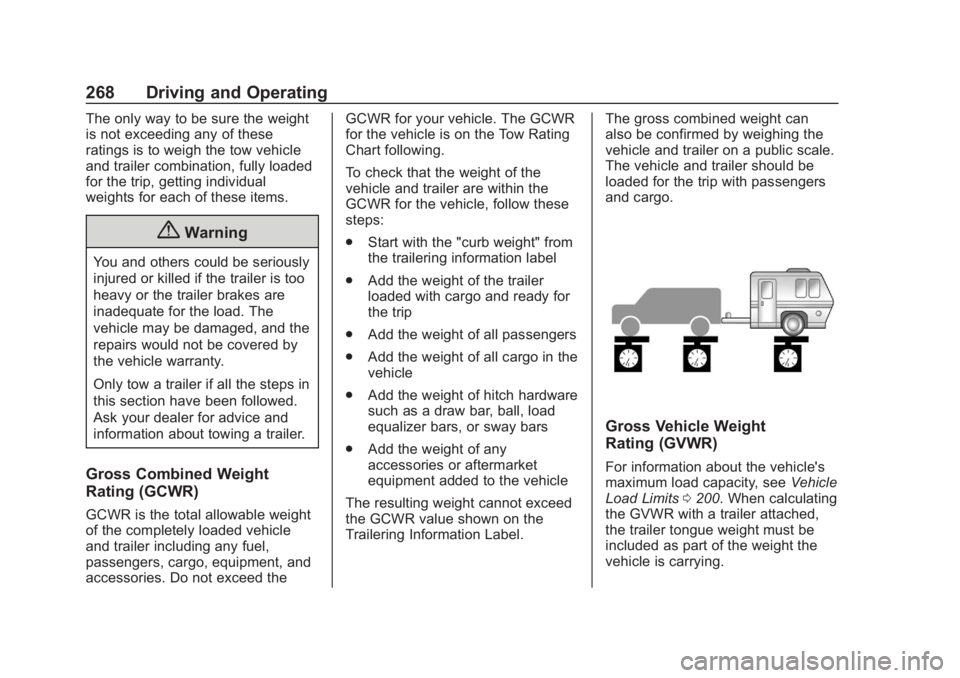
vehicle and trailer on a public scale.
The vehicle and trailer should be
loaded for the trip with passengers
and cargo.
Gross Vehicle Weight
Rating (GVWR)
For information about the vehicle's
maximum load capacity, see
Vehicle
Load Limits 0200. When calculating
the GVWR with a trailer attached,
the trailer tongue weight must be
included as part of the weight the
vehicle is carrying.
Page 278 of 438
Chevrolet Tahoe/Suburban Owner Manual (GMNA-Localizing-U.S./Canada/
Mexico-13566622) - 2020 - CRC - 4/24/19
Driving and Operating 277
all. Make sure all of these systems
are fully operational to allow the
ITBC system to function properly.
The ITBC system is powered
through the vehicle's electrical
system. Turning the ignition off will
also turn off the ITBC system. The
ITBC system is fully functional only
when the ignition is in ON/RUN.
{Warning
Connecting a trailer that has an
air brake system may result in
reduced or complete loss of trailer
braking, including increased
stopping distance or trailer
instability which could result in
serious injury, death, or property
damage. Only use the ITBC
system with electric or electric
over hydraulic trailer brake
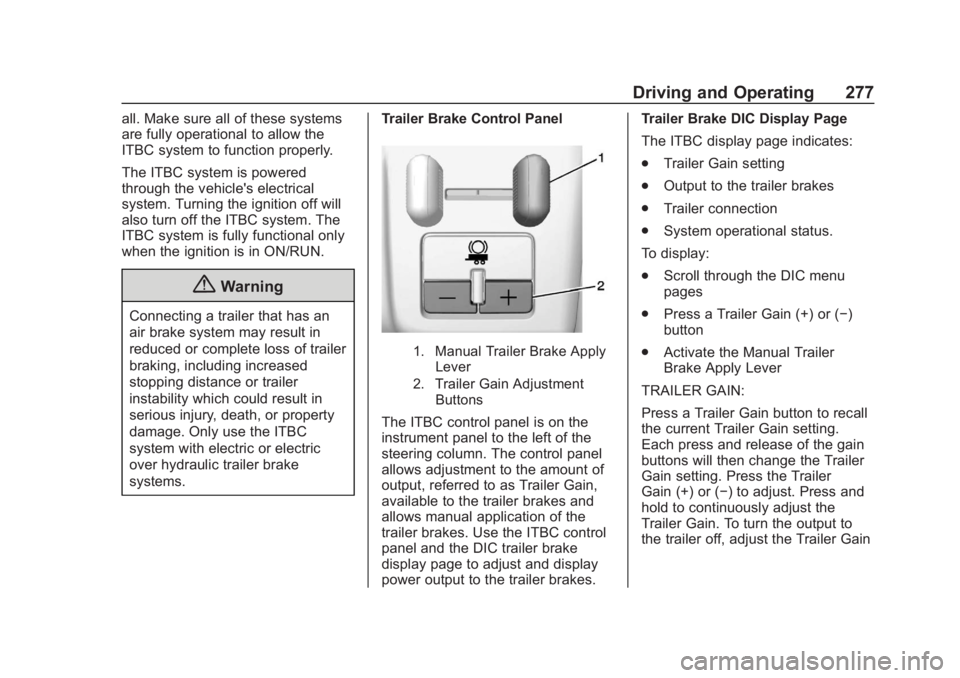
systems.Trailer Brake Control Panel
1. Manual Trailer Brake Apply
Lever
2. Trailer Gain Adjustment Buttons
The ITBC control panel is on the
instrument panel to the left of the
steering column. The control panel
allows adjustment to the amount of
output, referred to as Trailer Gain,
available to the trailer brakes and
allows manual application of the
trailer brakes. Use the ITBC control
panel and the DIC trailer brake
display page to adjust and display
power output to the trailer brakes. Trailer Brake DIC Display Page
The ITBC display page indicates:
.
Trailer Gain setting
. Output to the trailer brakes
. Trailer connection
. System operational status.
To display:
. Scroll through the DIC menu
pages
. Press a Trailer Gain (+) or (−)
button
. Activate the Manual Trailer
Brake Apply Lever
TRAILER GAIN:
Press a Trailer Gain button to recall
the current Trailer Gain setting.
Each press and release of the gain
buttons will then change the Trailer
Gain setting. Press the Trailer
Gain (+) or (−) to adjust. Press and
hold to continuously adjust the
Trailer Gain. To turn the output to
the trailer off, adjust the Trailer Gain
Page 279 of 438
Chevrolet Tahoe/Suburban Owner Manual (GMNA-Localizing-U.S./Canada/
Mexico-13566622) - 2020 - CRC - 4/24/19
278 Driving and Operating
setting to 0.0. This setting can be
adjusted from 0.0 to 10.0 with a
trailer connected or disconnected.
TRAILER OUTPUT: This displays
anytime a trailer with electric brakes
is connected. Output to the trailer
brakes is based on the amount of
vehicle braking present and relative
to the Trailer Gain setting. Output is
displayed from 0 to 100% for each
gain setting.
The Trailer Output will indicate“- - -
- - -” on the Trailer Brake Display
Page whenever the following occur:
. No trailer is connected.
. A trailer without electric brakes
is connected, no DIC message
will display
. A trailer with electric brakes has
become disconnected, a CHECK
TRAILER WIRING message
displays on the DIC
. There is a fault present in the
wiring to the trailer brakes, a
CHECK TRAILER WIRING
message displays on the DIC .
The ITBC system is not working
due to a fault, a SERVICE
TRAILER BRAKE SYSTEM
message displays in the DIC
Manual Trailer Brake Apply Lever
Slide this lever left to apply the
trailer ’s electric brakes independent
of the vehicle’s brakes. Use this
lever to adjust Trailer Gain to
achieve the proper power output to
the trailer brakes. The trailer's and
the vehicle's brake lamps will come
on when either vehicle brakes or
manual trailer brakes are applied
and properly connected.
Trailer Gain Adjustment Procedure
Trailer Gain should be set for a
specific trailering condition and it
must be readjusted anytime vehicle
loading, trailer loading, or road
surface conditions change.{Warning
Trailer brakes that are
over-gained or under-gained may
not stop the vehicle and the trailer
as intended and can result in a
crash. Always follow the
instructions to set the Trailer Gain
for the proper trailer stopping
performance.
To adjust Trailer Gain for each
towing condition: 1. Drive the vehicle with the trailer attached on a level road
surface representative of the
towing condition and free of
traffic at about 32 to 40 km/h
(20 to 25 mph) and fully apply
the Manual Trailer Brake apply
lever.
Note
Adjusting Trailer Gain at speeds
lower than 32 to 40 km/h (20 to
25 mph) may result in an incorrect
gain setting.
Page 281 of 438
Chevrolet Tahoe/Suburban Owner Manual (GMNA-Localizing-U.S./Canada/
Mexico-13566622) - 2020 - CRC - 4/24/19
280 Driving and Operating
If either the CHECK TRAILER
WIRING or SERVICE TRAILER
BRAKE SYSTEM message displays
while driving, the ITBC system may
not be fully functional or may not
function at all. When traffic
conditions allow, carefully pull the
vehicle over to the side of the road
and turn the ignition off. Check the
wiring connection to the trailer and
turn the ignition back on. If either of
these messages continues, either
the vehicle or trailer needs service.
A GM dealer may be able to
diagnose and repair problems with
the trailer. However, any diagnosis
and repair of the trailer is not
covered under the vehicle warranty.
Contact your trailer dealer for
assistance with trailer repairs and
trailer warranty information.
Trailer Sway
Control (TSC)
Vehicles with StabiliTrak have a
Trailer Sway Control (TSC) feature.
Trailer sway is unintended
side-to-side motion of a trailer while
towing. If the vehicle is towing atrailer and the TSC detects that
sway is increasing, the vehicle
brakes are selectively applied at
each wheel, to help reduce
excessive trailer sway. If equipped
with the Integrated Trailer Brake
Control (ITBC) system, and the
trailer has an electric brake system,
StabiliTrak may also apply the trailer
brakes.
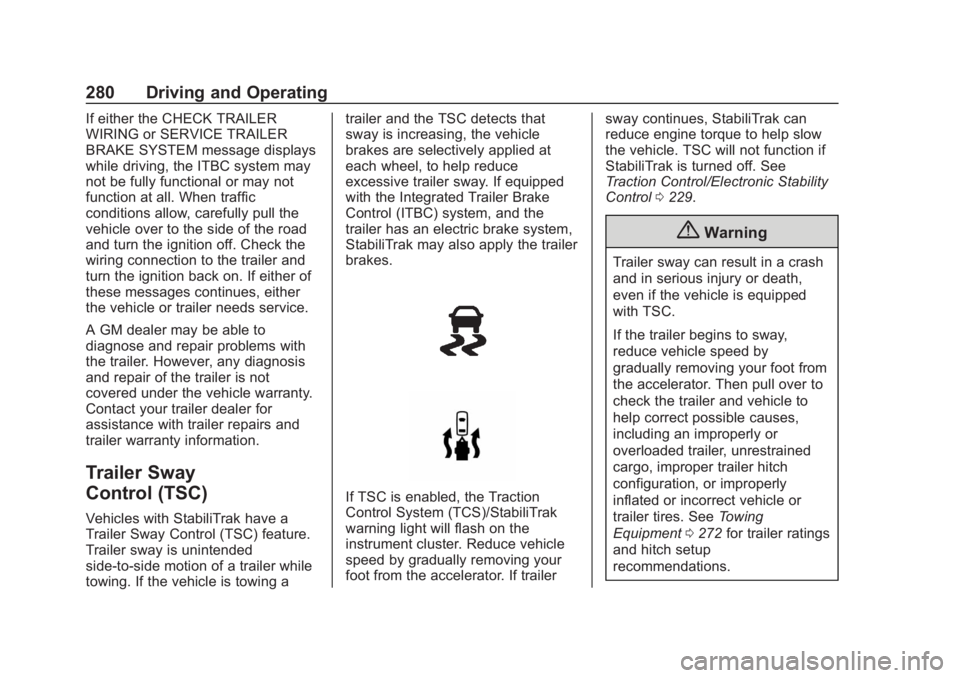
If TSC is enabled, the Traction
Control System (TCS)/StabiliTrak
warning light will flash on the
instrument cluster. Reduce vehicle
speed by gradually removing your
foot from the accelerator. If trailer
sway continues, StabiliTrak can
reduce engine torque to help slow
the vehicle. TSC will not function if
StabiliTrak is turned off. See
Traction Control/Electronic Stability
Control
0229.
{Warning
Trailer sway can result in a crash
and in serious injury or death,
even if the vehicle is equipped
with TSC.
If the trailer begins to sway,
reduce vehicle speed by
gradually removing your foot from
the accelerator. Then pull over to
check the trailer and vehicle to
help correct possible causes,
including an improperly or
overloaded trailer, unrestrained
cargo, improper trailer hitch
configuration, or improperly
inflated or incorrect vehicle or
trailer tires. See Towing
Equipment 0272 for trailer ratings
and hitch setup
recommendations.
Page 282 of 438
Chevrolet Tahoe/Suburban Owner Manual (GMNA-Localizing-U.S./Canada/
Mexico-13566622) - 2020 - CRC - 4/24/19
Driving and Operating 281
Aftermarket Electronic Trailer
Sway Control Devices
Some trailers may come equipped
with an electronic device designed
to reduce or control trailer sway.
Aftermarket equipment
manufacturers also offer similar
devices that connect to the wiring
between the trailer and the vehicle.
These devices may interfere with
the vehicle’s trailer brake systems
or other systems, including
integrated anti-sway systems,
if equipped. Messages related to
trailer connections or trailer brakes
could appear on the DIC. The
effects of these aftermarket devices
on vehicle handling or trailer brake
performance is not known.
{Warning
Use of aftermarket electronic
trailer sway control devices could
result in reduced trailer brake
performance, loss of trailer
brakes, or other malfunctions, and
(Continued)
Warning (Continued)
result in a crash. You or others
could be seriously injured or
killed. Before using one of these
devices:
. Ask the device or trailer
manufacturer if the device
has been thoroughly tested
for compatibility with the
make, model, and year of
your vehicle and any
optional equipment installed
on your vehicle.
. Before driving, check the
trailer brakes are working
properly, if equipped. Drive
the vehicle with the trailer
attached on a level road
surface that is free of traffic
at about 32-40 km/h
(20-25 mph) and fully apply
the manual trailer brake
apply lever. Also, check the
trailer brake lamps and
other lamps are functioning
correctly.
(Continued)
Warning (Continued)
.If the trailer brakes are not
operating properly at any
time, or if a DIC message
indicates problems with the
trailer connections or trailer
brakes, carefully pull the
vehicle over to the side of
the road when traffic
conditions allow.
Trailer Tires
Special Trailer (ST) tires differ from
vehicle tires. Trailer tires are
designed with stiff sidewalls to help
prevent sway and to support heavy
loads. These features can make it
difficult to determine if the trailer tire
pressures are low only based on
a visual inspection.
Always check all trailer tire
pressures before each trip when the
tires are cool. Low trailer tire
pressure is a leading cause of trailer
tire blow-outs.
Page 283 of 438
Chevrolet Tahoe/Suburban Owner Manual (GMNA-Localizing-U.S./Canada/
Mexico-13566622) - 2020 - CRC - 4/24/19
282 Driving and Operating
Trailer tires deteriorate over time.
The trailer tire sidewall will show the
week and year the tire was
manufactured. Many trailer tire
manufacturers recommend
replacing tires more than six
years old.
Overloading is another leading
cause of trailer tire blow-outs. Never
load your trailer with more weight
than the tires are designed to
support. The load rating is located
on the trailer tire sidewall.
Always know the maximum speed
rating for the trailer tires before
driving. This may be significantly
lower than the vehicle tire speed
rating. The speed rating may be on
the trailer tire sidewall. If the speed
rating is not shown, the default
trailer tire speed rating is 105 km/h
(65 mph).Conversions and
Add-Ons
Add-On Electrical
Equipment
{Warning
The Data Link Connector (DLC) is
used for vehicle service and
Emission Inspection/Maintenance
testing. SeeMalfunction Indicator
Lamp (Check Engine Light) 0137
. A device connected to the DLC
— such as an aftermarket fleet or
driver-behavior tracking device —
may interfere with vehicle
systems. This could affect vehicle
operation and cause a crash.
Such devices may also access
information stored in the vehicle’s
systems.
Caution
Some electrical equipment can
damage the vehicle or cause
components to not work and
would not be covered by the
vehicle warranty. Always check
with your dealer before adding
electrical equipment.
Add-on equipment can drain the
vehicle's 12-volt battery, even if the
vehicle is not operating.
The vehicle has an airbag system.
Before attempting to add anything
electrical to the vehicle, see
Servicing the Airbag-Equipped
Vehicle 085 and
Adding Equipment to the
Airbag-Equipped Vehicle 085.
Page 284 of 438
Chevrolet Tahoe/Suburban Owner Manual (GMNA-Localizing-U.S./Canada/
Mexico-13566622) - 2020 - CRC - 4/15/19
Vehicle Care 283
Vehicle Care
General Information
General Information . . . . . . . . . . 284
California Proposition65 Warning . . . . . . . . . . . . . . . . . 285
California Perchlorate Materials Requirements . . . . . 285
Accessories and Modifications . . . . . . . . . . . . . . . . 285
Vehicle Checks
Doing Your OwnService Work . . . . . . . . . . . . . . . 286
Hood . . . . . . . . . . . . . . . . . . . . . . . . . 286
Engine Compartment Overview . . . . . . . . . . . . . . . . . . . . 288
Engine Oil . . . . . . . . . . . . . . . . . . . . 293
Engine Oil Life System . . . . . . . 295
Automatic Transmission Fluid (6-Speed Transmission) . . . . . 296
Automatic Transmission Fluid (10-Speed Transmission) . . . 299
Engine Air Cleaner/Filter . . . . . . 300
Cooling System . . . . . . . . . . . . . . 301
Engine Overheating . . . . . . . . . . 305
Engine Fan . . . . . . . . . . . . . . . . . . . 306
Washer Fluid . . . . . . . . . . . . . . . . . 306
Brakes . . . . . . . . . . . . . . . . . . . . . . . 307 Brake Fluid . . . . . . . . . . . . . . . . . . . 308
Battery - North America . . . . . . 309
Four-Wheel Drive . . . . . . . . . . . . . 310
Front Axle . . . . . . . . . . . . . . . . . . . . 310
Rear Axle . . . . . . . . . . . . . . . . . . . . . 311
Starter Switch Check . . . . . . . . . 311
Automatic Transmission Shift
Lock Control Function
Check . . . . . . . . . . . . . . . . . . . . . . . 311
Ignition Transmission Lock Check . . . . . . . . . . . . . . . . . . . . . . . 311
Park Brake and P (Park) Mechanism Check . . . . . . . . . . 312
Wiper Blade Replacement . . . . 312
Glass Replacement . . . . . . . . . . 313
Windshield Replacement . . . . . 313
Gas Strut(s) . . . . . . . . . . . . . . . . . . 314
Headlamp Aiming
Headlamp Aiming . . . . . . . . . . . . 315
Bulb Replacement
Bulb Replacement . . . . . . . . . . . . 315
Halogen Bulbs . . . . . . . . . . . . . . . . 315
High Intensity Discharge (HID) Lighting . . . . . . . . . . . . . . . . . . . . . 315
LED Lighting . . . . . . . . . . . . . . . . . 315
Headlamps . . . . . . . . . . . . . . . . . . . 316
Fog Lamps . . . . . . . . . . . . . . . . . . . 316
Front Turn Signal Lamps . . . . . 316 Taillamps, Turn Signal,
Stoplamps, and Back-Up
Lamps . . . . . . . . . . . . . . . . . . . . . . 317
License Plate Lamp . . . . . . . . . . 318
Electrical System
Electrical System Overload . . . 319
Fuses and Circuit Breakers . . . 319
Engine Compartment Fuse Block . . . . . . . . . . . . . . . . . . . . . . . . 320
Instrument Panel Fuse Block (Left) . . . . . . . . . . . . . . . . . 324
Instrument Panel Fuse Block (Right) . . . . . . . . . . . . . . . . . . . . . . 327
Rear Compartment Fuse Block . . . . . . . . . . . . . . . . . . . . . . . . 329
Wheels and Tires
Tires . . . . . . . . . . . . . . . . . . . . . . . . . . 330
All-Season Tires . . . . . . . . . . . . . . 331
Winter Tires . . . . . . . . . . . . . . . . . . 331
Low-Profile Tires . . . . . . . . . . . . . 332
All-Terrain Tires . . . . . . . . . . . . . . . 332
Tire Sidewall Labeling . . . . . . . . 332
Tire Designations . . . . . . . . . . . . . 333
Tire Terminology andDefinitions . . . . . . . . . . . . . . . . . . 334
Tire Pressure . . . . . . . . . . . . . . . . . 337
Tire Pressure for High-Speed Operation . . . . . . . . . . . . . . . . . . . 338
Page 286 of 438
Chevrolet Tahoe/Suburban Owner Manual (GMNA-Localizing-U.S./Canada/
Mexico-13566622) - 2020 - CRC - 4/15/19
Vehicle Care 285
California Proposition
65 Warning
{Warning
Most motor vehicles, including
this one, as well as many of its
service parts and fluids, contain
and/or emit chemicals known to
the State of California to cause
cancer and birth defects or other
reproductive harm. Engine
exhaust, many parts and
systems, many fluids, and some
component wear by-products
contain and/or emit these
chemicals. For more information
go to www.P65Warnings.ca.gov/
passenger-vehicle.
See Battery - North America 0309
and
Jump Starting - North America
0 363 and the back cover.
California Perchlorate
Materials Requirements
Certain types of automotive
applications, such as airbag
initiators, seat belt pretensioners,
and lithium batteries contained in
electronic keys, may contain
perchlorate materials. Perchlorate
Material –special handling may
apply. See www.dtsc.ca.gov/
hazardouswaste/perchlorate.
Accessories and
Modifications
Adding non-dealer accessories or
making modifications to the vehicle
can affect vehicle performance and
safety, including such things as
airbags, braking, stability, ride and
handling, emissions systems,
aerodynamics, durability, and
electronic systems like antilock
brakes, traction control, and stability
control. These accessories or
modifications could even cause
malfunction or damage not covered
by the vehicle warranty. Damage to suspension components
caused by modifying vehicle height
outside of factory settings will not be
covered by the vehicle warranty.
Damage to vehicle components
resulting from modifications or the
installation or use of non-GM
certified parts, including control
module or software modifications, is
not covered under the terms of the
vehicle warranty and may affect
remaining warranty coverage for
affected parts.
GM Accessories are designed to
complement and function with other
systems on the vehicle. See your
dealer to accessorize the vehicle
using genuine GM Accessories
installed by a dealer technician.
Also, see
Adding Equipment to the
Airbag-Equipped Vehicle 085.
Page 287 of 438
Chevrolet Tahoe/Suburban Owner Manual (GMNA-Localizing-U.S./Canada/
Mexico-13566622) - 2020 - CRC - 4/15/19
286 Vehicle Care
Vehicle Checks
Doing Your Own
Service Work
{Warning
It can be dangerous to work on
your vehicle if you do not have
the proper knowledge, service
manual, tools, or parts. Always
follow owner’s manual procedures
and consult the service manual
for your vehicle before doing any
service work.
If doing some of your own service
work, use the proper service
manual. It tells you much more
about how to service the vehicle
than this manual can. To order the
proper service manual, see
Publication Ordering Information
0 409.
This vehicle has an airbag system.
Before attempting to do your own
service work, see Servicing the
Airbag-Equipped Vehicle 085. If equipped with remote vehicle
start, open the hood before
performing any service work to
prevent remote starting the vehicle
accidentally. See
Remote Vehicle
Start 023.
Keep a record with all parts receipts
and list the mileage and the date of
any service work performed. See
Maintenance Records 0395.
Caution
Even small amounts of
contamination can cause damage
to vehicle systems. Do not allow
contaminants to contact the fluids,
reservoir caps, or dipsticks.
Hood
{Warning
Turn the vehicle off before
opening the hood. If the engine is
running with the hood open, you
or others could be injured.
{Warning
Components under the hood can
get hot from running the engine.
To help avoid the risk of burning
unprotected skin, never touch
these components until they have
cooled, and always use a glove or
towel to avoid direct skin contact.
Clear any snow from the hood
before opening.
To open the hood: 1. Pull the hood release lever with the
isymbol. It is on the
lower left side of the instrument
panel.
Page 288 of 438
Chevrolet Tahoe/Suburban Owner Manual (GMNA-Localizing-U.S./Canada/
Mexico-13566622) - 2020 - CRC - 4/15/19
Vehicle Care 287
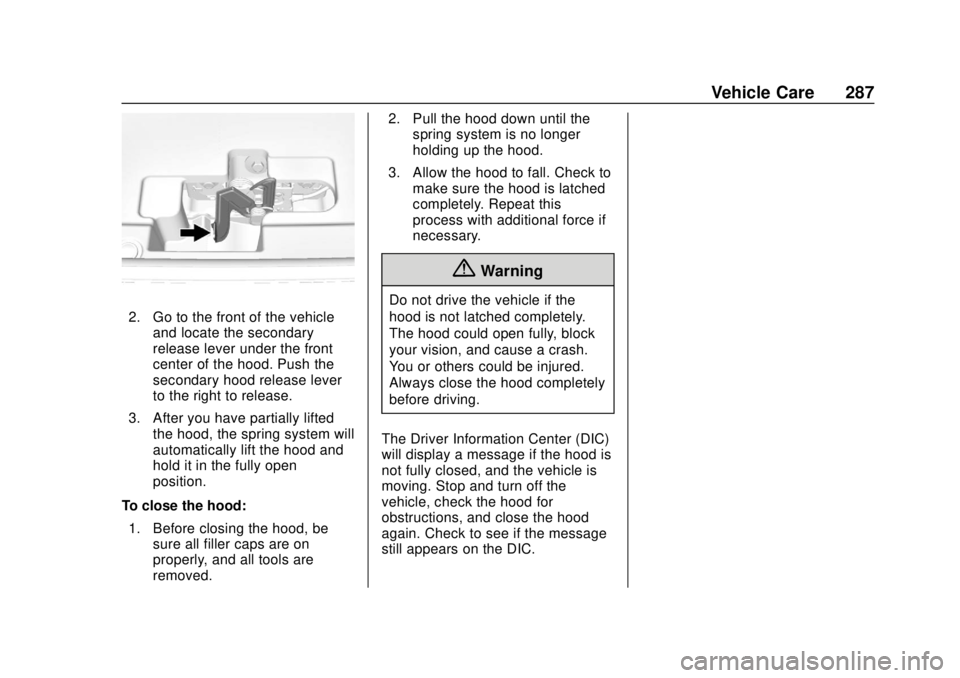
2. Go to the front of the vehicleand locate the secondary
release lever under the front
center of the hood. Push the
secondary hood release lever
to the right to release.
3. After you have partially lifted the hood, the spring system will
automatically lift the hood and
hold it in the fully open
position.
To close the hood: 1. Before closing the hood, be sure all filler caps are on
properly, and all tools are
removed. 2. Pull the hood down until the
spring system is no longer
holding up the hood.
3. Allow the hood to fall. Check to make sure the hood is latched
completely. Repeat this
process with additional force if
necessary.
{Warning
Do not drive the vehicle if the
hood is not latched completely.
The hood could open fully, block
your vision, and cause a crash.
You or others could be injured.
Always close the hood completely
before driving.
The Driver Information Center (DIC)
will display a message if the hood is
not fully closed, and the vehicle is
moving. Stop and turn off the
vehicle, check the hood for
obstructions, and close the hood
again. Check to see if the message
still appears on the DIC.