trans CHEVROLET TAHOE 2020 Workshop Manual
[x] Cancel search | Manufacturer: CHEVROLET, Model Year: 2020, Model line: TAHOE, Model: CHEVROLET TAHOE 2020Pages: 438, PDF Size: 6.71 MB
Page 165 of 438
Chevrolet Tahoe/Suburban Owner Manual (GMNA-Localizing-U.S./Canada/
Mexico-13566622) - 2020 - CRC - 4/15/19
164 Instruments and Controls
2. At the same time, press andhold both the hand-held
transmitter button and one of
the three Universal Remote
system buttons to be used to
operate the garage door. Do
not release either button until
the indicator light changes from
a slow to a rapid flash. Then
release both buttons.
Some garage door openers
may require substitution of
Step 2 with the procedure
under “Radio Signals for Some
Gate Operators” later in this
section.
3. Press and hold the newly programmed Universal Remote
system button for five seconds
while watching the indicator
light and garage door
activation.
.If the indicator light stays on
continuously or the garage
door moves when the
button is pressed, then
programming is complete.
There is no need to
complete Steps 4–6. .
If the indicator light does
not come on or the garage
door does not move, a
second button press may
be required. For a second
time, press and hold the
newly programmed button
for five seconds. If the light
stays on or the garage door
moves, programming is
complete.
. If the indicator light blinks
rapidly for two seconds,
then changes to a solid light
and the garage door does
not move, continue with
programming Steps 4–6.
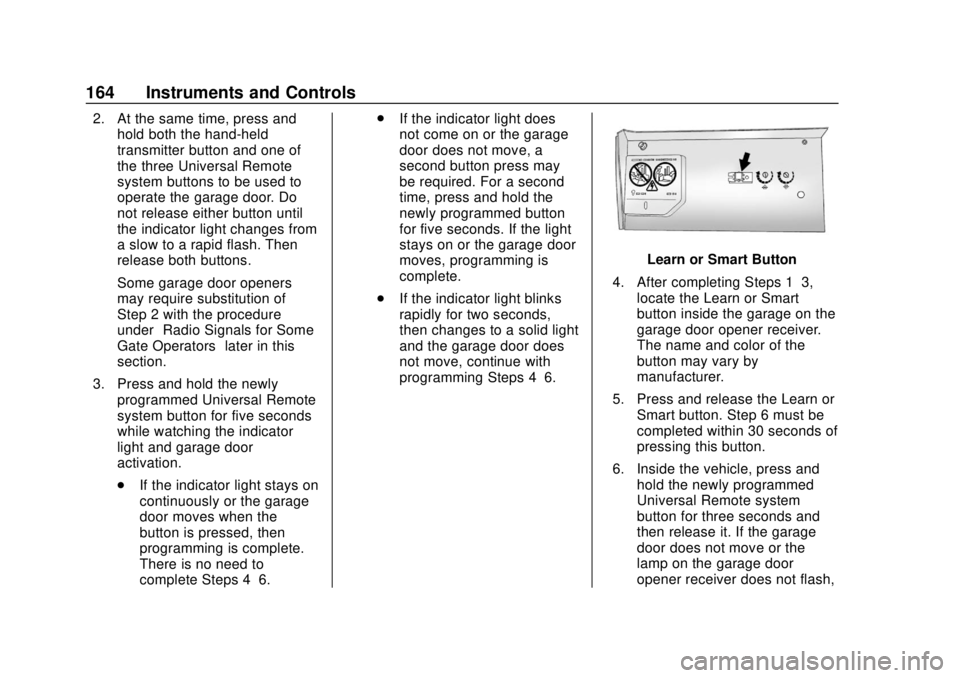
Learn or Smart Button
4. After completing Steps 1–3, locate the Learn or Smart
button inside the garage on the
garage door opener receiver.
The name and color of the
button may vary by
manufacturer.
5. Press and release the Learn or Smart button. Step 6 must be
completed within 30 seconds of
pressing this button.
6. Inside the vehicle, press and hold the newly programmed
Universal Remote system
button for three seconds and
then release it. If the garage
door does not move or the
lamp on the garage door
opener receiver does not flash,
Page 166 of 438
Chevrolet Tahoe/Suburban Owner Manual (GMNA-Localizing-U.S./Canada/
Mexico-13566622) - 2020 - CRC - 4/15/19
Instruments and Controls 165
press and hold the same
button a second time for
three seconds then release it.
Again, if the door does not
move or the garage door lamp
does not flash, press and hold
the same button a third time for
three seconds, then release it.
The Universal Remote system
should now activate the
garage door.
Repeat the process for
programming the two remaining
buttons.
Radio Signals for Some Gate
Operators
For questions or programming help,
see www.homelink.com/gm or call
1-800-355-3515. For calls placed
outside the U.S.A, Canada,
or Puerto Rico, international rates
will apply and may differ based on
landline or mobile phone. Some radio-frequency laws and
gate operators require transmitter
signals to time out or quit after
several seconds of transmission.
This may not be long enough for the
Universal Remote system to pick up
the signal during programming.
If the programming did not work,
replace Step 2 under
“Programming
the Universal Remote System” with
the following:
Press and hold the Universal
Remote system button while
pressing and releasing the
hand-held transmitter button every
two seconds until the signal has
been successfully accepted by the
Universal Remote system. The
Universal Remote system indicator
light will flash slowly at first and then
rapidly. Proceed with Step 3 under
“Programming the Universal Remote
System” to complete.
Universal Remote System
Operation
Using the Universal Remote
System
Press and hold the appropriate
Universal Remote system button for
at least one-half second. The
indicator light will come on while the
signal is being transmitted.
Erasing Universal Remote
System Buttons
Erase all programmed buttons when
vehicle ownership is terminated.
To erase:
1. Press and hold the two outside buttons until the indicator light
begins to flash. This should
take about 10 seconds.
2. Release both buttons.
Page 171 of 438
Chevrolet Tahoe/Suburban Owner Manual (GMNA-Localizing-U.S./Canada/
Mexico-13566622) - 2020 - CRC - 4/15/19
170 Lighting
Flash-to-Pass
This feature lets you use the
high-beam headlamps to signal a
driver in front of you that you want
to pass. It works even if the
headlamps are in the automatic
position.
To use it, pull the turn signal lever
toward you, then release it.
If the headlamps are in the
automatic position or on low beam,
the high-beam headlamps will turn
on. Depending on the type of
headlamp, they will either turn off
after a short duration or stay on as
long as you hold the lever toward
you. The high-beam indicator on the
instrument cluster will come on.
Release the lever to return to
normal operation.
Daytime Running
Lamps (DRL)
DRL can make it easier for others to
see the front of the vehicle during
the day. Fully functional DRL are
required on all vehicles first sold in
Canada.
The DRL system comes on when
the following conditions are met:
.The ignition is on.
. The exterior lamp control is
in AUTO.
. The transmission is not in
P (Park).
. The light sensor determines it is
daytime.
When the DRL system is on, only
the DRL are on. The taillamps,
sidemarker lamps, instrument panel
lights, and other lamps will not
be on.
When it begins to get dark, the
automatic headlamp system
switches from DRL to the
headlamps. To turn off the DRL, turn the exterior
lamp control to
Oand then release.
For vehicles first sold in Canada, off
will only work when the vehicle is
parked.
Automatic Headlamp
System
When the exterior lamp control is
set to AUTO and it is dark enough
outside, the headlamps come on
automatically.
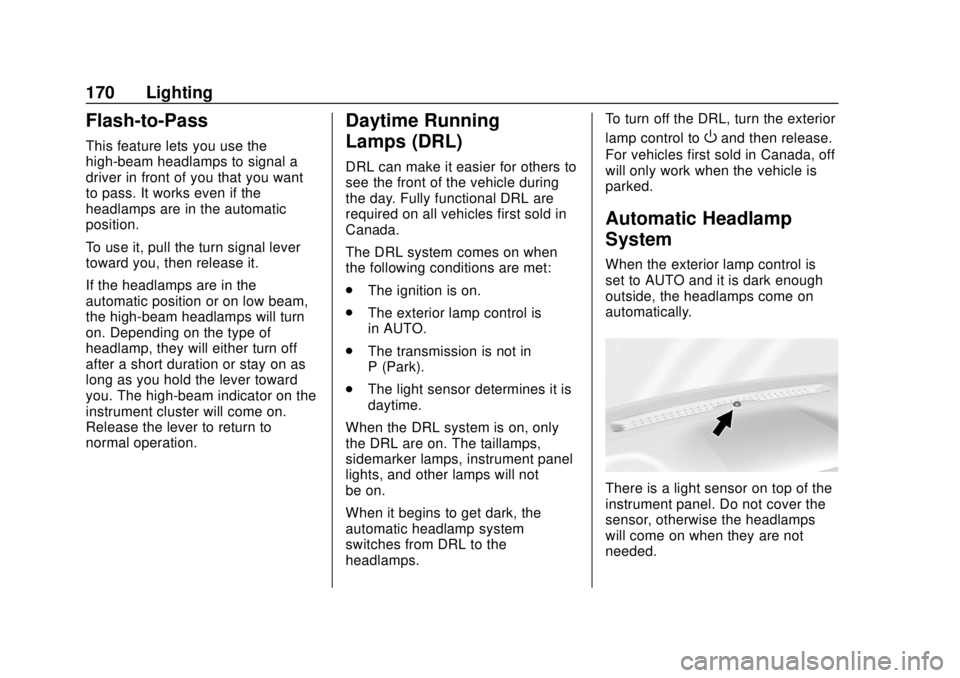
There is a light sensor on top of the
instrument panel. Do not cover the
sensor, otherwise the headlamps
will come on when they are not
needed.
Page 172 of 438
Chevrolet Tahoe/Suburban Owner Manual (GMNA-Localizing-U.S./Canada/
Mexico-13566622) - 2020 - CRC - 4/15/19
Lighting 171
The system may also turn on the
headlamps when driving through
a parking garage or tunnel.
If the vehicle is started in a dark
garage, the automatic headlamp
system comes on immediately. If it
is light outside when the vehicle
leaves the garage, there is a slight
delay before the automatic
headlamp system changes to the
DRL. During that delay, the
instrument cluster may not be as
bright as usual. Make sure the
instrument panel brightness control
is in the full bright position. See
Instrument Panel Illumination
Control0173.
When it is bright enough outside,
the headlamps will turn off or may
change to Daytime Running
Lamps (DRL).
The automatic headlamp system
turns off when the exterior lamp
control is turned to
Oor the ignition
is off.
Lights On with Wipers
If the windshield wipers are
activated in daylight with the engine
on, and the exterior lamp control is
in AUTO, the headlamps, parking
lamps, and other exterior lamps
come on. The transition time for the
lamps coming on varies based on
wiper speed. When the wipers are
not operating, these lamps turn off.
Move the exterior lamp control to
O
or;to disable this feature.
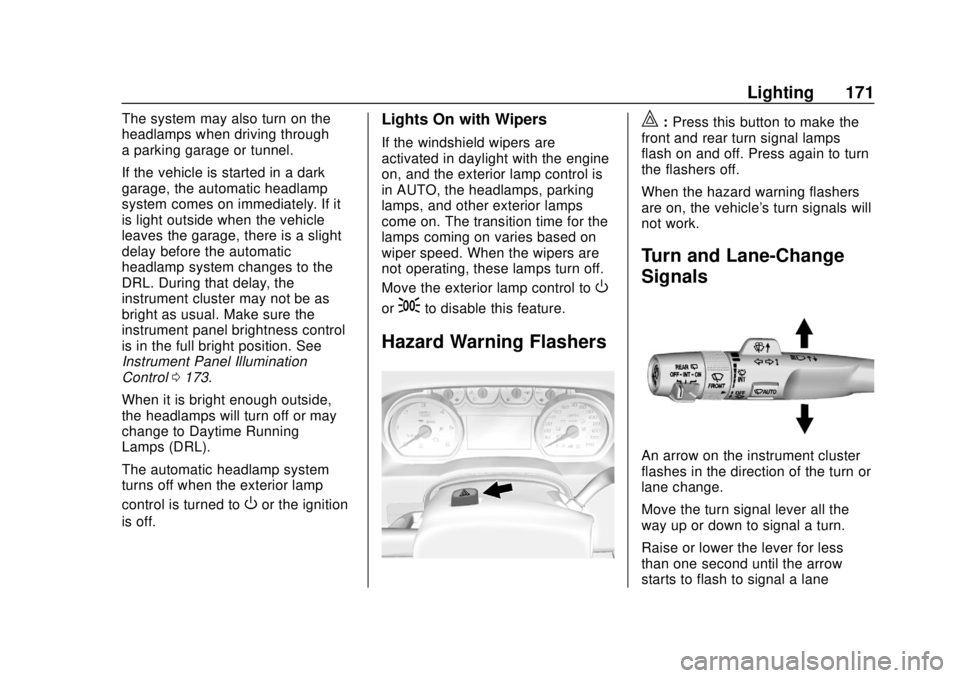
Hazard Warning Flashers
|: Press this button to make the
front and rear turn signal lamps
flash on and off. Press again to turn
the flashers off.
When the hazard warning flashers
are on, the vehicle's turn signals will
not work.
Turn and Lane-Change
Signals
An arrow on the instrument cluster
flashes in the direction of the turn or
lane change.
Move the turn signal lever all the
way up or down to signal a turn.
Raise or lower the lever for less
than one second until the arrow
starts to flash to signal a lane
Page 175 of 438
Chevrolet Tahoe/Suburban Owner Manual (GMNA-Localizing-U.S./Canada/
Mexico-13566622) - 2020 - CRC - 4/15/19
174 Lighting
Reading Lamps
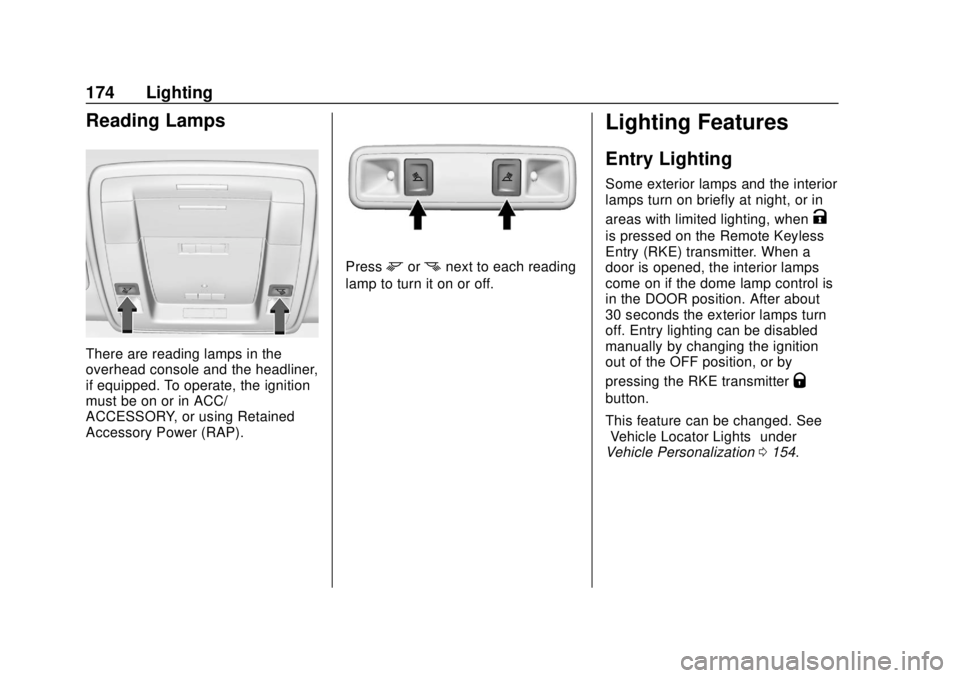
There are reading lamps in the
overhead console and the headliner,
if equipped. To operate, the ignition
must be on or in ACC/
ACCESSORY, or using Retained
Accessory Power (RAP).
Pressmornnext to each reading
lamp to turn it on or off.
Lighting Features
Entry Lighting
Some exterior lamps and the interior
lamps turn on briefly at night, or in
areas with limited lighting, when
K
is pressed on the Remote Keyless
Entry (RKE) transmitter. When a
door is opened, the interior lamps
come on if the dome lamp control is
in the DOOR position. After about
30 seconds the exterior lamps turn
off. Entry lighting can be disabled
manually by changing the ignition
out of the OFF position, or by
pressing the RKE transmitter
Q
button.
This feature can be changed. See
“Vehicle Locator Lights” under
Vehicle Personalization 0154.
Page 187 of 438
Chevrolet Tahoe/Suburban Owner Manual (GMNA-Localizing-U.S./Canada/
Mexico-13566622) - 2020 - CRC - 4/24/19
186 Driving and Operating
Driving and
Operating
Driving Information
Driving for Better FuelEconomy . . . . . . . . . . . . . . . . . . . . 187
Distracted Driving . . . . . . . . . . . . 187
Defensive Driving . . . . . . . . . . . . . 188
Drunk Driving . . . . . . . . . . . . . . . . . 188
Control of a Vehicle . . . . . . . . . . . 189
Braking . . . . . . . . . . . . . . . . . . . . . . . 189
Steering . . . . . . . . . . . . . . . . . . . . . . 189
Off-Road Recovery . . . . . . . . . . . 190
Loss of Control . . . . . . . . . . . . . . . 190
Off-Road Driving . . . . . . . . . . . . . 191
Driving on Wet Roads . . . . . . . . 196
Hill and Mountain Roads . . . . . 196
Winter Driving . . . . . . . . . . . . . . . . 197
If the Vehicle Is Stuck . . . . . . . . 198
Vehicle Load Limits . . . . . . . . . . . 200
Starting and Operating
New Vehicle Break-In . . . . . . . . . 204
Adjustable Throttle and Brake Pedal . . . . . . . . . . . . . . . . . . . . . . . 204
Ignition Positions (Keyless Access) . . . . . . . . . . . . . . . . . . . . . 205 Ignition Positions (Key
Access) . . . . . . . . . . . . . . . . . . . . . 207
Starting the Engine . . . . . . . . . . . 209
Engine Heater . . . . . . . . . . . . . . . . 211
Retained Accessory Power (RAP) . . . . . . . . . . . . . . . . 212
Shifting Into Park . . . . . . . . . . . . . 212
Shifting out of Park . . . . . . . . . . . 214
Parking over Things That Burn . . . . . . . . . . . . . . . . . . . 214
Active Fuel Management . . . . . 214
Extended Parking . . . . . . . . . . . . 214
Engine Exhaust
Engine Exhaust . . . . . . . . . . . . . . 215
Running the Vehicle While Parked . . . . . . . . . . . . . . . . . . . . . . 216
Automatic Transmission
Automatic Transmission . . . . . . 216
Manual Mode . . . . . . . . . . . . . . . . . 219
Tow/Haul Mode . . . . . . . . . . . . . . . 221
Drive Systems
Four-Wheel Drive . . . . . . . . . . . . . 222
Brakes
Antilock Brake
System (ABS) . . . . . . . . . . . . . . . 227
Parking Brake . . . . . . . . . . . . . . . . 228
Brake Assist . . . . . . . . . . . . . . . . . . 228
Hill Start Assist (HSA) . . . . . . . . 228
Ride Control Systems
Traction Control/Electronic Stability Control . . . . . . . . . . . . . 229
Hill Descent Control (HDC) . . . 231
Magnetic Ride Control . . . . . . . . 232
Locking Rear Axle . . . . . . . . . . . . 232
Automatic Level Control . . . . . . 232
Cruise Control
Cruise Control . . . . . . . . . . . . . . . . 232
Adaptive Cruise Control . . . . . . 235
Driver Assistance Systems
Driver Assistance Systems . . . 243
Assistance Systems for Parking or Backing . . . . . . . . . . 244
Assistance Systems for Driving . . . . . . . . . . . . . . . . . . . . . . 248
Forward Collision Alert (FCA) System . . . . . . . . . . . . . . . . . . . . . . 248
Automatic Emergency Braking (AEB) . . . . . . . . . . . . . . . 250
Side Blind Zone Alert (SBZA) . . . . . . . . . . . . . . . . 252
Lane Change Alert (LCA) . . . . . 252
Lane Keep Assist (LKA) . . . . . . 254
Fuel
Top Tier Fuel . . . . . . . . . . . . . . . . . 256
Recommended Fuel (5.3L V8 Engine) . . . . . . . . . . . . . . . . . . 257
Page 194 of 438
Chevrolet Tahoe/Suburban Owner Manual (GMNA-Localizing-U.S./Canada/
Mexico-13566622) - 2020 - CRC - 4/24/19
Driving and Operating 193
Warning (Continued)
cause a rollover. You could be
injured or killed. Do not drive on
steep hills.
Before driving on a hill, assess the
steepness, traction, and
obstructions. If the terrain ahead
cannot be seen, get out of the
vehicle and walk the hill before
driving further.
When driving on hills:
. Use a low gear and keep a firm
grip on the steering wheel.
. Maintain a slow speed.
. When possible, drive straight up
or down the hill.
. Slow down when approaching
the top of the hill.
. Use headlamps even during the
day to make the vehicle more
visible.
{Warning
Driving to the top of a hill at high
speed can cause a crash. There
could be a drop-off, embankment,
cliff, or even another vehicle. You
could be seriously injured or
killed. As you near the top of a
hill, slow down and stay alert.
. Never go downhill forward or
backward with either the
transmission or transfer case in
N (Neutral). The brakes could
overheat and you could lose
control.
{Warning
If the vehicle has the two-speed
automatic or electronic transfer
case, shifting the transfer case to
N (Neutral) can cause your
vehicle to roll even if the
transmission is in P (Park). This is
because the N (Neutral) position
(Continued)
Warning (Continued)
on the transfer case overrides the
transmission. You or someone
else could be injured. If leaving
the vehicle, set the parking brake
and shift the transmission to
P (Park). Shift the transfer case to
any position but N (Neutral).
. When driving down a hill, keep
the vehicle headed straight
down. Use a low gear because
the engine will work with the
brakes to slow the vehicle and
help keep the vehicle under
control.
{Warning
Heavy braking when going down
a hill can cause your brakes to
overheat and fade. This could
cause loss of control and you or
others could be injured or killed.
Apply the brakes lightly when
(Continued)
Page 198 of 438
Chevrolet Tahoe/Suburban Owner Manual (GMNA-Localizing-U.S./Canada/
Mexico-13566622) - 2020 - CRC - 4/24/19
Driving and Operating 197
.Keep the vehicle serviced and in
good shape.
. Check all fluid levels and brakes,
tires, cooling system, and
transmission.
. Shift to a lower gear when going
down steep or long hills.
{Warning
Using the brakes to slow the
vehicle on a long downhill slope
can cause brake overheating, can
reduce brake performance, and
could result in a loss of braking.
Shift the transmission to a lower
gear to let the engine assist the
brakes on a steep downhill slope.
{Warning
Coasting downhill in N (Neutral)
or with the ignition off is
dangerous. This can cause
overheating of the brakes and
(Continued)
Warning (Continued)
loss of steering assist. Always
have the engine running and the
vehicle in gear.
. Drive at speeds that keep the
vehicle in its own lane. Do not
swing wide or cross the
center line.
. Be alert on top of hills;
something could be in your lane
(e.g., stalled car, crash).
. Pay attention to special road
signs (e.g., falling rocks area,
winding roads, long grades,
passing or no-passing zones)
and take appropriate action.
Winter Driving
Driving on Snow or Ice
Snow or ice between the tires and
the road creates less traction or
grip, so drive carefully. Wet ice can
occur at about 0 °C (32 °F) when freezing rain begins to fall. Avoid
driving on wet ice or in freezing rain
until roads can be treated.
For Slippery Road Driving:
.
Accelerate gently. Accelerating
too quickly causes the wheels to
spin and makes the surface
under the tires slick.
. Turn on Traction Control. See
Traction Control/Electronic
Stability Control 0229.
. The Antilock Brake System
(ABS) improves vehicle stability
during hard stops, but the
brakes should be applied sooner
than when on dry pavement.
See Antilock Brake System
(ABS) 0227.
. Allow greater following distance
and watch for slippery spots. Icy
patches can occur on otherwise
clear roads in shaded areas.
The surface of a curve or an
overpass can remain icy when
the surrounding roads are clear.
Avoid sudden steering
maneuvers and braking while
on ice.
Page 200 of 438
Chevrolet Tahoe/Suburban Owner Manual (GMNA-Localizing-U.S./Canada/
Mexico-13566622) - 2020 - CRC - 4/24/19
Driving and Operating 199
{Warning
If the vehicle's tires spin at high
speed, they can explode, and you
or others could be injured. The
vehicle can overheat, causing an
engine compartment fire or other
damage. Spin the wheels as little
as possible and avoid going
above 56 km/h (35 mph).
For information about using tire
chains on the vehicle, see Tire
Chains 0350.
Rocking the Vehicle to Get
It Out
Turn the steering wheel left and
right to clear the area around the
front wheels. For four-wheel-drive
vehicles, shift into Four-Wheel Drive
High. Turn the TCS off. Shift back
and forth between R (Reverse) and
a forward gear, spinning the wheels
as little as possible. To prevent
transmission wear, wait until the
wheels stop spinning before shifting
gears. Slowly spinning the wheels in the forward and reverse directions
causes a rocking motion that could
free the vehicle. If that does not get
the vehicle out after a few tries, it
might need to be towed out. See
Towing the Vehicle
0367. Recovery
hooks can be used, if equipped.
Recovery Hooks
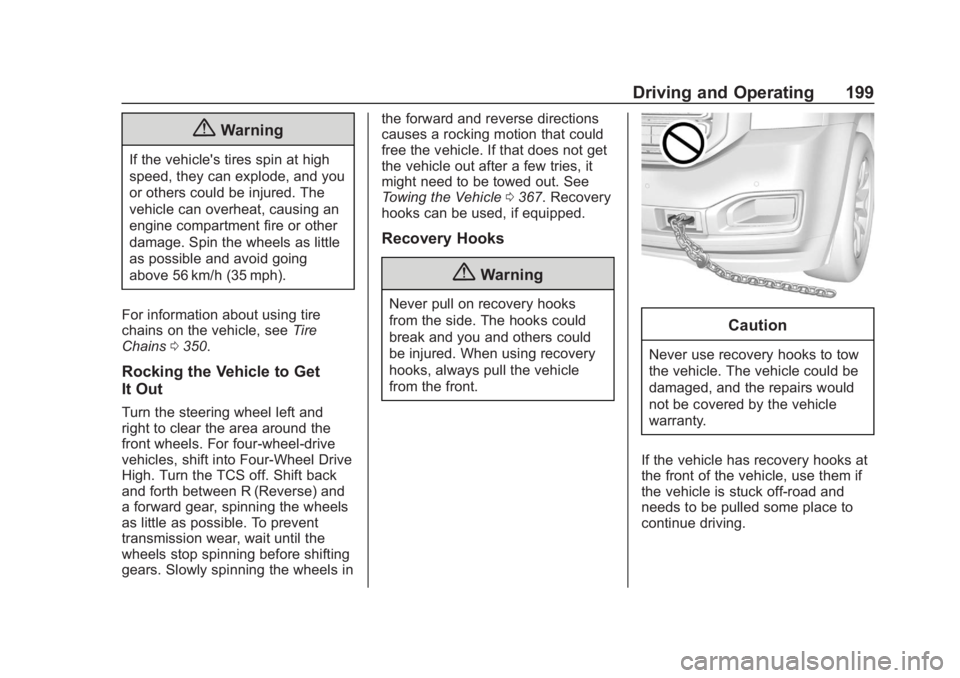
{Warning
Never pull on recovery hooks
from the side. The hooks could
break and you and others could
be injured. When using recovery
hooks, always pull the vehicle
from the front.
Caution
Never use recovery hooks to tow
the vehicle. The vehicle could be
damaged, and the repairs would
not be covered by the vehicle
warranty.
If the vehicle has recovery hooks at
the front of the vehicle, use them if
the vehicle is stuck off-road and
needs to be pulled some place to
continue driving.
Page 202 of 438
Chevrolet Tahoe/Suburban Owner Manual (GMNA-Localizing-U.S./Canada/
Mexico-13566622) - 2020 - CRC - 4/24/19
Driving and Operating 201
“Steps for Determining Correct
Load Limit–
1.Locate the statement "The
combined weight of
occupants and cargo should
never exceed XXX kg or
XXX lbs." on your vehicle’s
placard.
2.Determine the combined
weight of the driver and
passengers that will be
riding in your vehicle.
3.Subtract the combined
weight of the driver and
passengers from XXX kg or
XXX lbs.
4.The resulting figure equals
the available amount of
cargo and luggage load
capacity. For example, if the
"XXX" amount equals
1400 lbs. and there will be
five 150 lb passengers in
your vehicle, the amount of
available cargo and luggageload capacity is 650 lbs.
(1400-750 (5 x 150) =
650 lbs.)
5.Determine the combined
weight of luggage and cargo
being loaded on the vehicle.
That weight may not safely
exceed the available cargo
and luggage load capacity
calculated in Step 4.
6.If your vehicle will be towing
a trailer, load from your
trailer will be transferred to
your vehicle. Consult this
manual to determine how
this reduces the available
cargo and luggage load
capacity of your vehicle.”
See
Trailer Towing 0267 for
important information on towing a
trailer, towing safety rules, and
trailering tips.
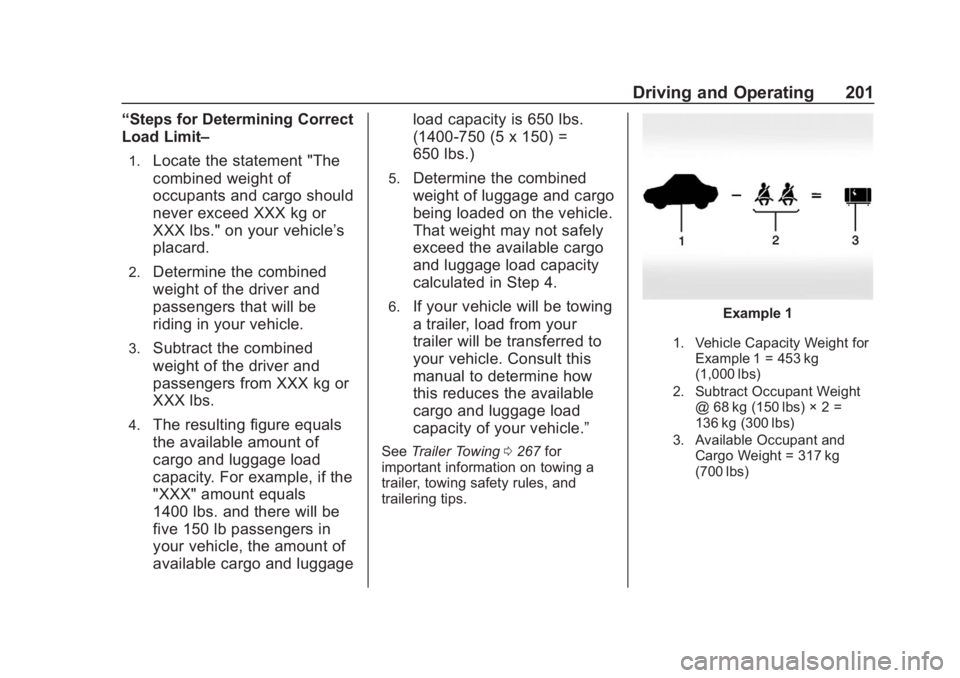
Example 1
1. Vehicle Capacity Weight for
Example 1 = 453 kg
(1,000 lbs)
2. Subtract Occupant Weight @ 68 kg (150 lbs) × 2 =
136 kg (300 lbs)
3. Available Occupant and Cargo Weight = 317 kg
(700 lbs)