Interior CHEVROLET TAHOE 2021 Owner's Manual
[x] Cancel search | Manufacturer: CHEVROLET, Model Year: 2021, Model line: TAHOE, Model: CHEVROLET TAHOE 2021Pages: 433, PDF Size: 7.36 MB
Page 8 of 433
Chevrolet Tahoe/Suburban Owner Manual (GMNA-Localizing-U.S./Canada/
Mexico-13690484) - 2021 - crc - 8/17/20
Keys, Doors, and Windows 7
Keys, Doors, and
Windows
Keys and Locks
Keys . . . . . . . . . . . . . . . . . . . . . . . . . . . . . . . . . . . . . 7
Remote Keyless Entry (RKE) System . . . . . 8
Remote Keyless Entry (RKE) SystemOperation . . . . . . . . . . . . . . . . . . . . . . . . . . . . . . 8
Remote Vehicle Start . . . . . . . . . . . . . . . . . . . 14
Door Locks . . . . . . . . . . . . . . . . . . . . . . . . . . . . . . 15
Power Door Locks . . . . . . . . . . . . . . . . . . . . . . . 16
Delayed Locking . . . . . . . . . . . . . . . . . . . . . . . . 17
Automatic Door Locks . . . . . . . . . . . . . . . . . . . 17
Lockout Protection . . . . . . . . . . . . . . . . . . . . . . 17
Safety Locks . . . . . . . . . . . . . . . . . . . . . . . . . . . . 17
Doors
Liftgate . . . . . . . . . . . . . . . . . . . . . . . . . . . . . . . . . 18
Power Assist Steps . . . . . . . . . . . . . . . . . . . . . 25
Vehicle Security
Vehicle Security . . . . . . . . . . . . . . . . . . . . . . . . 25
Vehicle Alarm System . . . . . . . . . . . . . . . . . . 25
Steering Column Lock . . . . . . . . . . . . . . . . . . 26
Immobilizer . . . . . . . . . . . . . . . . . . . . . . . . . . . . . 27
Immobilizer Operation . . . . . . . . . . . . . . . . . . 27
Exterior Mirrors
Convex Mirrors . . . . . . . . . . . . . . . . . . . . . . . . . 27
Power Mirrors . . . . . . . . . . . . . . . . . . . . . . . . . . 28 Folding Mirrors . . . . . . . . . . . . . . . . . . . . . . . . . 28
Heated Mirrors . . . . . . . . . . . . . . . . . . . . . . . . . 29
Automatic Dimming Mirror . . . . . . . . . . . . . 29
Reverse Tilt Mirrors . . . . . . . . . . . . . . . . . . . . 29
Interior Mirrors
Interior Rearview Mirrors . . . . . . . . . . . . . . . 30
Manual Rearview Mirror . . . . . . . . . . . . . . . . 30
Automatic Dimming Rearview Mirror . . . 30
Rear Camera Mirror . . . . . . . . . . . . . . . . . . . . 30
Windows
Windows . . . . . . . . . . . . . . . . . . . . . . . . . . . . . . . 32
Power Windows . . . . . . . . . . . . . . . . . . . . . . . . 32
Sun Visors . . . . . . . . . . . . . . . . . . . . . . . . . . . . . . 34
Roof
Sunroof . . . . . . . . . . . . . . . . . . . . . . . . . . . . . . . . . 34
Keys and Locks
Keys
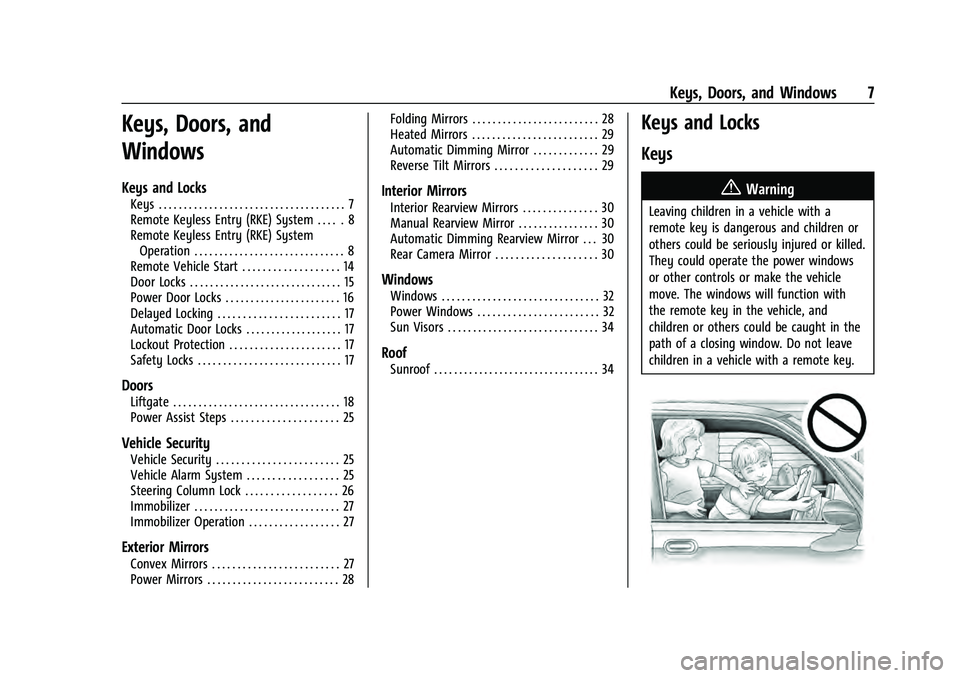
{Warning
Leaving children in a vehicle with a
remote key is dangerous and children or
others could be seriously injured or killed.
They could operate the power windows
or other controls or make the vehicle
move. The windows will function with
the remote key in the vehicle, and
children or others could be caught in the
path of a closing window. Do not leave
children in a vehicle with a remote key.
Page 10 of 433
Chevrolet Tahoe/Suburban Owner Manual (GMNA-Localizing-U.S./Canada/
Mexico-13690484) - 2021 - crc - 8/17/20
Keys, Doors, and Windows 9
Q:Press to lock all doors.
If enabled, the turn signal lamps flash once
on the second press to indicate locking has
occurred. If enabled, the horn chirps when
Qis pressed again within three seconds. See
Vehicle Personalization 0124.
Pressing
Qarms the alarm system. See
Vehicle Alarm System 025.
If equipped with auto mirror folding,
pressing and holding
Qfor one second will
fold the mirrors, if enabled. See Vehicle
Personalization 0124.
K:Press once to unlock only the driver
door. If
Kis pressed again within
three seconds, all remaining doors unlock.
The interior lamps may come on and stay
on for 20 seconds or until the ignition is
turned on.
If enabled, the turn signal lamps flash twice
to indicate unlocking has occurred.
If enabled, the exterior lamps may turn on.
See Vehicle Personalization 0124.
Pressing
Kon the remote key disarms the
alarm system. See Vehicle Alarm System
0 25. If equipped with auto mirror folding,
pressing and holding
Kfor one second will
unfold the mirrors, if enabled. See Vehicle
Personalization 0124.
Press and hold
Kuntil the windows fully
open, if remote window operation is
enabled. See Vehicle Personalization 0124.
b:Press twice to open or close the
liftgate. Press once to stop the liftgate from
moving.
c: Press twice to open the liftglass.
7:Press and release to initiate vehicle
locate. The turn signal lamps flash and the
horn sounds three times.
Press and hold
7for more than
three seconds to activate the panic alarm.
The turn signal lamps flash and the horn
sounds repeatedly for 30 seconds. The alarm
turns off when the ignition is turned on or
7is pressed again. The ignition must be off
for the panic alarm to work.
/: To remote start the vehicle, double
press
/from outside the vehicle using the
remote key. The vehicle cannot be started if
a remote key is left inside the vehicle. See
Remote Vehicle Start 014.
Keyless Access Operation
The Keyless Access system allows for doors
and the liftgate to be accessed without
removing the remote key from your pocket,
purse, briefcase, etc. The remote key must
be within 1 m (3 ft) of the liftgate or door
being opened. If the vehicle has this feature,
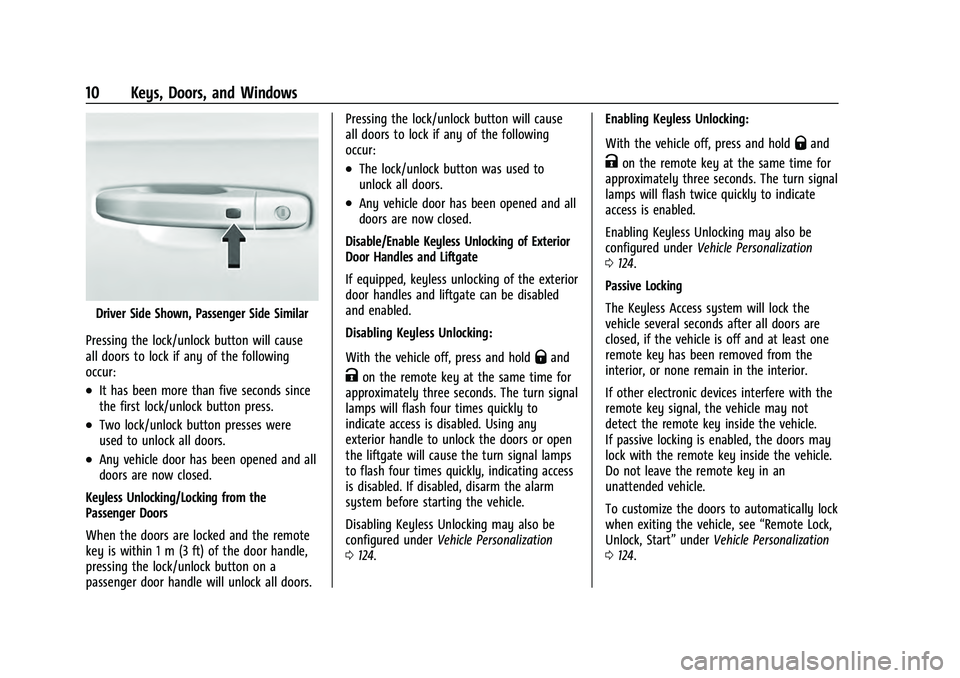
there will be a button on the outside door
handles.
Keyless Access can be programmed to
unlock all doors on the first lock/unlock
press from the driver door. See Vehicle
Personalization 0124.
If equipped with memory seats, remote keys
1 and 2 are linked to seating positions of
memory 1 or 2. See Memory Seats040.
Keyless Unlocking/Locking from the
Driver Door
When the doors are locked and the remote
key is within 1 m (3 ft) of the door handle,
pressing the lock/unlock button on the
driver door handle will unlock the driver
door. If the lock/unlock button is pressed
again within five seconds, all passenger
doors and the liftgate will unlock.
Page 11 of 433
Chevrolet Tahoe/Suburban Owner Manual (GMNA-Localizing-U.S./Canada/
Mexico-13690484) - 2021 - crc - 8/17/20
10 Keys, Doors, and Windows
Driver Side Shown, Passenger Side Similar
Pressing the lock/unlock button will cause
all doors to lock if any of the following
occur:
.It has been more than five seconds since
the first lock/unlock button press.
.Two lock/unlock button presses were
used to unlock all doors.
.Any vehicle door has been opened and all
doors are now closed.
Keyless Unlocking/Locking from the
Passenger Doors
When the doors are locked and the remote
key is within 1 m (3 ft) of the door handle,
pressing the lock/unlock button on a
passenger door handle will unlock all doors. Pressing the lock/unlock button will cause
all doors to lock if any of the following
occur:
.The lock/unlock button was used to
unlock all doors.
.Any vehicle door has been opened and all
doors are now closed.
Disable/Enable Keyless Unlocking of Exterior
Door Handles and Liftgate
If equipped, keyless unlocking of the exterior
door handles and liftgate can be disabled
and enabled.
Disabling Keyless Unlocking:
With the vehicle off, press and hold
Qand
Kon the remote key at the same time for
approximately three seconds. The turn signal
lamps will flash four times quickly to
indicate access is disabled. Using any
exterior handle to unlock the doors or open
the liftgate will cause the turn signal lamps
to flash four times quickly, indicating access
is disabled. If disabled, disarm the alarm
system before starting the vehicle.
Disabling Keyless Unlocking may also be
configured under Vehicle Personalization
0 124. Enabling Keyless Unlocking:
With the vehicle off, press and hold
Qand
Kon the remote key at the same time for
approximately three seconds. The turn signal
lamps will flash twice quickly to indicate
access is enabled.
Enabling Keyless Unlocking may also be
configured under Vehicle Personalization
0 124.
Passive Locking
The Keyless Access system will lock the
vehicle several seconds after all doors are
closed, if the vehicle is off and at least one
remote key has been removed from the
interior, or none remain in the interior.
If other electronic devices interfere with the
remote key signal, the vehicle may not
detect the remote key inside the vehicle.
If passive locking is enabled, the doors may
lock with the remote key inside the vehicle.
Do not leave the remote key in an
unattended vehicle.
To customize the doors to automatically lock
when exiting the vehicle, see “Remote Lock,
Unlock, Start” underVehicle Personalization
0 124.
Page 12 of 433
Chevrolet Tahoe/Suburban Owner Manual (GMNA-Localizing-U.S./Canada/
Mexico-13690484) - 2021 - crc - 8/17/20
Keys, Doors, and Windows 11
Temporary Disable of Passive Locking
Temporarily disable passive locking by
pressing and holding
Kon the interior door
switch with a door open for at least
four seconds, or until three chimes are
heard. Passive locking will then remain
disabled until
Qon the interior door is
pressed, or until the vehicle is turned on.
Remote Left In Vehicle Alert
When the vehicle is turned off and a remote
key is left in the vehicle, the horn will chirp
three times after all doors are closed. To
turn on or off see Vehicle Personalization
0 124.
Remote Removed From Vehicle Alert
If the vehicle is on with a door open, and
then all doors are closed, the vehicle will
check for remote keys inside. If a remote
key is not detected, the Driver Information
Center (DIC) will display NO REMOTE
DETECTED and the horn will chirp three
times. This occurs only once each time the
vehicle is driven. To turn on or off see
Vehicle Personalization 0124. Keyless Liftgate Opening
Press the touch pad on the underside of the
liftgate handle to open the liftgate when all
doors are unlocked, or when the remote key
is within 1 m (3 ft).
Keyless Liftglass Opening
Press the exterior liftglass button to open
the liftglass when all doors are unlocked,
or when the remote key is within 1 m (3 ft).
See
Liftgate 018.
Key Access
To access a vehicle with a weak remote key
battery, see Door Locks015.
Programming Remote Keys to the
Vehicle
Only remote keys programmed to the
vehicle will work. If a remote key is lost or
stolen, a replacement can be purchased and
programmed through your dealer. The
vehicle can be reprogrammed so that lost or
stolen remote keys no longer work. Each
vehicle can have up to eight remote keys
programmed to it.
Programming with Recognized Remote Keys
A new key can be programmed to the
vehicle when there are two recognized keys. To program, the vehicle must be in RUN and
all remote keys, both currently recognized
and new, must be with you.
Vehicles with Front Bench Seat
1. Place the two recognized remote keys on the passenger seat.
2. Scroll to the DIC menu to "Remote Key Learn" menu and select.
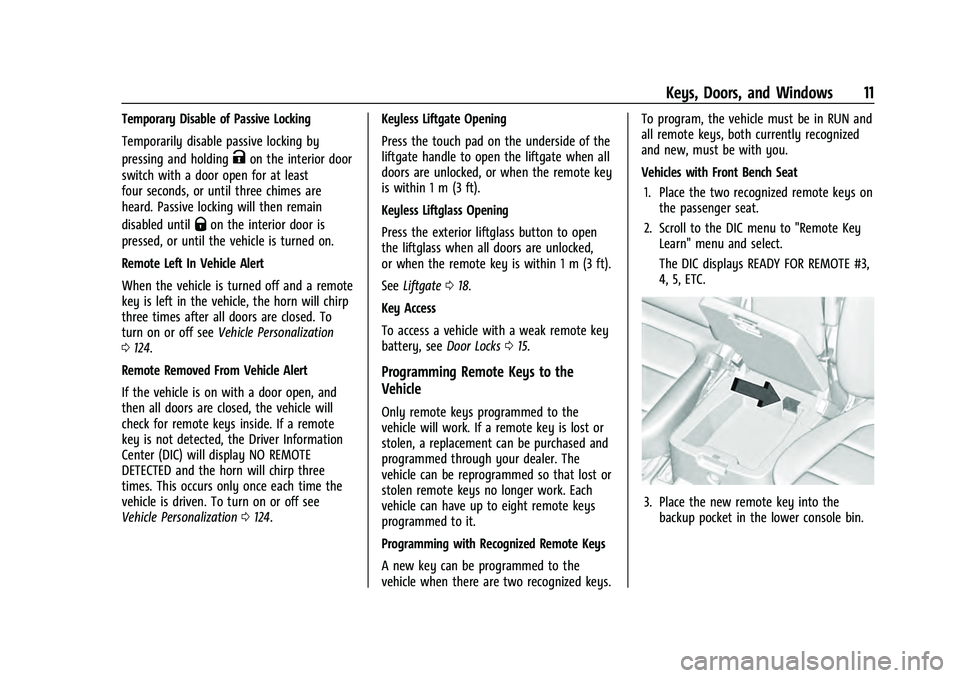
The DIC displays READY FOR REMOTE #3,
4, 5, ETC.
3. Place the new remote key into thebackup pocket in the lower console bin.
Page 17 of 433
Chevrolet Tahoe/Suburban Owner Manual (GMNA-Localizing-U.S./Canada/
Mexico-13690484) - 2021 - crc - 8/17/20
16 Keys, Doors, and Windows
.PressQorKon the power door lock
switch.
.Pulling an interior door handle will unlock
the door. Pulling the door handle again
unlatches it.
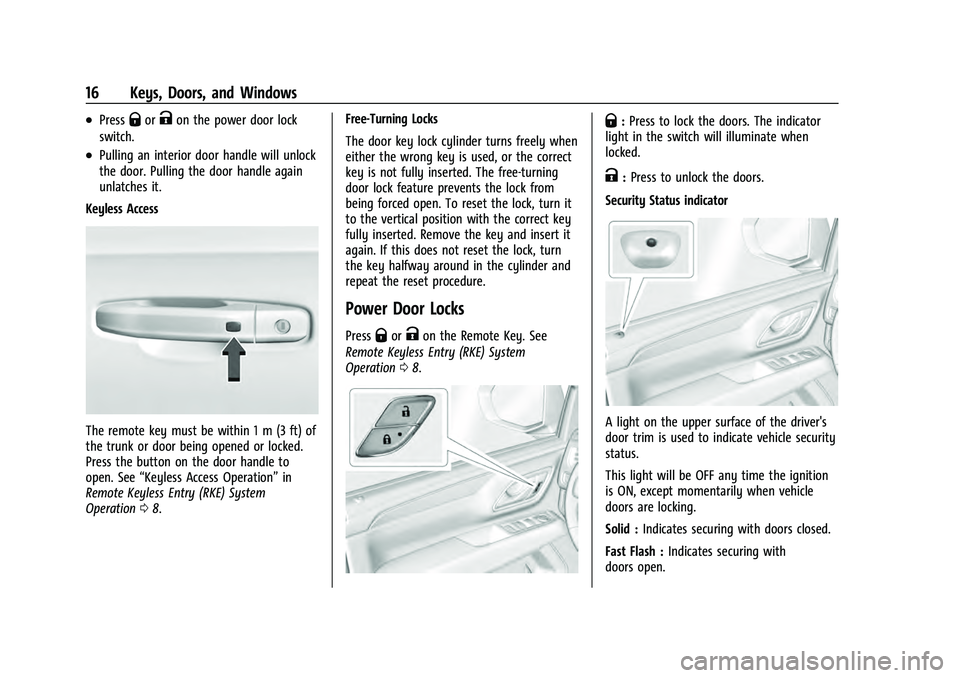
Keyless Access
The remote key must be within 1 m (3 ft) of
the trunk or door being opened or locked.
Press the button on the door handle to
open. See “Keyless Access Operation” in
Remote Keyless Entry (RKE) System
Operation 08. Free-Turning Locks
The door key lock cylinder turns freely when
either the wrong key is used, or the correct
key is not fully inserted. The free-turning
door lock feature prevents the lock from
being forced open. To reset the lock, turn it
to the vertical position with the correct key
fully inserted. Remove the key and insert it
again. If this does not reset the lock, turn
the key halfway around in the cylinder and
repeat the reset procedure.
Power Door Locks
PressQorKon the Remote Key. See
Remote Keyless Entry (RKE) System
Operation 08.
Q:Press to lock the doors. The indicator
light in the switch will illuminate when
locked.
K: Press to unlock the doors.
Security Status indicator
A light on the upper surface of the driver's
door trim is used to indicate vehicle security
status.
This light will be OFF any time the ignition
is ON, except momentarily when vehicle
doors are locking.
Solid : Indicates securing with doors closed.
Fast Flash : Indicates securing with
doors open.
Page 26 of 433
Chevrolet Tahoe/Suburban Owner Manual (GMNA-Localizing-U.S./Canada/
Mexico-13690484) - 2021 - crc - 8/17/20
Keys, Doors, and Windows 25
Power Assist Steps
{Warning
To avoid personal injury or property
damage, before entering or exiting the
vehicle, be sure the power assist step is
fully extended. Do not step on the power
assist step while it is moving. Never place
hands or other body parts between the
extended power assist step and the
vehicle.
If equipped, the power assist steps will
deploy when the door is opened and
automatically retract three seconds after the
door is closed. The power assist steps will
retract immediately if the vehicle starts
moving.
Disable the power assist steps before jacking
or placing any object under the vehicle. Too
much ice buildup may prevent deployment
of the power assist steps. Check the step
position before exiting the vehicle. If this
happens, disable the power assist steps,
clear the ice, then enable the assist steps
and confirm normal function prior to use. Keep hands, children, pets, objects, and
clothing clear of the power assist steps
when in motion. The steps will reverse
direction if they encounter an obstruction
when opening or closing. Remove the
obstruction, then open and close the door
on the same side to complete the motion of
the assist steps. If the obstruction is not
cleared, the assist steps remain extended
while driving.
To extend or retract both power assist steps
for cleaning, see
Vehicle Personalization
0 124.
Enable/Disable
To enable or disable the power assist steps,
see Vehicle Personalization 0124.
Vehicle Security
This vehicle has theft-deterrent features;
however, they do not make the vehicle
impossible to steal.
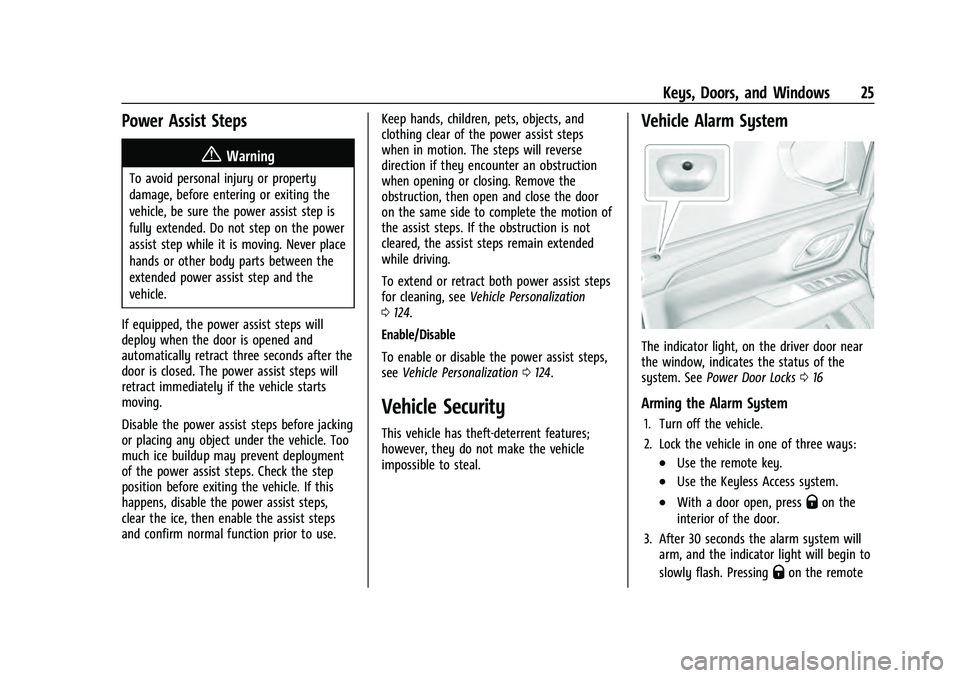
Vehicle Alarm System
The indicator light, on the driver door near
the window, indicates the status of the
system. See Power Door Locks 016
Arming the Alarm System
1. Turn off the vehicle.
2. Lock the vehicle in one of three ways:
.Use the remote key.
.Use the Keyless Access system.
.With a door open, pressQon the
interior of the door.
3. After 30 seconds the alarm system will arm, and the indicator light will begin to
slowly flash. Pressing
Qon the remote
Page 31 of 433
Chevrolet Tahoe/Suburban Owner Manual (GMNA-Localizing-U.S./Canada/
Mexico-13690484) - 2021 - crc - 8/17/20
30 Keys, Doors, and Windows
Interior Mirrors
Interior Rearview Mirrors
Adjust the rearview mirror for a clear view
of the area behind the vehicle.
Do not spray glass cleaner directly on the
mirror. Use a soft towel dampened with
water.
Manual Rearview Mirror
If equipped, push the tab forward for
daytime use and pull it rearward for
nighttime use to avoid glare of the
headlamps from behind.
Automatic Dimming Rearview
Mirror
If equipped, automatic dimming reduces the
glare of headlamps from behind. The
dimming feature comes on when the vehicle
is started.
Rear Camera Mirror
If equipped, this automatic dimming mirror
provides a wide angle camera view of the
area behind the vehicle.
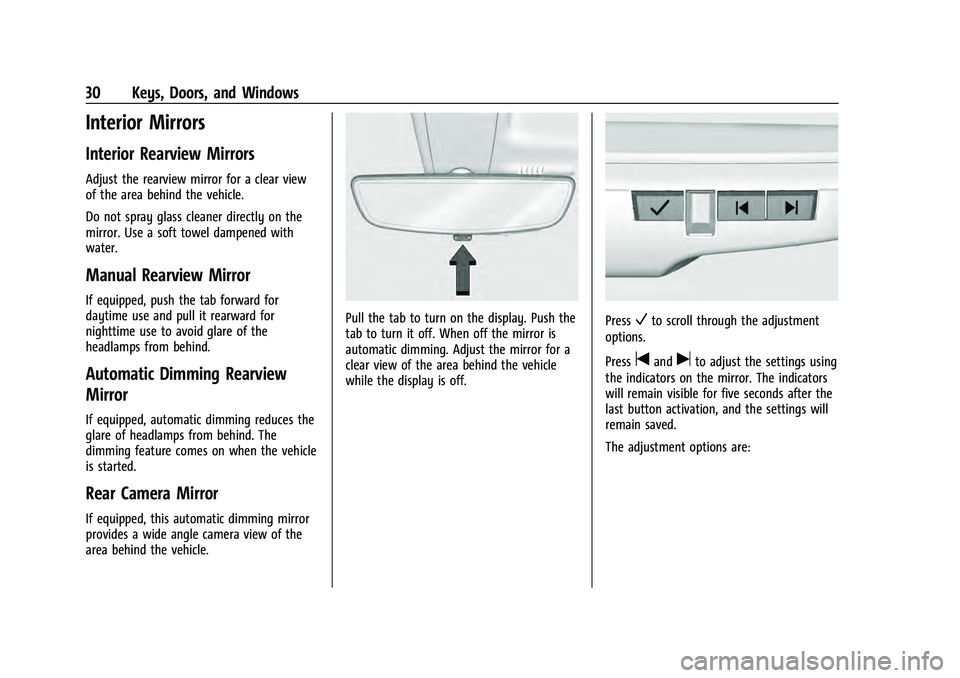
Pull the tab to turn on the display. Push the
tab to turn it off. When off the mirror is
automatic dimming. Adjust the mirror for a
clear view of the area behind the vehicle
while the display is off.PressVto scroll through the adjustment
options.
Press
tanduto adjust the settings using
the indicators on the mirror. The indicators
will remain visible for five seconds after the
last button activation, and the settings will
remain saved.
The adjustment options are:
Page 44 of 433
Chevrolet Tahoe/Suburban Owner Manual (GMNA-Localizing-U.S./Canada/
Mexico-13690484) - 2021 - crc - 8/17/20
Seats and Restraints 43
Obstructions
If something has blocked the driver seat
while recalling a memory position, the recall
may stop. Remove the obstruction and try
the recall again. If the memory position still
does not recall, see your dealer.
Heated and Ventilated Front
Seats
{Warning
If temperature change or pain to the skin
cannot be felt, the seat heater may cause
burns. To reduce the risk of burns, use
care when using the seat heater,
especially for long periods of time. Do
not place anything on the seat that
insulates against heat, such as a blanket,
cushion, cover, or similar item. This may
cause the seat heater to overheat. An
overheated seat heater may cause a burn
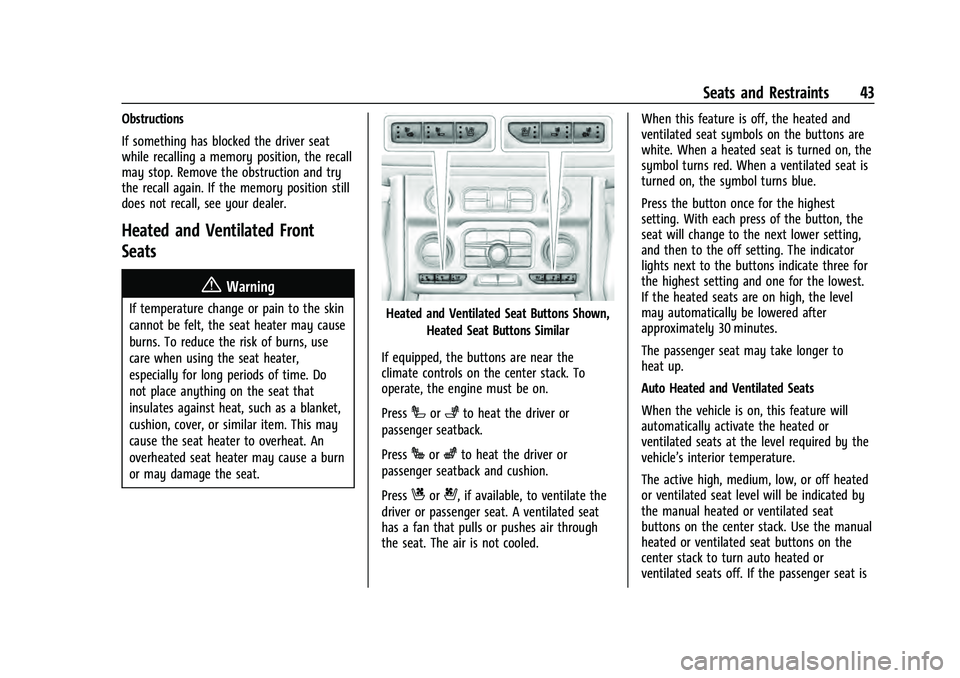
or may damage the seat.Heated and Ventilated Seat Buttons Shown,Heated Seat Buttons Similar
If equipped, the buttons are near the
climate controls on the center stack. To
operate, the engine must be on.
Press
Ior+to heat the driver or
passenger seatback.
Press
Jorzto heat the driver or
passenger seatback and cushion.
Press
Cor{, if available, to ventilate the
driver or passenger seat. A ventilated seat
has a fan that pulls or pushes air through
the seat. The air is not cooled. When this feature is off, the heated and
ventilated seat symbols on the buttons are
white. When a heated seat is turned on, the
symbol turns red. When a ventilated seat is
turned on, the symbol turns blue.
Press the button once for the highest
setting. With each press of the button, the
seat will change to the next lower setting,
and then to the off setting. The indicator
lights next to the buttons indicate three for
the highest setting and one for the lowest.
If the heated seats are on high, the level
may automatically be lowered after
approximately 30 minutes.
The passenger seat may take longer to
heat up.
Auto Heated and Ventilated Seats
When the vehicle is on, this feature will
automatically activate the heated or
ventilated seats at the level required by the
vehicle’s interior temperature.
The active high, medium, low, or off heated
or ventilated seat level will be indicated by
the manual heated or ventilated seat
buttons on the center stack. Use the manual
heated or ventilated seat buttons on the
center stack to turn auto heated or
ventilated seats off. If the passenger seat is
Page 65 of 433
Chevrolet Tahoe/Suburban Owner Manual (GMNA-Localizing-U.S./Canada/
Mexico-13690484) - 2021 - crc - 8/17/20
64 Seats and Restraints
least partially inflated for some time after
they inflate. Some components of the airbag
module may be hot for several minutes. For
location of the airbags, seeWhere Are the
Airbags? 061.
The parts of the airbag that come into
contact with you may be warm, but not too
hot to touch. There may be some smoke
and dust coming from the vents in the
deflated airbags. Airbag inflation does not
prevent the driver from seeing out of the
windshield or being able to steer the
vehicle, nor does it prevent people from
leaving the vehicle.
{Warning
When an airbag inflates, there may be
dust in the air. This dust could cause
breathing problems for people with a
history of asthma or other breathing
trouble. To avoid this, everyone in the
vehicle should get out as soon as it is
safe to do so. If you have breathing
problems but cannot get out of the
vehicle after an airbag inflates, then get
fresh air by opening a window or a door. (Continued)
Warning (Continued)
If you experience breathing problems
following an airbag deployment, you
should seek medical attention.
The vehicle has a feature that may
automatically unlock the doors, turn on the
interior lamps and hazard warning flashers,
and shut off the fuel system after the
airbags inflate. The feature may also
activate, without airbag inflation, after an
event that exceeds a predetermined
threshold. After turning the ignition off and
then on again, the fuel system will return to
normal operation; the doors can be locked,
the interior lamps can be turned off, and
the hazard warning flashers can be turned
off using the controls for those features.
If any of these systems are damaged in the
crash they may not operate as normal.
{Warning
A crash severe enough to inflate the
airbags may have also damaged
important functions in the vehicle, such
as the fuel system, brake and steering
systems, etc. Even if the vehicle appears (Continued)
Warning (Continued)
to be drivable after a moderate crash,
there may be concealed damage that
could make it difficult to safely operate
the vehicle.
Use caution if you should attempt to
restart the engine after a crash has
occurred.
In many crashes severe enough to inflate
the airbag, windshields are broken by
vehicle deformation. Additional windshield
breakage may also occur from the front
outboard passenger airbag.
.Airbags are designed to inflate only once.
After an airbag inflates, you will need
some new parts for the airbag system.
If you do not get them, the airbag
system will not be there to help protect
you in another crash. A new system will
include airbag modules and possibly other
parts. The service manual for the vehicle
covers the need to replace other parts.
.The vehicle has a crash sensing and
diagnostic module which records
information after a crash. See Vehicle
Data Recording and Privacy 0410 and
Event Data Recorders 0411.
Page 134 of 433
Chevrolet Tahoe/Suburban Owner Manual (GMNA-Localizing-U.S./Canada/
Mexico-13690484) - 2021 - crc - 8/17/20
Lighting 133
Lighting
Exterior Lighting
Exterior Lamp Controls . . . . . . . . . . . . . . . . . 133
Exterior Lamps Off Reminder . . . . . . . . . . 135
Headlamp High/Low-Beam Changer . . . . 135
Flash-to-Pass . . . . . . . . . . . . . . . . . . . . . . . . . . . 135
Daytime Running Lamps (DRL) . . . . . . . . . 135
Automatic Headlamp System . . . . . . . . . . 135
Hazard Warning Flashers . . . . . . . . . . . . . . 136
Turn and Lane-Change Signals . . . . . . . . . 137
Interior Lighting
Instrument Panel IlluminationControl . . . . . . . . . . . . . . . . . . . . . . . . . . . . . . . 137
Dome Lamps . . . . . . . . . . . . . . . . . . . . . . . . . . 138
Reading Lamps . . . . . . . . . . . . . . . . . . . . . . . . 138
Lighting Features
Entry Lighting . . . . . . . . . . . . . . . . . . . . . . . . . 139
Exit Lighting . . . . . . . . . . . . . . . . . . . . . . . . . . . 139
Battery Load Management . . . . . . . . . . . . 139
Battery Power Protection . . . . . . . . . . . . . . 140
Exterior Lighting Battery Saver . . . . . . . . 140
Exterior Lighting
Exterior Lamp Controls
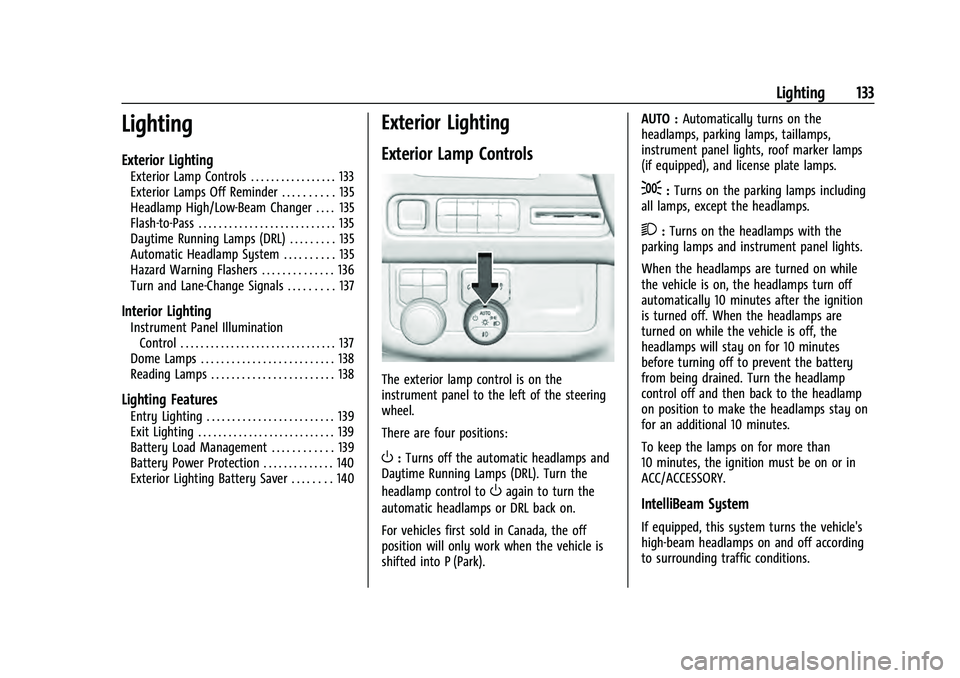
The exterior lamp control is on the
instrument panel to the left of the steering
wheel.
There are four positions:
O: Turns off the automatic headlamps and
Daytime Running Lamps (DRL). Turn the
headlamp control to
Oagain to turn the
automatic headlamps or DRL back on.
For vehicles first sold in Canada, the off
position will only work when the vehicle is
shifted into P (Park). AUTO :
Automatically turns on the
headlamps, parking lamps, taillamps,
instrument panel lights, roof marker lamps
(if equipped), and license plate lamps.
;: Turns on the parking lamps including
all lamps, except the headlamps.
2: Turns on the headlamps with the
parking lamps and instrument panel lights.
When the headlamps are turned on while
the vehicle is on, the headlamps turn off
automatically 10 minutes after the ignition
is turned off. When the headlamps are
turned on while the vehicle is off, the
headlamps will stay on for 10 minutes
before turning off to prevent the battery
from being drained. Turn the headlamp
control off and then back to the headlamp
on position to make the headlamps stay on
for an additional 10 minutes.
To keep the lamps on for more than
10 minutes, the ignition must be on or in
ACC/ACCESSORY.
IntelliBeam System
If equipped, this system turns the vehicle's
high-beam headlamps on and off according
to surrounding traffic conditions.