horn CHEVROLET TAHOE 2022 User Guide
[x] Cancel search | Manufacturer: CHEVROLET, Model Year: 2022, Model line: TAHOE, Model: CHEVROLET TAHOE 2022Pages: 433, PDF Size: 7.37 MB
Page 337 of 433
Chevrolet Tahoe/Suburban Owner Manual (GMNA-Localizing-U.S./Canada/
Mexico-13690484) - 2021 - crc - 8/17/20
336 Vehicle Care
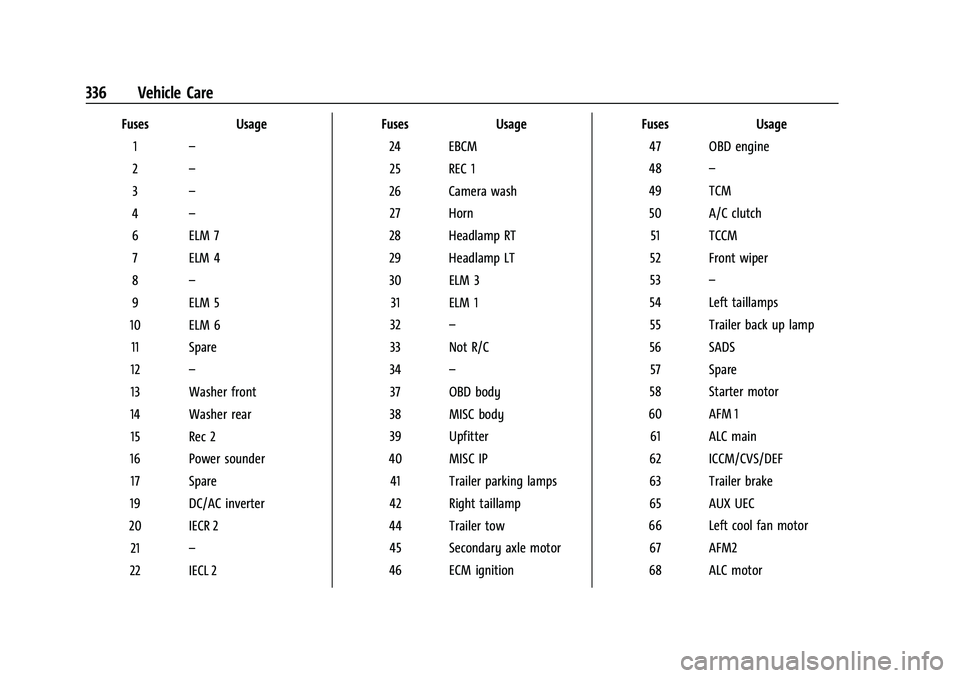
FusesUsage
1 –
2 –
3 –
4 –
6 ELM 7 7 ELM 4
8 –
9 ELM 5
10 ELM 6 11 Spare
12 –
13 Washer front
14 Washer rear 15 Rec 2
16 Power sounder 17 Spare
19 DC/AC inverter
20 IECR 2 21 –
22 IECL 2 Fuses
Usage
24 EBCM 25 REC 1
26 Camera wash 27 Horn
28 Headlamp RT
29 Headlamp LT
30 ELM 3 31 ELM 1
32 –
33 Not R/C
34 –
37 OBD body
38 MISC body
39 Upfitter
40 MISC IP 41 Trailer parking lamps
42 Right taillamp
44 Trailer tow 45 Secondary axle motor
46 ECM ignition Fuses
Usage
47 OBD engine
48 –
49 TCM 50 A/C clutch 51 TCCM
52 Front wiper
53 –
54 Left taillamps 55 Trailer back up lamp
56 SADS 57 Spare
58 Starter motor
60 AFM 1 61 ALC main
62 ICCM/CVS/DEF
63 Trailer brake
65 AUX UEC
66 Left cool fan motor 67 AFM2
68 ALC motor
Page 352 of 433
Chevrolet Tahoe/Suburban Owner Manual (GMNA-Localizing-U.S./Canada/
Mexico-13690484) - 2021 - crc - 8/17/20
Vehicle Care 351
When the recommended pressure is
reached, the horn sounds once and the
turn signal lamp will stop flashing and
briefly turn solid.
Repeat these steps for all underinflated tires
that have illuminated the low tire pressure
warning light.
{Warning
Overinflating a tire could cause the tire
to rupture and you or others could be
injured. Do not exceed the maximum
pressure listed on the tire sidewall. See
Tire Sidewall Labeling 0343 and
Vehicle Load Limits 0222.
If the tire is overinflated by more than
35 kPa (5 psi), the horn will sound multiple
times and the turn signal lamp will continue
to flash for several seconds after filling
stops. To release and correct the pressure,
while the turn signal lamp is still flashing,
briefly press the center of the valve stem.
When the recommended pressure is reached,
the horn sounds once.
If the turn signal lamp does not flash within
15 seconds after starting to inflate the tire,
the tire fill alert has not been activated or is
not working. If the hazard warning flashers are on, the
tire fill alert visual feedback will not work
properly.
The TPMS will not activate the tire fill alert
properly under the following conditions:
.There is interference from an external
device or transmitter.
.The air pressure from the inflation device
is not sufficient to inflate the tire.
.There is a malfunction in the TPMS.
.There is a malfunction in the horn or turn
signal lamps.
.The identification code of the TPMS
sensor is not registered to the system.
.The battery of the TPMS sensor is low.
If the tire fill alert does not operate due to
TPMS interference, move the vehicle about
1 m (3 ft) back or forward and try again.
If the tire fill alert feature is not working,
use a tire pressure gauge.
TPMS Sensor Matching Process —Auto
Learn Function
Each TPMS sensor has a unique
identification code. The identification code
needs to be matched to a new tire/wheel
position after rotating the tires or replacing
one or more of the TPMS sensors. When a tire is installed, the vehicle must be
stationary for about 20 minutes before the
system recalculates. The following relearn
process takes up to 10 minutes, driving at a
minimum speed of 20 km/h (12 mph).
A dash (-) or pressure value will display in
the DIC. See
Driver Information Center (DIC)
0 119. A warning message displays in the
DIC if a problem occurs during the relearn
process.
Tire Inspection
We recommend that the tires, including
the spare tire, if the vehicle has one, be
inspected for signs of wear or damage
at least once a month.
Replace the tire if:
.The indicators at three or more
places around the tire can be seen.
.There is cord or fabric showing
through the tire's rubber.
.The tread or sidewall is cracked, cut,
or snagged deep enough to show
cord or fabric.
.The tire has a bump, bulge, or split.
Page 419 of 433
Chevrolet Tahoe/Suburban Owner Manual (GMNA-Localizing-U.S./Canada/
Mexico-13690484) - 2021 - crc - 8/17/20
418 Connected Services
PressQ, then ask the Advisor to download
directions to the vehicle’s navigation system,
if equipped. After the call ends, the
navigation screen will provide prompts to
begin driving directions. Routes that are sent
to the navigation screen can only be
canceled through the navigation system.
See www.onstar.com (U.S.) or www.onstar.ca
(Canada).
Connections
The following services help with staying
connected.
For coverage maps, see www.onstar.com
(U.S.) or www.onstar.ca (Canada).
Ensuring Security
.Change the default passwords for the
Wi-Fi hotspot and myChevrolet mobile
application. Make these passwords
different from each other and use a
combination of letters and numbers to
increase the security.
.Change the default name of the SSID
(Service Set Identifier). This is your
network’s name that is visible to other
wireless devices. Choose a unique name
and avoid family names or vehicle
descriptions. Wi-Fi Hotspot (If Equipped)
The vehicle may have a built-in Wi-Fi
hotspot that provides access to the Internet
and web content at 4G LTE speed. Up to
seven mobile devices can be connected.
A data plan is required. Use the in-vehicle
controls only when it is safe to do so.
1. To retrieve Wi-Fi hotspot information, press
=to open the OnStar app on the
infotainment display, then select Wi-Fi
Hotspot. On some vehicles, touch Wi-Fi
or Wi-Fi Settings on the screen.
2. The Wi-Fi settings will display the Wi-Fi hotspot name (SSID), password, and on
some vehicles, the connection type (no
Internet connection, 3G, 4G, 4G LTE), and
signal quality (poor, good, excellent). The
LTE icon shows connection to Wi-Fi. It is
possible that the icon may not illuminate
even though the vehicle has an active
connection.
3. To change the SSID or password, press
Qor call 1-888-4ONSTAR to connect
with an Advisor. On some vehicles, the
SSID and password can be changed in
the Wi-Fi Hotspot menu. After initial set-up, your vehicle’s Wi-Fi
hotspot will connect automatically to your
mobile devices. Manage data usage by
turning Wi-Fi on or off on your mobile
device, using the myChevrolet mobile app,
or by contacting an OnStar Advisor. On
some vehicles, Wi-Fi can also be managed
from the Wi-Fi Hotspot menu.
MyChevrolet Mobile App (If Available)
Download the myChevrolet mobile app to
compatible Apple and Android smartphones.
Chevrolet users can access the following
services from a smartphone:
.Remotely start/stop the vehicle,
if factory-equipped.
.Lock/unlock doors, if equipped with
automatic locks.
.Activate the horn and lamps.
.Check the vehicle’s fuel level, oil life,
or tire pressure, if factory-equipped with
the Tire Pressure Monitor System.
.Send destinations to the vehicle.
.Locate the vehicle on a map (U.S.
market only).
.Turn the vehicle's Wi-Fi hotspot on/off,
manage settings, and monitor data
consumption, if equipped.
.Locate a dealer and schedule service.
Page 420 of 433
Chevrolet Tahoe/Suburban Owner Manual (GMNA-Localizing-U.S./Canada/
Mexico-13690484) - 2021 - crc - 8/17/20
Connected Services 419
.Request Roadside Assistance.
.Set a parking reminder with pin drop,
take a photo, make a note, and set a
timer.
.Connect with Chevrolet on social media.
Features are subject to change. For
myChevrolet mobile app information and
compatibility, see my.chevrolet.com.
An active OnStar or connected service plan
may be required. A compatible device,
factory-installed remote start, and power
locks are required. Data rates apply. See
www.onstar.com for details and system
limitations.
Remote Services
Contact an OnStar Advisor to unlock the
doors or sound the horn and flash the
lamps.
Marketplace
OnStar Advisors can provide offers from
restaurants and retailers on your route, help
locate hotels, or book a room. These services
vary by market.
Diagnostics
By monitoring and reporting on the vehicle's
key systems, OnStar Advanced Diagnostics,
if equipped, provides a way to keep up on
maintenance. Capabilities vary by model.
See www.onstar.com for details and system
limitations. Features are subject to change.
For updates on feature capabilities, see
my.chevrolet.com. Message and data rates
may apply.
Page 425 of 433
Chevrolet Tahoe/Suburban Owner Manual (GMNA-Localizing-U.S./Canada/-
Mexico-13690484) - 2021 - crc - 8/17/20
424 Index
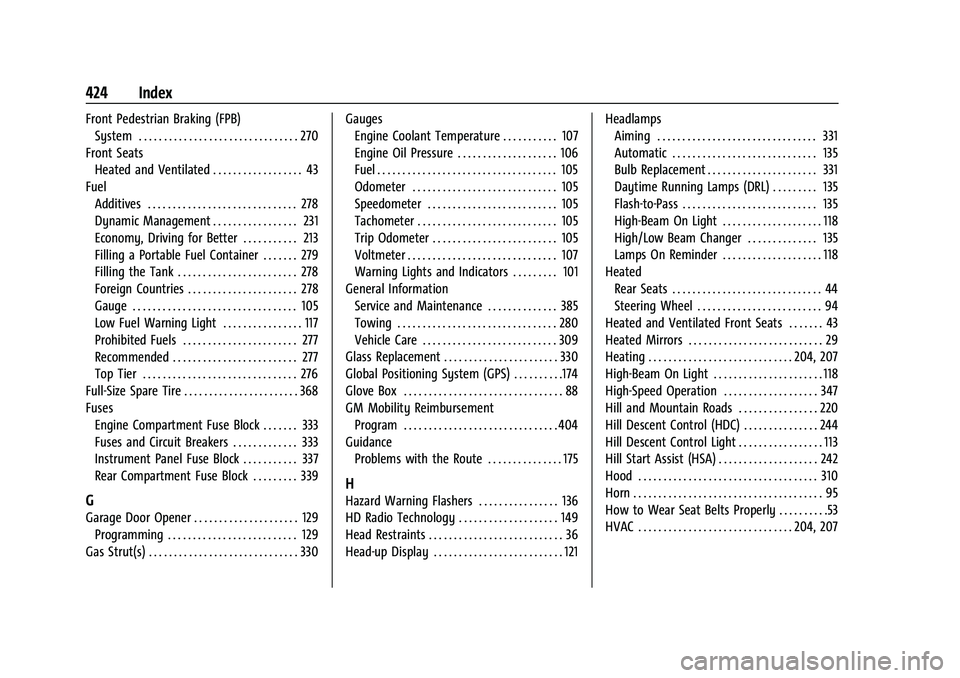
Front Pedestrian Braking (FPB)System . . . . . . . . . . . . . . . . . . . . . . . . . . . . . . . . 270
Front Seats Heated and Ventilated . . . . . . . . . . . . . . . . . . 43
Fuel Additives . . . . . . . . . . . . . . . . . . . . . . . . . . . . . . 278
Dynamic Management . . . . . . . . . . . . . . . . . 231
Economy, Driving for Better . . . . . . . . . . . 213
Filling a Portable Fuel Container . . . . . . . 279
Filling the Tank . . . . . . . . . . . . . . . . . . . . . . . . 278
Foreign Countries . . . . . . . . . . . . . . . . . . . . . . 278
Gauge . . . . . . . . . . . . . . . . . . . . . . . . . . . . . . . . . 105
Low Fuel Warning Light . . . . . . . . . . . . . . . . 117
Prohibited Fuels . . . . . . . . . . . . . . . . . . . . . . . 277
Recommended . . . . . . . . . . . . . . . . . . . . . . . . . 277
Top Tier . . . . . . . . . . . . . . . . . . . . . . . . . . . . . . . 276
Full-Size Spare Tire . . . . . . . . . . . . . . . . . . . . . . . 368
Fuses Engine Compartment Fuse Block . . . . . . . 333
Fuses and Circuit Breakers . . . . . . . . . . . . . 333
Instrument Panel Fuse Block . . . . . . . . . . . 337
Rear Compartment Fuse Block . . . . . . . . . 339
G
Garage Door Opener . . . . . . . . . . . . . . . . . . . . . 129Programming . . . . . . . . . . . . . . . . . . . . . . . . . . 129
Gas Strut(s) . . . . . . . . . . . . . . . . . . . . . . . . . . . . . . 330 Gauges
Engine Coolant Temperature . . . . . . . . . . . 107
Engine Oil Pressure . . . . . . . . . . . . . . . . . . . . 106
Fuel . . . . . . . . . . . . . . . . . . . . . . . . . . . . . . . . . . . . 105
Odometer . . . . . . . . . . . . . . . . . . . . . . . . . . . . . 105
Speedometer . . . . . . . . . . . . . . . . . . . . . . . . . . 105
Tachometer . . . . . . . . . . . . . . . . . . . . . . . . . . . . 105
Trip Odometer . . . . . . . . . . . . . . . . . . . . . . . . . 105
Voltmeter . . . . . . . . . . . . . . . . . . . . . . . . . . . . . . 107
Warning Lights and Indicators . . . . . . . . . 101
General Information
Service and Maintenance . . . . . . . . . . . . . . 385
Towing . . . . . . . . . . . . . . . . . . . . . . . . . . . . . . . . 280
Vehicle Care . . . . . . . . . . . . . . . . . . . . . . . . . . . 309
Glass Replacement . . . . . . . . . . . . . . . . . . . . . . . 330
Global Positioning System (GPS) . . . . . . . . . .174
Glove Box . . . . . . . . . . . . . . . . . . . . . . . . . . . . . . . . 88
GM Mobility Reimbursement Program . . . . . . . . . . . . . . . . . . . . . . . . . . . . . . . 404
Guidance Problems with the Route . . . . . . . . . . . . . . . 175
H
Hazard Warning Flashers . . . . . . . . . . . . . . . . 136
HD Radio Technology . . . . . . . . . . . . . . . . . . . . 149
Head Restraints . . . . . . . . . . . . . . . . . . . . . . . . . . . 36
Head-up Display . . . . . . . . . . . . . . . . . . . . . . . . . . 121 Headlamps
Aiming . . . . . . . . . . . . . . . . . . . . . . . . . . . . . . . . 331
Automatic . . . . . . . . . . . . . . . . . . . . . . . . . . . . . 135
Bulb Replacement . . . . . . . . . . . . . . . . . . . . . . 331
Daytime Running Lamps (DRL) . . . . . . . . . 135
Flash-to-Pass . . . . . . . . . . . . . . . . . . . . . . . . . . . 135
High-Beam On Light . . . . . . . . . . . . . . . . . . . . 118
High/Low Beam Changer . . . . . . . . . . . . . . 135
Lamps On Reminder . . . . . . . . . . . . . . . . . . . . 118
Heated Rear Seats . . . . . . . . . . . . . . . . . . . . . . . . . . . . . . 44
Steering Wheel . . . . . . . . . . . . . . . . . . . . . . . . . 94
Heated and Ventilated Front Seats . . . . . . . 43
Heated Mirrors . . . . . . . . . . . . . . . . . . . . . . . . . . . 29
Heating . . . . . . . . . . . . . . . . . . . . . . . . . . . . . 204, 207
High-Beam On Light . . . . . . . . . . . . . . . . . . . . . . 118
High-Speed Operation . . . . . . . . . . . . . . . . . . . 347
Hill and Mountain Roads . . . . . . . . . . . . . . . . 220
Hill Descent Control (HDC) . . . . . . . . . . . . . . . 244
Hill Descent Control Light . . . . . . . . . . . . . . . . . 113
Hill Start Assist (HSA) . . . . . . . . . . . . . . . . . . . . 242
Hood . . . . . . . . . . . . . . . . . . . . . . . . . . . . . . . . . . . . 310
Horn . . . . . . . . . . . . . . . . . . . . . . . . . . . . . . . . . . . . . . 95
How to Wear Seat Belts Properly . . . . . . . . . .53
HVAC . . . . . . . . . . . . . . . . . . . . . . . . . . . . . . . 204, 207