format CHEVROLET TAHOE 2023 Owners Manual
[x] Cancel search | Manufacturer: CHEVROLET, Model Year: 2023, Model line: TAHOE, Model: CHEVROLET TAHOE 2023Pages: 443, PDF Size: 18.73 MB
Page 225 of 443
Chevrolet Tahoe/Suburban Owner Manual (GMNA-Localizing-U.S./Canada/
Mexico-16416971) - 2023 - CRC - 5/16/22
224 Driving and Operating
Service Electric Parking Brake Light0116.
There are also parking brake-related Driver
Information Center (DIC) messages.
Before leaving the vehicle, check the red EPB
status light to ensure that the EPB is
applied.
If a message displays on the DIC indicating
the transmission is unable to shift soon, the
service electric parking brake is on, and the
EPB light flashes at the same time, the
system must be reset. Start the vehicle,
apply the EPB, and then release it. The
message and the light should turn off. See
Electric Parking Brake Light 0116 and
Service Electric Parking Brake Light 0116.
EPB Apply
To apply the EPB:
1. Be sure the vehicle is at a complete stop.
2. Press the EPB switch.
The red EPB status light will flash and then
stay on once the EPB is fully applied. If the
red EPB status light flashes continuously,
then the EPB is only partially applied or
there is a problem with the EPB. A DIC
message will display. Release the EPB and
try to apply it again. If the light does not come on, or keeps flashing, have the vehicle
serviced. Do not drive the vehicle if the red
EPB light is flashing. See your dealer.
If the amber service EPB warning light is on,
press the EPB switch. Continue to hold the
switch until the red EPB status light remains
on. If the amber service EPB warning light is
on, see your dealer.
If the EPB is applied while the vehicle is
moving, the vehicle will decelerate as long
as the switch is pressed. If the switch is
pressed until the vehicle comes to a stop,
the EPB will remain applied.
The vehicle may automatically apply the EPB
in some situations when the vehicle is not
moving. This is normal, and is done to
periodically check the correct operation of
the EPB system, or as required by other
safety functions that utilize the EPB.
If the EPB fails to apply, block the rear
wheels to prevent vehicle movement.
EPB Release
To release the EPB:
1. Turn the ignition on or to accessory mode.
2. Apply and hold the brake pedal.
3. Press the EPB switch momentarily. The EPB is released when the red EPB status
light is off.
If the amber service EPB warning light is on,
release the EPB by pressing and holding the
EPB switch. Continue to hold the switch
until the red EPB status light is off. If either
light stays on after release is attempted, see
your dealer.
Caution
Driving with the parking brake on can
overheat the brake system and cause
premature wear or damage to brake
system parts. Make sure that the parking
brake is fully released and the brake
warning light is off before driving.
If you are towing a trailer and parking on a
hill, see Driving Characteristics and Towing
Tips 0288.
Automatic EPB Release
The EPB automatically releases if the vehicle
is running, placed into gear, and an attempt
is made to drive. Avoid rapid acceleration
when the EPB is applied to preserve parking
brake lining life.
Page 227 of 443
Chevrolet Tahoe/Suburban Owner Manual (GMNA-Localizing-U.S./Canada/
Mexico-16416971) - 2023 - CRC - 5/16/22
226 Driving and Operating
stuck in sand, mud, ice, or snow. SeeIf the
Vehicle Is Stuck 0204 and “Turning the
Systems Off and On” later in this section.
When the transfer case (if equipped) is in
Four-Wheel Drive Low, the TCS and
StabiliTrak/ESC are automatically disabled,
g
comes on, and the appropriate message will
appear on the Driver Information
Center (DIC).
The indicator light for both systems is in the
instrument cluster. This light will:
.Flash when TCS is limiting wheel spin.
.Flash when StabiliTrak/ESC is activated.
.Turn on and stay on when either system
is not working.
See Traction Control System (TCS)/StabiliTrak
Light 0118.
If either system fails to turn on or to
activate, a message displays in the DIC, and
dcomes on and stays on to indicate that
the system is inactive and is not assisting the driver in maintaining control. Without
the assistance of properly functioning
StabiliTrak/ESC the possibility of rollover is
increased. Adjust driving accordingly.
If
dcomes on and stays on:
1. Stop the vehicle.
2. Turn the engine off and wait 15 seconds.
3. Start the engine.
Drive the vehicle. If
dcomes on and stays
on, see your dealer.
Turning the Systems Off and On
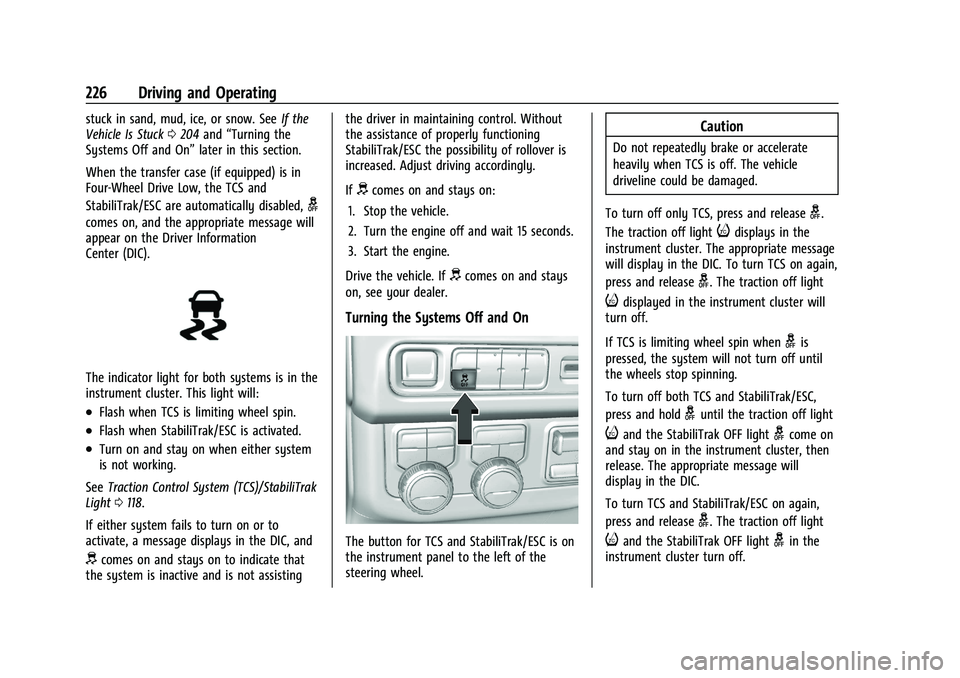
The button for TCS and StabiliTrak/ESC is on
the instrument panel to the left of the
steering wheel.
Caution
Do not repeatedly brake or accelerate
heavily when TCS is off. The vehicle
driveline could be damaged.
To turn off only TCS, press and release
g.
The traction off light
idisplays in the
instrument cluster. The appropriate message
will display in the DIC. To turn TCS on again,
press and release
g. The traction off light
idisplayed in the instrument cluster will
turn off.
If TCS is limiting wheel spin when
gis
pressed, the system will not turn off until
the wheels stop spinning.
To turn off both TCS and StabiliTrak/ESC,
press and hold
guntil the traction off light
iand the StabiliTrak OFF lightgcome on
and stay on in the instrument cluster, then
release. The appropriate message will
display in the DIC.
To turn TCS and StabiliTrak/ESC on again,
press and release
g. The traction off light
iand the StabiliTrak OFF lightgin the
instrument cluster turn off.
Page 230 of 443
Chevrolet Tahoe/Suburban Owner Manual (GMNA-Localizing-U.S./Canada/
Mexico-16416971) - 2023 - CRC - 5/16/22
Driving and Operating 229
compromise the acceleration on dry asphalt.
This feature is not intended for use when
the vehicle is stuck in sand, mud, ice, snow,
or gravel. If the vehicle becomes stuck, seeIf
the Vehicle Is Stuck 0204.
7Off-Road Mode : Use this mode for
off-road recreational driving. Off-Road Mode
should be used to improve driving at
moderate speeds, on grass, gravel, dirt,
unpaved roads, or snow-covered roads. The
accelerator pedal is tuned for off-road use.
This mode modifies pedal mapping, ride
height, and Traction Control System (TCS)
performance. For more information on
off-road driving, see Off-Road Driving0198.
_Tow/Haul Mode : Use this mode
when hauling heavy loads to provide
increased performance and vehicle control.
Tow/Haul Mode adjusts the transmission
shift pattern, steering, and Electronic
Stability Control (ESC) performance.
If the vehicle is turned off while in Tow/
Haul Mode and then restarted within four
hours or less, it will remain active.
Otherwise, the vehicle will start in
Normal Mode. If the vehicle has a diesel engine, exhaust
braking is automatically activated when
Tow/Haul Mode is selected. It maintains
vehicle speed by automatically
implementing a shift pattern that uses the
engine and the transmission to slow the
vehicle. The system will command
downshifts and use the turbo charger on the
engine to reduce vehicle speed when the
brake is applied. The normal Tow/Haul shift
pattern will return once the vehicle is on a
low grade or when the accelerator pedal is
pressed.
For more information, see
Towing
Equipment 0296 orTransporting a Disabled
Vehicle 0386.
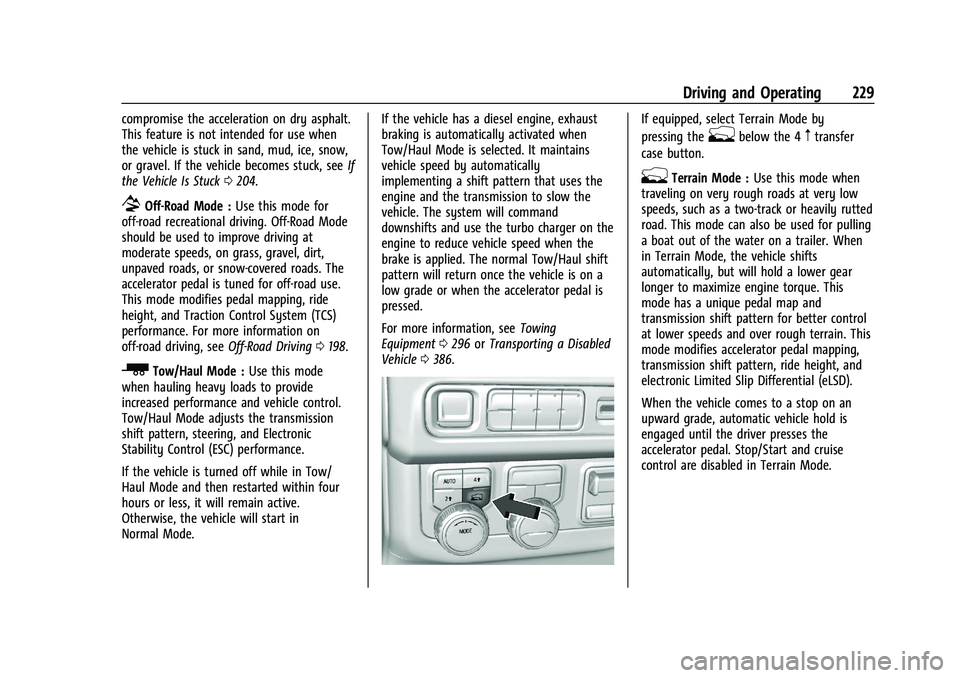
If equipped, select Terrain Mode by
pressing the
gbelow the 4mtransfer
case button.
gTerrain Mode : Use this mode when
traveling on very rough roads at very low
speeds, such as a two-track or heavily rutted
road. This mode can also be used for pulling
a boat out of the water on a trailer. When
in Terrain Mode, the vehicle shifts
automatically, but will hold a lower gear
longer to maximize engine torque. This
mode has a unique pedal map and
transmission shift pattern for better control
at lower speeds and over rough terrain. This
mode modifies accelerator pedal mapping,
transmission shift pattern, ride height, and
electronic Limited Slip Differential (eLSD).
When the vehicle comes to a stop on an
upward grade, automatic vehicle hold is
engaged until the driver presses the
accelerator pedal. Stop/Start and cruise
control are disabled in Terrain Mode.
Page 231 of 443
Chevrolet Tahoe/Suburban Owner Manual (GMNA-Localizing-U.S./Canada/
Mexico-16416971) - 2023 - CRC - 5/16/22
230 Driving and Operating
Active Braking during lift throttle will be
engaged. This feature automatically applies
light braking to simulate heavy engine
braking of four-wheel-dive low. It also
applies light braking in D (Drive) until the
vehicle is at idle speeds. In L1 and L2 light
braking will typically bring the vehicle to a
stop. Active Braking during lift throttle also
reduces trailer braking.
Terrain Mode automatically exits to Normal
Mode if the brake temperatures become too
hot, electronic parking brake becomes
inoperable, or the vehicle cannot perform
braking or vehicle hold.
For more information on off-road driving,
seeOff-Road Driving 0198 and
Hill and Mountain Roads 0202. Terrain Mode Drive
Select Expected Vehicle Behavior Ideal Terrain
Drive (L3-Lx) Minor deceleration when off
throttle and mild ability to
modulate throttle; mimics
performance of 4
nwithout torque
multiplication. Grassy fields,
mild two tracks,
rutted roads,
large rolling hills
L2 Moderate deceleration when off
throttle and moderate ability to
modulate throttle; brings vehicle to
a stop in most cases. Mild rock crawling,
heavy ruts,
short, steeper grades
L1 Significant deceleration when off
throttle and significant ability to
modulate throttle; brings vehicle to
a stop in most cases. Rock crawling downhill
Vehicle Hold Features
.When the vehicle comes to a stop on an
incline grade in forward gear or on a
decline grade in reverse gear, Vehicle
Hold is engaged until the accelerator
pedal is pressed.
.When the vehicle is in forward gear on a
decline, the vehicle will creep down the
hill when the brake pedal is released without pressing the accelerator pedal.
The vehicle will also creep forward on flat
ground.
.If the driver seat belt is removed and the
driver door is opened while the vehicle is
being held, Electric Parking Brake (EPB) is
engaged.
.EPB engages if the vehicle is held for an
extended period.
Page 239 of 443
Chevrolet Tahoe/Suburban Owner Manual (GMNA-Localizing-U.S./Canada/
Mexico-16416971) - 2023 - CRC - 5/16/22
238 Driving and Operating
Switching Between ACC and Regular Cruise
Control
To switch between ACC and regular cruise
control, press and hold
*. A Driver
Information Display (DIC) message displays.
See Vehicle Messages 0132.
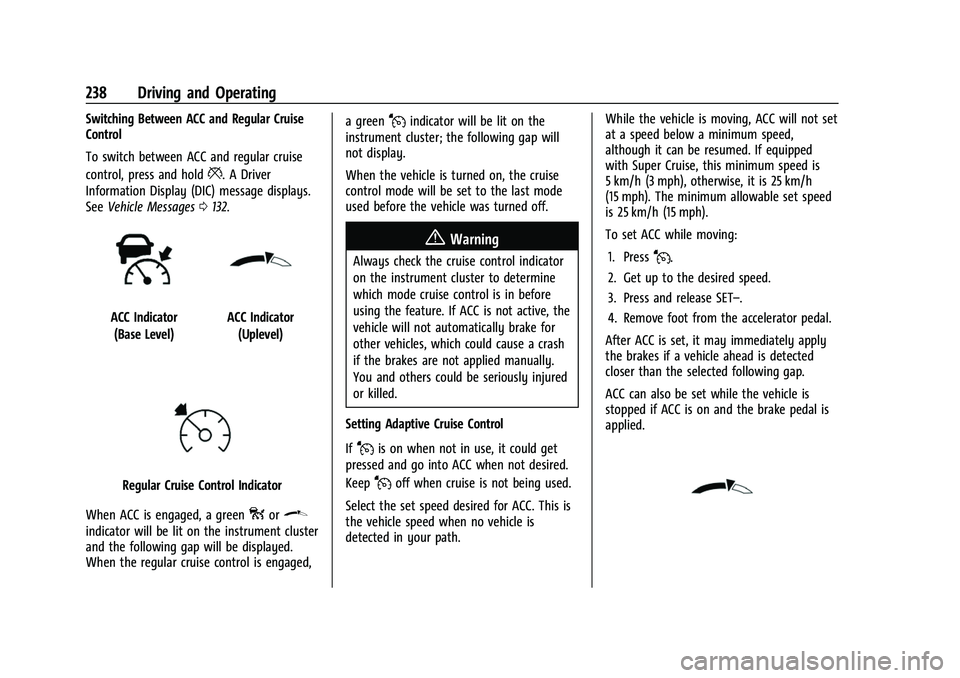
ACC Indicator
(Base Level)ACC Indicator (Uplevel)
Regular Cruise Control Indicator
When ACC is engaged, a green
oor\
indicator will be lit on the instrument cluster
and the following gap will be displayed.
When the regular cruise control is engaged, a green
Jindicator will be lit on the
instrument cluster; the following gap will
not display.
When the vehicle is turned on, the cruise
control mode will be set to the last mode
used before the vehicle was turned off.
{Warning
Always check the cruise control indicator
on the instrument cluster to determine
which mode cruise control is in before
using the feature. If ACC is not active, the
vehicle will not automatically brake for
other vehicles, which could cause a crash
if the brakes are not applied manually.
You and others could be seriously injured
or killed.
Setting Adaptive Cruise Control
If
Jis on when not in use, it could get
pressed and go into ACC when not desired.
Keep
Joff when cruise is not being used.
Select the set speed desired for ACC. This is
the vehicle speed when no vehicle is
detected in your path. While the vehicle is moving, ACC will not set
at a speed below a minimum speed,
although it can be resumed. If equipped
with Super Cruise, this minimum speed is
5 km/h (3 mph), otherwise, it is 25 km/h
(15 mph). The minimum allowable set speed
is 25 km/h (15 mph).
To set ACC while moving:
1. Press
J.
2. Get up to the desired speed.
3. Press and release SET–.
4. Remove foot from the accelerator pedal.
After ACC is set, it may immediately apply
the brakes if a vehicle ahead is detected
closer than the selected following gap.
ACC can also be set while the vehicle is
stopped if ACC is on and the brake pedal is
applied.
Page 251 of 443
Chevrolet Tahoe/Suburban Owner Manual (GMNA-Localizing-U.S./Canada/
Mexico-16416971) - 2023 - CRC - 5/16/22
250 Driving and Operating
wheel until the steering wheel light bar
turns green, and then release the steering
wheel when it is safe to do so.
{Warning
To help prevent crashes before making a
lane change:
.Always check mirrors.
.Glance over your shoulder.
.Use the turn signals.
Super Cruise Lane Change
Super Cruise can steer to perform a single
lane change under certain conditions when
requested by the driver or initiated by the
Super Cruise System.
On Demand Lane Changes
To request a lane change: 1. Verify the lane next to your vehicle is clear and conditions are safe to make a
lane change.
2. Use the turn signal lever to activate the turn signal in the direction of the desired
lane change.
3. Return the turn signal lever to the neutral position after the lane change.
See Turn and Lane-Change Signals 0139. 4. To cancel a lane change, return the turn
signal lever to the neutral position, move
the lever in the opposite direction of the
lane change, or steer manually at
any time.
Automatic Lane Changes
Super Cruise System may initiate a single
lane change when enabled through vehicle
settings under following conditions:.The Super Cruise System may initiate a
lane change to the left to pass a slower
moving vehicle ahead and a subsequent
lane change to right to return to your
original lane.
.Super Cruise System may initiate a lane
change to left or right when current lane
is ending ahead.
.Super Cruise System may initiate an
automatic lane change to left or right
when a slower moving vehicle is detected
in the adjacent ending lane to provide
space for merging vehicle.
.To cancel a Super Cruise automatic lane
change, move the turn signal lever,
or steer manually at any time.
If Super Cruise detects that traffic is clear,
Super Cruise will steer the vehicle to
perform the lane change. A message appears on the Driver Information Center (DIC)
during the lane change to provide more
information on the status of the lane
change.
Super Cruise Lane Change functionality is
only available on Super Cruise capable
Divided Roads.
Super Cruise Lane Change may be disabled
when a trailer or other accessories (e.g. bike
rack, cargo tray, etc.) are detected.
Do not use Super Cruise Lane Change when
towing a trailer.
The Super Cruise Lane Change feature can
be customized to be Off, On Demand Lane
Change, or On Demand Lane Change &
Automatic Lane Change through the vehicle
personalization menu. Touch the Settings
icon on the infotainment home page. Select
"Vehicle" to display the list of available
options and select "Super Cruise Lane
Change".{Warning
Super Cruise Lane Change may not detect
a vehicle in an adjacent lane. Always
supervise the driving task and monitor
traffic conditions when using the Super
(Continued)
Page 252 of 443
Chevrolet Tahoe/Suburban Owner Manual (GMNA-Localizing-U.S./Canada/
Mexico-16416971) - 2023 - CRC - 5/16/22
Driving and Operating 251
Warning (Continued)
Cruise Lane Change feature. Only request
a lane change when traffic conditions are
safe for a lane change, and always be
ready to manually steer the vehicle. See
“Steering Manually and Changing Lanes”
listed previously in this section.
Take Over Alert
{Warning
Super Cruise will not maintain the
vehicle’s speed while the steering wheel
light bar is flashing red. If the steering
wheel light bar flashes red, immediately
resume manual steering to prevent
serious injury or death. If you do not
resume manual steering, the vehicle will
begin to slow in the same lane and
eventually come to a complete stop on
the road.
Any time the steering wheel light bar
flashes red, resume manual steering
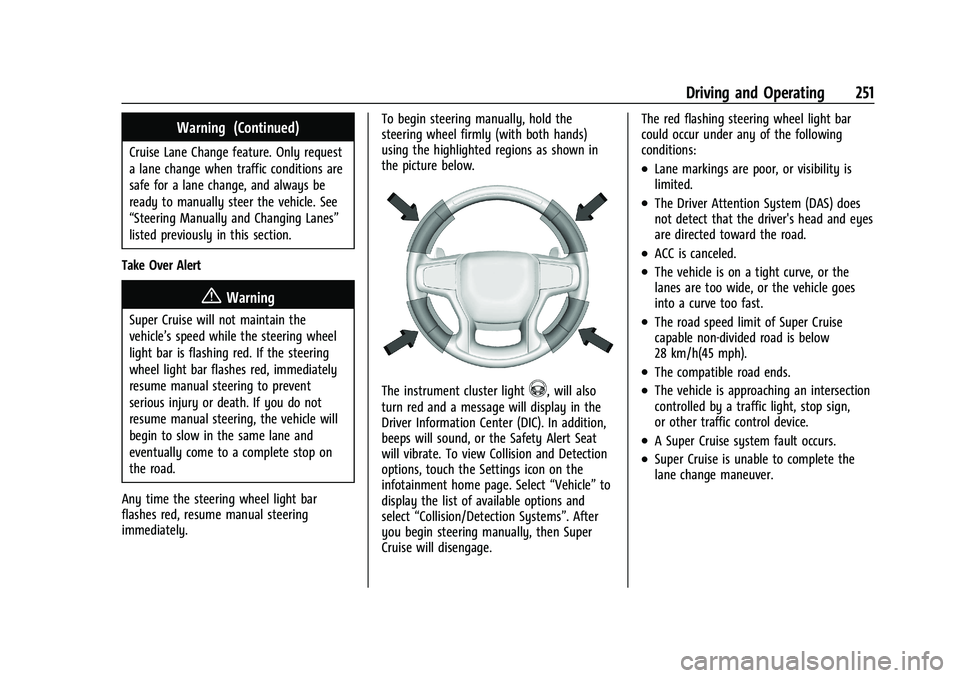
immediately. To begin steering manually, hold the
steering wheel firmly (with both hands)
using the highlighted regions as shown in
the picture below.
The instrument cluster light^, will also
turn red and a message will display in the
Driver Information Center (DIC). In addition,
beeps will sound, or the Safety Alert Seat
will vibrate. To view Collision and Detection
options, touch the Settings icon on the
infotainment home page. Select “Vehicle”to
display the list of available options and
select “Collision/Detection Systems”. After
you begin steering manually, then Super
Cruise will disengage. The red flashing steering wheel light bar
could occur under any of the following
conditions:
.Lane markings are poor, or visibility is
limited.
.The Driver Attention System (DAS) does
not detect that the driver's head and eyes
are directed toward the road.
.ACC is canceled.
.The vehicle is on a tight curve, or the
lanes are too wide, or the vehicle goes
into a curve too fast.
.The road speed limit of Super Cruise
capable non-divided road is below
28 km/h(45 mph).
.The compatible road ends.
.The vehicle is approaching an intersection
controlled by a traffic light, stop sign,
or other traffic control device.
.A Super Cruise system fault occurs.
.Super Cruise is unable to complete the
lane change maneuver.
Page 256 of 443
Chevrolet Tahoe/Suburban Owner Manual (GMNA-Localizing-U.S./Canada/
Mexico-16416971) - 2023 - CRC - 5/16/22
Driving and Operating 255
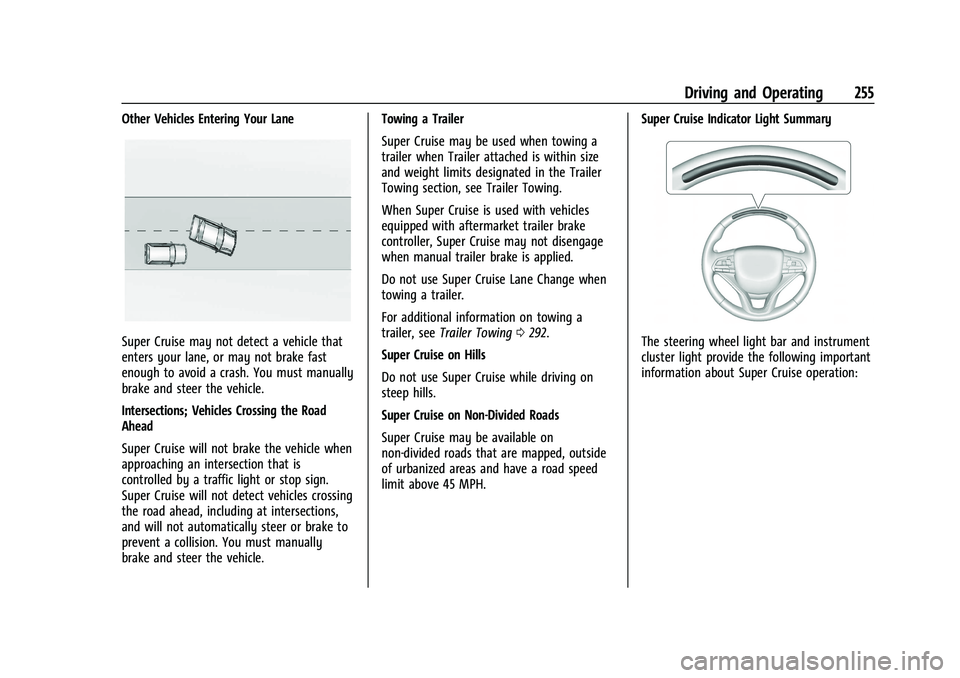
Other Vehicles Entering Your Lane
Super Cruise may not detect a vehicle that
enters your lane, or may not brake fast
enough to avoid a crash. You must manually
brake and steer the vehicle.
Intersections; Vehicles Crossing the Road
Ahead
Super Cruise will not brake the vehicle when
approaching an intersection that is
controlled by a traffic light or stop sign.
Super Cruise will not detect vehicles crossing
the road ahead, including at intersections,
and will not automatically steer or brake to
prevent a collision. You must manually
brake and steer the vehicle.Towing a Trailer
Super Cruise may be used when towing a
trailer when Trailer attached is within size
and weight limits designated in the Trailer
Towing section, see Trailer Towing.
When Super Cruise is used with vehicles
equipped with aftermarket trailer brake
controller, Super Cruise may not disengage
when manual trailer brake is applied.
Do not use Super Cruise Lane Change when
towing a trailer.
For additional information on towing a
trailer, see
Trailer Towing 0292.
Super Cruise on Hills
Do not use Super Cruise while driving on
steep hills.
Super Cruise on Non-Divided Roads
Super Cruise may be available on
non-divided roads that are mapped, outside
of urbanized areas and have a road speed
limit above 45 MPH. Super Cruise Indicator Light SummaryThe steering wheel light bar and instrument
cluster light provide the following important
information about Super Cruise operation:
Page 258 of 443
Chevrolet Tahoe/Suburban Owner Manual (GMNA-Localizing-U.S./Canada/
Mexico-16416971) - 2023 - CRC - 5/16/22
Driving and Operating 257
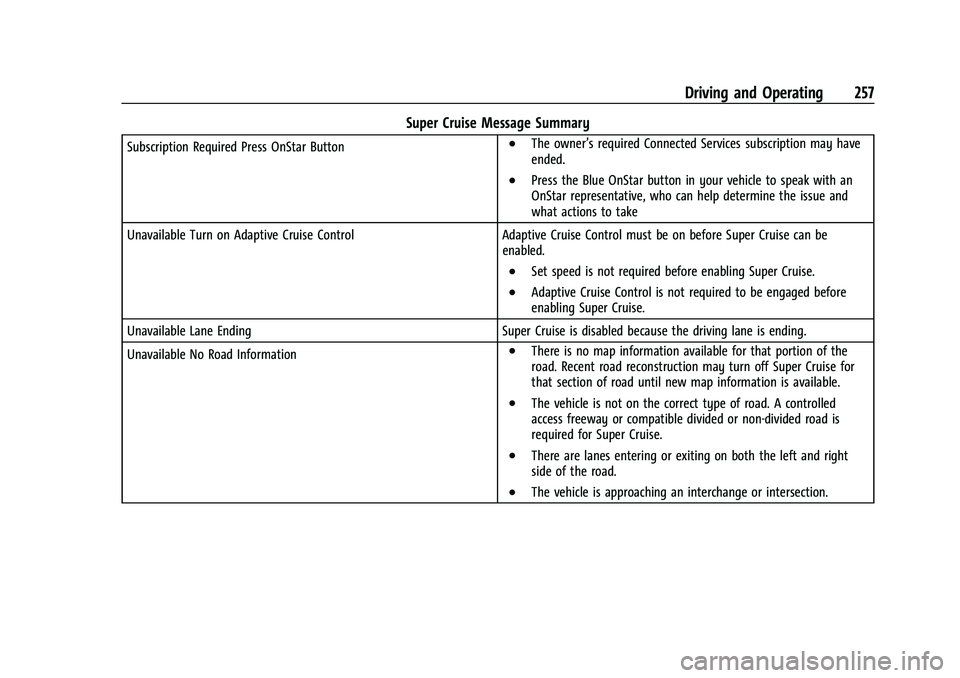
Super Cruise Message Summary
Subscription Required Press OnStar Button.The owner’s required Connected Services subscription may have
ended.
.Press the Blue OnStar button in your vehicle to speak with an
OnStar representative, who can help determine the issue and
what actions to take
Unavailable Turn on Adaptive Cruise Control Adaptive Cruise Control must be on before Super Cruise can be enabled.
.Set speed is not required before enabling Super Cruise.
.Adaptive Cruise Control is not required to be engaged before
enabling Super Cruise.
Unavailable Lane Ending Super Cruise is disabled because the driving lane is ending.
Unavailable No Road Information
.There is no map information available for that portion of the
road. Recent road reconstruction may turn off Super Cruise for
that section of road until new map information is available.
.The vehicle is not on the correct type of road. A controlled
access freeway or compatible divided or non-divided road is
required for Super Cruise.
.There are lanes entering or exiting on both the left and right
side of the road.
.The vehicle is approaching an interchange or intersection.
Page 261 of 443
Chevrolet Tahoe/Suburban Owner Manual (GMNA-Localizing-U.S./Canada/
Mexico-16416971) - 2023 - CRC - 5/16/22
260 Driving and Operating
Map Updates
Super Cruise map information must be
periodically updated at least once every
seven months to determine whether Super
Cruise is available on certain roads.
See the following website for Super Cruise
map open source compliance documentation,
including the license information:
https://oss.veoneer.com/
Data Download
If the vehicle is equipped with OnStar and
has an active service plan, additional data
may be collected through the OnStar
system. This includes information about: the
vehicle’s operation; a crash involving the
vehicle; the use of the vehicle and its
features; and, in certain situations, the
location and approximate GPS speed of the
vehicle. Refer to the OnStar Terms and
Conditions and Privacy Statement on the
OnStar website.
Location Services
This setting enables or disables sharing of
vehicle location outside the vehicle for
certain purposes. Even if the Location
Services setting is disabled, vehicle locationinformation will continue to be shared for
emergency services and Super Cruise,
if equipped.
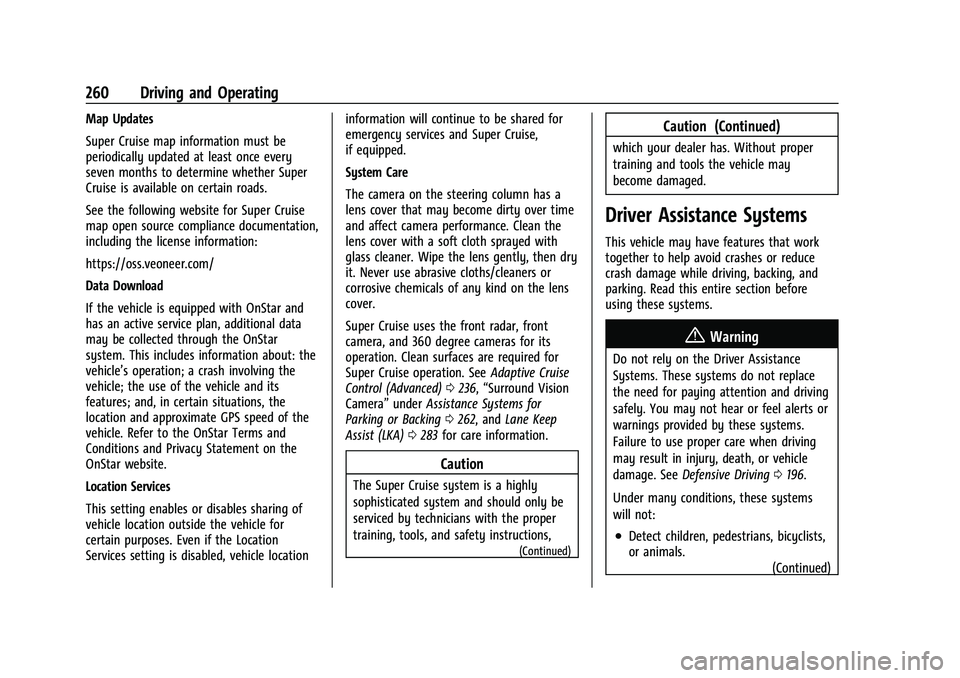
System Care
The camera on the steering column has a
lens cover that may become dirty over time
and affect camera performance. Clean the
lens cover with a soft cloth sprayed with
glass cleaner. Wipe the lens gently, then dry
it. Never use abrasive cloths/cleaners or
corrosive chemicals of any kind on the lens
cover.
Super Cruise uses the front radar, front
camera, and 360 degree cameras for its
operation. Clean surfaces are required for
Super Cruise operation. See
Adaptive Cruise
Control (Advanced) 0236, “Surround Vision
Camera” underAssistance Systems for
Parking or Backing 0262, and Lane Keep
Assist (LKA) 0283 for care information.
Caution
The Super Cruise system is a highly
sophisticated system and should only be
serviced by technicians with the proper
training, tools, and safety instructions,
(Continued)
Caution (Continued)
which your dealer has. Without proper
training and tools the vehicle may
become damaged.
Driver Assistance Systems
This vehicle may have features that work
together to help avoid crashes or reduce
crash damage while driving, backing, and
parking. Read this entire section before
using these systems.
{Warning
Do not rely on the Driver Assistance
Systems. These systems do not replace
the need for paying attention and driving
safely. You may not hear or feel alerts or
warnings provided by these systems.
Failure to use proper care when driving
may result in injury, death, or vehicle
damage. See Defensive Driving 0196.
Under many conditions, these systems
will not:
.Detect children, pedestrians, bicyclists,
or animals. (Continued)