Cargo CHEVROLET TAHOE 2023 Owner's Manual
[x] Cancel search | Manufacturer: CHEVROLET, Model Year: 2023, Model line: TAHOE, Model: CHEVROLET TAHOE 2023Pages: 443, PDF Size: 18.73 MB
Page 232 of 443
Chevrolet Tahoe/Suburban Owner Manual (GMNA-Localizing-U.S./Canada/
Mexico-16416971) - 2023 - CRC - 5/16/22
Driving and Operating 231
Terrain Mode is only available on vehicles
equipped with the single speed
transfer case.
Terrain Mode can only be active when:
.Vehicle speed is less than 80 km/h
(50 mph).
.The transfer case is in 4m.
Frequent use of this mode may cause brake
wear due to the light braking.
The vehicle automatically exits the mode if
the brakes get too hot. Terrain Mode can be
turned back on after the brakes have cooled.
When Terrain Mode is selected:
.Auto Engine Start/Stop is disabled.
.The Terrain Mode indicator displays on
the instrument cluster.
Magnetic Ride Control
This vehicle may have a semi-active damping
system called Magnetic Ride Control. With
this feature, improved vehicle ride and
handling is provided under a variety of
passenger and loading conditions.
Locking Rear Axle
Vehicles with a locking rear axle can give
more traction on snow, mud, ice, sand,
or gravel. It works like a standard axle most
of the time, but when traction is low, this
feature will allow the rear wheel with the
most traction to move the vehicle.
Four Corner Air Suspension
System
The Four Corner Air Suspension feature
provides full time load leveling capability
along with the benefit of adjusting ride
height for increased convenience and
capability.
{Warning
To help avoid personal injury or death,
make sure the area underneath the
vehicle and inside the wheel wells is clear
when lowering the vehicle.
{Warning
To help avoid personal injury or death,
always select the lowest ride height for
the current driving conditions. Higher ride
heights raise the vehicle's center of
gravity, increasing the chance of a
rollover during extreme maneuvers.
{Warning
Heavy loads on the roof rack will make
the vehicle's center of gravity higher,
increasing the possibility of a rollover. To
avoid losing control of the vehicle, always
select the normal height setting and
avoid high speeds, sudden starts, sharp
turns, sudden braking, or abrupt
maneuvers when carrying cargo on the
roof rack.
Page 233 of 443
Chevrolet Tahoe/Suburban Owner Manual (GMNA-Localizing-U.S./Canada/
Mexico-16416971) - 2023 - CRC - 5/16/22
232 Driving and Operating
Changing Ride Height
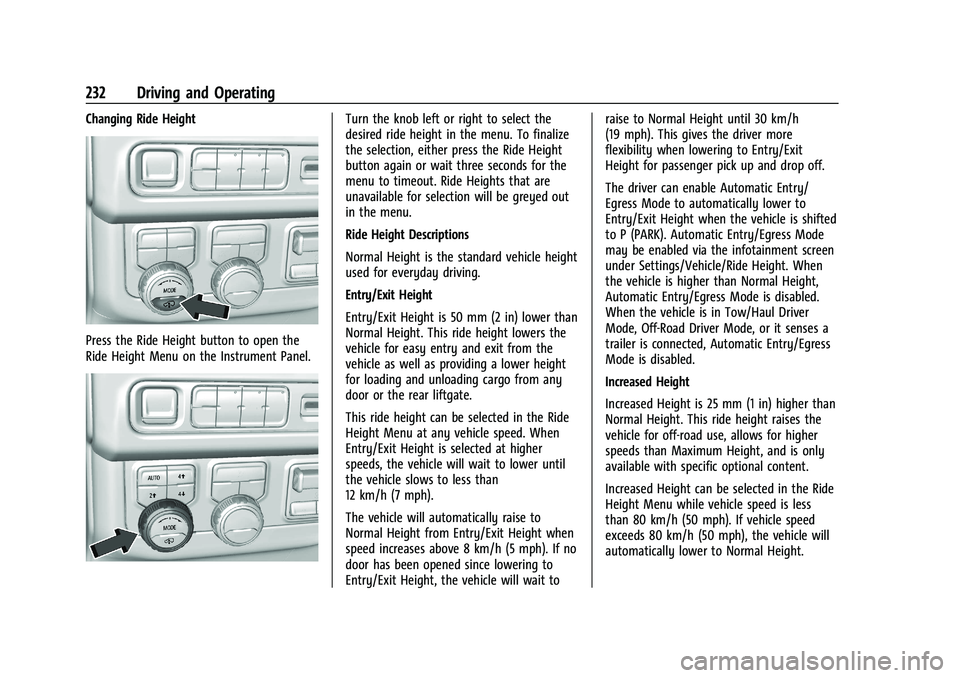
Press the Ride Height button to open the
Ride Height Menu on the Instrument Panel.
Turn the knob left or right to select the
desired ride height in the menu. To finalize
the selection, either press the Ride Height
button again or wait three seconds for the
menu to timeout. Ride Heights that are
unavailable for selection will be greyed out
in the menu.
Ride Height Descriptions
Normal Height is the standard vehicle height
used for everyday driving.
Entry/Exit Height
Entry/Exit Height is 50 mm (2 in) lower than
Normal Height. This ride height lowers the
vehicle for easy entry and exit from the
vehicle as well as providing a lower height
for loading and unloading cargo from any
door or the rear liftgate.
This ride height can be selected in the Ride
Height Menu at any vehicle speed. When
Entry/Exit Height is selected at higher
speeds, the vehicle will wait to lower until
the vehicle slows to less than
12 km/h (7 mph).
The vehicle will automatically raise to
Normal Height from Entry/Exit Height when
speed increases above 8 km/h (5 mph). If no
door has been opened since lowering to
Entry/Exit Height, the vehicle will wait toraise to Normal Height until 30 km/h
(19 mph). This gives the driver more
flexibility when lowering to Entry/Exit
Height for passenger pick up and drop off.
The driver can enable Automatic Entry/
Egress Mode to automatically lower to
Entry/Exit Height when the vehicle is shifted
to P (PARK). Automatic Entry/Egress Mode
may be enabled via the infotainment screen
under Settings/Vehicle/Ride Height. When
the vehicle is higher than Normal Height,
Automatic Entry/Egress Mode is disabled.
When the vehicle is in Tow/Haul Driver
Mode, Off-Road Driver Mode, or it senses a
trailer is connected, Automatic Entry/Egress
Mode is disabled.
Increased Height
Increased Height is 25 mm (1 in) higher than
Normal Height. This ride height raises the
vehicle for off-road use, allows for higher
speeds than Maximum Height, and is only
available with specific optional content.
Increased Height can be selected in the Ride
Height Menu while vehicle speed is less
than 80 km/h (50 mph). If vehicle speed
exceeds 80 km/h (50 mph), the vehicle will
automatically lower to Normal Height.
Page 243 of 443
Chevrolet Tahoe/Suburban Owner Manual (GMNA-Localizing-U.S./Canada/
Mexico-16416971) - 2023 - CRC - 5/16/22
242 Driving and Operating
page. Select“Vehicle”to display the list of
available options and select “Collision/
Detection Systems”.
See Defensive Driving 0196.
Approaching and Following a Vehicle
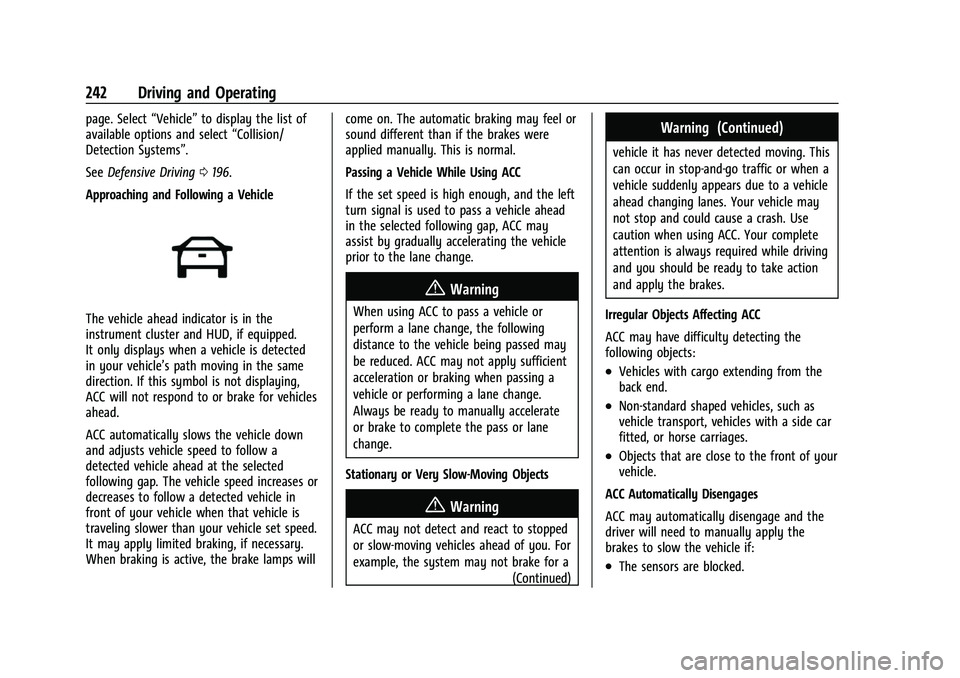
The vehicle ahead indicator is in the
instrument cluster and HUD, if equipped.
It only displays when a vehicle is detected
in your vehicle’s path moving in the same
direction. If this symbol is not displaying,
ACC will not respond to or brake for vehicles
ahead.
ACC automatically slows the vehicle down
and adjusts vehicle speed to follow a
detected vehicle ahead at the selected
following gap. The vehicle speed increases or
decreases to follow a detected vehicle in
front of your vehicle when that vehicle is
traveling slower than your vehicle set speed.
It may apply limited braking, if necessary.
When braking is active, the brake lamps will come on. The automatic braking may feel or
sound different than if the brakes were
applied manually. This is normal.
Passing a Vehicle While Using ACC
If the set speed is high enough, and the left
turn signal is used to pass a vehicle ahead
in the selected following gap, ACC may
assist by gradually accelerating the vehicle
prior to the lane change.
{Warning
When using ACC to pass a vehicle or
perform a lane change, the following
distance to the vehicle being passed may
be reduced. ACC may not apply sufficient
acceleration or braking when passing a
vehicle or performing a lane change.
Always be ready to manually accelerate
or brake to complete the pass or lane
change.
Stationary or Very Slow-Moving Objects
{Warning
ACC may not detect and react to stopped
or slow-moving vehicles ahead of you. For
example, the system may not brake for a (Continued)
Warning (Continued)
vehicle it has never detected moving. This
can occur in stop-and-go traffic or when a
vehicle suddenly appears due to a vehicle
ahead changing lanes. Your vehicle may
not stop and could cause a crash. Use
caution when using ACC. Your complete
attention is always required while driving
and you should be ready to take action
and apply the brakes.
Irregular Objects Affecting ACC
ACC may have difficulty detecting the
following objects:
.Vehicles with cargo extending from the
back end.
.Non-standard shaped vehicles, such as
vehicle transport, vehicles with a side car
fitted, or horse carriages.
.Objects that are close to the front of your
vehicle.
ACC Automatically Disengages
ACC may automatically disengage and the
driver will need to manually apply the
brakes to slow the vehicle if:
.The sensors are blocked.
Page 251 of 443
Chevrolet Tahoe/Suburban Owner Manual (GMNA-Localizing-U.S./Canada/
Mexico-16416971) - 2023 - CRC - 5/16/22
250 Driving and Operating
wheel until the steering wheel light bar
turns green, and then release the steering
wheel when it is safe to do so.
{Warning
To help prevent crashes before making a
lane change:
.Always check mirrors.
.Glance over your shoulder.
.Use the turn signals.
Super Cruise Lane Change
Super Cruise can steer to perform a single
lane change under certain conditions when
requested by the driver or initiated by the
Super Cruise System.
On Demand Lane Changes
To request a lane change: 1. Verify the lane next to your vehicle is clear and conditions are safe to make a
lane change.
2. Use the turn signal lever to activate the turn signal in the direction of the desired
lane change.
3. Return the turn signal lever to the neutral position after the lane change.
See Turn and Lane-Change Signals 0139. 4. To cancel a lane change, return the turn
signal lever to the neutral position, move
the lever in the opposite direction of the
lane change, or steer manually at
any time.
Automatic Lane Changes
Super Cruise System may initiate a single
lane change when enabled through vehicle
settings under following conditions:.The Super Cruise System may initiate a
lane change to the left to pass a slower
moving vehicle ahead and a subsequent
lane change to right to return to your
original lane.
.Super Cruise System may initiate a lane
change to left or right when current lane
is ending ahead.
.Super Cruise System may initiate an
automatic lane change to left or right
when a slower moving vehicle is detected
in the adjacent ending lane to provide
space for merging vehicle.
.To cancel a Super Cruise automatic lane
change, move the turn signal lever,
or steer manually at any time.
If Super Cruise detects that traffic is clear,
Super Cruise will steer the vehicle to
perform the lane change. A message appears on the Driver Information Center (DIC)
during the lane change to provide more
information on the status of the lane
change.
Super Cruise Lane Change functionality is
only available on Super Cruise capable
Divided Roads.
Super Cruise Lane Change may be disabled
when a trailer or other accessories (e.g. bike
rack, cargo tray, etc.) are detected.
Do not use Super Cruise Lane Change when
towing a trailer.
The Super Cruise Lane Change feature can
be customized to be Off, On Demand Lane
Change, or On Demand Lane Change &
Automatic Lane Change through the vehicle
personalization menu. Touch the Settings
icon on the infotainment home page. Select
"Vehicle" to display the list of available
options and select "Super Cruise Lane
Change".{Warning
Super Cruise Lane Change may not detect
a vehicle in an adjacent lane. Always
supervise the driving task and monitor
traffic conditions when using the Super
(Continued)
Page 268 of 443
Chevrolet Tahoe/Suburban Owner Manual (GMNA-Localizing-U.S./Canada/
Mexico-16416971) - 2023 - CRC - 5/16/22
Driving and Operating 267
position of the trailer is too far to the left
or right. The overlay can be enabled or
disabled. To view available settings from
the infotainment screen, touch Settings >
Vehicle > Collision/Detection Systems.
.Jack-Knife Detection and Alert
The vehicle may be equipped with
Jack-Knife Detection. The system will track
the position of the trailer relative to the
vehicle. As the front of the trailer
approaches the rear of the vehicle, a
warning or an alert will be displayed.
A warning indicates to the driver to
proceed with caution, an alert indicates
that a collision is imminent. Based on
vehicle equipment and user settings, the
visual warning or alert may be
accompanied by audible or safety alert
seat notifications. To view available
settings from the infotainment screen,
touch Settings > Vehicle > Collision/
Detection Systems.
.Trailer Angle Indicator
The vehicle may be equipped with a
Trailer Angle Indicator. The Trailer Angle
Indicator gives the driver a visual
representation of the trailer’s positionrelative to the vehicle. (Available only in
Reverse, Guidelines On, Rear Trailering
Views).
{Warning
Use Hitch Guidance only to help back the
vehicle to a trailer hitch or, when
traveling above 12 km/h (8 mph), to
briefly check the status of your trailer. Do
not use for any other purpose, such as
making lane change decisions. Before
making a lane change, always check the
mirrors and glance over your shoulder.
Improper use could result in serious
injury to you or others.
HD Surround Vision with Trailer Camera
Provisions
If equipped, this feature provides additional
views to aid in trailering/towing. The
system shows multiple views in the
infotainment display using five cameras
mounted around the vehicle and up to two
additional accessory cameras that can be
mounted on or in a trailer. The front camera
is in the grille under the front emblem, the
side cameras are on the bottom of the
outside mirrors, the rear camera is in the
tailgate handle and the bed camera is mounted on the rear of the cab.
Additionally, up to two accessory cameras
can be mounted to the rear and/or interior
of the trailer. See your dealer for accessory
trailer cameras. To access, touch CAMERA on
the infotainment display or shift to
R (Reverse). To return to the previous screen
when not in reverse, touch the Home or
Back buttons on the infotainment display.
Certain trailer views require a compatible
trailer profile be configured and selected.
A compatible trailer is a box type trailer
(cargo, camper, etc.) with a conventional
hitch.
Available camera views:
.Front/Rear Standard View
.Front/Rear Top-Down View
.Front/Rear Side View
.Hitch View
.Rear trailer View
.Rear Side view with a available
articulation functionality
.Picture-in-Picture Side View
.Interior Trailer View
.Transparent trailer View
.Surround View
.Guidance Lines
Page 274 of 443
Chevrolet Tahoe/Suburban Owner Manual (GMNA-Localizing-U.S./Canada/
Mexico-16416971) - 2023 - CRC - 5/16/22
Driving and Operating 273
{Warning
The Backing Warning System only
operates at speeds greater than 8 km/h
(5 mph). It does not detect children,
pedestrians, bicyclists, animals, or objects
below the bumper or that are too close
or too far from the vehicle. In some
situations, such as at higher backing
speeds, there may not be enough time
for the short, sharp application of the
vehicle brake system to occur. To prevent
injury, death, or vehicle damage, even
with the Backing Warning System, always
check the area around the vehicle and
check all mirrors before backing.
When the vehicle is in R (Reverse), if the
system detects the vehicle is backing too
fast to avoid a crash with a detected object
behind your vehicle in your path, it may
automatically brake hard to a stop to help
avoid or reduce the harm caused by a
backing crash.
{Warning
RAB may not avoid many types of
backing crashes. Do not wait for the
automatic braking to apply. This system
is not designed to replace driver braking
and only works in R (Reverse) when an
object is detected directly behind the
vehicle. It may not brake or stop in time
to avoid a crash. It will not brake for
objects when the vehicle is moving at
very low speeds. It does not detect
children, pedestrians, bicyclists, animals,
or objects below the bumper or that are
too close or too far from the vehicle. To
prevent injury, death, or vehicle damage,
even with RAB, always check the area
around the vehicle before and while
backing.
Pressing the brake pedal after the vehicle
comes to a stop will release RAB. If the
brake pedal is not pressed soon after the
stop, the Electric Parking Brake (EPB) may be
set. When it is safe, press the accelerator
pedal firmly at any time to override RAB.
{Warning
There may be instances where
unexpected or undesired automatic
braking occurs. If this happens, either
press the brake pedal or firmly press the
accelerator pedal to release the brakes
from the RAB system. Before releasing
the brakes, check the RVC and check the
area around the vehicle to make sure it is
safe to proceed.
Unexpected braking events are possible with
a static installed accessory, such as a bike
rack or hitch-mounted cargo carrier.
Rear Pedestrian Alert
If equipped, and under certain conditions,
this feature can provide alerts for a
pedestrian within the system’s range
directly behind the vehicle. This feature only
works in R (Reverse) below 12 km/h (8 mph),
and detects pedestrians up to 8 m (26 ft)
away during daytime driving. During
nighttime driving, feature performance is
very limited.
Page 290 of 443
Chevrolet Tahoe/Suburban Owner Manual (GMNA-Localizing-U.S./Canada/
Mexico-16416971) - 2023 - CRC - 5/16/22
Driving and Operating 289
transmission downshifts too often, a
lower gear may be selected using Manual
Mode. SeeManual Mode 0218.
If equipped, the following driver assistance
features should be turned off when towing
a trailer:
.Park Assist
.Automatic Parking Assist (APA)
.Reverse Automatic Braking (RAB)
If equipped, the following driver assistance
features should be turned to alert or off
when towing a trailer, unless equipped with
Super Cruise:
.Automatic Emergency Braking (AEB)
.Front Pedestrian Braking (FPB)
If equipped with Lane Change Alert (LCA),
the LCA detection zones that extend back
from the side of the vehicle do not move
further back when a trailer is towed. Use
caution while changing lanes when towing a
trailer.
If equipped with Rear Cross Traffic Alert RIM
(RCTA, RTCB, and RAB), these features will be
disabled when towing a trailer.
{Warning
When towing a trailer, exhaust gases
may collect at the rear of the vehicle and
enter if the liftgate, trunk/hatch,
or rear-most window is open.
When towing a trailer:
.Do not drive with the liftgate, trunk/
hatch, or rear-most window open.
.Fully open the air outlets on or under
the instrument panel.
.Also adjust the climate control system
to a setting that brings in only outside
air. See “Climate Control Systems” in
the Index.
For more information about carbon
monoxide, see Engine Exhaust 0214.
Towing a trailer requires experience. The
combination of the vehicle and trailer is
longer and not as responsive as the vehicle
itself. Get used to the handling and braking
of the combination by driving on a level
road surface before driving on public roads.
The trailer structure, the tires, and the
brakes must be all be rated to carry the
intended cargo. Inadequate trailer equipment can cause the combination to
operate in an unexpected or unsafe manner.
Before driving, inspect all trailer hitch parts
and attachments, safety chains, electrical
connectors, lamps, tires, and mirrors. See
Towing Equipment
0296. If the trailer has
electric brakes, start the combination
moving and then manually apply the trailer
brake controller to check the trailer brakes
work. During the trip, occasionally check
that the cargo and trailer are secure and
that the lamps and any trailer brakes are
working.Towing with a Stability Control System
When towing, the stability control system
might be heard. The system reacts to
vehicle movement caused by the trailer,
which mainly occurs during cornering. This is
normal when towing heavier trailers.
Following Distance
Stay at least twice as far behind the vehicle
ahead as you would when driving without a
trailer. This can help to avoid heavy braking
and sudden turns.
Page 294 of 443
Chevrolet Tahoe/Suburban Owner Manual (GMNA-Localizing-U.S./Canada/
Mexico-16416971) - 2023 - CRC - 5/16/22
Driving and Operating 293
See“Trailer Brakes” underTowing
Equipment 0296 to determine if brakes are
required based on the trailer weight.
The only way to be sure the weight is not
exceeding any of these ratings is to weigh
the tow vehicle and trailer combination,
fully loaded for the trip, getting individual
weights for each of these items.
A trailering information label on the driver
side door center pillar (B-pillar) shows tow
rating information for your vehicle.
{Warning
You and others could be seriously injured
or killed if the trailer is too heavy or the
trailer brakes are inadequate for the load.
The vehicle may be damaged, and the
repairs would not be covered by the
vehicle warranty.
Only tow a trailer if all the steps in this
section have been followed. Ask your
dealer for advice and information about
towing a trailer.
Gross Combined Weight Rating (GCWR)
GCWR is the total allowable weight of the
completely loaded vehicle and trailer
including any fuel, passengers, cargo,
equipment, and accessories. Do not exceed
the GCWR for your vehicle. The GCWR for
the vehicle is on the Trailering Information
Label.
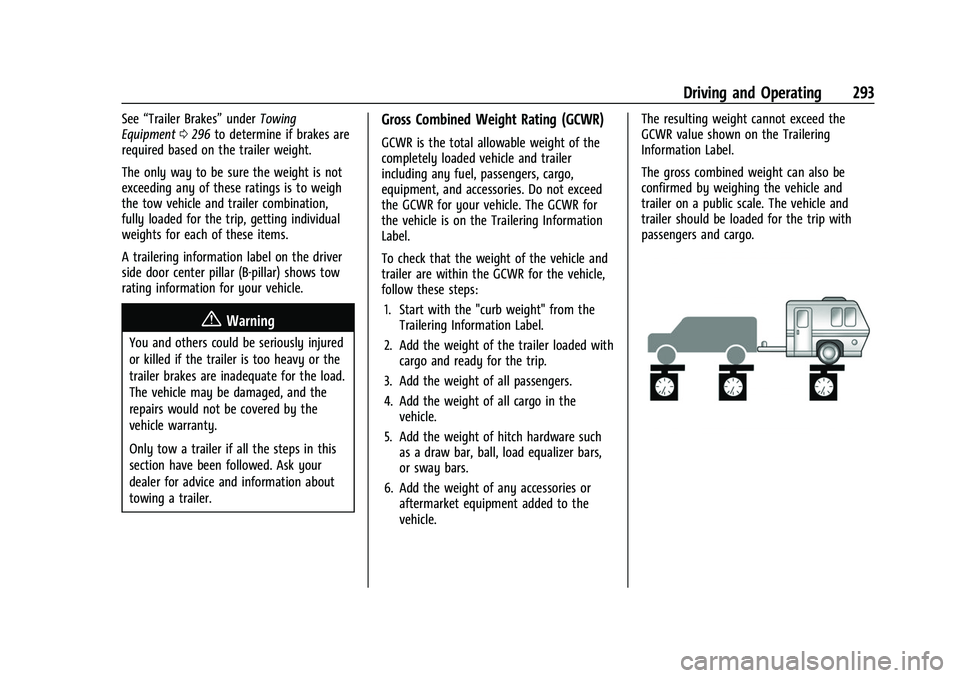
To check that the weight of the vehicle and
trailer are within the GCWR for the vehicle,
follow these steps:
1. Start with the "curb weight" from the Trailering Information Label.
2. Add the weight of the trailer loaded with cargo and ready for the trip.
3. Add the weight of all passengers.
4. Add the weight of all cargo in the vehicle.
5. Add the weight of hitch hardware such as a draw bar, ball, load equalizer bars,
or sway bars.
6. Add the weight of any accessories or aftermarket equipment added to the
vehicle. The resulting weight cannot exceed the
GCWR value shown on the Trailering
Information Label.
The gross combined weight can also be
confirmed by weighing the vehicle and
trailer on a public scale. The vehicle and
trailer should be loaded for the trip with
passengers and cargo.
Page 296 of 443
Chevrolet Tahoe/Suburban Owner Manual (GMNA-Localizing-U.S./Canada/
Mexico-16416971) - 2023 - CRC - 5/16/22
Driving and Operating 295
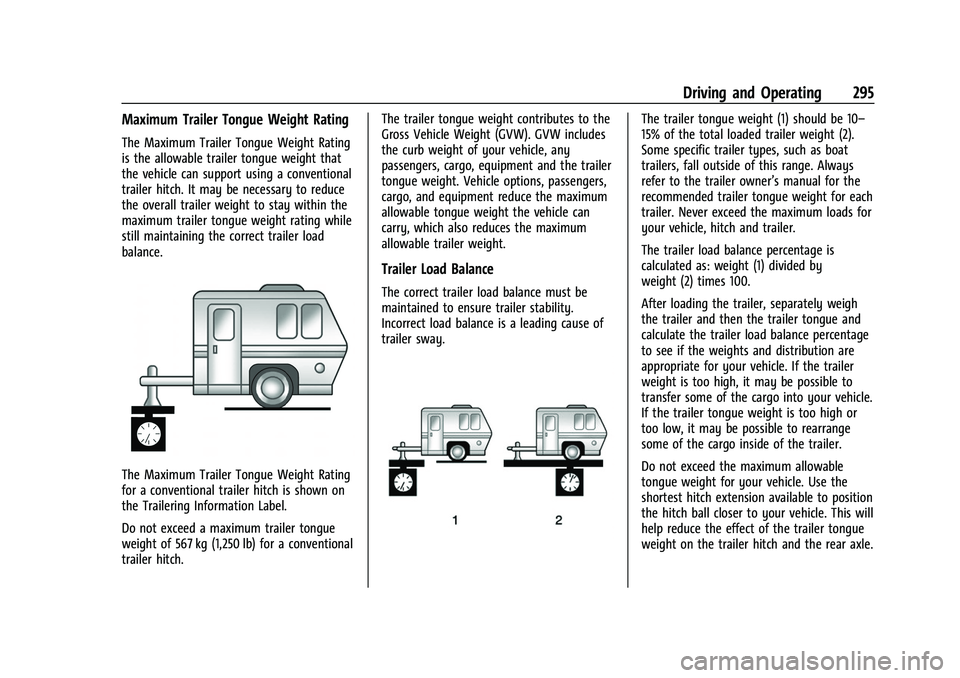
Maximum Trailer Tongue Weight Rating
The Maximum Trailer Tongue Weight Rating
is the allowable trailer tongue weight that
the vehicle can support using a conventional
trailer hitch. It may be necessary to reduce
the overall trailer weight to stay within the
maximum trailer tongue weight rating while
still maintaining the correct trailer load
balance.
The Maximum Trailer Tongue Weight Rating
for a conventional trailer hitch is shown on
the Trailering Information Label.
Do not exceed a maximum trailer tongue
weight of 567 kg (1,250 lb) for a conventional
trailer hitch.The trailer tongue weight contributes to the
Gross Vehicle Weight (GVW). GVW includes
the curb weight of your vehicle, any
passengers, cargo, equipment and the trailer
tongue weight. Vehicle options, passengers,
cargo, and equipment reduce the maximum
allowable tongue weight the vehicle can
carry, which also reduces the maximum
allowable trailer weight.
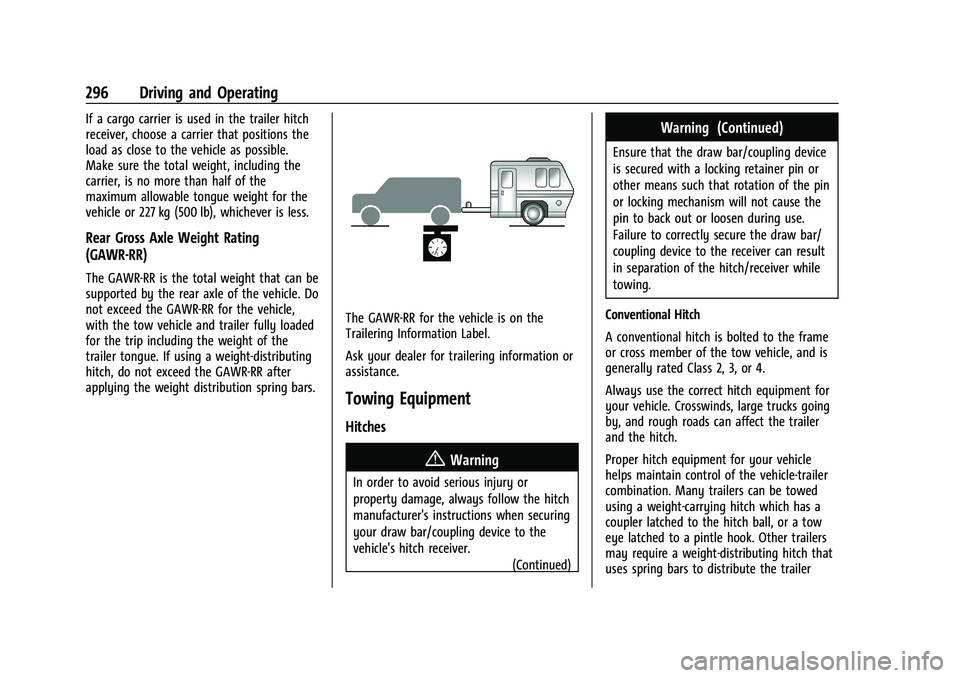
Trailer Load Balance
The correct trailer load balance must be
maintained to ensure trailer stability.
Incorrect load balance is a leading cause of
trailer sway.
The trailer tongue weight (1) should be 10–
15% of the total loaded trailer weight (2).
Some specific trailer types, such as boat
trailers, fall outside of this range. Always
refer to the trailer owner’s manual for the
recommended trailer tongue weight for each
trailer. Never exceed the maximum loads for
your vehicle, hitch and trailer.
The trailer load balance percentage is
calculated as: weight (1) divided by
weight (2) times 100.
After loading the trailer, separately weigh
the trailer and then the trailer tongue and
calculate the trailer load balance percentage
to see if the weights and distribution are
appropriate for your vehicle. If the trailer
weight is too high, it may be possible to
transfer some of the cargo into your vehicle.
If the trailer tongue weight is too high or
too low, it may be possible to rearrange
some of the cargo inside of the trailer.
Do not exceed the maximum allowable
tongue weight for your vehicle. Use the
shortest hitch extension available to position
the hitch ball closer to your vehicle. This will
help reduce the effect of the trailer tongue
weight on the trailer hitch and the rear axle.
Page 297 of 443
Chevrolet Tahoe/Suburban Owner Manual (GMNA-Localizing-U.S./Canada/
Mexico-16416971) - 2023 - CRC - 5/16/22
296 Driving and Operating
If a cargo carrier is used in the trailer hitch
receiver, choose a carrier that positions the
load as close to the vehicle as possible.
Make sure the total weight, including the
carrier, is no more than half of the
maximum allowable tongue weight for the
vehicle or 227 kg (500 lb), whichever is less.
Rear Gross Axle Weight Rating
(GAWR-RR)
The GAWR-RR is the total weight that can be
supported by the rear axle of the vehicle. Do
not exceed the GAWR-RR for the vehicle,
with the tow vehicle and trailer fully loaded
for the trip including the weight of the
trailer tongue. If using a weight-distributing
hitch, do not exceed the GAWR-RR after
applying the weight distribution spring bars.
The GAWR-RR for the vehicle is on the
Trailering Information Label.
Ask your dealer for trailering information or
assistance.
Towing Equipment
Hitches
{Warning
In order to avoid serious injury or
property damage, always follow the hitch
manufacturer's instructions when securing
your draw bar/coupling device to the
vehicle's hitch receiver.(Continued)
Warning (Continued)
Ensure that the draw bar/coupling device
is secured with a locking retainer pin or
other means such that rotation of the pin
or locking mechanism will not cause the
pin to back out or loosen during use.
Failure to correctly secure the draw bar/
coupling device to the receiver can result
in separation of the hitch/receiver while
towing.
Conventional Hitch
A conventional hitch is bolted to the frame
or cross member of the tow vehicle, and is
generally rated Class 2, 3, or 4.
Always use the correct hitch equipment for
your vehicle. Crosswinds, large trucks going
by, and rough roads can affect the trailer
and the hitch.
Proper hitch equipment for your vehicle
helps maintain control of the vehicle-trailer
combination. Many trailers can be towed
using a weight-carrying hitch which has a
coupler latched to the hitch ball, or a tow
eye latched to a pintle hook. Other trailers
may require a weight-distributing hitch that
uses spring bars to distribute the trailer