tow CHEVROLET TRACKER 1999 2.G User Guide
[x] Cancel search | Manufacturer: CHEVROLET, Model Year: 1999, Model line: TRACKER, Model: CHEVROLET TRACKER 1999 2.GPages: 376, PDF Size: 2.82 MB
Page 81 of 376
Second Printing for Chevrolet Tracker Owner's Manual ± 1999
yellowblue
2-23
To release the parking brake, hold the brake pedal down.
Pull the parking brake lever up until you can push in the
release button. Hold the release button in as you move
the lever all the way down.
NOTICE:
Driving with the parking brake on can cause
your rear brakes to overheat. You may have to
replace them, and you could also damage other
parts of your vehicle.
If you are towing a trailer, see ªTowing a Trailerº in
the Index.
Shifting Into PARK (P)
(Automatic Transmission Only)
CAUTION:
It can be dangerous to get out of your vehicle if
the shift lever is not fully in PARK (P) with the
parking brake firmly set. Your vehicle can roll. If
you have left the engine running, the vehicle can
move suddenly. You or others could be injured.
To be sure your vehicle won't move, even when
you're on fairly level ground, use the steps that
follow. With four
-wheel drive if your transfer
case is in NEUTRAL (N), your vehicle will be free
to roll, even if your shift lever is in PARK (P). So,
be sure the transfer case is in a drive gear
-- not
in NEUTRAL (N). If you're pulling a trailer, see
ªTowing a Trailerº in the Index.
Page 82 of 376

Second Printing for Chevrolet Tracker Owner's Manual ± 1999
yellowblue
2-24
1. Hold the brake pedal down with your right foot and
set the parking brake.
JE±12±0010±X
2. Move the shift lever into PARK (P) by holding in the
button on the lever and pushing the lever all the way
toward the front of your vehicle.
3. If you have four
-wheel drive, be sure the transfer
case is in a drive gear
-- not in NEUTRAL (N).
4. Move the key to LOCK.
5. Remove the key and take it with you. If you can
leave your vehicle with the key in your hand, your
vehicle is in PARK (P).
Leaving Your Vehicle With the Engine
Running (Automatic Transmission Only)
CAUTION:
It can be dangerous to leave your vehicle with the
engine running. Your vehicle could move
suddenly if the shift lever is not fully in PARK (P)
with the parking brake firmly set. If you have
four
-wheel drive and your transfer case is in
NEUTRAL (N), your vehicle will be free to roll,
even if your shift lever is in PARK (P). So be sure
the transfer case is in a drive gear
-- not in
NEUTRAL (N). And, if you leave the vehicle with
the engine running, it could overheat and even
catch fire. You or others could be injured. Don't
leave your vehicle with the engine running unless
you have to.
Page 83 of 376
Second Printing for Chevrolet Tracker Owner's Manual ± 1999
yellowblue
2-25 Torque Lock (Automatic Transmission)
If you are parking on a hill and you don't shift your
transmission into PARK (P) properly, the weight of the
vehicle may put too much force on the parking pawl in
the transmission. You may find it difficult to pull the
shift lever out of PARK (P). This is called ªtorque lock.º
To prevent torque lock, set the parking brake and then
shift into PARK (P) properly before you leave the
driver's seat. To find out how, see ªShifting Into
PARK (P)º in the Index.
When you are ready to drive, move the shift lever out of
PARK (P) before you release the parking brake.
If torque lock does occur, you may need to have another
vehicle push yours a little uphill to take some of the
pressure from the parking pawl in the transmission, so
you can pull the shift lever out of PARK (P).
Shifting Out of PARK (P)
(Automatic Transmission Only)
CAUTION:
Before shifting out of PARK (P) you must fully
apply your regular brakes. Your vehicle can roll.
If you have left the engine running, the vehicle
can move suddenly. You or others could
be injured.
If you're pulling a trailer, see ªTowing a Trailerº
in the Index.
Your vehicle has a Brake-Transmission Shift Interlock
(BTSI). You have to fully apply your regular brakes
before you can shift from PARK (P) when the ignition is
in the ON position. See ªAutomatic Transmissionº in
the Index.
If you cannot shift out of PARK (P), ease pressure on
the shift lever
-- push the shift lever all the way into
PARK (P) and release the shift lever button as you
maintain brake application. Then press the shift lever
button and move the shift lever into the gear you wish.
Page 84 of 376

Second Printing for Chevrolet Tracker Owner's Manual ± 1999
yellowblue
2-26
If you ever hold the brake pedal down but still can't
shift out of PARK (P), try this:
JE±12±0038±X
1. Apply the parking brake until the end of Step 6.2. If the engine is running, turn it off. Turn the key to
ON or ACC.
3. Find the access hole cover on the driver's side of the
console, near the shift lever.
4. Remove the screw and cover.
5. Inside, you'll see the return plate. Using your finger,
move the return plate toward the rear of the vehicle
until it stops.
6. Move the shift lever into the gear you want.
7. Have the vehicle fixed as soon as possible.
Parking Your Vehicle (Manual
Transmission Models Only)
Before you get out of your vehicle, put your manual
transmission in REVERSE (R) and firmly apply the
parking brake.
If you have four
-wheel drive, be sure your transfer case
is in a drive gear. Your vehicle could roll if it isn't.
If you are towing a trailer, see ªTowing a Trailerº in
the Index.
Page 86 of 376
Second Printing for Chevrolet Tracker Owner's Manual ± 1999
yellowblue
2-28
Running Your Engine While You're
Parked (Automatic Transmission)
It's better not to park with the engine running. But if
ever you have to, here are some things to know.
CAUTION:
Idling the engine with the climate control system
off could allow dangerous exhaust into your
vehicle (see the earlier Caution under
ªEngine Exhaustº).
Also, idling in a closed-in place can let deadly
carbon monoxide (CO) into your vehicle even if
the fan switch is at the highest setting. One place
this can happen is a garage. Exhaust
-- with
CO
-- can come in easily. NEVER park in a
garage with the engine running.
Another closed-in place can be a blizzard.
(See ªBlizzardº in the Index.)
CAUTION:
It can be dangerous to get out of your vehicle if
the shift lever is not fully in PARK (P) with the
parking brake firmly set. Your vehicle can roll.
Don't leave your vehicle when the engine is
running unless you have to. If you've left the
engine running, the vehicle can move suddenly.
You or others could be injured. To be sure your
vehicle won't move, even when you're on fairly
level ground, always set your parking brake and
move the shift lever to PARK (P).
Four-wheel drive vehicles with the transfer case
in NEUTRAL (N) will allow the vehicle to roll,
even if your shift lever is in PARK (P). So, be
sure the transfer case is in a drive gear
-- not in
NEUTRAL (N). Always set your parking brake.
Follow the proper steps to be sure your vehicle won't
move. See ªShifting Into PARK (P)º in the Index.
If you're pulling a trailer, see ªTowing a Trailerº in
the Index.
Page 89 of 376

Second Printing for Chevrolet Tracker Owner's Manual ± 1999
yellowblue
2-31 Turn Signal and Lane Change Indicator
The turn signal has two upward (for right) and two
downward (for left) positions. These positions allow you
to signal a turn or a lane change.
To signal a turn, move the lever all the way up or down.
When the turn is finished, the lever will return automatically.
X±02±1321±T
An arrow on the instrument
panel will flash in the
direction of the turn or
lane change.
To signal a lane change, just raise or lower the lever
until the arrow starts to flash. Hold it there until you
complete your lane change. The lever will return by
itself when you release it.
As you signal a turn or a lane change, if the arrows don't
flash but just stay on, a signal bulb may be burned out
and other drivers won't see your turn signal.
If a bulb is burned out, replace it to help avoid an
accident. If the arrows don't go on at all when you
signal a turn, check the fuse (see ªFuses and Circuit
Breakersº in the Index) and for burned
-out bulbs.
Headlamp High/Low Beam Changer
First, you must have the headlamps on. For high beams,
push the turn signal lever toward the instrument panel.
X±02±3323±T
When the high beams are
on, a light on the instrument
panel also will be on. It will
go off when you switch to
low beam.
To switch back to low beams, pull the lever toward you.
Flash-to-Pass
With the lever in the low-beam position, pull the lever
toward you to momentarily switch to high beam (to
signal that you are going to pass). When you release the
lever, the headlamps will return to low
-beam operation.
Page 91 of 376
Second Printing for Chevrolet Tracker Owner's Manual ± 1999
yellowblue
2-33 Windshield Washer
To wash your windshield, pull the stalk with the wiper
symbol on it toward you one time. When you release the
stalk, the washers will stop. The wiper continue wiping
for approximately three cycles and will either stop or
will resume the speed you were using before. See
ªWindshield Washer Fluidº in the Index.
CAUTION:
In freezing weather, don't use your washer until
the windshield is warmed. Otherwise the washer
fluid can form ice on the windshield, blocking
your vision.
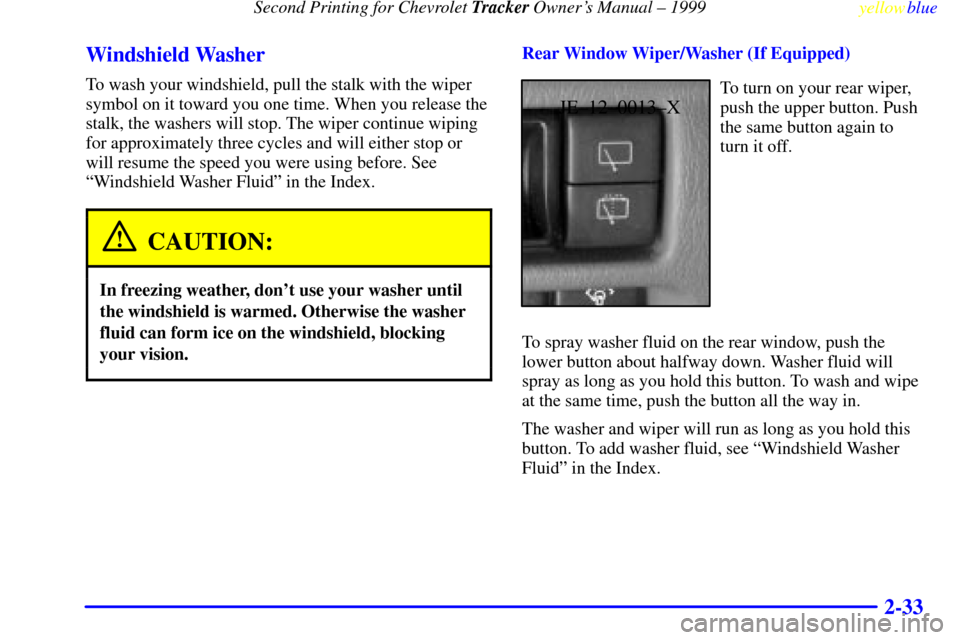
Rear Window Wiper/Washer (If Equipped)
JE±12±0013±X
To turn on your rear wiper,
push the upper button. Push
the same button again to
turn it off.
To spray washer fluid on the rear window, push the
lower button about halfway down. Washer fluid will
spray as long as you hold this button. To wash and wipe
at the same time, push the button all the way in.
The washer and wiper will run as long as you hold this
button. To add washer fluid, see ªWindshield Washer
Fluidº in the Index.
Page 99 of 376
Second Printing for Chevrolet Tracker Owner's Manual ± 1999
yellowblue
2-41
To adjust the mirrors:
1. Move the selector switch to the L (left) or R (right)
to select the mirror you wish to adjust.
2. Press the outer part of the pad that matches the
direction you want to move the mirror.
3. Return the selector switch to the center position to
help prevent moving the mirror accidentally.
Convex Outside Mirror
Your passenger's side mirror is convex. A convex
mirror's surface is curved so you can see more from the
driver's seat.
CAUTION:
A convex mirror can make things (like other
vehicles) look farther away than they really are.
If you cut too sharply into the right lane, you
could hit a vehicle on your right. Check your
inside mirror or glance over your shoulder before
changing lanes.
Storage Compartments
Glove Box
To open the glove box, pull the latch toward you.
Use your key to lock and unlock the glove box.
The glove box has a two
-position detent for opening the
door. Lower the door to the first detent for access to the
glove box. Pull it to the next detent for further access.
Door Storage
Each door has a storage compartment.
Coinholder
Your instrument panel has a coinholder located to the
left of the steering wheel.
Cupholder
Two cupholders are on the center console next to the
parking brake lever.
Page 120 of 376
Second Printing for Chevrolet Tracker Owner's Manual ± 1999
yellowblue
2-62
This light should come on when you turn the ignition
key to START. If it doesn't come on then, have it fixed
so it will be ready to warn you if there's a problem.
If the light comes on while you are driving, pull off the
road and stop carefully. You may notice that the pedal is
harder to push. Or, the pedal may go closer to the floor.
It may take longer to stop. If the light is still on, have the
vehicle towed for service. (See ªAnti
-Lock Brake
System Warning Lightº and ªTowing Your Vehicleº in
the Index.)
CAUTION:
Your brake system may not be working properly
if the brake system warning light is on. Driving
with the brake system warning light on can lead
to an accident. If the light is still on after you've
pulled off the road and stopped carefully, have
the vehicle towed for service.
Anti-Lock Brake System Warning
Light (Option)
X±02±0111±T
With the anti-lock brake
system, this light will come
on when you start your
engine and it will stay on
for three seconds.
That's normal.
If the light comes on when you're driving, you don't
have anti
-lock brakes and there could be a problem with
your regular brakes. Pull off the road and stop carefully.
You may notice that the pedal is harder to push. Or, the
pedal may go closer to the floor. It may take longer to
stop. Have the vehicle towed for service. (See ªTowing
Your Vehicleº in the Index.)
Page 121 of 376

Second Printing for Chevrolet Tracker Owner's Manual ± 1999
yellowblue
2-63
CAUTION:
Your regular brake system may not be working
properly if the anti
-lock brake system warning
light is on. Driving with the anti
-lock brake
system warning light on can lead to an accident.
After you've pulled off the road and stopped
carefully, have the vehicle towed for service.
If the anti-lock brake system warning light stays on
longer than normal after you've started your engine, turn
the ignition off. Or, if the light comes on and stays on
when you're driving, stop as soon as possible and turn
the ignition off. Then start the engine again to reset the
system. If the light still stays on, or comes on again
while you're driving, your vehicle needs service. If the
light is on and the regular brake system warning light
isn't on, you still have brakes, but you don't have
anti
-lock brakes.
The anti
-lock brake system warning light should come
on briefly when you turn the ignition key to ON. If the
light doesn't come on then, have it fixed so it will be
ready to warn you if there is a problem.
Engine Coolant Temperature Gage
X±02±0271±X
This gage shows the engine
coolant temperature. If the
gage pointer moves to the
H (red) side, your engine is
too hot.
It means that your engine coolant has overheated and
you should stop your vehicle and turn off the engine as
soon as possible.
The ªProblems on the Roadº section of this manual
shows what to do. See ªEngine Overheatingº in
the Index.