climate control CHEVROLET TRAIL BLAZER 2006 1.G User Guide
[x] Cancel search | Manufacturer: CHEVROLET, Model Year: 2006, Model line: TRAIL BLAZER, Model: CHEVROLET TRAIL BLAZER 2006 1.GPages: 534, PDF Size: 2.91 MB
Page 165 of 534
Defogging and Defrosting
Fog on the inside of windows is a result of high humidity
(moisture) condensing on the cool window glass. This
can be minimized if the climate control system is
used properly. There are two modes to choose from to
clear fog or frost from your windshield. Use the
defog mode to clear the windows of fog or moisture and
warm the passengers. Use the defrost mode to
remove fog or frost from the windshield more quickly.
Turn the right knob clockwise or counterclockwise
to select one of the following modes:
-(Defog):This mode directs the air to the oor outlets,
windshield and side window outlets. The recirculation
button cannot be selected while in defog mode.
1(Defrost):This mode directs most of the air to the
windshield and the side window outlets, with only a
little air directed to the oor outlets. The air conditioning
compressor may run to dehumidify the air to prevent
window fogging. The recirculation button cannot
be selected while in defrost mode. Do not drive the
vehicle until all the windows are clear.
Rear Window Defogger
The lines you see on the rear window warm the glass.
<(Rear):Press this button to turn the rear window
defogger on or off. An indicator light in the button
will come on to let you know that the rear window
defogger is active. The rear window defogger will
automatically turn off approximately ten minutes after
the button is pressed.
If your vehicle is equipped with heated mirrors, this
button will activate them.
Notice:Do not use anything sharp on the inside of
the rear window. If you do, you could cut or
damage the warming grid, and the repairs would not
be covered by your warranty. Do not attach a
temporary vehicle license, tape, a decal or anything
similar to the defogger grid.
3-21
Page 166 of 534
Dual Automatic Climate Control
System
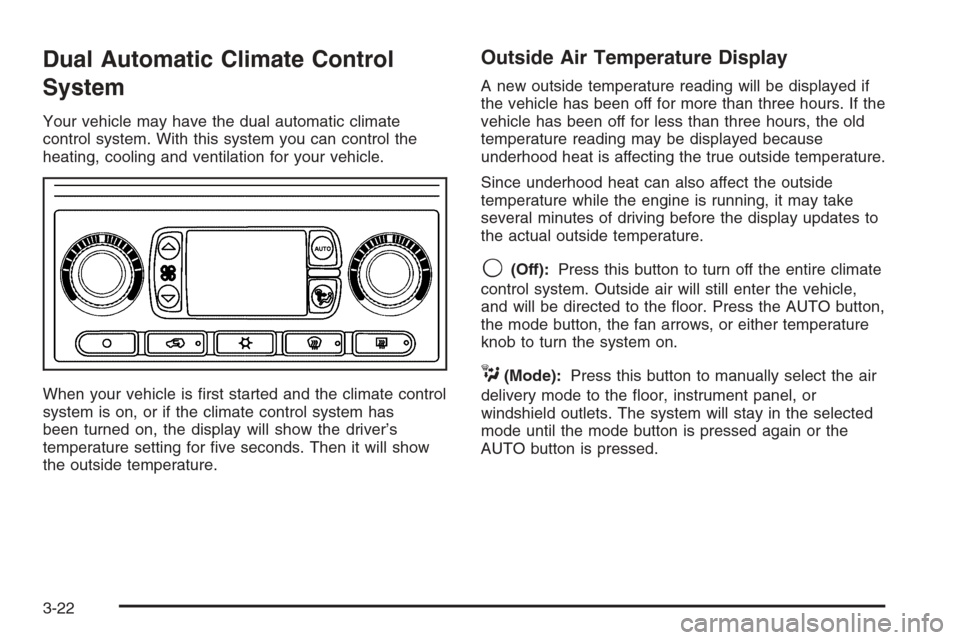
Your vehicle may have the dual automatic climate
control system. With this system you can control the
heating, cooling and ventilation for your vehicle.
When your vehicle is rst started and the climate control
system is on, or if the climate control system has
been turned on, the display will show the driver’s
temperature setting for ve seconds. Then it will show
the outside temperature.
Outside Air Temperature Display
A new outside temperature reading will be displayed if
the vehicle has been off for more than three hours. If the
vehicle has been off for less than three hours, the old
temperature reading may be displayed because
underhood heat is affecting the true outside temperature.
Since underhood heat can also affect the outside
temperature while the engine is running, it may take
several minutes of driving before the display updates to
the actual outside temperature.
9(Off):Press this button to turn off the entire climate
control system. Outside air will still enter the vehicle,
and will be directed to the oor. Press the AUTO button,
the mode button, the fan arrows, or either temperature
knob to turn the system on.
C(Mode):Press this button to manually select the air
delivery mode to the oor, instrument panel, or
windshield outlets. The system will stay in the selected
mode until the mode button is pressed again or the
AUTO button is pressed.
3-22
Page 169 of 534
#A/C (Air Conditioning):Press this button to
manually turn the air conditioning system on or off.
When the system is on, the system will automatically
begin to cool and dehumidify the air inside of your
vehicle. The air conditioning symbol will appear on the
display when the air conditioning is on and will turn
off when the air conditioning is off.
If you select turn the air conditioning off while in front
defrost or defog mode, the air conditioning symbol
will turn off, however, the A/C compressor will remain
on to help de-humidify the air inside the vehicle. If one of
the other modes is selected the compressor will then
turn the A/C off until it is selected again or the
AUTO button is pressed.
You may notice a slight change in engine performance
when the air conditioning compressor shuts off and
turns on again. This is normal.
Defogging and Defrosting
Fog on the inside of windows is a result of high humidity
(moisture) condensing on the cool window glass. This
can be minimized if the climate control system is
used properly. You can use either defog or front defrost
to clear fog or frost from your windshield.
-(Defog):Use this setting to clear the windows of
fog or moisture. This setting will deliver air to the
oor and windshield outlets.
0(Defrost):Press the front defrost button to clear
the windshield and side windows of frost or fog quickly.
The system will automatically control the fan speed if
you select defrost from AUTO mode. If the outside
temperature is 40°F (4°C) or warmer, your air
conditioning compressor will automatically run to help
dehumidify the air and dry the windshield. Do not
drive the vehicle until all the windows are clear.
Rear Window Defogger
The rear window defogger uses a warming grid to
remove fog from the rear window.
<(Rear):Press this button to turn the rear window
defogger on or off.
An indicator light in the button will come on to let you
know that the rear window defogger is activated.
The rear window defogger will turn off approximately
10 minutes after the button is pressed. If you need
additional warming time, press the button again.
If equipped, your heated mirrors will also come on when
you press this button.
Notice:Do not use a razor blade or sharp object to
clear the inside rear window. Do not adhere
anything to the defogger grid lines in the rear glass.
These actions may damage the rear defogger.
Repairs would not be covered by your warranty.
3-25
Page 170 of 534
Outlet Adjustment
Use the air outlets located in the center and on the side
of your instrument panel to direct the airow.
Operation Tips
Keep the hood and front air inlets free of ice, snow,
or any other obstruction (such as leaves). The
heater and defroster will work better, reducing the
chance of fogging the inside of your windows.
When you enter a vehicle in cold weather, turn the
fan knob all the way to the right for a few moments
before driving. This helps clear the intake ducts
of snow and moisture, and reduces the chance of
fogging the inside of your window.
Keep the air path under the front seats clear of
objects. This helps air to circulate throughout
your vehicle.
Adding outside equipment to the front of your
vehicle, such as hood-air deectors, may affect the
performance of the heating and air conditioning
system. Check with your dealer before adding
equipment to the outside of your vehicle.
Rear Climate Control System
Regular Wheelbase
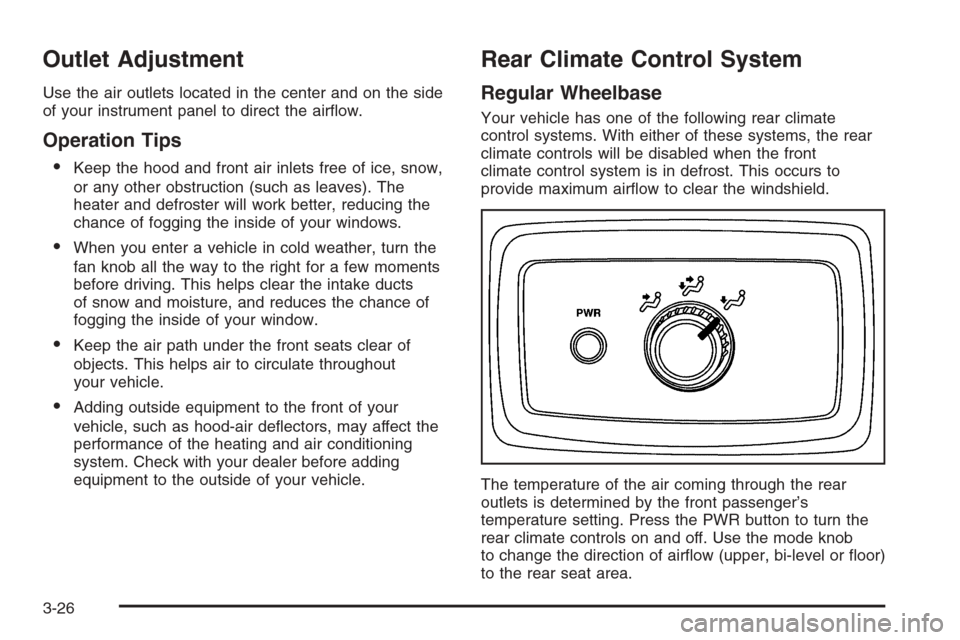
Your vehicle has one of the following rear climate
control systems. With either of these systems, the rear
climate controls will be disabled when the front
climate control system is in defrost. This occurs to
provide maximum airow to clear the windshield.
The temperature of the air coming through the rear
outlets is determined by the front passenger’s
temperature setting. Press the PWR button to turn the
rear climate controls on and off. Use the mode knob
to change the direction of airow (upper, bi-level or oor)
to the rear seat area.
3-26
Page 171 of 534
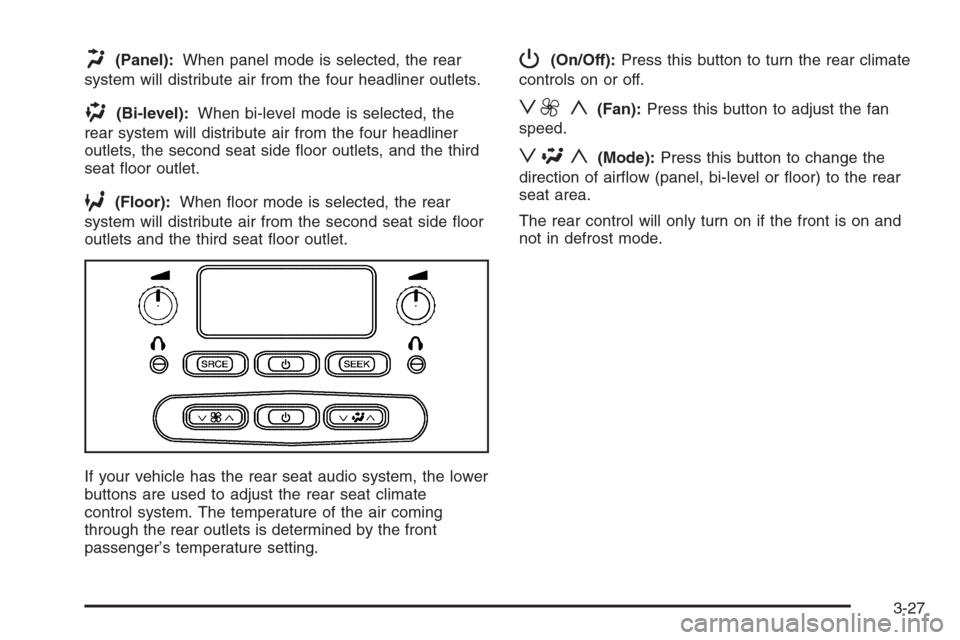
H(Panel):When panel mode is selected, the rear
system will distribute air from the four headliner outlets.
)(Bi-level):When bi-level mode is selected, the
rear system will distribute air from the four headliner
outlets, the second seat side oor outlets, and the third
seat oor outlet.
6(Floor):When oor mode is selected, the rear
system will distribute air from the second seat side oor
outlets and the third seat oor outlet.
If your vehicle has the rear seat audio system, the lower
buttons are used to adjust the rear seat climate
control system. The temperature of the air coming
through the rear outlets is determined by the front
passenger’s temperature setting.
P(On/Off):Press this button to turn the rear climate
controls on or off.
z9 y(Fan):Press this button to adjust the fan
speed.
z\y(Mode):Press this button to change the
direction of airow (panel, bi-level or oor) to the rear
seat area.
The rear control will only turn on if the front is on and
not in defrost mode.
3-27
Page 173 of 534
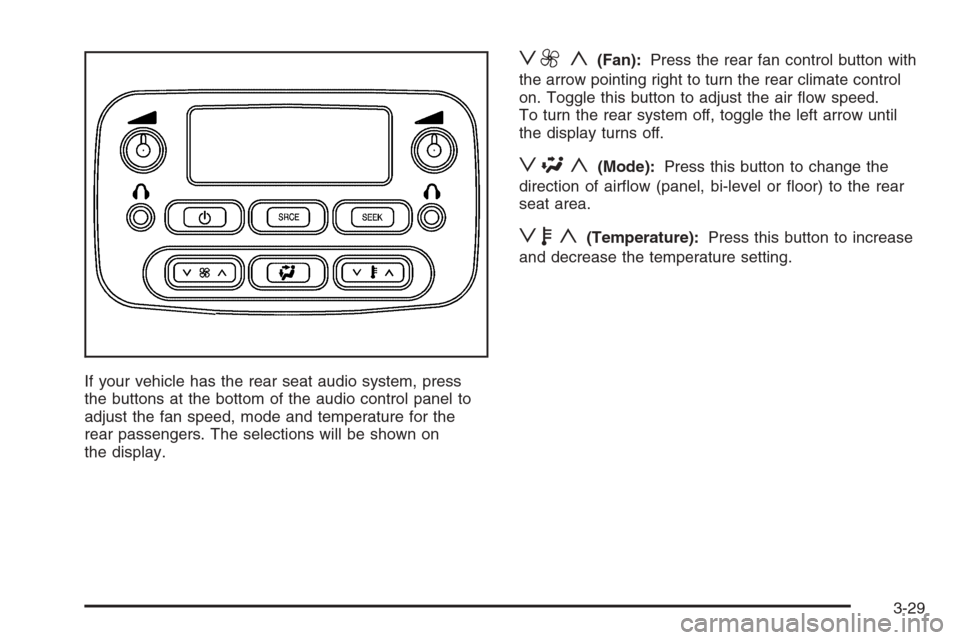
If your vehicle has the rear seat audio system, press
the buttons at the bottom of the audio control panel to
adjust the fan speed, mode and temperature for the
rear passengers. The selections will be shown on
the display.
z9 y(Fan):Press the rear fan control button with
the arrow pointing right to turn the rear climate control
on. Toggle this button to adjust the air ow speed.
To turn the rear system off, toggle the left arrow until
the display turns off.
z\y(Mode):Press this button to change the
direction of airow (panel, bi-level or oor) to the rear
seat area.
zby(Temperature):Press this button to increase
and decrease the temperature setting.
3-29
Page 355 of 534
Your trailer’s brake system can tap into the vehicle’s
hydraulic brake system only if:
The trailer parts can withstand 3,000 psi
(20 650 kPa) of pressure.
The trailer’s brake system will use less than
0.02 cubic inch (0.3 cc) of uid from your vehicle’s
master cylinder. Otherwise, both braking systems
won’t work well. You could even lose your brakes.
If everything checks out this far, then make the brake
uid tap at the port on the master cylinder that
sends uid to the rear brakes. But don’t use copper
tubing for this. If you do, it will bend and nally break off.
Use steel brake tubing.
Driving with a Trailer
{CAUTION:
If you have a rear-most window open and you
pull a trailer with your vehicle, carbon
monoxide (CO) could come into your vehicle.
You can not see or smell CO. It can cause
unconsciousness or death. SeeEngine
Exhaust on page 2-34.
CAUTION: (Continued)
CAUTION: (Continued)
To maximize your safety when towing a trailer:
Have your exhaust system inspected for
leaks and make necessary repairs before
starting on your trip.
Keep the rear-most windows closed.
If exhaust does come into your vehicle
through a window in the rear or another
opening, drive with your front, main
heating or cooling system on and with the
fan on any speed. This will bring fresh,
outside air into your vehicle. Do not use
the climate control setting for maximum air
because it only recirculates the air inside
your vehicle. SeeDual Climate Control
System on page 3-19orDual Automatic
Climate Control System on page 3-22.
Towing a trailer requires a certain amount of experience.
Before setting out for the open road, you’ll want to get
to know your rig. Acquaint yourself with the feel of
handling and braking with the added weight of the trailer.
And always keep in mind that the vehicle you are
driving is now a good deal longer and not nearly as
responsive as your vehicle is by itself.
4-67
Page 435 of 534
Treadwear
The treadwear grade is a comparative rating based on
the wear rate of the tire when tested under controlled
conditions on a specied government test course.
For example, a tire graded 150 would wear one and
a half (1.5) times as well on the government course as
a tire graded 100. The relative performance of tires
depends upon the actual conditions of their use,
however, and may depart signicantly from the norm
due to variations in driving habits, service practices, and
differences in road characteristics and climate.
Traction – AA, A, B, C
The traction grades, from highest to lowest, are AA, A,
B, and C. Those grades represent the tire’s ability
to stop on wet pavement as measured under controlled
conditions on specied government test surfaces of
asphalt and concrete. A tire marked C may have poor
traction performance.
Warning:The traction grade assigned to this tire is
based on straight-ahead braking traction tests, and does
not include acceleration, cornering, hydroplaning, or
peak traction characteristics.
Temperature – A, B, C
The temperature grades are A (the highest), B, and C,
representing the tire’s resistance to the generation
of heat and its ability to dissipate heat when tested
under controlled conditions on a specied indoor
laboratory test wheel. Sustained high temperature can
cause the material of the tire to degenerate and
reduce tire life, and excessive temperature can lead to
sudden tire failure. The grade C corresponds to a
level of performance which all passenger car tires must
meet under the Federal Motor Vehicle Safety Standard
No. 109. Grades B and A represent higher levels of
performance on the laboratory test wheel than the
minimum required by law.
Warning:The temperature grade for this tire is
established for a tire that is properly inated and not
overloaded. Excessive speed, underination, or
excessive loading, either separately or in combination,
can cause heat buildup and possible tire failure.
5-75
Page 477 of 534
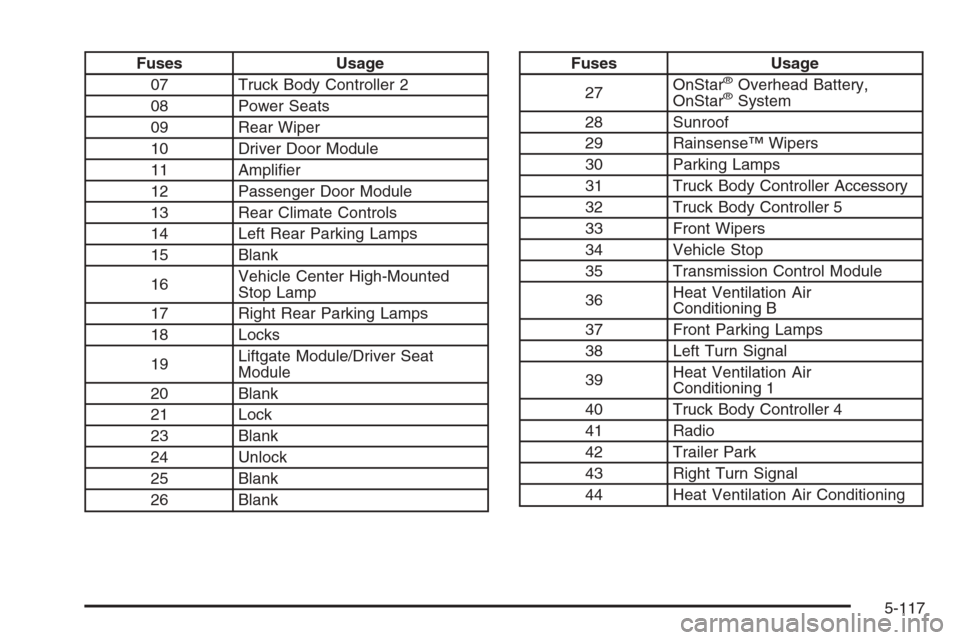
Fuses Usage
07 Truck Body Controller 2
08 Power Seats
09 Rear Wiper
10 Driver Door Module
11 Amplier
12 Passenger Door Module
13 Rear Climate Controls
14 Left Rear Parking Lamps
15 Blank
16Vehicle Center High-Mounted
Stop Lamp
17 Right Rear Parking Lamps
18 Locks
19Liftgate Module/Driver Seat
Module
20 Blank
21 Lock
23 Blank
24 Unlock
25 Blank
26 BlankFuses Usage
27OnStar®Overhead Battery,
OnStar®System
28 Sunroof
29 Rainsense™ Wipers
30 Parking Lamps
31 Truck Body Controller Accessory
32 Truck Body Controller 5
33 Front Wipers
34 Vehicle Stop
35 Transmission Control Module
36Heat Ventilation Air
Conditioning B
37 Front Parking Lamps
38 Left Turn Signal
39Heat Ventilation Air
Conditioning 1
40 Truck Body Controller 4
41 Radio
42 Trailer Park
43 Right Turn Signal
44 Heat Ventilation Air Conditioning
5-117
Page 480 of 534
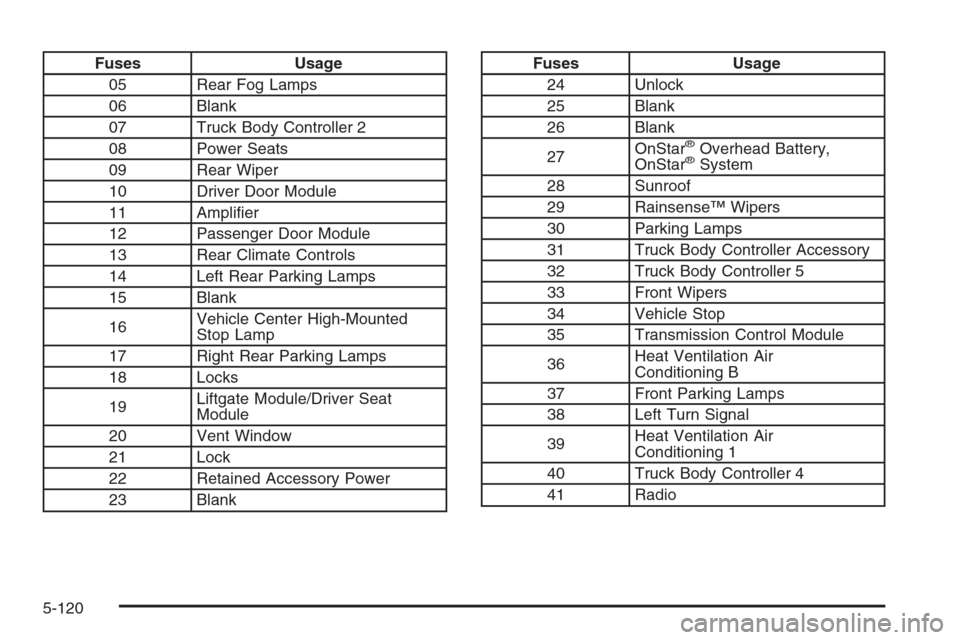
Fuses Usage
05 Rear Fog Lamps
06 Blank
07 Truck Body Controller 2
08 Power Seats
09 Rear Wiper
10 Driver Door Module
11 Amplier
12 Passenger Door Module
13 Rear Climate Controls
14 Left Rear Parking Lamps
15 Blank
16Vehicle Center High-Mounted
Stop Lamp
17 Right Rear Parking Lamps
18 Locks
19Liftgate Module/Driver Seat
Module
20 Vent Window
21 Lock
22 Retained Accessory Power
23 BlankFuses Usage
24 Unlock
25 Blank
26 Blank
27OnStar
®Overhead Battery,
OnStar®System
28 Sunroof
29 Rainsense™ Wipers
30 Parking Lamps
31 Truck Body Controller Accessory
32 Truck Body Controller 5
33 Front Wipers
34 Vehicle Stop
35 Transmission Control Module
36Heat Ventilation Air
Conditioning B
37 Front Parking Lamps
38 Left Turn Signal
39Heat Ventilation Air
Conditioning 1
40 Truck Body Controller 4
41 Radio
5-120