climate control CHEVROLET TRAIL BLAZER 2009 1.G User Guide
[x] Cancel search | Manufacturer: CHEVROLET, Model Year: 2009, Model line: TRAIL BLAZER, Model: CHEVROLET TRAIL BLAZER 2009 1.GPages: 484, PDF Size: 2.61 MB
Page 157 of 484
Outside Air Temperature Display
A new outside temperature reading is displayed if
the vehicle has been off for more than three hours.
If the vehicle has been off for less than three hours,
the old temperature reading may be displayed because
underhood heat is affecting the true outside temperature.
Underhood heat can also affect the outside temperature
while the engine is running. It may also take several
minutes of driving before the display updates to
the actual outside temperature.
Automatic Operation
AUTO (Automatic):When automatic operation is
active, the system controls the air delivery mode,
fan speed, and temperature inside the vehicle.
Use the steps below to place the entire system in
automatic mode:
1. Press AUTO.
When AUTO is selected, the air conditioning and air
inlet are automatically controlled. The air conditioning
compressor will run continuously when the outside
temperature is over approximately 40°F (4°C).
The air inlet will normally be set to outside air.
If it is hot outside, the air inlet automatically changes
to recirculate inside air to help quickly cool down
the vehicle.2. Set the driver’s and passenger’s temperature.
To nd your comfort setting, start with a 72°F (22°C)
temperature setting and allow about 20 minutes for
the system to adjust. Turn the driver or passenger
side temperature knob to adjust the temperature
setting as necessary. If a temperature setting of
60°F (15°C) is chosen, the system will remain at the
maximum cooling setting. If a temperature setting of
90°F (32°C) is chosen, the system remains at the
maximum heat setting. Choosing either maximum
setting may not cause the vehicle to heat or cool
any faster.Manual Operation
9(Off):Press to turn off the entire climate control
system. Outside air still enters the vehicle, and will be
directed to the oor. The system turns on by pressing
either AUTO, air delivery mode, fan control, or by
adjusting either temperature knob.
Driver’s Side Temperature Knob:Turn clockwise
or counterclockwise to increase or decrease the
temperature on the driver side of the vehicle.
The display will show the temperature setting
decreasing or increasing and an arrow pointing
toward the driver. This knob can also adjust the
passenger side temperature setting if the two
are linked.
3-23
Page 161 of 484
Rear Climate Control System
The vehicle has one of the following rear climate control
systems. With either of these systems, the rear climate
controls will be disabled when the front climate control
system is in defrost. This occurs to provide maximum
airow to clear the windshield.
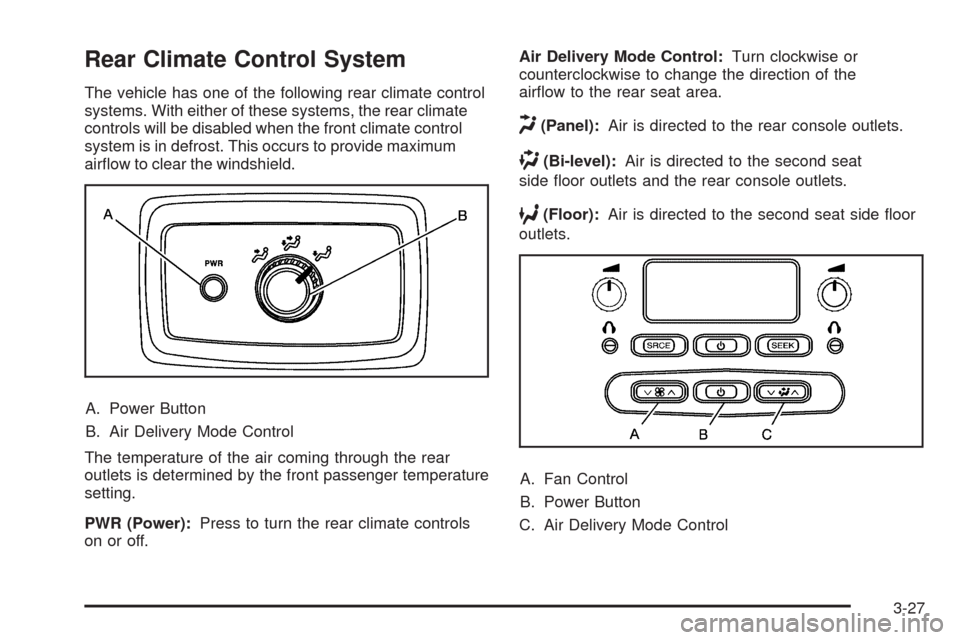
A. Power Button
B. Air Delivery Mode Control
The temperature of the air coming through the rear
outlets is determined by the front passenger temperature
setting.
PWR (Power):Press to turn the rear climate controls
on or off.Air Delivery Mode Control:Turn clockwise or
counterclockwise to change the direction of the
airow to the rear seat area.
H(Panel):Air is directed to the rear console outlets.
)(Bi-level):Air is directed to the second seat
side oor outlets and the rear console outlets.
6(Floor):Air is directed to the second seat side oor
outlets.
A. Fan Control
B. Power Button
C. Air Delivery Mode Control
3-27
Page 162 of 484
If the vehicle has the rear seat audio system, the lower
buttons are used to adjust the rear seat climate control
system. The temperature of the air coming through the
rear outlets is determined by the front passenger
temperature setting.
P(On/Off):Press to turn the rear climate controls on
or off.
z9y(Fan Control):Press to increase or decrease
the fan speed.
z\y(Air Delivery Mode Control):Press to
change the direction of airow (panel, bi-level or oor)
to the rear seat area.
The rear control only turns on if the front climate control
system is on and not in defrost mode.
Warning Lights, Gages, and
Indicators
Warning lights and gages can signal that something is
wrong before it becomes serious enough to cause an
expensive repair or replacement. Paying attention to
the warning lights and gages could prevent injury.
Warning lights come on when there may be or is a
problem with one of the vehicle’s functions. Some
warning lights come on briey when the engine is
started to indicate they are working.
Gages can indicate when there may be or is a problem
with one of the vehicle’s functions. Often gages and
warning lights work together to indicate a problem with
the vehicle.
When one of the warning lights comes on and stays on
while driving, or when one of the gages shows there
may be a problem, check the section that explains
what to do. Follow this manual’s advice. Waiting to
do repairs can be costly and even dangerous.
3-28
Page 277 of 484
CAUTION: (Continued)
Open a window about two inches (5 cm) on
the side of the vehicle that is away from the
wind to bring in fresh air.
Fully open the air outlets on or under the
instrument panel.
Adjust the Climate Control system to a setting
that circulates the air inside the vehicle and
set the fan speed to the highest setting.
See Climate Control System in the Index.
For more information about carbon monoxide, see
Engine Exhaust on page 2-38.
Snow can trap exhaust gases under your vehicle.
This can cause deadly CO (carbon monoxide) gas
to get inside. CO could overcome you and kill you.
You cannot see it or smell it, so you might not
know it is in your vehicle. Clear away snow from
around the base of your vehicle, especially any
that is blocking the exhaust.Run the engine for short periods only as needed to
keep warm, but be careful.
To save fuel, run the engine for only short periods as
needed to warm the vehicle and then shut the engine
off and close the window most of the way to save heat.
Repeat this until help arrives but only when you feel
really uncomfortable from the cold. Moving about
to keep warm also helps.
If it takes some time for help to arrive, now and then
when you run the engine, push the accelerator pedal
slightly so the engine runs faster than the idle speed.
This keeps the battery charged to restart the vehicle and
to signal for help with the headlamps. Do this as little as
possible to save fuel.
4-31
Page 301 of 484
Driving with a Trailer
{CAUTION:
When towing a trailer, exhaust gases may collect
at the rear of the vehicle and enter if the liftgate,
trunk/hatch, or rear-most window is open.
Engine exhaust contains carbon monoxide (CO)
which cannot be seen or smelled. It can cause
unconsciousness and even death.
To maximize safety when towing a trailer:
Have the exhaust system inspected for leaks
and make necessary repairs before starting
a trip.
Never drive with the liftgate, trunk/hatch, or
rear-most window open.
Fully open the air outlets on or under the
instrument panel.
Adjust the Climate Control system to a setting
that brings in only outside air and set the fan
speed to the highest setting. See Climate
Control System in the Index.
For more information about carbon monoxide, see
Engine Exhaust on page 2-38.Towing a trailer requires a certain amount of experience.
Get to know the rig before setting out for the open road.
Get acquainted with the feel of handling and braking with
the added weight of the trailer. And always keep in mind
that the vehicle you are driving is now longer and not as
responsive as the vehicle is by itself.
Before starting, check all trailer hitch parts and
attachments, safety chains, electrical connectors, lamps,
tires and mirror adjustments. If the trailer has electric
brakes, start the vehicle and trailer moving and then
apply the trailer brake controller by hand to be sure the
brakes are working. This checks the electrical connection
at the same time.
During the trip, check occasionally to be sure that the
load is secure, and that the lamps and any trailer brakes
are still working.
Following Distance
Stay at least twice as far behind the vehicle ahead as
you would when driving the vehicle without a trailer. This
can help to avoid situations that require heavy braking
and sudden turns.
Passing
More passing distance is needed when towing a trailer.
Because the rig is longer, it is necessary to go much
farther beyond the passed vehicle before returning to
the lane.
4-55
Page 384 of 484
Uniform Tire Quality Grading
Quality grades can be found where applicable on
the tire sidewall between tread shoulder and
maximum section width. For example:
Treadwear 200 Traction AA
Temperature A
The following information relates to the
system developed by the United States National
Highway Traffic Safety Administration (NHTSA),
which grades tires by treadwear, traction, and
temperature performance. This applies only to
vehicles sold in the United States. The grades are
molded on the sidewalls of most passenger car
tires. The Uniform Tire Quality Grading (UTQG)
system does not apply to deep tread, winter-type
snow tires, space-saver, or temporary use
spare tires, tires with nominal rim diameters
of 10 to 12 inches (25 to 30 cm), or to some
limited-production tires.While the tires available on General Motors
passenger cars and light trucks may vary with
respect to these grades, they must also conform
to federal safety requirements and additional
General Motors Tire Performance Criteria (TPC)
standards.
Treadwear
The treadwear grade is a comparative rating
based on the wear rate of the tire when tested
under controlled conditions on a specied
government test course. For example, a tire
graded 150 would wear one and a half (1.5) times
as well on the government course as a tire
graded 100. The relative performance of tires
depends upon the actual conditions of their use,
however, and may depart signicantly from the
norm due to variations in driving habits, service
practices, and differences in road characteristics
and climate.
5-78
Page 429 of 484
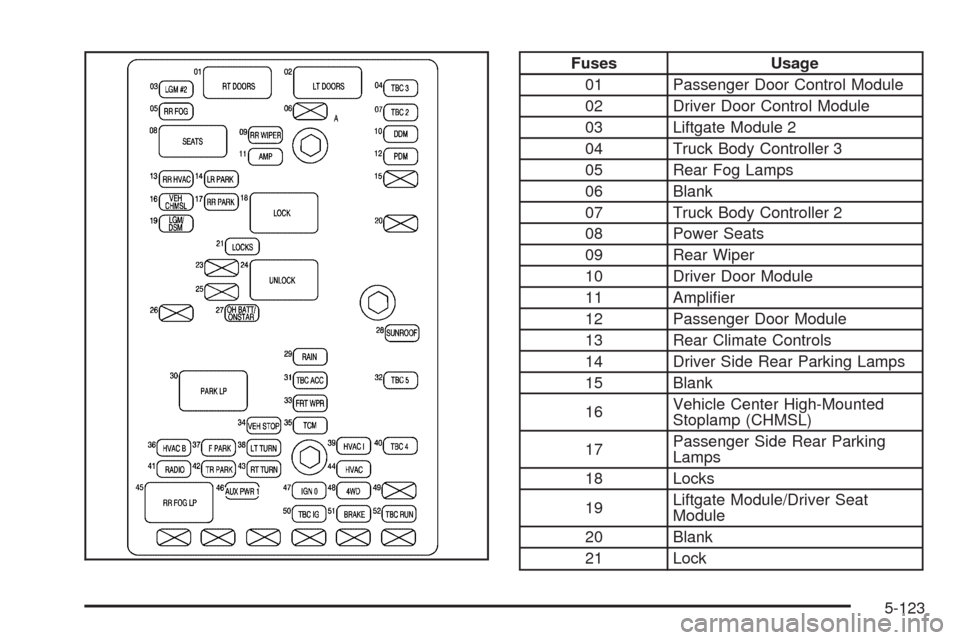
Fuses Usage
01 Passenger Door Control Module
02 Driver Door Control Module
03 Liftgate Module 2
04 Truck Body Controller 3
05 Rear Fog Lamps
06 Blank
07 Truck Body Controller 2
08 Power Seats
09 Rear Wiper
10 Driver Door Module
11 Amplier
12 Passenger Door Module
13 Rear Climate Controls
14 Driver Side Rear Parking Lamps
15 Blank
16Vehicle Center High-Mounted
Stoplamp (CHMSL)
17Passenger Side Rear Parking
Lamps
18 Locks
19Liftgate Module/Driver Seat
Module
20 Blank
21 Lock
5-123
Page 473 of 484
Charging System Light....................................3-34
Check
Engine Lamp..............................................3-39
Gages Warning Light...................................3-45
Check Gas Cap Light......................................3-47
Checking Things Under the Hood......................5-10
Chemical Paint Spotting.................................5-116
Child Restraints
Child Restraint Systems...............................1-39
Infants and Young Children...........................1-35
Lower Anchors and Tethers for Children..........1-43
Older Children.............................................1-32
Securing a Child Restraint in a
Rear Outside Seat Position........................1-49
Securing a Child Restraint in the
Center Rear Seat Position.........................1-51
Securing a Child Restraint in the
Right Front Seat Position..........................1-52
Where to Put the Restraint...........................1-42
Chime Level Adjustment.................................3-111
Cigarette Lighter.............................................3-19
Cleaning
Aluminum Wheels......................................5-115
Exterior Lamps/Lenses................................5-113
Fabric/Carpet............................................5-111
Finish Care...............................................5-114
Instrument Panel, Vinyl, and Other
Plastic Surfaces.....................................5-112
Interior.....................................................5-109Cleaning (cont.)
Leather....................................................5-111
Tires........................................................5-115
Underbody Maintenance.............................5-116
Washing Your Vehicle.................................5-113
Weatherstrips............................................5-112
Windshield, Backglass, and Wiper Blades......5-114
Climate Control System
Dual ..........................................................3-20
Dual Automatic............................................3-22
Outlet Adjustment........................................3-26
Rear ..........................................................3-27
Clock, Setting.................................................3-63
Collision Damage Repair..................................7-12
Compass.......................................................2-42
Competitive Driving.........................................4-14
Compressor Kit
Storing.......................................................5-92
Compressor Kit, Tire Sealant............................5-83
Content Theft-Deterrent....................................2-17
Control of a Vehicle.......................................... 4-3
Convenience Net............................................2-56
Coolant
Engine.......................................................5-29
Engine Temperature Gage............................3-38
Cooling System..............................................5-28
Cruise Control................................................3-10
Cruise Control Light........................................3-44
3
Page 474 of 484
Customer Assistance Information
Courtesy Transportation................................7-11
Customer Assistance for
Text Telephone (TTY) Users........................ 7-6
Customer Assistance Offices........................... 7-6
Customer Satisfaction Procedure..................... 7-2
GM Mobility Reimbursement Program............... 7-7
Reporting Safety Defects to General Motors....7-16
Reporting Safety Defects to the
Canadian Government..............................7-16
Reporting Safety Defects to the
United States Government.........................7-15
Roadside Assistance Program......................... 7-7
Service Publications Ordering Information........7-16
D
Daytime Running Lamp...................................3-14
Defensive Driving............................................. 4-2
Delayed Locking............................................... 2-8
Disc, MP3......................................................3-80
Doing Your Own Service Work........................... 5-4
Dome Lamp Override......................................3-17
Dome Lamps .................................................3-17Door
Delayed Locking........................................... 2-8
Locks.......................................................... 2-7
Power Door Locks......................................... 2-8
Programmable Automatic Door Locks............... 2-9
Rear Door Security Locks.............................2-12
Driver Information Center (DIC).........................3-47
DIC Operation and Displays..........................3-48
DIC Vehicle Customization............................3-56
DIC Warnings and Messages........................3-51
Driving
At Night.....................................................4-27
Before a Long Trip......................................4-28
Defensive..................................................... 4-2
Drunken....................................................... 4-3
Highway Hypnosis.......................................4-28
Hill and Mountain Roads..............................4-29
In Rain and on Wet Roads...........................4-27
Off-Road ....................................................4-14
Recovery Hooks..........................................4-32
Rocking Your Vehicle to Get it Out.................4-32
Winter........................................................4-30
Driving for Better Fuel Economy......................... 4-2
Dual Automatic Climate Control System.............3-22
Dual Climate Control System............................3-20
DVD
Rear Seat Entertainment System...................3-96
4
Page 480 of 484
PASS-Key®III+ Electronic Immobilizer
Operation...................................................2-19
Passlock
®......................................................2-18
Perchlorate Materials Requirements, California...... 5-4
Phone
Bluetooth
®..................................................3-85
Power
Door Locks.................................................. 2-8
Electrical System.......................................5-118
Lumbar Controls........................................... 1-4
Reduced Engine Light..................................3-44
Retained Accessory.....................................2-23
Seat ............................................................ 1-3
Steering Fluid.............................................5-37
Windows....................................................2-15
Privacy..........................................................7-17
Event Data Recorders..................................7-18
Navigation System.......................................7-19
OnStar .......................................................7-19
Radio Frequency Identication.......................7-19
Programmable Automatic Door Locks.................. 2-9
R
Radiator Pressure Cap....................................5-34
Radio Frequency Identication (RFID), Privacy....7-19
Radio(s)........................................................3-64
Radios
Navigation/Radio System, see Navigation
Manual...................................................3-85
Rear Seat Audio........................................3-108
Reception.................................................3-110
Setting the Clock.........................................3-63
Theft-Deterrent..........................................3-109
Reading Lamps..............................................3-17
Rear Axle......................................................5-49
Locking......................................................4-10
Rear Climate Control System............................3-27
Rear Door Security Locks................................2-12
Rear Floor Storage Cover................................2-55
Rear Seat Audio (RSA)..................................3-108
Rear Seat Entertainment System.......................3-96
Rear Seat Operation.......................................1-11
10