display CHEVROLET TRAIL BLAZER 2009 1.G User Guide
[x] Cancel search | Manufacturer: CHEVROLET, Model Year: 2009, Model line: TRAIL BLAZER, Model: CHEVROLET TRAIL BLAZER 2009 1.GPages: 484, PDF Size: 2.61 MB
Page 158 of 484
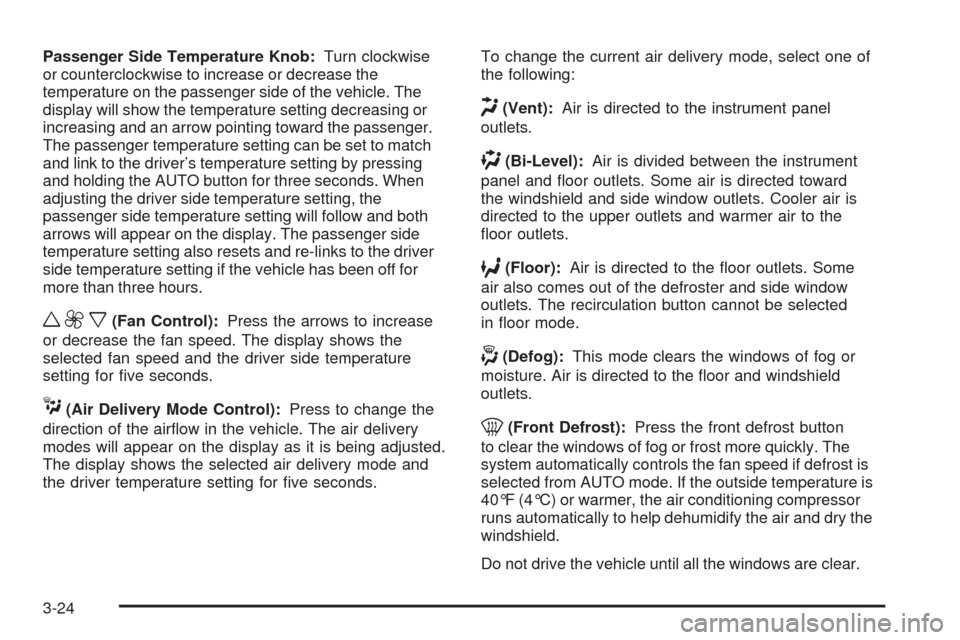
Passenger Side Temperature Knob:Turn clockwise
or counterclockwise to increase or decrease the
temperature on the passenger side of the vehicle. The
display will show the temperature setting decreasing or
increasing and an arrow pointing toward the passenger.
The passenger temperature setting can be set to match
and link to the driver’s temperature setting by pressing
and holding the AUTO button for three seconds. When
adjusting the driver side temperature setting, the
passenger side temperature setting will follow and both
arrows will appear on the display. The passenger side
temperature setting also resets and re-links to the driver
side temperature setting if the vehicle has been off for
more than three hours.
w9x(Fan Control):Press the arrows to increase
or decrease the fan speed. The display shows the
selected fan speed and the driver side temperature
setting for ve seconds.
C(Air Delivery Mode Control):Press to change the
direction of the airow in the vehicle. The air delivery
modes will appear on the display as it is being adjusted.
The display shows the selected air delivery mode and
the driver temperature setting for ve seconds.To change the current air delivery mode, select one of
the following:
H(Vent):Air is directed to the instrument panel
outlets.
)(Bi-Level):Air is divided between the instrument
panel and oor outlets. Some air is directed toward
the windshield and side window outlets. Cooler air is
directed to the upper outlets and warmer air to the
oor outlets.
6(Floor):Air is directed to the oor outlets. Some
air also comes out of the defroster and side window
outlets. The recirculation button cannot be selected
in oor mode.
-(Defog):This mode clears the windows of fog or
moisture. Air is directed to the oor and windshield
outlets.
0(Front Defrost):Press the front defrost button
to clear the windows of fog or frost more quickly. The
system automatically controls the fan speed if defrost is
selected from AUTO mode. If the outside temperature is
40°F (4°C) or warmer, the air conditioning compressor
runs automatically to help dehumidify the air and dry the
windshield.
Do not drive the vehicle until all the windows are clear.
3-24
Page 159 of 484
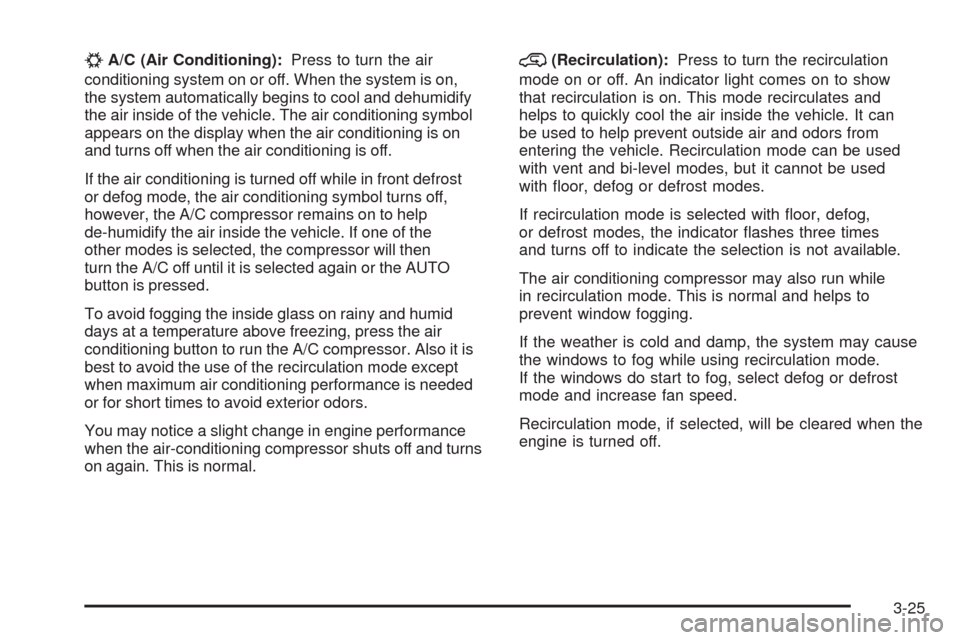
#A/C (Air Conditioning):Press to turn the air
conditioning system on or off. When the system is on,
the system automatically begins to cool and dehumidify
the air inside of the vehicle. The air conditioning symbol
appears on the display when the air conditioning is on
and turns off when the air conditioning is off.
If the air conditioning is turned off while in front defrost
or defog mode, the air conditioning symbol turns off,
however, the A/C compressor remains on to help
de-humidify the air inside the vehicle. If one of the
other modes is selected, the compressor will then
turn the A/C off until it is selected again or the AUTO
button is pressed.
To avoid fogging the inside glass on rainy and humid
days at a temperature above freezing, press the air
conditioning button to run the A/C compressor. Also it is
best to avoid the use of the recirculation mode except
when maximum air conditioning performance is needed
or for short times to avoid exterior odors.
You may notice a slight change in engine performance
when the air-conditioning compressor shuts off and turns
on again. This is normal.@(Recirculation):Press to turn the recirculation
mode on or off. An indicator light comes on to show
that recirculation is on. This mode recirculates and
helps to quickly cool the air inside the vehicle. It can
be used to help prevent outside air and odors from
entering the vehicle. Recirculation mode can be used
with vent and bi-level modes, but it cannot be used
with oor, defog or defrost modes.
If recirculation mode is selected with oor, defog,
or defrost modes, the indicator ashes three times
and turns off to indicate the selection is not available.
The air conditioning compressor may also run while
in recirculation mode. This is normal and helps to
prevent window fogging.
If the weather is cold and damp, the system may cause
the windows to fog while using recirculation mode.
If the windows do start to fog, select defog or defrost
mode and increase fan speed.
Recirculation mode, if selected, will be cleared when the
engine is turned off.
3-25
Page 164 of 484
Speedometer and Odometer
The speedometer the vehicle speed in both miles per
hour (mph) and kilometers per hour (km/h).
The odometer shows how far the vehicle has been
driven, in either miles (used in the United States)
or kilometers (used in Canada).
The odometer mileage can be checked without the
vehicle running. Press the trip stem located on
the instrument panel cluster.
If the vehicle needs a new odometer installed, the new
one will be set to the correct mileage total of the old
odometer.
Trip Odometer
The trip odometer can tell you how far your vehicle has
been driven since you last set the trip odometer to zero.
The odometer works together with the Driver Information
Center (DIC). You can set a Trip A and Trip B odometer.
See “Trip Information” underDIC Operation and Displays
on page 3-48.
The odometer mileage can be checked without the
vehicle running. Press the trip stem on the instrument
panel cluster.
Tachometer
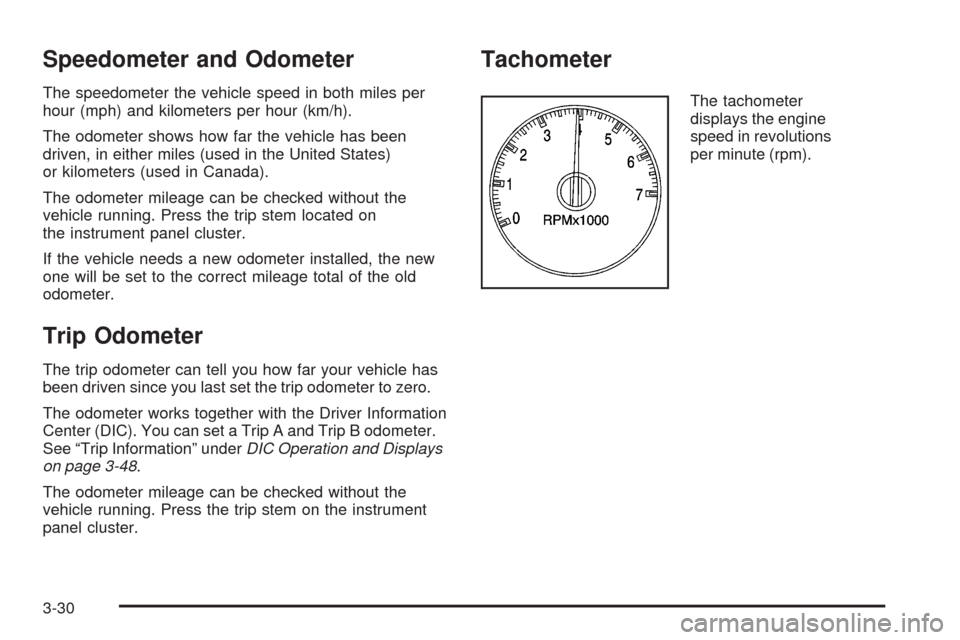
The tachometer
displays the engine
speed in revolutions
per minute (rpm).
3-30
Page 169 of 484
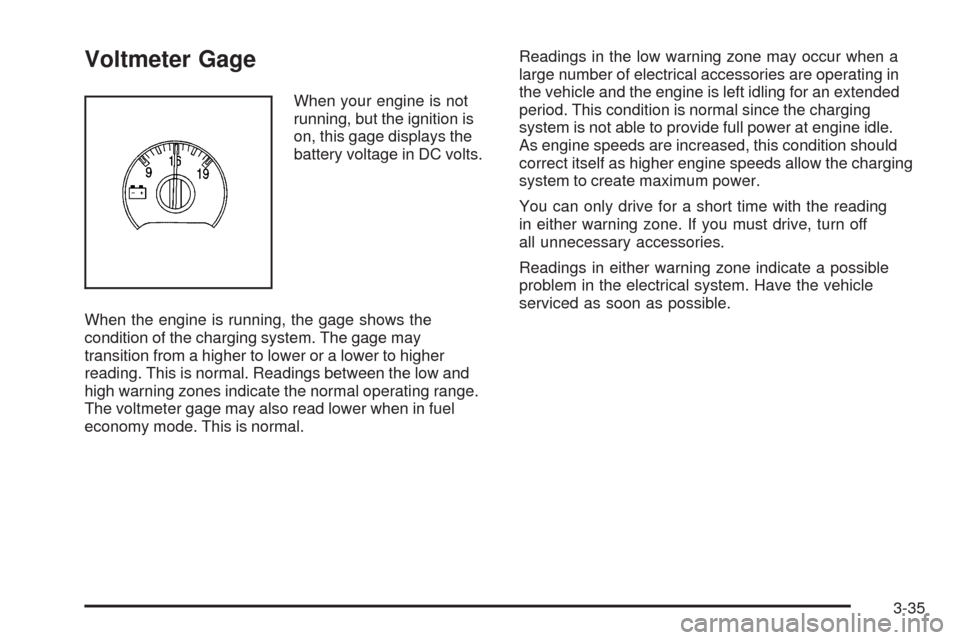
Voltmeter Gage
When your engine is not
running, but the ignition is
on, this gage displays the
battery voltage in DC volts.
When the engine is running, the gage shows the
condition of the charging system. The gage may
transition from a higher to lower or a lower to higher
reading. This is normal. Readings between the low and
high warning zones indicate the normal operating range.
The voltmeter gage may also read lower when in fuel
economy mode. This is normal.Readings in the low warning zone may occur when a
large number of electrical accessories are operating in
the vehicle and the engine is left idling for an extended
period. This condition is normal since the charging
system is not able to provide full power at engine idle.
As engine speeds are increased, this condition should
correct itself as higher engine speeds allow the charging
system to create maximum power.
You can only drive for a short time with the reading
in either warning zone. If you must drive, turn off
all unnecessary accessories.
Readings in either warning zone indicate a possible
problem in the electrical system. Have the vehicle
serviced as soon as possible.
3-35
Page 181 of 484
Low Fuel Warning Light
The light next to the fuel gage will come on briey when
you are starting the engine.
This light comes on when the fuel tank is low on fuel.
To turn it off, add fuel to the fuel tank.
Check Gas Cap Light
If your vehicle has this
light, it will come on if your
gas cap is not securely
fastened.
SeeMalfunction Indicator Lamp on page 3-39for more
information.
Driver Information Center (DIC)
Your vehicle may have this feature. The Driver
Information Center (DIC) display is located on the
instrument panel cluster, below the speedometer.
If your vehicle has DIC buttons, they are located on
the steering wheel. The DIC can display information
such as the trip odometer, fuel economy, customization
features, and warning/status messages.
If your vehicle does not have DIC steering wheel
buttons, you will not have all of the features listed.
Scroll through the odometer and trip odometer by
pressing the trip odometer reset stem located on the
instrument panel cluster. Turn off, or acknowledge, DIC
messages by pressing the trip odometer reset stem.
SeeSpeedometer and Odometer on page 3-30for
information on features for vehicles without DIC buttons.
3-47
Page 182 of 484
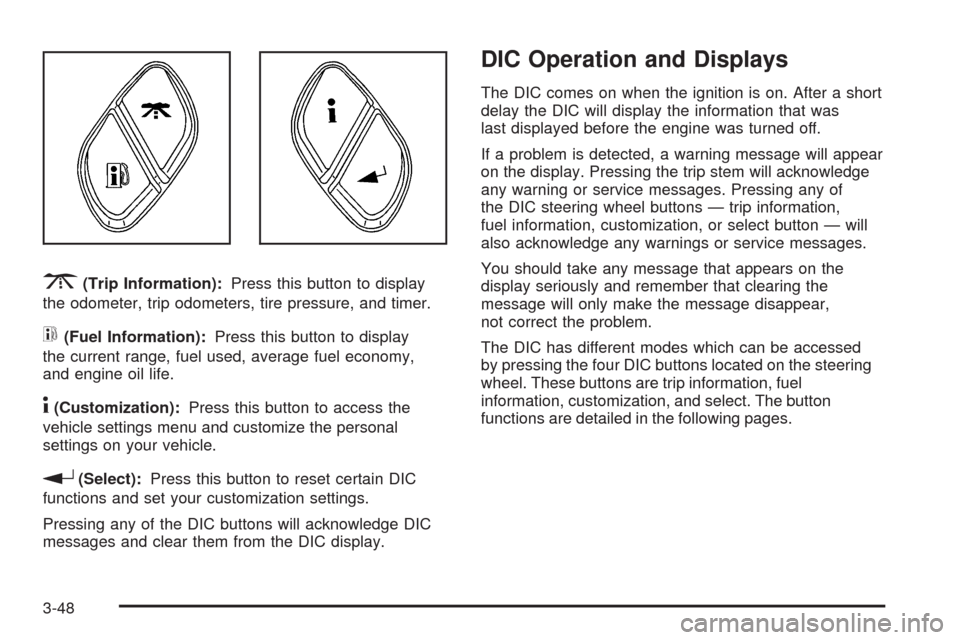
3(Trip Information):Press this button to display
the odometer, trip odometers, tire pressure, and timer.
t(Fuel Information):Press this button to display
the current range, fuel used, average fuel economy,
and engine oil life.
4(Customization):Press this button to access the
vehicle settings menu and customize the personal
settings on your vehicle.
r(Select):Press this button to reset certain DIC
functions and set your customization settings.
Pressing any of the DIC buttons will acknowledge DIC
messages and clear them from the DIC display.
DIC Operation and Displays
The DIC comes on when the ignition is on. After a short
delay the DIC will display the information that was
last displayed before the engine was turned off.
If a problem is detected, a warning message will appear
on the display. Pressing the trip stem will acknowledge
any warning or service messages. Pressing any of
the DIC steering wheel buttons — trip information,
fuel information, customization, or select button — will
also acknowledge any warnings or service messages.
You should take any message that appears on the
display seriously and remember that clearing the
message will only make the message disappear,
not correct the problem.
The DIC has different modes which can be accessed
by pressing the four DIC buttons located on the steering
wheel. These buttons are trip information, fuel
information, customization, and select. The button
functions are detailed in the following pages.
3-48
Page 183 of 484
Trip Information Button
3
(Trip Information):Press the trip information
button to scroll through the ODOMETER, TRIP A,
TRIP B, TIRE PRESSURES, and TIMER.
Odometer:Press the trip information button until
ODOMETER appears on the display. This mode shows
the total distance the vehicle has been driven in either
miles or kilometers. Pressing the reset stem located on
the instrument cluster with the vehicle off will also display
the odometer.
Trip A:Press the trip information button until TRIP A
appears on the display. This mode shows the current
distance traveled since the last reset for TRIP A in either
miles or kilometers.
Trip B:Press the trip information button until TRIP B
appears on the display. This mode shows the current
distance traveled since the last reset for TRIP B in either
miles or kilometers.
To reset TRIP A or TRIP B information, press and hold
the select button for one second while in one of the trip
modes. This will reset the information for TRIP A or
TRIP B.
You can also reset the TRIP A or TRIP B while they are
displayed by pressing the reset stem on the cluster. If you
press and hold the reset stem or the select button for
more than four seconds, the display will show the
distance traveled since the last ignition cycle for
TRIP A or TRIP B.Tire Pressures:On vehicles with the Tire Pressure
Monitor System (TPMS), press the trip information
button until TIRE PRESSURES appears on the display.
This mode shows the tire pressure in pounds per
square inch (psi) or kilopascals (kPa). Press the select
button to scroll through the following information:
LF TIRE shows the tire pressure for the front
driver’s side tire.
RF TIRE shows the tire pressure for the front
passenger’s side tire.
LR TIRE shows the tire pressure for the rear
driver’s side tire.
RR TIRE shows the tire pressure for the rear
passenger’s side tire.
Timer:The DIC can be used as a timer. Press the
select button while TIMER is displayed to start the timer.
The display will show the amount of time that has
passed since the timer was last reset, not including time
the ignition is off. Time will continue to be counted as
long as the ignition is on, even if another display is being
shown on the DIC. The timer will record up to 99 hours,
59 minutes and 59 seconds (99:59:59) after which
the display will roll back to zero.
To stop the counting of time, press the select button
briey while TIMER is displayed.
To reset the timer to zero, press and hold the select
button while TIMER is displayed.
3-49
Page 184 of 484
Fuel Information Button
t
(Fuel Information):Press the fuel information
button to scroll through the range, fuel used, average
fuel economy, and the engine oil life system.
Fuel Range:Press the fuel information button until
RANGE appears on the display. This mode shows the
remaining distance you can drive without refueling.
It is based on fuel economy and the fuel remaining in
the fuel tank. The display will show LOW if the fuel level
is low.
The fuel economy data used to determine fuel range is
an average of recent driving conditions. As your
driving conditions change, this data is gradually updated.
Fuel range cannot be reset.
Fuel Used:Press the fuel information button until
FUEL USED appears on the display. This mode shows
the number of gallons or liters of fuel used since the
last reset of this menu item. To reset the fuel used
information, press and hold the select button for one
second while FUEL USED is displayed.Average Fuel Economy:Press the fuel information
button until AVG. ECON appears on the display.
This mode shows how many miles per gallon (MPG),
liters per 100 kilometers (L/100 km), or kilometers
per liter (km/L) your vehicle is getting based on current
and past driving conditions.
Press and hold the select button for one second while
AVG. ECON is displayed to reset the average fuel
economy. Average fuel economy will then be calculated
starting from that point. If the average fuel economy
is not reset, it will be continually updated each time you
drive.
Engine Oil Life System:Press the fuel information
button until ENGINE OIL LIFE appears on the display.
The engine oil life system shows an estimate of the
oil’s remaining useful life. It will show 100% when the
system is reset after an oil change. It will alert you
to change the oil on a schedule consistent with your
driving conditions.
Always reset the engine oil life system after an oil
change. To reset the engine oil life system, seeEngine
Oil Life System on page 5-22.
In addition to the engine oil life system monitoring the
oil life, additional maintenance is recommended in
the Maintenance Schedule in this manual. SeeEngine
Oil on page 5-18andScheduled Maintenance on
page 6-4.
3-50
Page 185 of 484
Customization Button
4
(Customization):Press the customization button to
access the VEHICLE SETTINGS menu and customize
the settings to your vehicle. SeeDIC Vehicle
Customization on page 3-56for more information.
Select Button
r
(Select):Press the select button to reset certain
DIC functions, turn off or acknowledge messages on
the DIC display, and set your customization settings.
For example, this button will allow you to reset the trip
odometers, turn off the FUEL LEVEL LOW message,
and enables you to scroll through and select the
language in which the DIC information will appear.
DIC Warnings and Messages
Messages are displayed on the DIC to notify the driver
that the status of the vehicle has changed and that
some action may be needed to correct the condition.
Multiple messages may appear one after another.Some messages may not require immediate action.
Press any of the DIC buttons on the steering wheel or
the trip odometer reset stem on the instrument panel
cluster to acknowledge that you received the messages
and to clear them from the display.
Some messages cannot be cleared from the display
because they are more urgent. These messages require
action before they can be removed from the DIC display.
Take any messages that appear on the display seriously
and remember that clearing the messages will only make
the messages disappear, not correct the problem.
The following are the possible messages that can be
displayed and some information about them.
CHANGE ENGINE OIL
This message displays when the engine oil needs to
be changed and service is required for your vehicle. See
Scheduled Maintenance on page 6-4andEngine Oil on
page 5-18for more information. Also seeEngine Oil Life
System on page 5-22for information on how to reset the
message. This message clears itself after 10 seconds
until the next ignition cycle.
3-51
Page 186 of 484
CHECK TIRE PRESSURE
On vehicles with the Tire Pressure Monitor System
(TPMS), this message displays when the pressure in
one or more of the vehicle’s tires needs to be checked.
If a tire pressure message appears on the DIC, stop as
soon as you can. Have the tire pressures checked and
set to those shown on the Tire Loading Information
label. SeeTires on page 5-58,Loading the Vehicle on
page 4-33, andInflation - Tire Pressure on page 5-65.
The DIC also shows the tire pressure values. SeeDIC
Operation and Displays on page 3-48. If the tire pressure
is low, the low tire pressure warning light comes on.
SeeTire Pressure Light on page 3-39.
CHECK WASHER FLUID
This message displays if the washer uid level is low.
Adding washer uid to the windshield washer uid
reservoir clears this message. SeeWindshield Washer
Fluid on page 5-38. This message clears itself after
10 seconds, or you can manually clear it from the
DIC display.
DRIVER DOOR AJAR
This message displays and a chime sounds if the driver
door is not fully closed. Stop and turn off the vehicle,
check the door for obstructions, and close the door
again. Check to see if the message still appears on
the DIC.
ENGINE COOLANT HOT/ENGINE
OVERHEATED
Notice:If you drive your vehicle while the engine
is overheating, severe engine damage may occur.
If an overheat warning appears on the instrument
panel cluster and/or DIC, stop the vehicle as soon as
possible. Do not increase the engine speed above
normal idling speed. SeeEngine Overheating
on page 5-35for more information.
This message displays and a chime sounds if the
cooling system temperature gets hot. SeeEngine
Overheating on page 5-35for the proper course
of action. This message clears when the coolant
temperature drops to a safe operating temperature.
3-52