ECU CHEVROLET TRAIL BLAZER 2009 1.G Service Manual
[x] Cancel search | Manufacturer: CHEVROLET, Model Year: 2009, Model line: TRAIL BLAZER, Model: CHEVROLET TRAIL BLAZER 2009 1.GPages: 484, PDF Size: 2.61 MB
Page 219 of 484
XM Lock:The XM receiver in your vehicle could
have previously been in another vehicle. For security
purposes, XM receivers cannot be swapped between
vehicles. If this message is received after having your
vehicle serviced, check with your dealer/retailer.
Radio ID:If tuned to channel 0, there could be a
receiver fault., this message will alternate with the XM
Radio 8 digit radio ID label. This label is needed to
activate the service. Consult with your dealer/retailer.
Unknown:If this message is received when tuned
to channel 0, there could be a receiver fault. Consult
with your dealer/retailer.
Chk XMRcvr:If this message does not clear within
a short period of time, the receiver may have a
fault. Consult with your dealer/retailer.
Check XM:If this message does not clear within
a short period of time, the receiver could have a
fault. Consult with your dealer/retailer.
Navigation/Radio System
For vehicles with a navigation radio system, see the
separate Navigation System manual.
Bluetooth®
Vehicles with a Bluetooth system can use a Bluetooth
capable cell phone with a Hands Free Prole to make and
receive phone calls. The system can be used while the
key is in ON/RUN or ACC/ACCESSORY position. The
range of the Bluetooth system can be up to 30 ft. (9.1 m).
Not all phones support all functions, and not all phones
are guaranteed to work with the in-vehicle Bluetooth
system. See gm.com/bluetooth for more information
on compatible phones.
Voice Recognition
The Bluetooth system uses voice recognition to interpret
voice commands to dial phone numbers and name tags.
Noise:Keep interior noise levels to a minimum.
The system may not recognize voice commands if
there is too much background noise.
When to Speak:A short tone sounds after the system
responds indicating when it is waiting for a voice
command. Wait until the tone and then speak.
How to Speak:Speak clearly in a calm and natural
voice.
3-85
Page 239 of 484
Battery Replacement
To change the remote control batteries:
1. Remove the battery compartment door located on
the bottom of the remote control.
2. Replace the two batteries in the compartment.
Make sure that they are installed correctly,
using the diagram on the inside of the battery
compartment.
3. Close the battery door securely.
If the remote control is to be stored for a long period
of time, remove the batteries and keep them in a cool,
dry place.
Problem Recommended Action
No power. The ignition might
not be in ON/RUN or
ACC/ACCESSORY.
The parental control
button might have been
turned on. The power
indicator light ashes.
Disc will not play. The system might be off.
The parental control
button might have been
turned on. The power
indicator light ashes.
The system might be
in auxiliary mode.
The disc is upside down
or is not compatible.
The picture does not ll
the screen. There are
black borders on the top
and bottom or on both
sides or it looks
stretched out.Check the display
mode settings in the
display menu.
The disc was ejected, but
it was pulled back into the
DVD player.The disc is being stored in
the DVD player. Press the
eject button again to eject
the disc.
3-105
Page 262 of 484
Loading Your Vehicle for Off-Road
Driving
{CAUTION:
Cargo on the load oor piled higher than the
seatbacks can be thrown forward during a
sudden stop. You or your passengers could
be injured. Keep cargo below the top of the
seatbacks.
Unsecured cargo on the load oor can be
tossed about when driving over rough terrain.
You or your passengers can be struck by
ying objects. Secure the cargo properly.
CAUTION: (Continued)
CAUTION: (Continued)
Heavy loads on the roof raise the vehicle’s
center of gravity, making it more likely to roll
over. You can be seriously or fatally injured if
the vehicle rolls over. Put heavy loads inside
the cargo area, not on the roof. Keep cargo in
the cargo area as far forward and low as
possible.
There are some important things to remember about
how to load your vehicle.
The heaviest things should be on the oor, forward
of the rear axle. Put heavier items as far forward
as you can.
Be sure the load is properly secured, so things are
not tossed around.
You will nd other important information underLoading
the Vehicle on page 4-33andTires on page 5-58.
4-16
Page 285 of 484
Using heavier suspension components to get
added durability might not change your vehicle’s
weight ratings. Ask your dealer to help you
load your vehicle the right way.
Notice
:Overloading your vehicle may cause
damage. Repairs would not be covered by your
warranty. Do not overload your vehicle.
If you put things inside your vehicle — like
suitcases, tools, packages, or anything else — they
will go as fast as the vehicle goes. If you have to
stop or turn quickly, or if there is a crash, they will
keep going.
{CAUTION:
Things you put inside your vehicle can strike
and injure people in a sudden stop or turn, or
in a crash.
Put things in the cargo area of your
vehicle. Try to spread the weight evenly.
Never stack heavier things, like
suitcases, inside the vehicle so that some
of them are above the tops of the seats.
CAUTION: (Continued)
CAUTION: (Continued)
Do not leave an unsecured child restraint
in your vehicle.
When you carry something inside the
vehicle, secure it whenever you can.
Do not leave a seat folded down unless
you need to.
There is also important loading information for
off-road driving in this manual. See “Loading Your
Vehicle for Off-Road Driving” underOff-Road
Driving on page 4-14.
Adding a Snow Plow or Similar
Equipment
Your vehicle was neither designed nor intended for a
snow plow.
Notice:Adding a snow plow or similar equipment
to your vehicle can damage it, and the repairs would
not be covered by warranty. Do not install a snow
plow or similar equipment on your vehicle.
4-39
Page 288 of 484
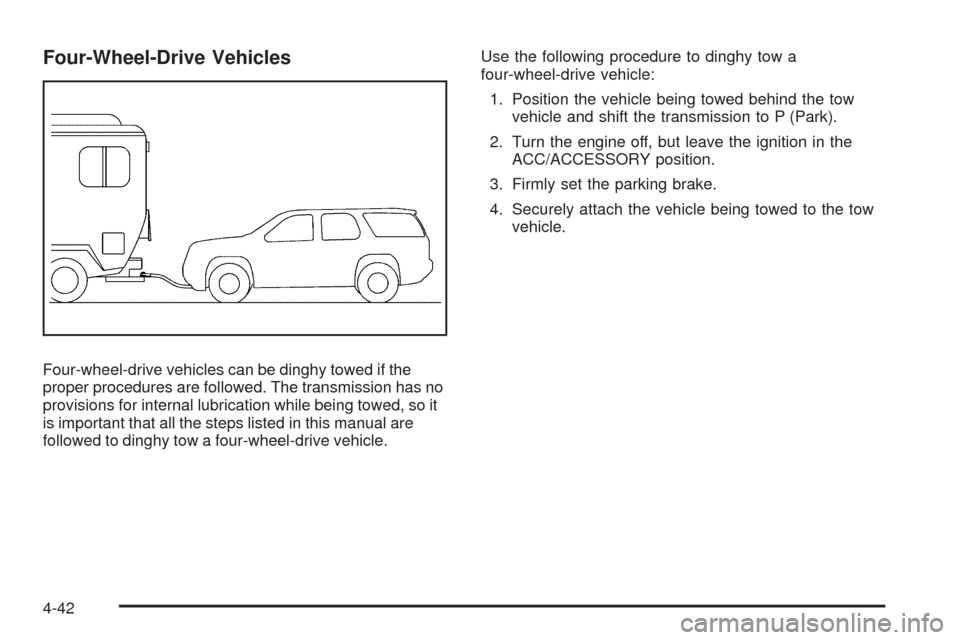
Four-Wheel-Drive Vehicles
Four-wheel-drive vehicles can be dinghy towed if the
proper procedures are followed. The transmission has no
provisions for internal lubrication while being towed, so it
is important that all the steps listed in this manual are
followed to dinghy tow a four-wheel-drive vehicle.Use the following procedure to dinghy tow a
four-wheel-drive vehicle:
1. Position the vehicle being towed behind the tow
vehicle and shift the transmission to P (Park).
2. Turn the engine off, but leave the ignition in the
ACC/ACCESSORY position.
3. Firmly set the parking brake.
4. Securely attach the vehicle being towed to the tow
vehicle.
4-42
Page 290 of 484
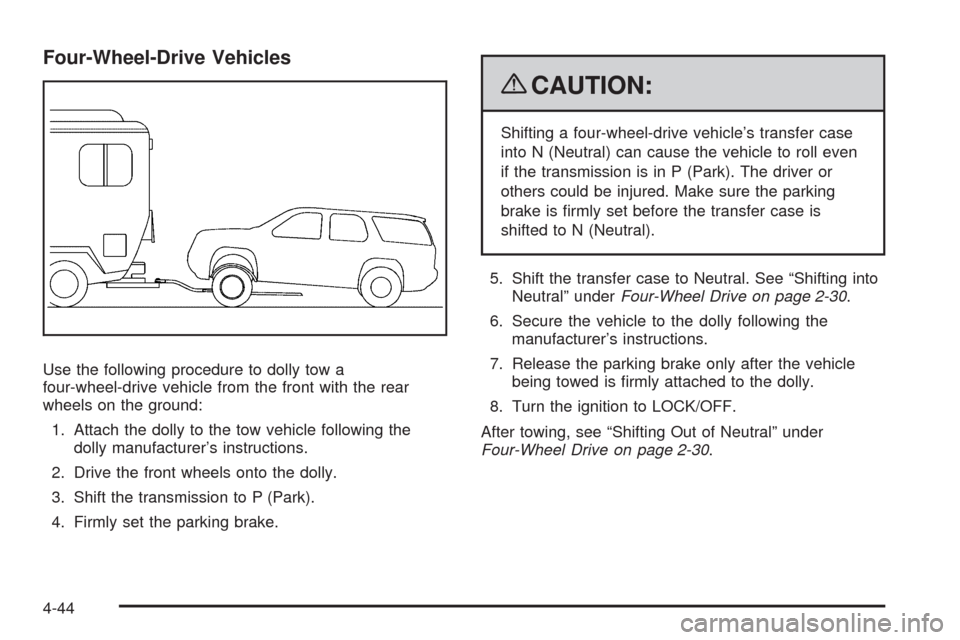
Four-Wheel-Drive Vehicles
Use the following procedure to dolly tow a
four-wheel-drive vehicle from the front with the rear
wheels on the ground:
1. Attach the dolly to the tow vehicle following the
dolly manufacturer’s instructions.
2. Drive the front wheels onto the dolly.
3. Shift the transmission to P (Park).
4. Firmly set the parking brake.
{CAUTION:
Shifting a four-wheel-drive vehicle’s transfer case
into N (Neutral) can cause the vehicle to roll even
if the transmission is in P (Park). The driver or
others could be injured. Make sure the parking
brake is rmly set before the transfer case is
shifted to N (Neutral).
5. Shift the transfer case to Neutral. See “Shifting into
Neutral” underFour-Wheel Drive on page 2-30.
6. Secure the vehicle to the dolly following the
manufacturer’s instructions.
7. Release the parking brake only after the vehicle
being towed is rmly attached to the dolly.
8. Turn the ignition to LOCK/OFF.
After towing, see “Shifting Out of Neutral” under
Four-Wheel Drive on page 2-30.
4-44
Page 291 of 484
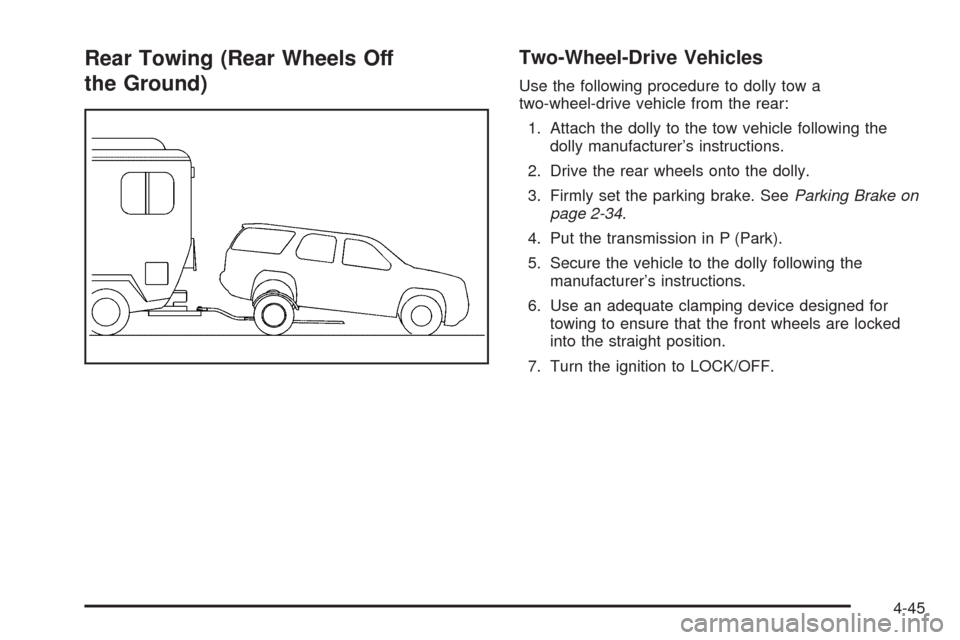
Rear Towing (Rear Wheels Off
the Ground)Two-Wheel-Drive Vehicles
Use the following procedure to dolly tow a
two-wheel-drive vehicle from the rear:
1. Attach the dolly to the tow vehicle following the
dolly manufacturer’s instructions.
2. Drive the rear wheels onto the dolly.
3. Firmly set the parking brake. SeeParking Brake on
page 2-34.
4. Put the transmission in P (Park).
5. Secure the vehicle to the dolly following the
manufacturer’s instructions.
6. Use an adequate clamping device designed for
towing to ensure that the front wheels are locked
into the straight position.
7. Turn the ignition to LOCK/OFF.
4-45
Page 292 of 484
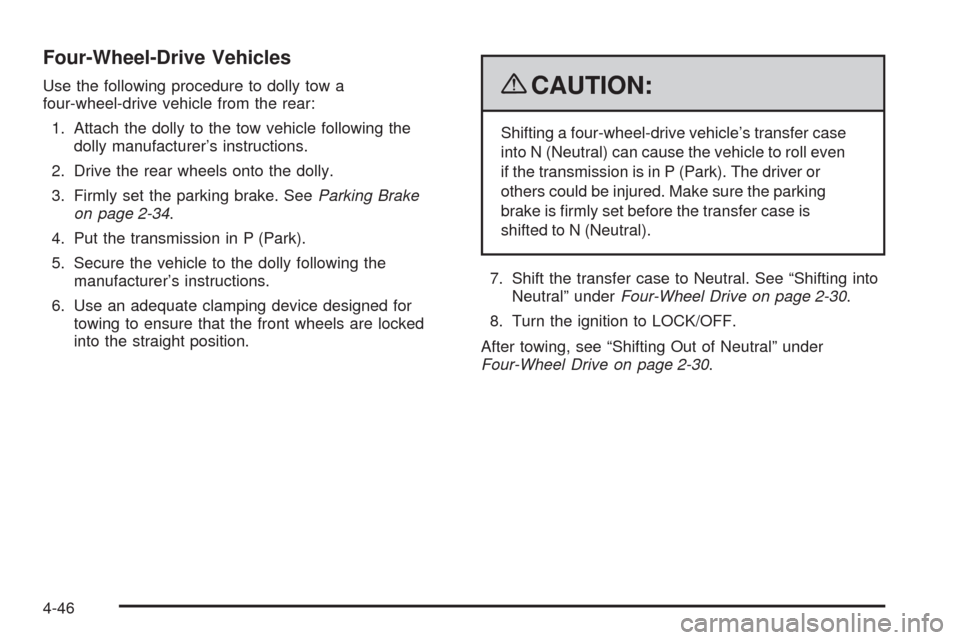
Four-Wheel-Drive Vehicles
Use the following procedure to dolly tow a
four-wheel-drive vehicle from the rear:
1. Attach the dolly to the tow vehicle following the
dolly manufacturer’s instructions.
2. Drive the rear wheels onto the dolly.
3. Firmly set the parking brake. SeeParking Brake
on page 2-34.
4. Put the transmission in P (Park).
5. Secure the vehicle to the dolly following the
manufacturer’s instructions.
6. Use an adequate clamping device designed for
towing to ensure that the front wheels are locked
into the straight position.{CAUTION:
Shifting a four-wheel-drive vehicle’s transfer case
into N (Neutral) can cause the vehicle to roll even
if the transmission is in P (Park). The driver or
others could be injured. Make sure the parking
brake is rmly set before the transfer case is
shifted to N (Neutral).
7. Shift the transfer case to Neutral. See “Shifting into
Neutral” underFour-Wheel Drive on page 2-30.
8. Turn the ignition to LOCK/OFF.
After towing, see “Shifting Out of Neutral” under
Four-Wheel Drive on page 2-30.
4-46
Page 296 of 484
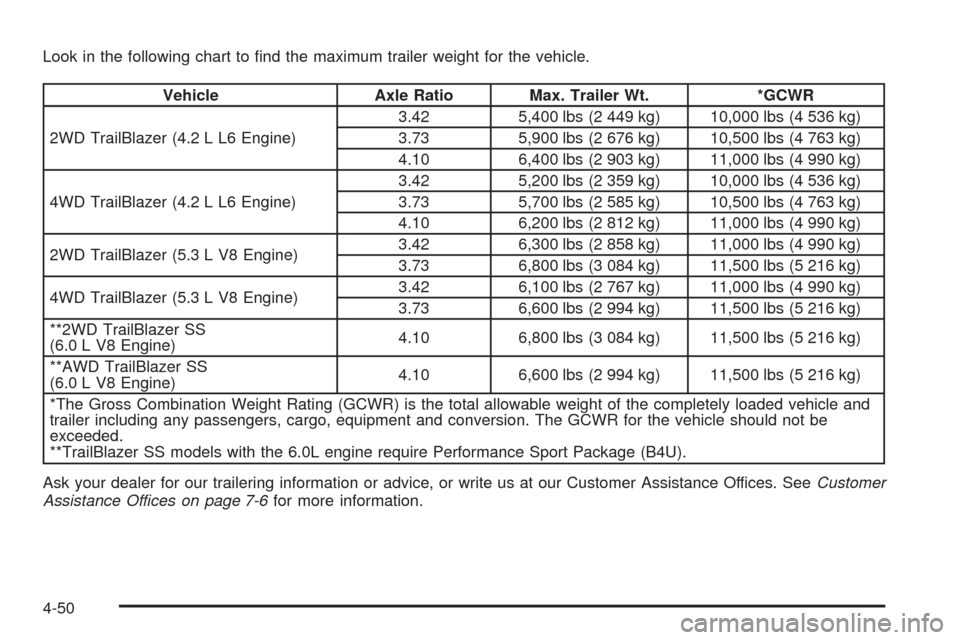
Look in the following chart to nd the maximum trailer weight for the vehicle.
Vehicle Axle Ratio Max. Trailer Wt. *GCWR
2WD TrailBlazer (4.2 L L6 Engine)3.42 5,400 lbs (2 449 kg) 10,000 lbs (4 536 kg)
3.73 5,900 lbs (2 676 kg) 10,500 lbs (4 763 kg)
4.10 6,400 lbs (2 903 kg) 11,000 lbs (4 990 kg)
4WD TrailBlazer (4.2 L L6 Engine)3.42 5,200 lbs (2 359 kg) 10,000 lbs (4 536 kg)
3.73 5,700 lbs (2 585 kg) 10,500 lbs (4 763 kg)
4.10 6,200 lbs (2 812 kg) 11,000 lbs (4 990 kg)
2WD TrailBlazer (5.3 L V8 Engine)3.42 6,300 lbs (2 858 kg) 11,000 lbs (4 990 kg)
3.73 6,800 lbs (3 084 kg) 11,500 lbs (5 216 kg)
4WD TrailBlazer (5.3 L V8 Engine)3.42 6,100 lbs (2 767 kg) 11,000 lbs (4 990 kg)
3.73 6,600 lbs (2 994 kg) 11,500 lbs (5 216 kg)
**2WD TrailBlazer SS
(6.0 L V8 Engine)4.10 6,800 lbs (3 084 kg) 11,500 lbs (5 216 kg)
**AWD TrailBlazer SS
(6.0 L V8 Engine)4.10 6,600 lbs (2 994 kg) 11,500 lbs (5 216 kg)
*The Gross Combination Weight Rating (GCWR) is the total allowable weight of the completely loaded vehicle and
trailer including any passengers, cargo, equipment and conversion. The GCWR for the vehicle should not be
exceeded.
**TrailBlazer SS models with the 6.0L engine require Performance Sport Package (B4U).
Ask your dealer for our trailering information or advice, or write us at our Customer Assistance Offices. SeeCustomer
Assistance Offices on page 7-6for more information.
4-50
Page 301 of 484
Driving with a Trailer
{CAUTION:
When towing a trailer, exhaust gases may collect
at the rear of the vehicle and enter if the liftgate,
trunk/hatch, or rear-most window is open.
Engine exhaust contains carbon monoxide (CO)
which cannot be seen or smelled. It can cause
unconsciousness and even death.
To maximize safety when towing a trailer:
Have the exhaust system inspected for leaks
and make necessary repairs before starting
a trip.
Never drive with the liftgate, trunk/hatch, or
rear-most window open.
Fully open the air outlets on or under the
instrument panel.
Adjust the Climate Control system to a setting
that brings in only outside air and set the fan
speed to the highest setting. See Climate
Control System in the Index.
For more information about carbon monoxide, see
Engine Exhaust on page 2-38.Towing a trailer requires a certain amount of experience.
Get to know the rig before setting out for the open road.
Get acquainted with the feel of handling and braking with
the added weight of the trailer. And always keep in mind
that the vehicle you are driving is now longer and not as
responsive as the vehicle is by itself.
Before starting, check all trailer hitch parts and
attachments, safety chains, electrical connectors, lamps,
tires and mirror adjustments. If the trailer has electric
brakes, start the vehicle and trailer moving and then
apply the trailer brake controller by hand to be sure the
brakes are working. This checks the electrical connection
at the same time.
During the trip, check occasionally to be sure that the
load is secure, and that the lamps and any trailer brakes
are still working.
Following Distance
Stay at least twice as far behind the vehicle ahead as
you would when driving the vehicle without a trailer. This
can help to avoid situations that require heavy braking
and sudden turns.
Passing
More passing distance is needed when towing a trailer.
Because the rig is longer, it is necessary to go much
farther beyond the passed vehicle before returning to
the lane.
4-55