Windshield wiper system CHEVROLET TRAILBLAZER 2021 Owner's Manual
[x] Cancel search | Manufacturer: CHEVROLET, Model Year: 2021, Model line: TRAILBLAZER, Model: CHEVROLET TRAILBLAZER 2021Pages: 363, PDF Size: 6.75 MB
Page 6 of 363
Chevrolet Trailblazer Owner Manual (GMNA-Localizing-U.S./Canada-
14400528) - 2021 - CRC - 11/7/19
Introduction 5
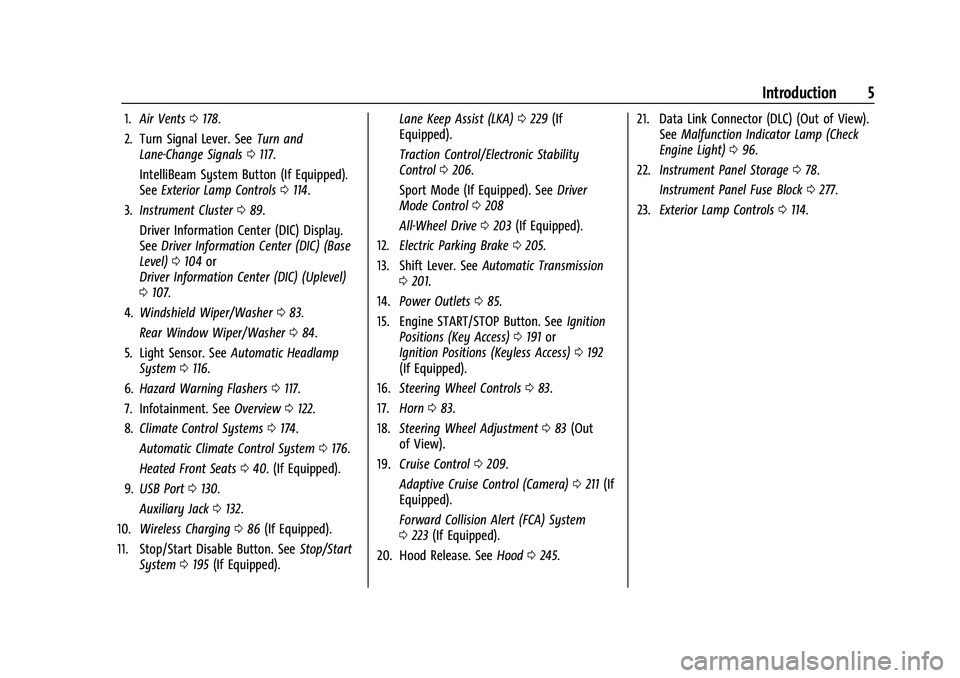
1.Air Vents 0178.
2. Turn Signal Lever. See Turn and
Lane-Change Signals 0117.
IntelliBeam System Button (If Equipped).
See Exterior Lamp Controls 0114.
3. Instrument Cluster 089.
Driver Information Center (DIC) Display.
See Driver Information Center (DIC) (Base
Level) 0104 or
Driver Information Center (DIC) (Uplevel)
0 107.
4. Windshield Wiper/Washer 083.
Rear Window Wiper/Washer 084.
5. Light Sensor. See Automatic Headlamp
System 0116.
6. Hazard Warning Flashers 0117.
7. Infotainment. See Overview0122.
8. Climate Control Systems 0174.
Automatic Climate Control System 0176.
Heated Front Seats 040. (If Equipped).
9. USB Port 0130.
Auxiliary Jack 0132.
10. Wireless Charging 086 (If Equipped).
11. Stop/Start Disable Button. See Stop/Start
System 0195 (If Equipped). Lane Keep Assist (LKA)
0229 (If
Equipped).
Traction Control/Electronic Stability
Control 0206.
Sport Mode (If Equipped). See Driver
Mode Control 0208
All-Wheel Drive 0203 (If Equipped).
12. Electric Parking Brake 0205.
13. Shift Lever. See Automatic Transmission
0 201.
14. Power Outlets 085.
15. Engine START/STOP Button. See Ignition
Positions (Key Access) 0191 or
Ignition Positions (Keyless Access) 0192
(If Equipped).
16. Steering Wheel Controls 083.
17. Horn 083.
18. Steering Wheel Adjustment 083 (Out
of View).
19. Cruise Control 0209.
Adaptive Cruise Control (Camera) 0211 (If
Equipped).
Forward Collision Alert (FCA) System
0 223 (If Equipped).
20. Hood Release. See Hood0245. 21. Data Link Connector (DLC) (Out of View).
SeeMalfunction Indicator Lamp (Check
Engine Light) 096.
22. Instrument Panel Storage 078.
Instrument Panel Fuse Block 0277.
23. Exterior Lamp Controls 0114.
Page 83 of 363
Chevrolet Trailblazer Owner Manual (GMNA-Localizing-U.S./Canada-
14400528) - 2021 - CRC - 11/7/19
82 Instruments and Controls
Instruments and Controls
Controls
Steering Wheel Adjustment . . . . . . . . . . . . 83
Steering Wheel Controls . . . . . . . . . . . . . . . . 83
Horn . . . . . . . . . . . . . . . . . . . . . . . . . . . . . . . . . . . 83
Windshield Wiper/Washer . . . . . . . . . . . . . . 83
Rear Window Wiper/Washer . . . . . . . . . . . 84
Compass . . . . . . . . . . . . . . . . . . . . . . . . . . . . . . . . 85
Clock . . . . . . . . . . . . . . . . . . . . . . . . . . . . . . . . . . . 85
Power Outlets . . . . . . . . . . . . . . . . . . . . . . . . . . 85
Wireless Charging . . . . . . . . . . . . . . . . . . . . . . 86
Warning Lights, Gauges, and Indicators
Warning Lights, Gauges, andIndicators . . . . . . . . . . . . . . . . . . . . . . . . . . . . . 88
Instrument Cluster . . . . . . . . . . . . . . . . . . . . . 89
Speedometer . . . . . . . . . . . . . . . . . . . . . . . . . . . 92
Odometer . . . . . . . . . . . . . . . . . . . . . . . . . . . . . . 93
Trip Odometer . . . . . . . . . . . . . . . . . . . . . . . . . 93
Tachometer . . . . . . . . . . . . . . . . . . . . . . . . . . . . 93
Fuel Gauge . . . . . . . . . . . . . . . . . . . . . . . . . . . . . 93
Engine Coolant Temperature Gauge . . . . 94
Seat Belt Reminders . . . . . . . . . . . . . . . . . . . . 94
Airbag Readiness Light . . . . . . . . . . . . . . . . . 95
Passenger Airbag Status Indicator . . . . . . 95
Charging System Light . . . . . . . . . . . . . . . . . 96
Malfunction Indicator Lamp (Check Engine Light) . . . . . . . . . . . . . . . . . . . . . . . . . 96 Brake System Warning Light . . . . . . . . . . . 98
Electric Parking Brake Light . . . . . . . . . . . . . 98
Service Electric Parking Brake Light . . . . . 99
Antilock Brake System (ABS) Warning
Light . . . . . . . . . . . . . . . . . . . . . . . . . . . . . . . . . 99
All-Wheel-Drive Light . . . . . . . . . . . . . . . . . . . 99
Sport Mode Light . . . . . . . . . . . . . . . . . . . . . 100
Lane Keep Assist (LKA) Light . . . . . . . . . . 100
Vehicle Ahead Indicator . . . . . . . . . . . . . . . 100
Pedestrian Ahead Indicator . . . . . . . . . . . . 100
Traction Off Light . . . . . . . . . . . . . . . . . . . . . 100
StabiliTrak OFF Light . . . . . . . . . . . . . . . . . . . 101
Traction Control System (TCS)/ StabiliTrak Light . . . . . . . . . . . . . . . . . . . . . . 101
Tire Pressure Light . . . . . . . . . . . . . . . . . . . . . 101
Engine Oil Pressure Light . . . . . . . . . . . . . . 102
Low Fuel Warning Light . . . . . . . . . . . . . . . 102
Security Light . . . . . . . . . . . . . . . . . . . . . . . . . . 102
High-Beam On Light . . . . . . . . . . . . . . . . . . . 103
Front Fog Lamp Light . . . . . . . . . . . . . . . . . . 103
Lamps On Reminder . . . . . . . . . . . . . . . . . . . 103
Cruise Control Light . . . . . . . . . . . . . . . . . . . 103
Door Ajar Light . . . . . . . . . . . . . . . . . . . . . . . . 104
Information Displays
Driver Information Center (DIC) (Base Level) . . . . . . . . . . . . . . . . . . . . . . . . . . . . . . . . 104
Driver Information Center (DIC) (Uplevel) . . . . . . . . . . . . . . . . . . . . . . . . . . . . . 107
Vehicle Messages
Vehicle Messages . . . . . . . . . . . . . . . . . . . . . 109
Engine Power Messages . . . . . . . . . . . . . . . 110
Vehicle Speed Messages . . . . . . . . . . . . . . . 110
Vehicle Personalization
Vehicle Personalization . . . . . . . . . . . . . . . . . 110
Page 84 of 363
Chevrolet Trailblazer Owner Manual (GMNA-Localizing-U.S./Canada-
14400528) - 2021 - CRC - 11/7/19
Instruments and Controls 83
Controls
Steering Wheel Adjustment
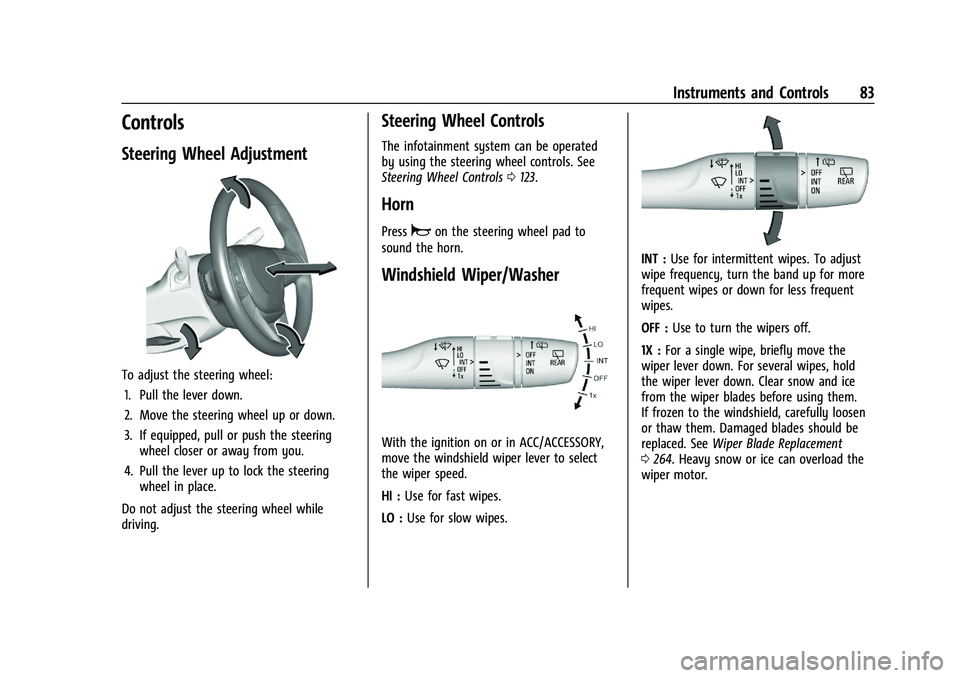
To adjust the steering wheel:1. Pull the lever down.
2. Move the steering wheel up or down.
3. If equipped, pull or push the steering wheel closer or away from you.
4. Pull the lever up to lock the steering wheel in place.
Do not adjust the steering wheel while
driving.
Steering Wheel Controls
The infotainment system can be operated
by using the steering wheel controls. See
Steering Wheel Controls 0123.
Horn
Pressaon the steering wheel pad to
sound the horn.
Windshield Wiper/Washer
With the ignition on or in ACC/ACCESSORY,
move the windshield wiper lever to select
the wiper speed.
HI : Use for fast wipes.
LO : Use for slow wipes.
INT : Use for intermittent wipes. To adjust
wipe frequency, turn the band up for more
frequent wipes or down for less frequent
wipes.
OFF : Use to turn the wipers off.
1X : For a single wipe, briefly move the
wiper lever down. For several wipes, hold
the wiper lever down. Clear snow and ice
from the wiper blades before using them.
If frozen to the windshield, carefully loosen
or thaw them. Damaged blades should be
replaced. See Wiper Blade Replacement
0 264. Heavy snow or ice can overload the
wiper motor.
Page 86 of 363
Chevrolet Trailblazer Owner Manual (GMNA-Localizing-U.S./Canada-
14400528) - 2021 - CRC - 11/7/19
Instruments and Controls 85
R (Reverse), and the front windshield wiper
is performing interval wipes, then the rear
wiper automatically performs interval wipes.
This feature can be turned on or off. See
Vehicle Personalization0110.
The windshield washer reservoir is used for
the windshield and the rear window. Check
the fluid level in the reservoir if either
washer is not working. See Washer Fluid
0 259.
Compass
The vehicle may have a compass display on
the Driver Information Center (DIC). The
compass receives its heading and other
information from the Global Positioning
System (GPS) antenna, StabiliTrak/Electronic
Stability Control (ESC), and vehicle speed
information.
The compass system is designed to operate
for a certain number of miles or degrees of
turn before needing a signal from the GPS
satellites. When the compass display shows
CAL, drive the vehicle for a short distance in
an open area where it can receive a GPS
signal. The compass system will
automatically determine when a GPS signal
is restored and provide a heading again.
Clock
Set the time and date using the
infotainment system. See "Time / Date"
under Settings 0157.
Power Outlets
Power Outlets 12-Volt Direct Current
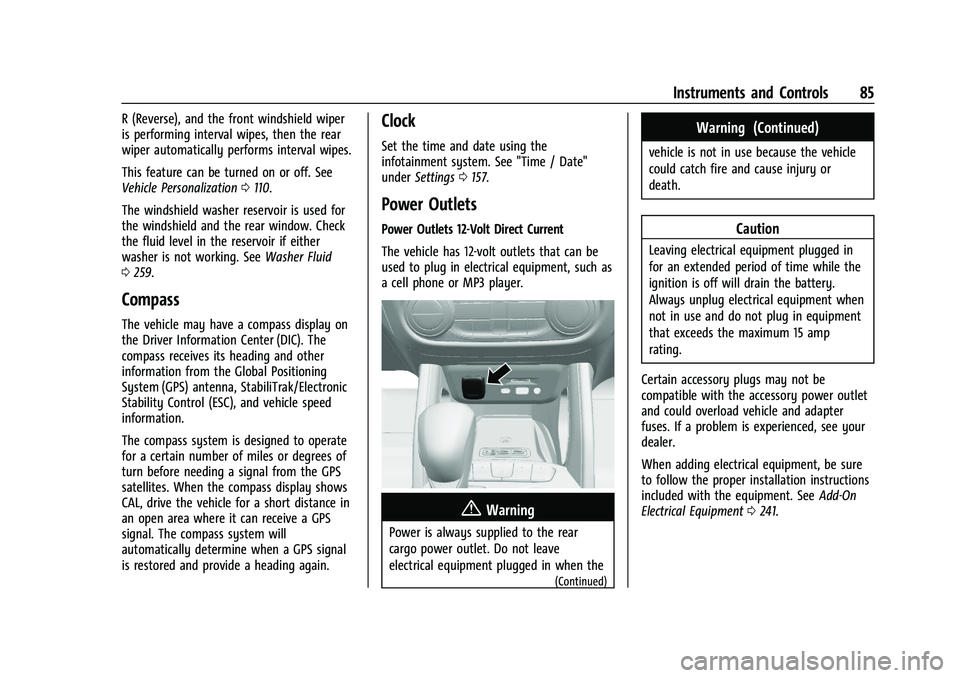
The vehicle has 12-volt outlets that can be
used to plug in electrical equipment, such as
a cell phone or MP3 player.
{Warning
Power is always supplied to the rear
cargo power outlet. Do not leave
electrical equipment plugged in when the
(Continued)
Warning (Continued)
vehicle is not in use because the vehicle
could catch fire and cause injury or
death.
Caution
Leaving electrical equipment plugged in
for an extended period of time while the
ignition is off will drain the battery.
Always unplug electrical equipment when
not in use and do not plug in equipment
that exceeds the maximum 15 amp
rating.
Certain accessory plugs may not be
compatible with the accessory power outlet
and could overload vehicle and adapter
fuses. If a problem is experienced, see your
dealer.
When adding electrical equipment, be sure
to follow the proper installation instructions
included with the equipment. See Add-On
Electrical Equipment 0241.
Page 117 of 363
Chevrolet Trailblazer Owner Manual (GMNA-Localizing-U.S./Canada-
14400528) - 2021 - CRC - 11/7/19
116 Lighting
This indicator light turns on in the
instrument cluster when the high-beam
headlamps are on.
Flash-to-Pass
The flash-to-pass feature works with the low
beams or Daytime Running Lamps (DRL) on
or off.
To flash the high beams, pull the turn signal
lever toward you momentarily and then
release it.
Daytime Running Lamps (DRL)
DRL can make it easier for others to see the
front of your vehicle during the day. Fully
functional DRL are required on all vehicles
first sold in Canada.
The DRL system comes on in daylight when
the following conditions are met:
.The ignition is on.
.The exterior lamp control is in AUTO.
.The light sensor determines it is daytime.
When the DRL are on, the taillamps,
sidemarker lamps, instrument panel lights,
and other lamps will not be on. The DRL turn off when the headlamps are
turned to
Oor the ignition is off. For
vehicles sold in Canada, this control only
works when the vehicle is parked.
The regular headlamp system should be
turned on when needed.
Automatic Headlamp System
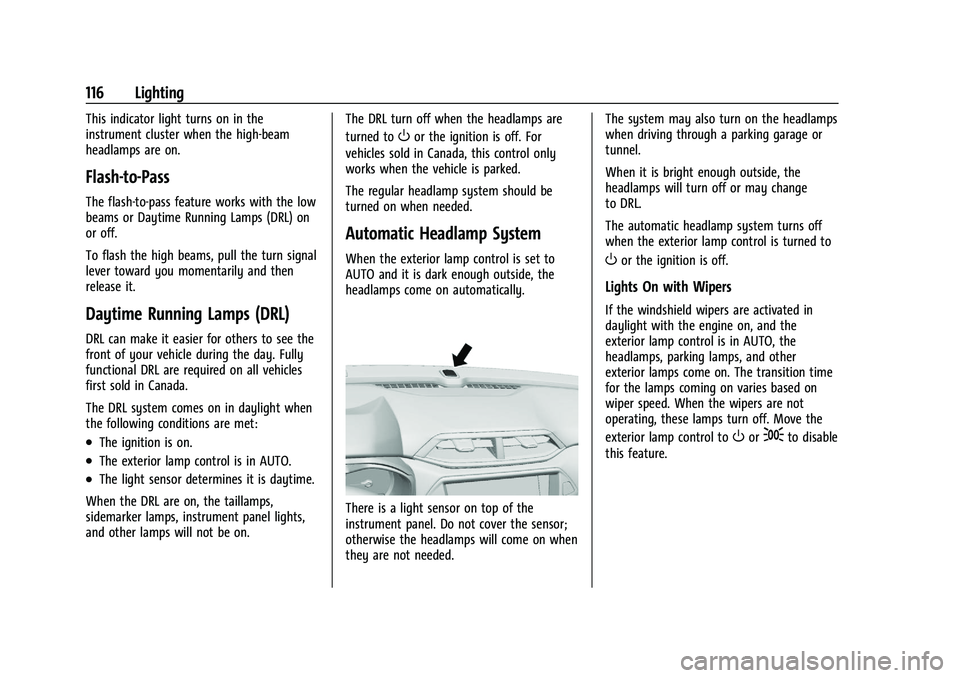
When the exterior lamp control is set to
AUTO and it is dark enough outside, the
headlamps come on automatically.
There is a light sensor on top of the
instrument panel. Do not cover the sensor;
otherwise the headlamps will come on when
they are not needed. The system may also turn on the headlamps
when driving through a parking garage or
tunnel.
When it is bright enough outside, the
headlamps will turn off or may change
to DRL.
The automatic headlamp system turns off
when the exterior lamp control is turned to
Oor the ignition is off.
Lights On with Wipers
If the windshield wipers are activated in
daylight with the engine on, and the
exterior lamp control is in AUTO, the
headlamps, parking lamps, and other
exterior lamps come on. The transition time
for the lamps coming on varies based on
wiper speed. When the wipers are not
operating, these lamps turn off. Move the
exterior lamp control to
Oor;to disable
this feature.
Page 244 of 363
Chevrolet Trailblazer Owner Manual (GMNA-Localizing-U.S./Canada-
14400528) - 2021 - CRC - 11/7/19
Vehicle Care 243
Vehicle Care
General Information
General Information . . . . . . . . . . . . . . . . . . . 244
California Proposition 65 Warning . . . . . 244
California Perchlorate MaterialsRequirements . . . . . . . . . . . . . . . . . . . . . . . . 244
Accessories and Modifications . . . . . . . . . 245
Vehicle Checks
Doing Your Own Service Work . . . . . . . . 245
Hood . . . . . . . . . . . . . . . . . . . . . . . . . . . . . . . . . . 245
Engine Compartment Overview . . . . . . . . 247
Engine Oil . . . . . . . . . . . . . . . . . . . . . . . . . . . . . 250
Engine Oil Life System . . . . . . . . . . . . . . . . . 252
Automatic Transmission Fluid . . . . . . . . . . 252
Engine Air Filter Life System . . . . . . . . . . . 253
Engine Air Cleaner/Filter . . . . . . . . . . . . . . . 253
Cooling System . . . . . . . . . . . . . . . . . . . . . . . . 255
Engine Overheating . . . . . . . . . . . . . . . . . . . 258
Washer Fluid . . . . . . . . . . . . . . . . . . . . . . . . . . 259
Brakes . . . . . . . . . . . . . . . . . . . . . . . . . . . . . . . . 260
Brake Fluid . . . . . . . . . . . . . . . . . . . . . . . . . . . . 260
Battery - North America . . . . . . . . . . . . . . . 261
All-Wheel Drive . . . . . . . . . . . . . . . . . . . . . . . . 263
Starter Switch Check . . . . . . . . . . . . . . . . . . 263
Automatic Transmission Shift Lock Control Function Check . . . . . . . . . . . . . . 263
Park Brake and P (Park) Mechanism Check . . . . . . . . . . . . . . . . . . . . . . . . . . . . . . . 264 Wiper Blade Replacement . . . . . . . . . . . . . 264
Windshield Replacement . . . . . . . . . . . . . . 265
Gas Strut(s) . . . . . . . . . . . . . . . . . . . . . . . . . . . 265
Headlamp Aiming
Front Headlamp Aiming . . . . . . . . . . . . . . . 266
Bulb Replacement
Bulb Replacement . . . . . . . . . . . . . . . . . . . . . 266
Halogen Bulbs . . . . . . . . . . . . . . . . . . . . . . . . . 267
LED Lighting . . . . . . . . . . . . . . . . . . . . . . . . . . . 267
Headlamps, Front Turn Signal,
Sidemarker, and Parking Lamps (Base
Level) . . . . . . . . . . . . . . . . . . . . . . . . . . . . . . . . 267
Headlamps, Front Turn Signal, Sidemarker, and Parking Lamps
(Uplevel) . . . . . . . . . . . . . . . . . . . . . . . . . . . . 268
Fog Lamps . . . . . . . . . . . . . . . . . . . . . . . . . . . . 269
Taillamps, Turn Signal, Sidemarker, Stoplamps, and Back-Up Lamps (Base
Level) . . . . . . . . . . . . . . . . . . . . . . . . . . . . . . . 269
Taillamps, Turn Signal, Sidemarker, Stoplamps, and Back-Up Lamps
(Uplevel) . . . . . . . . . . . . . . . . . . . . . . . . . . . . . 271
Electrical System
Electrical System Overload . . . . . . . . . . . . . 273
Fuses and Circuit Breakers . . . . . . . . . . . . . 274
Engine Compartment Fuse Block . . . . . . 274
Instrument Panel Fuse Block . . . . . . . . . . . 277
Rear Compartment Fuse Block . . . . . . . . . 278
Wheels and Tires
Tires . . . . . . . . . . . . . . . . . . . . . . . . . . . . . . . . . . . 279
All-Season Tires . . . . . . . . . . . . . . . . . . . . . . . 280
Winter Tires . . . . . . . . . . . . . . . . . . . . . . . . . . . 280
Tire Sidewall Labeling . . . . . . . . . . . . . . . . . . 281
Tire Designations . . . . . . . . . . . . . . . . . . . . . . 282
Tire Terminology and Definitions . . . . . . 283
Tire Pressure . . . . . . . . . . . . . . . . . . . . . . . . . . 285
Tire Pressure Monitor System . . . . . . . . . 286
Tire Pressure Monitor Operation . . . . . . . 287
Tire Inspection . . . . . . . . . . . . . . . . . . . . . . . . 290
Tire Rotation . . . . . . . . . . . . . . . . . . . . . . . . . . 290
When It Is Time for New Tires . . . . . . . . 291
Buying New Tires . . . . . . . . . . . . . . . . . . . . . 292
Different Size Tires and Wheels . . . . . . . 293
Uniform Tire Quality Grading . . . . . . . . . 293
Wheel Alignment and Tire Balance . . . . 295
Wheel Replacement . . . . . . . . . . . . . . . . . . . 295
Tire Chains . . . . . . . . . . . . . . . . . . . . . . . . . . . . 295
If a Tire Goes Flat . . . . . . . . . . . . . . . . . . . . . 296
Tire Changing . . . . . . . . . . . . . . . . . . . . . . . . . 297
Compact Spare Tire . . . . . . . . . . . . . . . . . . . . 301
Jump Starting
Jump Starting - North America . . . . . . . . 302
Towing the Vehicle
Towing the Vehicle . . . . . . . . . . . . . . . . . . . 304
Recreational Vehicle Towing . . . . . . . . . . . 305
Page 260 of 363
Chevrolet Trailblazer Owner Manual (GMNA-Localizing-U.S./Canada-
14400528) - 2021 - CRC - 11/7/19
Vehicle Care 259
Warning (Continued)
including the pressure cap, is hot. Wait
for the cooling system and pressure cap
to cool.
If No Steam Is Coming from the Engine
Compartment
If an engine overheat warning is displayed
but no steam can be seen or heard, the
problem may not be too serious. Sometimes
the engine can get a little too hot when the
vehicle:
.Climbs a long hill on a hot day
.Stops after high-speed driving
If the overheat warning is displayed with no
sign of steam: 1. Turn the air conditioning off.
2. Turn the heater on to the highest temperature and to the highest fan
speed. Open the windows as necessary.
3. When it is safe to do so, pull off the road, shift to P (Park) or N (Neutral), and
let the engine idle.
If the engine coolant temperature gauge is
no longer in the overheat zone, the vehicle
can be driven. Continue to drive the vehicle slowly for about 10 minutes. Keep a safe
vehicle distance from the vehicle in front.
If the warning does not come back on,
continue to drive normally and have the
cooling system checked for proper fill and
function.
If the warning continues, pull over, stop, and
park the vehicle right away.
If there is no sign of steam, idle the engine
for three minutes while parked. If the
warning is still displayed, turn off the
engine until it cools down.
Washer Fluid
What to Use
When the vehicle needs windshield washer
fluid, be sure to read the manufacturer's
instructions before use. If operating the
vehicle in an area where the temperature
may fall below freezing, use a fluid that has
sufficient protection against freezing.
Adding Washer Fluid
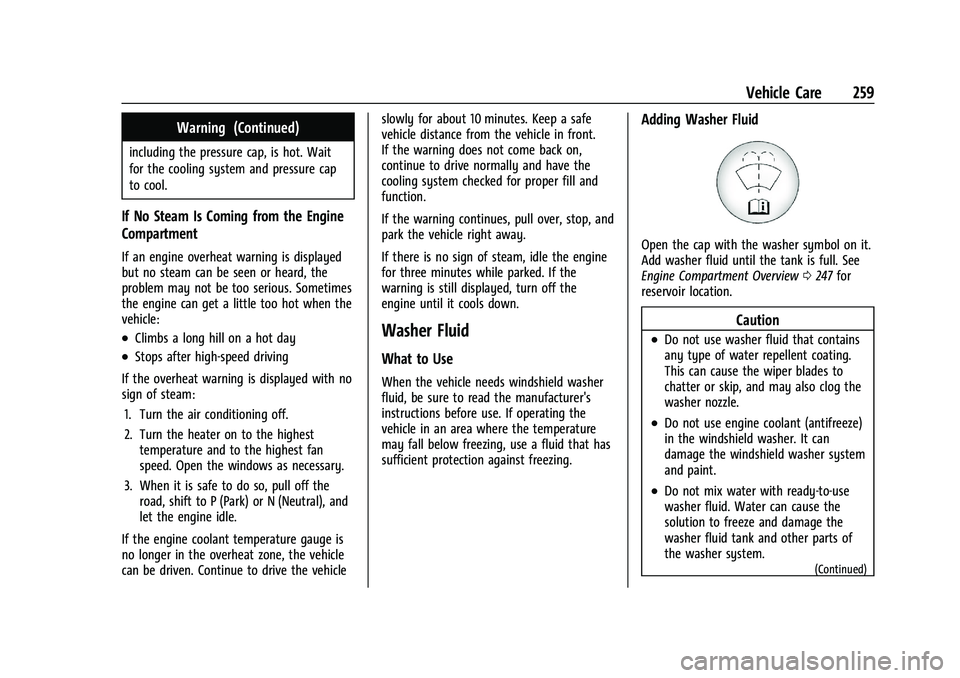
Open the cap with the washer symbol on it.
Add washer fluid until the tank is full. See
Engine Compartment Overview
0247 for
reservoir location.
Caution
.Do not use washer fluid that contains
any type of water repellent coating.
This can cause the wiper blades to
chatter or skip, and may also clog the
washer nozzle.
.Do not use engine coolant (antifreeze)
in the windshield washer. It can
damage the windshield washer system
and paint.
.Do not mix water with ready-to-use
washer fluid. Water can cause the
solution to freeze and damage the
washer fluid tank and other parts of
the washer system.
(Continued)
Page 265 of 363
Chevrolet Trailblazer Owner Manual (GMNA-Localizing-U.S./Canada-
14400528) - 2021 - CRC - 11/7/19
264 Vehicle Care
Park Brake and P (Park)
Mechanism Check
{Warning
When you are doing this check, the
vehicle could begin to move. You or
others could be injured and property
could be damaged. Make sure there is
room in front of the vehicle in case it
begins to roll. Be ready to apply the
regular brake at once should the vehicle
begin to move.
Park on a fairly steep hill, with the vehicle
facing downhill. Keeping your foot on the
regular brake, set the parking brake.
.To check the parking brake's holding
ability: With the engine running and the
transmission in N (Neutral), slowly remove
foot pressure from the regular brake
pedal. Do this until the vehicle is held by
the parking brake only.
.To check the P (Park) mechanism's holding
ability: With the engine running, shift to
P (Park). Then release the parking brake
followed by the regular brake.
Contact your dealer if service is required.
Wiper Blade Replacement
Windshield wiper blades should be replaced
periodically. See Maintenance Schedule
0 316.
Replacement blades come in different types
and are removed in different ways. For
proper type and length, see Maintenance
Replacement Parts 0326.
Caution
Allowing the wiper arm to touch the
windshield when no wiper blade is
installed could damage the windshield.
Any damage that occurs would not be
covered by the vehicle warranty. Do not
allow the wiper arm to touch the
windshield.
Front Wiper Blade Replacement
To replace the front wiper blades:
1. Lift the wiper arm from the windshield until no further movement is possible.
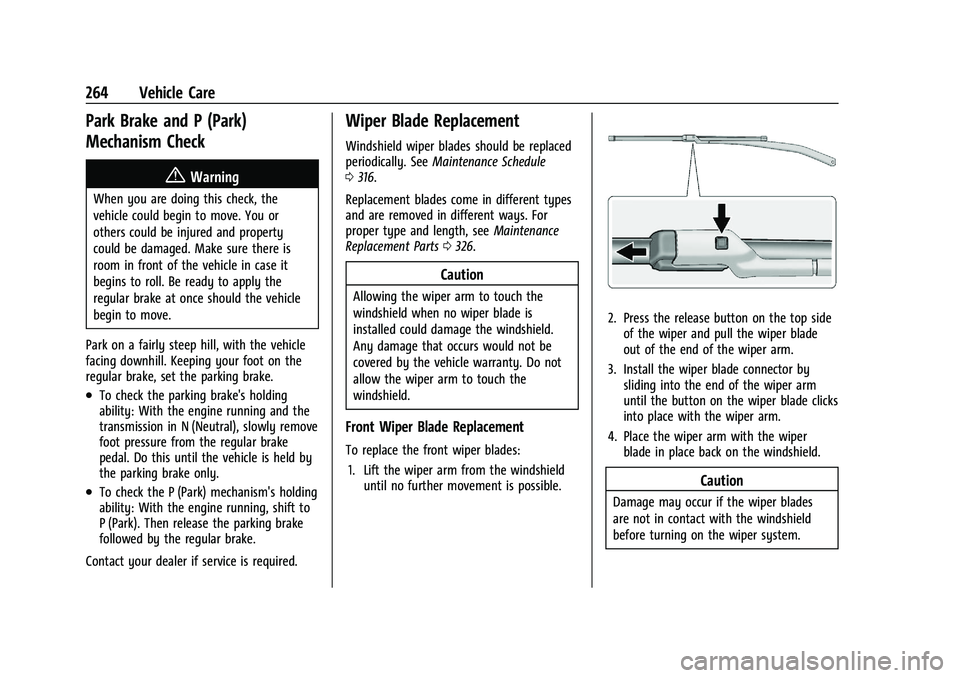
2. Press the release button on the top side
of the wiper and pull the wiper blade
out of the end of the wiper arm.
3. Install the wiper blade connector by sliding into the end of the wiper arm
until the button on the wiper blade clicks
into place with the wiper arm.
4. Place the wiper arm with the wiper blade in place back on the windshield.
Caution
Damage may occur if the wiper blades
are not in contact with the windshield
before turning on the wiper system.
Page 266 of 363
Chevrolet Trailblazer Owner Manual (GMNA-Localizing-U.S./Canada-
14400528) - 2021 - CRC - 11/7/19
Vehicle Care 265
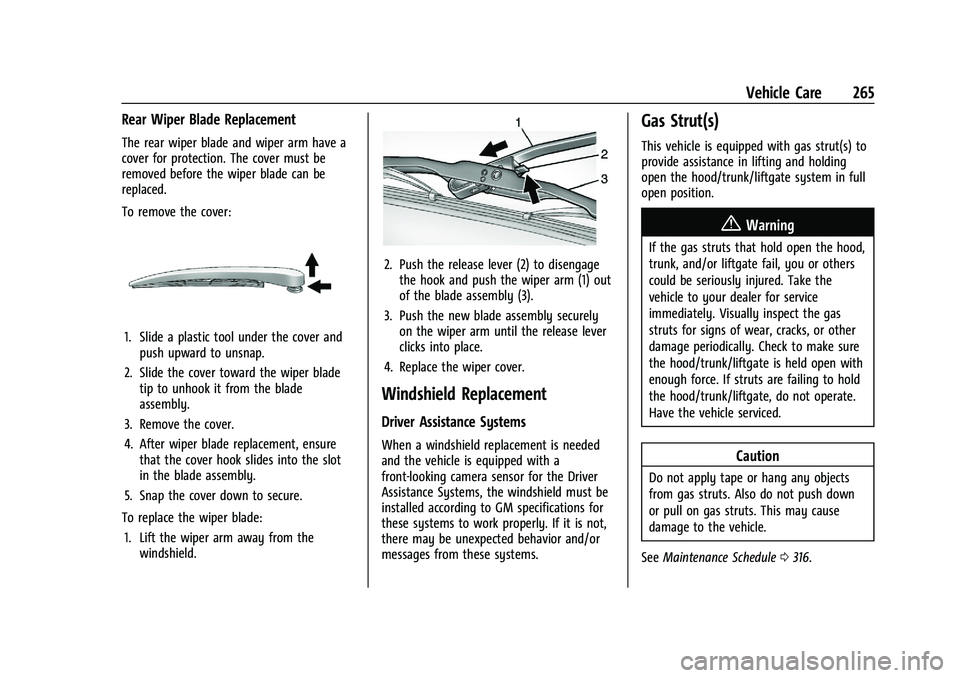
Rear Wiper Blade Replacement
The rear wiper blade and wiper arm have a
cover for protection. The cover must be
removed before the wiper blade can be
replaced.
To remove the cover:
1. Slide a plastic tool under the cover andpush upward to unsnap.
2. Slide the cover toward the wiper blade tip to unhook it from the blade
assembly.
3. Remove the cover.
4. After wiper blade replacement, ensure that the cover hook slides into the slot
in the blade assembly.
5. Snap the cover down to secure.
To replace the wiper blade: 1. Lift the wiper arm away from the windshield.
2. Push the release lever (2) to disengagethe hook and push the wiper arm (1) out
of the blade assembly (3).
3. Push the new blade assembly securely on the wiper arm until the release lever
clicks into place.
4. Replace the wiper cover.
Windshield Replacement
Driver Assistance Systems
When a windshield replacement is needed
and the vehicle is equipped with a
front-looking camera sensor for the Driver
Assistance Systems, the windshield must be
installed according to GM specifications for
these systems to work properly. If it is not,
there may be unexpected behavior and/or
messages from these systems.
Gas Strut(s)
This vehicle is equipped with gas strut(s) to
provide assistance in lifting and holding
open the hood/trunk/liftgate system in full
open position.
{Warning
If the gas struts that hold open the hood,
trunk, and/or liftgate fail, you or others
could be seriously injured. Take the
vehicle to your dealer for service
immediately. Visually inspect the gas
struts for signs of wear, cracks, or other
damage periodically. Check to make sure
the hood/trunk/liftgate is held open with
enough force. If struts are failing to hold
the hood/trunk/liftgate, do not operate.
Have the vehicle serviced.
Caution
Do not apply tape or hang any objects
from gas struts. Also do not push down
or pull on gas struts. This may cause
damage to the vehicle.
See Maintenance Schedule 0316.
Page 311 of 363
Chevrolet Trailblazer Owner Manual (GMNA-Localizing-U.S./Canada-
14400528) - 2021 - CRC - 11/7/19
310 Vehicle Care
snow and ice. If the check engine light is
activated, please check to see if the shutter
system is clear of debris, snow or ice.
Windshield and Wiper Blades
Clean the outside of the windshield with
glass cleaner.
Clean rubber blades using a lint-free cloth or
paper towel soaked with windshield washer
fluid or a mild detergent. Wash the
windshield thoroughly when cleaning the
blades. Bugs, road grime, sap, and a buildup
of vehicle wash/wax treatments may cause
wiper streaking.
Replace the wiper blades if they are worn or
damaged. Damage can be caused by
extreme dusty conditions, sand, salt, heat,
sun, snow, and ice.
Weatherstrips
Apply weatherstrip lubricant on
weatherstrips to make them last longer, seal
better, and not stick or squeak. Lubricate
weatherstrips at least once a year. Hot, dry
climates may require more frequent
application. Black marks from rubber
material on painted surfaces can be removed
by rubbing with a clean cloth. See
Recommended Fluids and Lubricants0325.
Tires
Use a stiff brush with tire cleaner to clean
the tires.
Caution
Using petroleum-based tire dressing
products on the vehicle may damage the
paint finish and/or tires. When applying a
tire dressing, always wipe off any
overspray from all painted surfaces on
the vehicle.
Wheels and Wheel Trim
Use a soft, clean cloth with mild soap and
water to clean the wheels. After rinsing
thoroughly with clean water, dry with a
soft, clean towel. A wax may then be
applied.
Caution
Chrome wheels and chrome wheel trim
may be damaged if the vehicle is not
washed after driving on roads that have
been sprayed with magnesium chloride or
calcium chloride. These are used on roads
for conditions such as dust and ice.
Always wash the chrome with soap and
water after exposure.
Caution
To avoid surface damage on wheels and
wheel trim, do not use strong soaps,
chemicals, abrasive polishes, cleaners,
or brushes. Use only GM approved
cleaners. Do not drive the vehicle through
an automatic car wash that uses silicon
carbide tire/wheel cleaning brushes.
Damage could occur and the repairs
would not be covered by the vehicle
warranty.
Brake System
Visually inspect brake lines and hoses for
proper attachment, connections, binding,
leaks, cracks, chafing, etc. Inspect disc brake
pads for wear and rotors for surface
condition. Inspect drum brake linings/shoes
for wear or cracks. Inspect all other brake
parts.
Steering, Suspension, and Chassis
Components
Visually inspect steering, suspension, and
chassis components for damaged, loose,
or missing parts or signs of wear at least
once a year.