mirror CHEVROLET TRAILBLAZER 2022 User Guide
[x] Cancel search | Manufacturer: CHEVROLET, Model Year: 2022, Model line: TRAILBLAZER, Model: CHEVROLET TRAILBLAZER 2022Pages: 363, PDF Size: 6.76 MB
Page 223 of 363
Chevrolet Trailblazer Owner Manual (GMNA-Localizing-U.S./Canada-
14400528) - 2021 - CRC - 11/7/19
222 Driving and Operating
RPA operates at speeds less than 8 km/h
(5 mph), and the sensors on the rear bumper
detect objects up to 2.5 m (8 ft) behind the
vehicle, and at least 25 cm (10 in) off the
ground. The distance objects can be detected
may be less during warmer or humid
weather.
Blocked sensors will not detect objects and
can also cause false detections. Keep the
sensors clean of mud, dirt, snow, ice, and
slush; and clean sensors after a car wash in
freezing temperatures.
{Warning
The Park Assist system does not detect
children, pedestrians, bicyclists, animals,
or objects located below the bumper or
that are too close or too far from the
vehicle. It is not available at speeds
greater than 8 km/h (5 mph). To prevent
injury, death, or vehicle damage, even
with Park Assist, always check the area
around the vehicle and check all mirrors
before moving forward or backing.
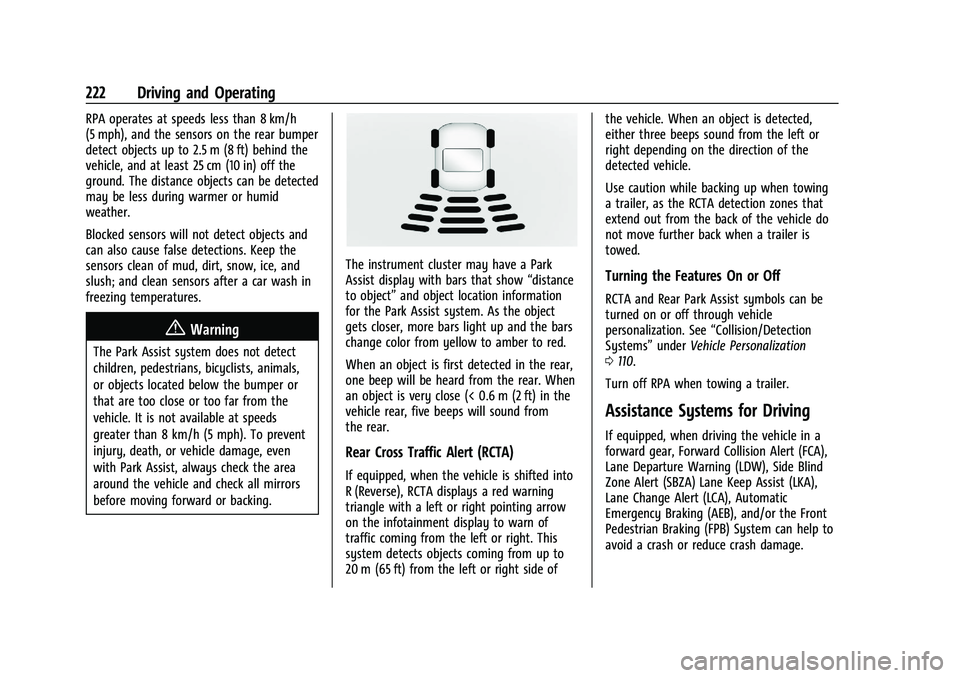
The instrument cluster may have a Park
Assist display with bars that show“distance
to object” and object location information
for the Park Assist system. As the object
gets closer, more bars light up and the bars
change color from yellow to amber to red.
When an object is first detected in the rear,
one beep will be heard from the rear. When
an object is very close (< 0.6 m (2 ft) in the
vehicle rear, five beeps will sound from
the rear.
Rear Cross Traffic Alert (RCTA)
If equipped, when the vehicle is shifted into
R (Reverse), RCTA displays a red warning
triangle with a left or right pointing arrow
on the infotainment display to warn of
traffic coming from the left or right. This
system detects objects coming from up to
20 m (65 ft) from the left or right side of the vehicle. When an object is detected,
either three beeps sound from the left or
right depending on the direction of the
detected vehicle.
Use caution while backing up when towing
a trailer, as the RCTA detection zones that
extend out from the back of the vehicle do
not move further back when a trailer is
towed.
Turning the Features On or Off
RCTA and Rear Park Assist symbols can be
turned on or off through vehicle
personalization. See
“Collision/Detection
Systems” underVehicle Personalization
0 110.
Turn off RPA when towing a trailer.
Assistance Systems for Driving
If equipped, when driving the vehicle in a
forward gear, Forward Collision Alert (FCA),
Lane Departure Warning (LDW), Side Blind
Zone Alert (SBZA) Lane Keep Assist (LKA),
Lane Change Alert (LCA), Automatic
Emergency Braking (AEB), and/or the Front
Pedestrian Braking (FPB) System can help to
avoid a crash or reduce crash damage.
Page 225 of 363
Chevrolet Trailblazer Owner Manual (GMNA-Localizing-U.S./Canada-
14400528) - 2021 - CRC - 11/7/19
224 Driving and Operating
Also, eight rapid high-pitched beeps will
sound from the front. When this Collision
Alert occurs, the brake system may prepare
for driver braking to occur more rapidly
which can cause a brief, mild deceleration.
Continue to apply the brake pedal as
needed. Cruise control may be disengaged
when the Collision Alert occurs.
Tailgating Alert
The vehicle ahead indicator will display
amber when you are following a vehicle
ahead too closely.
Selecting the Alert Timing
The Collision Alert control is on the steering
wheel. Press
[to set the FCA timing to
Far, Medium, or Near. The first button press
shows the current setting on the DIC.
Additional button presses will change this
setting. The chosen setting will remain until
it is changed and will affect the timing of
both the Collision Alert and the Tailgating
Alert features. The timing of both alerts will vary based on vehicle speed. The faster the
vehicle speed, the farther away the alert will
occur. Consider traffic and weather
conditions when selecting the alert timing.
The range of selectable alert timings may
not be appropriate for all drivers and driving
conditions.
If your vehicle is equipped with Adaptive
Cruise Control (ACC), changing the FCA
timing setting automatically changes the
following gap setting (Far, Medium,
or Near).
Following Distance Indicator
The following distance to a moving vehicle
ahead in your path is indicated in following
time in seconds on the Driver Information
Center (DIC). See
Driver Information Center
(DIC) (Base Level) 0104 or
Driver Information Center (DIC) (Uplevel)
0 107. The minimum following time is
0.5 seconds away. If there is no vehicle
detected ahead, or the vehicle ahead is out
of sensor range, dashes will be displayed.
Unnecessary Alerts
FCA may provide unnecessary alerts for
turning vehicles, vehicles in other lanes,
objects that are not vehicles, or shadows.
These alerts are normal operation and the
vehicle does not need service.
Cleaning the System
If the FCA system does not seem to operate
properly, this may correct the issue:
.Clean the outside of the windshield in
front of the rearview mirror.
.Clean the entire front of the vehicle.
.Clean the headlamps.
Automatic Emergency
Braking (AEB)
If the vehicle has Forward Collision Alert
(FCA), it also has AEB, which includes
Intelligent Brake Assist (IBA). When the
system detects a vehicle ahead in your path
that is traveling in the same direction that
you may be about to crash into, it can
provide a boost to braking or automatically
brake the vehicle. This can help avoid or
lessen the severity of crashes when driving
in a forward gear. Depending on the
situation, the vehicle may automatically
Page 228 of 363
Chevrolet Trailblazer Owner Manual (GMNA-Localizing-U.S./Canada-
14400528) - 2021 - CRC - 11/7/19
Driving and Operating 227
detected directly in front of the vehicle, the
pedestrian ahead indicator will display
amber.
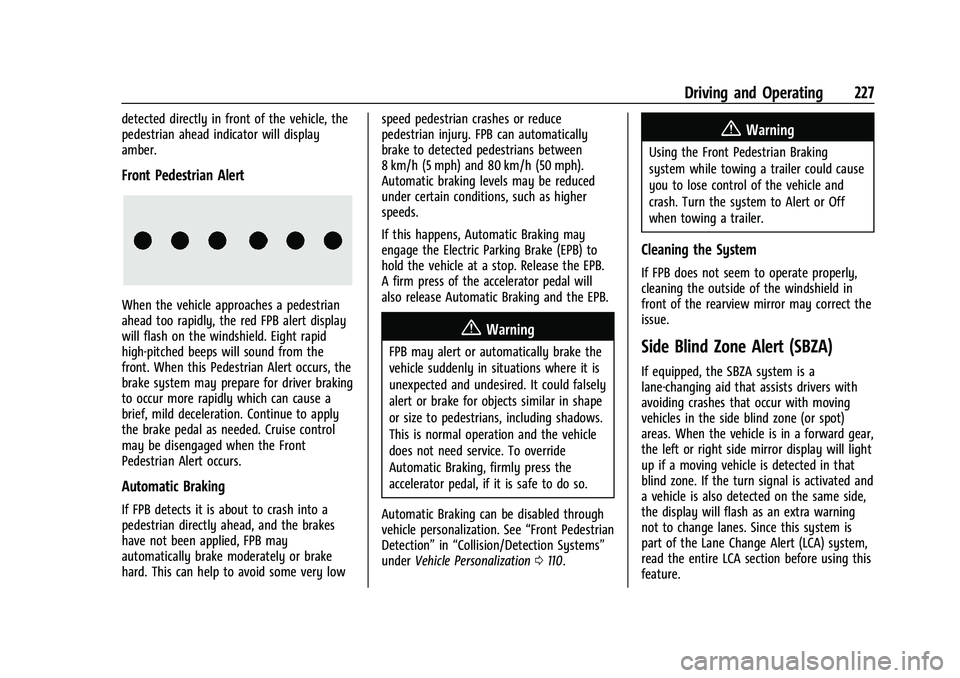
Front Pedestrian Alert
When the vehicle approaches a pedestrian
ahead too rapidly, the red FPB alert display
will flash on the windshield. Eight rapid
high-pitched beeps will sound from the
front. When this Pedestrian Alert occurs, the
brake system may prepare for driver braking
to occur more rapidly which can cause a
brief, mild deceleration. Continue to apply
the brake pedal as needed. Cruise control
may be disengaged when the Front
Pedestrian Alert occurs.
Automatic Braking
If FPB detects it is about to crash into a
pedestrian directly ahead, and the brakes
have not been applied, FPB may
automatically brake moderately or brake
hard. This can help to avoid some very lowspeed pedestrian crashes or reduce
pedestrian injury. FPB can automatically
brake to detected pedestrians between
8 km/h (5 mph) and 80 km/h (50 mph).
Automatic braking levels may be reduced
under certain conditions, such as higher
speeds.
If this happens, Automatic Braking may
engage the Electric Parking Brake (EPB) to
hold the vehicle at a stop. Release the EPB.
A firm press of the accelerator pedal will
also release Automatic Braking and the EPB.
{Warning
FPB may alert or automatically brake the
vehicle suddenly in situations where it is
unexpected and undesired. It could falsely
alert or brake for objects similar in shape
or size to pedestrians, including shadows.
This is normal operation and the vehicle
does not need service. To override
Automatic Braking, firmly press the
accelerator pedal, if it is safe to do so.
Automatic Braking can be disabled through
vehicle personalization. See “Front Pedestrian
Detection” in“Collision/Detection Systems”
under Vehicle Personalization 0110.
{Warning
Using the Front Pedestrian Braking
system while towing a trailer could cause
you to lose control of the vehicle and
crash. Turn the system to Alert or Off
when towing a trailer.
Cleaning the System
If FPB does not seem to operate properly,
cleaning the outside of the windshield in
front of the rearview mirror may correct the
issue.
Side Blind Zone Alert (SBZA)
If equipped, the SBZA system is a
lane-changing aid that assists drivers with
avoiding crashes that occur with moving
vehicles in the side blind zone (or spot)
areas. When the vehicle is in a forward gear,
the left or right side mirror display will light
up if a moving vehicle is detected in that
blind zone. If the turn signal is activated and
a vehicle is also detected on the same side,
the display will flash as an extra warning
not to change lanes. Since this system is
part of the Lane Change Alert (LCA) system,
read the entire LCA section before using this
feature.
Page 229 of 363
Chevrolet Trailblazer Owner Manual (GMNA-Localizing-U.S./Canada-
14400528) - 2021 - CRC - 11/7/19
228 Driving and Operating
Lane Change Alert (LCA)
If equipped, the LCA system is a
lane-changing aid that assists drivers with
avoiding lane change crashes that occur with
moving vehicles in the side blind zone (or
spot) areas or with vehicles rapidly
approaching these areas from behind. The
LCA warning display will light up in the
corresponding outside mirror and will flash
if the turn signal is on.
{Warning
LCA does not alert the driver to vehicles
outside of the system detection zones,
pedestrians, bicyclists, or animals. It may
not provide alerts when changing lanes
under all driving conditions. Failure to use
proper care when changing lanes may
result in injury, death, or vehicle damage.
Before making a lane change, always
check mirrors, glance over your shoulder,
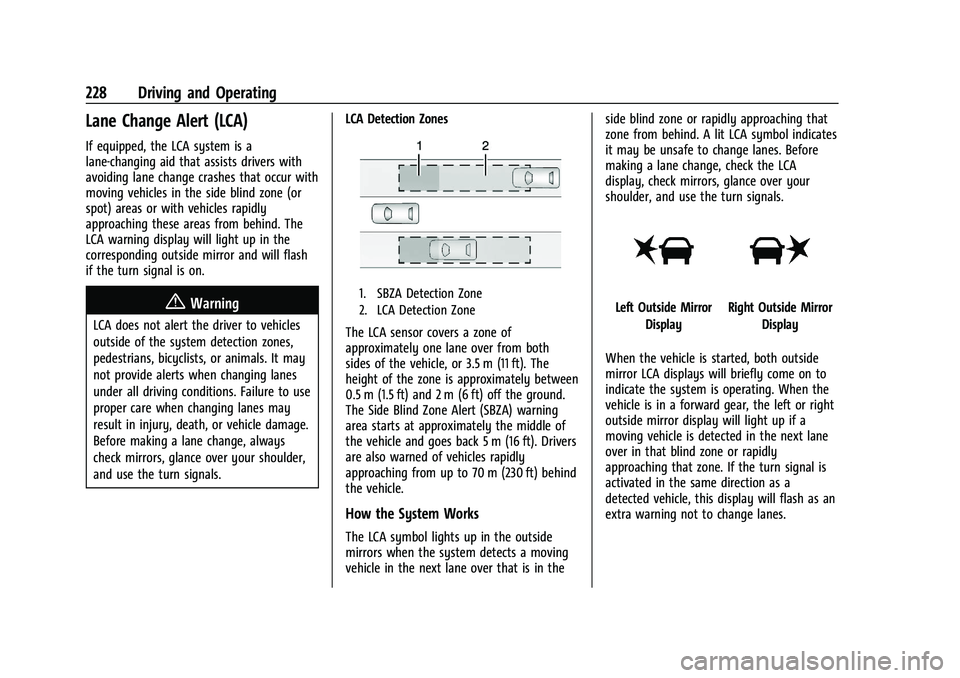
and use the turn signals.LCA Detection Zones
1. SBZA Detection Zone
2. LCA Detection Zone
The LCA sensor covers a zone of
approximately one lane over from both
sides of the vehicle, or 3.5 m (11 ft). The
height of the zone is approximately between
0.5 m (1.5 ft) and 2 m (6 ft) off the ground.
The Side Blind Zone Alert (SBZA) warning
area starts at approximately the middle of
the vehicle and goes back 5 m (16 ft). Drivers
are also warned of vehicles rapidly
approaching from up to 70 m (230 ft) behind
the vehicle.
How the System Works
The LCA symbol lights up in the outside
mirrors when the system detects a moving
vehicle in the next lane over that is in the side blind zone or rapidly approaching that
zone from behind. A lit LCA symbol indicates
it may be unsafe to change lanes. Before
making a lane change, check the LCA
display, check mirrors, glance over your
shoulder, and use the turn signals.
Left Outside Mirror
DisplayRight Outside Mirror Display
When the vehicle is started, both outside
mirror LCA displays will briefly come on to
indicate the system is operating. When the
vehicle is in a forward gear, the left or right
outside mirror display will light up if a
moving vehicle is detected in the next lane
over in that blind zone or rapidly
approaching that zone. If the turn signal is
activated in the same direction as a
detected vehicle, this display will flash as an
extra warning not to change lanes.
Page 230 of 363
Chevrolet Trailblazer Owner Manual (GMNA-Localizing-U.S./Canada-
14400528) - 2021 - CRC - 11/7/19
Driving and Operating 229
LCA can be disabled. When you disable LCA,
Side Blind Zone Alert is also disabled. See
“Collision/Detection Systems”underVehicle
Personalization 0110. If LCA is disabled by
the driver, the LCA mirror displays will not
light up.
When the System Does Not Seem to
Work Properly
The LCA system requires some driving for
the system to calibrate to maximum
performance. This calibration may occur
more quickly if the vehicle is driving on a
straight highway road with traffic and
roadside objects (e.g., guardrails, barriers).
LCA displays may not come on when
passing a vehicle quickly, for a stopped
vehicle, or when towing a trailer. The LCA
detection zones that extend back from the
side of the vehicle do not move further back
when a trailer is towed. Use caution while
changing lanes when towing a trailer. LCA
may alert to objects attached to the vehicle,
such as a trailer, bicycle, or object extending
out to either side of the vehicle. Attached
objects may also interfere with the
detection of vehicles. This is normal system
operation; the vehicle does not need service. LCA may not always alert the driver to
vehicles in the next lane over, especially in
wet conditions or when driving on sharp
curves. The system does not need to be
serviced. The system may light up due to
guardrails, signs, trees, shrubs, and other
non-moving objects. This is normal system
operation; the vehicle does not need service.
LCA may not operate when the LCA sensors
in the left or right corners of the rear
bumper are covered with mud, dirt, snow,
ice, or slush, or in heavy rainstorms. For
cleaning instructions, see "Washing the
Vehicle" under
Exterior Care0307. If the
DIC still displays the system unavailable
message after cleaning both sides of the
vehicle toward the rear corners of the
vehicle, see your dealer.
If the LCA displays do not light up when
moving vehicles are in the side blind zone or
are rapidly approaching this zone and the
system is clean, the system may need
service. Take the vehicle to your dealer.
Radio Frequency Information
See Radio Frequency Statement 0340.
Lane Keep Assist (LKA)
If equipped, LKA may help avoid crashes due
to unintentional lane departures. This
system uses a camera to detect lane
markings between 60 km/h (37 mph) and
180 km/h (112 mph). It may assist by gently
turning the steering wheel if the vehicle
approaches a detected lane marking. It may
also provide a Lane Departure Warning
(LDW) alert if the vehicle crosses a detected
lane marking. LKA can be overridden by
turning the steering wheel. This system is
not intended to keep the vehicle centered in
the lane. LKA will not assist and alert if the
turn signal is active in the direction of lane
departure, or if it detects that you are
accelerating, braking or actively steering.
{Warning
The LKA system does not continuously
steer the vehicle. It may not keep the
vehicle in the lane or give a Lane
Departure Warning (LDW) alert, even if a
lane marking is detected.
The LKA and LDW systems may not:
(Continued)
Page 231 of 363
Chevrolet Trailblazer Owner Manual (GMNA-Localizing-U.S./Canada-
14400528) - 2021 - CRC - 11/7/19
230 Driving and Operating
Warning (Continued)
.Provide an alert or enough steering
assist to avoid a lane departure or
crash.
.Detect lane markings under poor
weather or visibility conditions. This
can occur if the windshield or
headlamps are blocked by dirt, snow,
or ice; if they are not in proper
condition; or if the sun shines directly
into the camera.
.Detect road edges.
.Detect lanes on winding or hilly roads.
If LKA only detects lane markings on one
side of the road, it will only assist or
provide an LDW alert when approaching
the lane on the side where it has
detected a lane marking. Even with LKA
and LDW, you must steer the vehicle.
Always keep your attention on the road
and maintain proper vehicle position
within the lane, or vehicle damage,
injury, or death could occur. Always keep
the windshield, headlamps, and camera
sensors clean and in good repair. Do not
(Continued)
Warning (Continued)
use LKA in bad weather conditions or on
roads with unclear lane markings, such as
construction zones.
{Warning
Using LKA while towing a trailer or on
slippery roads could cause loss of control
of the vehicle and a crash. Turn the
system off.
How the System Works
LKA uses a camera sensor installed on the
windshield ahead of the rearview mirror to
detect lane markings. It may provide brief
steering assist if it detects an unintended
lane departure. It may further provide an
audible alert or the driver seat may pulse
indicating that a lane marking has been
crossed.
To turn LKA on and off, press
Aon the
center stack. If equipped, the indicator light
on the button comes on when LKA is on and
turns off when LKA is disabled. When on,
Ais white, if equipped,
indicating that the system is not ready to
assist.
Ais green if LKA is ready to
assist. LKA may assist by gently turning the
steering wheel if the vehicle approaches a
detected lane marking.
Ais amber when
assisting. It may also provide a Lane
Departure Warning (LDW) alert by flashing
Aamber if the vehicle crosses a
detected lane marking. Additionally, there
may be three beeps, on the right or left,
depending on the lane departure direction.
Take Steering
The LKA system does not continuously steer
the vehicle. If LKA does not detect active
driver steering, an alert and chime may be
provided. Steer the vehicle to dismiss. LKA
may become temporarily unavailable after
repeated take steering alerts.
When the System Does Not Seem to
Work Properly
The system performance may be
affected by:
.Close vehicles ahead.
.Sudden lighting changes, such as when
driving through tunnels.
.Banked roads.
Page 232 of 363
Chevrolet Trailblazer Owner Manual (GMNA-Localizing-U.S./Canada-
14400528) - 2021 - CRC - 11/7/19
Driving and Operating 231
.Roads with poor lane markings, such as
two-lane roads.
If the LKA system is not functioning
properly when lane markings are clearly
visible, cleaning the windshield may help.
A camera blocked message may display if
the camera is blocked. Some driver
assistance systems may have reduced
performance or not work at all. An LKA or
LDW unavailable message may display if the
systems are temporarily unavailable. This
message could be due to a blocked camera.
The LKA system does not need service. Clean
the outside of the windshield behind the
rearview mirror.
LKA assistance and/or LDW alerts may occur
due to tar marks, shadows, cracks in the
road, temporary or construction lane
markings, or other road imperfections. This
is normal system operation; the vehicle does
not need service. Turn LKA off if these
conditions continue.Fuel
Top Tier Fuel
GM recommends the use of TOP TIER
Detergent Gasoline to keep the engine clean,
reduce engine deposits, and maintain
optimal vehicle performance. Look for the
TOP TIER Logo or see www.toptiergas.com
for a list of TOP TIER Detergent Gasoline
marketers and applicable countries.
Recommended Fuel
Use regular unleaded gasoline meeting
ASTM specification D4814 with a posted
octane rating of 87 —(R+M)/2 —or higher.
Do not use gasoline with a posted octane
rating of less than 87, as this may cause
engine knock and will lower fuel economy.
Do not use any fuel labeled E85 or FlexFuel.
Do not use gasoline with ethanol levels
greater than 15% by volume.
Prohibited Fuels
Caution
Do not use fuels with any of the
following conditions; doing so may
damage the vehicle and void its
warranty:
(Continued)
Page 235 of 363
Chevrolet Trailblazer Owner Manual (GMNA-Localizing-U.S./Canada-
14400528) - 2021 - CRC - 11/7/19
234 Driving and Operating
Warning (Continued)
.Bring the fill nozzle in contact with
the inside of the fill opening before
operating the nozzle. Maintain contact
until filling is complete.
.Keep sparks, flames, and smoking
materials away from fuel.
.Avoid using electronic devices while
pumping fuel.
Trailer Towing
General Towing Information
Only use towing equipment that has been
designed for the vehicle. Contact your dealer
or trailering dealer for assistance with
preparing the vehicle to tow a trailer. Read
the entire section before towing a trailer.
To tow a disabled vehicle, seeTowing the
Vehicle 0304. To tow the vehicle behind
another vehicle such as a motor home, see
Recreational Vehicle Towing 0305.
Driving Characteristics and
Towing Tips
{Warning
You can lose control when towing a
trailer if the correct equipment is not
used or the vehicle is not driven properly.
For example, if the trailer is too heavy or
the trailer brakes are inadequate for the
load, the vehicle may not stop as
expected. You and others could be
seriously injured. The vehicle may also be
damaged, and the repairs would not be
covered by the vehicle warranty. Pull a
trailer only if all the steps in this section
have been followed. Ask your dealer for
advice and information about towing a
trailer with the vehicle.
Driving with a Trailer
Trailering is different than just driving the
vehicle by itself. Trailering means changes in
handling, acceleration, braking, durability,
and fuel economy. Successful, safe trailering
takes correct equipment, and it has to be
used properly. The following information has many
time-tested, important trailering tips and
safety rules. Many of these are important
for your safety and that of your passengers.
Read this section carefully before pulling a
trailer.
When towing a trailer:
.Become familiar with and follow all state
and local laws that apply to trailer
towing. These requirements vary from
state to state.
.State laws may require the use of
extended side view mirrors. Even if not
required, you should install extended side
view mirrors if your visibility is limited or
restricted while towing.
.Do not tow a trailer during the first
800 km (500 mi) of vehicle use to
prevent damage to the engine, axle,
or other parts.
.It is recommended to perform the first oil
change before heavy towing.
.During the first 800 km (500 mi) of
trailer towing, do not drive over 80 km/h
(50 mph) and do not make starts at full
throttle.
Page 236 of 363
Chevrolet Trailblazer Owner Manual (GMNA-Localizing-U.S./Canada-
14400528) - 2021 - CRC - 11/7/19
Driving and Operating 235
.Vehicles can tow in D (Drive). If the
transmission downshifts too often, a
lower gear may be selected using Manual
Mode SeeManual Mode 0203.
If equipped, the following driver assistance
features should be turned off when towing
a trailer:
.Adaptive Cruise Control (ACC)
.Super Cruise Control
.Lane Keep Assist (LKA)
.Park Assist
If equipped, the following driver assistance
features should be turned to alert or off
when towing a trailer:
.Automatic Emergency Braking (AEB)
.Intelligent Brake Assist (IBA)
.Front Pedestrian Braking (FPB)
If equipped with Lane Change Alert (LCA),
the LCA detection zones that extend back
from the side of the vehicle do not move
further back when a trailer is towed. Use
caution while changing lanes when towing a
trailer.
If equipped with Rear Cross Traffic Alert
(RCTA), use caution while backing up when
towing a trailer, as the RCTA detection zones that extend out from the back of the vehicle
do not move further back when a trailer is
towed.
{Warning
To prevent serious injury or death from
carbon monoxide (CO), when towing a
trailer:
.Do not drive with the liftgate, trunk/
hatch, or rear-most window open.
.Fully open the air outlets on or under
the instrument panel.
.Adjust the climate control system to a
setting that brings in only outside air.
See
“Climate Control Systems” in the
Index.
For more information about carbon
monoxide, see Engine Exhaust 0200.
Towing a trailer requires experience. The
combination of the vehicle and trailer is
longer and not as responsive as the vehicle
itself. Get used to the handling and braking
of the combination by driving on a level
road surface before driving on public roads.
The trailer structure, the tires, and the
brakes must be all be rated to carry the
intended cargo. Inadequate trailer equipment can cause the combination to
operate in an unexpected or unsafe manner.
Before driving, inspect all trailer hitch parts
and attachments, safety chains, electrical
connectors, lamps, tires, and mirrors. See
Towing Equipment
0240. If the trailer has
electric brakes, start the combination
moving and then manually apply the trailer
brake controller to check the trailer brakes
work. During the trip, occasionally check
that the cargo and trailer are secure and
that the lamps and any trailer brakes are
working.Towing with a Stability Control System
When towing, the stability control system
might be heard. The system reacts to
vehicle movement caused by the trailer,
which mainly occurs during cornering. This is
normal when towing heavier trailers.
Following Distance
Stay at least twice as far behind the vehicle
ahead as you would when driving without a
trailer. This can help to avoid heavy braking
and sudden turns.
Page 354 of 363
Chevrolet Trailblazer Owner Manual (GMNA-Localizing-U.S./Canada-
14400528) - 2021 - CRC - 11/7/19
Index 353
Child Restraints (cont'd)Older Children . . . . . . . . . . . . . . . . . . . . . . . . . . . 61
Securing . . . . . . . . . . . . . . . . . . . . . . . . . . . . . 73, 74
Systems . . . . . . . . . . . . . . . . . . . . . . . . . . . . . . . . 64
Circuit Breakers . . . . . . . . . . . . . . . . . . . . . . . . . . 274
Cleaning Exterior Care . . . . . . . . . . . . . . . . . . . . . . . . . . . 307
Interior Care . . . . . . . . . . . . . . . . . . . . . . . . . . . . 311
Climate Control Systems . . . . . . . . . . . . . . . . . .174 Air Conditioning . . . . . . . . . . . . . . . . . . . . . . . . 174
Automatic . . . . . . . . . . . . . . . . . . . . . . . . . . . . . . 176
Heating . . . . . . . . . . . . . . . . . . . . . . . . . . . . . . . . . 174
Clock . . . . . . . . . . . . . . . . . . . . . . . . . . . . . . . . . . . . . 85
Cluster, Instrument . . . . . . . . . . . . . . . . . . . . . . . 89
Collision Damage Repair . . . . . . . . . . . . . . . . . 337
Compact Spare Tire . . . . . . . . . . . . . . . . . . . . . . 301
Compartments Storage . . . . . . . . . . . . . . . . . . . . . . . . . . . . . . . . . .78
Compass . . . . . . . . . . . . . . . . . . . . . . . . . . . . . . . . . . 85
Connected Services Connections . . . . . . . . . . . . . . . . . . . . . . . . . . . 349
Diagnostics . . . . . . . . . . . . . . . . . . . . . . . . . . . . 350
Navigation . . . . . . . . . . . . . . . . . . . . . . . . . . . . . 348
Connections Connected Services . . . . . . . . . . . . . . . . . . . . 349
Control
Traction and Electronic Stability . . . . . . . 206
Control of a Vehicle . . . . . . . . . . . . . . . . . . . . . .183 Controls
Steering Wheel . . . . . . . . . . . . . . . . . . . . . . . . . 123
Convex Mirrors . . . . . . . . . . . . . . . . . . . . . . . . . . . . 31
Coolant Engine Temperature Gauge . . . . . . . . . . . . . 94
Cooling . . . . . . . . . . . . . . . . . . . . . . . . . . . . . . 174, 176
Cooling System . . . . . . . . . . . . . . . . . . . . . . . . . . 255
Courtesy Lamps . . . . . . . . . . . . . . . . . . . . . . . . . . . 118
Courtesy Transportation Program . . . . . . . . 337
Coverage Explanations . . . . . . . . . . . . . . . . . . . 146
Covers Rear Compartment/Storage Panel . . . . . . . .79
Winter . . . . . . . . . . . . . . . . . . . . . . . . . . . . . . . . . 196
Cruise Control . . . . . . . . . . . . . . . . . . . . . . . . . . . 209 Light . . . . . . . . . . . . . . . . . . . . . . . . . . . . . . . . . . . .103
Cruise Control, Adaptive . . . . . . . . . . . . . . . . . . 211
Cupholders . . . . . . . . . . . . . . . . . . . . . . . . . . . . . . . 78
Customer Assistance . . . . . . . . . . . . . . . . . . . . . 334
Offices . . . . . . . . . . . . . . . . . . . . . . . . . . . . . . . . . 334
Text Telephone (TTY) Users . . . . . . . . . . . . 334
Customer Information
Publications Ordering Information . . . . . 339
Customer Satisfaction Procedure . . . . . . . . . 332
Cybersecurity . . . . . . . . . . . . . . . . . . . . . . . . . . . . .341
D
Damage Repair, Collision . . . . . . . . . . . . . . . . . 337
Danger, Warning, and Caution . . . . . . . . . . . . . .2 Data Collection
Infotainment System . . . . . . . . . . . . . . . . . . 342
OnStar . . . . . . . . . . . . . . . . . . . . . . . . . . . . . . . . . 342
Data Recorders, Event . . . . . . . . . . . . . . . . . . . 342
Database Coverage Explanations . . . . . . . . . 146
Daytime Running Lamps (DRL) . . . . . . . . . . . . 116
Defensive Driving . . . . . . . . . . . . . . . . . . . . . . . . .182
Delayed Locking . . . . . . . . . . . . . . . . . . . . . . . . . . . 21
Destination . . . . . . . . . . . . . . . . . . . . . . . . . . . . . . 139
Diagnostics Connected Services . . . . . . . . . . . . . . . . . . . . 350
Distracted Driving . . . . . . . . . . . . . . . . . . . . . . . . .182
Dome Lamps . . . . . . . . . . . . . . . . . . . . . . . . . . . . . . 118
Door Ajar Light . . . . . . . . . . . . . . . . . . . . . . . . . . . . . . 104
Delayed Locking . . . . . . . . . . . . . . . . . . . . . . . . . 21
Locks . . . . . . . . . . . . . . . . . . . . . . . . . . . . . . . . . . . . 19
Power Locks . . . . . . . . . . . . . . . . . . . . . . . . . . . . 20
Drive Belt Routing, Engine . . . . . . . . . . . . . . . . 331
Drive Systems All-Wheel Drive . . . . . . . . . . . . . . . . . . . 203, 263
Driver Teen . . . . . . . . . . . . . . . . . . . . . . . . . . . . . . . . . . . . 162
Driver Assistance Systems . . . . . . . . . . . . . . . 219
Driver Behavior . . . . . . . . . . . . . . . . . . . . . . . . . . . 181
Driver Information Center (DIC) . . . . . .104, 107
Driver Mode Control . . . . . . . . . . . . . . . . . . . . . 208