wire CHEVROLET TRAILBLAZER 2023 User Guide
[x] Cancel search | Manufacturer: CHEVROLET, Model Year: 2023, Model line: TRAILBLAZER, Model: CHEVROLET TRAILBLAZER 2023Pages: 360, PDF Size: 6.48 MB
Page 289 of 360
Chevrolet Trailblazer Owner Manual (GMNA-Localizing-U.S./Canada-
16263960) - 2023 - CRC - 2/23/22
288 Vehicle Care
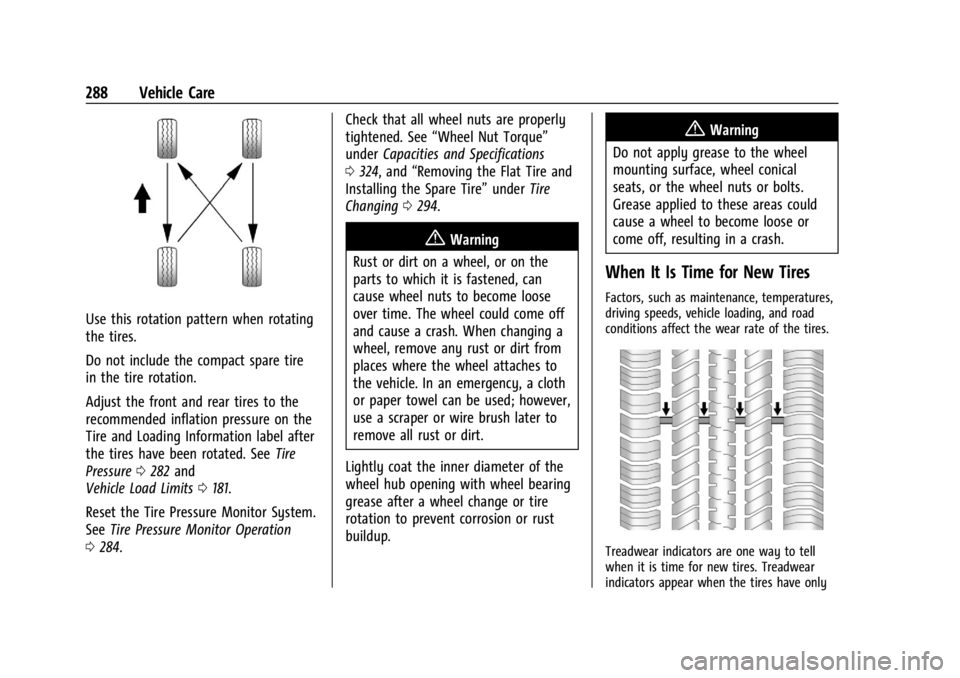
Use this rotation pattern when rotating
the tires.
Do not include the compact spare tire
in the tire rotation.
Adjust the front and rear tires to the
recommended inflation pressure on the
Tire and Loading Information label after
the tires have been rotated. SeeTire
Pressure 0282 and
Vehicle Load Limits 0181.
Reset the Tire Pressure Monitor System.
See Tire Pressure Monitor Operation
0 284. Check that all wheel nuts are properly
tightened. See
“Wheel Nut Torque”
under Capacities and Specifications
0 324, and “Removing the Flat Tire and
Installing the Spare Tire” underTire
Changing 0294.
{Warning
Rust or dirt on a wheel, or on the
parts to which it is fastened, can
cause wheel nuts to become loose
over time. The wheel could come off
and cause a crash. When changing a
wheel, remove any rust or dirt from
places where the wheel attaches to
the vehicle. In an emergency, a cloth
or paper towel can be used; however,
use a scraper or wire brush later to
remove all rust or dirt.
Lightly coat the inner diameter of the
wheel hub opening with wheel bearing
grease after a wheel change or tire
rotation to prevent corrosion or rust
buildup.
{Warning
Do not apply grease to the wheel
mounting surface, wheel conical
seats, or the wheel nuts or bolts.
Grease applied to these areas could
cause a wheel to become loose or
come off, resulting in a crash.
When It Is Time for New Tires
Factors, such as maintenance, temperatures,
driving speeds, vehicle loading, and road
conditions affect the wear rate of the tires.
Treadwear indicators are one way to tell
when it is time for new tires. Treadwear
indicators appear when the tires have only
Page 297 of 360
Chevrolet Trailblazer Owner Manual (GMNA-Localizing-U.S./Canada-
16263960) - 2023 - CRC - 2/23/22
296 Vehicle Care
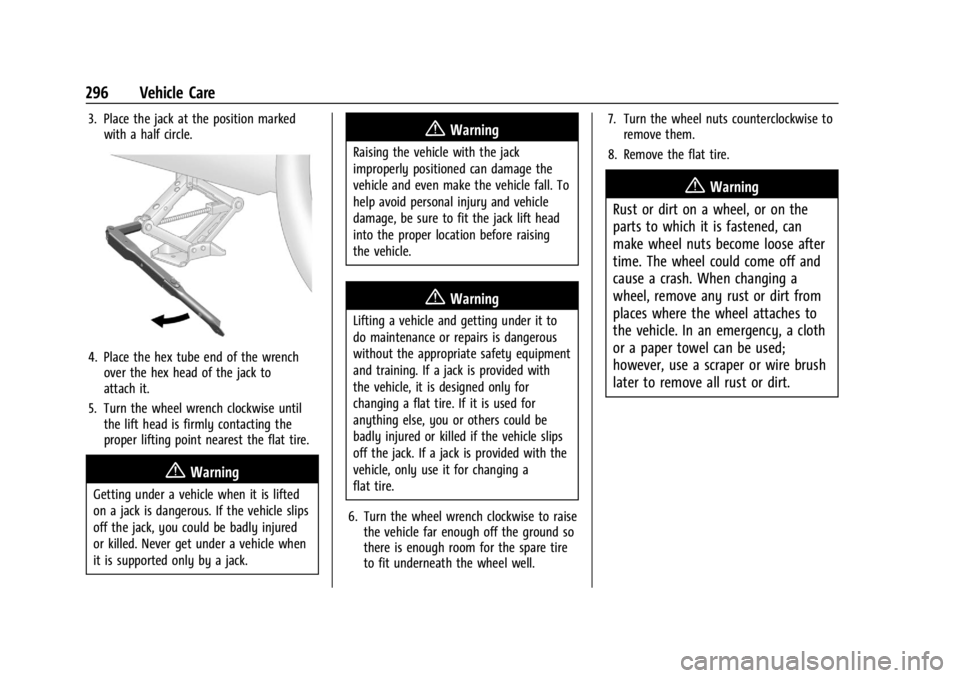
3. Place the jack at the position markedwith a half circle.
4. Place the hex tube end of the wrenchover the hex head of the jack to
attach it.
5. Turn the wheel wrench clockwise until the lift head is firmly contacting the
proper lifting point nearest the flat tire.
{Warning
Getting under a vehicle when it is lifted
on a jack is dangerous. If the vehicle slips
off the jack, you could be badly injured
or killed. Never get under a vehicle when
it is supported only by a jack.
{Warning
Raising the vehicle with the jack
improperly positioned can damage the
vehicle and even make the vehicle fall. To
help avoid personal injury and vehicle
damage, be sure to fit the jack lift head
into the proper location before raising
the vehicle.
{Warning
Lifting a vehicle and getting under it to
do maintenance or repairs is dangerous
without the appropriate safety equipment
and training. If a jack is provided with
the vehicle, it is designed only for
changing a flat tire. If it is used for
anything else, you or others could be
badly injured or killed if the vehicle slips
off the jack. If a jack is provided with the
vehicle, only use it for changing a
flat tire.
6. Turn the wheel wrench clockwise to raise the vehicle far enough off the ground so
there is enough room for the spare tire
to fit underneath the wheel well. 7. Turn the wheel nuts counterclockwise to
remove them.
8. Remove the flat tire.
{Warning
Rust or dirt on a wheel, or on the
parts to which it is fastened, can
make wheel nuts become loose after
time. The wheel could come off and
cause a crash. When changing a
wheel, remove any rust or dirt from
places where the wheel attaches to
the vehicle. In an emergency, a cloth
or a paper towel can be used;
however, use a scraper or wire brush
later to remove all rust or dirt.
Page 317 of 360
Chevrolet Trailblazer Owner Manual (GMNA-Localizing-U.S./Canada-
16263960) - 2023 - CRC - 2/23/22
316 Service and Maintenance
Reset the oil life system when the oil is
changed. SeeEngine Oil Life System
0 247.
.When the REPLACE AT NEXT OIL CHANGE
message displays, the engine air filter
should be replaced at the next engine oil
change. When the REPLACE ENGINE AIR
FILTER SOON message displays, the
engine air filter should be replaced at the
earliest convenience. Reset the engine air
filter life system after the engine air filter
is replaced. See Engine Air Filter Life
System 0248.
Every 36 000 km (22,500 mi)
.Passenger compartment air filter
replacement (or every 24 months,
whichever occurs first). More frequent
replacement may be needed if the vehicle
is driven in areas with heavy traffic, poor
air quality, areas with high dust levels or
are sensitive to environmental allergens.
Filter replacement may also be needed if
you notice reduced airflow, windows
fogging up, or odors. Your local GM
Service location can help you determine
when it is the right time to replace your
filter. Every 96 000 km (60,000 mi)
.Replace spark plugs. Inspect spark plug
wires and/or boots.
Every 161 000 km (100,000 mi)
.Replace hood and/or body lift support gas
struts. Or every 10 years, whichever
comes first. See Gas Strut(s)0261.
Every 240 000 km (150,000 mi)
.Change rear axle fluid, if equipped with
AWD. Do not directly power wash the
transfer case and/or front/rear axle
output seals. High pressure water can
overcome the seals and contaminate the
transfer case fluid. Contaminated fluid will
decrease the life of the transfer case and/
or axles and should be replaced.
.Drain and fill engine cooling system. Or
every six years, whichever comes first.
See Cooling System 0250.
Severe Conditions Requiring More
Frequent Maintenance*
.Public service, military, or commercial use
vehicles to include the following:
‐ Ambulances, police cars, and
emergency rescue vehicles. ‐
Civilian vehicles such as light duty
pick-up trucks, SUVs, and passenger
cars that are used in military
applications.
‐ Recovery vehicles such as tow trucks
and flatbed single vehicle carriers or
any vehicle that is consistently used in
towing trailers or other loads.
‐ High use commercial vehicles such as
courier delivery vehicles, private
security patrol vehicles, or any vehicles
that operate on a 24–hour basis.
‐ Any vehicle consistently operated in a
high sand or dust environment such as
those used on oil pipelines and similar
applications.
.Vehicles that are regularly used for short
trips of 6 km (4 mi) or less.
The oil life indicator will show you when
to change the oil and filter. Under severe
conditions the indicator may come on
before 12 000 km (7,500 mi).
* Footnote: Under extreme driving
conditions listed above, it may be
necessary to replace your spark plugs at
more frequent intervals. For further
assistance in determining the most
Page 342 of 360
Chevrolet Trailblazer Owner Manual (GMNA-Localizing-U.S./Canada-
16263960) - 2023 - CRC - 2/23/22
OnStar 341
OnStar Additional
Information
In-Vehicle Audio Messages
Audio messages may play important
information at the following times:
.Prior to vehicle purchase. PressQto set
up an account.
.After change in ownership and at
90 days.
Transferring Service
PressQto request account transfer
eligibility information. The Advisor can
cancel or change account information.
Selling/Transferring the Vehicle
Call 1-888-4ONSTAR (1-888-466-7827)
immediately to terminate your OnStar or
connected services if the vehicle is disposed
of, sold, transferred, or if the lease ends.
Reactivation for Subsequent Owners
PressQand follow the prompts to speak to
an Advisor as soon as possible. The Advisor
will update vehicle records and explain
OnStar or connected service options.
How OnStar Service Works
Automatic Crash Response, Emergency
Services, Crisis Assist, Stolen Vehicle
Assistance, Remote Services, and Roadside
Assistance are available on most vehicles.
Not all OnStar services are available
everywhere or on all vehicles. For more
information, a full description of OnStar
services, system limitations, and OnStar User
Terms, Privacy Statement, and Software
Terms:
.Call 1-888-4ONSTAR (1-888-466-7827).
.See www.onstar.com (U.S.).
.See www.onstar.ca (Canada).
.Call TTY 1-877-248-2080.
.PressQto speak with an Advisor.
OnStar or connected services cannot work
unless the vehicle is in a place where OnStar
has an agreement with a wireless service
provider for service in that area. The
wireless service provider must also have
coverage, network capacity, reception, and
technology compatible with OnStar or
connected services. Service involving location
information about the vehicle cannot work
unless GPS signals are available,
unobstructed, and compatible with the
OnStar hardware. OnStar or connected services may not work if the OnStar
equipment is not properly installed or it has
not been properly maintained. If equipment
or software is added, connected,
or modified, OnStar or connected services
may not work. Other problems beyond the
control of OnStar
—such as hills, tall
buildings, tunnels, weather, electrical system
design and architecture of the vehicle,
damage to the vehicle in a crash, or wireless
phone network congestion or jamming —
may prevent service.
See Radio Frequency Statement 0335.
Services for People with Disabilities
Advisors provide services to help with
physical disabilities and medical conditions.
Press
Qto help:
.Locate a gas station with an attendant to
pump gas.
.Find a hotel, restaurant, etc., that meets
accessibility needs.
.Provide directions to the closest hospital
or pharmacy in urgent situations.
Page 344 of 360
Chevrolet Trailblazer Owner Manual (GMNA-Localizing-U.S./Canada-
16263960) - 2023 - CRC - 2/23/22
OnStar 343
Vehicle and Power Issues
OnStar services require a vehicle electrical
system, wireless service, and GPS satellite
technologies to be available and operating
for features to function properly. These
systems may not operate if the battery is
discharged or disconnected.
Add-on Electrical Equipment
The OnStar system is integrated into the
electrical architecture of the vehicle. Do not
add any electrical equipment. SeeAdd-On
Electrical Equipment 0237. Added electrical
equipment may interfere with the operation
of the OnStar system and cause it to not
operate.
Vehicle Software Updates
OnStar or GM may remotely deliver
software updates or changes to the vehicle
without further notice or consent. These
updates or changes may enhance or
maintain safety, security, or the operation
of the vehicle or the vehicle systems.
Software updates or changes may affect or
erase data or settings that are stored in the
vehicle, such as saved navigation
destinations or pre-set radio stations.
Neither OnStar nor GM is responsible for
any affected or erased data or settings. These updates or changes may also collect
personal information. Such collection is
described in the OnStar privacy statement or
separately disclosed at the time of
installation. These updates or changes may
also cause a system to automatically
communicate with GM servers to collect
information about vehicle system status,
identify whether updates or changes are
available, or deliver updates or changes. An
active OnStar agreement constitutes consent
to these software updates or changes and
agreement that either OnStar or GM may
remotely deliver them to the vehicle.
Privacy
The complete OnStar Privacy Statement may
be found at www.onstar.com (U.S.),
or www.onstar.ca (Canada). We recommend
that you review it. If you have any
questions, call 1-888-4ONSTAR
(1-888-466-7827) or press
Qto speak with
an Advisor. Users of wireless
communications are cautioned that the
privacy of any information sent via wireless
cellular communications cannot be assured.
Third parties may unlawfully intercept or
access transmissions and private
communications without consent.
OnStar - Software Acknowledgements
To obtain the source code under GPL, LGPL,
MPL, and other open source licenses, that is
contained in this product, please visit
https://opensource.lge.com. In addition to
the source code, all referred license terms,
warranty disclaimers, and copyright notices
are available for download. This offer is valid
for a period of three years after our last
shipment of this product. This offer is valid
to anyone in receipt of this information.
*Provided through LG Electronics Inc., who is
solely responsible for provisions of related
OSS compliance.
Page 346 of 360

Chevrolet Trailblazer Owner Manual (GMNA-Localizing-U.S./Canada-
16263960) - 2023 - CRC - 2/23/22
Connected Services 345
Ensuring Security
.Change the default passwords for the
Wi-Fi hotspot and myChevrolet mobile
application. Make these passwords
different from each other and use a
combination of letters and numbers to
increase the security.
.Change the default name of the SSID
(Service Set Identifier). This is your
network’s name that is visible to other
wireless devices. Choose a unique name
and avoid family names or vehicle
descriptions.
Wi-Fi Hotspot (If Equipped)
The vehicle may have a built-in Wi-Fi
hotspot that provides access to the Internet
and web content at 4G LTE speed. Up to
seven mobile devices can be connected.
A data plan is required. Use the in-vehicle
controls only when it is safe to do so. 1. To retrieve Wi-Fi hotspot information, press
=to open the OnStar app on the
infotainment display, then select Wi-Fi
Hotspot. On some vehicles, touch Wi-Fi
or Wi-Fi Settings on the screen. 2. The Wi-Fi settings will display the Wi-Fi
hotspot name (SSID), password, and on
some vehicles, the connection type (no
Internet connection, 3G, 4G, 4G LTE), and
signal quality (poor, good, excellent).
3. To change the SSID or password, press
Qor call 1-888-4ONSTAR to connect
with an Advisor. On some vehicles, the
SSID and password can be changed in
the Wi-Fi Hotspot menu.
After initial set-up, your vehicle’s Wi-Fi
hotspot will connect automatically to your
mobile devices. Manage data usage by
turning Wi-Fi on or off on your mobile
device, using the myChevrolet mobile app,
or by contacting an OnStar Advisor. On
some vehicles, Wi-Fi can also be managed
from the Wi-Fi Hotspot menu.
MyChevrolet Mobile App (If Available)
Download the myChevrolet mobile app to
compatible Apple and Android smartphones.
Chevrolet users can access the following
services from a smartphone:
.Remotely start/stop the vehicle,
if factory-equipped.
.Lock/unlock doors, if equipped with
automatic locks.
.Activate the horn and lamps.
.Check the vehicle’s fuel level, oil life,
or tire pressure, if factory-equipped with
the Tire Pressure Monitor System.
.Send destinations to the vehicle.
.Locate the vehicle on a map
(U.S. market only).
.Turn the vehicle's Wi-Fi hotspot on/off,
manage settings, and monitor data
consumption, if equipped.
.Locate a dealer and schedule service.
.Request roadside assistance.
.Set a parking reminder with pin drop,
take a photo, make a note, and set a
timer.
.Connect with Chevrolet on social media.
Features are subject to change. For
myChevrolet mobile app information and
compatibility, see my.chevrolet.com.
An active OnStar or connected service plan
may be required. A compatible device,
factory-installed remote start, and power
locks are required. Data rates apply. See
www.onstar.com for details and system
limitations.
Page 350 of 360

Chevrolet Trailblazer Owner Manual (GMNA-Localizing-U.S./Canada-
16263960) - 2023 - CRC - 2/23/22
Index 349
Center ConsoleStorage . . . . . . . . . . . . . . . . . . . . . . . . . . . . . . . . . 81
Chains, Tire . . . . . . . . . . . . . . . . . . . . . . . . . . . . . . 292
Charging System Light . . . . . . . . . . . . . . . . . . . . . . . . . . . 99
Wireless . . . . . . . . . . . . . . . . . . . . . . . . . . . . . . . . 89
Check Engine Light (Malfunction
Indicator) . . . . . . . . . . . . . . . . . . . . . . . . . . . . . . . 99
Child Restraints Infants and Young Children . . . . . . . . . . . . . 64
Lower Anchors and Tethers forChildren . . . . . . . . . . . . . . . . . . . . . . . . . . . . . . . 69
Older Children . . . . . . . . . . . . . . . . . . . . . . . . . . 63
Securing . . . . . . . . . . . . . . . . . . . . . . . . . . . . . 75, 76
Systems . . . . . . . . . . . . . . . . . . . . . . . . . . . . . . . . 66
Child Safety Locks . . . . . . . . . . . . . . . . . . . . . . . . .23
Circuit Breakers . . . . . . . . . . . . . . . . . . . . . . . . . . 270
Cleaning
Exterior Care . . . . . . . . . . . . . . . . . . . . . . . . . . . 305
Interior Care . . . . . . . . . . . . . . . . . . . . . . . . . . . 309
Climate Control Systems . . . . . . . . . . . . . . . . . 167
Air Conditioning . . . . . . . . . . . . . . . . . . . . . . . 167
Automatic . . . . . . . . . . . . . . . . . . . . . . . . . . . . . 169
Heating . . . . . . . . . . . . . . . . . . . . . . . . . . . . . . . . 167
Clock . . . . . . . . . . . . . . . . . . . . . . . . . . . . . . . . . . . . . 88
Cluster, Instrument . . . . . . . . . . . . . . . . . . . . . . . 92
Collision Damage Repair . . . . . . . . . . . . . . . . . 333 Compact Spare Tire . . . . . . . . . . . . . . . . . . . . . . 298
Compartments
Storage . . . . . . . . . . . . . . . . . . . . . . . . . . . . . . . . . 80
Compass . . . . . . . . . . . . . . . . . . . . . . . . . . . . . . . . . . 88
Connected Services Connections . . . . . . . . . . . . . . . . . . . . . . . . . . . 344
Diagnostics . . . . . . . . . . . . . . . . . . . . . . . . . . . . 346
Navigation . . . . . . . . . . . . . . . . . . . . . . . . . . . . . 344
Connections Connected Services . . . . . . . . . . . . . . . . . . . . 344
Control
Traction and Electronic Stability . . . . . . . 200
Control of a Vehicle . . . . . . . . . . . . . . . . . . . . . 176
Controls Steering Wheel . . . . . . . . . . . . . . . . . . . . . . . . . 121
Convex Mirrors . . . . . . . . . . . . . . . . . . . . . . . . . . . .32
Coolant
Engine Temperature Gauge . . . . . . . . . . . . . 96
Cooling . . . . . . . . . . . . . . . . . . . . . . . . . . . . . .167, 169
Cooling System . . . . . . . . . . . . . . . . . . . . . . . . . . 250
Courtesy Lamps . . . . . . . . . . . . . . . . . . . . . . . . . . . 116
Courtesy Transportation Program . . . . . . . . 332
Coverage Explanations . . . . . . . . . . . . . . . . . . . .142
Covers Rear Compartment/Storage Panel . . . . . . . 82
Winter . . . . . . . . . . . . . . . . . . . . . . . . . . . . . . . . . 189 Cruise Control . . . . . . . . . . . . . . . . . . . . . . . . . . . 203
Adaptive . . . . . . . . . . . . . . . . . . . . . . . . . . . . . . . 205
Light . . . . . . . . . . . . . . . . . . . . . . . . . . . . . . . . . . . 106
Cupholders . . . . . . . . . . . . . . . . . . . . . . . . . . . . . . . .81
Customer Assistance Offices . . . . . . . . . . . . . . . . . . . . . . . . . . . . . . . . . 329
Text Telephone (TTY) Users . . . . . . . . . . . . 329
Customer Information Publications Ordering Information . . . . . 335
Customer Satisfaction Procedure . . . . . . . . . 327
Cybersecurity . . . . . . . . . . . . . . . . . . . . . . . . . . . . 337
D
Damage Repair, Collision . . . . . . . . . . . . . . . . . 333
Danger, Warning, and Caution . . . . . . . . . . . . . .3
Dashboard . . . . . . . . . . . . . . . . . . . . . . . . . . . . . . . . . .5
Data Collection Infotainment System . . . . . . . . . . . . . . . . . . 338
OnStar . . . . . . . . . . . . . . . . . . . . . . . . . . . . . . . . . 338
Data Recorders, Event . . . . . . . . . . . . . . . . . . . 337
Database Coverage Explanations . . . . . . . . . .142
Daytime Running Lamps (DRL) . . . . . . . . . . . . 114
Defensive Driving . . . . . . . . . . . . . . . . . . . . . . . . . 175
Delayed Locking . . . . . . . . . . . . . . . . . . . . . . . . . . .22
Destination . . . . . . . . . . . . . . . . . . . . . . . . . . . . . . . 135
Diagnostics Connected Services . . . . . . . . . . . . . . . . . . . . 346
Page 359 of 360

Chevrolet Trailblazer Owner Manual (GMNA-Localizing-U.S./Canada-
16263960) - 2023 - CRC - 2/23/22
358 Index
Windows . . . . . . . . . . . . . . . . . . . . . . . . . . . . . . . . . .33Power . . . . . . . . . . . . . . . . . . . . . . . . . . . . . . . . . . 33
Windshield Replacement . . . . . . . . . . . . . . . . . . . . . . . . . . . 261
Wiper/Washer . . . . . . . . . . . . . . . . . . . . . . . . . . 86
Winter Cover . . . . . . . . . . . . . . . . . . . . . . . . . . . . . . . . . . 189
Driving . . . . . . . . . . . . . . . . . . . . . . . . . . . . . . . . 179
Tires . . . . . . . . . . . . . . . . . . . . . . . . . . . . . . . . . . . 277
Wiper Blade Replacement . . . . . . . . . . . . . . . . . . . . 260
Rear Washer . . . . . . . . . . . . . . . . . . . . . . . . . . . . 87
Wireless Charging . . . . . . . . . . . . . . . . . . . . . . . . 89