buttons CHEVROLET TRAVERSE 2009 1.G Owner's Manual
[x] Cancel search | Manufacturer: CHEVROLET, Model Year: 2009, Model line: TRAVERSE, Model: CHEVROLET TRAVERSE 2009 1.GPages: 422, PDF Size: 2.06 MB
Page 132 of 422
2(Headlamps):Turns on
the headlamps together with
the following lamps listed below.
A warning chime sounds if the driver
door is opened when the ignition
switch is off and the headlamps
are on.
Parking Lamps
Taillamps
License Plate Lamps
Instrument Panel Lights
#(Fog Lamps) (If Equipped):
Turns on the fog lamps.
SeeFog Lamps on page 3-13.
Delayed Headlamps
Delayed headlamps provide a
period of exterior lighting as you
leave the area around your vehicle.
This feature is activated when the
headlamps are on due to the
automatic headlamps control feature,
and when the ignition is turned off.
The headlamps remain on until the
exterior lamps control is moved to
the parking lamps position or until
the pre-selected delayed headlamp
lighting period has ended.
If the ignition is turned off with the
headlamps switch in the parking
lamps or headlamps position,
the delayed headlamps cycle
will not occur.
To disable the delayed headlamps
feature or change the time of delay,
seeDIC Vehicle Customization
(With DIC Buttons) on page 3-65.
Daytime Running
Lamps (DRL)/Automatic
Headlamp System
Daytime Running Lamps (DRL) can
make it easier for others to see the
front of your vehicle during the day.
Fully functional daytime running
lamps are required on all vehicles
rst sold in Canada.
The DRL system makes the
low-beam headlamps come on
at a reduced brightness when the
following conditions are met:
The ignition is in the ON/RUN
position.
The exterior lamps control is
in AUTO.
The engine is running.
3-12 Instrument Panel
Page 142 of 422
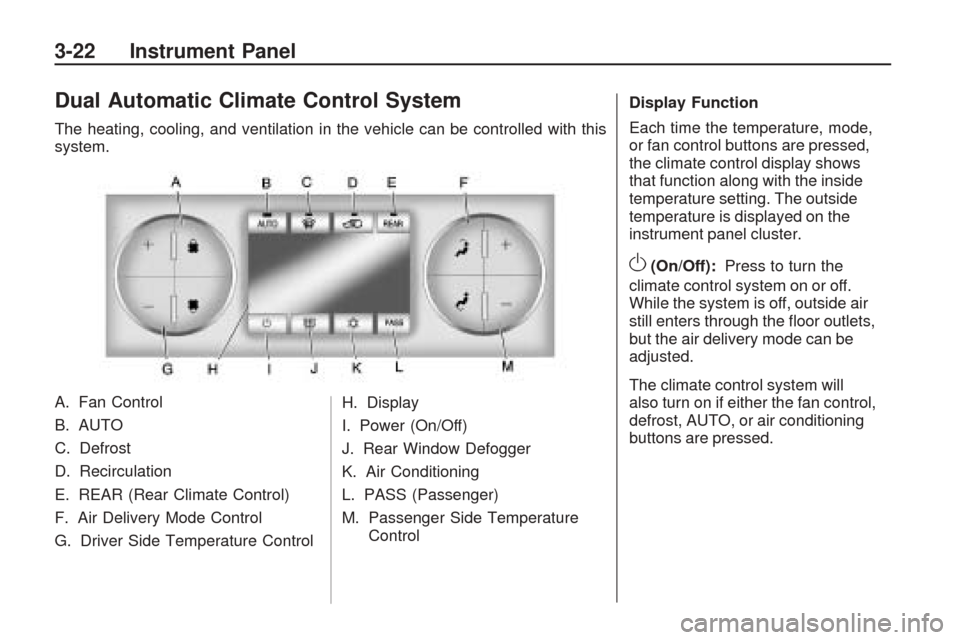
Dual Automatic Climate Control System
The heating, cooling, and ventilation in the vehicle can be controlled with this
system.
A. Fan Control
B. AUTO
C. Defrost
D. Recirculation
E. REAR (Rear Climate Control)
F. Air Delivery Mode Control
G. Driver Side Temperature ControlH. Display
I. Power (On/Off)
J. Rear Window Defogger
K. Air Conditioning
L. PASS (Passenger)
M. Passenger Side Temperature
Control Display Function
Each time the temperature, mode,
or fan control buttons are pressed,
the climate control display shows
that function along with the inside
temperature setting. The outside
temperature is displayed on the
instrument panel cluster.
O(On/Off):
Press to turn the
climate control system on or off.
While the system is off, outside air
still enters through the oor outlets,
but the air delivery mode can be
adjusted.
The climate control system will
also turn on if either the fan control,
defrost, AUTO, or air conditioning
buttons are pressed.
3-22 Instrument Panel
Page 143 of 422
Automatic Operation
AUTO (Automatic):The system
automatically controls the inside
temperature, the air delivery,
and the fan speed.
To use automatic mode:
1. Press the AUTO button.
When AUTO is selected, the
current temperature(s) selected
and AUTO is shown on the
display. The current air delivery
mode and fan speed also appear
for approximately ve seconds.
When AUTO is selected, the
air conditioning and air inlet
are automatically controlled.
The air conditioning runs when
the outside temperature is over
40°F (4°C). The system is
automatically set to outside
air, unless it is hot outside and
then the air inlet changes to
recirculation mode to help quickly
cool the vehicle. The recirculation
indicator light will come on.2. Set the temperature for the driver
and passenger.
To nd a comfortable setting,
start with a 73°F (22°C)
temperature setting and allow
about 20 minutes for the system
to regulate. Use the driver’s side
or passenger side temperature
buttons to adjust the temperature
setting as necessary. The system
will remain at the selected setting.
Choosing the warmest or coolest
temperatures does not cause
the vehicle to heat or cool more
quickly.
To avoid blowing cold air in
cold weather, the system delays
turning on the fan until warm air is
available. Press the fan control to
override this delay and select the
fan speed.Temperature Control
The driver and passenger side
temperature buttons are used
to adjust the temperature of the
air coming through the system.
The temperature can be adjusted
even if the system is turned off since
outside air still enters the vehicle,
unless the recirculation mode is
selected. See “Recirculation”
later in this section.
Driver Side Temperature Control:
Press the + or−buttons to increase
or decrease the driver side
temperature. The driver side
temperature display will show
the temperature setting.
Passenger Side Temperature
Control:Press the + or−buttons to
increase or decrease the passenger
side temperature. The passenger
side display will show the
temperature setting.
Instrument Panel 3-23
Page 145 of 422
-(Defog):This mode clears the
windows of fog or moisture. Air is
directed to the windshield, oor
outlets, and side window vents.
When this mode is selected, the
system turns off recirculation and
runs the air conditioning compressor
unless the outside temperature is
less than 40°F (4°C). Do not drive
the vehicle until all the windows
are clear.
0(Defrost):Press to turn the
defrost on or off. This mode quickly
clears the windshield of fog or frost.
Air is directed to the windshield,
side window, and oor vents. In this
mode, outside air is pulled inside the
vehicle. The air conditioning system
runs automatically in this setting,
unless the outside temperature is
less than 40°F (4°C).
Do not drive the vehicle until all the
windows are clear.While in defrost mode, if the PASS
button is pressed, the PASS button
indicator ashes three times to show
that the passenger climate control
system cannot be activated. If the
passenger temperature buttons are
adjusted while in defrost mode, the
driver temperature indicator will
change. The passenger temperature
will not be displayed.
Air Conditioning
#(Air Conditioning):Press to
turn the air conditioning (A/C) on and
off. An indicator light comes on when
A/C is on.
The A/C does not work when
the outside temperature is below
40°F (4°C). If
#is pressed the
indicator ashes three times and
turns off to show that the A/C mode
is not available. If the A/C is on and
the outside temperature drops below
a temperature which is too cool forair conditioning to be effective, the
A/C indicator turns off to show that
the A/C mode has been canceled.
On hot days, open the windows
briey to let hot inside air escape.
This helps reduce the time it
takes for the interior of the vehicle
to cool down.
The air conditioning system
removes moisture from the air,
so a small amount of water might
drip under the vehicle while idling
or after turning off the engine.
This is normal.
@(Recirculation):Press to turn
the recirculation mode on or off.
An indicator light comes on when
recirculation is on. When the engine
is turned off, the recirculation mode
automatically turns off and must
be re-selected when the engine is
turned on again.
Instrument Panel 3-25
Page 149 of 422
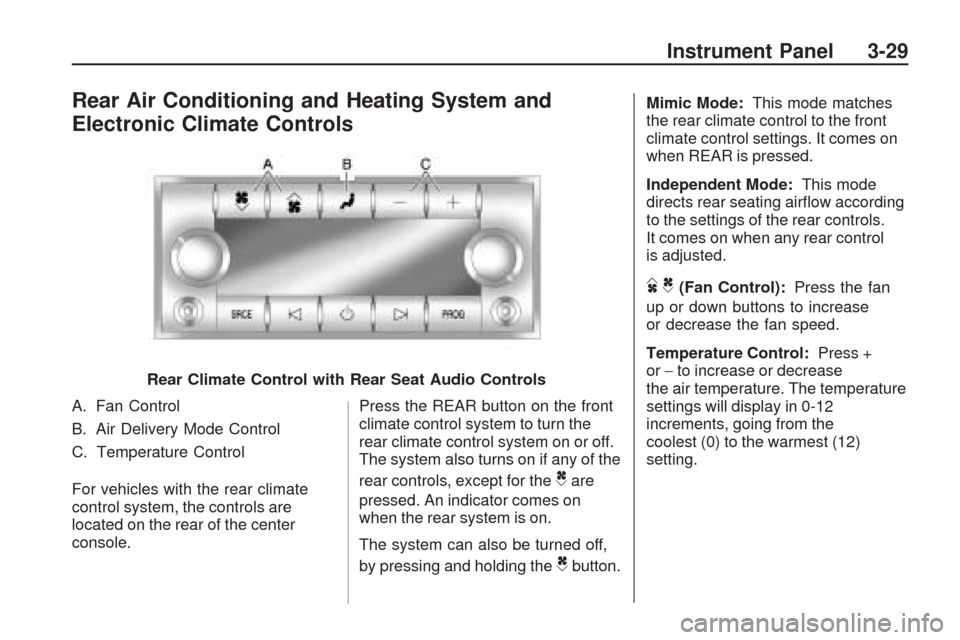
Rear Air Conditioning and Heating System and
Electronic Climate Controls
A. Fan Control
B. Air Delivery Mode Control
C. Temperature Control
For vehicles with the rear climate
control system, the controls are
located on the rear of the center
console.Press the REAR button on the front
climate control system to turn the
rear climate control system on or off.
The system also turns on if any of the
rear controls, except for the
Care
pressed. An indicator comes on
when the rear system is on.
The system can also be turned off,
by pressing and holding the
Cbutton. Mimic Mode:
This mode matches
the rear climate control to the front
climate control settings. It comes on
when REAR is pressed.
Independent Mode: This mode
directs rear seating airow according
to the settings of the rear controls.
It comes on when any rear control
is adjusted.
DC(Fan Control): Press the fan
up or down buttons to increase
or decrease the fan speed.
Temperature Control: Press +
or −to increase or decrease
the air temperature. The temperature
settings will display in 0-12
increments, going from the
coolest (0) to the warmest (12)
setting.
Rear Climate Control with Rear Seat Audio Controls
Instrument Panel 3-29
Page 164 of 422
An arrow on the fuel gage indicates
the side of the vehicle the fuel
door is on.
Here are four things that some
owners ask about. None of these
show a problem with the fuel gage:
At the gas station, the gas
pump shuts off before the gage
reads full.
It takes a little more or less fuel
to ll up than the gage indicated.
For example, the gage might have
indicated the tank was half full,
but it actually took a little more or
less than half the tank’s capacity
to ll the tank.
The gage moves a little while
turning a corner or speeding up.
The gage does not go back to
empty when the ignition is
turned off.
Driver Information
Center (DIC)
Your vehicle has a Driver
Information Center (DIC).
The DIC displays information about
your vehicle. It also displays warning
messages if a system problem is
detected.
All messages will appear in the DIC
display located at the top of the
instrument panel cluster.
The DIC comes on when the
ignition is on. After a short delay,
the DIC will display the information
that was last displayed before
the engine was turned off.
The DIC also displays a shift lever
position indicator on the bottom
line of the display. SeeAutomatic
Transmission Operation on
page 2-24for more information.
The outside air temperature
and compass, if equipped, also
displays on the DIC when viewing
the trip and fuel information.The outside air temperature
automatically appears in the top
right corner of the DIC display.
If there is a problem with the system
that controls the temperature display,
the numbers will be replaced with
dashes. If this occurs, have the
vehicle serviced. The compass
will be shown in the bottom right
corner of the DIC display. SeeDIC
Compass on page 3-54for more
information.
If your vehicle has DIC buttons,
see “DIC Operation and Displays
(With DIC Buttons)” later in
this section andDIC Vehicle
Customization (With DIC Buttons) on
page 3-65for the displays available.
If your vehicle does not have
DIC buttons, see “DIC Operation
and Displays (Without DIC Buttons)”
later in this section for the displays
available.
3-44 Instrument Panel
Page 165 of 422
DIC Operation and
Displays (With DIC
Buttons)
If your vehicle has DIC buttons,
the information below explains the
operation of this system.
The DIC has different displays
which can be accessed by pressing
the DIC buttons located on the
instrument panel. SeeInstrument
Panel Overview on page 3-4
for more information.
The DIC displays trip, fuel, and
vehicle system information, and
warning messages if a system
problem is detected.
The DIC also allows some features
to be customized. SeeDIC Vehicle
Customization (With DIC Buttons)
on page 3-65for more information.
If your vehicle has DIC buttons,
you can also use the trip odometer
reset stem to view the odometer
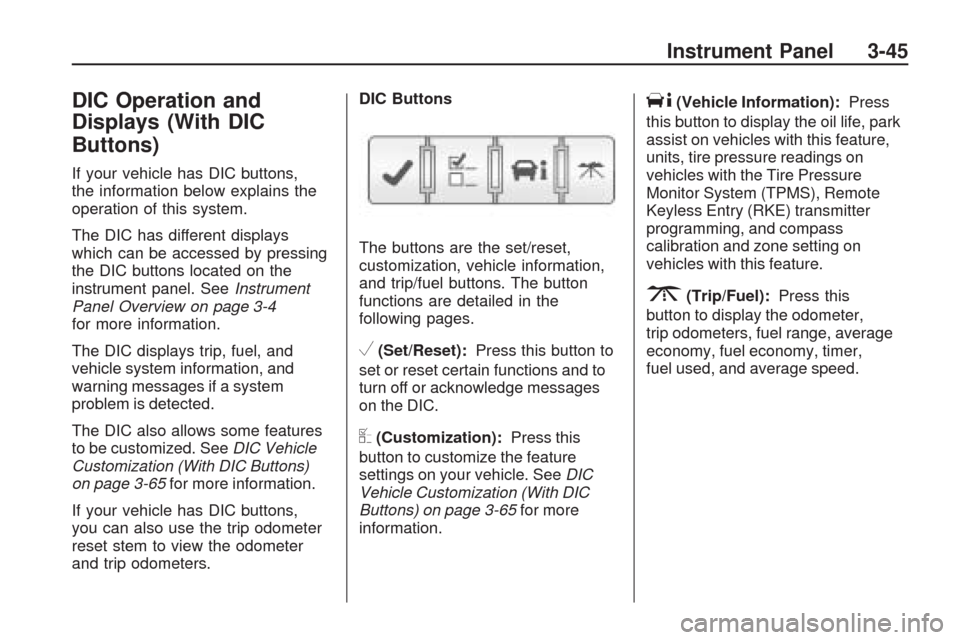
and trip odometers.DIC Buttons
The buttons are the set/reset,
customization, vehicle information,
and trip/fuel buttons. The button
functions are detailed in the
following pages.
V(Set/Reset):Press this button to
set or reset certain functions and to
turn off or acknowledge messages
on the DIC.
U(Customization):Press this
button to customize the feature
settings on your vehicle. SeeDIC
Vehicle Customization (With DIC
Buttons) on page 3-65for more
information.
T(Vehicle Information):Press
this button to display the oil life, park
assist on vehicles with this feature,
units, tire pressure readings on
vehicles with the Tire Pressure
Monitor System (TPMS), Remote
Keyless Entry (RKE) transmitter
programming, and compass
calibration and zone setting on
vehicles with this feature.
3(Trip/Fuel):Press this
button to display the odometer,
trip odometers, fuel range, average
economy, fuel economy, timer,
fuel used, and average speed.
Instrument Panel 3-45
Page 167 of 422
FRONT TIRES or REAR TIRES
On vehicles with the Tire Pressure
Monitor System (TPMS), the
pressure for each tire can be viewed
in the DIC. The tire pressure will be
shown in either pounds per square
inch (psi) or kilopascals (kPa). Press
the vehicle information button until
the DIC displays FRONT TIRES
PSI (kPa) LEFT ## RIGHT ##. Press
the vehicle information button again
until the DIC displays REAR TIRES
PSI (kPa) LEFT ## RIGHT ##.
If a low or high tire pressure
condition is detected by the system
while driving, a message advising
you to check the pressure in a
specic tire will appear in the display.
SeeInflation - Tire Pressure on
page 5-42andDIC Warnings and
Messages on page 3-56for more
information.If the tire pressure display shows
dashes instead of a value, there
may be a problem with your vehicle.
If this consistently occurs, see
your dealer/retailer for service.
RELEARN REMOTE KEY
This display allows you to match
Remote Keyless Entry (RKE)
transmitters to your vehicle.
This procedure will erase all
previously learned transmitters.
Therefore, they must be relearned
as additional transmitters.
To match an RKE transmitter to
your vehicle:
1. Press the vehicle information
button until PRESS
VTO
RELEARN REMOTE KEY
displays.
2. Press the set/reset button until
REMOTE KEY LEARNING
ACTIVE is displayed.3. Press and hold the lock and
unlock buttons on the rst
transmitter at the same time
for about 15 seconds.
On vehicles with memory
recall seats, the rst transmitter
learned will match driver 1
and the second will match
driver 2.
A chime will sound indicating
that the transmitter is matched.
4. To match additional transmitters
at this time, repeat Step 3.
Each vehicle can have a
maximum of eight transmitters
matched to it.
5. To exit the programming mode,
you must cycle the key to
LOCK/OFF.
Instrument Panel 3-47
Page 171 of 422
DIC Operation and
Displays (Without DIC
Buttons)
If your vehicle does not have DIC
buttons, the information below
explains the operation of this system.
The DIC has different displays which
can be accessed by pressing the trip
odometer reset stem located on the
instrument panel cluster. Pressing
the trip odometer reset stem will
also turn off, or acknowledge,
DIC messages.
The DIC displays trip and vehicle
system information, and warning
messages if a system problem
is detected.
If your vehicle does not have
DIC buttons, you can use the trip
odometer reset stem to view the
following displays: odometer, tripodometers, oil life, park assist menu
for vehicles with the Ultrasonic
Rear Parking Assist (URPA) system,
Remote Keyless Entry (RKE)
transmitter programming, units,
and display language.
If your vehicle has DIC buttons,
you can use the trip odometer reset
stem to view the following displays:
odometer and trip odometers.
Trip Odometer Reset Stem
Menu Items
ODOMETER
Press the trip odometer reset
stem until ODOMETER displays.
This display shows the distance the
vehicle has been driven in either
miles (mi) or kilometers (km).
To switch between English and
metric measurements, see “UNITS”
later in this section.TRIP A or TRIP B
Press the trip odometer reset stem
until TRIP A or TRIP B displays.
This display shows the current
distance traveled in either miles (mi)
or kilometers (km) since the last
reset for each trip odometer. Both
trip odometers can be used at the
same time.
Each trip odometer can be reset to
zero separately by pressing and
holding the trip odometer reset stem
while the desired trip odometer is
displayed.
The trip odometer has a feature
called the retro-active reset. This can
be used to set the trip odometer to
the number of miles (kilometers)
driven since the ignition was last
turned on. This can be used if the
trip odometer is not reset at the
beginning of the trip.
Instrument Panel 3-51
Page 173 of 422
PARK ASSIST
To access this display, the vehicle
must be in P (Park). If your vehicle
has the Ultrasonic Rear Parking
Assist (URPA) system, press the trip
odometer reset stem until PARK
ASSIST displays. This display allows
the system to be turned on or off.
Once in this display, press and hold
the trip odometer reset stem to select
between ON or OFF. If you choose
ON, the system will be turned on.
If you choose OFF, the system will
be turned off. The URPA system
automatically turns back on after
each vehicle start. When the URPA
system is turned off and the vehicle
is shifted out of P (Park), the DIC
will display the PARK ASSIST OFF
message as a reminder that the
system has been turned off.
SeeDIC Warnings and Messages
on page 3-56andUltrasonic Rear
Parking Assist (URPA) on page 2-36
for more information.RELEARN REMOTE KEY
To access this display, the vehicle
must be in P (Park). This display
allows you to match Remote Keyless
Entry (RKE) transmitters to your
vehicle. This procedure will erase
all previously learned transmitters.
Therefore, they must be relearned
as additional transmitters.
To match an RKE transmitter to
your vehicle:
1. Press the trip odometer reset
stem until RELEARN REMOTE
KEY displays.
2. Press and hold the trip odometer
reset stem until REMOTE KEY
LEARNING ACTIVE is displayed.
3. Press and hold the lock and
unlock buttons on the rst
transmitter at the same time
for about 15 seconds.
On vehicles with memory recall
seats, the rst transmitter learned
will match driver 1 and the
second will match driver 2.A chime will sound indicating
that the transmitter is matched.
4. To match additional transmitters
at this time, repeat Step 3.
Each vehicle can have a
maximum of eight transmitters
matched to it.
5. To exit the programming mode,
you must cycle the key to
LOCK/OFF.
UNITS
To access this display, the vehicle
must be in P (Park). Press the trip
odometer reset stem until UNITS
displays. This display allows you to
select between English or Metric
units of measurement. Once in
this display, press and hold the
trip odometer reset stem to select
between ENGLISH or METRIC units.
All of the vehicle information will
then be displayed in the unit of
measurement selected.
Instrument Panel 3-53