keyless entry CHEVROLET TRAVERSE 2011 1.G User Guide
[x] Cancel search | Manufacturer: CHEVROLET, Model Year: 2011, Model line: TRAVERSE, Model: CHEVROLET TRAVERSE 2011 1.GPages: 454, PDF Size: 6.56 MB
Page 59 of 454
Black plate (5,1)Chevrolet Traverse Owner Manual - 2011
Seats and Restraints 3-5
Storing Memory Positions
To save into memory:
1. Adjust the driver seat, seatbackrecliner, and both outside
mirrors.
See Power Mirrors
on
page 2‑16for more information.
Not all vehicles will have the
ability to save and recall the
mirror positions.
2. Press and hold “1”until
two beeps sound.
3. Repeat for a second driver position using “2.”
To recall the memory positions,
press and release “1”or“2.” The
vehicle must be in P (Park). A single
beep will sound. The seat and
outside mirrors will move to the
position previously stored for the
identified driver. Memory Remote Recall
The memory feature can recall the
driver seat and outside mirrors to
stored positions when entering
the vehicle.
To activate memory remote recall,
unlock the driver door with the
Remote Keyless Entry (RKE)
transmitter. The driver seat and
outside mirrors will move to the
memory position associated with the
transmitter used to unlock the
vehicle.
The automatic recall feature can be
turned on or off using the vehicle
personalization menu. See
“Memory
Seat Recall” underVehicle
Personalization (With DIC Buttons)
on page 5‑41for more information.
To stop recall movement of the
memory feature, press one of the
power seat controls, memory
buttons, or the power mirror buttons. If something has blocked the driver
seat while recalling a memory
position, the recall may stop.
Remove the obstruction; then press
and hold the appropriate manual
control for the memory item that is
not recalling for two seconds. Try
recalling the memory position again
by pressing the appropriate memory
button. If the memory position is still
not recalling, see your dealer for
service.
Easy Exit Driver Seat
The easy exit driver seat feature
can move the seat rearward to allow
extra room to exit the vehicle.
S(Easy Exit Driver Seat):
Press
to recall the easy exit seat position.
The vehicle must be in P (Park).
If the easy exit seat feature is
programmed on in the vehicle
personalization menu, automatic
seat movement occurs when the
ignition key is removed.
Page 164 of 454
Black plate (36,1)Chevrolet Traverse Owner Manual - 2011
5-36 Instruments and Controls
Key and Lock Messages
REPLACE BATTERY IN
REMOTE KEY
This message displays if a Remote
Keyless Entry (RKE) transmitter
battery is low. The battery needs to
be replaced in the transmitter. See
“Battery Replacement”under
Remote Keyless Entry (RKE)
System Operation on page 2‑3.
Lamp Messages
AUTOMATIC LIGHT
CONTROL OFF
This message displays when the
automatic headlamps are turned off.
This message clears itself after
10 seconds.
AUTOMATIC LIGHT
CONTROL ON
This message displays when the
automatic headlamps are turned on.
This message clears itself after
10 seconds.
TURN SIGNAL ON
This message displays and a chime
sounds if a turn signal is left on for
1.2 km (0.75 mile). Move the turn
signal/multifunction lever to the off
position.
Object Detection System
Messages
PARK ASST (Assist)
BLOCKED SEE OWNERS
MANUAL
If your vehicle has the Ultrasonic
Rear Parking Assist (URPA) system,
this message displays if there is
something interfering with the park
assist system. See Ultrasonic
Parking Assist
on page 9‑34for
more information.
PARK ASSIST OFF
If your vehicle has the Ultrasonic
Rear Parking Assist (URPA) system,
after the vehicle has been started
and shifted out of P (Park), this
message displays to remind the
driver that the URPA system has
been turned off or to notify the driver
that the system has turned itself off.
Press the set/reset button or
the trip odometer reset stem to
acknowledge this message and
clear it from the DIC display. For
more information see Ultrasonic
Parking Assist on page 9‑34.
SERVICE PARK ASSIST
If your vehicle has the Ultrasonic
Rear Parking Assist (URPA) system,
this message displays if there is a
problem with the URPA system.
Do not use this system to help you
park. See Ultrasonic Parking Assist
on page 9‑34for more information.
See your dealer for service.
Page 171 of 454
Black plate (43,1)Chevrolet Traverse Owner Manual - 2011
Instruments and Controls 5-43
DRIVER AT KEY OUT:Only the
driver's door will unlock when the
key is taken out of the ignition.
DRIVER IN PARK: Only the
driver's door will unlock when the
vehicle is shifted into P (Park) .
ALL AT KEY OUT: All of the doors
will unlock when the key is taken
out of the ignition.
ALL IN PARK (default): All of the
doors will unlock when the vehicle is
shifted into P (Park).
NO CHANGE: No change will be
made to this feature. The current
setting will remain.
To select a setting, press the
set/reset button while the desired
setting is displayed on the DIC. REMOTE DOOR LOCK
This feature allows you to select the
type of feedback you will receive
when locking the vehicle with the
Remote Keyless Entry (RKE)
transmitter. You will not receive
feedback when locking the vehicle
with the RKE transmitter if the doors
are open. See
Remote Keyless
Entry (RKE) System Operation
on
page 2‑3for more information.
Press the customization button until
REMOTE DOOR LOCK appears on
the DIC display. Press the set/reset
button once to access the settings
for this feature. Then press the
customization button to scroll
through the following settings:
OFF: There will be no feedback
when you press the lock button on
the RKE transmitter. LIGHTS ONLY:
The exterior lamps
will flash when you press the lock
button on the RKE transmitter.
HORN ONLY: The horn will sound
on the second press of the lock
button on the RKE transmitter.
HORN & LIGHTS (default): The
exterior lamps will flash when you
press the lock button on the
RKE transmitter, and the horn will
sound when the lock button is
pressed again within five seconds
of the previous command.
NO CHANGE: No change will be
made to this feature. The current
setting will remain.
To select a setting, press the
set/reset button while the desired
setting is displayed on the DIC.
Page 172 of 454
Black plate (44,1)Chevrolet Traverse Owner Manual - 2011
5-44 Instruments and Controls
REMOTE DOOR UNLOCK
This feature allows you to select the
type of feedback you will receive
when unlocking the vehicle with the
Remote Keyless Entry (RKE)
transmitter. You will not receive
feedback when unlocking the
vehicle with the RKE transmitter if
the doors are open. SeeRemote
Keyless Entry (RKE) System
Operation
on page 2‑3for more
information.
Press the customization button until
REMOTE DOOR UNLOCK appears
on the DIC display. Press the set/
reset button once to access the
settings for this feature. Then press
the customization button to scroll
through the following settings:
LIGHTS OFF: The exterior lamps
will not flash when you press the
unlock button on the RKE
transmitter. LIGHTS ON (default):
The exterior
lamps will flash when you press the
unlock button on the RKE
transmitter.
NO CHANGE: No change will be
made to this feature. The current
setting will remain.
To select a setting, press the
set/reset button while the desired
setting is displayed on the DIC.
DELAY DOOR LOCK
This feature allows you to select
whether or not the locking of the
vehicle's doors and liftgate will be
delayed. When locking the doors
and liftgate with the power door lock
switch and a door or the liftgate is
open, this feature will delay locking
the doors and liftgate until
five seconds after the last door is
closed. You will hear three chimes
to signal that the delayed locking
feature is in use. The key must be
out of the ignition for this feature to work. You can temporarily override
delayed locking by pressing the
power door lock switch twice or the
lock button on the RKE transmitter
twice. See
Delayed Locking
on
page 2‑8for more information.
Press the customization button until
DELAY DOOR LOCK appears on
the DIC display. Press the set/reset
button once to access the settings
for this feature. Then press the
customization button to scroll
through the following settings:
OFF: There will be no delayed
locking of the vehicle's doors.
ON (default): The doors will not
lock until five seconds after the last
door or the liftgate is closed.
NO CHANGE: No change will be
made to this feature. The current
setting will remain.
To select a setting, press the
set/reset button while the desired
setting is displayed on the DIC.
Page 173 of 454
Black plate (45,1)Chevrolet Traverse Owner Manual - 2011
Instruments and Controls 5-45
EXIT LIGHTING
This feature allows you to select the
amount of time you want the
exterior lamps to remain on when it
is dark enough outside. This
happens after the key is turned from
ON/RUN to LOCK/OFF.
Press the customization button until
EXIT LIGHTING appears on the DIC
display. Press the set/reset button
once to access the settings for this
feature. Then press the
customization button to scroll
through the following settings:
OFF:The exterior lamps will not
turn on.
30 SECONDS (default): The
exterior lamps will stay on for
30 seconds.
1 MINUTE: The exterior lamps will
stay on for one minute.
2 MINUTES: The exterior lamps will
stay on for two minutes. NO CHANGE:
No change will be
made to this feature. The current
setting will remain.
To select a setting, press the
set/reset button while the desired
setting is displayed on the DIC.
APPROACH LIGHTING
This feature allows you to select
whether or not to have the exterior
lights turn on briefly during low light
periods after unlocking the vehicle
using the Remote Keyless Entry
(RKE) transmitter.
Press the customization button until
APPROACH LIGHTING appears on
the DIC display. Press the set/reset
button once to access the settings
for this feature. Then press the
customization button to scroll
through the following settings:
OFF: The exterior lights will not
turn on when you unlock the vehicle
with the RKE transmitter. ON (default):
If it is dark enough
outside, the exterior lights will turn
on briefly when you unlock the
vehicle with the RKE transmitter.
The lights will remain on for
20 seconds or until the lock button
on the RKE transmitter is pressed,
or the vehicle is no longer off.
See Remote Keyless Entry (RKE)
System Operation
on page 2‑3for
more information.
NO CHANGE : No change will be
made to this feature. The current
setting will remain.
To select a setting, press the
set/reset button while the desired
setting is displayed on the DIC.
Page 175 of 454
Black plate (47,1)Chevrolet Traverse Owner Manual - 2011
Instruments and Controls 5-47
Press the customization button until
EASY EXIT SEAT appears on the
DIC display. Press the set/reset
button once to access the settings
for this feature. Then press the
customization button to scroll
through the following settings:
OFF (default):No automatic seat
exit recall will occur.
ON: The driver's seat will move
back when the key is removed from
the ignition.
The automatic easy exit seat
movement will only occur one time
after the key is removed from the
ignition. If the automatic movement
has already occurred, and you put
the key back in the ignition and
remove it again, the seat and
steering column will stay in the
original exit position, unless a
memory recall took place prior to
removing the key again.
NO CHANGE: No change will be
made to this feature. The current
setting will remain. To select a setting, press the
set/reset button while the desired
setting is displayed on the DIC.
MEMORY SEAT RECALL
If your vehicle has this feature, it
allows you to select your preference
for the remote memory seat recall
feature. See
Delayed Locking
on
page 2‑8for more information.
Press the customization button until
MEMORY SEAT RECALL appears
on the DIC display. Press the
set/reset button once to access
the settings for this feature. Then
press the customization button to
scroll through the following settings:
OFF (default): No remote memory
seat recall will occur.
ON: The driver's seat and outside
mirrors will automatically move to
the stored driving position when the
unlock button on the Remote
Keyless Entry (RKE) transmitter is
pressed. See “Relearn Remote Key”
under Driver Information Center
(DIC) (With DIC Buttons)
on page 5‑24
or
Driver Information
Center (DIC) (Without DIC Buttons)
on page 5‑29for more information
on matching transmitters to driver ID
numbers.
NO CHANGE: No change will be
made to this feature. The current
setting will remain.
To select a setting, press the
set/reset button while the desired
setting is displayed on the DIC.
FACTORY SETTINGS
This feature allows you to set all of
the customization features back to
their factory default settings.
Press the customization button until
FACTORY SETTINGS appears on
the DIC display. Press the set/reset
button once to access the settings
for this feature. Then press the
customization button to scroll
through the following settings:
RESTORE ALL (default): The
customization features will be set to
their factory default settings.
Page 185 of 454
Black plate (5,1)Chevrolet Traverse Owner Manual - 2011
Lighting 6-5
Courtesy Lamps
The courtesy lamps automatically
come on when a door is opened.
The lamps can also be turned on
manually by fully turning the
instrument panel brightness control
clockwise.
The reading lamps, located on the
headliner above the rearview mirror,
can be turned on or off independent
of the automatic courtesy lamps,
when the doors are closed.
Dome Lamps
The dome lamps are located in the
overhead console and above the
rear seat passengers.
The dome lamps come on when a
door is opened, unless the dome
lamp override button is pressed in.
The lamps can also be turned on
and off by turning the instrument
panel brightness control clockwise
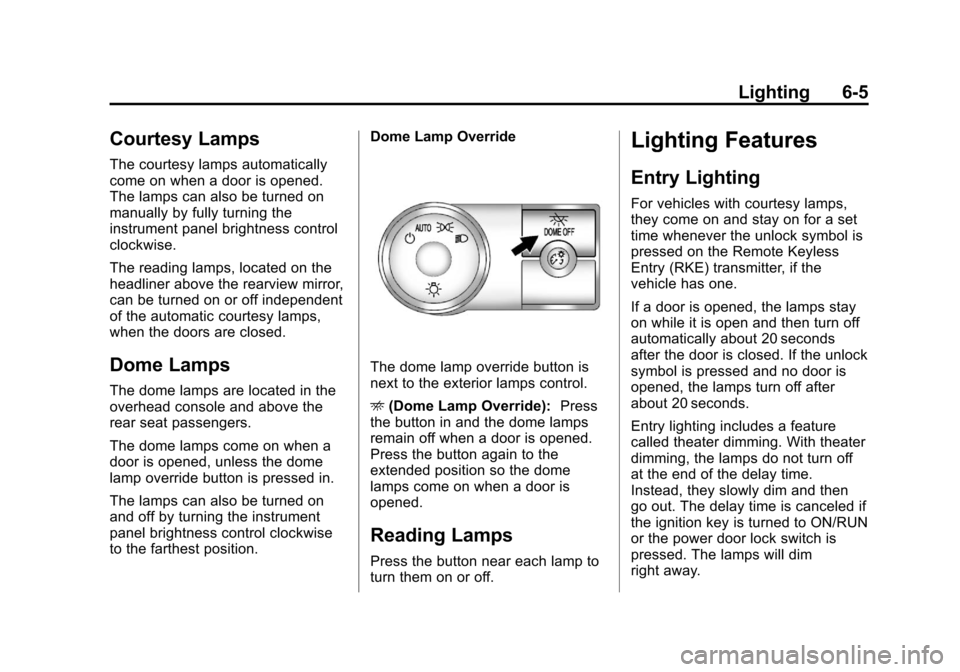
to the farthest position.Dome Lamp Override
The dome lamp override button is
next to the exterior lamps control.
E
(Dome Lamp Override): Press
the button in and the dome lamps
remain off when a door is opened.
Press the button again to the
extended position so the dome
lamps come on when a door is
opened.
Reading Lamps
Press the button near each lamp to
turn them on or off.
Lighting Features
Entry Lighting
For vehicles with courtesy lamps,
they come on and stay on for a set
time whenever the unlock symbol is
pressed on the Remote Keyless
Entry (RKE) transmitter, if the
vehicle has one.
If a door is opened, the lamps stay
on while it is open and then turn off
automatically about 20 seconds
after the door is closed. If the unlock
symbol is pressed and no door is
opened, the lamps turn off after
about 20 seconds.
Entry lighting includes a feature
called theater dimming. With theater
dimming, the lamps do not turn off
at the end of the delay time.
Instead, they slowly dim and then
go out. The delay time is canceled if
the ignition key is turned to ON/RUN
or the power door lock switch is
pressed. The lamps will dim
right away.
Page 359 of 454
Black plate (49,1)Chevrolet Traverse Owner Manual - 2011
Vehicle Care 10-49
.Operating electronic devices or
being near facilities using radio
wave frequencies similar to the
TPMS could cause the TPMS
sensors to malfunction.
If the TPMS is not functioning it
cannot detect or signal a low tire
condition. See your dealer for
service if the TPMS malfunction
light and DIC message comes on
and stays on.
TPMS Sensor Matching
Process
Each TPMS sensor has a unique
identification code. Any time you
rotate your vehicle's tires or replace
one or more of the TPMS sensors,
the identification codes will need to
be matched to the new tire/wheel
position. The sensors are matched
to the tire/wheel positions in the
following order: driver side front tire,
passenger side front tire, passenger
side rear tire, and driver side rear
tire using a TPMS diagnostic tool.
See your dealer for service. The TPMS sensors can also be
matched to each tire/wheel position
by increasing or decreasing the
tire's air pressure. If increasing the
tire's air pressure, do not exceed
the maximum inflation pressure
indicated on the tire's sidewall.
To decrease air-pressure out of a
tire you can use the pointed end of
the valve cap, a pencil-style air
pressure gauge, or a key.
You have two minutes to match the
first tire/wheel position, and
five minutes overall to match all four
tire/wheel positions. If it takes longer
than two minutes, to match the first
tire and wheel, or more than
five minutes to match all four tire
and wheel positions the matching
process stops and you need to
start over.
The TPMS sensor matching process
is outlined below:
1. Set the parking brake.
2. Turn the ignition switch to ON/
RUN with the engine off. 3. Press the Remote Keyless Entry
(RKE) transmitter's LOCK and
UNLOCK buttons at the same
time for approximately
five seconds. The horn sounds
twice to signal the receiver is in
relearn mode and TIRE
LEARNING ACTIVE message
displays on the DIC screen.
4. Start with the driver side front tire.
5. Remove the valve cap from the valve cap stem. Activate the
TPMS sensor by increasing or
decreasing the tire's air pressure
for five seconds, or until a horn
chirp sounds. The horn chirp,
which may take up to
30 seconds to sound, confirms
that the sensor identification
code has been matched to this
tire and wheel position.
6. Proceed to the passenger side front tire, and repeat the
procedure in Step 5.
Page 448 of 454

Black plate (6,1)Chevrolet Traverse Owner Manual - 2011
i-6 INDEX
Heated and Ventilated FrontSeats . . . . . . . . . . . . . . . . . . . . . . . . 3-10
Heated Front Seats . . . . . . . . . . . . . 3-9
Heated Mirrors . . . . . . . . . . . . . . . . . 2-16
High Voltage Devices and Wiring . . . . . . . . . . . . . . . . . . . . . . . 10-31
High-Beam On Light . . . . . . . . . . . 5-23
Highway Hypnosis . . . . . . . . . . . . . . 9-7
Hill and Mountain Roads . . . . . . . . 9-8
Hood . . . . . . . . . . . . . . . . . . . . . . . . . . 10-5
Horn . . . . . . . . . . . . . . . . . . . . . . . . . . . . 5-4
How to Wear Safety Belts
Properly . . . . . . . . . . . . . . . . . . . . . . 3-19
I
Ignition Positions . . . . . . . . . . . . . . 9-16
Ignition Transmission LockCheck . . . . . . . . . . . . . . . . . . . . . . . 10-27
Immobilizer . . . . . . . . . . . . . . . . . . . . 2-14
Infants and Young Children, Restraints . . . . . . . . . . . . . . . . . . . . 3-49
Instrument Cluster . . . . . . . . . . . . . 5-11
Instrument Panel Storage Area . . . . . . . . . . . . . . . . . . 4-1
Introduction . . . . . . . . . . . . . . . . . . .iii, 7-1
J
Jump Starting . . . . . . . . . . . . . . . . . 10-81
K
Key and Lock Messages . . . . . . . 5-36
Keyless Entry Remote (RKE) System . . . . . . . . 2-3
Keyless Entry System . . . . . . . . . . 2-2
Keys . . . . . . . . . . . . . . . . . . . . . . . . . . . . 2-2
L
Labeling, Tire Sidewall . . . . . . . . 10-39
Lamp Messages . . . . . . . . . . . . . . . 5-36
Lamps Courtesy . . . . . . . . . . . . . . . . . . . . . . . 6-5
Dome . . . . . . . . . . . . . . . . . . . . . . . . . . 6-5
Exterior Controls . . . . . . . . . . . . . . . 6-1
Malfunction Indicator . . . . . . . . . 5-16
Reading . . . . . . . . . . . . . . . . . . . . . . . 6-5
Lap-Shoulder Belt . . . . . . . . . . . . . 3-24
LATCH System
Replacing Parts After aCrash . . . . . . . . . . . . . . . . . . . . . . . 3-63
Latch, Lower Anchors and Tethers for Children . . . . . . . . . . 3-56 Liftgate
Carbon Monoxide . . . . . . . . . . . . . . 2-9
Lighting Delayed Entry . . . . . . . . . . . . . . . . . 6-6
Delayed Exit . . . . . . . . . . . . . . . . . . . 6-6
Entry . . . . . . . . . . . . . . . . . . . . . . . . . . 6-5
Illumination Control . . . . . . . . . . . . 6-4
Parade Dimming . . . . . . . . . . . . . . . 6-6
Lights Airbag Readiness . . . . . . . . . . . . . 5-15
Antilock Brake System(ABS) Warning . . . . . . . . . . . . . . 5-20
Charging System . . . . . . . . . . . . . 5-16
Cruise Control . . . . . . . . . . . . . . . . 5-23
Engine Coolant Temperature Warning . . . . . . . 5-21
Engine Oil Pressure . . . . . . . . . . 5-22
Flash-to-Pass . . . . . . . . . . . . . . . . . . 6-2
High-Beam On . . . . . . . . . . . . . . . . 5-23
High/Low Beam Changer . . . . . . 6-2
Safety Belt Reminders . . . . . . . . 5-14
Security . . . . . . . . . . . . . . . . . . . . . . 5-23
StabiliTrak
®Indicator . . . . . . . . . 5-21
Tire Pressure . . . . . . . . . . . . . . . . . 5-21
Tow/Haul Mode . . . . . . . . . . . . . . . 5-20
Page 451 of 454

Black plate (9,1)Chevrolet Traverse Owner Manual - 2011
INDEX i-9
Rear Climate ControlSystem . . . . . . . . . . . . . . . . . 8-10, 8-11
Rear Seat Audio (RSA) System . . . . . . . . . . . . . . . . . . . . . . . 7-44
Rear Seat Entertainment System . . . . . . . . . . . . . . . . . . . . . . . 7-35
Rear Seat Audio (RSA) . . . . . . . 7-44
Rear Seats . . . . . . . . . . . . . . . . . . . . 3-11
Rear Vision Camera (RVC) . . . . 9-36
Rear Window Washer/Wiper . . . . 5-6
Rearview Mirrors . . . . . . . . . . . . . . 2-18 Automatic Dimming . . . . . . . . . . . 2-18
Reclining Seatbacks . . . . . . . . . . . . 3-7
Recommended Fluids and Lubricants . . . . . . . . . . . . . . . . . . . . 11-6
Recommended Fuel . . . . . . . . . . . 9-41
Records
Maintenance . . . . . . . . . . . . . . . . . . 11-9
Recreational Vehicle Towing . . . . . . . . . . . . . . . . . . . . . . 10-85
Reimbursement Program,
GM Mobility . . . . . . . . . . . . . . . . . . 13-8
Remote Keyless Entry (RKE) System . . . . . . . . . . . . . 2-2, 2-3
Remote Vehicle Start . . . . . . . . . . . 2-5
Replacement Bulbs . . . . . . . . . . . 10-31 Replacement Parts
Airbags . . . . . . . . . . . . . . . . . . . . . . . 3-46
Maintenance . . . . . . . . . . . . . . . . . . 11-8
Replacing Airbag System . . . . . . 3-46
Replacing LATCH System Parts After a Crash . . . . . . . . . . . 3-63
Replacing Safety Belt
System Parts After a
Crash . . . . . . . . . . . . . . . . . . . . . . . . 3-30
Reporting Safety Defects Canadian Government . . . . . . 13-16
General Motors . . . . . . . . . . . . . 13-17
U.S. Government . . . . . . . . . . . 13-16
Retained Accessory Power (RAP) . . . . . . . . . . . . . . . . . 9-18
Ride Control Systems
Messages . . . . . . . . . . . . . . . . . . . . 5-37
Roadside Assistance Program . . . . . . . . . . . . . . . 13-8, 13-10
Roof Sunroof . . . . . . . . . . . . . . . . . . . . . . . 2-21
Roof Rack System . . . . . . . . . . . . . . 4-5
Rotation, Tires . . . . . . . . . . . . . . . . 10-50
Routing, Engine Drive Belt . . . . . 12-3
Running the Vehicle While Parked . . . . . . . . . . . . . . . . . . . . . . . 9-23S
Safety Belts . . . . . . . . . . . . . . . . . . . 3-16Care . . . . . . . . . . . . . . . . . . . . . . . . . . 3-30
Extender . . . . . . . . . . . . . . . . . . . . . . 3-29
How to Wear Safety BeltsProperly . . . . . . . . . . . . . . . . . . . . . 3-19
Lap-Shoulder Belt . . . . . . . . . . . . 3-24
Reminders . . . . . . . . . . . . . . . . . . . . 5-14
Replacing After a Crash . . . . . . 3-30
Use During Pregnancy . . . . . . . . 3-29
Safety Defects Reporting
Canadian Government . . . . . . 13-16
General Motors . . . . . . . . . . . . . 13-17
U.S. Government . . . . . . . . . . . 13-16
Safety Locks . . . . . . . . . . . . . . . . . . . . 2-8
Safety System Check . . . . . . . . . . 3-30
Satellite Radio . . . . . . . . . . . . . . . . . . 7-8
Scheduled Maintenance . . . . . . . 11-2
Scheduling Appointments . . . . . 13-10
Sealant Kit, Tire . . . . . . . . . . . . . . 10-61
Seats Adjustment, Front . . . . . . . . . . . . . . 3-3
Head Restraints . . . . . . . . . . . . . . . 3-2
Heated and VentilatedFront . . . . . . . . . . . . . . . . . . . . . . . . 3-10
Heated Front . . . . . . . . . . . . . . . . . . 3-9