light CHEVROLET TRAVERSE 2011 1.G User Guide
[x] Cancel search | Manufacturer: CHEVROLET, Model Year: 2011, Model line: TRAVERSE, Model: CHEVROLET TRAVERSE 2011 1.GPages: 454, PDF Size: 6.56 MB
Page 43 of 454
Black plate (11,1)Chevrolet Traverse Owner Manual - 2011
Keys, Doors and Windows 2-11
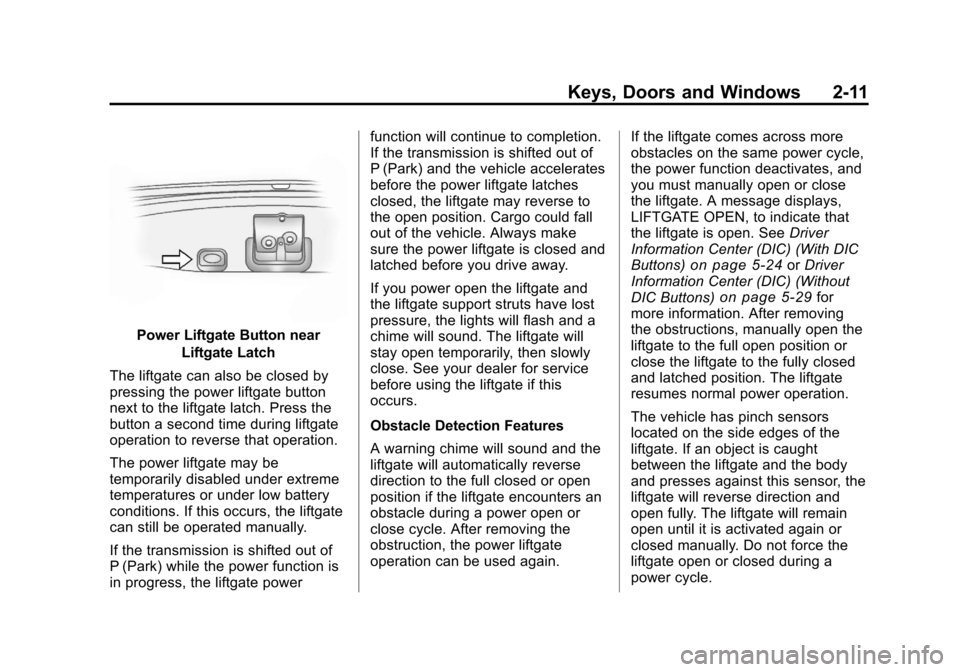
Power Liftgate Button nearLiftgate Latch
The liftgate can also be closed by
pressing the power liftgate button
next to the liftgate latch. Press the
button a second time during liftgate
operation to reverse that operation.
The power liftgate may be
temporarily disabled under extreme
temperatures or under low battery
conditions. If this occurs, the liftgate
can still be operated manually.
If the transmission is shifted out of
P (Park) while the power function is
in progress, the liftgate power function will continue to completion.
If the transmission is shifted out of
P (Park) and the vehicle accelerates
before the power liftgate latches
closed, the liftgate may reverse to
the open position. Cargo could fall
out of the vehicle. Always make
sure the power liftgate is closed and
latched before you drive away.
If you power open the liftgate and
the liftgate support struts have lost
pressure, the lights will flash and a
chime will sound. The liftgate will
stay open temporarily, then slowly
close. See your dealer for service
before using the liftgate if this
occurs.
Obstacle Detection Features
A warning chime will sound and the
liftgate will automatically reverse
direction to the full closed or open
position if the liftgate encounters an
obstacle during a power open or
close cycle. After removing the
obstruction, the power liftgate
operation can be used again.
If the liftgate comes across more
obstacles on the same power cycle,
the power function deactivates, and
you must manually open or close
the liftgate. A message displays,
LIFTGATE OPEN, to indicate that
the liftgate is open. See
Driver
Information Center (DIC) (With DIC
Buttons)
on page 5‑24or Driver
Information Center (DIC) (Without
DIC Buttons)
on page 5‑29for
more information. After removing
the obstructions, manually open the
liftgate to the full open position or
close the liftgate to the fully closed
and latched position. The liftgate
resumes normal power operation.
The vehicle has pinch sensors
located on the side edges of the
liftgate. If an object is caught
between the liftgate and the body
and presses against this sensor, the
liftgate will reverse direction and
open fully. The liftgate will remain
open until it is activated again or
closed manually. Do not force the
liftgate open or closed during a
power cycle.
Page 44 of 454
Black plate (12,1)Chevrolet Traverse Owner Manual - 2011
2-12 Keys, Doors and Windows
Manual Operation of Power
Liftgate
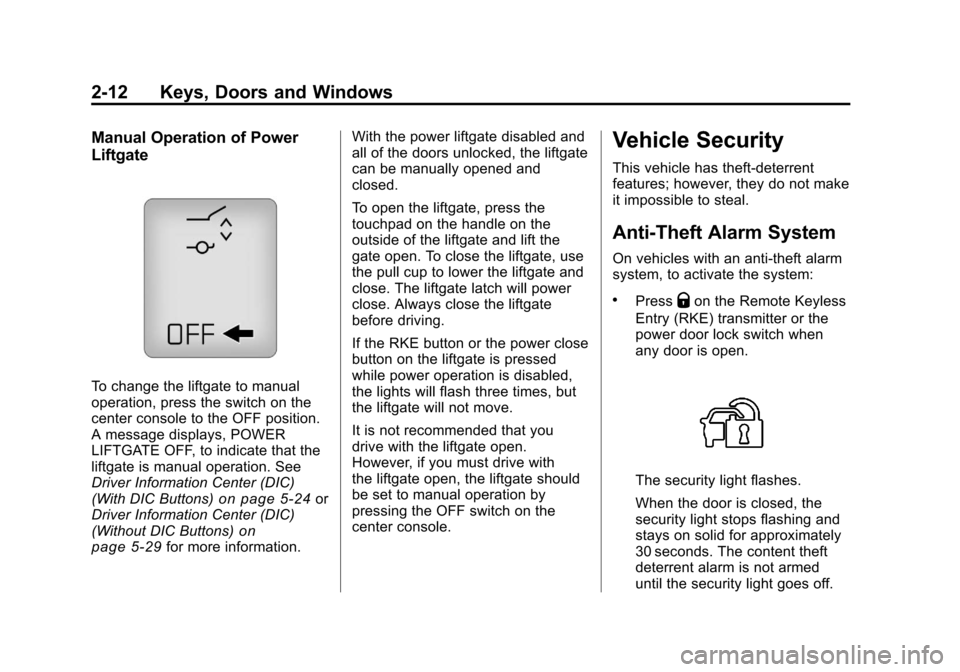
To change the liftgate to manual
operation, press the switch on the
center console to the OFF position.
A message displays, POWER
LIFTGATE OFF, to indicate that the
liftgate is manual operation. See
Driver Information Center (DIC)
(With DIC Buttons)
on page 5‑24or
Driver Information Center (DIC)
(Without DIC Buttons)
on
page 5‑29for more information. With the power liftgate disabled and
all of the doors unlocked, the liftgate
can be manually opened and
closed.
To open the liftgate, press the
touchpad on the handle on the
outside of the liftgate and lift the
gate open. To close the liftgate, use
the pull cup to lower the liftgate and
close. The liftgate latch will power
close. Always close the liftgate
before driving.
If the RKE button or the power close
button on the liftgate is pressed
while power operation is disabled,
the lights will flash three times, but
the liftgate will not move.
It is not recommended that you
drive with the liftgate open.
However, if you must drive with
the liftgate open, the liftgate should
be set to manual operation by
pressing the OFF switch on the
center console.
Vehicle Security
This vehicle has theft-deterrent
features; however, they do not make
it impossible to steal.
Anti-Theft Alarm System
On vehicles with an anti-theft alarm
system, to activate the system:
.PressQon the Remote Keyless
Entry (RKE) transmitter or the
power door lock switch when
any door is open.
The security light flashes.
When the door is closed, the
security light stops flashing and
stays on solid for approximately
30 seconds. The content theft
deterrent alarm is not armed
until the security light goes off.
Page 45 of 454
Black plate (13,1)Chevrolet Traverse Owner Manual - 2011
Keys, Doors and Windows 2-13
If the delayed locking feature is
active, the alarm is not activated
until all doors are closed and the
security light goes off.
.PressQwhen the driver door is
closed. The security light comes
on solid for approximately
30 seconds and then goes off.
The content theft deterrent alarm
is not armed until the security
light goes off.
The theft-deterrent system will not
activate if the doors are locked with
the vehicle's key or the manual
door lock.
If a locked door is opened without
using the RKE transmitter, a ten
second pre-alarm occurs. The horn
chirps and the lights flash. If the key
is not placed in the ignition and
turned to START or the door is not
unlocked by pressing
Qduring the
ten second pre-alarm, the alarm
goes off. The headlamps flash and
the horn sounds for about 30 seconds, then turns off to save
the battery power.
The vehicle can be started with the
correct ignition key if the alarm has
been set off.
To avoid setting off the alarm by
accident:
.Lock the vehicle with the door
key after the doors are closed.
.Unlock the door with the RKE
transmitter. Unlocking a door any
other way sets off the alarm if
the system has been armed.
Press
Kor place the key in the
ignition and turn it to START to turn
off the alarm.
Testing the Alarm
To test the alarm:
1. From inside the vehicle, lower the driver side window and open
the driver door.
2. Press
Q. 3. Get out of the vehicle, close the
door and wait for the security
light to go out.
4. Then reach in through the window, unlock the door with the
manual door lock and open the
door. This should set off the
alarm.
If the alarm does not sound when it
should, but the vehicle's headlamps
flash, check to see if the horn
works. The horn fuse may be blown.
To replace the fuse, see Fuses and
Circuit Breakers on page 10‑32.
If the alarm does not sound or the
vehicle's headlamps do not flash,
see your dealer for service.
Page 46 of 454
Black plate (14,1)Chevrolet Traverse Owner Manual - 2011
2-14 Keys, Doors and Windows
Immobilizer
SeeRadio Frequency Statementon
page 13‑19for information regarding
Part 15 of the Federal
Communications Commission (FCC)
rules and Industry Canada
Standards RSS-210/220/310.
Immobilizer Operation
This vehicle has PASS-Key®III+
(Personalized Automotive Security
System) theft-deterrent system.
PASS-Key
®III+ is a passive
theft-deterrent system.
The system is automatically armed
when the key is removed from the
ignition.
The system is automatically
disarmed when the key is turned to
ON/RUN, ACC/ACCESSORY or
START from the LOCK/OFF
position. You do not have to manually arm or
disarm the system.
The security light comes on if there
is a problem with arming or
disarming the theft-deterrent
system.
When the PASS-Key
®III+ system
senses an incorrect key, the vehicle
does not start. Anyone using a
trial-and-error method to start the
vehicle will be discouraged because
of the high number of electrical
key codes.
If the engine does not start and the
security light on the instrument
panel comes on when trying to start
the vehicle, there may be a problem
with your theft-deterrent system.
Turn the ignition off and try again.
If the engine still does not start, and
the key appears to be undamaged,
try another ignition key and check
the fuses. See Fuses and Circuit
Breakers
on page 10‑32for additional information. If the engine
still does not start with the other key,
the vehicle needs service. If the
vehicle does start, the first key may
be faulty. See your dealer who can
service the PASS-Key
®III+ to have
a new key made. In an emergency,
contact Roadside Assistance. See
Roadside Assistance Program
on
page 13‑8.
It is possible for the PASS-Key
®III+
decoder to learn the transponder
value of a new or replacement key.
Up to 10 keys may be programmed
to the vehicle. The following
procedure is for programming
additional keys only. If all the
currently programmed keys are lost
or do not operate, you must see
your dealer or a locksmith who can
service PASS-Key
®III+ to have
keys made and programmed
to the system.
Page 47 of 454
Black plate (15,1)Chevrolet Traverse Owner Manual - 2011
Keys, Doors and Windows 2-15
See your dealer or a locksmith who
can service PASS-Key®III+ to get a
new key blank that is cut exactly
as the ignition key that operates
the system.
To program the new additional key:
1. Verify that the new key has a
1
stamped on it.
2. Insert the already programmed key in the ignition and start the
engine. If the engine does not
start, see your dealer for service.
3. After the engine has started, turn the key to LOCK/OFF, and
remove the key. 4. Insert the key to be programmed
and turn it to the ON/RUN
position within five seconds of
the original key being turned to
the LOCK/OFF position.
The security light turns off once
the key has been programmed.
5. Repeat Steps 1 through 4 if additional keys are to be
programmed.
If the PASS-Key
®III+ key is lost or
damaged, see your dealer or a
locksmith to have a new key made. The SERVICE THEFT
DETERRENT SYSTEM message
displays on the Driver Information
Center (DIC) when there is a
problem with the theft-deterrent
system. See
Anti-Theft Alarm
System Messages
on page 5‑37for additional information.
Do not leave the key or device that
disarms or deactivates the theft
deterrent system in the vehicle.
Page 50 of 454
Black plate (18,1)Chevrolet Traverse Owner Manual - 2011
2-18 Keys, Doors and Windows
Interior Mirrors
Manual Rearview Mirror
Adjust the inside rearview mirror
for a clear view of the area behind
your vehicle. To avoid glare of the
headlamps from behind, move the
lever to the right for nighttime use
and to the center for daytime use.
Vehicles with OnStar
®have three
additional control buttons located at
the bottom of the mirror. See your
dealer for more information about
OnStar and how to subscribe to it.
See the OnStar Owner's Guide for
more information about the services
OnStar provides.
Automatic Dimming
Rearview Mirror
The vehicle may have an automatic
dimming inside rearview mirror.
Automatic dimming reduces the
glare from the headlamps of the
vehicle behind you. The dimming feature comes on and the indicator
light illuminates each time the
ignition is turned to start.
O(On/Off):
Press to turn the
dimming feature on or off.
The vehicle may also have a Rear
Vision Camera (RVC). See Rear
Vision Camera (RVC)
on page 9‑36for more information.
If the vehicle has RVC, the
Obutton for turning the dimming
feature on or off will not be
available.
Vehicles with OnStar have three
additional control buttons for the
OnStar system. See your dealer for
more information about OnStar and
how to subscribe to it. See the
OnStar Owner Guide for more
information about the services
OnStar provides.
Cleaning the Mirror
Do not spray glass cleaner directly
on the mirror. Use a soft towel
dampened with water.
Windows
{WARNING
Leaving children, helpless adults,
or pets in a vehicle with the
windows closed is dangerous.
They can be overcome by the
extreme heat and suffer
permanent injuries or even death
from heat stroke. Never leave a
child, a helpless adult, or a pet
alone in a vehicle, especially with
the windows closed in warm or
hot weather.
Page 52 of 454
Black plate (20,1)Chevrolet Traverse Owner Manual - 2011
2-20 Keys, Doors and Windows
Express-Up/Express-Down
Windows
A window with the express‐up/down
feature allows it to be raised or
lowered without holding the switch.
Press or pull the window switch fully
and release it to activate the
express feature. The express mode
can be canceled by pressing or
pulling the switch.
Programming the Power
Windows
If the battery on the vehicle has
been recharged, disconnected,
or replaced, windows with the
express-up feature need to be
reprogrammed for this feature to
work. To program the window:
1. Close all doors with the ignitionin the ACC/ACCESSORY,
ON/RUN position, or when
Retained Accessory
Power (RAP) is active. See
Retained Accessory Power
(RAP) on page 9‑18. 2. Press and continue to hold the
window switch until the window
is fully open.
3. Pull up and hold the window switch to close the window.
Continue to hold it briefly after
the window is fully closed.
4. Repeat for each window that has the express-up feature.
Anti-Pinch Feature
The anti-pinch feature is on
windows with the express-up
feature. If an object is in the way of
the window as it is express-closing,
or in certain weather conditions like
severe icing, the window will stop
and open to a factory preset
position. The window functions
normally once the obstruction is
removed.
Window Lockout
o(Window Lockout): The window
lockout switch is located with the
power window switches on the
driver door armrest. This feature
prevents the rear windows from
being operated, except from the
driver position. Press the switch to
turn the lockout feature on or off.
An indicator light will come on to
show the lockout feature is on.
Page 63 of 454
Black plate (9,1)Chevrolet Traverse Owner Manual - 2011
Seats and Restraints 3-9
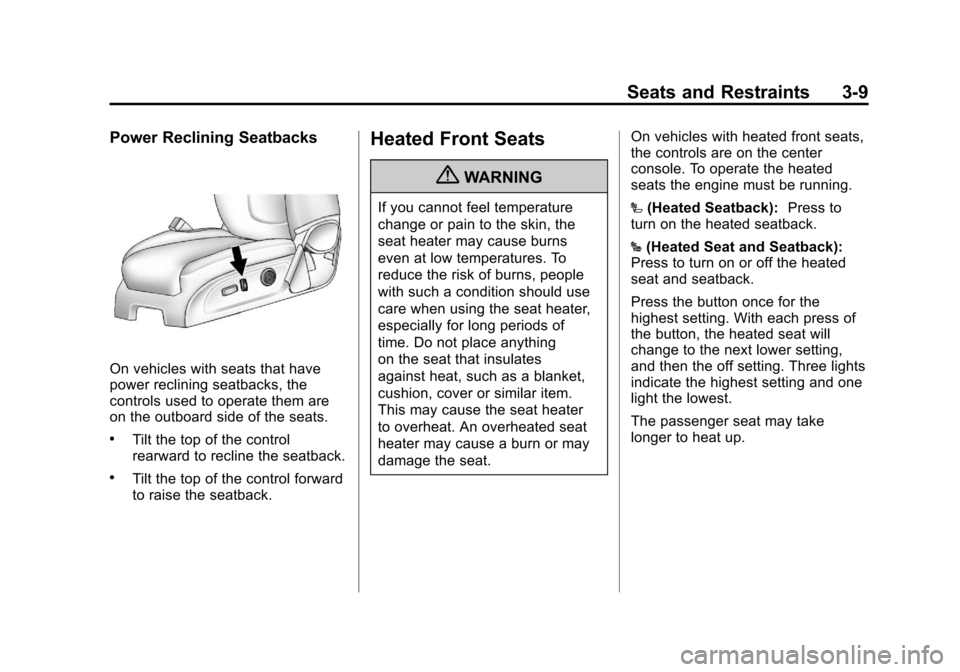
Power Reclining Seatbacks
On vehicles with seats that have
power reclining seatbacks, the
controls used to operate them are
on the outboard side of the seats.
.Tilt the top of the control
rearward to recline the seatback.
.Tilt the top of the control forward
to raise the seatback.
Heated Front Seats
{WARNING
If you cannot feel temperature
change or pain to the skin, the
seat heater may cause burns
even at low temperatures. To
reduce the risk of burns, people
with such a condition should use
care when using the seat heater,
especially for long periods of
time. Do not place anything
on the seat that insulates
against heat, such as a blanket,
cushion, cover or similar item.
This may cause the seat heater
to overheat. An overheated seat
heater may cause a burn or may
damage the seat.On vehicles with heated front seats,
the controls are on the center
console. To operate the heated
seats the engine must be running.
I
(Heated Seatback): Press to
turn on the heated seatback.
J (Heated Seat and Seatback):
Press to turn on or off the heated
seat and seatback.
Press the button once for the
highest setting. With each press of
the button, the heated seat will
change to the next lower setting,
and then the off setting. Three lights
indicate the highest setting and one
light the lowest.
The passenger seat may take
longer to heat up.
Page 64 of 454
Black plate (10,1)Chevrolet Traverse Owner Manual - 2011
3-10 Seats and Restraints
Remote Start Heated Seats
When it is cold outside, the heated
seats may turn on automatically
during a remote vehicle start. The
heated seats will be canceled when
the ignition is turned on. Press the
desired heated seat button to use
the heated seats after the vehicle
is started.
The heated seat button lights will
not turn on during a remote start.
The temperature of an unoccupied
seat may be reduced.
SeeRemote Vehicle Start
on
page 2‑5for more information.
Heated and Ventilated
Front Seats
{WARNING
If you cannot feel temperature
change or pain to the skin, the
seat heater may cause burns
even at low temperatures. See
the Warning under Heated Front
Seats on page 3‑9.
On vehicles with the heated and
ventilated seat feature, the controls
are on the center console. To
operate the heated seats the
engine must be running.
H(Ventilated Seat): Press to
ventilate the entire seat.
J(Heated Seat and Seatback):
Press to heat the entire seat.
Press the button once for the
highest setting. With each press of
the button, the seat will change to
the next lower setting, and then to the off setting. The lights indicate
three for the highest setting and one
for the lowest.
The passenger heated seat may
take longer to heat up.
The heated and ventilated seats are
canceled after the ignition is
turned off.
Remote Start Heated Seats
When it is cold outside, the heated
seats may turn on automatically
during a remote vehicle start. The
heated seats will be canceled when
the ignition is turned on. Press the
heated seat button to use the
heated seats after the vehicle is
started.
The heated seat button lights will
not turn on during a remote start.
The temperature of an unoccupied
seat may be reduced.
See
Remote Vehicle Start
on
page 2‑5for more information.
Page 69 of 454
Black plate (15,1)Chevrolet Traverse Owner Manual - 2011
Seats and Restraints 3-15
Removing the Third Row Seats
1. Remove the cargo managementsystem, if it is in the vehicle. See
Cargo Management System
on
page 4‑4.
2. Remove anything on or under the seat.
Notice: Folding a rear seat with
the safety belts still fastened may
cause damage to the seat or the
safety belts. Always unbuckle the
safety belts and return them to
their normal stowed position
before folding a rear seat.
3. Fold the seatback down. See “Folding the Seatback” earlier in
this section. 4. Remove the rear bolts located
on the floor on each side of
the seat.
5. Remove the seat by tilting it slightly upward, and then pulling
it out of the rear of the vehicle in
one motion.
6. Replace the bolts in the floor holes for storage.
Installing the Third Row Seats
1. Before installing the seat the
seatback must be folded
forward. See “Folding the
Seatback” earlier in this section.
The seats must be placed in the
proper locations to attach
correctly. The wider seat must
be installed on the driver side
and the narrower seat on the
passenger side. Remove the
bolts from the holes in the floor
before installing the seats. 2. Place the seat on the vehicle
floor so that the front seat hooks
are on the vehicle bars.
3. Reinstall the bolts, and torque to 55Y (41 lb ft). Pull up on the
seat to make sure it is locked
in place.
4. Raise the seatback to its upright position. Push and pull on the
seatback to make sure it is
locked into place.
5. Reconnect the center safety belt mini-latch to the mini-buckle.
Do not let it twist.