wheel CHEVROLET TRAVERSE 2011 1.G Owners Manual
[x] Cancel search | Manufacturer: CHEVROLET, Model Year: 2011, Model line: TRAVERSE, Model: CHEVROLET TRAVERSE 2011 1.GPages: 454, PDF Size: 6.56 MB
Page 2 of 454

Black plate (2,1)Chevrolet Traverse Owner Manual - 2011
2011 Chevrolet Traverse Owner ManualM
Vehicle Care. . . . . . . . . . . . . . . . . 10-1
General Information . . . . . . . . . . 10-2
Vehicle Checks . . . . . . . . . . . . . . . 10-4
Headlamp Aiming . . . . . . . . . . . 10-29
Bulb Replacement . . . . . . . . . . 10-29
Electrical System . . . . . . . . . . . . 10-31
Wheels and Tires . . . . . . . . . . . 10-38
Jump Starting . . . . . . . . . . . . . . . 10-81
Towing . . . . . . . . . . . . . . . . . . . . . . 10-85
Appearance Care . . . . . . . . . . . 10-89
Service and Maintenance . . . 11-1
General Information . . . . . . . . . . 11-1
Scheduled Maintenance . . . . . . 11-2
Recommended Fluids,
Lubricants, and Parts . . . . . . . 11-6
Maintenance Records . . . . . . . . 11-9 Technical Data
. . . . . . . . . . . . . . . 12-1
Vehicle Identification . . . . . . . . . 12-1
Vehicle Data . . . . . . . . . . . . . . . . . . 12-2
Customer Information . . . . . . . 13-1
Customer Information . . . . . . . . 13-1
Reporting Safety Defects . . . . 13-16
Vehicle Data Recording and
Privacy . . . . . . . . . . . . . . . . . . . . 13-17
Index . . . . . . . . . . . . . . . . . . . . . i-1
Page 5 of 454
Black plate (5,1)Chevrolet Traverse Owner Manual - 2011
Introduction v
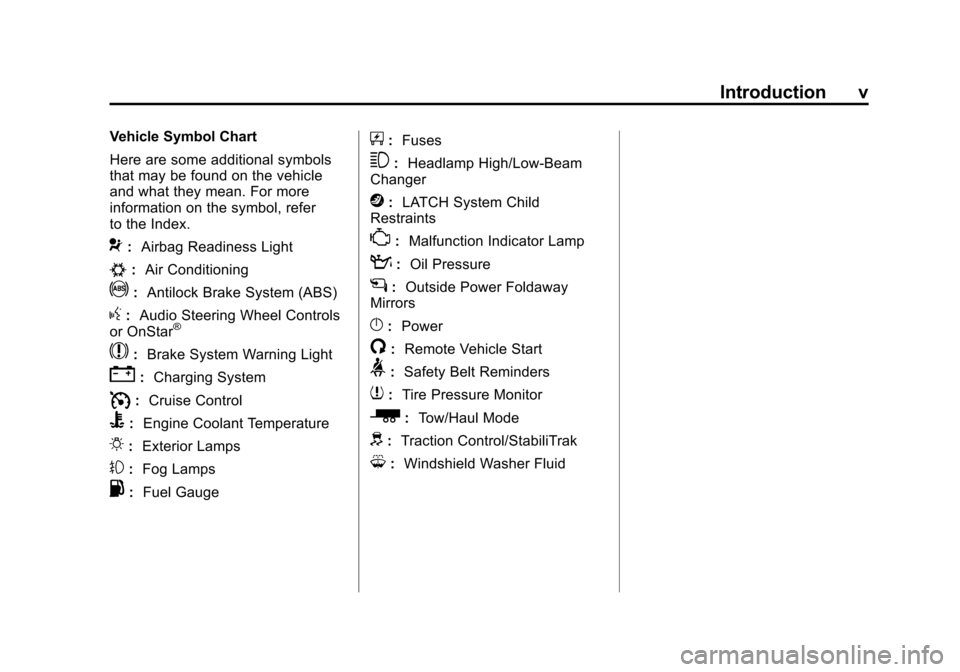
Vehicle Symbol Chart
Here are some additional symbols
that may be found on the vehicle
and what they mean. For more
information on the symbol, refer
to the Index.
9:Airbag Readiness Light
#:Air Conditioning
!:Antilock Brake System (ABS)
g:Audio Steering Wheel Controls
or OnStar®
$: Brake System Warning Light
":Charging System
I:Cruise Control
B: Engine Coolant Temperature
O:Exterior Lamps
#:Fog Lamps
.: Fuel Gauge
+:Fuses
3: Headlamp High/Low-Beam
Changer
j: LATCH System Child
Restraints
*: Malfunction Indicator Lamp
::Oil Pressure
g:Outside Power Foldaway
Mirrors
}: Power
/:Remote Vehicle Start
>:Safety Belt Reminders
7:Tire Pressure Monitor
_: Tow/Haul Mode
d:Traction Control/StabiliTrak
M:Windshield Washer Fluid
Page 7 of 454
Black plate (1,1)Chevrolet Traverse Owner Manual - 2011
In Brief 1-1
In Brief
Instrument Panel
Instrument Panel . . . . . . . . . . . . . . 1-2
Initial Drive Information
Initial Drive Information . . . . . . . . 1-4
Remote Keyless Entry (RKE)System . . . . . . . . . . . . . . . . . . . . . . 1-4
Remote Vehicle Start . . . . . . . . . 1-4
Door Locks . . . . . . . . . . . . . . . . . . . 1-5
Liftgate . . . . . . . . . . . . . . . . . . . . . . . . 1-5
Windows . . . . . . . . . . . . . . . . . . . . . . 1-6
Seat Adjustment . . . . . . . . . . . . . . 1-6
Memory Features . . . . . . . . . . . . . 1-7
Second Row Seats . . . . . . . . . . . 1-8
Third Row Seats . . . . . . . . . . . . . . 1-9
Heated Seats . . . . . . . . . . . . . . . . . 1-9
Heated and Ventilated Seats . . . . . . . . . . . . . . . . . . . . . . . . 1-9
Head Restraint Adjustment . . . . 1-9
Safety Belt . . . . . . . . . . . . . . . . . . . 1-10 Sensing System for
Passenger Airbag . . . . . . . . . . 1-10
Mirror Adjustment . . . . . . . . . . . . 1-11
Steering Wheel Adjustment . . . . . . . . . . . . . . . . . 1-12
Interior Lighting . . . . . . . . . . . . . . 1-12
Exterior Lighting . . . . . . . . . . . . . 1-13
Windshield Wiper/Washer . . . . 1-13
Climate Controls . . . . . . . . . . . . . 1-14
Transmission . . . . . . . . . . . . . . . . 1-16
Vehicle Features
Radio(s) . . . . . . . . . . . . . . . . . . . . . 1-16
Satellite Radio . . . . . . . . . . . . . . . 1-17
Portable Audio Devices . . . . . . 1-18
Bluetooth
®. . . . . . . . . . . . . . . . . . . 1-18
Steering Wheel Controls . . . . . 1-18
Cruise Control . . . . . . . . . . . . . . . 1-19
Navigation System . . . . . . . . . . . 1-19
Driver Information Center
(DIC) (With DIC Buttons) . . . 1-19
Storage Compartments . . . . . . 1-20
Power Outlets . . . . . . . . . . . . . . . 1-20
Sunroof . . . . . . . . . . . . . . . . . . . . . . 1-21
Performance and Maintenance
StabiliTrak®System . . . . . . . . . 1-21
Tire Pressure Monitor . . . . . . . . 1-21
Tire Sealant and Compressor Kit . . . . . . . . . . . . . 1-22
Engine Oil Life System . . . . . . 1-22
Driving for Better Fuel
Economy . . . . . . . . . . . . . . . . . . . 1-23
Roadside Assistance Program . . . . . . . . . . . . . . . . . . . . 1-23
OnStar
®. . . . . . . . . . . . . . . . . . . . . 1-24
Page 9 of 454

Black plate (3,1)Chevrolet Traverse Owner Manual - 2011
In Brief 1-3
A. Turn and Lane‐Change Lever.See Turn and Lane-Change
Signals on page 6‑4.
Windshield Wiper/Washer
on
page 5‑5.
B. Instrument Cluster
on
page 5‑11.
C. Steering Wheel Controls
on
page 5‑2.
D. Instrument Panel Storage
on
page 4‑1.
E. AM-FM Radio on page 7‑6.
F. Air Vents on page 8‑12.
G. Exterior Lamp Controls
on
page 6‑1.
H. Instrument Panel Illumination
Control on page 6‑4.
I. Data Link Connector (DLC). See Malfunction Indicator Lamp
on page 5‑16. J.
Cruise Control on page 9‑32.
K. Steering Wheel Adjustment
on
page 5‑2.
L. Horn on page 5‑4.
M. Driver Information Center (DIC) Buttons (If Equipped). See
Driver Information Center (DIC)
(With DIC Buttons)
on
page 5‑24or Driver Information
Center (DIC) (Without DIC
Buttons) on page 5‑29.
N. Climate Control Systems
on
page 8‑1(If Equipped).
Dual Automatic Climate Control
System
on page 8‑4(If Equipped).
O. Shift Lever. See Shifting Into
Park on page 9‑20.
P. Power Outlets on page 5‑8. Q.
Rear Window Wiper/Washer
on
page 5‑6.
Traction Control System (TCS)
Disable Button. See
StabiliTrak
®Systemon
page 9‑30.
Tow/Haul Mode
on page 9‑27(If Equipped) .
Power Liftgate. See Liftgate
on
page 2‑9(If Equipped).
R. Heated Front Seats
on
page 3‑9.
S. Hazard Warning Flashers
on
page 6‑3.
T. Passenger Airbag Status
Indicator
on page 5‑15(If Equipped).
U. Glove Box on page 4‑1.
Page 18 of 454
Black plate (12,1)Chevrolet Traverse Owner Manual - 2011
1-12 In Brief
Steering Wheel
Adjustment
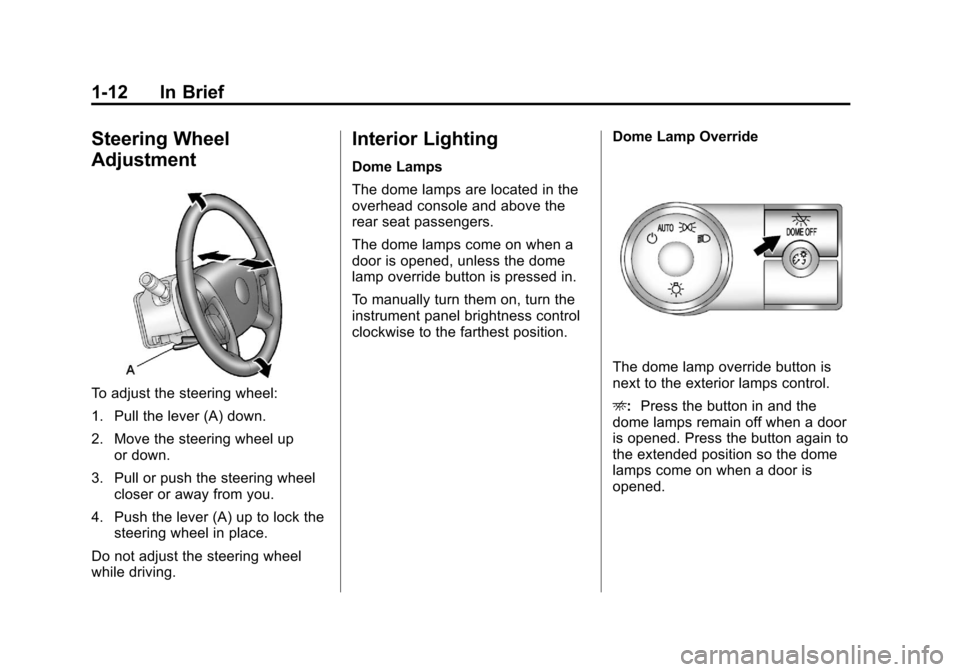
To adjust the steering wheel:
1. Pull the lever (A) down.
2. Move the steering wheel upor down.
3. Pull or push the steering wheel closer or away from you.
4. Push the lever (A) up to lock the steering wheel in place.
Do not adjust the steering wheel
while driving.
Interior Lighting
Dome Lamps
The dome lamps are located in the
overhead console and above the
rear seat passengers.
The dome lamps come on when a
door is opened, unless the dome
lamp override button is pressed in.
To manually turn them on, turn the
instrument panel brightness control
clockwise to the farthest position. Dome Lamp Override
The dome lamp override button is
next to the exterior lamps control.
E:
Press the button in and the
dome lamps remain off when a door
is opened. Press the button again to
the extended position so the dome
lamps come on when a door is
opened.
Page 19 of 454
Black plate (13,1)Chevrolet Traverse Owner Manual - 2011
In Brief 1-13
Reading Lamps
Press the button near each lamp to
turn them on or off.
For more information, see:
.Dome Lamps on page 6‑5.
.Instrument Panel Illumination
Control on page 6‑4.
Exterior Lighting
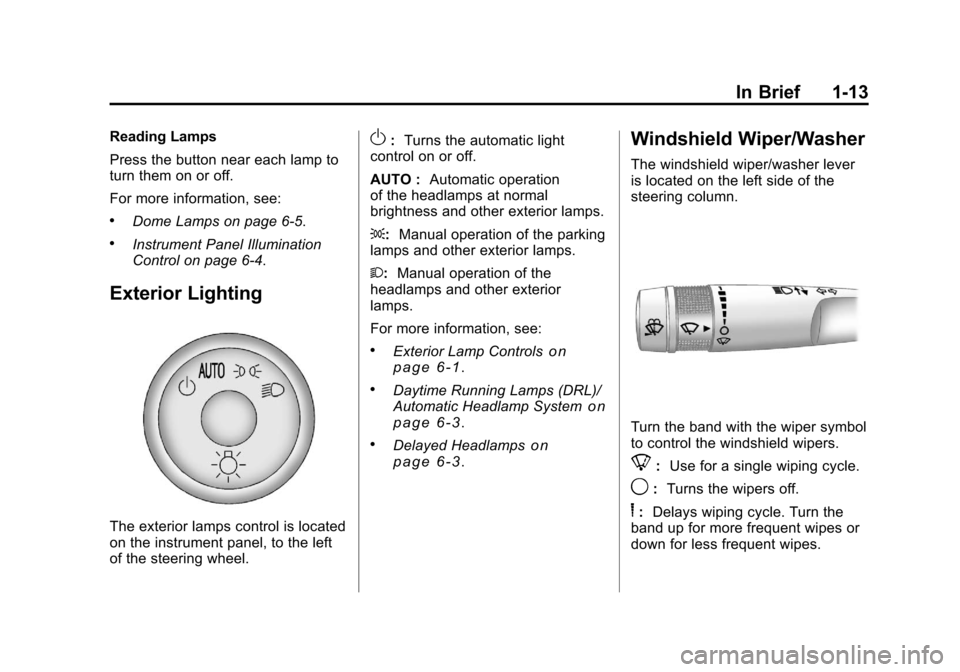
The exterior lamps control is located
on the instrument panel, to the left
of the steering wheel.
O:Turns the automatic light
control on or off.
AUTO : Automatic operation
of the headlamps at normal
brightness and other exterior lamps.
;: Manual operation of the parking
lamps and other exterior lamps.
2: Manual operation of the
headlamps and other exterior
lamps.
For more information, see:
.Exterior Lamp Controlson
page 6‑1.
.Daytime Running Lamps (DRL)/
Automatic Headlamp Systemon
page 6‑3.
.Delayed Headlampson
page 6‑3.
Windshield Wiper/Washer
The windshield wiper/washer lever
is located on the left side of the
steering column.
Turn the band with the wiper symbol
to control the windshield wipers.
8: Use for a single wiping cycle.
9:Turns the wipers off.
6:Delays wiping cycle. Turn the
band up for more frequent wipes or
down for less frequent wipes.
Page 24 of 454
Black plate (18,1)Chevrolet Traverse Owner Manual - 2011
1-18 In Brief
Portable Audio Devices
This vehicle may have an auxiliary
input located on the radio faceplate
and a USB port located in the center
console. External devices such as
iPod
®, laptop computers, MP3
players, CD changers, USB storage
device, etc. can be connected to the
auxiliary port using a 3.5 mm (1/8 in)
input jack or the USB port
depending on the audio system.
See Auxiliary Devices
on
page 7‑33.
Bluetooth®
The Bluetooth®system allows users
with a Bluetooth-enabled cell phone
to make and receive hands-free
calls using the vehicle’s audio
system, microphone, and controls.
The Bluetooth-enabled cell phone
must be paired with the in-vehicle
Bluetooth system before it can be
used in the vehicle. Not all phones
will support all functions.
See Bluetooth on page 7‑46.
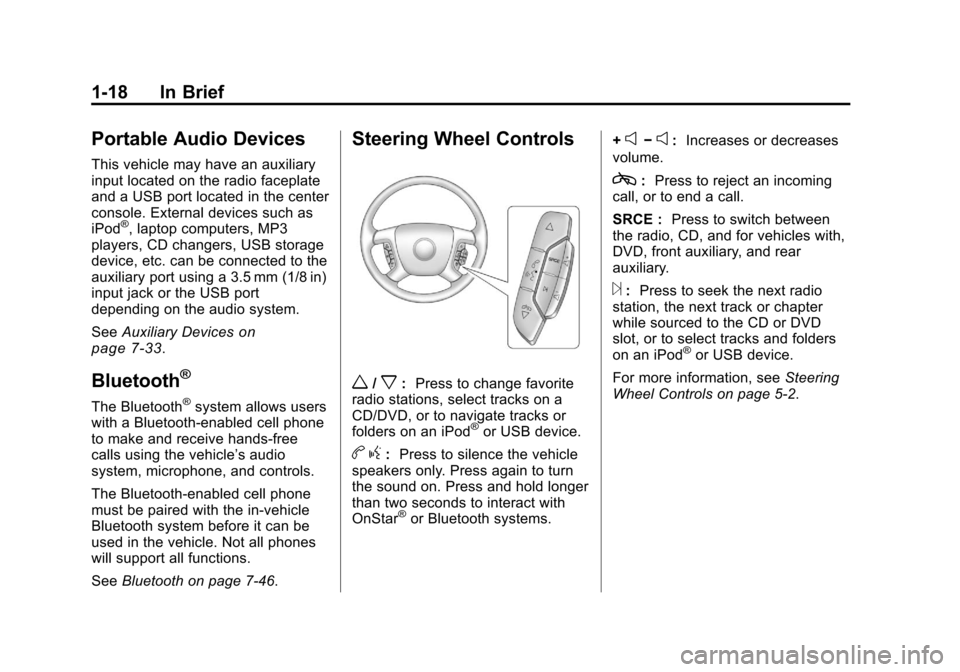
Steering Wheel Controls
w/x:Press to change favorite
radio stations, select tracks on a
CD/DVD, or to navigate tracks or
folders on an iPod
®or USB device.
b g: Press to silence the vehicle
speakers only. Press again to turn
the sound on. Press and hold longer
than two seconds to interact with
OnStar
®or Bluetooth systems. +
e−e:
Increases or decreases
volume.
c: Press to reject an incoming
call, or to end a call.
SRCE : Press to switch between
the radio, CD, and for vehicles with,
DVD, front auxiliary, and rear
auxiliary.
¨: Press to seek the next radio
station, the next track or chapter
while sourced to the CD or DVD
slot, or to select tracks and folders
on an iPod
®or USB device.
For more information, see Steering
Wheel Controls on page 5‑2.
Page 27 of 454
Black plate (21,1)Chevrolet Traverse Owner Manual - 2011
In Brief 1-21
Sunroof
The ignition must be in ON/RUN or
ACC/ACCESSORY to operate the
sunroof and power sunshade. See
Retained Accessory Power (RAP)
on page 9‑18.
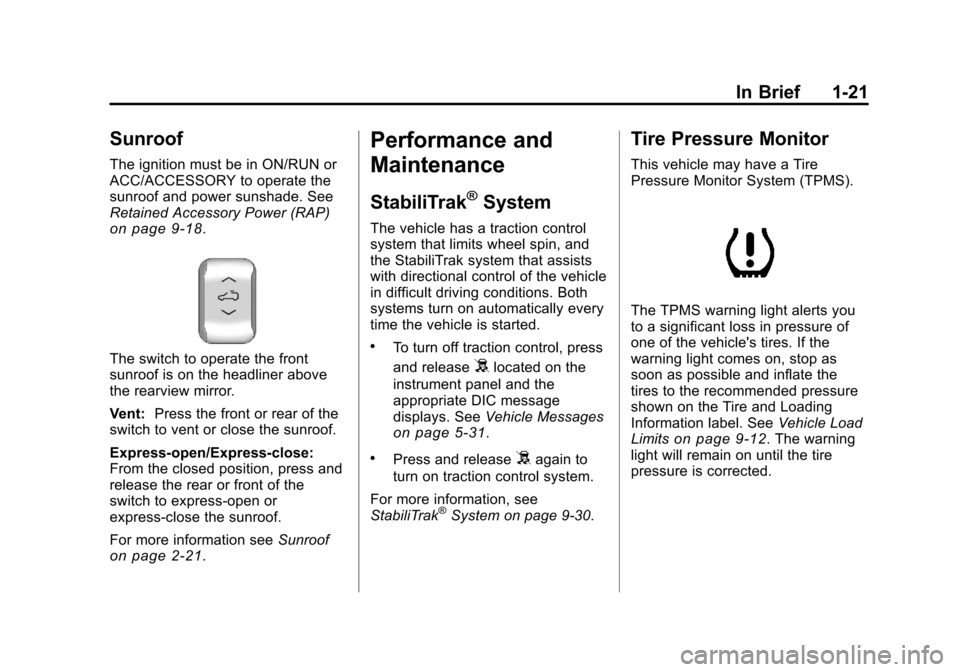
The switch to operate the front
sunroof is on the headliner above
the rearview mirror.
Vent:Press the front or rear of the
switch to vent or close the sunroof.
Express-open/Express-close:
From the closed position, press and
release the rear or front of the
switch to express-open or
express-close the sunroof.
For more information see Sunroof
on page 2‑21.
Performance and
Maintenance
StabiliTrak®System
The vehicle has a traction control
system that limits wheel spin, and
the StabiliTrak system that assists
with directional control of the vehicle
in difficult driving conditions. Both
systems turn on automatically every
time the vehicle is started.
.To turn off traction control, press
and release
5located on the
instrument panel and the
appropriate DIC message
displays. See Vehicle Messages
on page 5‑31.
.Press and release5again to
turn on traction control system.
For more information, see
StabiliTrak
®System on page 9‑30.
Tire Pressure Monitor
This vehicle may have a Tire
Pressure Monitor System (TPMS).
The TPMS warning light alerts you
to a significant loss in pressure of
one of the vehicle's tires. If the
warning light comes on, stop as
soon as possible and inflate the
tires to the recommended pressure
shown on the Tire and Loading
Information label. See Vehicle Load
Limits
on page 9‑12. The warning
light will remain on until the tire
pressure is corrected.
Page 31 of 454
Black plate (25,1)Chevrolet Traverse Owner Manual - 2011
In Brief 1-25
OnStar service can’t work unless
your vehicle is in a place where
OnStar has an agreement with a
wireless service provider for service
in that area, and the wireless
service provider has coverage,
network capacity, reception, and
technology compatible with OnStar's
service. Service involving location
information about your vehicle can’t
work unless GPS signals are
available, unobstructed, and
compatible with the OnStar
hardware. The vehicle has to have a
working electrical system and
adequate battery power for the
OnStar equipment to operate.
OnStar service may not work if the
OnStar equipment isn’t properly
installed or you haven’t maintained
it and your vehicle is in good
working order and in compliance
with all government regulations.
If you try to add, connect, or modifyany equipment or software in your
vehicle, OnStar service may not
work. Other problems OnStar can’t
control may prevent service to you,
such as hills, tall buildings, tunnels,
weather, electrical system design
and architecture of your vehicle,
damage to important parts of your
vehicle in a crash, or wireless phone
network congestion or jamming.
See
Radio Frequency Statement
on
page 13‑19for information
regarding Part 15 of the Federal
Communications Commission (FCC)
rules and Industry Canada
Standards RSS-210/220/310.
OnStar Steering Wheel
Controls
This vehicle may have a Talk/Mute
button that can be used to interact
with OnStar Hands-Free calling.
See Steering Wheel Controls
on
page 5‑2for more information. On some vehicles, the mute button
can be used to dial numbers into
voice mail systems, or to dial phone
extensions. See the OnStar Owner's
Guide for more information.
Your Responsibility
Increase the volume of the radio if
the OnStar advisor cannot be heard.
If the light next to the OnStar
buttons is red, the system may
not be functioning properly. Push
the
Qbutton and request a vehicle
diagnostic. If the light appears clear
(no light appears), your OnStar
subscription has expired and all
services have been deactivated.
Push the
Qbutton to confirm that
the OnStar equipment is active.
Page 71 of 454
Black plate (17,1)Chevrolet Traverse Owner Manual - 2011
Seats and Restraints 3-17
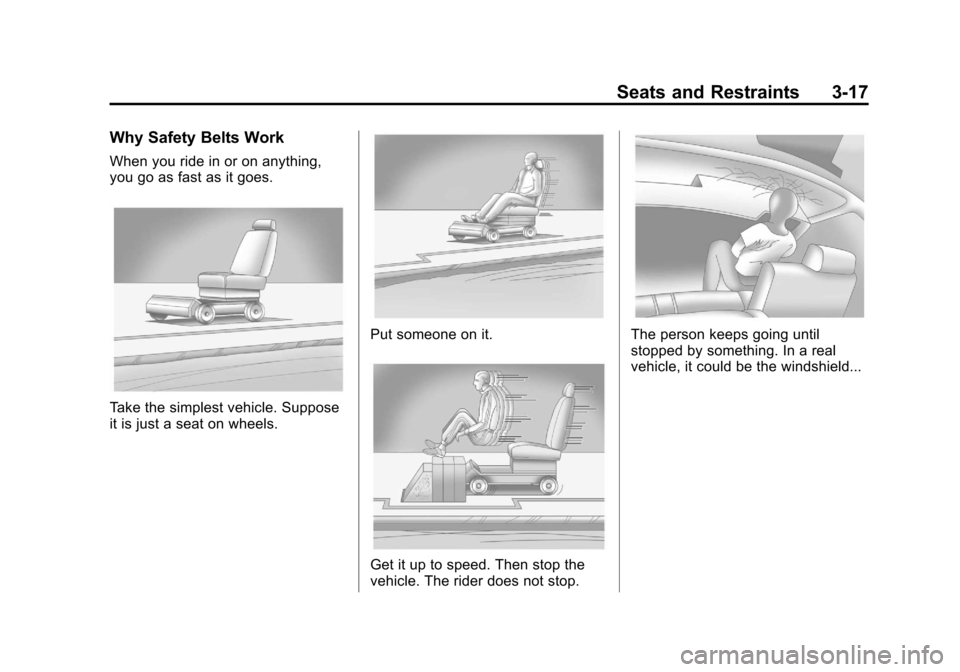
Why Safety Belts Work
When you ride in or on anything,
you go as fast as it goes.
Take the simplest vehicle. Suppose
it is just a seat on wheels.
Put someone on it.
Get it up to speed. Then stop the
vehicle. The rider does not stop.
The person keeps going until
stopped by something. In a real
vehicle, it could be the windshield...