buttons CHEVROLET TRAVERSE 2013 1.G Owner's Guide
[x] Cancel search | Manufacturer: CHEVROLET, Model Year: 2013, Model line: TRAVERSE, Model: CHEVROLET TRAVERSE 2013 1.GPages: 444
Page 169 of 444
Black plate (51,1)Chevrolet Traverse Owner Manual - 2013 - CRC 2nd Edition - 11/13/12
Instruments and Controls 5-51
To program the remaining two
Universal Remote system buttons,
begin with Step 1 of“Programming
the Universal Remote System.”
Gate Operator and Canadian
Programming
If you have questions or need help
programming the Universal Remote
system, call 1-800-355-3515 or go
to www.homelink.com.
Canadian radio-frequency laws
require transmitter signals to time
out or quit after several seconds of
transmission. This may not be long
enough for the Universal Remote
system to pick up the signal during
programming. Similarly, some U.S.
gate operators are manufactured to
time out in the same manner. If you live in Canada, or you are
having difficulty programming a gate
operator or garage door opener by
using the
“Programming the
Universal Remote System”
procedures, regardless of where
you live, replace Step 2 under
“Programming the Universal Remote
System” with the following:
Continue to press and hold the
Universal Remote system button
while you press and release every
two seconds (cycle) the hand-held
transmitter button until the
frequency signal has been
successfully accepted by the
Universal Remote system. The
Universal Remote system indicator
light will flash slowly at first and then
rapidly. Proceed with Step 3 under
“Programming the Universal Remote
System” to complete.
Universal Remote System
Operation
Using Universal Remote
Press and hold the appropriate
Universal Remote button for at least
half of a second. The indicator light
will come on while the signal is
being transmitted.
Page 170 of 444
Black plate (52,1)Chevrolet Traverse Owner Manual - 2013 - CRC 2nd Edition - 11/13/12
5-52 Instruments and Controls
Erasing Universal Remote
Buttons
All programmed buttons should be
erased when the vehicle is sold or
the lease ends.
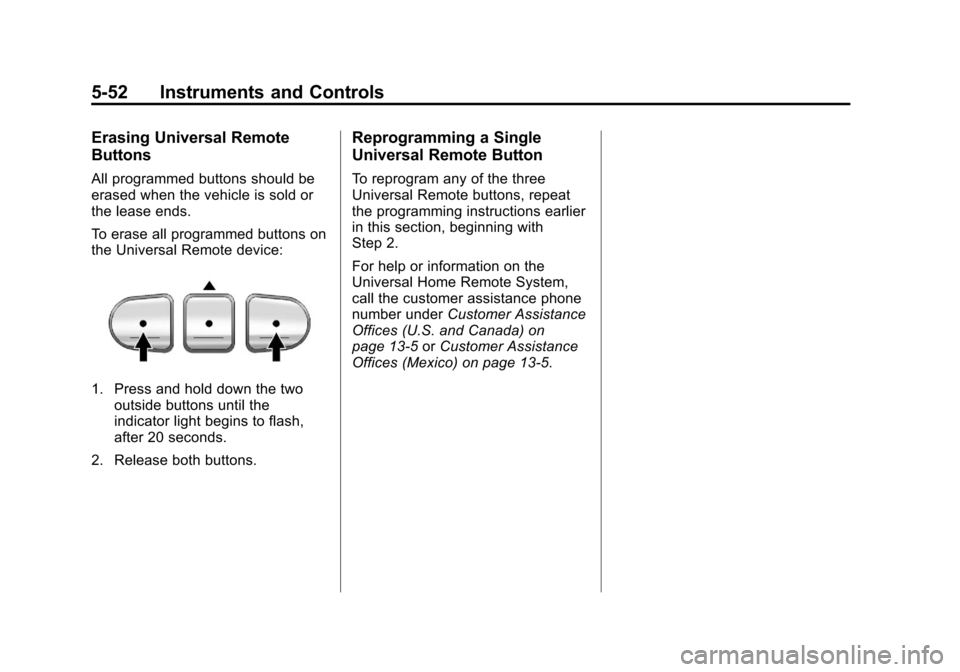
To erase all programmed buttons on
the Universal Remote device:
1. Press and hold down the twooutside buttons until the
indicator light begins to flash,
after 20 seconds.
2. Release both buttons.
Reprogramming a Single
Universal Remote Button
To reprogram any of the three
Universal Remote buttons, repeat
the programming instructions earlier
in this section, beginning with
Step 2.
For help or information on the
Universal Home Remote System,
call the customer assistance phone
number under Customer Assistance
Offices (U.S. and Canada) on
page 13‑5 orCustomer Assistance
Offices (Mexico) on page 13‑5.
Page 173 of 444
Black plate (3,1)Chevrolet Traverse Owner Manual - 2013 - CRC 2nd Edition - 11/13/12
Lighting 6-3
The DRL system makes the
low-beam headlamps come on at a
reduced brightness when the
following conditions are met:
.The ignition is in the ON/RUN
position.
.The exterior lamp control is
in AUTO.
.The engine is running.
When the DRL are on, the regular
headlamps, taillamps, sidemarker,
and other lamps will not be on. The
instrument cluster will also not be lit.
The headlamps automatically
change from DRL to the regular
headlamps depending on the
darkness of the surroundings. The
other lamps that come on with the
headlamps will also come on.
When it is bright enough outside,
the headlamps will go off and the
DRL will come on. When the DRLs are active and a
turn signal is operated, the DRL on
the side the turn signal is activated,
will turn off until the turn signal is
turned off.
The regular headlamp system
should be turned on when needed.
Do not cover the light sensor on top
of the instrument panel because it
works with the DRL.
Lights On with Wipers
If the windshield wipers are
activated in daylight with the engine
on, and the exterior lamp control is
in AUTO, the headlamps, parking
lamps, and other exterior lamps
come on. The transition time for the
lamps coming on varies based on
wiper speed. When the wipers are
not operating, these lamps turn off.
Move the exterior lamp control to
P
or;to disable this feature.
Delayed Headlamps
Delayed headlamps provide a
period of exterior lighting as you
leave the area around the vehicle.
This feature is activated when the
headlamps are on due to the
automatic headlamps control
feature, and when the ignition is
turned off. The headlamps remain
on until the exterior lamp control is
moved to the parking lamps position
or until the pre-selected delayed
headlamp lighting period has ended.
If the ignition is turned off with the
exterior lamp control in the
;or
5position, the delayed headlamps
cycle will not occur.
To disable the delayed headlamps
feature or change the time of delay,
see Vehicle Personalization (With
DIC Buttons) on page 5‑41.
Page 179 of 444
Black plate (9,1)Chevrolet Traverse Owner Manual - 2013 - CRC 2nd Edition - 11/13/12
Lighting 6-9
A high electrical load occurs when
several of the following are on, such
as: headlamps, high beams, fog
lamps, rear window defogger,
climate control fan at high speed,
heated seats, engine cooling fans,
trailer loads, and loads plugged into
accessory power outlets.
EPM works to prevent excessive
discharge of the battery. It does this
by balancing the generator's output
and the vehicle's electrical needs.
It can increase engine idle speed to
generate more power whenever
needed. It can temporarily reduce
the power demands of some
accessories.Normally, these actions occur in
steps or levels, without being
noticeable. In rare cases at the
highest levels of corrective action,
this action may be noticeable to the
driver. If so, a DIC message might
be displayed, such as BATTERY
SAVER ACTIVE, BATTERY
VOLTAGE LOW, or LOW BATTERY.
If one of these messages displays, it
is recommended that the driver
reduce the electrical loads as much
as possible. See
Driver Information
Center (DIC) (Without DIC Buttons)
on page 5‑29 orDriver Information
Center (DIC) (With DIC Buttons) on
page 5‑24.Battery Power Protection
This feature helps prevent the
battery from being drained, if the
interior courtesy lamps or reading
lamps are accidentally left on. If any
of these lamps are left on, they
automatically turn off after
10 minutes, if the ignition is off. The
lamps will not come back on again
until one of the following occurs:
.The ignition is turned on.
.The exterior lamps control is
turned off, then on again.
The headlamps will time out after
10 minutes, if they are manually
turned on while the ignition is on
or off.
Page 182 of 444
Black plate (2,1)Chevrolet Traverse Owner Manual - 2013 - CRC 2nd Edition - 11/13/12
7-2 Infotainment System
The infotainment system has built-in
features intended to help with this
by disabling some functions when
driving. A grayed-out function is not
available when the vehicle is
moving.
All functions are available when the
vehicle is parked. Before driving:
.Become familiar with the
infotainment system operation
and buttons on the faceplate.
.Set up the audio by presetting
favorite stations, setting the
tone, and adjusting the
speakers.
.Set up phone numbers in
advance so they can be called
easily by pressing a single
button or a single voice
command for vehicles equipped
with phone capability.
See Defensive Driving on page 9‑2. The vehicle has Retained
Accessory Power (RAP). With RAP,
the audio system can be played
even after the ignition is turned off.
See
Retained Accessory Power
(RAP) on page 9‑18.
The vehicle has a base radio
included in this manual. See the
separate infotainment manual for
information on the uplevel radios,
audio players, phone, navigation
system, and voice or speech
recognition. There is also
information on settings and
downloadable applications (if
equipped).
Theft-Deterrent Feature
TheftLock®is designed to
discourage theft of the vehicle's
radio by learning a portion of the
Vehicle Identification Number (VIN).
The radio does not operate if it is
stolen or moved to a different
vehicle.
Page 183 of 444
Black plate (3,1)Chevrolet Traverse Owner Manual - 2013 - CRC 2nd Edition - 11/13/12
Infotainment System 7-3
Overview (Radio without Touchscreen)
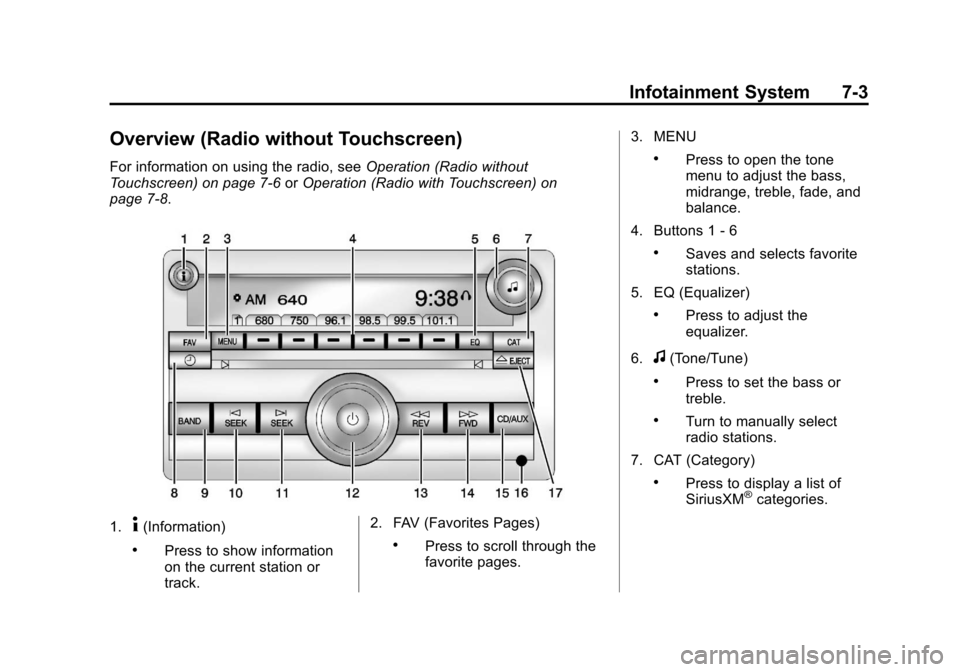
For information on using the radio, seeOperation (Radio without
Touchscreen) on page 7‑6 orOperation (Radio with Touchscreen) on
page 7‑8.
1.4(Information)
.Press to show information
on the current station or
track. 2. FAV (Favorites Pages).Press to scroll through the
favorite pages.3. MENU
.Press to open the tone
menu to adjust the bass,
midrange, treble, fade, and
balance.
4. Buttons 1 - 6
.Saves and selects favorite
stations.
5. EQ (Equalizer)
.Press to adjust the
equalizer.
6.
f(Tone/Tune)
.Press to set the bass or
treble.
.Turn to manually select
radio stations.
7. CAT (Category)
.Press to display a list of
SiriusXM®categories.
Page 185 of 444
Black plate (5,1)Chevrolet Traverse Owner Manual - 2013 - CRC 2nd Edition - 11/13/12
Infotainment System 7-5
Overview (Radio with Touchscreen)
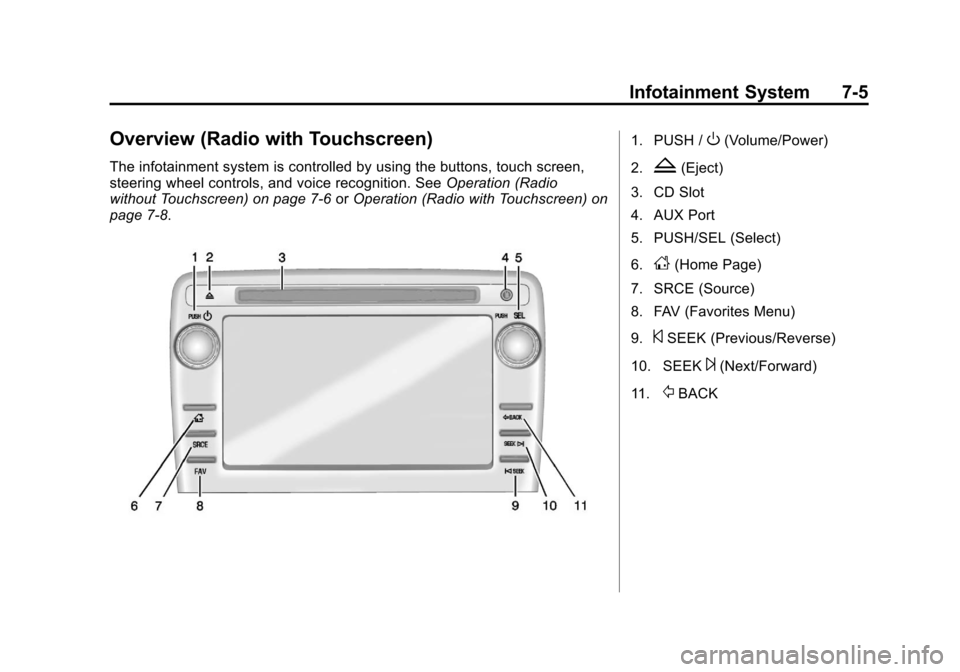
The infotainment system is controlled by using the buttons, touch screen,
steering wheel controls, and voice recognition. SeeOperation (Radio
without Touchscreen) on page 7‑6 orOperation (Radio with Touchscreen) on
page 7‑8.
1. PUSH /O(Volume/Power)
2.
Z(Eject)
3. CD Slot
4. AUX Port
5. PUSH/SEL (Select)
6.
D(Home Page)
7. SRCE (Source)
8. FAV (Favorites Menu)
9.
©SEEK (Previous/Reverse)
10. SEEK
¨(Next/Forward)
11.
/BACK
Page 188 of 444
Black plate (8,1)Chevrolet Traverse Owner Manual - 2013 - CRC 2nd Edition - 11/13/12
7-8 Infotainment System
To quickly adjust all speaker and
tone controls to the middle position,
press
ffor more than two seconds
until a beep sounds.
Radio Messages
Calibration Error: The audio
system has been calibrated for the
vehicle from the factory.
If Calibration Error displays, it
means that the radio has not been
configured properly for the vehicle
and it must be returned to your
dealer for service.
Locked: This message displays
when the TheftLock
®system has
locked up the radio. Take the
vehicle to your dealer for service.
If any error occurs repeatedly or if
an error cannot be corrected,
contact your dealer.
Operation (Radio with
Touchscreen)
Infotainment Controls
PUSH/O(Volume/Power):
.Press to turn the system on
and off.
.Turn to adjust the volume.
Z(Eject): Press to eject a disc
from the CD player. See CD Player
(Radio without Touchscreen) on
page 7‑21 orCD Player (Radio with
Touchscreen) on page 7‑23.
AUX Port: 3.5 mm (1/8 in)
connection for external audio
devices.
PUSH/SEL (Select):
.Turn to manually find a station or
highlight a menu selection.
.Press to select a highlighted
selection.
D(Home Page): Press to go to
the Home Page. See “Home Page”
in this section. SRCE (Source):
Press to change
the audio source to AM, FM,
SiriusXM
®(if equipped), CD, USB,
iPod®, or AUX.
FAV (Favorites Menu): In AM, FM,
or SiriusXM, press to display or
change the current favorite page
number above the preset buttons.
Keep pressing to scroll through the
favorites pages. The stored stations
for each list display on the bottom of
the screen. The number of preset
Favorite Pages can be changed by
pressing the Settings button on a
Home Page, then pressing
Favorites Pages, and then selecting
the number of Favorite Pages.
©SEEK (Previous/Reverse):
1. AM, FM, SiriusXM (if equipped): Press to seek to the previous
strong station. Press and hold
for Scan. Press
©again to stop
the scan.
2. CD, USB: Press to seek to the beginning of the current or
previous track.
Page 189 of 444
Black plate (9,1)Chevrolet Traverse Owner Manual - 2013 - CRC 2nd Edition - 11/13/12
Infotainment System 7-9
3. CD, USB: Press and hold toquickly reverse through a track.
Release the button to return to
playing speed. See CD Player
(Radio without Touchscreen) on
page 7‑21 orCD Player (Radio
with Touchscreen) on page 7‑23
and Auxiliary Devices on
page 7‑35.
SEEK
¨(Next/Forward):
1. AM, FM, SiriusXM (if equipped): Press to seek to the next strong
station. Press and hold for Scan.
Press
¨again to stop the scan.
2. CD, USB: Press to seek or skip the next track or program.
3. CD, USB: Press and hold to fast forward through a track. Release
the button to return to playing
speed. See CD Player (Radio
without Touchscreen) on
page 7‑21 orCD Player (Radio
with Touchscreen) on page 7‑23
and Auxiliary Devices on
page 7‑35.
/BACK: Press to return to the
previous screen in a menu.
Touchscreen Buttons
Touchscreen buttons show visibly
on the screen when available. When
a function is unavailable, the button
may gray-out. When a function is
selected, the button may highlight,
or animate.
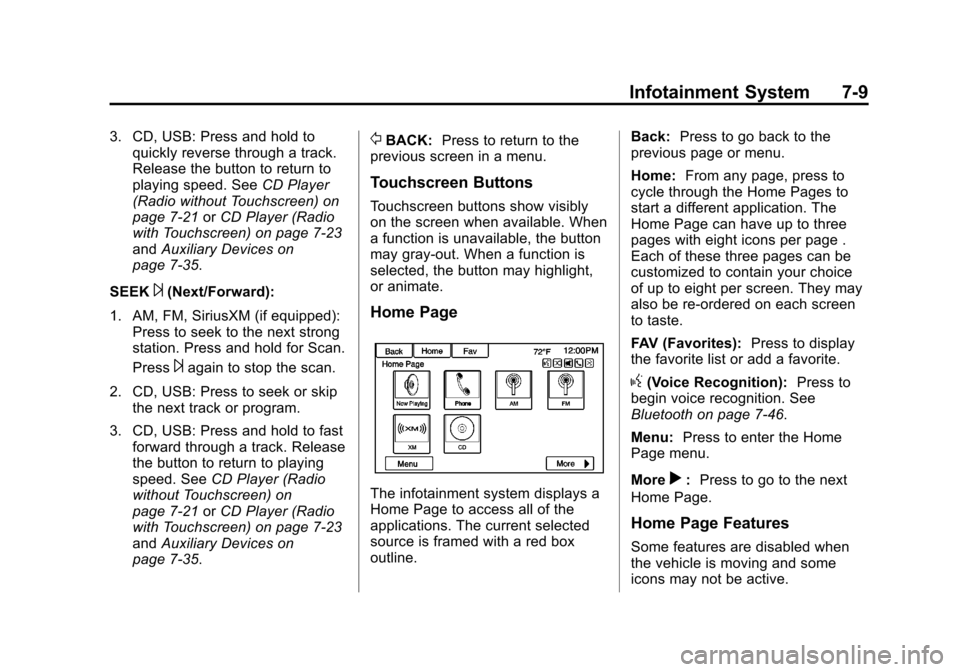
Home Page
The infotainment system displays a
Home Page to access all of the
applications. The current selected
source is framed with a red box
outline. Back:
Press to go back to the
previous page or menu.
Home: From any page, press to
cycle through the Home Pages to
start a different application. The
Home Page can have up to three
pages with eight icons per page .
Each of these three pages can be
customized to contain your choice
of up to eight per screen. They may
also be re-ordered on each screen
to taste.
FAV (Favorites): Press to display
the favorite list or add a favorite.
g(Voice Recognition): Press to
begin voice recognition. See
Bluetooth on page 7‑46.
Menu: Press to enter the Home
Page menu.
More
r: Press to go to the next
Home Page.
Home Page Features
Some features are disabled when
the vehicle is moving and some
icons may not be active.
Page 190 of 444
Black plate (10,1)Chevrolet Traverse Owner Manual - 2013 - CRC 2nd Edition - 11/13/12
7-10 Infotainment System
Now Playing:Press to display the
active source page. The sources
available are AM, FM, XM (if
equipped), CD, USB, Bluetooth,
or AUX Input.
}(Navigation): Press to display
the OnStar®Turn-by-Turn
Navigation. See OnStar Overview
on page 14‑1.
5(Phone): Press to display the
Phone main page. See Bluetooth on
page 7‑46.
Settings: Press to display the
Settings menu. See Settings on
page 7‑53.
Tone : Press to display the Tone
Settings menu. The following may
display: Tone Settings:
Press to adjust the
tone settings. The following may
display:
.EQ: Pressoorpto adjust the
equalizer.
.Bass: Press + or −to adjust
the bass.
.Middle: Press + or −to adjust
the middle.
.Treble: Press + or −to adjust the
treble.
.Balance: Press L to hear more
sound from the left speakers or
R for more sound from the right
speakers. The middle position
balances the sound between the
left and right speakers.
.Fade: Press F for more sound
from the front speakers or R for
more sound from the rear
speakers. The middle position
balances the sound between the
front and rear speakers. DSP Mode:
Press
oorpto adjust
the DSP mode (if equipped).
Language
To change the language of the
screens. See Vehicle
Personalization (With DIC Buttons)
on page 5‑41.
English or Metric Units
To change the screens from English
or metric. See Driver Information
Center (DIC) (Without DIC Buttons)
on page 5‑29 orDriver Information
Center (DIC) (With DIC Buttons) on
page 5‑24.