infotainment CHEVROLET TRAVERSE 2013 1.G Repair Manual
[x] Cancel search | Manufacturer: CHEVROLET, Model Year: 2013, Model line: TRAVERSE, Model: CHEVROLET TRAVERSE 2013 1.GPages: 444
Page 236 of 444
Black plate (56,1)Chevrolet Traverse Owner Manual - 2013 - CRC 2nd Edition - 11/13/12
7-56 Infotainment System
Trademarks and
License Agreements
Manufactured under license under
U.S. Patent #'s: 5,451,942;
5,956,674; 5,974,380; 5,978,762;
6,487,535 & other U.S. and
worldwide patents issued &
pending. DTS and DTS Digital
Surround are registered trademarks
and the DTS logos and Symbol are
trademarks of DTS, Inc.©
1996-2010 DTS, Inc. All Rights
Reserved.
Manufactured under license from
Dolby Laboratories. Dolby and the
double-D symbol are trademarks of
Dolby Laboratories. Copyright
1992-2010 Dolby Laboratories. All
rights reserved.
Page 250 of 444
Black plate (2,1)Chevrolet Traverse Owner Manual - 2013 - CRC 2nd Edition - 11/13/12
9-2 Driving and Operating
Driving Information
Distracted Driving
Distraction comes in many forms
and can take your focus from the
task of driving. Exercise good
judgment and do not let other
activities divert your attention away
from the road. Many local
governments have enacted laws
regarding driver distraction. Become
familiar with the local laws in
your area.
To avoid distracted driving, always
keep your eyes on the road, hands
on the wheel, and mind on the drive.
.Do not use a phone in
demanding driving situations.
Use a hands-free method to
place or receive necessary
phone calls.
.Watch the road. Do not read,
take notes, or look up
information on phones or other
electronic devices.
.Designate a front seat
passenger to handle potential
distractions.
.Become familiar with vehicle
features before driving, such as
programming favorite radio
stations and adjusting climate
control and seat settings.
Program all trip information into
any navigation device prior to
driving.
.Wait until the vehicle is parked
to retrieve items that have fallen
to the floor.
.Stop or park the vehicle to tend
to children.
.Keep pets in an appropriate
carrier or restraint.
.Avoid stressful conversations
while driving, whether with a
passenger or on a cell phone.
{WARNING
Taking your eyes off the road too
long or too often could cause a
crash resulting in injury or death.
Focus your attention on driving.
Refer to the Infotainment section
and the infotainment manual for
more information on using that
system, including pairing and using
a cell phone.
Defensive Driving
Defensive driving means “always
expect the unexpected.” The first
step in driving defensively is to wear
the safety belt. See Safety Belts on
page 3‑13.
.Assume that other road users
(pedestrians, bicyclists, and
other drivers) are going to be
careless and make mistakes.
Anticipate what they might do
and be ready.
Page 283 of 444
Black plate (35,1)Chevrolet Traverse Owner Manual - 2013 - CRC 2nd Edition - 11/13/12
Driving and Operating 9-35
Rear Vision
Camera (RVC)
The vehicle may have an RVC
system. Read this entire section
before using it.
{WARNING
The RVC system does not display
children, pedestrians, bicyclists,
animals, or any other object
located outside the camera's field
of view, below the bumper,
or under the vehicle. Perceived
distances may be different from
actual distances. Do not back the
vehicle using only the RVC
screen, during longer, higher
speed backing maneuvers,
or where there could be cross
traffic. Failure to use proper care
before backing may result in
injury, death, or vehicle damage.
Always check behind and around
the vehicle before backing.
Vehicles with RVC on the
Rearview Mirror
The rear vision camera system is
designed to help the driver when
backing up by displaying a view of
the area behind the vehicle. When
the key is in the ON/RUN position
and the driver shifts the vehicle into
R (Reverse), the video image
automatically appears on the inside
rearview mirror. Once the driver
shifts out of R (Reverse), the video
image automatically disappears
from the inside rearview mirror.
Turning the Rear Vision Camera
System Off or On
To turn off the rear vision camera
system, press and hold
z, located
on the inside rearview mirror, until
the left indicator light turns off. The
rear vision camera display is now
disabled.
To turn the rear vision camera
system on again, press and hold
z
until the left indicator light
illuminates. The rear vision camera system display is now enabled and
the display will appear in the mirror
normally.
Vehicles with RVC on the
Infotainment System
The rear vision camera system is
designed to help the driver when
backing up by displaying a view of
the area behind the vehicle. When
the driver shifts the vehicle into
R (Reverse), the video image
automatically appears on the
infotainment screen. Once the driver
shifts out of R (Reverse), the screen
will go back to the last screen that
had been displayed, after a delay.
Turning the Rear Vision Camera
System On or Off
To turn the rear vision camera
system on or off:
1. Shift into P (Park).
2. Press the Settings menu button
on the Home screen of the
infotainment system.
Page 284 of 444
Black plate (36,1)Chevrolet Traverse Owner Manual - 2013 - CRC 2nd Edition - 11/13/12
9-36 Driving and Operating
3. Select the Rear Camera screenbutton. The Rear Camera screen
displays.
4. Select Rear Camera display and then select ON or OFF.
The display remains on after shifting
out of R (Reverse) for approximately
10 seconds. The display can be
canceled during this time by
performing one of the following:
.Press a hard key on the
infotainment system.
.Shift into P (Park).
.Reach a vehicle speed of
8 km/h (5 mph).
Symbols
The RVC system may have a
feature that lets the driver view
symbols on the RVC screen while
using the rear vision camera. The
Ultrasonic Rear Parking Assist
(URPA) system must not be
disabled to use the caution symbols.
See Ultrasonic Parking Assist on
page 9‑31. The symbols appear when an object
has been detected by the URPA
system. The symbol may cover the
object when viewing the RVC
screen.
To turn the symbols on or off:
1. Shift into P (Park).
2. Press the Settings menu button
on the Home screen of the
infotainment system.
3. Select the Rear Camera screen button. The Rear Camera screen
displays.
4. Select Park Assist Symbols and then select ON or OFF.
Rear Cross Traffic Alert (RCTA)
On vehicles with RCTA, a red
warning triangle with an arrow may
also display on the RVC screen to
warn of traffic coming from either
direction. Three beeps will sound
from the speaker on that side. This
system detects objects coming from
up to 20 m (65 ft) from the left or
right side behind the vehicle. Use caution while backing up when
towing a trailer, as the RCTA
detection zones that extend out
from the back of your vehicle do not
move further back when a trailer is
towed.
The RCTA system can be disabled
through the Driver Information
Center (DIC). See
Driver
Information Center (DIC) (Without
DIC Buttons) on page 5‑29 orDriver
Information Center (DIC) (With DIC
Buttons) on page 5‑24.
Rear Vision Camera Location
The camera is located above the
license plate.
The area displayed by the camera is
limited and does not display objects
that are close to either corner or
under the bumper. The area
displayed can vary depending on
vehicle orientation or road
conditions. The distance of the
image that appears on the screen
differs from the actual distance.
Page 331 of 444
Black plate (33,1)Chevrolet Traverse Owner Manual - 2013 - CRC 2nd Edition - 11/13/12
Vehicle Care 10-33
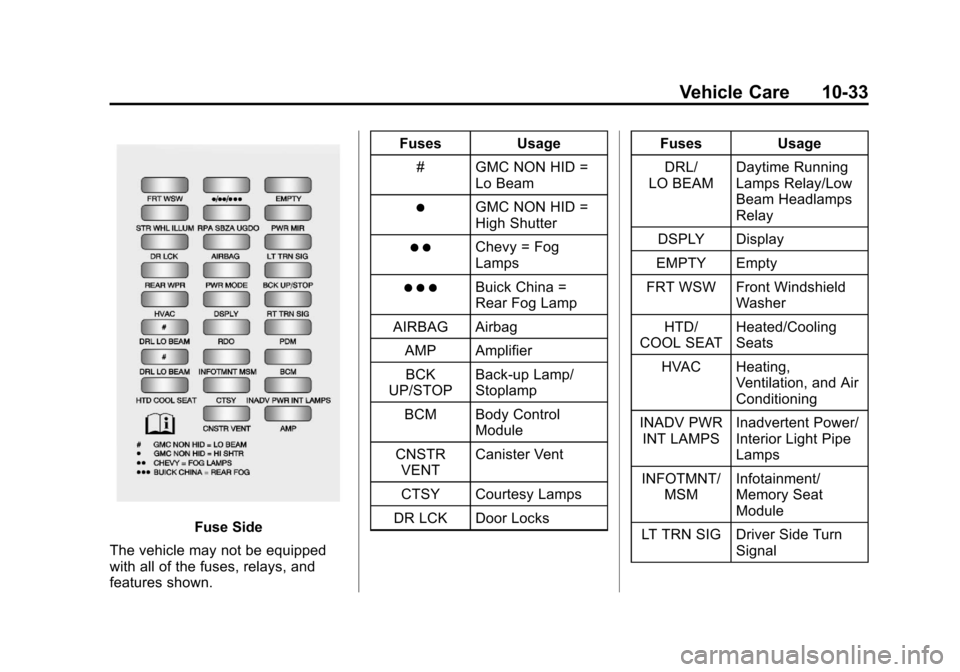
Fuse Side
The vehicle may not be equipped
with all of the fuses, relays, and
features shown. Fuses Usage
# GMC NON HID = Lo Beam
)GMC NON HID =
High Shutter
) )Chevy = Fog
Lamps
) ) )Buick China =
Rear Fog Lamp
AIRBAG Airbag
AMP AmplifierBCK
UP/STOP Back-up Lamp/
Stoplamp
BCM Body Control Module
CNSTR VENT Canister Vent
CTSY Courtesy Lamps
DR LCK Door Locks Fuses Usage
DRL/
LO BEAM Daytime Running
Lamps Relay/Low
Beam Headlamps
Relay
DSPLY Display
EMPTY Empty
FRT WSW Front Windshield Washer
HTD/
COOL SEAT Heated/Cooling
Seats
HVAC Heating, Ventilation, and Air
Conditioning
INADV PWR INT LAMPS Inadvertent Power/
Interior Light Pipe
Lamps
INFOTMNT/ MSM Infotainment/
Memory Seat
Module
LT TRN SIG Driver Side Turn Signal
Page 401 of 444
Black plate (1,1)Chevrolet Traverse Owner Manual - 2013 - CRC 2nd Edition - 11/13/12
Customer Information 13-1
Customer
Information
Customer Information
Customer SatisfactionProcedure (U.S. and
Canada) . . . . . . . . . . . . . . . . . . . . 13-2
Customer Satisfaction Procedure (Mexico) . . . . . . . . 13-4
Customer Assistance Offices (U.S. and Canada) . . . . . . . . . 13-5
Customer Assistance Offices (Mexico) . . . . . . . . . . . . . . . . . . . . 13-5
Customer Assistance for Text Telephone (TTY) Users (U.S.
and Canada) . . . . . . . . . . . . . . . 13-6
Online Owner Center . . . . . . . . 13-6
GM Mobility Reimbursement Program (U.S. and
Canada) . . . . . . . . . . . . . . . . . . . . 13-7 Roadside Assistance Program
(Mexico) . . . . . . . . . . . . . . . . . . . . 13-7
Roadside Assistance Program (U.S. and
Canada) . . . . . . . . . . . . . . . . . . . 13-11
Scheduling Service Appointments (U.S. and
Canada) . . . . . . . . . . . . . . . . . . 13-13
Courtesy Transportation Program (U.S. and
Canada) . . . . . . . . . . . . . . . . . . 13-13
Collision Damage Repair (U.S. and Canada) . . . . . . . . 13-14
Service Publications Ordering Information . . . . . . 13-17
Reporting Safety Defects
Reporting Safety Defects tothe United States
Government . . . . . . . . . . . . . . . 13-18
Reporting Safety Defects to the Canadian
Government . . . . . . . . . . . . . . . 13-18
Reporting Safety Defects to General Motors . . . . . . . . . . . 13-18
Vehicle Data Recording and
Privacy
Vehicle Data Recording andPrivacy . . . . . . . . . . . . . . . . . . . . 13-19
Event Data Recorders . . . . . . 13-19
OnStar
®. . . . . . . . . . . . . . . . . . . . 13-20
Infotainment System . . . . . . . . 13-21
Radio Frequency Identification (RFID) . . . . . . . 13-21
Radio Frequency Statement . . . . . . . . . . . . . . . . . 13-21
Page 421 of 444
Black plate (21,1)Chevrolet Traverse Owner Manual - 2013 - CRC 2nd Edition - 11/13/12
Customer Information 13-21
Infotainment System
If the vehicle is equipped with a
navigation system as part of the
infotainment system, use of the
system may result in the storage of
destinations, addresses, telephone
numbers, and other trip information.
See the infotainment manual for
information on stored data and for
deletion instructions.
Radio Frequency
Identification (RFID)
RFID technology is used in some
vehicles for functions such as tire
pressure monitoring and ignition
system security, as well as in
connection with conveniences such
as Remote Keyless Entry (RKE)
transmitters for remote door locking/
unlocking and starting, and
in-vehicle transmitters for garage
door openers. RFID technology in
GM vehicles does not use or record
personal information or link with any
other GM system containing
personal information.
Radio Frequency
Statement
This vehicle has systems that
operate on a radio frequency that
comply with Part 15 of the Federal
Communications Commission (FCC)
rules and with Industry Canada
Standards RSS‐GEN/210/220/310.
Operation is subject to the following
two conditions:
1. The device may not causeharmful interference.
2. The device must accept any interference received, including
interference that may cause
undesired operation of the
device.
Changes or modifications to any of
these systems by other than an
authorized service facility could void
authorization to use this equipment.
Page 438 of 444

Black plate (6,1)Chevrolet Traverse Owner Manual - 2013 - CRC 2nd Edition - 11/13/12
i-6 INDEX
Hill Start Assist (HSA) . . . . . . . . . 9-26
Hood . . . . . . . . . . . . . . . . . . . . . . . . . . 10-4
Horn . . . . . . . . . . . . . . . . . . . . . . . . . . . . 5-4
How to Wear Safety BeltsProperly . . . . . . . . . . . . . . . . . . . . . . 3-15
I
Ignition Positions . . . . . . . . . . . . . . 9-14
Ignition Transmission LockCheck . . . . . . . . . . . . . . . . . . . . . . . 10-23
Immobilizer . . . . . . . . . . . . . . . . . . . . 2-13
Infants and Young Children, Restraints . . . . . . . . . . . . . . . . . . . . 3-39
Infotainment . . . . . . . . . . . . . . . . . . . . 7-1
Infotainment System . . . . . . . . . . 13-21
Instrument Cluster . . . . . . . . . . . . . 5-11
Instrument Panel Storage Area . . . . . . . . . . . . . . . . . . 4-1
Introduction . . . . . . . . . . . . . . . . . . . . . . . iii
J
Jump Starting . . . . . . . . . . . . . . . . . 10-66
K
Key and Lock Messages . . . . . . . 5-35
Keyless Entry Remote (RKE) System . . . . . . . . 2-2
Keys . . . . . . . . . . . . . . . . . . . . . . . . . . . . 2-1
L
Labeling, Tire Sidewall . . . . . . . . 10-37
Lamps Courtesy . . . . . . . . . . . . . . . . . . . . . . . 6-6
Dome . . . . . . . . . . . . . . . . . . . . . . . . . . 6-6
Exterior Controls . . . . . . . . . . . . . . . 6-1
License Plate . . . . . . . . . . . . . . . 10-27
Malfunction Indicator . . . . . . . . . 5-17
Messages . . . . . . . . . . . . . . . . . . . . 5-36
Reading . . . . . . . . . . . . . . . . . . . . . . . 6-7
Lap-Shoulder Belt . . . . . . . . . . . . . 3-16
LATCH System Replacing Parts after aCrash . . . . . . . . . . . . . . . . . . . . . . . 3-51
LATCH, Lower Anchors and Tethers for Children . . . . . . . . . . 3-44
Liftgate
Carbon Monoxide . . . . . . . . . . . . . . 2-9 Lighting
Delayed Entry . . . . . . . . . . . . . . . . . 6-7
Delayed Exit . . . . . . . . . . . . . . . . . . . 6-8
Entry . . . . . . . . . . . . . . . . . . . . . . . . . . 6-7
Illumination Control . . . . . . . . . . . . 6-5
Parade Dimming . . . . . . . . . . . . . . . 6-8
Lights
Airbag Readiness . . . . . . . . . . . . . 5-15
Antilock Brake System(ABS) Warning . . . . . . . . . . . . . . 5-20
Brake System Warning . . . . . . . 5-19
Charging System . . . . . . . . . . . . . 5-16
Cruise Control . . . . . . . . . . . . . . . . 5-23
Engine Coolant
Temperature Warning . . . . . . . 5-21
Engine Oil Pressure . . . . . . . . . . 5-22
Flash-to-Pass . . . . . . . . . . . . . . . . . . 6-2
High-Beam On . . . . . . . . . . . . . . . . 5-23
High/Low Beam Changer . . . . . . 6-2
Safety Belt Reminders . . . . . . . . 5-14
Security . . . . . . . . . . . . . . . . . . . . . . 5-23
StabiliTrak
®Indicator . . . . . . . . . 5-21
Tire Pressure . . . . . . . . . . . . . . . . . 5-22
Tow/Haul Mode . . . . . . . . . . . . . . . 5-21
Page 440 of 444

Black plate (8,1)Chevrolet Traverse Owner Manual - 2013 - CRC 2nd Edition - 11/13/12
i-8 INDEX
O
Object Detection SystemMessages . . . . . . . . . . . . . . . . . . . . 5-36
Object Detection, Side Blind Zone Alert (SBZA) . . . . . . . . . . . 9-32
Odometer . . . . . . . . . . . . . . . . . . . . . . 5-12
Off-Road Recovery . . . . . . . . . . . . . . . . . . . . . . 9-4
Oil Engine . . . . . . . . . . . . . . . . . . . . . . . . 10-7
Engine Oil Life System . . . . . . . 10-9
Messages . . . . . . . . . . . . . . . . . . . . 5-34
Pressure Light . . . . . . . . . . . . . . . . 5-22
Older Children, Restraints . . . . . 3-37
Online Owner Center . . . . . . . . . . 13-6
OnStar
®
System, In Brief . . . . . . . . . . . . . . 1-26
OnStar®Additional
Information . . . . . . . . . . . . . . . . . . . 14-5
OnStar
®Connections . . . . . . . . . . 14-3
OnStar®Diagnostics . . . . . . . . . . . 14-4
OnStar®Emergency . . . . . . . . . . . 14-2
OnStar®Navigation . . . . . . . . . . . . 14-2 OnStar
®Overview . . . . . . . . . . . . . 14-1
OnStar®Security . . . . . . . . . . . . . . 14-2
Operation, Infotainment System . . . . . . . . . . . . . . . . . . . . 7-6, 7-8
Ordering Service Publications . . . . . . . . 13-17
Outlets
Power . . . . . . . . . . . . . . . . . . . . . . . . . 5-8
Overheated Engine Protection
Operating Mode . . . . . . . . . . . . . 10-18
Overheating, Engine . . . . . . . . . . 10-16
Overview, Infotainment System . . . . . . . . . . . . . . . . . . . . 7-3, 7-5
P
Parade Dimming . . . . . . . . . . . . . . . . 6-8
ParkShifting Into . . . . . . . . . . . . . . . . . . . 9-18
Shifting Out of . . . . . . . . . . . . . . . . 9-19
Tilt Mirrors . . . . . . . . . . . . . . . . . . . . 2-17 Parking
Assist, Ultrasonic . . . . . . . . . . . . . 9-31
Brake . . . . . . . . . . . . . . . . . . . . . . . . . 9-26
Brake and P (Park)
Mechanism Check . . . . . . . . 10-23
Over Things That Burn . . . . . . . 9-20
Passenger Airbag Status
Indicator . . . . . . . . . . . . . . . . . . . . . 5-15
Passenger Compartment Air Filter . . . . . . . . . . . . . . . . . . . . . . . . . 8-11
Passenger Sensing System . . . 3-30
Perchlorate Materials
Requirements, California . . . . . 10-2
Personalization Vehicle . . . . . . . . . . . . . . . . . . . . . . . 5-41
Phone
Bluetooth . . . . . . . . . . . . . . . . . . . . . 7-46
Power Door Locks . . . . . . . . . . . . . . . . . . . . 2-7
Mirrors . . . . . . . . . . . . . . . . . . . . . . . . 2-15
Outlets . . . . . . . . . . . . . . . . . . . . . . . . 5-8
Protection, Battery . . . . . . . . . . . . . 6-9
Retained Accessory (RAP) . . . 9-18
Seat Adjustment . . . . . . . . . . . . . . . 3-4
Steering Fluid . . . . . . . . . . . . . . . 10-18
Windows . . . . . . . . . . . . . . . . . . . . . 2-19
Page 443 of 444

Black plate (11,1)Chevrolet Traverse Owner Manual - 2013 - CRC 2nd Edition - 11/13/12
INDEX i-11
Storage AreasArmrest . . . . . . . . . . . . . . . . . . . . . . . . 4-2
Cargo Cover . . . . . . . . . . . . . . . . . . . 4-3
Cargo Management System . . . 4-3
Center Console . . . . . . . . . . . . . . . . 4-2
Convenience Net . . . . . . . . . . . . . . 4-4
Glove Box . . . . . . . . . . . . . . . . . . . . . 4-1
Instrument Panel . . . . . . . . . . . . . . 4-1
Roof Rack System . . . . . . . . . . . . . 4-4
Stuck Vehicle . . . . . . . . . . . . . . . . . . . 9-9
Sun Visors . . . . . . . . . . . . . . . . . . . . . 2-21
Sunroof . . . . . . . . . . . . . . . . . . . . . . . . 2-21
Symbols . . . . . . . . . . . . . . . . . . . . . . . . . . iv
System Infotainment . . . . . . . . . . . . 13-21, 7-1
Roof Rack . . . . . . . . . . . . . . . . . . . . . 4-4
T
Tachometer . . . . . . . . . . . . . . . . . . . . 5-12
TaillampsTurn Signal andStoplamps . . . . . . . . . . . . . . . . 10-26
Text Telephone (TTY) Users . . . 13-6
Theft-Deterrent Systems . . . . . . . 2-13
Immobilizer . . . . . . . . . . . . . . . . . . . 2-13
Third-Row Seats . . . . . . . . . . . . . . . 3-11 Time . . . . . . . . . . . . . . . . . . . . . . . . 5-7, 5-8
Tires
Buying New Tires . . . . . . . . . . . 10-50
Chains . . . . . . . . . . . . . . . . . . . . . . 10-55
Changing . . . . . . . . . . . . . . . . . . . 10-57
Compact Spare . . . . . . . . . . . . . 10-65
Designations . . . . . . . . . . . . . . . 10-39
Different Size . . . . . . . . . . . . . . . 10-52
If a Tire Goes Flat . . . . . . . . . . 10-55
Inflation Monitor System . . . . 10-45
Inspection . . . . . . . . . . . . . . . . . . 10-48
Messages . . . . . . . . . . . . . . . . . . . . 5-39
Pressure Light . . . . . . . . . . . . . . . . 5-22
Pressure Monitor System . . . 10-44
Rotation . . . . . . . . . . . . . . . . . . . . 10-48
Sidewall Labeling . . . . . . . . . . . 10-37
Terminology andDefinitions . . . . . . . . . . . . . . . . . 10-40
Uniform Tire Quality Grading . . . . . . . . . . . . . . . . . . . 10-52
Wheel Alignment and Tire
Balance . . . . . . . . . . . . . . . . . . . 10-54
Wheel Replacement . . . . . . . . 10-54
When It Is Time for New Tires . . . . . . . . . . . . . . . . . . . . . . 10-49
Winter . . . . . . . . . . . . . . . . . . . . . . 10-36 Tow/Haul Mode . . . . . . . . . . . . . . . . 9-24
Tow/Haul Mode Light . . . . . . . . . . 5-21
Towing
Driving Characteristics . . . . . . . . 9-43
Equipment . . . . . . . . . . . . . . . . . . . . 9-48
General Information . . . . . . . . . . 9-43
Recreational Vehicle . . . . . . . . 10-70
Trailer . . . . . . . . . . . . . . . . . . . . . . . . 9-46
Vehicle . . . . . . . . . . . . . . . . . . . . . 10-69
Trailer Towing . . . . . . . . . . . . . . . . . . . . . . . . 9-46
Transmission Automatic . . . . . . . . . . . . . . . . . . . . . 9-21
Fluid, Automatic . . . . . . . . . . . . 10-10
Messages . . . . . . . . . . . . . . . . . . . . 5-39
Transportation Program,
Courtesy . . . . . . . . . . . . . . . . . . . . 13-13
Turn and Lane-Change Signals . . . . . . . . . . . . . . . . . . . . . . . . 6-4