display CHEVROLET TRAVERSE 2013 Owners Manual
[x] Cancel search | Manufacturer: CHEVROLET, Model Year: 2013, Model line: TRAVERSE, Model: CHEVROLET TRAVERSE 2013Pages: 444, PDF Size: 7.45 MB
Page 282 of 444
Black plate (34,1)Chevrolet Traverse Owner Manual - 2013 - CRC 2nd Edition - 11/13/12
9-34 Driving and Operating
When the System Does Not Seem
To Work Properly
Missed alerts can occur under
normal circumstances and will
increase in wet conditions. The
system does not need to be
serviced. SBZA is designed to
ignore stationary objects; however,
the system may occasionally light
up due to guard rails, signs, trees,
shrubs, and other stationary objects.
This is normal system operation, the
vehicle does not need service.
If the SBZA displays do not light up
when the system is on and vehicles
are in the blind zone, the system
may need service. Take the vehicle
to your dealer.
SBZA does not operate when the
SBZA sensors in the left or right
corners of the rear bumper are
covered with mud, dirt, snow, ice,
slush, or in heavy rainstorms. For
cleaning instructions, see“Washing
the Vehicle” underExterior Care on
page 10‑73. If the DIC still displays
the SIDE DETECTION SYS TEMPORARILY OFF message after
cleaning the bumper, see your
dealer.
The SBZA displays may remain on
if a trailer is attached to the vehicle,
or a bicycle or object is extending
out to either side of the vehicle.
When SBZA is disabled for any
reason other than the driver turning
it off, it cannot be turned back on.
The SIDE BLIND ZONE ALERT ON
option will not be selectable if the
conditions for normal system
operation are not met.
SBZA Error Messages
The following messages may
appear in the DIC:
SIDE BLIND ZONE ALERT
SYSTEM OFF:
This message
indicates that the driver has turned
the system off.
SIDE DETECTION SYS
TEMPORARILY OFF: This
message indicates that the SBZA
system is disabled either because
the sensor cannot detect vehicles in your blind zone, or the vehicle is
passing through an open field of
view area, such as the desert,
where there is insufficient data for
operation. This message may also
activate during heavy rain or due to
road spray. The vehicle does not
need service. For cleaning, see
“Washing the Vehicle”
under
Exterior Care on page 10‑73.
SERVICE SIDE DETECTION
SYSTEM: If this message appears,
both SBZA displays will remain on
indicating there is a problem with
the SBZA system. If these displays
remain on after continued driving,
the system needs service. Take the
vehicle to your dealer.
FCC Information
See Radio Frequency Statement on
page 13‑21 for information
regarding Part 15 of the Federal
Communications Commission (FCC)
rules and Industry Canada
Standards RSS-GEN/210/220/310.
ProCarManuals.com
Page 283 of 444
Black plate (35,1)Chevrolet Traverse Owner Manual - 2013 - CRC 2nd Edition - 11/13/12
Driving and Operating 9-35
Rear Vision
Camera (RVC)
The vehicle may have an RVC
system. Read this entire section
before using it.
{WARNING
The RVC system does not display
children, pedestrians, bicyclists,
animals, or any other object
located outside the camera's field
of view, below the bumper,
or under the vehicle. Perceived
distances may be different from
actual distances. Do not back the
vehicle using only the RVC
screen, during longer, higher
speed backing maneuvers,
or where there could be cross
traffic. Failure to use proper care
before backing may result in
injury, death, or vehicle damage.
Always check behind and around
the vehicle before backing.
Vehicles with RVC on the
Rearview Mirror
The rear vision camera system is
designed to help the driver when
backing up by displaying a view of
the area behind the vehicle. When
the key is in the ON/RUN position
and the driver shifts the vehicle into
R (Reverse), the video image
automatically appears on the inside
rearview mirror. Once the driver
shifts out of R (Reverse), the video
image automatically disappears
from the inside rearview mirror.
Turning the Rear Vision Camera
System Off or On
To turn off the rear vision camera
system, press and hold
z, located
on the inside rearview mirror, until
the left indicator light turns off. The
rear vision camera display is now
disabled.
To turn the rear vision camera
system on again, press and hold
z
until the left indicator light
illuminates. The rear vision camera system display is now enabled and
the display will appear in the mirror
normally.
Vehicles with RVC on the
Infotainment System
The rear vision camera system is
designed to help the driver when
backing up by displaying a view of
the area behind the vehicle. When
the driver shifts the vehicle into
R (Reverse), the video image
automatically appears on the
infotainment screen. Once the driver
shifts out of R (Reverse), the screen
will go back to the last screen that
had been displayed, after a delay.
Turning the Rear Vision Camera
System On or Off
To turn the rear vision camera
system on or off:
1. Shift into P (Park).
2. Press the Settings menu button
on the Home screen of the
infotainment system.
ProCarManuals.com
Page 284 of 444
Black plate (36,1)Chevrolet Traverse Owner Manual - 2013 - CRC 2nd Edition - 11/13/12
9-36 Driving and Operating
3. Select the Rear Camera screenbutton. The Rear Camera screen
displays.
4. Select Rear Camera display and then select ON or OFF.
The display remains on after shifting
out of R (Reverse) for approximately
10 seconds. The display can be
canceled during this time by
performing one of the following:
.Press a hard key on the
infotainment system.
.Shift into P (Park).
.Reach a vehicle speed of
8 km/h (5 mph).
Symbols
The RVC system may have a
feature that lets the driver view
symbols on the RVC screen while
using the rear vision camera. The
Ultrasonic Rear Parking Assist
(URPA) system must not be
disabled to use the caution symbols.
See Ultrasonic Parking Assist on
page 9‑31. The symbols appear when an object
has been detected by the URPA
system. The symbol may cover the
object when viewing the RVC
screen.
To turn the symbols on or off:
1. Shift into P (Park).
2. Press the Settings menu button
on the Home screen of the
infotainment system.
3. Select the Rear Camera screen button. The Rear Camera screen
displays.
4. Select Park Assist Symbols and then select ON or OFF.
Rear Cross Traffic Alert (RCTA)
On vehicles with RCTA, a red
warning triangle with an arrow may
also display on the RVC screen to
warn of traffic coming from either
direction. Three beeps will sound
from the speaker on that side. This
system detects objects coming from
up to 20 m (65 ft) from the left or
right side behind the vehicle. Use caution while backing up when
towing a trailer, as the RCTA
detection zones that extend out
from the back of your vehicle do not
move further back when a trailer is
towed.
The RCTA system can be disabled
through the Driver Information
Center (DIC). See
Driver
Information Center (DIC) (Without
DIC Buttons) on page 5‑29 orDriver
Information Center (DIC) (With DIC
Buttons) on page 5‑24.
Rear Vision Camera Location
The camera is located above the
license plate.
The area displayed by the camera is
limited and does not display objects
that are close to either corner or
under the bumper. The area
displayed can vary depending on
vehicle orientation or road
conditions. The distance of the
image that appears on the screen
differs from the actual distance.
ProCarManuals.com
Page 285 of 444
Black plate (37,1)Chevrolet Traverse Owner Manual - 2013 - CRC 2nd Edition - 11/13/12
Driving and Operating 9-37
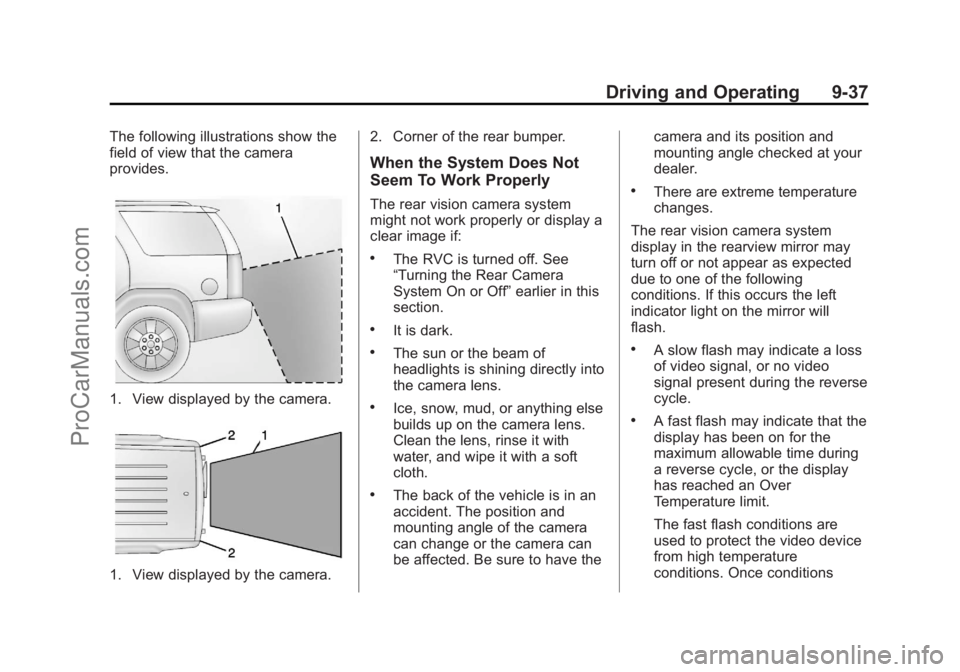
The following illustrations show the
field of view that the camera
provides.
1. View displayed by the camera.
1. View displayed by the camera.2. Corner of the rear bumper.
When the System Does Not
Seem To Work Properly
The rear vision camera system
might not work properly or display a
clear image if:
.The RVC is turned off. See
“Turning the Rear Camera
System On or Off”
earlier in this
section.
.It is dark.
.The sun or the beam of
headlights is shining directly into
the camera lens.
.Ice, snow, mud, or anything else
builds up on the camera lens.
Clean the lens, rinse it with
water, and wipe it with a soft
cloth.
.The back of the vehicle is in an
accident. The position and
mounting angle of the camera
can change or the camera can
be affected. Be sure to have the camera and its position and
mounting angle checked at your
dealer.
.There are extreme temperature
changes.
The rear vision camera system
display in the rearview mirror may
turn off or not appear as expected
due to one of the following
conditions. If this occurs the left
indicator light on the mirror will
flash.
.A slow flash may indicate a loss
of video signal, or no video
signal present during the reverse
cycle.
.A fast flash may indicate that the
display has been on for the
maximum allowable time during
a reverse cycle, or the display
has reached an Over
Temperature limit.
The fast flash conditions are
used to protect the video device
from high temperature
conditions. Once conditions
ProCarManuals.com
Page 286 of 444
Black plate (38,1)Chevrolet Traverse Owner Manual - 2013 - CRC 2nd Edition - 11/13/12
9-38 Driving and Operating
return to normal the device will
reset and the green indicator will
stop flashing.
During any of these fault conditions,
the display will be blank and the
indicator will continue to flash as
long as the vehicle is in R (Reverse)
or until the conditions return to
normal.
Pressing and holding
zwhen the
left indicator light is flashing will turn
off the video display along with the
left indicator light.
Fuel
Use of the recommended fuel is an
important part of the proper
maintenance of this vehicle. To help
keep the engine clean and maintain
optimum vehicle performance, we
recommend the use of gasoline
advertised as TOP TIER Detergent
Gasoline.
Look for the TOP TIER label on the
fuel pump to ensure gasoline meets
enhanced detergency standards
developed by auto companies. A list
of marketers providing TOP TIER
Detergent Gasoline can be found at
www.toptiergas.com. TOP TIER
gasoline is only available in the U.S.
and Canada.
Recommended Fuel
Use regular unleaded gasoline with
a posted octane rating of 87 or
higher. If the octane rating is less
than 87, an audible knocking noise,
commonly referred to as spark
knock, might be heard when driving.
If this occurs, use a gasoline rated
at 87 octane or higher as soon as
possible. If heavy knocking is heard
when using gasoline rated at
87 octane or higher, the engine
needs service.
ProCarManuals.com
Page 306 of 444
Black plate (8,1)Chevrolet Traverse Owner Manual - 2013 - CRC 2nd Edition - 11/13/12
10-8 Vehicle Care
to the engine. If you find that you
have an oil level above the
operating range, i.e., the engine
has so much oil that the oil level
gets above the cross-hatched
area that shows the proper
operating range, the engine could
be damaged. You should drain
out the excess oil or limit driving
of the vehicle and seek a service
professional to remove the
excess amount of oil.
SeeEngine Compartment Overview
on page 10‑5 for the location of the
engine oil fill cap.
Add enough oil to put the level
somewhere in the proper operating
range. Push the dipstick all the way
back in when through.
Selecting the Right Engine Oil
Selecting the right engine oil
depends on both the proper oil
specification and viscosity grade.
See Recommended Fluids and
Lubricants on page 11‑12. Specification
Use and ask for licensed engine oils
with the dexos1
®approved
certification mark. Engine oils
meeting the requirements for the
vehicle should have the dexos1
approved certification mark. This
certification mark indicates that the
oil has been approved to the dexos1
specification.
Notice: Failure to use the
recommended engine oil or
equivalent can result in engine
damage not covered by the
vehicle warranty. Check with your
dealer or service provider on
whether the oil is approved to the
dexos1 specification. Viscosity Grade
SAE 5W-30 is the best viscosity
grade for the vehicle. Do not use
other viscosity grade oils such as
SAE 10W-30, 10W-40, or 20W-50.
Cold Temperature Operation: In an
area of extreme cold, where the
temperature falls below
−29°C
(−20°F), an SAE 0W-30 oil may be
used. An oil of this viscosity grade
will provide easier cold starting for
the engine at extremely low
temperatures. When selecting an oil
of the appropriate viscosity grade,
always select an oil of the correct
specification. See “Specification”
earlier in this section for more
information.
Engine Oil Additives/Engine
Oil Flushes
Do not add anything to the oil. The
recommended oils with the dexos
specification and displaying the
dexos certification mark are all that
is needed for good performance and
engine protection.
ProCarManuals.com
Page 308 of 444
Black plate (10,1)Chevrolet Traverse Owner Manual - 2013 - CRC 2nd Edition - 11/13/12
10-10 Vehicle Care
this display. Press the trip
odometer reset stem until OIL
LIFE REMAINING displays.
2. Press and hold the trip odometer reset stem until OIL LIFE
REMAINING shows “100%.”
Three chimes sound and the
CHANGE ENGINE OIL SOON
message goes off.
3. Turn the key to LOCK/OFF. If the CHANGE ENGINE OIL
SOON message comes back on
when the vehicle is started, the
engine oil life system has not
been reset. Repeat the
procedure.
If the vehicle has Driver Information
Center (DIC) buttons:
1. Turn the ignition to ON/RUN, with the engine off. 2. Press the vehicle information
button until OIL LIFE
REMAINING displays.
3. Press and hold the set/reset button until “100%”is displayed.
Three chimes sound and the
CHANGE ENGINE OIL SOON
message goes off.
4. Turn the key to LOCK/OFF.
If the CHANGE ENGINE OIL SOON
message comes back on when the
vehicle is started, the engine oil life
system has not been reset. Repeat
the procedure.
Automatic Transmission
Fluid
It is not necessary to check the
transmission fluid level.
A transmission fluid leak is the only
reason for fluid loss. If a leak
occurs, take the vehicle to the
dealer and have it repaired as soon
as possible. Change the fluid at the intervals
listed in
Maintenance Schedule on
page 11‑2, and be sure to use the
transmission fluid listed in
Recommended Fluids and
Lubricants on page 11‑12.
Notice: Use of the incorrect
automatic transmission fluid may
damage the vehicle, and the
damages may not be covered by
the vehicle warranty. Always use
the automatic transmission fluid
listed in Recommended Fluids
and Lubricants on page 11‑12.
The transmission fluid will not reach
the end of the dipstick unless the
transmission is at operating
temperature. If you need to check
the transmission fluid level, please
take the vehicle to your dealer.
ProCarManuals.com
Page 314 of 444
Black plate (16,1)Chevrolet Traverse Owner Manual - 2013 - CRC 2nd Edition - 11/13/12
10-16 Vehicle Care
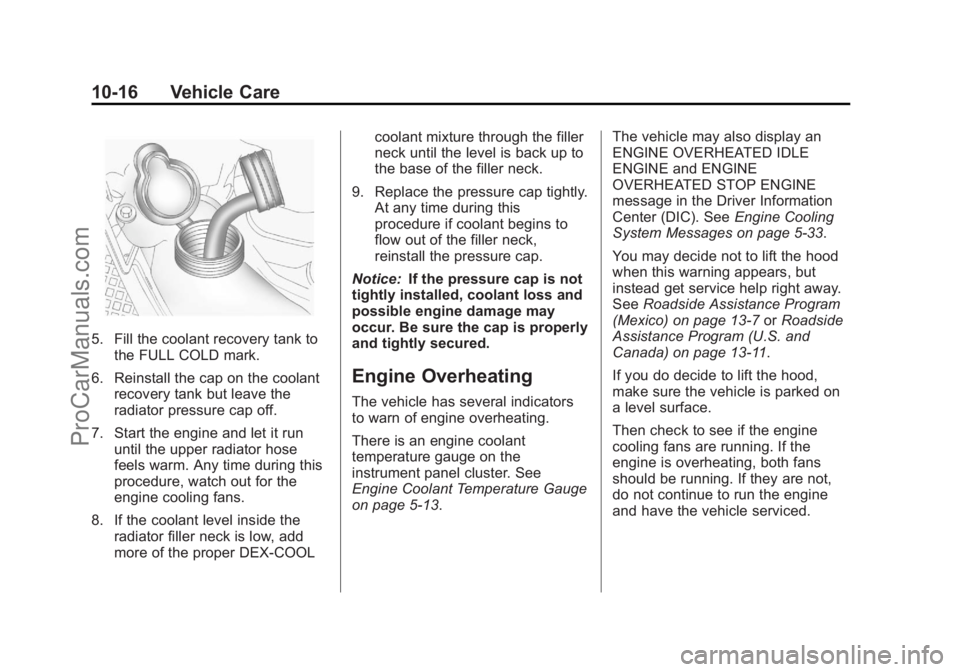
5. Fill the coolant recovery tank tothe FULL COLD mark.
6. Reinstall the cap on the coolant recovery tank but leave the
radiator pressure cap off.
7. Start the engine and let it run until the upper radiator hose
feels warm. Any time during this
procedure, watch out for the
engine cooling fans.
8. If the coolant level inside the radiator filler neck is low, add
more of the proper DEX-COOL coolant mixture through the filler
neck until the level is back up to
the base of the filler neck.
9. Replace the pressure cap tightly. At any time during this
procedure if coolant begins to
flow out of the filler neck,
reinstall the pressure cap.
Notice: If the pressure cap is not
tightly installed, coolant loss and
possible engine damage may
occur. Be sure the cap is properly
and tightly secured.
Engine Overheating
The vehicle has several indicators
to warn of engine overheating.
There is an engine coolant
temperature gauge on the
instrument panel cluster. See
Engine Coolant Temperature Gauge
on page 5‑13. The vehicle may also display an
ENGINE OVERHEATED IDLE
ENGINE and ENGINE
OVERHEATED STOP ENGINE
message in the Driver Information
Center (DIC). See
Engine Cooling
System Messages on page 5‑33.
You may decide not to lift the hood
when this warning appears, but
instead get service help right away.
See Roadside Assistance Program
(Mexico) on page 13‑7 orRoadside
Assistance Program (U.S. and
Canada) on page 13‑11.
If you do decide to lift the hood,
make sure the vehicle is parked on
a level surface.
Then check to see if the engine
cooling fans are running. If the
engine is overheating, both fans
should be running. If they are not,
do not continue to run the engine
and have the vehicle serviced.
ProCarManuals.com
Page 315 of 444
Black plate (17,1)Chevrolet Traverse Owner Manual - 2013 - CRC 2nd Edition - 11/13/12
Vehicle Care 10-17
Notice:Running the engine
without coolant may cause
damage or a fire. Vehicle damage
would not be covered by the
warranty. See Overheated Engine
Protection Operating Mode on
page 10‑18 for information on
driving to a safe place in an
emergency.
If Steam Is Coming from the
Engine Compartment
{WARNING
Steam from an overheated engine
can burn you badly, even if you
just open the hood. Stay away
from the engine if you see or hear
steam coming from it. Turn it off
and get everyone away from the
vehicle until it cools down. Wait
until there is no sign of steam or
coolant before you open
the hood.
(Continued)
WARNING (Continued)
If you keep driving when the
vehicles engine is overheated,
the liquids in it can catch fire. You
or others could be badly burned.
Stop the engine if it overheats,
and get out of the vehicle until the
engine is cool.
SeeOverheated Engine
Protection Operating Mode on
page 10‑18 for information on
driving to a safe place in an
emergency.
If No Steam Is Coming from
the Engine Compartment
If an engine overheat warning is
displayed but no steam can be seen
or heard, the problem may not be
too serious. Sometimes the engine
can get a little too hot when the
vehicle:
.Climbs a long hill on a hot day.
.Stops after high-speed driving.
.Idles for long periods in traffic.
.Tows a trailer.
If the overheat warning is displayed
with no sign of steam:
1. Turn the air conditioning off.
2. Turn the heater on to the highest temperature and to the highest
fan speed. Open the windows as
necessary.
3. If in a traffic jam, shift to N (Neutral); otherwise, shift to
the highest gear while
driving —D (Drive) or L (Low).
If the temperature overheat gauge is
no longer in the overheat zone or an
overheat warning no longer
displays, the vehicle can be driven.
Continue to drive the vehicle slow
for about 10 minutes. Keep a safe
vehicle distance from the car in front
of you. If the warning does not come
back on, continue to drive normally.
If the warning continues, pull over,
stop, and park the vehicle
right away.
ProCarManuals.com
Page 316 of 444
Black plate (18,1)Chevrolet Traverse Owner Manual - 2013 - CRC 2nd Edition - 11/13/12
10-18 Vehicle Care
If there is no sign of steam, idle the
engine for three minutes while
parked. If the warning is still
displayed, turn off the engine until it
cools down. Also, see“Overheated
Engine Protection Operating Mode”
next in this section.
Overheated Engine
Protection
Operating Mode
This emergency operating mode lets
the vehicle be driven to a safe place
in an emergency situation. If an
overheated engine condition exists,
an overheat protection mode which
alternates firing groups of cylinders
helps prevent engine damage. In
this mode, there is a significant loss
in power and engine performance.
The temperature gauge indicates an
overheat condition exists. Driving
extended distances and/or towing a
trailer in the overheat protection
mode should be avoided. Notice:
After driving in the
overheated engine protection
operating mode, to avoid engine
damage, allow the engine to cool
before attempting any repair. The
engine oil will be severely
degraded. Repair the cause of
coolant loss, change the oil and
reset the oil life system. See
Engine Oil on page 10‑7.
Power Steering Fluid
The power steering fluid reservoir is
located under the engine cover on
the passenger side of the vehicle.
See Engine Compartment Overview
on page 10‑5 for reservoir location.
When to Check Power Steering
Fluid
It is not necessary to regularly
check power steering fluid unless
you suspect there is a leak in the
system or you hear an unusual
noise. A fluid loss in this system
could indicate a problem. Have the
system inspected and repaired.
How to Check Power Steering
Fluid
To check the power steering fluid:
1. Turn the key off and let the
engine compartment cool down.
2. Remove the engine cover. See Engine Cover on page 10‑6.
3. Wipe the cap and the top of the reservoir clean.
4. Unscrew the cap and wipe the dipstick with a clean rag.
5. Replace the cap and completely tighten it.
6. Remove the cap again and look at the fluid level on the dipstick.
ProCarManuals.com