clock CHEVROLET TRAVERSE 2013 Owners Manual
[x] Cancel search | Manufacturer: CHEVROLET, Model Year: 2013, Model line: TRAVERSE, Model: CHEVROLET TRAVERSE 2013Pages: 444, PDF Size: 7.45 MB
Page 18 of 444
Black plate (12,1)Chevrolet Traverse Owner Manual - 2013 - CRC 2nd Edition - 11/13/12
1-12 In Brief
Interior Mirror
Adjustment
Adjust the rearview mirror to clearly
view the area behind the vehicle.
Manual Rearview Mirror
For vehicles with a manual rearview
mirror, push the tab forward for
daytime use and pull it for nighttime
use to avoid glare from the
headlamps from behind. See
Manual Rearview Mirror on
page 2‑18.
Automatic Dimming Rearview
Mirror
The mirror will automatically reduce
the glare from the headlamps from
behind. The dimming feature comes
on when the vehicle is started. See
Automatic Dimming Rearview Mirror
on page 2‑18.
Steering Wheel
Adjustment
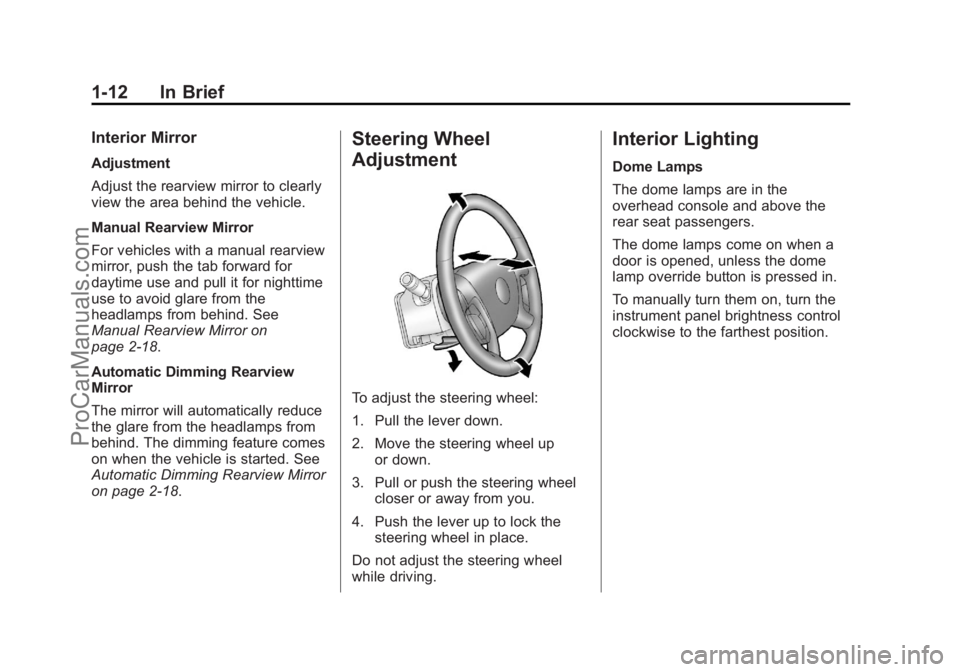
To adjust the steering wheel:
1. Pull the lever down.
2. Move the steering wheel upor down.
3. Pull or push the steering wheel closer or away from you.
4. Push the lever up to lock the steering wheel in place.
Do not adjust the steering wheel
while driving.
Interior Lighting
Dome Lamps
The dome lamps are in the
overhead console and above the
rear seat passengers.
The dome lamps come on when a
door is opened, unless the dome
lamp override button is pressed in.
To manually turn them on, turn the
instrument panel brightness control
clockwise to the farthest position.
ProCarManuals.com
Page 24 of 444
Black plate (18,1)Chevrolet Traverse Owner Manual - 2013 - CRC 2nd Edition - 11/13/12
1-18 In Brief
Storing a Favorite Station
A maximum of 36 stations can be
stored as favorites using the six
softkeys located below the radio
station frequency tabs and by using
the radio FAV button. Press FAV to
go through up to six pages of
favorites, each having six favorite
stations available per page. Each
page of favorites can contain any
combination of AM, FM, or SiriusXM
stations.
SeeAM-FM Radio (Radio without
Touchscreen) on page 7‑11 or
AM-FM Radio (Radio with
Touchscreen) on page 7‑12.
Setting the Clock
To set the time and date:
1. Turn the ignition key to ACC/ ACCESSORY or ON/RUN, then
press
Oto turn the radio on.
2. Press
Hto display HR, MIN,
MM, DD, YYYY (hour, minute,
month, day, and year).
3. Press the pushbutton located under any one of the labels to be
changed.
4. To increase or decrease the time or date, turn
fclockwise or
counterclockwise.
See Clock (Radio with Touchscreen)
on page 5‑8 orClock (Radio without
Touchscreen) on page 5‑7.
ProCarManuals.com
Page 26 of 444
Black plate (20,1)Chevrolet Traverse Owner Manual - 2013 - CRC 2nd Edition - 11/13/12
1-20 In Brief
1. From the AM, FM, or SiriusXMmain page, press and hold any
1−5 buttons or one of the preset
screen buttons at the bottom of
the screen. After a few seconds,
a beep is heard and the new
preset information displays on
that screen button.
2. Repeat for each preset.
Setting the Time and Date
Press Settings on the Home Page,
then press the Set Time or Set Date
settings screen button to display the
different options for setting the time
and date.
Set Time:
.Press the up or down arrows to
increase or decrease the Hours,
Minutes, AM, PM, or 24 hr on
the clock.
.Press and hold to quickly
increase or decrease the time
settings.
.Press OK or the Back screen
button to save the adjustments
that were made.
Set Date:
.Press the up or down arrows to
increase or decrease the Month,
Day, and Year settings.
.Press and hold to quickly
increase or decrease the date
settings.
.Press OK or the Back screen
button to save the adjustments
that were made.
See Clock (Radio with Touchscreen)
on page 5‑8 orClock (Radio without
Touchscreen) on page 5‑7.
Satellite Radio
Vehicles with a SiriusXM®satellite
radio tuner and a valid SiriusXM
satellite radio subscription can
receive SiriusXM programming.
SiriusXM Satellite Radio
Service
SiriusXM is a satellite radio service
based in the 48 contiguous United
States and 10 Canadian provinces.
SiriusXM satellite radio has a wide
variety of programming and
commercial-free music, coast to
coast, and in digital-quality sound.
A fee is required to receive the
SiriusXM service.
Refer to:
.www.siriusxm.com or call
1-866-635-2349 (U.S.).
.www.xmradio.ca or call
1-877-209-0079 (Canada).
See Satellite Radio (Radio without
Touchscreen) on page 7‑15 or
Satellite Radio (Radio with
Touchscreen) on page 7‑19.
Portable Audio Devices
This vehicle may have an auxiliary
input on the radio faceplate and a
USB port in the instrument panel
storage area. External devices such
ProCarManuals.com
Page 119 of 444
Black plate (1,1)Chevrolet Traverse Owner Manual - 2013 - CRC 2nd Edition - 11/13/12
Instruments and Controls 5-1
Instruments and
Controls
Controls
Steering Wheel Adjustment . . . 5-2
Steering Wheel Controls . . . . . . 5-2
Heated Steering Wheel . . . . . . . 5-4
Horn . . . . . . . . . . . . . . . . . . . . . . . . . . 5-4
Windshield Wiper/Washer . . . . . 5-4
Rear Window Wiper/Washer . . . . . . . . . . . . . . . . . . . . . . 5-5
Compass . . . . . . . . . . . . . . . . . . . . . 5-5
Clock (Radio without Touchscreen) . . . . . . . . . . . . . . . . 5-7
Clock (Radio with Touchscreen) . . . . . . . . . . . . . . . . 5-8
Power Outlets . . . . . . . . . . . . . . . . . 5-8
Warning Lights, Gauges, and
Indicators
Warning Lights, Gauges, and Indicators . . . . . . . . . . . . . . . . . . 5-10
Instrument Cluster . . . . . . . . . . . 5-11
Speedometer . . . . . . . . . . . . . . . . 5-12
Odometer . . . . . . . . . . . . . . . . . . . . 5-12
Tachometer . . . . . . . . . . . . . . . . . . 5-12
Fuel Gauge . . . . . . . . . . . . . . . . . . 5-12 Engine Coolant Temperature
Gauge . . . . . . . . . . . . . . . . . . . . . . 5-13
Voltmeter Gauge . . . . . . . . . . . . . 5-14
Safety Belt Reminders . . . . . . . 5-14
Airbag Readiness Light . . . . . . 5-15
Passenger Airbag Status Indicator . . . . . . . . . . . . . . . . . . . . 5-15
Charging System Light . . . . . . 5-16
Malfunction Indicator Lamp . . . . . . . . . . . . . 5-17
Brake System Warning Light . . . . . . . . . . . . . . . . . . . . . . . 5-19
Antilock Brake System (ABS) Warning Light . . . . . . . . . . . . . . 5-20
Tow/Haul Mode Light . . . . . . . . 5-21
StabiliTrak
®Indicator Light . . . 5-21
Engine Coolant Temperature Warning Light . . . . . . . . . . . . . . 5-21
Tire Pressure Light . . . . . . . . . . 5-22
Engine Oil Pressure Light . . . . 5-22
Security Light . . . . . . . . . . . . . . . . 5-23
High-Beam On Light . . . . . . . . . 5-23
Cruise Control Light . . . . . . . . . 5-23
Information Displays
Driver Information Center (DIC) (With DIC Buttons) . . . 5-24
Driver Information Center (DIC) (Without DIC
Buttons) . . . . . . . . . . . . . . . . . . . . 5-29
Vehicle Messages
Vehicle Messages . . . . . . . . . . . 5-31
Battery Voltage and ChargingMessages . . . . . . . . . . . . . . . . . . 5-32
Brake System Messages . . . . 5-32
Cruise Control Messages . . . . 5-32
Door Ajar Messages . . . . . . . . . 5-32
Engine Cooling System Messages . . . . . . . . . . . . . . . . . . 5-33
Engine Oil Messages . . . . . . . . 5-34
Engine Power Messages . . . . 5-35
Fuel System Messages . . . . . . 5-35
Key and Lock Messages . . . . . 5-35
Lamp Messages . . . . . . . . . . . . . 5-36
Object Detection System Messages . . . . . . . . . . . . . . . . . . 5-36
Ride Control System Messages . . . . . . . . . . . . . . . . . . 5-37
Airbag System Messages . . . . 5-38
Security Messages . . . . . . . . . . 5-38
Service Vehicle Messages . . . 5-38
Tire Messages . . . . . . . . . . . . . . . 5-39
ProCarManuals.com
Page 125 of 444
Black plate (7,1)Chevrolet Traverse Owner Manual - 2013 - CRC 2nd Edition - 11/13/12
Instruments and Controls 5-7
To calibrate the compass, use the
following procedure:
Compass Calibration Procedure
1. Before calibrating the compass,make sure the compass zone is
set to the variance zone in which
the vehicle is located. See
“Compass Variance (Zone)
Procedure” earlier in this
section.
Do not operate any switches
such as window, sunroof,
climate controls, seats, etc.
during the calibration procedure.
2. Press the vehicle information button until PRESS
VTO
CALIBRATE COMPASS
displays.
3. Press the set/reset button to start the compass calibration.
4. The DIC will display CALIBRATING: DRIVE IN
CIRCLES. Drive the vehicle in
tight circles at less than 8 km/h
(5 mph) to complete the
calibration. The DIC will display CALIBRATION COMPLETE for a
few seconds when the
calibration is complete. The DIC
display will then return to the
previous menu.
Clock (Radio without
Touchscreen)
To adjust the time and date:
1. Turn the ignition key to ACC/
ACCESSORY or ON/RUN, then
press
Oto turn the radio on.
2. Press
Gto display HR, MIN,
MM, DD, YYYY (hour, minute,
month, day, and year).
3. Press the pushbutton located under any one of the labels to be
changed.
4. To increase the time or date, do one of the following:
.Press the pushbutton below
the selected label.
.Press¨SEEK.
.Press\FWD.
.Turnfclockwise.
5. To decrease the time or date, do one of the following:
.Press©SEEK.
.PresssREV.
.Turnfcounterclockwise.
To change the time default setting
from 12 hour to 24 hour or to
change the date default setting from
month/day/year to day/month/year:
1. Press
Gand then the
pushbutton located under the
forward arrow that displays on
the radio screen until the time
12H (hour) and 24H (hour), and
the date MM/DD (month and
day) and DD/MM (day and
month) display.
2. Press the pushbutton located under the desired option.
ProCarManuals.com
Page 126 of 444
Black plate (8,1)Chevrolet Traverse Owner Manual - 2013 - CRC 2nd Edition - 11/13/12
5-8 Instruments and Controls
3. PressGagain to apply the
selected default, or let the
screen time out.
Clock (Radio with
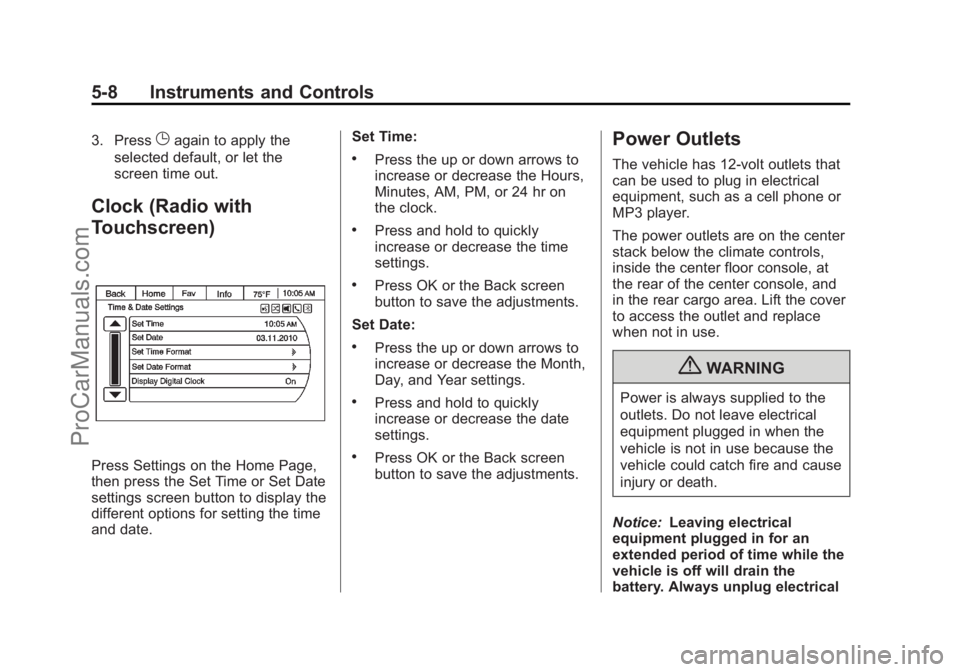
Touchscreen)
Press Settings on the Home Page,
then press the Set Time or Set Date
settings screen button to display the
different options for setting the time
and date. Set Time:
.Press the up or down arrows to
increase or decrease the Hours,
Minutes, AM, PM, or 24 hr on
the clock.
.Press and hold to quickly
increase or decrease the time
settings.
.Press OK or the Back screen
button to save the adjustments.
Set Date:
.Press the up or down arrows to
increase or decrease the Month,
Day, and Year settings.
.Press and hold to quickly
increase or decrease the date
settings.
.Press OK or the Back screen
button to save the adjustments.
Power Outlets
The vehicle has 12-volt outlets that
can be used to plug in electrical
equipment, such as a cell phone or
MP3 player.
The power outlets are on the center
stack below the climate controls,
inside the center floor console, at
the rear of the center console, and
in the rear cargo area. Lift the cover
to access the outlet and replace
when not in use.
{WARNING
Power is always supplied to the
outlets. Do not leave electrical
equipment plugged in when the
vehicle is not in use because the
vehicle could catch fire and cause
injury or death.
Notice: Leaving electrical
equipment plugged in for an
extended period of time while the
vehicle is off will drain the
battery. Always unplug electrical
ProCarManuals.com
Page 175 of 444
Black plate (5,1)Chevrolet Traverse Owner Manual - 2013 - CRC 2nd Edition - 11/13/12
Lighting 6-5
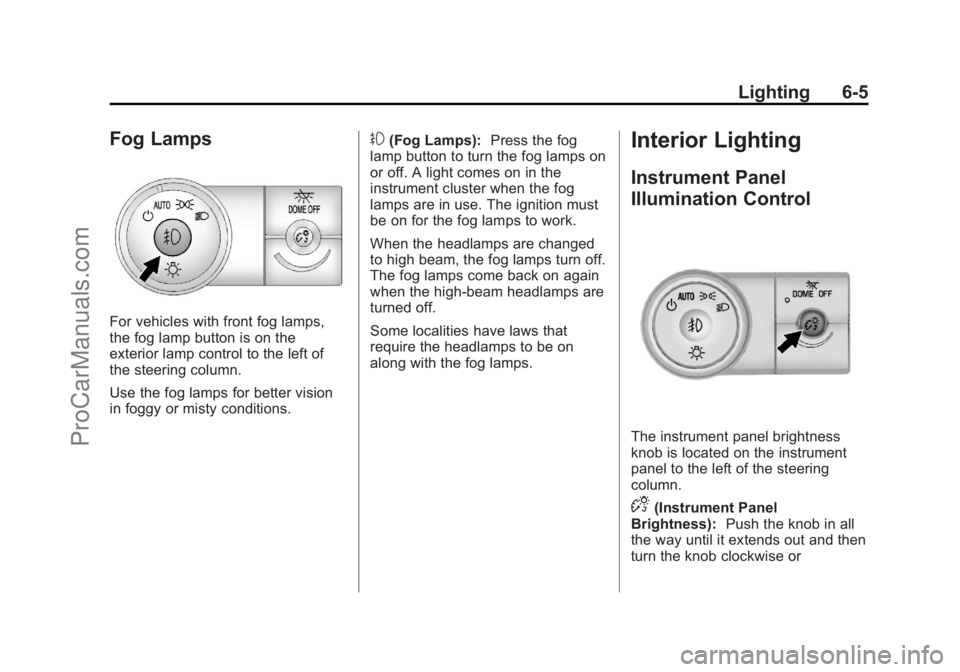
Fog Lamps
For vehicles with front fog lamps,
the fog lamp button is on the
exterior lamp control to the left of
the steering column.
Use the fog lamps for better vision
in foggy or misty conditions.
#(Fog Lamps):Press the fog
lamp button to turn the fog lamps on
or off. A light comes on in the
instrument cluster when the fog
lamps are in use. The ignition must
be on for the fog lamps to work.
When the headlamps are changed
to high beam, the fog lamps turn off.
The fog lamps come back on again
when the high-beam headlamps are
turned off.
Some localities have laws that
require the headlamps to be on
along with the fog lamps.Interior Lighting
Instrument Panel
Illumination Control
The instrument panel brightness
knob is located on the instrument
panel to the left of the steering
column.
D(Instrument Panel
Brightness): Push the knob in all
the way until it extends out and then
turn the knob clockwise or
ProCarManuals.com
Page 176 of 444
Black plate (6,1)Chevrolet Traverse Owner Manual - 2013 - CRC 2nd Edition - 11/13/12
6-6 Lighting
counterclockwise to brighten or dim
the lights. Push the knob back in
when finished.
Courtesy Lamps
The courtesy lamps automatically
come on when a door is opened.
The lamps can also be turned on
manually by fully turning the
instrument panel brightness control
clockwise.
The reading lamps, located on the
headliner above the rearview mirror,
can be turned on or off
independently of the automatic
courtesy lamps, when the doors are
closed.
Dome Lamps
The dome lamps are in the
overhead console and above the
rear seat passengers.
The dome lamps come on when a
door is opened, unless the dome
lamp override button is pressed in.
The lamps can also be turned on
and off by turning the instrument
panel brightness control clockwise
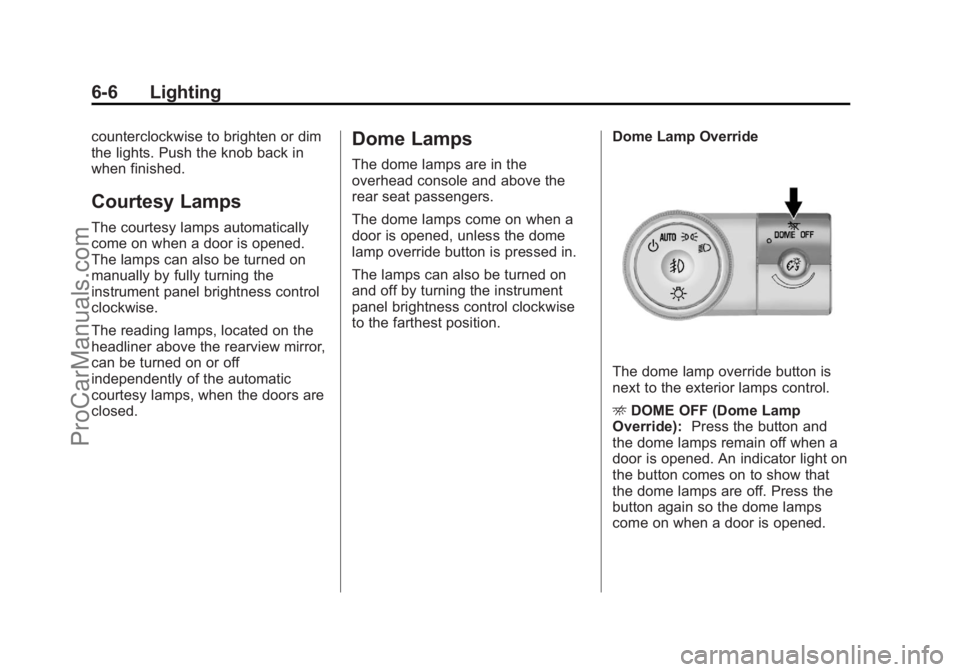
to the farthest position.Dome Lamp Override
The dome lamp override button is
next to the exterior lamps control.
E
DOME OFF (Dome Lamp
Override): Press the button and
the dome lamps remain off when a
door is opened. An indicator light on
the button comes on to show that
the dome lamps are off. Press the
button again so the dome lamps
come on when a door is opened.
ProCarManuals.com
Page 184 of 444
Black plate (4,1)Chevrolet Traverse Owner Manual - 2013 - CRC 2nd Edition - 11/13/12
7-4 Infotainment System
8.H(Clock)
.Press to set the clock.
9. BAND
.Press to scroll through the
available bands AM, FM,
or SiriusXM if equipped.
10.
©SEEK
.Seeks the previous
station.
11.
¨SEEK
.Seeks the next station. 12.
P(Power/Volume)
.Press to turn the
infotainment system on
or off.
.Turn to adjust the volume.
13.
sREV (Reverse)
.Press and hold to go
backward fast through a
track.
14.
\FWD (Forward)
.Press and hold to fast
forward through a track. 15. CD/AUX
.Press to scroll through
selecting the CD or an
auxiliary device.
16. Auxiliary Input Jack
.Use to connect external
audio devices.
17.
ZEJECT
.Press to eject the
loaded CD.
ProCarManuals.com
Page 186 of 444
Black plate (6,1)Chevrolet Traverse Owner Manual - 2013 - CRC 2nd Edition - 11/13/12
7-6 Infotainment System
Operation (Radio without
Touchscreen)
Playing the Radio
O(Power/Volume):Press to turn
the system on and off. Turn to
increase or decrease the volume.
A lock symbol displays next to the
clock display while the parental
control feature is being used. The
feature remains on until
Ois
pressed and held for more than
two seconds, or the driver turns the
ignition off and exits the vehicle.
4(Information): Press to switch
the display between the radio
station frequency and the time.
When the ignition is in the OFF
position, press
4to display the time.
For vehicles with XM, MP3, WMA,
or RDS features, press
4to display
additional text information related to
the current FM-RDS or XM station;
or CD, MP3, or WMA song.
If information is available during XM,
CD, MP3, or WMA playback, the song title information displays on
the top line of the display and artist
information displays on the bottom
line. When information is not
available,
“NO INFO” displays.
Auto Text (Satellite Radio Service,
CD, MP3, and WMA features): If
additional information is available
for the current song being played,
Auto Text will automatically page/
scroll the information every
five seconds above the FAV presets
on the radio display.
To activate Auto Text:
1. Press MENU to display the radio setup menu.
2. Press the softkey under the AUTO TXT tab on the radio
display.
3. Press the softkey under the ON tab on the radio display.
If
4is pressed and the song title or
artist information is longer than what
can be displayed, the extra information will page every
five seconds when Auto Text is
activated.
Speed Compensated Volume
(SCV):
The Speed Compensated
Volume (SCV) feature automatically
adjusts the radio volume to
compensate for road and wind noise
as the vehicle speeds up or slows
down, so that the volume level is
consistent.
To activate SCV:
1. Set the radio volume.
2. Press the MENU button to
display the radio setup menu.
3. Press the softkey under the AUTO VOLUM (automatic
volume) tab on the radio display.
4. Press the softkey under the Speed Compensated Volume
setting (OFF, Low, Med, or High)
to select the level of radio
volume compensation. Press the
softkey located below the BACK
tab on the MENU SETUP
display or let the display time out
ProCarManuals.com