seat memory CHEVROLET TRAVERSE 2016 1.G Owners Manual
[x] Cancel search | Manufacturer: CHEVROLET, Model Year: 2016, Model line: TRAVERSE, Model: CHEVROLET TRAVERSE 2016 1.GPages: 392, PDF Size: 6.66 MB
Page 6 of 392
Chevrolet Traverse Owner Manual (GMNA-Localizing-U.S./Canada/Mexico-
9159264) - 2016 - crc - 8/17/15
In Brief 5
In Brief
Instrument Panel
Instrument Panel . . . . . . . . . . . . . . . . 6
Initial Drive Information
Initial Drive Information . . . . . . . . . . 8
Remote Keyless Entry (RKE)System . . . . . . . . . . . . . . . . . . . . . . . . 8
Remote Vehicle Start . . . . . . . . . . . 8
Door Locks . . . . . . . . . . . . . . . . . . . . . 9
Liftgate . . . . . . . . . . . . . . . . . . . . . . . . . . 9
Windows . . . . . . . . . . . . . . . . . . . . . . . 10
Seat Adjustment . . . . . . . . . . . . . . . 10
Memory Features . . . . . . . . . . . . . . 11
Second Row Seats . . . . . . . . . . . . 12
Third Row Seats . . . . . . . . . . . . . . . 12
Heated and Cooled Front Seats . . . . . . . . . . . . . . . . . . . . . . . . . 13
Head Restraint Adjustment . . . . 13
Safety Belts . . . . . . . . . . . . . . . . . . . . 13
Passenger Sensing System . . . 14
Mirror Adjustment . . . . . . . . . . . . . . 14
Steering Wheel Adjustment . . . . 15
Interior Lighting . . . . . . . . . . . . . . . . 16
Exterior Lighting . . . . . . . . . . . . . . . 16
Windshield Wiper/Washer . . . . . . 17
Climate Controls . . . . . . . . . . . . . . . 18
Transmission . . . . . . . . . . . . . . . . . . 19
Vehicle Features
Infotainment System . . . . . . . . . . . 20
Radio(s) . . . . . . . . . . . . . . . . . . . . . . . 20
Satellite Radio . . . . . . . . . . . . . . . . . 23
Portable Audio Devices . . . . . . . . 23
Bluetooth
®. . . . . . . . . . . . . . . . . . . . . 24
Steering Wheel Controls (Radio without Touchscreen) . . . . . . . . . 24
Steering Wheel Controls (Radio with Touchscreen) . . . . . . . . . . . . 25
Cruise Control . . . . . . . . . . . . . . . . . 25
Driver Information Center (DIC) (With DIC Buttons) . . . . . . . . . . . 25
Forward Collision Alert (FCA) System . . . . . . . . . . . . . . . . . . . . . . . 26
Lane Departure Warning (LDW) . . . . . . . . . . . . . . . 26
Side Blind Zone Alert (SBZA) . . . . . . . . . . . . . . . . . . 26
Rear Vision Camera (RVC) . . . . 27
Rear Cross Traffic Alert (RCTA) System . . . . . . . . . . . . . . . . . . . . . . . 27
Parking Assist . . . . . . . . . . . . . . . . . 27
Power Outlets . . . . . . . . . . . . . . . . . 27
Universal Remote System . . . . . 27
Sunroof . . . . . . . . . . . . . . . . . . . . . . . . 27
Performance and Maintenance
Traction Control/Electronic Stability Control . . . . . . . . . . . . . . 28
Tire Pressure Monitor . . . . . . . . . . 28 Engine Oil Life System . . . . . . . . 29
Driving for Better Fuel
Economy . . . . . . . . . . . . . . . . . . . . . 29
Roadside Assistance Program . . . . . . . . . . . . . . . . . . . . . . 30
Page 12 of 392
Chevrolet Traverse Owner Manual (GMNA-Localizing-U.S./Canada/Mexico-
9159264) - 2016 - crc - 8/17/15
In Brief 11
3. Try to move the seat back andforth to be sure it is locked in
place.
Move the lever (2) up or down to
raise or lower the seat.
Use the lever (3) to adjust the
seatback.
See Seat Adjustment 053
iiand
Reclining Seatbacks 055ii.
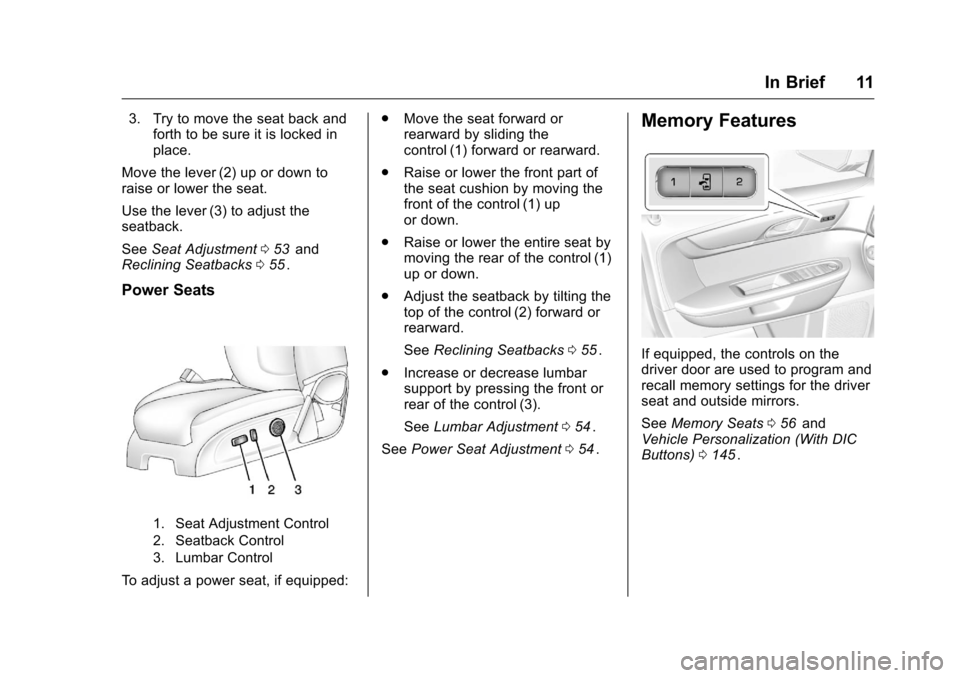
Power Seats
1. Seat Adjustment Control
2. Seatback Control
3. Lumbar Control
To adjust a power seat, if equipped: .
Move the seat forward or
rearward by sliding the
control (1) forward or rearward.
. Raise or lower the front part of
the seat cushion by moving the
front of the control (1) up
or down.
. Raise or lower the entire seat by
moving the rear of the control (1)
up or down.
. Adjust the seatback by tilting the
top of the control (2) forward or
rearward.
See Reclining Seatbacks 055
ii.
. Increase or decrease lumbar
support by pressing the front or
rear of the control (3).
See Lumbar Adjustment 054
ii.
See Power Seat Adjustment 054
ii.
Memory Features
If equipped, the controls on the
driver door are used to program and
recall memory settings for the driver
seat and outside mirrors.
See Memory Seats 056
iiand
Vehicle Personalization (With DIC
Buttons) 0145
ii.
Page 47 of 392
Chevrolet Traverse Owner Manual (GMNA-Localizing-U.S./Canada/Mexico-
9159264) - 2016 - crc - 8/17/15
46 Keys, Doors, and Windows
Resetting the Power Folding
Mirrors
Reset the power folding mirrors if:
.The mirrors are accidentally
obstructed while folding.
. They are accidentally manually
folded/unfolded.
. The mirrors vibrate at normal
driving speeds.
To reset the mirrors, fold and unfold
the mirrors one time using the
power folding mirror controls.
A popping noise may be heard
during the resetting. This sound is
normal during the reset operation.
Heated Mirrors
For vehicles with heated mirrors:
1(Rear Window Defogger) :
Press to heat the mirrors.
See “Rear Window Defogger” under
Dual Automatic Climate Control
System 0207
ii.
Park Tilt Mirrors
If equipped with memory seats, the
passenger and/or driver mirror tilts
to a preselected position when the
vehicle is in R (Reverse). This
allows the curb to be seen when
parallel parking.
The mirror(s) return to the original
position when:
.
The vehicle is shifted out of
R (Reverse), or remains in
R (Reverse) for about
30 seconds.
. The ignition is turned off.
. The vehicle is driven in
R (Reverse) above a set speed.
To turn this feature on or off, see
Vehicle Personalization (With DIC
Buttons) 0145
ii.
Interior Mirrors
Interior Rearview Mirrors
Adjust the rearview mirror for a clear
view of the area behind your
vehicle.
If equipped with OnStar, the vehicle
may have three control buttons at
the bottom of the mirror. See your
dealer for more information about
OnStar and how to subscribe to it.
See “OnStar,” if equipped.
Do not spray glass cleaner directly
on the mirror. Use a soft towel
dampened with water.
Manual Rearview Mirror
If equipped, push the tab forward for
daytime use and pull it for nighttime
use to avoid glare from the
headlamps from behind.
Page 52 of 392
Chevrolet Traverse Owner Manual (GMNA-Localizing-U.S./Canada/Mexico-
9159264) - 2016 - crc - 8/17/15
Seats and Restraints 51
Seats and
Restraints
Head Restraints
Head Restraints . . . . . . . . . . . . . . . 52
Front Seats
Seat Adjustment . . . . . . . . . . . . . . . 53
Power Seat Adjustment . . . . . . . . 54
Lumbar Adjustment . . . . . . . . . . . . 54
Reclining Seatbacks . . . . . . . . . . . 55
Memory Seats . . . . . . . . . . . . . . . . . 56
Heated and Cooled FrontSeats . . . . . . . . . . . . . . . . . . . . . . . . . 57
Rear Seats
Rear Seats . . . . . . . . . . . . . . . . . . . . 58
Third Row Seats . . . . . . . . . . . . . . . 60
Safety Belts
Safety Belts . . . . . . . . . . . . . . . . . . . . 63
How to Wear Safety BeltsProperly . . . . . . . . . . . . . . . . . . . . . . 64
Lap-Shoulder Belt . . . . . . . . . . . . . 65
Safety Belt Use During Pregnancy . . . . . . . . . . . . . . . . . . . . 69
Safety Belt Extender . . . . . . . . . . . 69
Safety System Check . . . . . . . . . . 69
Safety Belt Care . . . . . . . . . . . . . . . 70 Replacing Safety Belt System
Parts after a Crash . . . . . . . . . . . 70
Airbag System
Airbag System . . . . . . . . . . . . . . . . . 71
Where Are the Airbags? . . . . . . . 72
When Should an AirbagInflate? . . . . . . . . . . . . . . . . . . . . . . . 74
What Makes an Airbag Inflate? . . . . . . . . . . . . . . . . . . . . . . . 75
How Does an Airbag Restrain? . . . . . . . . . . . . . . . . . . . . . 75
What Will You See after an Airbag Inflates? . . . . . . . . . . . . . . 75
Passenger Sensing System . . . 77
Servicing the Airbag-Equipped Vehicle . . . . . . . . . . . . . . . . . . . . . . . 81
Adding Equipment to the Airbag-Equipped Vehicle . . . . . 81
Airbag System Check . . . . . . . . . . 82
Replacing Airbag System Parts after a Crash . . . . . . . . . . . . . . . . . 82
Child Restraints
Older Children . . . . . . . . . . . . . . . . . 83
Infants and Young Children . . . . 84
Child Restraint Systems . . . . . . . 87
Where to Put the Restraint . . . . . 88
Lower Anchors and Tethers forChildren (LATCH System) . . . . 90 Replacing LATCH System Parts
After a Crash . . . . . . . . . . . . . . . . . 96
Securing Child Restraints (Rear Seat) . . . . . . . . . . . . . . . . . . . 96
Securing Child Restraints (Front
Passenger Seat) . . . . . . . . . . . . . 98
Page 57 of 392
Chevrolet Traverse Owner Manual (GMNA-Localizing-U.S./Canada/Mexico-
9159264) - 2016 - crc - 8/17/15
56 Seats and Restraints
2. Push and pull on the seatbackto make sure it is locked.
Power Reclining Seatbacks
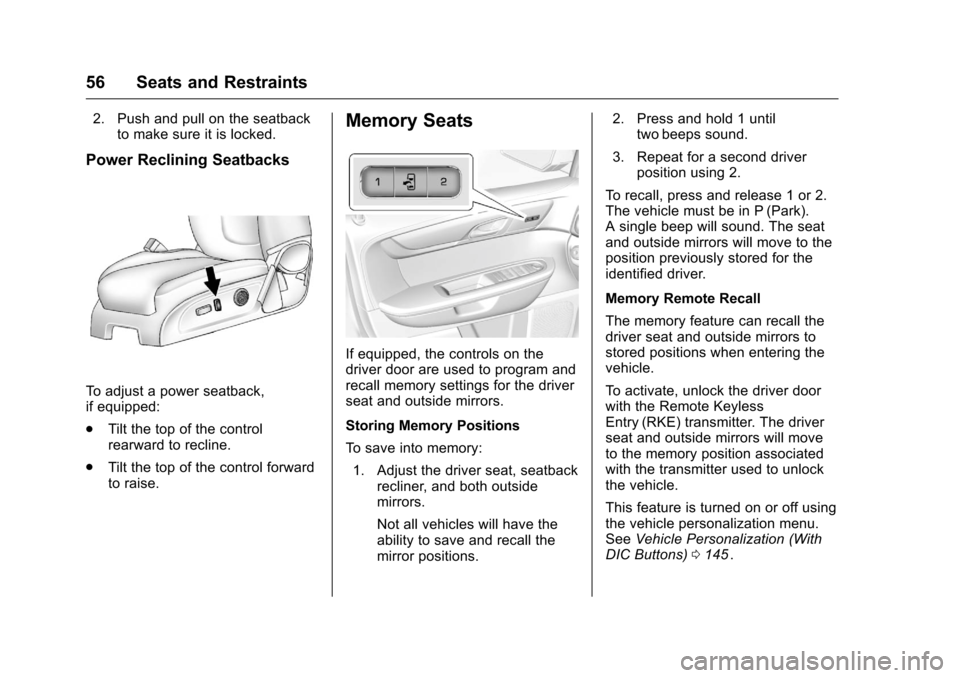
To adjust a power seatback,
if equipped:
.Tilt the top of the control
rearward to recline.
. Tilt the top of the control forward
to raise.
Memory Seats
If equipped, the controls on the
driver door are used to program and
recall memory settings for the driver
seat and outside mirrors.
Storing Memory Positions
To save into memory:
1. Adjust the driver seat, seatback recliner, and both outside
mirrors.
Not all vehicles will have the
ability to save and recall the
mirror positions. 2. Press and hold 1 until
two beeps sound.
3. Repeat for a second driver position using 2.
To recall, press and release 1 or 2.
The vehicle must be in P (Park).
A single beep will sound. The seat
and outside mirrors will move to the
position previously stored for the
identified driver.
Memory Remote Recall
The memory feature can recall the
driver seat and outside mirrors to
stored positions when entering the
vehicle.
To activate, unlock the driver door
with the Remote Keyless
Entry (RKE) transmitter. The driver
seat and outside mirrors will move
to the memory position associated
with the transmitter used to unlock
the vehicle.
This feature is turned on or off using
the vehicle personalization menu.
See Vehicle Personalization (With
DIC Buttons) 0145
ii.
Page 58 of 392
Chevrolet Traverse Owner Manual (GMNA-Localizing-U.S./Canada/Mexico-
9159264) - 2016 - crc - 8/17/15
Seats and Restraints 57
To stop recall movement, press one
of the power seat controls, memory
buttons, or the power mirror buttons.
If something has blocked the driver
seat while recalling a memory
position, the recall may stop.
Remove the obstruction; then press
and hold the appropriate manual
control for the memory item that is
not recalling for two seconds. Try
recalling the memory position again
by pressing the appropriate memory
button. If the memory position is still
not recalling, see your dealer for
service.
Easy Exit Driver Seat
This feature can move the seat
rearward to allow extra room to exit
the vehicle.
S(Easy Exit Driver Seat) :Press
to activate the recall. The vehicle
must be in P (Park).
If this feature is programmed on in
the vehicle personalization menu,
automatic seat movement occurs
when the ignition key is removed. A single beep sounds. The driver
seat moves back approximately
8 cm (3 in). To move the seat back
farther, press
Sagain until the seat
is all the way back.
If something has blocked the driver
seat while recalling the exit position,
the recall may stop. Remove the
obstruction; then press and hold the
power seat control rearward for
two seconds. Try recalling the exit
position again. If the exit position is
still not recalling, see your dealer for
service.
See Vehicle Personalization (With
DIC Buttons) 0145
ii.
Heated and Cooled Front
Seats
{Warning
If you cannot feel temperature
change or pain to the skin, the
seat heater may cause burns. To
reduce the risk of burns, people
with such a condition should use
(Continued)
Warning (Continued)
care when using the seat heater,
especially for long periods of
time. Do not place anything on
the seat that insulates against
heat, such as a blanket, cushion,
cover, or similar item. This may
cause the seat heater to
overheat. An overheated seat
heater may cause a burn or may
damage the seat.
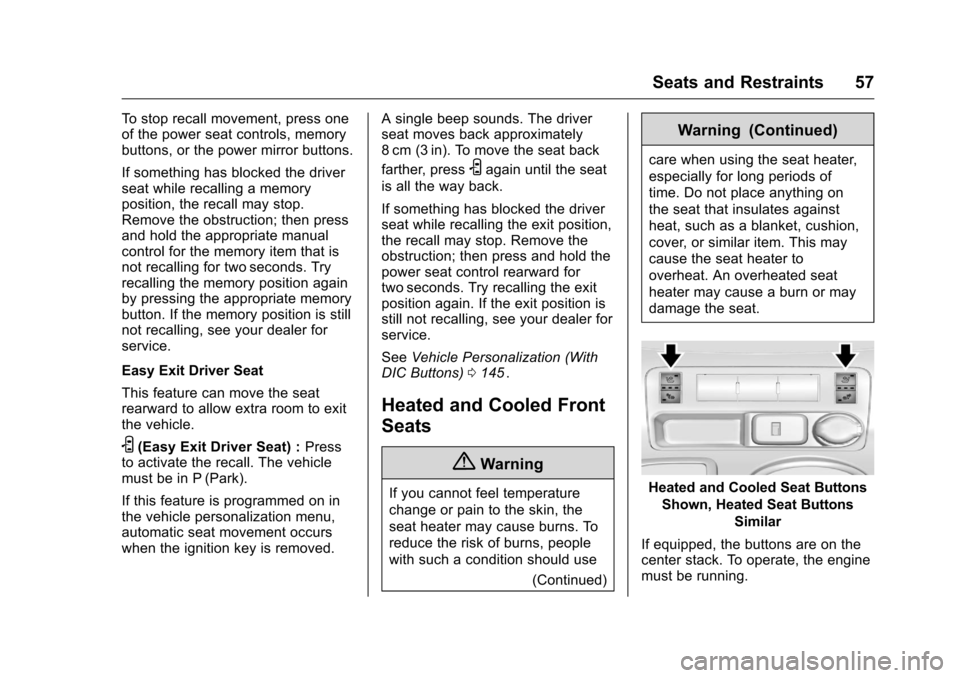
Heated and Cooled Seat ButtonsShown, Heated Seat Buttons Similar
If equipped, the buttons are on the
center stack. To operate, the engine
must be running.
Page 151 of 392
Chevrolet Traverse Owner Manual (GMNA-Localizing-U.S./Canada/Mexico-
9159264) - 2016 - crc - 8/17/15
150 Instruments and Controls
To select a setting, press the set/
reset button while the desired
setting is displayed on the DIC.
PARK TILT MIRRORS
If your vehicle has this feature, it
allows you to select whether or not
the outside mirror(s) will
automatically tilt down when the
vehicle is shifted into R (Reverse).
SeePark Tilt Mirrors 046
ii.
Press the customization button until
PARK TILT MIRRORS appears on
the DIC display. Press the set/reset
button once to access the settings
for this feature. Then press the
customization button to scroll
through the following settings:
OFF (default) : Neither outside
mirror will be tilted down when the
vehicle is shifted into R (Reverse).
DRIVER MIRROR : The driver
outside mirror will be tilted down
when the vehicle is shifted into
R (Reverse).
PASSENGER MIRROR : The
passenger outside mirror will be
tilted down when the vehicle is
shifted into R (Reverse). BOTH MIRRORS :
The driver and
passenger outside mirrors will be
tilted down when the vehicle is
shifted into R (Reverse).
NO CHANGE : No change will be
made to this feature. The current
setting will remain.
To select a setting, press the set/
reset button while the desired
setting is displayed on the DIC.
EASY EXIT SEAT
If your vehicle has this feature, it
allows you to select your preference
for the automatic easy exit seat
feature. See Memory Seats 056
ii.
Press the customization button until
EASY EXIT SEAT appears on the
DIC display. Press the set/reset
button once to access the settings
for this feature. Then press the
customization button to scroll
through the following settings:
OFF (default) : No automatic seat
exit recall will occur.
ON : The driver seat will move back
when the key is removed from the
ignition. The automatic easy exit seat
movement will only occur one time
after the key is removed from the
ignition. If the automatic movement
has already occurred, and you put
the key back in the ignition and
remove it again, the seat and
steering column will stay in the
original exit position, unless a
memory recall took place prior to
removing the key again.
NO CHANGE :
No change will be
made to this feature. The current
setting will remain.
To select a setting, press the set/
reset button while the desired
setting is displayed on the DIC.
MEMORY SEAT RECALL
If your vehicle has this feature, it
allows you to select your preference
for the remote memory seat recall
feature. See Memory Seats 056
ii.
Press the customization button until
MEMORY SEAT RECALL appears
on the DIC display. Press the set/
reset button once to access the
Page 152 of 392
Chevrolet Traverse Owner Manual (GMNA-Localizing-U.S./Canada/Mexico-
9159264) - 2016 - crc - 8/17/15
Instruments and Controls 151
settings for this feature. Then press
the customization button to scroll
through the following settings:
OFF (default) :No remote memory
seat recall will occur.
ON : The driver seat and outside
mirrors will automatically move to
the stored driving position when the
unlock button on the Remote
Keyless Entry (RKE) transmitter is
pressed.
NO CHANGE : No change will be
made to this feature. The current
setting will remain.
To select a setting, press the set/
reset button while the desired
setting is displayed on the DIC.
REMOTE START
If your vehicle has this feature, it
allows you to turn the remote start
off or on. The remote start feature
allows you to start the engine from
outside of the vehicle using the
Remote Keyless Entry (RKE)
transmitter. See Remote Vehicle
Start 035
ii. Press the customization button until
REMOTE START appears on the
DIC display. Press the set/reset
button once to access the settings
for this feature. Then press the
customization button to scroll
through the following settings:
OFF :
The remote start feature will
be disabled.
ON (default) : The remote start
feature will be enabled.
NO CHANGE : No change will be
made to this feature. The current
setting will remain.
To select a setting, press the set/
reset button while the desired
setting is displayed on the DIC.
FACTORY SETTINGS
This feature allows you to set all of
the customization features back to
their factory default settings.
Press the customization button until
FACTORY SETTINGS appears on
the DIC display. Press the set/reset
button once to access the settings for this feature. Then press the
customization button to scroll
through the following settings:
RESTORE ALL (default) :
The
customization features will be set to
their factory default settings.
DO NOT RESTORE : The
customization features will not be
set to their factory default settings.
To select a setting, press the set/
reset button while the desired
setting is displayed on the DIC.
EXIT FEATURE SETTINGS
This feature allows you to exit the
feature settings menu.
Press the customization button until
FEATURE SETTINGS PRESS
V
TO EXIT appears in the DIC display.
Press the set/reset button once to
exit the menu.
If you do not exit, pressing the
customization button again will
return you to the beginning of the
feature settings menu.
Page 295 of 392
Chevrolet Traverse Owner Manual (GMNA-Localizing-U.S./Canada/Mexico-
9159264) - 2016 - crc - 8/17/15
294 Vehicle Care
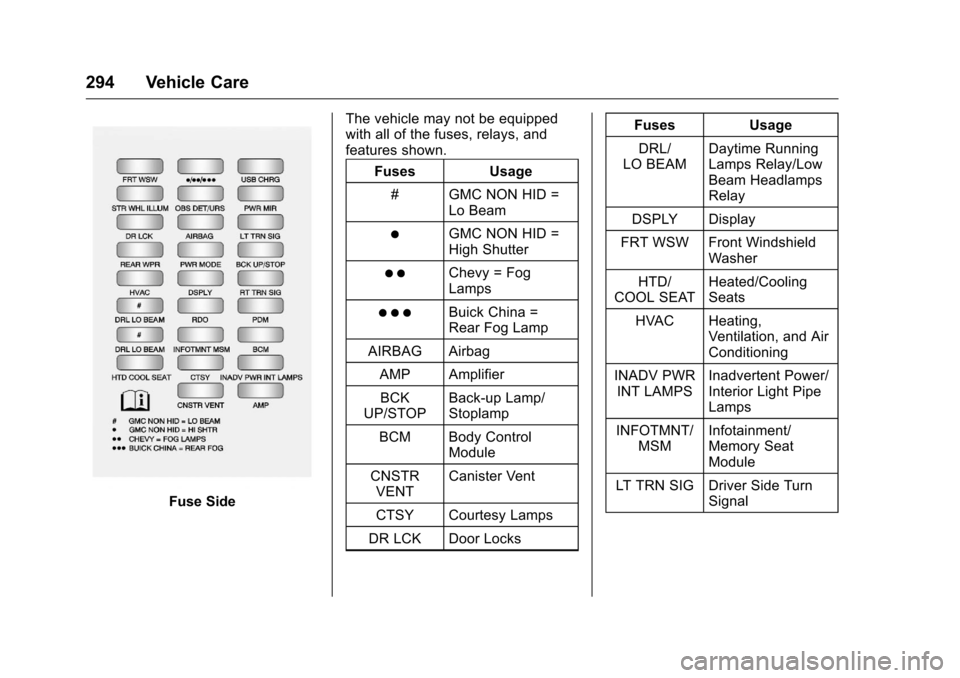
Fuse SideThe vehicle may not be equipped
with all of the fuses, relays, and
features shown.
Fuses Usage
# GMC NON HID = Lo Beam
)GMC NON HID =
High Shutter
) )Chevy = Fog
Lamps
) ) )Buick China =
Rear Fog Lamp
AIRBAG Airbag
AMP AmplifierBCK
UP/STOP Back-up Lamp/
Stoplamp
BCM Body Control Module
CNSTR VENT Canister Vent
CTSY Courtesy Lamps
DR LCK Door Locks Fuses Usage
DRL/
LO BEAM Daytime Running
Lamps Relay/Low
Beam Headlamps
Relay
DSPLY Display
FRT WSW Front Windshield Washer
HTD/
COOL SEAT Heated/Cooling
Seats
HVAC Heating, Ventilation, and Air
Conditioning
INADV PWR INT LAMPS Inadvertent Power/
Interior Light Pipe
Lamps
INFOTMNT/ MSM Infotainment/
Memory Seat
Module
LT TRN SIG Driver Side Turn Signal
Page 385 of 392
Chevrolet Traverse Owner Manual (GMNA-Localizing-U.S./Canada/Mexico-
9159264) - 2016 - crc - 8/19/15
384 Index
Driving (cont'd)If the Vehicle is Stuck . . . . . . . . . 222
Loss of Control . . . . . . . . . . . . . . . 218
Off-Road Recovery . . . . . . . . . . . 218
Vehicle Load Limits . . . . . . . . . . . 222
Wet Roads . . . . . . . . . . . . . . . . . . . 219
Winter . . . . . . . . . . . . . . . . . . . . . . . . 220
Dual Automatic Climate Control System . . . . . . . . . . . . . . . . 207
E
Electrical Equipment,
Add-On . . . . . . . . . . . . . . . . . . . . . . . 263
Electrical System
Engine Compartment FuseBlock . . . . . . . . . . . . . . . . . . . . . . . . 290
Fuses and Circuit Breakers . . . 289
Instrument Panel Fuse Block . . . . . . . . . . . . . . . . . . . . . . . . 293
Overload . . . . . . . . . . . . . . . . . . . . . 289
Emergency OnStar
®. . . . . . . . . . . . . . . . . . . . . . 372
Engine Air Cleaner/Filter . . . . . . . . . . . . . 273
Check and Service Engine
Soon Light . . . . . . . . . . . . . . . . . . 123
Compartment Overview . . . . . . . 268
Coolant . . . . . . . . . . . . . . . . . . . . . . . 275 Engine (cont'd)
Coolant Temperature
Gauge . . . . . . . . . . . . . . . . . . . . . . .119
Coolant Temperature
Warning Light . . . . . . . . . . . . . . . 127
Cooling System . . . . . . . . . . . . . . . 274
Cooling System Messages . . . 138
Cover . . . . . . . . . . . . . . . . . . . . . . . . . 269
Drive Belt Routing . . . . . . . . . . . . 356
Exhaust . . . . . . . . . . . . . . . . . . . . . . 232
Heater . . . . . . . . . . . . . . . . . . . . . . . . 229
Oil Life System . . . . . . . . . . . . . . . 272
Oil Messages . . . . . . . . . . . . . . . . . 139
Oil Pressure Light . . . . . . . . . . . . 127
Overheated Protection Operating Mode . . . . . . . . . . . . . 280
Overheating . . . . . . . . . . . . . . . . . . 278
Power Messages . . . . . . . . . . . . . 139
Running While Parked . . . . . . . . 233
Starting . . . . . . . . . . . . . . . . . . . . . . . 228
Entry Lighting . . . . . . . . . . . . . . . . . . . 161
Equipment, Towing . . . . . . . . . . . . . 261
Event Data Recorders . . . . . . . . . . 369
Extender, Safety Belt . . . . . . . . . . . . 69
Exterior Lamp Controls . . . . . . . . . 156
F
Features Memory . . . . . . . . . . . . . . . . . . . . . . . . . 11
Filter, Engine Air Cleaner . . . . . . . . . . . 273
Flash-to-Pass . . . . . . . . . . . . . . . . . . . 157
Flashers, Hazard Warning . . . . . . 158
Flat Tire . . . . . . . . . . . . . . . . . . . . . . . . 315 Changing . . . . . . . . . . . . . . . . . . . . . 316
Floor Mats . . . . . . . . . . . . . . . . . . . . . . 339
Fluid
Automatic Transmission . . . . . . 273
Brakes . . . . . . . . . . . . . . . . . . . . . . . . 282
Power Steering . . . . . . . . . . . . . . . 280
Washer . . . . . . . . . . . . . . . . . . . . . . . 281
Fog Lamps Bulb Replacement . . . . . . . . . . . . 159
Folding Mirrors . . . . . . . . . . . . . . . . . . 45
Forward Collision Alert (FCA) System . . . . . . . . . . . . . . . . . 247
Frequency Statement Radio . . . . . . . . . . . . . . . . . . . . . . . . . 367
Front Seats Adjustment . . . . . . . . . . . . . . . . . . . . . 53
Heated and Cooled . . . . . . . . . . . . . 57
Fuel . . . . . . . . . . . . . . . . . . . . . . . . . . . . 252 Additives . . . . . . . . . . . . . . . . . . . . . 253
Economy Driving . . . . . . . . . . . . . . . 29