dic CHEVROLET TRAVERSE 2017 1.G Owners Manual
[x] Cancel search | Manufacturer: CHEVROLET, Model Year: 2017, Model line: TRAVERSE, Model: CHEVROLET TRAVERSE 2017 1.GPages: 394, PDF Size: 6.47 MB
Page 208 of 394
Chevrolet Traverse Owner Manual (GMNA-Localizing-U.S./Canada/Mexico-
9955676) - 2017 - crc - 3/29/16
Climate Controls 207
@:Press to turn the recirculation
mode on or off. An indicator light
comes on when recirculation is on.
When the engine is turned off, the
recirculation mode automatically
turns off and must be re-selected
when the engine is turned on again.
This mode recirculates and helps to
quickly cool the air inside the
vehicle. It can be used to reduce the
outside air and odors that may enter
the vehicle.
The recirculation mode cannot be
used with floor, defrost, or defogging
modes. If recirculation is selected in
these modes, the indicator flashes
three times and turns off. The air
conditioning also comes on when
this mode is activated unless the
outside air temperature is less than
4 °C (40 °F). While in recirculation
mode the windows can fog when
the weather is cold and damp. To
clear the fog, select either the defog
or defrost mode and increase the
fan speed. REAR :
Press to turn the rear
heating and air conditioning on or
off. See Rear Climate Control
System 0212 orRear Climate
Control System (with Rear Seat
Audio) 0213.
Rear Window Defogger
The rear window defogger uses a
warming grid to remove fog from the
rear window.
1:Press to turn the rear window
defogger on or off. An indicator light
on the button comes on to show that
the rear window defogger is on. Do
not drive the vehicle until all the
windows are clear.
The defogger only works when the
vehicle is in ON/RUN. The defogger
will turn off if the vehicle is
turned off.
If equipped with heated outside
rearview mirrors, fog or frost is
cleared from the surface of the
mirror when
1is pressed.
Caution
Using a razor blade or sharp
object to clear the inside rear
window can damage the rear
window defogger. Repairs would
not be covered by the vehicle
warranty. Do not clear the inside
rear window with sharp objects.
Page 209 of 394
Chevrolet Traverse Owner Manual (GMNA-Localizing-U.S./Canada/Mexico-
9955676) - 2017 - crc - 3/29/16
208 Climate Controls
Dual Automatic Climate Control System
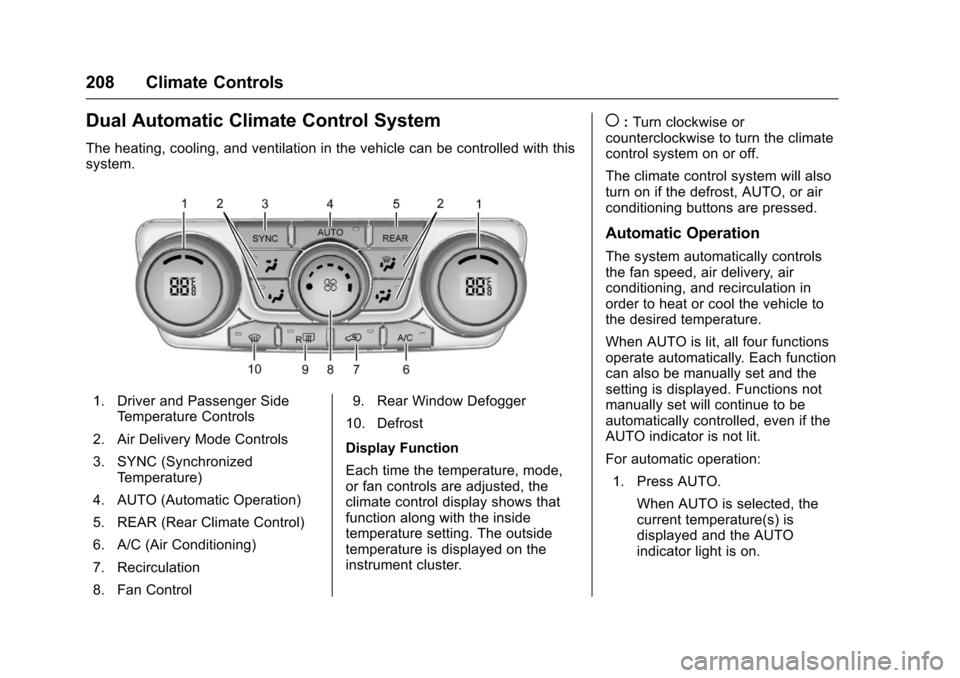
The heating, cooling, and ventilation in the vehicle can be controlled with this
system.
1. Driver and Passenger SideTemperature Controls
2. Air Delivery Mode Controls
3. SYNC (Synchronized Temperature)
4. AUTO (Automatic Operation)
5. REAR (Rear Climate Control)
6. A/C (Air Conditioning)
7. Recirculation
8. Fan Control 9. Rear Window Defogger
10. Defrost
Display Function
Each time the temperature, mode,
or fan controls are adjusted, the
climate control display shows that
function along with the inside
temperature setting. The outside
temperature is displayed on the
instrument cluster.
(: Turn clockwise or
counterclockwise to turn the climate
control system on or off.
The climate control system will also
turn on if the defrost, AUTO, or air
conditioning buttons are pressed.
Automatic Operation
The system automatically controls
the fan speed, air delivery, air
conditioning, and recirculation in
order to heat or cool the vehicle to
the desired temperature.
When AUTO is lit, all four functions
operate automatically. Each function
can also be manually set and the
setting is displayed. Functions not
manually set will continue to be
automatically controlled, even if the
AUTO indicator is not lit.
For automatic operation:
1. Press AUTO.
When AUTO is selected, the
current temperature(s) is
displayed and the AUTO
indicator light is on.
Page 210 of 394
Chevrolet Traverse Owner Manual (GMNA-Localizing-U.S./Canada/Mexico-
9955676) - 2017 - crc - 3/29/16
Climate Controls 209
When AUTO is selected, the
air conditioning and air inlet are
automatically controlled. The
air conditioning runs when the
outside temperature is over 4 °
C (40 °F). The system is
automatically set to outside air,
unless it is hot outside and
then the air inlet changes to
recirculation mode to help
quickly cool the vehicle. The
recirculation indicator light will
come on.
2. Set the temperature for the driver and passenger.
To find a comfortable setting,
start with a 22 °C (73 °F)
temperature setting and allow
about 20 minutes for the
system to regulate. Use the
driver side or passenger side
temperature control to adjust
the temperature setting as
necessary. The system will
remain at the selected setting.
Choosing the warmest or
coolest temperatures does not
cause the vehicle to heat or
cool more quickly. To avoid blowing cold air in
cold weather, the system
delays turning on the fan until
warm air is available. Turn the
fan knob to override this delay
and select the fan speed.
Temperature Control
The driver and passenger side
temperature controls are used to
adjust the temperature of the air
coming through the system. The
temperature can be adjusted even if
the system is turned off since
outside air still enters the vehicle,
unless the recirculation mode is
selected. See “Recirculation” later in
this section.
Driver Side Temperature
Control : Turn clockwise or
counterclockwise to increase or
decrease the driver side
temperature. The driver side
temperature display will show the
temperature setting.
Passenger Side Temperature
Control : Turn clockwise or
counterclockwise to increase or
decrease the passenger side temperature. The passenger side
display will show the temperature
setting.
SYNC :
Press to set the passenger
temperature to match the driver
temperature setting.
Manual Operation
The air delivery mode or fan speed
can be manually adjusted.
9: Turn the knob clockwise or
counterclockwise to increase or
decrease the fan speed.
Turning the fan control knob while in
automatic control places the fan
speed under manual control.
The air delivery mode remains in
automatic control. The fan setting
displays momentarily and then no
longer displays.
Air Delivery Modes : Press
H,),
6, or-to change the direction of
the airflow in the vehicle. An
indicator light comes on in the
selected mode button. Pressing a
mode button while the system is off
changes the air delivery mode
without turning the system on.
Page 211 of 394
Chevrolet Traverse Owner Manual (GMNA-Localizing-U.S./Canada/Mexico-
9955676) - 2017 - crc - 3/29/16
210 Climate Controls
Changing the air delivery mode
while in automatic control places the
system into manual control. The air
delivery mode button indicator
displays, and the AUTO button
indicator light turns off.
H:Air is directed to the instrument
panel outlets.
): Air is divided between the
instrument panel and floor outlets.
Some air is directed towards the
windshield and side window outlets.
Cooler air is directed to the upper
outlets and warmer air to the floor
outlets.
6: Air is directed to the floor
outlets, with some of the air directed
to the windshield, side window, and
second row floor outlets. In this
mode, the system uses outside air.
-: This mode clears the windows
of fog or moisture. Air is directed to
the windshield, floor outlets, and
side window vents. When this mode
is selected, the system turns off
recirculation and runs the air
conditioning compressor unless the outside temperature is less than 4 °
C (40 °F). Do not drive the vehicle
until all the windows are clear.
0:
Press to turn the defrost on or
off. This mode quickly clears the
windshield of fog or frost. Air is
directed to the windshield, side
window, and floor vents. In this
mode, outside air is pulled inside
the vehicle. The air conditioning
system runs automatically in this
setting, unless the outside
temperature is less than 4 °C (40
°F).
Do not drive the vehicle until all the
windows are clear.
Air Conditioning
A/C : Press to turn the air
conditioning on and off. An indicator
light comes on when A/C is on.
The A/C does not work when the
outside temperature is below 4 °C
(40 °F). If A/C is pressed the
indicator flashes three times and
turns off to show that the A/C mode
is not available. If the A/C is on and
the outside temperature drops
below a temperature which is too cool for air conditioning to be
effective, the A/C indicator turns off
to show that the A/C mode has
been canceled.
On hot days, open the windows
briefly to let hot inside air escape.
This helps reduce the time it takes
for the interior of the vehicle to
cool down.
The air conditioning system
removes moisture from the air, so
water might drip under the vehicle
while idling or after turning off the
engine. This is normal.
@:
Press to alternate between
recirculating air inside the vehicle or
pulling in outside air. An indicator
light comes on when recirculation
mode is active. With each ignition
cycle, the recirculation mode is
reset to automatic. When the engine
is turned on, outside air or
recirculation is automatically
selected for better performance.
When recirculation is activated, the
air conditioning compressor comes
on and helps to quickly cool the air
Page 212 of 394
Chevrolet Traverse Owner Manual (GMNA-Localizing-U.S./Canada/Mexico-
9955676) - 2017 - crc - 3/29/16
Climate Controls 211
inside the vehicle. This mode also
helps to reduce the outside air and
odors that may enter the vehicle.
The recirculation mode cannot be
used with floor, defog, or defrosting
modes. If recirculation is selected in
these modes, the indicator flashes
three times and turns off. While in
recirculation mode the windows can
fog when the weather is cold and
damp. To clear the fog, select either
the defog or defrost mode and
increase the fan speed.
REAR :Press to turn the rear
heating and air conditioning on or
off. See Rear Climate Control
System 0212 orRear Climate
Control System (with Rear Seat
Audio) 0213.
Rear Window Defogger
The rear window defogger uses a
warming grid to remove fog from the
rear window.
R
1:Press to turn the rear window
defogger on or off. An indicator light
on the button comes on to show that the rear window defogger is on. Do
not drive the vehicle until all the
windows are clear.
The defogger only works when the
vehicle is in ON/RUN. The defogger
will turn off if the vehicle is
turned off.
If equipped with heated outside
rearview mirrors, fog or frost is
cleared from the surface of the
mirror when the rear window defog
button is pressed.
Caution
Using a razor blade or sharp
object to clear the inside rear
window can damage the rear
window defogger. Repairs would
not be covered by the vehicle
warranty. Do not clear the inside
rear window with sharp objects.
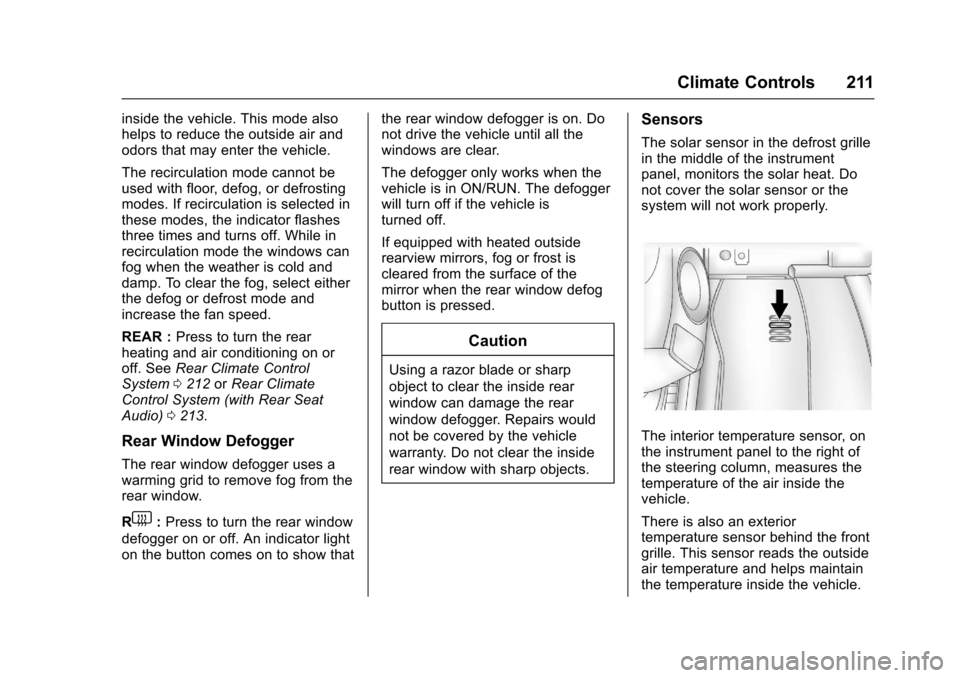
Sensors
The solar sensor in the defrost grille
in the middle of the instrument
panel, monitors the solar heat. Do
not cover the solar sensor or the
system will not work properly.
The interior temperature sensor, on
the instrument panel to the right of
the steering column, measures the
temperature of the air inside the
vehicle.
There is also an exterior
temperature sensor behind the front
grille. This sensor reads the outside
air temperature and helps maintain
the temperature inside the vehicle.
Page 230 of 394
Chevrolet Traverse Owner Manual (GMNA-Localizing-U.S./Canada/Mexico-
9955676) - 2017 - crc - 4/1/16
Driving and Operating 229
R(ON/RUN) :This position can be
used to operate the electrical
accessories and to display some
instrument panel warning and
indicator lights. This position can
also be used for service and
diagnostics, and to verify the proper
operation of the malfunction
indicator lamp as may be required
for emission inspection purposes.
The switch stays in this position
when the engine is running. The
transmission is also unlocked in this
position. If you leave the key in the
ACC/ACCESSORY or ON/RUN
position with the engine off, the
battery could be drained. You may
not be able to start the vehicle if the
battery is allowed to drain for an
extended period of time.
/(START) : This is the position
that starts the engine. When the
engine starts, release the key. The
ignition switch will return to ON/RUN
for driving.
Key Lock Release
The vehicle has an electronic key
lock release system. This system is
to prevent ignition key removal
unless the shift lever is in P (Park).
The key lock release will not work if
the battery is charged less than
9-volts, or uncharged. Try charging
or jump starting the battery. See
Jump Starting - North
America 0326
Starting the Engine
Move the shift lever to P (Park) or
N (Neutral). The engine will not start
in any other position. To restart the
engine when the vehicle is already
moving, use N (Neutral) only.
Caution
Do not try to shift to P (Park) if the
vehicle is moving. If you do, you
could damage the transmission.
Shift to P (Park) only when the
vehicle is stopped.
Caution
If you add electrical parts or
accessories, you could change
the way the engine operates. Any
resulting damage would not be
covered by the vehicle warranty.
See Add-On Electrical
Equipment 0264.
Caution
If the steering wheel is turned
until it reaches the end of its
travel, and is held in that position
while starting the vehicle, damage
may occur to the hydraulic power
steering system and there may be
loss of power steering assist.
Starting Procedure 1. With your foot off the accelerator pedal, turn the
ignition to START. When the
engine starts, let go of the key.
The idle speed will slow down
as the engine warms. Do not
Page 237 of 394
Chevrolet Traverse Owner Manual (GMNA-Localizing-U.S./Canada/Mexico-
9955676) - 2017 - crc - 4/1/16
236 Driving and Operating
{Warning
Shifting into a drive gear while the
engine is running at high speed is
dangerous. Unless your foot is
firmly on the brake pedal, the
vehicle could move very rapidly.
You could lose control and hit
people or objects. Do not shift
into a drive gear while the engine
is running at high speed.
Caution
Shifting out of P (Park) or
N (Neutral) with the engine
running at high speed may
damage the transmission. The
repairs would not be covered by
the vehicle warranty. Be sure the
engine is not running at high
speed when shifting the vehicle.D :
This position is for normal
driving. It provides the best fuel
economy. If you need more power
for passing, and you are:
. Going less than 56 km/h
(35 mph), push the accelerator
pedal about halfway down.
. Going about 56 km/h (35 mph) or
more, push the accelerator all
the way down.
Caution
If the vehicle does not shift gears,
the transmission could be
damaged. Have the vehicle
serviced right away.
If the vehicle is stopped on a hill,
with your foot off the brake pedal,
the vehicle may roll. This is normal
and is due to the torque converter
designed to improve fuel economy
and performance. Use the brake to
hold the vehicle on a hill. Do not use
the accelerator pedal.
L : This position gives you access
to gear ranges. This provides more
engine braking but lower fuel economy than D (Drive). You can
use it on very steep hills, or in deep
snow or mud. See
Manual
Mode 0236.
Manual Mode
Electronic Range Select
(ERS) Mode
ERS mode allows you to choose the
top-gear limit of the transmission
and the vehicle's speed while
driving downhill or towing a trailer.
The vehicle has an electronic shift
position indicator within the
instrument panel cluster. When
using the ERS mode a number will
display next to the L, indicating the
current gear that has been selected.
Page 238 of 394
Chevrolet Traverse Owner Manual (GMNA-Localizing-U.S./Canada/Mexico-
9955676) - 2017 - crc - 4/1/16
Driving and Operating 237
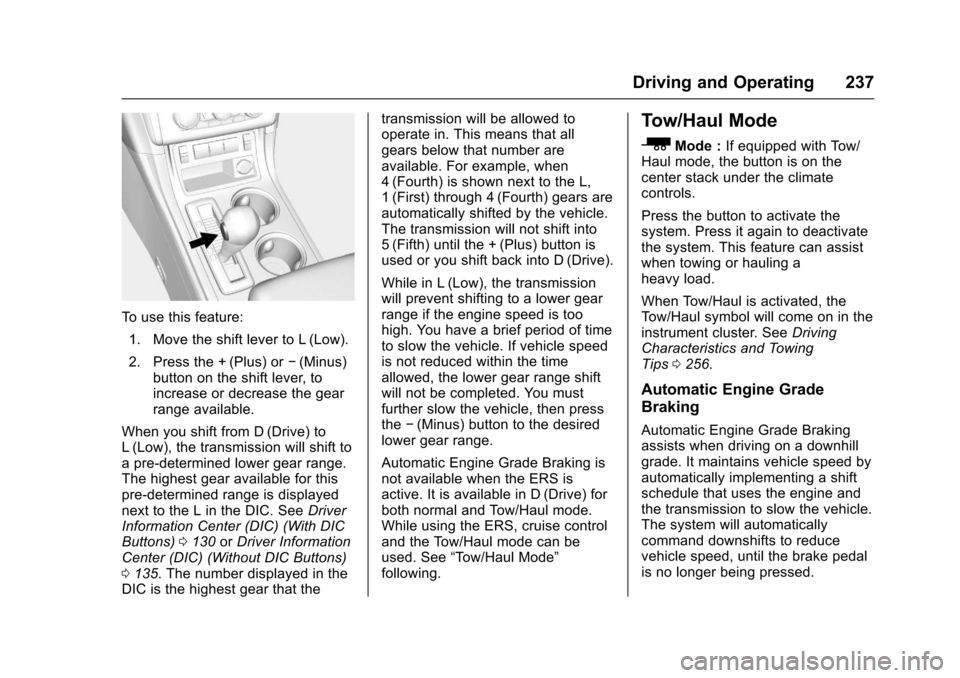
To use this feature:1. Move the shift lever to L (Low).
2. Press the + (Plus) or −(Minus)
button on the shift lever, to
increase or decrease the gear
range available.
When you shift from D (Drive) to
L (Low), the transmission will shift to
a pre-determined lower gear range.
The highest gear available for this
pre-determined range is displayed
next to the L in the DIC. See Driver
Information Center (DIC) (With DIC
Buttons) 0130 orDriver Information
Center (DIC) (Without DIC Buttons)
0 135. The number displayed in the
DIC is the highest gear that the transmission will be allowed to
operate in. This means that all
gears below that number are
available. For example, when
4 (Fourth) is shown next to the L,
1 (First) through 4 (Fourth) gears are
automatically shifted by the vehicle.
The transmission will not shift into
5 (Fifth) until the + (Plus) button is
used or you shift back into D (Drive).
While in L (Low), the transmission
will prevent shifting to a lower gear
range if the engine speed is too
high. You have a brief period of time
to slow the vehicle. If vehicle speed
is not reduced within the time
allowed, the lower gear range shift
will not be completed. You must
further slow the vehicle, then press
the
−(Minus) button to the desired
lower gear range.
Automatic Engine Grade Braking is
not available when the ERS is
active. It is available in D (Drive) for
both normal and Tow/Haul mode.
While using the ERS, cruise control
and the Tow/Haul mode can be
used. See “Tow/Haul Mode”
following.
Tow/Haul Mode
_
Mode : If equipped with Tow/
Haul mode, the button is on the
center stack under the climate
controls.
Press the button to activate the
system. Press it again to deactivate
the system. This feature can assist
when towing or hauling a
heavy load.
When Tow/Haul is activated, the
Tow/Haul symbol will come on in the
instrument cluster. See Driving
Characteristics and Towing
Tips 0256.
Automatic Engine Grade
Braking
Automatic Engine Grade Braking
assists when driving on a downhill
grade. It maintains vehicle speed by
automatically implementing a shift
schedule that uses the engine and
the transmission to slow the vehicle.
The system will automatically
command downshifts to reduce
vehicle speed, until the brake pedal
is no longer being pressed.
Page 241 of 394
Chevrolet Traverse Owner Manual (GMNA-Localizing-U.S./Canada/Mexico-
9955676) - 2017 - crc - 4/1/16
240 Driving and Operating
If you are towing a trailer and are
parking on a hill, seeDriving
Characteristics and Towing
Tips 0256.
Brake Assist
The Brake Assist feature is
designed to assist the driver in
stopping or decreasing vehicle
speed in emergency driving
conditions. This feature uses the
stability system hydraulic brake
control module to supplement the
power brake system under
conditions where the driver has
quickly and forcefully applied the
brake pedal in an attempt to quickly
stop or slow down the vehicle. The
stability system hydraulic brake
control module increases brake
pressure at each corner of the
vehicle until the ABS activates.
Minor brake pedal pulsation or
pedal movement during this time is
normal and the driver should
continue to apply the brake pedal as
the driving situation dictates. The
Brake Assist feature will
automatically disengage when the brake pedal is released or brake
pedal pressure is quickly
decreased.
Hill Start Assist (HSA)
This vehicle has a Hill Start Assist
(HSA) feature, which may be useful
when the vehicle is stopped on a
grade sufficient enough to activate
HSA. This feature is designed to
prevent the vehicle from rolling,
either forward or rearward, during
vehicle drive off. After the driver
completely stops and holds the
vehicle in a complete standstill on a
grade, HSA will be automatically
activated. During the transition
period between when the driver
releases the brake pedal and starts
to accelerate to drive off on a grade,
HSA holds the braking pressure for
a maximum of two seconds to
ensure that there is no rolling. The
brakes will automatically release
when the accelerator pedal is
applied within the two-second
window. It will not activate if the
vehicle is in a drive gear and facing
downhill, or if the vehicle is facing
uphill and in R (Reverse).
Ride Control Systems
Traction Control/
Electronic Stability
Control
System Operation
The vehicle has a Traction Control
System (TCS) and StabiliTrak®, an
electronic stability control system.
These systems help limit wheel slip
and assist the driver in maintaining
control, especially on slippery road
conditions.
TCS activates if it senses that any
of the drive wheels are spinning or
beginning to lose traction. When this
happens, TCS applies the brakes to
the spinning wheels and reduces
engine power to limit wheel spin.
StabiliTrak activates when the
vehicle senses a difference between
the intended path and the direction
the vehicle is actually traveling.
StabiliTrak selectively applies
braking pressure to any one of the
Page 242 of 394
Chevrolet Traverse Owner Manual (GMNA-Localizing-U.S./Canada/Mexico-
9955676) - 2017 - crc - 4/1/16
Driving and Operating 241
vehicle wheel brakes to assist the
driver in keeping the vehicle on the
intended path.
If cruise control is being used and
traction control or StabiliTrak begins
to limit wheel spin, cruise control will
disengage. Cruise control may be
turned back on when road
conditions allow.
Both systems come on
automatically when the vehicle is
started and begins to move. The
systems may be heard or felt while
they are operating or while
performing diagnostic checks. This
is normal and does not mean there
is a problem with the vehicle.
It is recommended to leave both
systems on for normal driving
conditions, but it may be necessary
to turn TCS off if the vehicle gets
stuck in sand, mud, ice, or snow.
SeeIf the Vehicle Is Stuck 0223
and “Turning the Systems Off and
On” later in this section.
The indicator light for both systems
is in the instrument cluster. This
light will:
.
Flash when TCS is limiting
wheel spin.
. Flash when StabiliTrak is
activated.
. Turn on and stay on when either
system is not working.
If either system fails to turn on or to
activate, a message displays in the
Driver Information Center (DIC), and
dcomes on and stays on to
indicate that the system is inactive
and is not assisting the driver in
maintaining control. The vehicle is
safe to drive, but driving should be
adjusted accordingly.
If
dcomes on and stays on:
1. Stop the vehicle. 2. Turn the engine off and wait
15 seconds.
3. Start the engine.
Drive the vehicle. If
dcomes on
and stays on, the vehicle may need
more time to diagnose the problem.
If the condition persists, see your
dealer.
Turning the Systems Off
and On
The button for TCS and StabiliTrak
is on the center stack.
Caution
Do not repeatedly brake or
accelerate heavily when TCS is
off. The vehicle driveline could be
damaged.