light CHEVROLET TRAVERSE 2017 1.G Owners Manual
[x] Cancel search | Manufacturer: CHEVROLET, Model Year: 2017, Model line: TRAVERSE, Model: CHEVROLET TRAVERSE 2017 1.GPages: 394, PDF Size: 6.47 MB
Page 2 of 394
Chevrolet Traverse Owner Manual (GMNA-Localizing-U.S./Canada/Mexico-
9955676) - 2017 - crc - 3/29/16
ContentsIntroduction . . . . . . . . . . . . . . . . . . . . . . 2
In Brief . . . . . . . . . . . . . . . . . . . . . . . . . . . 5
Keys, Doors, and Windows . . . . . 31
Seats and Restraints . . . . . . . . . . . 52
Storage . . . . . . . . . . . . . . . . . . . . . . . 103
Instruments and Controls . . . . . . 108
Lighting . . . . . . . . . . . . . . . . . . . . . . . 157
Infotainment System . . . . . . . . . . 164
Climate Controls . . . . . . . . . . . . . . 205
Driving and Operating . . . . . . . . . 216
Vehicle Care . . . . . . . . . . . . . . . . . . 265
Service and Maintenance . . . . . 343
Technical Data . . . . . . . . . . . . . . . . 356
Customer Information . . . . . . . . . 359
Reporting Safety Defects . . . . . . 370
OnStar . . . . . . . . . . . . . . . . . . . . . . . . 373
Index . . . . . . . . . . . . . . . . . . . . 383
Page 4 of 394
Chevrolet Traverse Owner Manual (GMNA-Localizing-U.S./Canada/Mexico-
9955676) - 2017 - crc - 3/29/16
Introduction 3
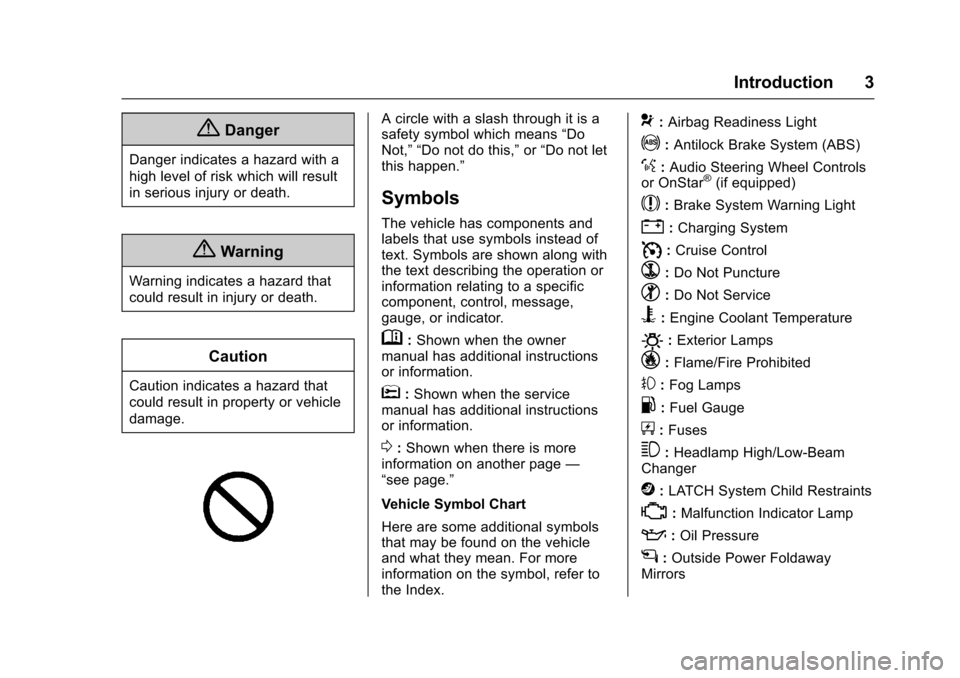
{Danger
Danger indicates a hazard with a
high level of risk which will result
in serious injury or death.
{Warning
Warning indicates a hazard that
could result in injury or death.
Caution
Caution indicates a hazard that
could result in property or vehicle
damage.
A circle with a slash through it is a
safety symbol which means“Do
Not,” “Do not do this,” or“Do not let
this happen.”
Symbols
The vehicle has components and
labels that use symbols instead of
text. Symbols are shown along with
the text describing the operation or
information relating to a specific
component, control, message,
gauge, or indicator.
M: Shown when the owner
manual has additional instructions
or information.
*: Shown when the service
manual has additional instructions
or information.
0: Shown when there is more
information on another page —
“see page.”
Vehicle Symbol Chart
Here are some additional symbols
that may be found on the vehicle
and what they mean. For more
information on the symbol, refer to
the Index.
9: Airbag Readiness Light
!:Antilock Brake System (ABS)
%:Audio Steering Wheel Controls
or OnStar®(if equipped)
$: Brake System Warning Light
":Charging System
I: Cruise Control
`:Do Not Puncture
^:Do Not Service
B:Engine Coolant Temperature
O:Exterior Lamps
_: Flame/Fire Prohibited
#:Fog Lamps
.:Fuel Gauge
+: Fuses
3:Headlamp High/Low-Beam
Changer
j: LATCH System Child Restraints
*:Malfunction Indicator Lamp
::Oil Pressure
g:Outside Power Foldaway
Mirrors
Page 6 of 394
Chevrolet Traverse Owner Manual (GMNA-Localizing-U.S./Canada/Mexico-
9955676) - 2017 - crc - 3/29/16
In Brief 5
In Brief
Instrument Panel
Instrument Panel . . . . . . . . . . . . . . . . 6
Initial Drive Information
Initial Drive Information . . . . . . . . . . 8
Remote Keyless Entry (RKE)System . . . . . . . . . . . . . . . . . . . . . . . . 8
Remote Vehicle Start . . . . . . . . . . . 8
Door Locks . . . . . . . . . . . . . . . . . . . . . 9
Liftgate . . . . . . . . . . . . . . . . . . . . . . . . . . 9
Windows . . . . . . . . . . . . . . . . . . . . . . . 10
Seat Adjustment . . . . . . . . . . . . . . . 10
Memory Features . . . . . . . . . . . . . . 11
Second Row Seats . . . . . . . . . . . . 12
Third Row Seats . . . . . . . . . . . . . . . 12
Heated and Cooled Front Seats . . . . . . . . . . . . . . . . . . . . . . . . . 13
Head Restraint Adjustment . . . . 13
Safety Belts . . . . . . . . . . . . . . . . . . . . 13
Passenger Sensing System . . . 14
Mirror Adjustment . . . . . . . . . . . . . . 14
Steering Wheel Adjustment . . . . 15
Interior Lighting . . . . . . . . . . . . . . . . 16
Exterior Lighting . . . . . . . . . . . . . . . 16
Windshield Wiper/Washer . . . . . . 17
Climate Controls . . . . . . . . . . . . . . . 18
Transmission . . . . . . . . . . . . . . . . . . 19
Vehicle Features
Infotainment System . . . . . . . . . . . 20
Radio(s) . . . . . . . . . . . . . . . . . . . . . . . 20
Satellite Radio . . . . . . . . . . . . . . . . . 23
Portable Audio Devices . . . . . . . . 23
Bluetooth
®. . . . . . . . . . . . . . . . . . . . . 24
Steering Wheel Controls (Radio without Touchscreen) . . . . . . . . . 24
Steering Wheel Controls (Radio with Touchscreen) . . . . . . . . . . . . 25
Cruise Control . . . . . . . . . . . . . . . . . 25
Driver Information Center (DIC) (With DIC Buttons) . . . . . . . . . . . 26
Forward Collision Alert (FCA) System . . . . . . . . . . . . . . . . . . . . . . . 26
Lane Departure Warning (LDW) . . . . . . . . . . . . . . . 26
Side Blind Zone Alert (SBZA) . . . . . . . . . . . . . . . . . . 26
Rear Vision Camera (RVC) . . . . 27
Rear Cross Traffic Alert (RCTA) System . . . . . . . . . . . . . . . . . . . . . . . 27
Parking Assist . . . . . . . . . . . . . . . . . 27
Power Outlets . . . . . . . . . . . . . . . . . 27
Universal Remote System . . . . . 27
Sunroof . . . . . . . . . . . . . . . . . . . . . . . . 27
Performance and Maintenance
Traction Control/Electronic Stability Control . . . . . . . . . . . . . . 28
Tire Pressure Monitor . . . . . . . . . . 29 Fuel . . . . . . . . . . . . . . . . . . . . . . . . . . . 29
E85 or FlexFuel . . . . . . . . . . . . . . . . 29
Engine Oil Life System . . . . . . . . 29
Driving for Better Fuel
Economy . . . . . . . . . . . . . . . . . . . . . 30
Roadside Assistance Program . . . . . . . . . . . . . . . . . . . . . . 30
Page 8 of 394

Chevrolet Traverse Owner Manual (GMNA-Localizing-U.S./Canada/Mexico-
9955676) - 2017 - crc - 3/29/16
In Brief 7
1.Air Vents 0214.
2. Turn Signal Lever. See Turn
and Lane-Change Signals
0 159 (Out of View).
Windshield Wiper/Washer
0 111 (Out of View).
3. Instrument Cluster 0118.
4. Instrument Panel
Storage 0103.
5. CD Player. See CD Player
(Radio without Touchscreen)
0 182 orCD Player (Radio with
Touchscreen) 0184.
6. Infotainment 0164.
7. Passenger Sensing
System 078.
8. Hazard Warning
Flashers 0159.
9. Heated and Cooled Front
Seats 058 (If Equipped).
10. Rear Window Wiper/
Washer 0112.
Traction Control System (TCS)
Disable Button. See Traction
Control/Electronic Stability
Control 0240. Forward Collision Alert (FCA)
System
0248 (If Equipped).
Lane Departure Warning
(LDW) 0252 (If Equipped).
Tow/Haul Button (If Equipped).
See Tow/Haul Mode 0237.
Power Liftgate Button (If
Equipped). See Liftgate039.
11. Power Outlets 0115.
12. USB Port. See Auxiliary
Devices 0193.
13. Shift Lever. See Automatic
Transmission 0235.
14. Climate Control Systems 0205
(If Equipped).
Dual Automatic Climate Control
System 0208 (If Equipped).
15. Driver Information Center (DIC) Buttons. See Driver Information
Center (DIC) (With DIC
Buttons) 0130 orDriver
Information Center (DIC)
(Without DIC Buttons) 0135.
16. Steering Wheel Controls
(Radio with Touchscreen)
0110 orSteering Wheel Controls (Radio without
Touchscreen)
0109 (If
Equipped).
17. Horn 0111.
18. Steering Wheel
Adjustment 0109.
19. Cruise Control 0242.
20. Dome Lamp Override. See Dome Lamps 0160.
Instrument Panel Illumination
Control 0160.
21. Data Link Connector (DLC) (Out of View). See Malfunction
Indicator Lamp (Check Engine
Light) 0124.
22. Parking Brake 0239.
23. Hood Release. See Hood 0268.
24. Exterior Lamp Controls 0157.
Fog Lamps 0159
(If Equipped).
Page 14 of 394
Chevrolet Traverse Owner Manual (GMNA-Localizing-U.S./Canada/Mexico-
9955676) - 2017 - crc - 3/29/16
In Brief 13
6. Push the seatback forward tolay flat.
See Third Row Seats 061.
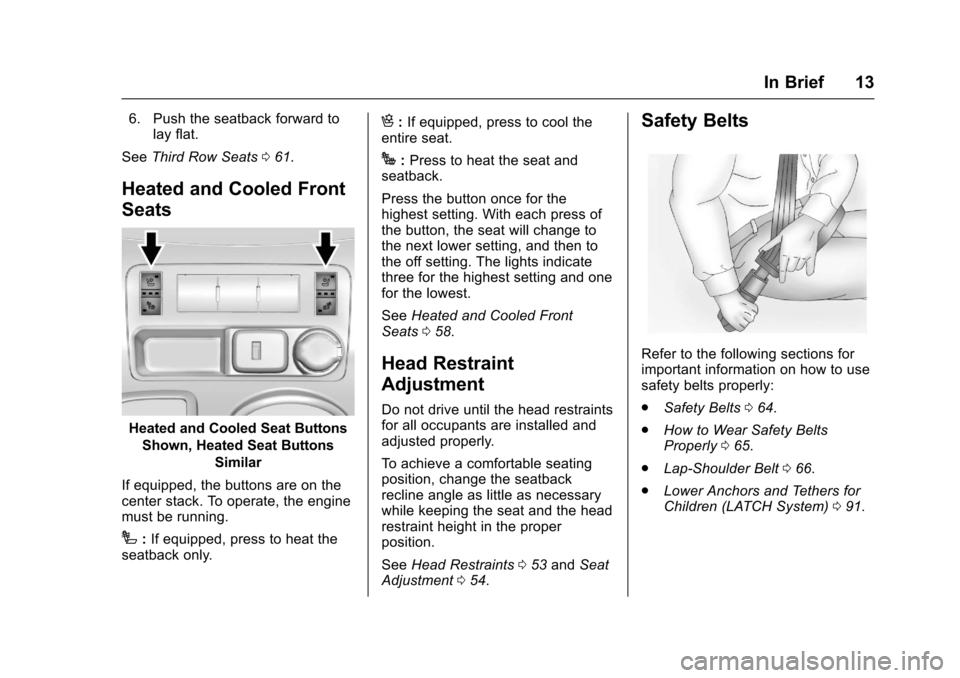
Heated and Cooled Front
Seats
Heated and Cooled Seat Buttons
Shown, Heated Seat Buttons Similar
If equipped, the buttons are on the
center stack. To operate, the engine
must be running.
I: If equipped, press to heat the
seatback only.
H: If equipped, press to cool the
entire seat.
J: Press to heat the seat and
seatback.
Press the button once for the
highest setting. With each press of
the button, the seat will change to
the next lower setting, and then to
the off setting. The lights indicate
three for the highest setting and one
for the lowest.
See Heated and Cooled Front
Seats 058.
Head Restraint
Adjustment
Do not drive until the head restraints
for all occupants are installed and
adjusted properly.
To achieve a comfortable seating
position, change the seatback
recline angle as little as necessary
while keeping the seat and the head
restraint height in the proper
position.
See Head Restraints 053 and Seat
Adjustment 054.
Safety Belts
Refer to the following sections for
important information on how to use
safety belts properly:
.
Safety Belts 064.
. How to Wear Safety Belts
Properly 065.
. Lap-Shoulder Belt 066.
. Lower Anchors and Tethers for
Children (LATCH System) 091.
Page 15 of 394
Chevrolet Traverse Owner Manual (GMNA-Localizing-U.S./Canada/Mexico-
9955676) - 2017 - crc - 3/29/16
14 In Brief
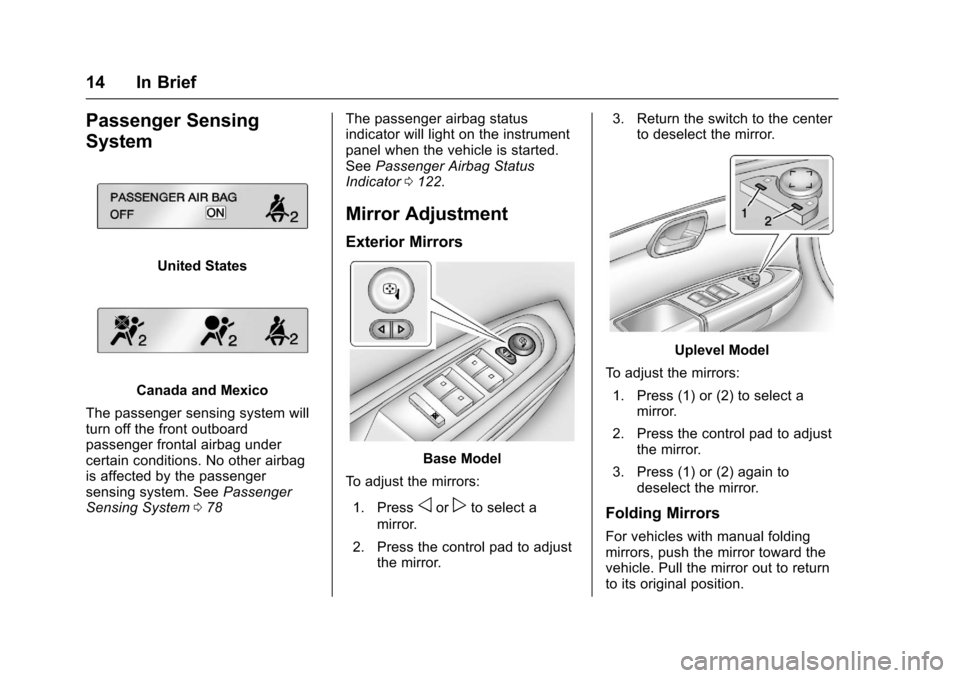
Passenger Sensing
System
United States
Canada and Mexico
The passenger sensing system will
turn off the front outboard
passenger frontal airbag under
certain conditions. No other airbag
is affected by the passenger
sensing system. See Passenger
Sensing System 078 The passenger airbag status
indicator will light on the instrument
panel when the vehicle is started.
See
Passenger Airbag Status
Indicator 0122.
Mirror Adjustment
Exterior Mirrors
Base Model
To adjust the mirrors:
1. Press
oorpto select a
mirror.
2. Press the control pad to adjust the mirror. 3. Return the switch to the center
to deselect the mirror.
Uplevel Model
To adjust the mirrors: 1. Press (1) or (2) to select a mirror.
2. Press the control pad to adjust the mirror.
3. Press (1) or (2) again to deselect the mirror.
Folding Mirrors
For vehicles with manual folding
mirrors, push the mirror toward the
vehicle. Pull the mirror out to return
to its original position.
Page 17 of 394
Chevrolet Traverse Owner Manual (GMNA-Localizing-U.S./Canada/Mexico-
9955676) - 2017 - crc - 3/29/16
16 In Brief
Interior Lighting
Dome Lamps
The dome lamps are in the
overhead console and above the
rear seat passengers.
The dome lamps come on when a
door is opened, unless the dome
lamp override button is pressed in.
To manually turn them on, turn the
instrument panel brightness control
clockwise to the farthest position.
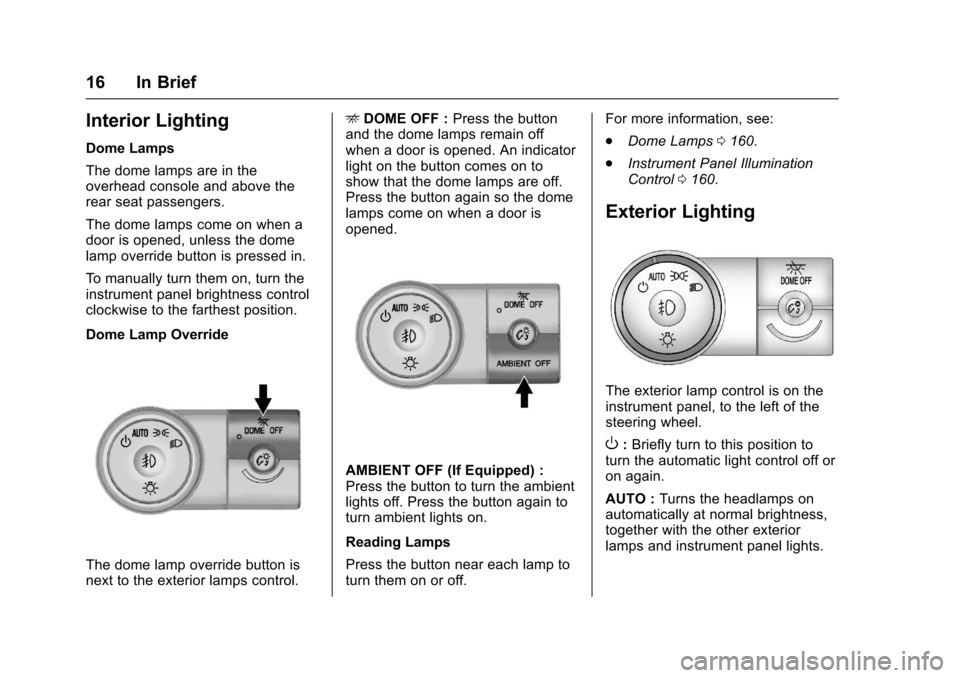
Dome Lamp Override
The dome lamp override button is
next to the exterior lamps control.E
DOME OFF : Press the button
and the dome lamps remain off
when a door is opened. An indicator
light on the button comes on to
show that the dome lamps are off.
Press the button again so the dome
lamps come on when a door is
opened.
AMBIENT OFF (If Equipped) :
Press the button to turn the ambient
lights off. Press the button again to
turn ambient lights on.
Reading Lamps
Press the button near each lamp to
turn them on or off. For more information, see:
.
Dome Lamps 0160.
. Instrument Panel Illumination
Control 0160.
Exterior Lighting
The exterior lamp control is on the
instrument panel, to the left of the
steering wheel.
O:Briefly turn to this position to
turn the automatic light control off or
on again.
AUTO : Turns the headlamps on
automatically at normal brightness,
together with the other exterior
lamps and instrument panel lights.
Page 18 of 394
Chevrolet Traverse Owner Manual (GMNA-Localizing-U.S./Canada/Mexico-
9955676) - 2017 - crc - 3/29/16
In Brief 17
;:Turns on the parking lamps
including all lamps, except the
headlamps.
5: Turns on the headlamps
together with the parking lamps and
instrument panel lights. A warning
chime sounds if the driver door is
opened when the ignition switch is
off and the headlamps are on.
#: If equipped, it turns the fog
lamps on or off.
See:
. Exterior Lamp Controls 0157.
. Fog Lamps 0159.
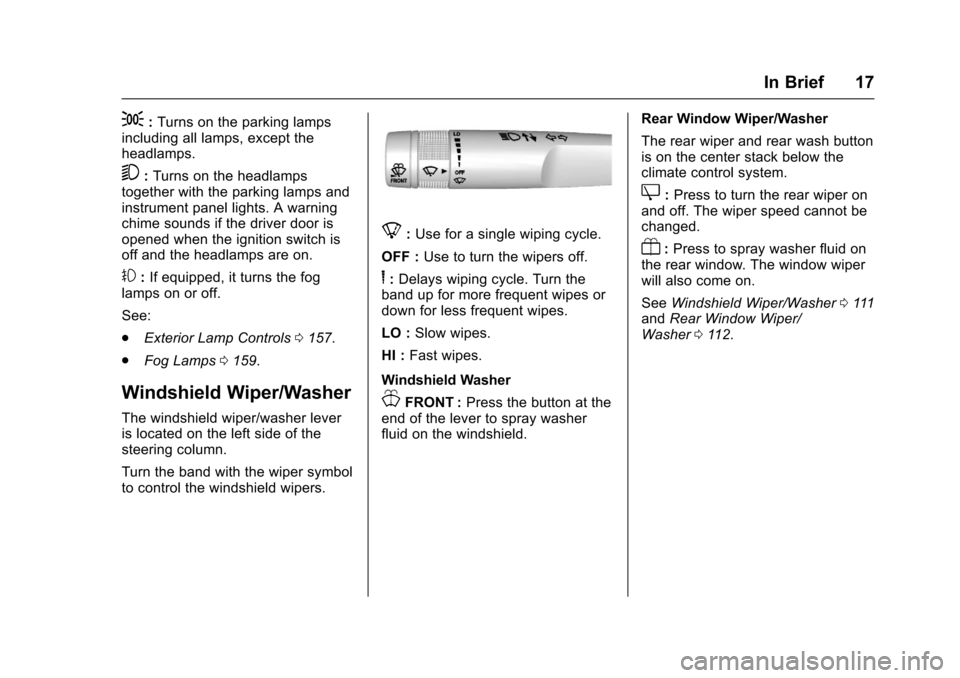
Windshield Wiper/Washer
The windshield wiper/washer lever
is located on the left side of the
steering column.
Turn the band with the wiper symbol
to control the windshield wipers.
8:Use for a single wiping cycle.
OFF : Use to turn the wipers off.
6:Delays wiping cycle. Turn the
band up for more frequent wipes or
down for less frequent wipes.
LO : Slow wipes.
HI : Fast wipes.
Windshield Washer
JFRONT : Press the button at the
end of the lever to spray washer
fluid on the windshield. Rear Window Wiper/Washer
The rear wiper and rear wash button
is on the center stack below the
climate control system.
Z:
Press to turn the rear wiper on
and off. The wiper speed cannot be
changed.
Y: Press to spray washer fluid on
the rear window. The window wiper
will also come on.
See Windshield Wiper/Washer 0111
and Rear Window Wiper/
Washer 0112.
Page 23 of 394
Chevrolet Traverse Owner Manual (GMNA-Localizing-U.S./Canada/Mexico-
9955676) - 2017 - crc - 3/29/16
22 In Brief
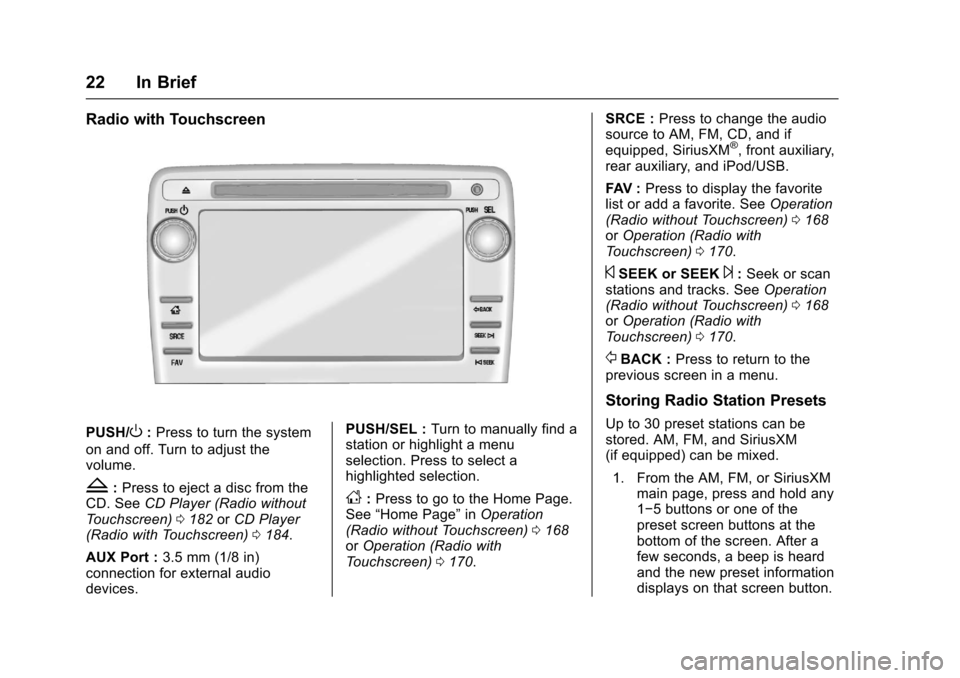
Radio with Touchscreen
PUSH/O:Press to turn the system
on and off. Turn to adjust the
volume.
Z: Press to eject a disc from the
CD. See CD Player (Radio without
Touchscreen) 0182 orCD Player
(Radio with Touchscreen) 0184.
AUX Port : 3.5 mm (1/8 in)
connection for external audio
devices. PUSH/SEL :
Turn to manually find a
station or highlight a menu
selection. Press to select a
highlighted selection.D: Press to go to the Home Page.
See “Home Page” inOperation
(Radio without Touchscreen) 0168
or Operation (Radio with
Touchscreen) 0170. SRCE :
Press to change the audio
source to AM, FM, CD, and if
equipped, SiriusXM
®, front auxiliary,
rear auxiliary, and iPod/USB.
FAV : Press to display the favorite
list or add a favorite. See Operation
(Radio without Touchscreen) 0168
or Operation (Radio with
Touchscreen) 0170.
©SEEK or SEEK¨:Seek or scan
stations and tracks. See Operation
(Radio without Touchscreen) 0168
or Operation (Radio with
Touchscreen) 0170.
/BACK : Press to return to the
previous screen in a menu.
Storing Radio Station Presets
Up to 30 preset stations can be
stored. AM, FM, and SiriusXM
(if equipped) can be mixed.
1. From the AM, FM, or SiriusXM main page, press and hold any
1−5 buttons or one of the
preset screen buttons at the
bottom of the screen. After a
few seconds, a beep is heard
and the new preset information
displays on that screen button.
Page 26 of 394
Chevrolet Traverse Owner Manual (GMNA-Localizing-U.S./Canada/Mexico-
9955676) - 2017 - crc - 3/29/16
In Brief 25
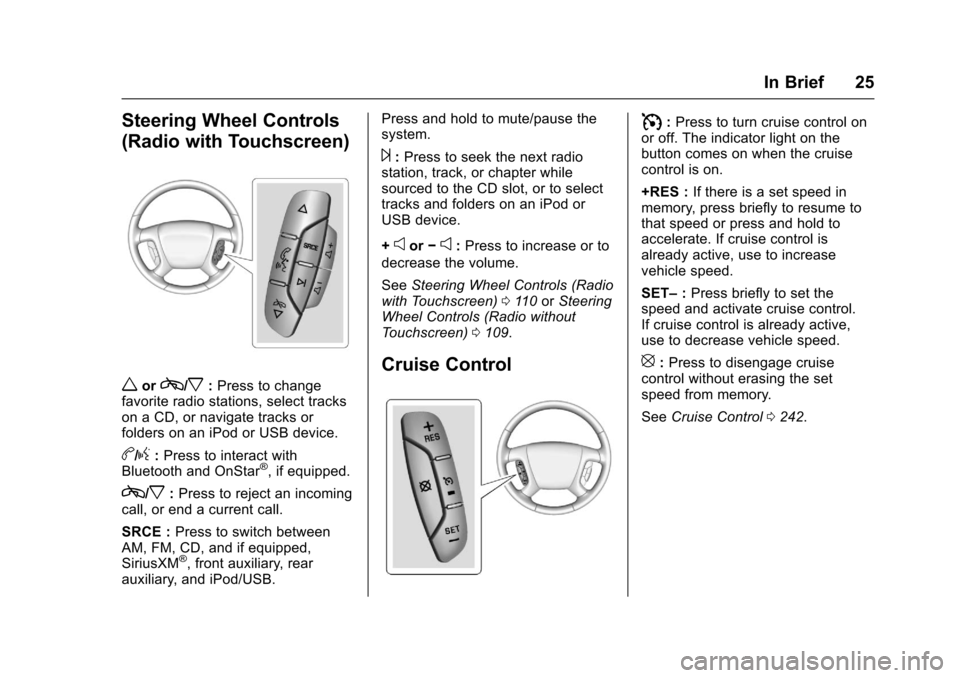
Steering Wheel Controls
(Radio with Touchscreen)
worc/x:Press to change
favorite radio stations, select tracks
on a CD, or navigate tracks or
folders on an iPod or USB device.
b/g: Press to interact with
Bluetooth and OnStar®, if equipped.
c/x: Press to reject an incoming
call, or end a current call.
SRCE : Press to switch between
AM, FM, CD, and if equipped,
SiriusXM
®, front auxiliary, rear
auxiliary, and iPod/USB. Press and hold to mute/pause the
system.
¨:
Press to seek the next radio
station, track, or chapter while
sourced to the CD slot, or to select
tracks and folders on an iPod or
USB device.
+
eor −e:Press to increase or to
decrease the volume.
See Steering Wheel Controls (Radio
with Touchscreen) 0110 orSteering
Wheel Controls (Radio without
Touchscreen) 0109.
Cruise Control
I:Press to turn cruise control on
or off. The indicator light on the
button comes on when the cruise
control is on.
+RES : If there is a set speed in
memory, press briefly to resume to
that speed or press and hold to
accelerate. If cruise control is
already active, use to increase
vehicle speed.
SET– :Press briefly to set the
speed and activate cruise control.
If cruise control is already active,
use to decrease vehicle speed.
[: Press to disengage cruise
control without erasing the set
speed from memory.
See Cruise Control 0242.