traction control CHEVROLET TRAVERSE 2017 1.G Owners Manual
[x] Cancel search | Manufacturer: CHEVROLET, Model Year: 2017, Model line: TRAVERSE, Model: CHEVROLET TRAVERSE 2017 1.GPages: 394, PDF Size: 6.47 MB
Page 5 of 394
Chevrolet Traverse Owner Manual (GMNA-Localizing-U.S./Canada/Mexico-
9955676) - 2017 - crc - 3/29/16
4 Introduction
}:Power
/:Remote Vehicle Start
>:Safety Belt Reminders
7: Tire Pressure Monitor
_:Tow/Haul Mode
t:Traction Control/StabiliTrak®
a:Under Pressure
M: Windshield Washer Fluid
Page 6 of 394
Chevrolet Traverse Owner Manual (GMNA-Localizing-U.S./Canada/Mexico-
9955676) - 2017 - crc - 3/29/16
In Brief 5
In Brief
Instrument Panel
Instrument Panel . . . . . . . . . . . . . . . . 6
Initial Drive Information
Initial Drive Information . . . . . . . . . . 8
Remote Keyless Entry (RKE)System . . . . . . . . . . . . . . . . . . . . . . . . 8
Remote Vehicle Start . . . . . . . . . . . 8
Door Locks . . . . . . . . . . . . . . . . . . . . . 9
Liftgate . . . . . . . . . . . . . . . . . . . . . . . . . . 9
Windows . . . . . . . . . . . . . . . . . . . . . . . 10
Seat Adjustment . . . . . . . . . . . . . . . 10
Memory Features . . . . . . . . . . . . . . 11
Second Row Seats . . . . . . . . . . . . 12
Third Row Seats . . . . . . . . . . . . . . . 12
Heated and Cooled Front Seats . . . . . . . . . . . . . . . . . . . . . . . . . 13
Head Restraint Adjustment . . . . 13
Safety Belts . . . . . . . . . . . . . . . . . . . . 13
Passenger Sensing System . . . 14
Mirror Adjustment . . . . . . . . . . . . . . 14
Steering Wheel Adjustment . . . . 15
Interior Lighting . . . . . . . . . . . . . . . . 16
Exterior Lighting . . . . . . . . . . . . . . . 16
Windshield Wiper/Washer . . . . . . 17
Climate Controls . . . . . . . . . . . . . . . 18
Transmission . . . . . . . . . . . . . . . . . . 19
Vehicle Features
Infotainment System . . . . . . . . . . . 20
Radio(s) . . . . . . . . . . . . . . . . . . . . . . . 20
Satellite Radio . . . . . . . . . . . . . . . . . 23
Portable Audio Devices . . . . . . . . 23
Bluetooth
®. . . . . . . . . . . . . . . . . . . . . 24
Steering Wheel Controls (Radio without Touchscreen) . . . . . . . . . 24
Steering Wheel Controls (Radio with Touchscreen) . . . . . . . . . . . . 25
Cruise Control . . . . . . . . . . . . . . . . . 25
Driver Information Center (DIC) (With DIC Buttons) . . . . . . . . . . . 26
Forward Collision Alert (FCA) System . . . . . . . . . . . . . . . . . . . . . . . 26
Lane Departure Warning (LDW) . . . . . . . . . . . . . . . 26
Side Blind Zone Alert (SBZA) . . . . . . . . . . . . . . . . . . 26
Rear Vision Camera (RVC) . . . . 27
Rear Cross Traffic Alert (RCTA) System . . . . . . . . . . . . . . . . . . . . . . . 27
Parking Assist . . . . . . . . . . . . . . . . . 27
Power Outlets . . . . . . . . . . . . . . . . . 27
Universal Remote System . . . . . 27
Sunroof . . . . . . . . . . . . . . . . . . . . . . . . 27
Performance and Maintenance
Traction Control/Electronic Stability Control . . . . . . . . . . . . . . 28
Tire Pressure Monitor . . . . . . . . . . 29 Fuel . . . . . . . . . . . . . . . . . . . . . . . . . . . 29
E85 or FlexFuel . . . . . . . . . . . . . . . . 29
Engine Oil Life System . . . . . . . . 29
Driving for Better Fuel
Economy . . . . . . . . . . . . . . . . . . . . . 30
Roadside Assistance Program . . . . . . . . . . . . . . . . . . . . . . 30
Page 8 of 394

Chevrolet Traverse Owner Manual (GMNA-Localizing-U.S./Canada/Mexico-
9955676) - 2017 - crc - 3/29/16
In Brief 7
1.Air Vents 0214.
2. Turn Signal Lever. See Turn
and Lane-Change Signals
0 159 (Out of View).
Windshield Wiper/Washer
0 111 (Out of View).
3. Instrument Cluster 0118.
4. Instrument Panel
Storage 0103.
5. CD Player. See CD Player
(Radio without Touchscreen)
0 182 orCD Player (Radio with
Touchscreen) 0184.
6. Infotainment 0164.
7. Passenger Sensing
System 078.
8. Hazard Warning
Flashers 0159.
9. Heated and Cooled Front
Seats 058 (If Equipped).
10. Rear Window Wiper/
Washer 0112.
Traction Control System (TCS)
Disable Button. See Traction
Control/Electronic Stability
Control 0240. Forward Collision Alert (FCA)
System
0248 (If Equipped).
Lane Departure Warning
(LDW) 0252 (If Equipped).
Tow/Haul Button (If Equipped).
See Tow/Haul Mode 0237.
Power Liftgate Button (If
Equipped). See Liftgate039.
11. Power Outlets 0115.
12. USB Port. See Auxiliary
Devices 0193.
13. Shift Lever. See Automatic
Transmission 0235.
14. Climate Control Systems 0205
(If Equipped).
Dual Automatic Climate Control
System 0208 (If Equipped).
15. Driver Information Center (DIC) Buttons. See Driver Information
Center (DIC) (With DIC
Buttons) 0130 orDriver
Information Center (DIC)
(Without DIC Buttons) 0135.
16. Steering Wheel Controls
(Radio with Touchscreen)
0110 orSteering Wheel Controls (Radio without
Touchscreen)
0109 (If
Equipped).
17. Horn 0111.
18. Steering Wheel
Adjustment 0109.
19. Cruise Control 0242.
20. Dome Lamp Override. See Dome Lamps 0160.
Instrument Panel Illumination
Control 0160.
21. Data Link Connector (DLC) (Out of View). See Malfunction
Indicator Lamp (Check Engine
Light) 0124.
22. Parking Brake 0239.
23. Hood Release. See Hood 0268.
24. Exterior Lamp Controls 0157.
Fog Lamps 0159
(If Equipped).
Page 29 of 394
Chevrolet Traverse Owner Manual (GMNA-Localizing-U.S./Canada/Mexico-
9955676) - 2017 - crc - 3/29/16
28 In Brief
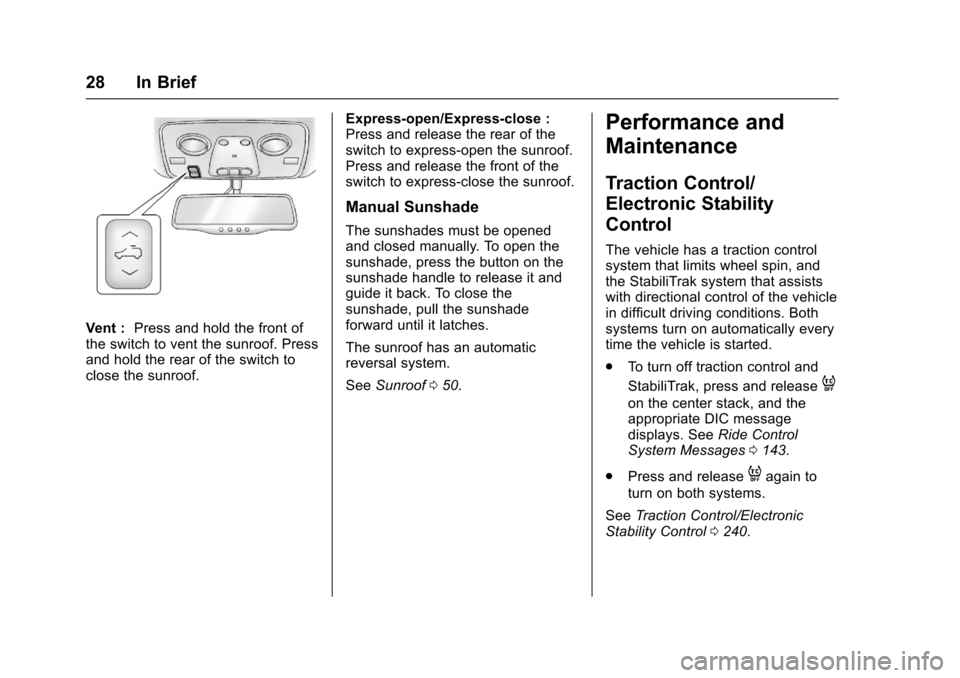
Vent :Press and hold the front of
the switch to vent the sunroof. Press
and hold the rear of the switch to
close the sunroof. Express-open/Express-close :
Press and release the rear of the
switch to express-open the sunroof.
Press and release the front of the
switch to express-close the sunroof.
Manual Sunshade
The sunshades must be opened
and closed manually. To open the
sunshade, press the button on the
sunshade handle to release it and
guide it back. To close the
sunshade, pull the sunshade
forward until it latches.
The sunroof has an automatic
reversal system.
See
Sunroof 050.
Performance and
Maintenance
Traction Control/
Electronic Stability
Control
The vehicle has a traction control
system that limits wheel spin, and
the StabiliTrak system that assists
with directional control of the vehicle
in difficult driving conditions. Both
systems turn on automatically every
time the vehicle is started.
.
To turn off traction control and
StabiliTrak, press and release
4
on the center stack, and the
appropriate DIC message
displays. See Ride Control
System Messages 0143.
. Press and release
4again to
turn on both systems.
See Traction Control/Electronic
Stability Control 0240.
Page 129 of 394
Chevrolet Traverse Owner Manual (GMNA-Localizing-U.S./Canada/Mexico-
9955676) - 2017 - crc - 3/29/16
128 Instruments and Controls
This light flashes while the
StabiliTrak system or the Traction
Control System (TCS) is working.
The light comes on when there is a
problem with the StabiliTrak system.
SeeTraction Control/Electronic
Stability Control 0240.
Engine Coolant
Temperature Warning
Light
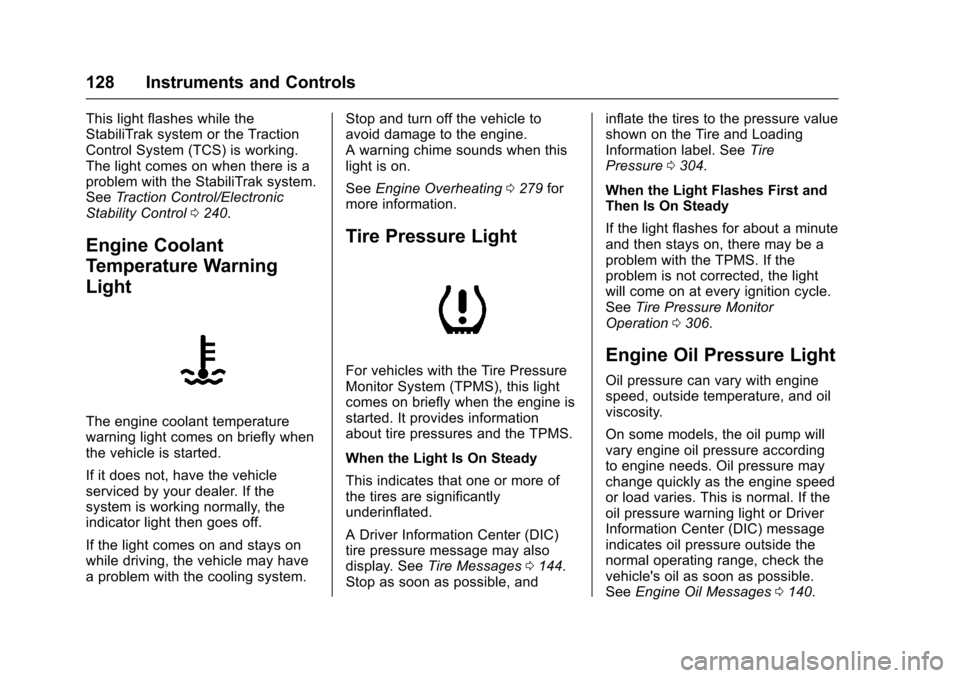
The engine coolant temperature
warning light comes on briefly when
the vehicle is started.
If it does not, have the vehicle
serviced by your dealer. If the
system is working normally, the
indicator light then goes off.
If the light comes on and stays on
while driving, the vehicle may have
a problem with the cooling system. Stop and turn off the vehicle to
avoid damage to the engine.
A warning chime sounds when this
light is on.
See
Engine Overheating 0279 for
more information.
Tire Pressure Light
For vehicles with the Tire Pressure
Monitor System (TPMS), this light
comes on briefly when the engine is
started. It provides information
about tire pressures and the TPMS.
When the Light Is On Steady
This indicates that one or more of
the tires are significantly
underinflated.
A Driver Information Center (DIC)
tire pressure message may also
display. See Tire Messages 0144.
Stop as soon as possible, and inflate the tires to the pressure value
shown on the Tire and Loading
Information label. See
Tire
Pressure 0304.
When the Light Flashes First and
Then Is On Steady
If the light flashes for about a minute
and then stays on, there may be a
problem with the TPMS. If the
problem is not corrected, the light
will come on at every ignition cycle.
See Tire Pressure Monitor
Operation 0306.Engine Oil Pressure Light
Oil pressure can vary with engine
speed, outside temperature, and oil
viscosity.
On some models, the oil pump will
vary engine oil pressure according
to engine needs. Oil pressure may
change quickly as the engine speed
or load varies. This is normal. If the
oil pressure warning light or Driver
Information Center (DIC) message
indicates oil pressure outside the
normal operating range, check the
vehicle's oil as soon as possible.
See Engine Oil Messages 0140.
Page 144 of 394
Chevrolet Traverse Owner Manual (GMNA-Localizing-U.S./Canada/Mexico-
9955676) - 2017 - crc - 3/29/16
Instruments and Controls 143
SIDE DETECTION SYS
TEMPORARILY OFF
If your vehicle has the Side Blind
Zone Alert (SBZA) system, this
message displays when the SBZA
system is disabled because the
sensor cannot detect vehicles in
your blind zone. The sensor may be
blocked by mud, dirt, snow, ice,
or slush. This message may also
display during heavy rain or due to
road spray. It may also come on
when driving in isolated areas with
no guardrails, trees, or road signs
and light traffic. Your vehicle does
not need service. For cleaning
instructions, see“Washing the
Vehicle” inExterior Care 0333. See
Side Blind Zone Alert (SBZA) 0250.
Ride Control System
Messages
SERVICE STABILITRAK
This message displays if there is a
problem with the StabiliTrak®
system. If this message appears, try
to reset the system. Stop; turn off
the engine for at least 15 seconds; then start the engine again. If this
message still comes on, it means
there is a problem. See your dealer
for service. The vehicle is safe to
drive, however, you do not have the
benefit of StabiliTrak, so reduce
your speed and drive accordingly.
SERVICE TRACTION
CONTROL
This message displays when there
is a problem with the Traction
Control System (TCS). When this
message is displayed, the system
will not limit wheel spin. Adjust your
driving accordingly. See your dealer
for service. See
Traction Control/
Electronic Stability Control 0240 for
more information.
TRACTION CONTROL OFF
This message displays when the
Traction Control System (TCS) is
turned off. Adjust your driving
accordingly. See Traction Control/
Electronic Stability Control 0240.
TRACTION CONTROL ON
This message displays when the
Traction Control System (TCS) is
turned on. See Traction Control/
Electronic Stability Control 0240.
This message clears itself after
10 seconds.
Airbag System Messages
SERVICE AIR BAG
This message displays if there is a
problem with the airbag system.
Have your dealer inspect the
system for problems. See Airbag
Readiness Light 0122 andAirbag
System 072 for more information.
Security Messages
SERVICE THEFT DETERRENT
SYSTEM
This message displays when there
is a problem with the theft-deterrent
system. The vehicle may or may not
restart so you may want to take the
vehicle to your dealer before turning
off the engine. See Immobilizer
Operation 043 for more information.
Page 194 of 394
Chevrolet Traverse Owner Manual (GMNA-Localizing-U.S./Canada/Mexico-
9955676) - 2017 - crc - 4/4/16
Infotainment System 193
Auxiliary Devices
The vehicle has a 3.5 mm (1/8 in)
auxiliary input jack on the faceplate
and a USB port in the center stack.
If equipped, there are two USB
ports on the rear of the center
console that can be used for
charging only. They can charge
devices that draw 2.1 amps or less.
See the device’s owner manual for
the specification.
Using the 3.5 mm (1/8 in)
Auxiliary Input Jack
This is not an audio output; do not
plug a headphone set into the front
auxiliary input jack. Connect an
auxiliary input device such as an
iPod, laptop computer, MP3 player,
CD player, or cassette tape player
to the auxiliary input jack for use as
another source for audio listening. Drivers are encouraged to set up
any auxiliary device while the
vehicle is in P (Park). See
Defensive Driving
0217 for more
information on driver distraction.
To use an auxiliary input device,
connect a 3.5 mm (1/8 in) cable to
the radio's front auxiliary input jack.
Press SRCE to select the device.
Using the USB Port
The USB port can control a USB
storage device or an iPod using the
radio buttons and knobs.
USB Supported Devices
. USB Flash Drives
. Portable USB Hard Drives
. Fifth generation or later iPod
. iPod classic
®(6th generation)
. iPod nano
®(3G, 4G, 5G,
and 6G)
. iPod touch
®(1G, 2G, 3G,
and 4G)
. iPhone
®(2G, 3G, 3GS, 4, and 5)
. iPad
®(1G, 2G) Not all iPods and USB drives are
compatible with the USB port.
Make sure the iPod has the latest
firmware from Apple
®for proper
operation. iPod firmware can be
updated using the latest iTunes
®
application. See www.apple.com/
itunes.
For help identifying your iPod, go to
www.apple.com/support.
Page 197 of 394
Chevrolet Traverse Owner Manual (GMNA-Localizing-U.S./Canada/Mexico-
9955676) - 2017 - crc - 4/4/16
196 Infotainment System
When a CD or DVD audio disc is
playing, press PROG to go to the
beginning of the CD or DVD audio.
This function is inactive, with some
radios, if the front seat passengers
are listening to the disc.
When a disc is playing in the CD or
DVD changer, press PROG to
select the next disc if multiple discs
are loaded. This function is inactive,
with some radios, if the front seat
passengers are listening to the disc.
When a DVD video menu is being
displayed, press PROG to perform
the ENTER menu function.Phone
Bluetooth
For vehicles equipped with
Bluetooth capability, the system can
interact with many cell phones,
allowing:
.Placement and receipt of calls in
a hands-free mode.
. Sharing of the cell phone’s
address book or contact list with
the vehicle.
To minimize driver distraction,
before driving, and with the vehicle
parked:
. Become familiar with the
features of the cell phone.
Organize the phone book and
contact lists clearly and delete
duplicate or rarely used entries.
If possible, program speed dial
or other shortcuts.
. Review the controls and
operation of the infotainment
system. .
Pair cell phone(s) to the vehicle.
The system may not work with
all cell phones. See “Pairing”in
this section.
. If the cell phone has voice
dialing capability, learn to use
that feature to access the
address book or contact list. See
“Voice Pass-Thru” in this
section.
. See “Storing and Deleting Phone
Numbers” in this section.
{Warning
When using a cell phone, it can
be distracting to look too long or
too often at the screen of the
phone or the infotainment system.
Taking your eyes off the road too
long or too often could cause a
crash resulting in injury or death.
Focus your attention on driving.
A Bluetooth system can use a
Bluetooth-capable cell phone with a
Hands-Free Profile to make and
receive phone calls. The system
can be used while the key is in the
Page 217 of 394
Chevrolet Traverse Owner Manual (GMNA-Localizing-U.S./Canada/Mexico-
9955676) - 2017 - crc - 4/1/16
216 Driving and Operating
Driving and
Operating
Driving Information
Distracted Driving . . . . . . . . . . . . 217
Defensive Driving . . . . . . . . . . . . . 217
Drunk Driving . . . . . . . . . . . . . . . . . 218
Control of a Vehicle . . . . . . . . . . . 218
Braking . . . . . . . . . . . . . . . . . . . . . . . 218
Steering . . . . . . . . . . . . . . . . . . . . . . 218
Off-Road Recovery . . . . . . . . . . . 219
Loss of Control . . . . . . . . . . . . . . . 219
Driving on Wet Roads . . . . . . . . 220
Hill and Mountain Roads . . . . . 221
Winter Driving . . . . . . . . . . . . . . . . 221
If the Vehicle Is Stuck . . . . . . . . 223
Vehicle Load Limits . . . . . . . . . . . 223
Starting and Operating
New Vehicle Break-In . . . . . . . . . 227
Ignition Positions . . . . . . . . . . . . . 227
Starting the Engine . . . . . . . . . . . 229
Engine Heater . . . . . . . . . . . . . . . . 230
Retained AccessoryPower (RAP) . . . . . . . . . . . . . . . . 231
Shifting Into Park . . . . . . . . . . . . . 232
Shifting out of Park . . . . . . . . . . . 233
Parking over Things That Burn . . . . . . . . . . . . . . . . . . . 233
Engine Exhaust
Engine Exhaust . . . . . . . . . . . . . . 234
Running the Vehicle WhileParked . . . . . . . . . . . . . . . . . . . . . . 234
Automatic Transmission
Automatic Transmission . . . . . . 235
Manual Mode . . . . . . . . . . . . . . . . . 236
Tow/Haul Mode . . . . . . . . . . . . . . . 237
Drive Systems
All-Wheel Drive . . . . . . . . . . . . . . . 238
Brakes
Antilock BrakeSystem (ABS) . . . . . . . . . . . . . . . 238
Parking Brake . . . . . . . . . . . . . . . . 239
Brake Assist . . . . . . . . . . . . . . . . . . 240
Hill Start Assist (HSA) . . . . . . . . 240
Ride Control Systems
Traction Control/Electronic Stability Control . . . . . . . . . . . . . 240
Cruise Control
Cruise Control . . . . . . . . . . . . . . . . 242
Driver Assistance Systems
Rear Vision Camera (RVC) . . . 244
Parking Assist . . . . . . . . . . . . . . . . 247
Forward Collision Alert (FCA)System . . . . . . . . . . . . . . . . . . . . . . 248 Side Blind Zone
Alert (SBZA) . . . . . . . . . . . . . . . . 250
Lane Departure Warning (LDW) . . . . . . . . . . . . . 252
Fuel
Fuel . . . . . . . . . . . . . . . . . . . . . . . . . . 253
California FuelRequirements . . . . . . . . . . . . . . . 254
Fuels in Foreign Countries . . . 254
Fuel Additives . . . . . . . . . . . . . . . . 254
Filling the Tank . . . . . . . . . . . . . . . 254
Filling a Portable Fuel Container . . . . . . . . . . . . . . . . . . . 256
Trailer Towing
General TowingInformation . . . . . . . . . . . . . . . . . . 256
Driving Characteristics and Towing Tips . . . . . . . . . . . . . . . . . 256
Trailer Towing . . . . . . . . . . . . . . . . 260
Towing Equipment . . . . . . . . . . . . 262
Conversions and Add-Ons
Add-On Electrical Equipment . . . . . . . . . . . . . . . . . . 264
Page 218 of 394
Chevrolet Traverse Owner Manual (GMNA-Localizing-U.S./Canada/Mexico-
9955676) - 2017 - crc - 4/1/16
Driving and Operating 217
Driving Information
Distracted Driving
Distraction comes in many forms
and can take your focus from the
task of driving. Exercise good
judgment and do not let other
activities divert your attention away
from the road. Many local
governments have enacted laws
regarding driver distraction. Become
familiar with the local laws in
your area.
To avoid distracted driving, always
keep your eyes on the road, hands
on the wheel, and mind on the drive.
.Do not use a phone in
demanding driving situations.
Use a hands-free method to
place or receive necessary
phone calls.
. Watch the road. Do not read,
take notes, or look up
information on phones or other
electronic devices.
. Designate a front seat
passenger to handle potential
distractions. .
Become familiar with vehicle
features before driving, such as
programming favorite radio
stations and adjusting climate
control and seat settings.
Program all trip information into
any navigation device prior to
driving.
. Wait until the vehicle is parked
to retrieve items that have fallen
to the floor.
. Stop or park the vehicle to tend
to children.
. Keep pets in an appropriate
carrier or restraint.
. Avoid stressful conversations
while driving, whether with a
passenger or on a cell phone.
{Warning
Taking your eyes off the road too
long or too often could cause a
crash resulting in injury or death.
Focus your attention on driving. Refer to the Infotainment section
and the infotainment manual for
more information on using that
system, including pairing and using
a cell phone.
Defensive Driving
Defensive driving means
“always
expect the unexpected.” The first
step in driving defensively is to wear
the safety belt. See Safety
Belts 064.
. Assume that other road users
(pedestrians, bicyclists, and
other drivers) are going to be
careless and make mistakes.
Anticipate what they might do
and be ready.
. Allow enough following distance
between you and the driver in
front of you.
. Focus on the task of driving.