Rear view CHEVROLET TRAVERSE 2018 User Guide
[x] Cancel search | Manufacturer: CHEVROLET, Model Year: 2018, Model line: TRAVERSE, Model: CHEVROLET TRAVERSE 2018Pages: 419, PDF Size: 5.92 MB
Page 186 of 419
Chevrolet Traverse Owner Manual (GMNA-Localizing-U.S./Canada/Mexico-
10603118) - 2018 - CRC - 1/29/18
Infotainment System 185
charging only USB ports on the rear
of the center console and in the
third row seating area.
USB Supported Devices
.USB Flash Drives
. Portable USB Hard Drives
Not all iPods and USB drives are
compatible with the USB port.
Make sure the iPod has the latest
firmware from Apple for proper
operation. iPod firmware can be
updated using the latest iTunes
application. See www.apple.com/
itunes.
For help with identifying your iPod,
go to www.apple.com/support.
The USB port can play both lower
and upper case .mp3, .wma, .ogg,
and .wav files stored on a USB
storage device.
Supported Apple Devices
To view supported devices in U.S.,
see www.my.chevrolet.com\learned. To view supported devices in
Canada, see
www.chevroletowner.ca.
To view supported devices in
Mexico, see your dealer for details.
USB Supported File and Folder
Structure
The infotainment system supports:
.
FAT16
. FAT32
. exFAT
Connecting a USB Storage
Device or iPod/iPhone
To connect a USB storage device,
connect the device to the USB port.
To connect an iPod/iPhone, connect
one end of the device’ s cable to the
iPod/iPhone and the other end to
the USB port.
The iPod/iPhone charges while it is
connected to the vehicle if the
ignition is on or in ACC/
ACCESSORY. See Ignition
Positions 0224. When the vehicle is
turned off, the iPod/iPhone automatically powers off and will not
charge or draw power from the
vehicle's battery.
For more information on USB
usage, see
“Audio System
Information” following.
Audio System Information
The infotainment system can play
the music files contained in the USB
storage device or iPod/iPhone
products.
Using MP3/WMA/OGG/WAV Files
.
Music files with .mp3, .wma,
.ogg, and .wav file name
extensions can be played.
. MP3 files that can be played: Bit
rate: 8 kbps to 320 kbps.
Sampling frequency: 48 kHz,
44.1 kHz, 32 kHz, 24 kHz, 22.05
kHz, and 16 kHz.
. Files with a bit rate above
128 kbps will result in higher
quality sound.
. ID3 Tag information for MP3
files, such as the album name
and the artist, can be played.
Page 255 of 419
Chevrolet Traverse Owner Manual (GMNA-Localizing-U.S./Canada/Mexico-
10603118) - 2018 - CRC - 1/29/18
254 Driving and Operating
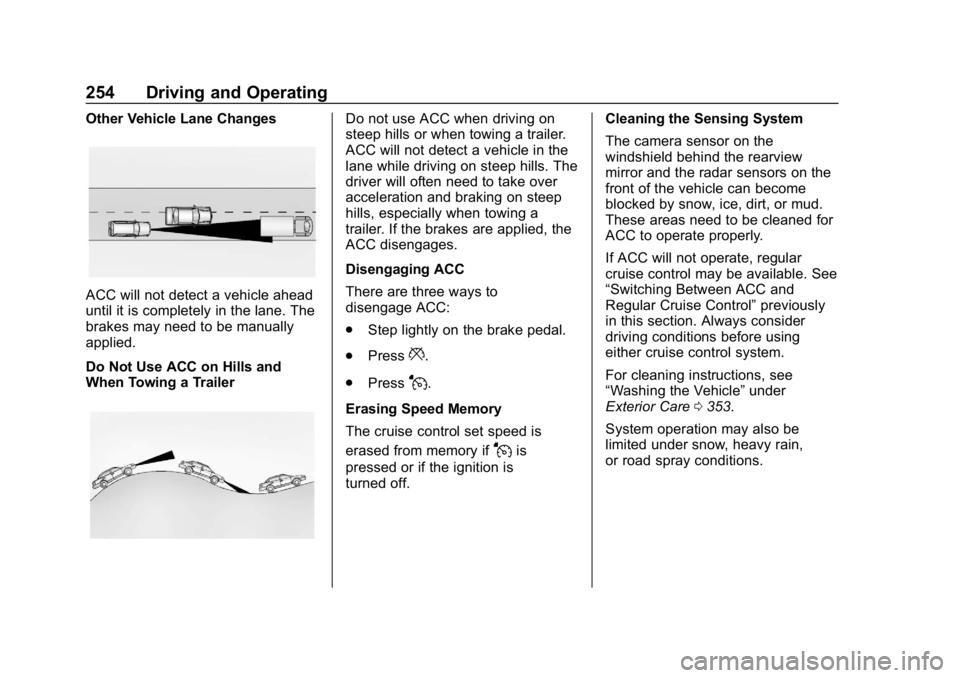
Other Vehicle Lane Changes
ACC will not detect a vehicle ahead
until it is completely in the lane. The
brakes may need to be manually
applied.
Do Not Use ACC on Hills and
When Towing a Trailer
Do not use ACC when driving on
steep hills or when towing a trailer.
ACC will not detect a vehicle in the
lane while driving on steep hills. The
driver will often need to take over
acceleration and braking on steep
hills, especially when towing a
trailer. If the brakes are applied, the
ACC disengages.
Disengaging ACC
There are three ways to
disengage ACC:
.Step lightly on the brake pedal.
. Press
*.
. Press
J.
Erasing Speed Memory
The cruise control set speed is
erased from memory if
Jis
pressed or if the ignition is
turned off. Cleaning the Sensing System
The camera sensor on the
windshield behind the rearview
mirror and the radar sensors on the
front of the vehicle can become
blocked by snow, ice, dirt, or mud.
These areas need to be cleaned for
ACC to operate properly.
If ACC will not operate, regular
cruise control may be available. See
“Switching Between ACC and
Regular Cruise Control”
previously
in this section. Always consider
driving conditions before using
either cruise control system.
For cleaning instructions, see
“Washing the Vehicle” under
Exterior Care 0353.
System operation may also be
limited under snow, heavy rain,
or road spray conditions.
Page 257 of 419
Chevrolet Traverse Owner Manual (GMNA-Localizing-U.S./Canada/Mexico-
10603118) - 2018 - CRC - 1/29/18
256 Driving and Operating
Assistance Systems for
Parking or Backing
If equipped, the Rear Vision Camera
(RVC), Rear Parking Assist (RPA),
Surround Vision, and Rear Cross
Traffic Alert (RCTA) may help the
driver park or avoid objects. Always
check around the vehicle when
parking or backing.
Rear Vision Camera (RVC)
When the vehicle is shifted into
R (Reverse), the RVC displays an
image of the area behind the vehicle
in the infotainment display. The
previous screen displays when the
vehicle is shifted out of R (Reverse)
after a short delay. To return to the
previous screen sooner, press any
button on the infotainment display,
shift into P (Park), or reach a vehicle
speed of approximately 12 km/h
(8 mph). Select Guidance Lines on
the infotainment display to enable or
disable the guidance lines.
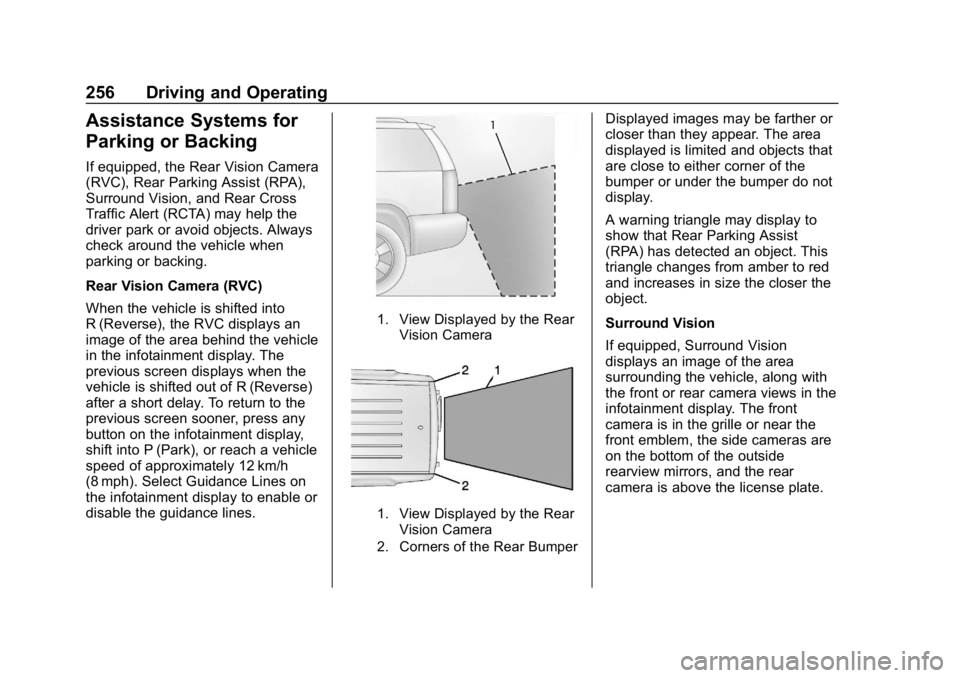
1. View Displayed by the RearVision Camera
1. View Displayed by the RearVision Camera
2. Corners of the Rear Bumper
Displayed images may be farther or
closer than they appear. The area
displayed is limited and objects that
are close to either corner of the
bumper or under the bumper do not
display.
A warning triangle may display to
show that Rear Parking Assist
(RPA) has detected an object. This
triangle changes from amber to red
and increases in size the closer the
object.
Surround Vision
If equipped, Surround Vision
displays an image of the area
surrounding the vehicle, along with
the front or rear camera views in the
infotainment display. The front
camera is in the grille or near the
front emblem, the side cameras are
on the bottom of the outside
rearview mirrors, and the rear
camera is above the license plate.
Page 258 of 419
Chevrolet Traverse Owner Manual (GMNA-Localizing-U.S./Canada/Mexico-
10603118) - 2018 - CRC - 1/29/18
Driving and Operating 257
{Warning
The Surround Vision cameras
have blind spots and will not
display all objects near the
corners of the vehicle. Folding
side mirrors that are out of
position may not display surround
view correctly. Always check
around the vehicle when parking
or backing.
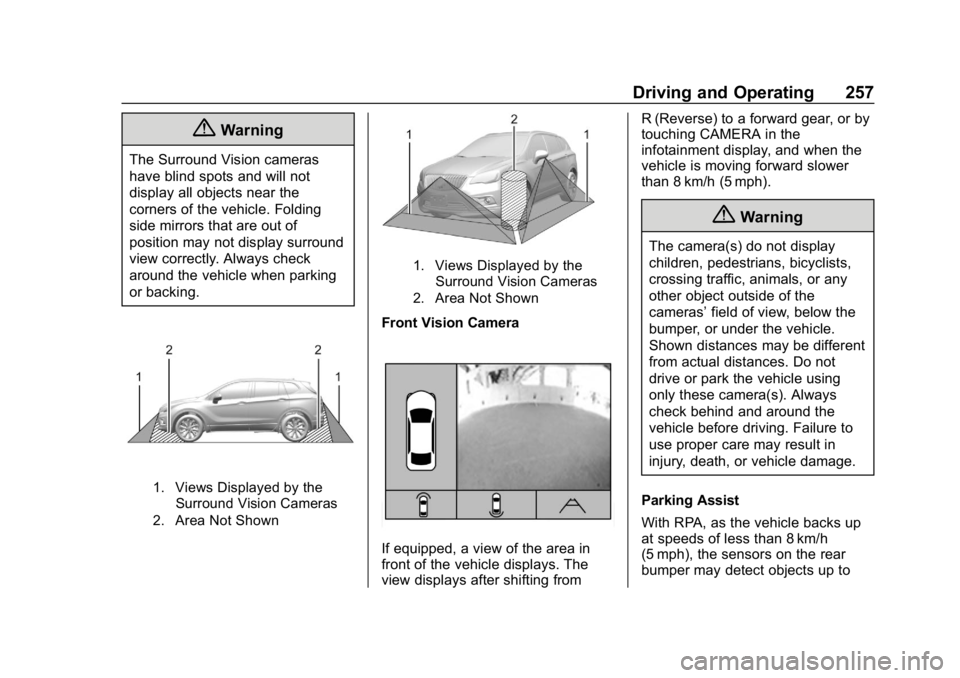
1. Views Displayed by theSurround Vision Cameras
2. Area Not Shown
1. Views Displayed by the Surround Vision Cameras
2. Area Not Shown
Front Vision Camera
If equipped, a view of the area in
front of the vehicle displays. The
view displays after shifting from R (Reverse) to a forward gear, or by
touching CAMERA in the
infotainment display, and when the
vehicle is moving forward slower
than 8 km/h (5 mph).
{Warning
The camera(s) do not display
children, pedestrians, bicyclists,
crossing traffic, animals, or any
other object outside of the
cameras’
field of view, below the
bumper, or under the vehicle.
Shown distances may be different
from actual distances. Do not
drive or park the vehicle using
only these camera(s). Always
check behind and around the
vehicle before driving. Failure to
use proper care may result in
injury, death, or vehicle damage.
Parking Assist
With RPA, as the vehicle backs up
at speeds of less than 8 km/h
(5 mph), the sensors on the rear
bumper may detect objects up to
Page 262 of 419
Chevrolet Traverse Owner Manual (GMNA-Localizing-U.S./Canada/Mexico-
10603118) - 2018 - CRC - 1/29/18
Driving and Operating 261
Following Distance Indication
The following distance to a moving
vehicle you are following is
indicated in following time in
seconds on the DIC. SeeDriver
Information Center (DIC) 0150. The
minimum following time is
0.5 seconds away. If there is no
vehicle detected ahead, or the
vehicle ahead is out of sensor
range, dashes will be displayed.
Unnecessary Alerts
FCA may provide unnecessary
alerts for turning vehicles, vehicles
in other lanes, objects that are not
vehicles, or shadows. These alerts
are normal operation and the
vehicle does not need service.
Cleaning the System
If the FCA system does not seem to
operate properly, this may correct
the issue:
. Clean the outside of the
windshield in front of the
rearview mirror. .
Clean the entire front of the
vehicle.
. Clean the headlamps.
Forward Automatic
Braking (FAB)
If the vehicle has Forward Collision
Alert (FCA), it also has FAB, which
includes Intelligent Brake
Assist (IBA). When the system
detects a vehicle ahead in your path
that is traveling in the same
direction that you may be about to
crash into, it can provide a boost to
braking or automatically brake the
vehicle. This can help avoid or
lessen the severity of crashes when
driving in a forward gear. Depending
on the situation, the vehicle may
automatically brake moderately or
hard. This forward automatic
braking can only occur if a vehicle is
detected. This is shown by the FCA
vehicle ahead indicator being lit.
See Forward Collision Alert (FCA)
System 0259. The system works when driving in a
forward gear between 8 km/h
(5 mph) and 80 km/h (50 mph),
or on vehicles with Adaptive Cruise
Control (ACC), above 4 km/h
(2 mph). It can detect vehicles up to
approximately 60 m (197 ft).{Warning
FAB is an emergency crash
preparation feature and is not
designed to avoid crashes. Do
not rely on FAB to brake the
vehicle. FAB will not brake
outside of its operating speed
range and only responds to
detected vehicles.
FAB may not:
. Detect a vehicle ahead on
winding or hilly roads.
. Detect all vehicles,
especially vehicles with a
trailer, tractors, muddy
vehicles, etc.
(Continued)
Page 266 of 419
Chevrolet Traverse Owner Manual (GMNA-Localizing-U.S./Canada/Mexico-
10603118) - 2018 - CRC - 1/29/18
Driving and Operating 265
{Warning
Using the Front Pedestrian
Braking system while towing a
trailer could cause you to lose
control of the vehicle and crash.
Turn the system to Alert or Off
when towing a trailer.
Cleaning the System
If FPB does not seem to operate
properly, cleaning the outside of the
windshield in front of the rearview
mirror may correct the issue.
Side Blind Zone
Alert (SBZA)
If equipped, the SBZA system is a
lane-changing aid that assists
drivers with avoiding crashes that
occur with moving vehicles in the
side blind zone (or spot) areas.
When the vehicle is in a forward
gear, the left or right side mirror
display will light up if a moving
vehicle is detected in that blind
zone. If the turn signal is activatedand a vehicle is also detected on
the same side, the display will flash
as an extra warning not to change
lanes. Since this system is part of
the Lane Change Alert (LCA)
system, read the entire LCA section
before using this feature.
Lane Change Alert (LCA)
If equipped, the LCA system is a
lane-changing aid that assists
drivers with avoiding lane change
crashes that occur with moving
vehicles in the side blind zone (or
spot) areas or with vehicles rapidly
approaching these areas from
behind. The LCA warning display
will light up in the corresponding
outside side mirror and will flash if
the turn signal is on.
{Warning
LCA does not alert the driver to
vehicles outside of the system
detection zones, pedestrians,
bicyclists, or animals. It may not
(Continued)
Warning (Continued)
provide alerts when changing
lanes under all driving conditions.
Failure to use proper care when
changing lanes may result in
injury, death, or vehicle damage.
Before making a lane change,
always check mirrors, glance over
your shoulder, and use the turn
signals.
LCA Detection Zones
1. SBZA Detection Zone
2. LCA Detection Zone
The LCA sensor covers a zone of
approximately one lane over from
both sides of the vehicle, or 3.5 m
Page 269 of 419

Chevrolet Traverse Owner Manual (GMNA-Localizing-U.S./Canada/Mexico-
10603118) - 2018 - CRC - 1/29/18
268 Driving and Operating
Warning (Continued)
.Detect lane markings under
poor weather or visibility
conditions. This can occur if
the windshield or
headlamps are blocked by
dirt, snow, or ice, if they are
not in proper condition, or if
the sun shines directly into
the camera.
. Detect road edges.
. Detect lanes on winding or
hilly roads.
If LKA only detects lane markings
on one side of the road, it will
only assist or provide an LDW
alert when approaching the lane
on the side where it has detected
a lane marking. Even with LKA
and LDW, you must steer the
vehicle. Always keep your
attention on the road and
maintain proper vehicle position
within the lane, or vehicle
damage, injury, or death could (Continued)
Warning (Continued)
occur. Always keep the
windshield, headlamps, and
camera sensors clean and in
good repair. Do not use LKA in
bad weather conditions.
{Warning
Using LKA while towing a trailer
or on slippery roads could cause
loss of control of the vehicle and
a crash. Turn the system off.
How the System Works
The LKA camera sensor is on the
windshield ahead of the rearview
mirror.
To turn LKA on and off, press
A
on the center console.
When on,
Ais green if LKA is
available to assist and provide LDW
alerts. It may assist by gently
turning the steering wheel and display
Aas amber if the vehicle
approaches a detected lane marking
without using a turn signal in that
direction. It may also provide an
LDW alert by flashing
Aamber
as the lane marking is crossed.
Additionally, there may be three
beeps, or the driver seat may pulse
three times, on the right or left,
depending on the lane departure
direction.
Take Steering
The LKA system does not
continuously steer the vehicle.
If LKA does not detect active driver
steering, an alert, chime, or DIC
message may be provided. Steer
the vehicle to dismiss.
When the System Does Not
Seem to Work Properly
The system performance may be
affected by:
. Close vehicles ahead.
. Sudden lighting changes, such
as when driving through tunnels.
. Banked roads.
Page 283 of 419
Chevrolet Traverse Owner Manual (GMNA-Localizing-U.S./Canada/Mexico-
10603118) - 2018 - CRC - 1/29/18
282 Vehicle Care
Vehicle Care
General Information
General Information . . . . . . . . . . 283
California Proposition65 Warning . . . . . . . . . . . . . . . . . 283
California Perchlorate Materials Requirements . . . . . 284
Accessories and Modifications . . . . . . . . . . . . . . . . 284
Vehicle Checks
Doing Your OwnService Work . . . . . . . . . . . . . . . 284
Hood . . . . . . . . . . . . . . . . . . . . . . . . . 285
Engine Compartment Overview . . . . . . . . . . . . . . . . . . . . 286
Engine Oil . . . . . . . . . . . . . . . . . . . . 289
Engine Oil Life System . . . . . . . 291
Automatic Transmission Fluid . . . . . . . . . . . . . . . . . . . . . . . . 292
Engine Air Cleaner/Filter . . . . . . 293
Cooling System . . . . . . . . . . . . . . 294
Engine Overheating . . . . . . . . . . 298
Washer Fluid . . . . . . . . . . . . . . . . . 299
Brakes . . . . . . . . . . . . . . . . . . . . . . . 300
Brake Fluid . . . . . . . . . . . . . . . . . . . 301
Battery - North America . . . . . . 302
All-Wheel Drive . . . . . . . . . . . . . . . 303 Starter Switch Check . . . . . . . . . 303
Automatic Transmission Shift
Lock Control Function
Check . . . . . . . . . . . . . . . . . . . . . . . 303
Park Brake and P (Park)
Mechanism Check . . . . . . . . . . 304
Wiper Blade Replacement . . . . 304
Windshield Replacement . . . . . 306
Gas Strut(s) . . . . . . . . . . . . . . . . . . 306
Headlamp Aiming
Headlamp Aiming . . . . . . . . . . . . 307
Bulb Replacement
Bulb Replacement . . . . . . . . . . . . 307
High Intensity Discharge (HID) Lighting . . . . . . . . . . . . . . . . . . . . . 307
LED Lighting . . . . . . . . . . . . . . . . . 308
Headlamps, Front Turn Signal, and Sidemarker . . . . . . . . . . . . . 308
License Plate Lamp . . . . . . . . . . 308
Electrical System
High Voltage Devices and Wiring . . . . . . . . . . . . . . . . . . . . . . . 309
Electrical System Overload . . . 309
Fuses and Circuit Breakers . . . 310
Engine Compartment Fuse Block . . . . . . . . . . . . . . . . . . . . . . . . 310
Instrument Panel Fuse Block . . . . . . . . . . . . . . . . . . . . . . . . 314 Rear Compartment Fuse
Block . . . . . . . . . . . . . . . . . . . . . . . . 316
Wheels and Tires
Tires . . . . . . . . . . . . . . . . . . . . . . . . . . 318
All-Season Tires . . . . . . . . . . . . . . 319
Winter Tires . . . . . . . . . . . . . . . . . . 319
Summer Tires . . . . . . . . . . . . . . . . 320
Tire Sidewall Labeling . . . . . . . . 320
Tire Designations . . . . . . . . . . . . . 322
Tire Terminology andDefinitions . . . . . . . . . . . . . . . . . . 323
Tire Pressure . . . . . . . . . . . . . . . . . 326
Tire Pressure for High-Speed Operation . . . . . . . . . . . . . . . . . . . 327
Tire Pressure Monitor System . . . . . . . . . . . . . . . . . . . . . . 327
Tire Pressure Monitor Operation . . . . . . . . . . . . . . . . . . . 328
Tire Inspection . . . . . . . . . . . . . . . . 332
Tire Rotation . . . . . . . . . . . . . . . . . 333
When It Is Time for New Tires . . . . . . . . . . . . . . . . . . . . . . . . 334
Buying New Tires . . . . . . . . . . . . . 334
Different Size Tires and Wheels . . . . . . . . . . . . . . . . . . . . . . 336
Uniform Tire Quality Grading . . . . . . . . . . . . . . . . . . . . . 336
Wheel Alignment and Tire Balance . . . . . . . . . . . . . . . . . . . . . 338
Wheel Replacement . . . . . . . . . . 338
Page 314 of 419

Chevrolet Traverse Owner Manual (GMNA-Localizing-U.S./Canada/Mexico-
10603118) - 2018 - CRC - 1/29/18
Vehicle Care 313
FusesUsage
F47 –
F48 –
F49 Interior rearview mirror
F50 Fuel system control module
F51 Heated steering wheel
F52 Folding seats switch
F53 –
F54 Coolant pump
F55 Air conditioning clutch
F56 Integrated chassis control module
F57 Engine control module/Ignition
F58 Transmission control module/
Ignition
F59 Engine control module battery Fuses
Usage
F60 –
F61 O2 sensor 1/MAF/ Aeroshutter
F62 Engine control module–even 1
F63 O2 sensor 2/ Canister/Engine oil/
Turbo
F64 Engine control module–even 2
F65 Engine control module
powertrain 1
F66 Engine control module
powertrain 2
F67 Engine control module–odd
F68 –
F69 –
F70 –
F71 –
F72 – Fuses
Usage
F73 –
F74 –
F75 –
F76 –
F77 –
Relays Usage
K1 Starter 1
K2 Run/Crank
K3 Vacuum pump
K4 –
K5 Air conditioning
K6 Coolant pump
K7 Engine control module
K8 Folding seats
K9 –
K10 Starter 2
Page 410 of 419

Chevrolet Traverse Owner Manual (GMNA-Localizing-U.S./Canada/Mexico-
10603118) - 2018 - CRC - 1/29/18
Index 409
Driver Mode Control . . . . . . . . . . . . 241
DrivingAssistance Systems . . . . . . . . . . 259
Characteristics andTowing Tips . . . . . . . . . . . . . . . . . 273
Defensive . . . . . . . . . . . . . . . . . . . . . 209
Drunk . . . . . . . . . . . . . . . . . . . . . . . . . 209
For Better Fuel Economy . . . . . . . 29
Hill and Mountain Roads . . . . . . 217
If the Vehicle is Stuck . . . . . . . . . 219
Loss of Control . . . . . . . . . . . . . . . .211
Off-Road . . . . . . . . . . . . . . . . . . . . . .211
Off-Road Recovery . . . . . . . . . . . 210
Vehicle Load Limits . . . . . . . . . . . 219
Wet Roads . . . . . . . . . . . . . . . . . . . 216
Winter . . . . . . . . . . . . . . . . . . . . . . . . 217
Dual Automatic Climate Control System . . . . . . . . . . . . . . . . 200
E
Electric Parking Brake . . . . . . . . . . 237
Electric Parking Brake Light . . . . 144
Electrical Equipment,Add-On . . . . . . . . . . . . . . . . . . . . . . . 281
Electrical System Engine Compartment Fuse
Block . . . . . . . . . . . . . . . . . . . . . . . . 310
Fuses and Circuit Breakers . . . 310 Electrical System (cont'd)
Instrument Panel Fuse
Block . . . . . . . . . . . . . . . . . . . . . . . . 314
Overload . . . . . . . . . . . . . . . . . . . . . 309
Rear Compartment Fuse
Block . . . . . . . . . . . . . . . . . . . . . . . . 316
Emergency OnStar . . . . . . . . . . . . . . . . . . . . . . . 395
Engine
Air Cleaner/Filter . . . . . . . . . . . . . 293
Check Light (MalfunctionIndicator) . . . . . . . . . . . . . . . . . . . . 141
Compartment Overview . . . . . . . 286
Coolant Temperature Gauge . . . . . . . . . . . . . . . . . . . . . . 138
Cooling System . . . . . . . . . . . . . . . 294
Drive Belt Routing . . . . . . . . . . . . 379
Exhaust . . . . . . . . . . . . . . . . . . . . . . 231
Heater . . . . . . . . . . . . . . . . . . . . . . . . 227
Oil Life System . . . . . . . . . . . . . . . 291
Oil Pressure Light . . . . . . . . . . . . 147
Overheating . . . . . . . . . . . . . . . . . . 298
Power Messages . . . . . . . . . . . . . 153
Running While Parked . . . . . . . . 231
Starting . . . . . . . . . . . . . . . . . . . . . . . 225
Entry Lighting . . . . . . . . . . . . . . . . . . . 173
Equipment, Towing . . . . . . . . . . . . . 279
Event Data Recorders . . . . . . . . . . 392 Exit Lighting . . . . . . . . . . . . . . . . . . . . 173
Extended Parking . . . . . . . . . . . . . . . 230
Extender, Seat Belt . . . . . . . . . . . . . . 83
Exterior Lamp Controls . . . . . . . . . 166
Exterior Lighting Battery
Saver . . . . . . . . . . . . . . . . . . . . . . . . . 174
F
FeaturesMemory . . . . . . . . . . . . . . . . . . . . . . . . . 12
Filter, Engine Air Cleaner . . . . . . . . . . . 293
Flash-to-Pass . . . . . . . . . . . . . . . . . . . 168
Flashers, Hazard Warning . . . . . . 170
Flat Tire . . . . . . . . . . . . . . . . . . . . . . . . 339 Changing . . . . . . . . . . . . . . . . . . . . . 341
Floor Mats . . . . . . . . . . . . . . . . . . . . . . 361
Fluid
Automatic Transmission . . . . . . 292
Brakes . . . . . . . . . . . . . . . . . . . . . . . . 301
Washer . . . . . . . . . . . . . . . . . . . . . . . 299
Fog Lamps . . . . . . . . . . . . . . . . . . . . . 170
Folding Mirrors . . . . . . . . . . . . . . . . . . 53
Forward Automatic Braking . . . . . 261
Forward Collision Alert (FCA) System . . . . . . . . . . . . . . . . . 259
Frequency Statement Radio . . . . . . . . . . . . . . . . . . . . . . . . . 390