lane assist CHEVROLET TRAVERSE 2018 User Guide
[x] Cancel search | Manufacturer: CHEVROLET, Model Year: 2018, Model line: TRAVERSE, Model: CHEVROLET TRAVERSE 2018Pages: 419, PDF Size: 5.92 MB
Page 262 of 419
Chevrolet Traverse Owner Manual (GMNA-Localizing-U.S./Canada/Mexico-
10603118) - 2018 - CRC - 1/29/18
Driving and Operating 261
Following Distance Indication
The following distance to a moving
vehicle you are following is
indicated in following time in
seconds on the DIC. SeeDriver
Information Center (DIC) 0150. The
minimum following time is
0.5 seconds away. If there is no
vehicle detected ahead, or the
vehicle ahead is out of sensor
range, dashes will be displayed.
Unnecessary Alerts
FCA may provide unnecessary
alerts for turning vehicles, vehicles
in other lanes, objects that are not
vehicles, or shadows. These alerts
are normal operation and the
vehicle does not need service.
Cleaning the System
If the FCA system does not seem to
operate properly, this may correct
the issue:
. Clean the outside of the
windshield in front of the
rearview mirror. .
Clean the entire front of the
vehicle.
. Clean the headlamps.
Forward Automatic
Braking (FAB)
If the vehicle has Forward Collision
Alert (FCA), it also has FAB, which
includes Intelligent Brake
Assist (IBA). When the system
detects a vehicle ahead in your path
that is traveling in the same
direction that you may be about to
crash into, it can provide a boost to
braking or automatically brake the
vehicle. This can help avoid or
lessen the severity of crashes when
driving in a forward gear. Depending
on the situation, the vehicle may
automatically brake moderately or
hard. This forward automatic
braking can only occur if a vehicle is
detected. This is shown by the FCA
vehicle ahead indicator being lit.
See Forward Collision Alert (FCA)
System 0259. The system works when driving in a
forward gear between 8 km/h
(5 mph) and 80 km/h (50 mph),
or on vehicles with Adaptive Cruise
Control (ACC), above 4 km/h
(2 mph). It can detect vehicles up to
approximately 60 m (197 ft).{Warning
FAB is an emergency crash
preparation feature and is not
designed to avoid crashes. Do
not rely on FAB to brake the
vehicle. FAB will not brake
outside of its operating speed
range and only responds to
detected vehicles.
FAB may not:
. Detect a vehicle ahead on
winding or hilly roads.
. Detect all vehicles,
especially vehicles with a
trailer, tractors, muddy
vehicles, etc.
(Continued)
Page 266 of 419
Chevrolet Traverse Owner Manual (GMNA-Localizing-U.S./Canada/Mexico-
10603118) - 2018 - CRC - 1/29/18
Driving and Operating 265
{Warning
Using the Front Pedestrian
Braking system while towing a
trailer could cause you to lose
control of the vehicle and crash.
Turn the system to Alert or Off
when towing a trailer.
Cleaning the System
If FPB does not seem to operate
properly, cleaning the outside of the
windshield in front of the rearview
mirror may correct the issue.
Side Blind Zone
Alert (SBZA)
If equipped, the SBZA system is a
lane-changing aid that assists
drivers with avoiding crashes that
occur with moving vehicles in the
side blind zone (or spot) areas.
When the vehicle is in a forward
gear, the left or right side mirror
display will light up if a moving
vehicle is detected in that blind
zone. If the turn signal is activatedand a vehicle is also detected on
the same side, the display will flash
as an extra warning not to change
lanes. Since this system is part of
the Lane Change Alert (LCA)
system, read the entire LCA section
before using this feature.
Lane Change Alert (LCA)
If equipped, the LCA system is a
lane-changing aid that assists
drivers with avoiding lane change
crashes that occur with moving
vehicles in the side blind zone (or
spot) areas or with vehicles rapidly
approaching these areas from
behind. The LCA warning display
will light up in the corresponding
outside side mirror and will flash if
the turn signal is on.
{Warning
LCA does not alert the driver to
vehicles outside of the system
detection zones, pedestrians,
bicyclists, or animals. It may not
(Continued)
Warning (Continued)
provide alerts when changing
lanes under all driving conditions.
Failure to use proper care when
changing lanes may result in
injury, death, or vehicle damage.
Before making a lane change,
always check mirrors, glance over
your shoulder, and use the turn
signals.
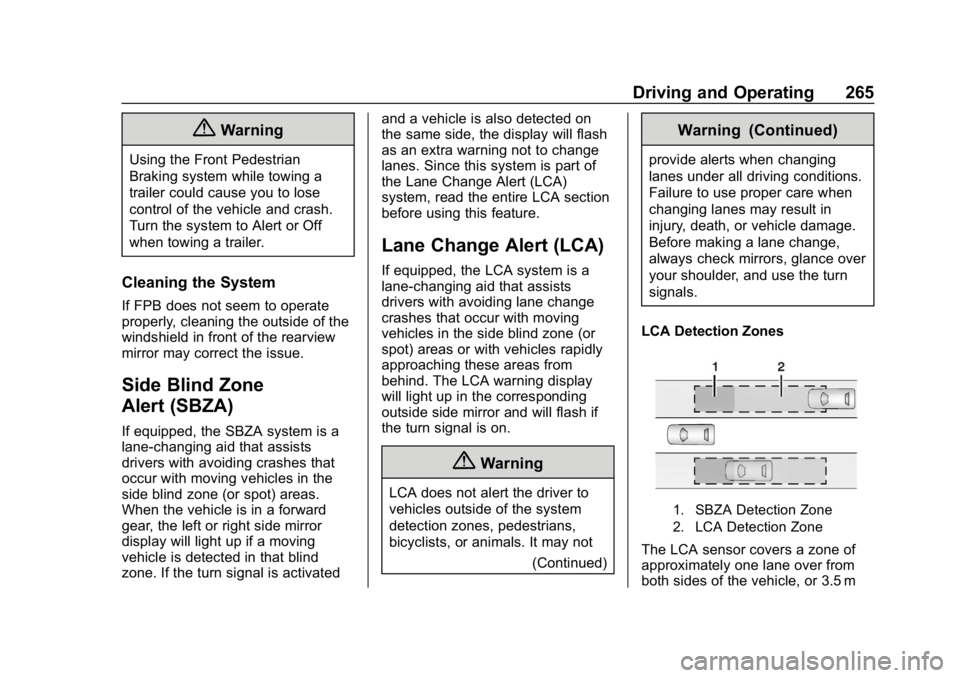
LCA Detection Zones
1. SBZA Detection Zone
2. LCA Detection Zone
The LCA sensor covers a zone of
approximately one lane over from
both sides of the vehicle, or 3.5 m
Page 268 of 419

Chevrolet Traverse Owner Manual (GMNA-Localizing-U.S./Canada/Mexico-
10603118) - 2018 - CRC - 1/29/18
Driving and Operating 267
driving on sharp curves. The system
does not need to be serviced. The
system may light up due to
guardrails, signs, trees, shrubs, and
other non-moving objects. This is
normal system operation; the
vehicle does not need service.
LCA may not operate when the LCA
sensors in the left or right corners of
the rear bumper are covered with
mud, dirt, snow, ice, or slush, or in
heavy rainstorms. For cleaning
instructions, see "Washing the
Vehicle" underExterior Care0353.
If the DIC still displays the system
unavailable message after cleaning
both sides of the vehicle toward the
rear corners of the vehicle, see your
dealer.
If the LCA displays do not light up
when moving vehicles are in the
side blind zone or are rapidly
approaching this zone and the
system is clean, the system may
need service. Take the vehicle to
your dealer. When LCA is disabled for any
reason other than the driver turning
it off, the Side Blind Zone Alert On
option will not be available on the
personalization menu.
Radio Frequency Information
See
Radio Frequency Statement
0 390.
Lane Departure
Warning (LDW)
If equipped, LDW may help avoid
crashes due to unintentional lane
departures. It may provide a
warning if the vehicle is crossing a
detected lane marking without using
a turn signal in the lane departure
direction. Since this system is part
of the Lane Keep Assist (LKA)
system, read the entire LKA section
before using this feature.
Lane Keep Assist (LKA)
If equipped, LKA may help avoid
crashes due to unintentional lane
departures. It may assist by gently
turning the steering wheel if the vehicle approaches a detected lane
marking without using a turn signal
in that direction. It may also provide
a Lane Departure Warning (LDW)
system alert as the lane marking is
crossed. The LKA system will not
assist or provide an LDW alert if it
detects that you are actively
steering. Override LKA by turning
the steering wheel. LKA uses a
camera to detect lane markings
between 60 km/h (37 mph) and
180 km/h (112 mph).
{Warning
The LKA system does not
continuously steer the vehicle.
It may not keep the vehicle in the
lane or give a Lane Departure
Warning (LDW) alert, even if a
lane marking is detected.
The LKA and LDW systems
may not:
. Provide an alert or enough
steering assist to avoid a
lane departure or crash.
(Continued)
Page 269 of 419

Chevrolet Traverse Owner Manual (GMNA-Localizing-U.S./Canada/Mexico-
10603118) - 2018 - CRC - 1/29/18
268 Driving and Operating
Warning (Continued)
.Detect lane markings under
poor weather or visibility
conditions. This can occur if
the windshield or
headlamps are blocked by
dirt, snow, or ice, if they are
not in proper condition, or if
the sun shines directly into
the camera.
. Detect road edges.
. Detect lanes on winding or
hilly roads.
If LKA only detects lane markings
on one side of the road, it will
only assist or provide an LDW
alert when approaching the lane
on the side where it has detected
a lane marking. Even with LKA
and LDW, you must steer the
vehicle. Always keep your
attention on the road and
maintain proper vehicle position
within the lane, or vehicle
damage, injury, or death could (Continued)
Warning (Continued)
occur. Always keep the
windshield, headlamps, and
camera sensors clean and in
good repair. Do not use LKA in
bad weather conditions.
{Warning
Using LKA while towing a trailer
or on slippery roads could cause
loss of control of the vehicle and
a crash. Turn the system off.
How the System Works
The LKA camera sensor is on the
windshield ahead of the rearview
mirror.
To turn LKA on and off, press
A
on the center console.
When on,
Ais green if LKA is
available to assist and provide LDW
alerts. It may assist by gently
turning the steering wheel and display
Aas amber if the vehicle
approaches a detected lane marking
without using a turn signal in that
direction. It may also provide an
LDW alert by flashing
Aamber
as the lane marking is crossed.
Additionally, there may be three
beeps, or the driver seat may pulse
three times, on the right or left,
depending on the lane departure
direction.
Take Steering
The LKA system does not
continuously steer the vehicle.
If LKA does not detect active driver
steering, an alert, chime, or DIC
message may be provided. Steer
the vehicle to dismiss.
When the System Does Not
Seem to Work Properly
The system performance may be
affected by:
. Close vehicles ahead.
. Sudden lighting changes, such
as when driving through tunnels.
. Banked roads.
Page 270 of 419
Chevrolet Traverse Owner Manual (GMNA-Localizing-U.S./Canada/Mexico-
10603118) - 2018 - CRC - 1/29/18
Driving and Operating 269
.Roads with poor lane markings,
such as two-lane roads.
If the LKA system is not functioning
properly when lane markings are
clearly visible, cleaning the
windshield may help.
A system unavailable message may
display if the camera is blocked.
The LKA system does not need
service.
LKA assistance and/or LDW alerts
may occur due to tar marks,
shadows, cracks in the road,
temporary or construction lane
markings, or other road
imperfections. This is normal system
operation; the vehicle does not need
service. Turn LKA off if these
conditions continue.Fuel
GM recommends the use of TOP
TIER Detergent Gasoline to keep
the engine cleaner and reduce
engine deposits. See
www.toptiergas.com for a list of TOP
TIER Detergent Gasoline marketers
and applicable countries.
Do not use any fuel labeled E85 or
FlexFuel. Do not use gasoline with
ethanol levels greater than 15% by
volume. For the 2.0L L4 engine, use
premium unleaded gasoline meeting
ASTM specification D4814 with a
posted octane rating of 93 is highly
recommended for best performance
and fuel economy. Unleaded
gasoline with an octane rated as low
as 87 can be used. Using unleaded
gasoline rated below 93 octane,
however, will lead to reduced
acceleration and fuel economy.
If knocking occurs, use a gasoline
rated at 93 octane as soon as
possible, otherwise, the engine
could be damaged. If heavy
knocking is heard when using
gasoline with a 93 octane rating, the
engine needs service.
For the 3.6L V6 engine, use regular
unleaded gasoline meeting ASTM
specification D4814 with a posted
octane rating of 87 or higher. Do not
use gasoline with a posted octane
rating of less than 87, as this may
cause engine knock and will lower
fuel economy.
Page 274 of 419
Chevrolet Traverse Owner Manual (GMNA-Localizing-U.S./Canada/Mexico-
10603118) - 2018 - CRC - 1/29/18
Driving and Operating 273
Trailer Towing
General Towing
Information
Only use towing equipment that has
been designed for the vehicle.
Contact your dealer or trailering
dealer for assistance with preparing
the vehicle for towing a trailer. Read
the entire section before towing a
trailer.
For towing a disabled vehicle, see
Towing the Vehicle0351. For
towing the vehicle behind another
vehicle such as a motor home, see
Recreational Vehicle Towing 0351.
Driving Characteristics
and Towing Tips
Driving with a Trailer
When towing a trailer:
.
Become familiar with the state
and local laws that apply
specifically to trailer towing. .
Do not tow a trailer during the
first 800 km (500 mi), to prevent
damage to the engine, axle or
other parts.
. Then, during the first 800 km
(500 mi), of trailer towing, do not
drive over 80 km/h (50 mph) and
do not make starts at full throttle.
. Vehicles can tow in D (Drive).
The Tow/Haul Mode may be
used in both modes. See Tow/
Haul Mode 0235.
. Turn off parking assist when
towing.
. Turn off Lane Keep Assist (LKA)
when towing. See Lane Keep
Assist (LKA) 0267.
. Do not use Adaptive Cruise
Control (ACC) when towing. See
Adaptive Cruise Control 0246.
. The Forward Automatic Braking
system should be set to Off
when towing. See Forward
Automatic Braking (FAB) 0261. .
The Front Pedestrian Braking
system should be set to Alert or
Off when towing. See Front
Pedestrian Braking (FPB)
System 0263.
{Warning
When towing a trailer, exhaust
gases may collect at the rear of
the vehicle and enter if the
liftgate, trunk/hatch, or rear-most
window is open.
When towing a trailer:
. Do not drive with the
liftgate, trunk/hatch,
or rear-most window open.
. Fully open the air outlets on
or under the instrument
panel.
. Also adjust the climate
control system to a setting
that brings in only outside
air. See “Climate Control
Systems” in the Index.
(Continued)
Page 412 of 419

Chevrolet Traverse Owner Manual (GMNA-Localizing-U.S./Canada/Mexico-
10603118) - 2018 - CRC - 1/29/18
Index 411
Horn . . . . . . . . . . . . . . . . . . . . . . . . . . . . 125
How to Wear Seat BeltsProperly . . . . . . . . . . . . . . . . . . . . . . . . 78
HVAC . . . . . . . . . . . . . . . . . . . . . . 200, 203
I
Ignition Positions . . . . . . . . . . . . . . . 224
Immobilizer . . . . . . . . . . . . . . . . . . . . . . 52
Indicator Pedestrian Ahead . . . . . . . . . . . . 145
Vehicle Ahead . . . . . . . . . . . . . . . . 145
Infants and Young Children,
Restraints . . . . . . . . . . . . . . . . . . . . . . 99
Infotainment . . . . . . . . . . . . . . . . . . . . 175
Infotainment System . . . . . . . . . . . . 393
Instrument Cluster . . . . . . . . . . . . . . 134
Instrument Panel Storage Area . . . . . . . . . . . . . . . . . .118
Interior Rearview Mirrors . . . . . . . . . 54
Introduction . . . . . . . . . . . . . . . . . . . . . . . 2
J
Jump Starting - North America . . . . . . . . . . . . . . . . . . . . . . . 348
K
Keyless EntryRemote (RKE) System . . . . . . . . . 32
Keys . . . . . . . . . . . . . . . . . . . . . . . . . . . . . 31
L
Labeling, Tire Sidewall . . . . . . . . . . 320
Lamps Courtesy . . . . . . . . . . . . . . . . . . . . . . 171
Daytime Running (DRL) . . . . . . 168
Dome . . . . . . . . . . . . . . . . . . . . . . . . . 171
Exterior Controls . . . . . . . . . . . . . . 166
Exterior Lighting BatterySaver . . . . . . . . . . . . . . . . . . . . . . . 174
License Plate . . . . . . . . . . . . . . . . . 308
Malfunction Indicator
(Check Engine) . . . . . . . . . . . . . 141
On Reminder . . . . . . . . . . . . . . . . . 149
Reading . . . . . . . . . . . . . . . . . . . . . . 172
Lane Change Alert (LCA) . . . . . . . 265
Lane Departure Warning (LDW) . . . . . . . . . . . . . . . . 267
Lane Keep Assist (LKA) . . . . . . . . 267
Lane Keep Assist Light . . . . . . . . . 145
Lap-Shoulder Belt . . . . . . . . . . . . . . . 79
LATCH System Replacing Parts after aCrash . . . . . . . . . . . . . . . . . . . . . . . .112
LATCH, Lower Anchors and
Tethers for Children . . . . . . . . . . . 104
LED Lighting . . . . . . . . . . . . . . . . . . . . 308
Liftgate . . . . . . . . . . . . . . . . . . . . . . . . . . 44 Lighting
Entry . . . . . . . . . . . . . . . . . . . . . . . . . 173
Exit . . . . . . . . . . . . . . . . . . . . . . . . . . . 173
Illumination Control . . . . . . . . . . . 171
LED . . . . . . . . . . . . . . . . . . . . . . . . . . 308
Lights Airbag Readiness . . . . . . . . . . . . . 140
Antilock Brake System
(ABS) Warning . . . . . . . . . . . . . . 144
Brake System Warning . . . . . . . 143
Charging System . . . . . . . . . . . . . 141
Check Engine (Malfunction Indicator) . . . . . . . . . . . . . . . . . . . . 141
Cruise Control . . . . . . . . . . . . . . . . 149
Door Ajar . . . . . . . . . . . . . . . . . . . . . 149
Electric Parking Brake . . . . . . . . 144
Engine Oil Pressure . . . . . . . . . . 147
Flash-to-Pass . . . . . . . . . . . . . . . . . 168
Front Fog Lamp . . . . . . . . . . . . . . 149
High-Beam On . . . . . . . . . . . . . . . . 148
High/Low Beam Changer . . . . . 168
Lane Keep Assist . . . . . . . . . . . . . 145
Low Fuel Warning . . . . . . . . . . . . 148
Seat Belt Reminders . . . . . . . . . . 139
Security . . . . . . . . . . . . . . . . . . . . . . 148
Service Electric Parking Brake . . . . . . . . . . . . . . . . . . . . . . . 144
StabiliTrak OFF . . . . . . . . . . . . . . . 146
Page 416 of 419

Chevrolet Traverse Owner Manual (GMNA-Localizing-U.S./Canada/Mexico-
10603118) - 2018 - CRC - 1/29/18
Index 415
ShiftingInto Park . . . . . . . . . . . . . . . . . . . . . . 229
Out of Park . . . . . . . . . . . . . . . . . . . 229
Side Blind Zone Alert (SBZA) . . . 265
Signals, Turn and Lane-Change . . . . . . . . . . . . . . . . . 170
Software Updates . . . . . . . . . . . . . . 179
Spare Tire
Compact . . . . . . . . . . . . . . . . . . . . . . 347
Special Application Services . . . . 370
Specifications and Capacities . . . . . . . . . . . . . . . . . . . . . 377
Speedometer . . . . . . . . . . . . . . . . . . . 137
StabiliTrak OFF Light . . . . . . . . . . . . . . . . . . . . . 146
Start Assist, Hill . . . . . . . . . . . . . . . . . 239
Start Vehicle, Remote . . . . . . . . . . . 38
Starter Switch Check . . . . . . . . . . . 303
Starting the Engine . . . . . . . . . . . . . 225
Steering . . . . . . . . . . . . . . . . . . . . . . . . 210 Heated Wheel . . . . . . . . . . . . . . . . 125
Wheel Adjustment . . . . . . . . . . . . 124
Wheel Controls . . . . . . . . . . . . . . . 124
Storage Areas Cargo Management System . . .119
Center Console . . . . . . . . . . . . . . . .119
Glove Box . . . . . . . . . . . . . . . . . . . . .118
Instrument Panel . . . . . . . . . . . . . .118 Storage Areas (cont'd)
Roof Rack System . . . . . . . . . . . . 121
Storage Compartments . . . . . . . . . 118
Struts Gas . . . . . . . . . . . . . . . . . . . . . . . . . . . 306
Stuck Vehicle . . . . . . . . . . . . . . . . . . . 219
Summer Tires . . . . . . . . . . . . . . . . . . 320
Sun Visors . . . . . . . . . . . . . . . . . . . . . . . 59
Sunroof . . . . . . . . . . . . . . . . . . . . . . . . . . 59
Symbols . . . . . . . . . . . . . . . . . . . . . . . . . . 3
System Forward CollisionAlert (FCA) . . . . . . . . . . . . . . . . . . 259
Infotainment . . . . . . . . . . . . . 175, 393
Roof Rack . . . . . . . . . . . . . . . . . . . . 121
Systems Driver Assistance . . . . . . . . . . . . . 255
T
Tachometer . . . . . . . . . . . . . . . . . . . . . 137
Text Telephone (TTY) Users . . . . 383
Theft-Deterrent Systems . . . . . . . . . 52Immobilizer . . . . . . . . . . . . . . . . . . . . . 52
Third-Row Seats . . . . . . . . . . . . . . . . . 74
Time . . . . . . . . . . . . . . . . . . . . . . . . . . . . 128
Tires . . . . . . . . . . . . . . . . . . . . . . . . . . . . 318
All-Season . . . . . . . . . . . . . . . . . . . . 319
Buying New Tires . . . . . . . . . . . . . 334 Tires (cont'd)
Chains . . . . . . . . . . . . . . . . . . . . . . . . 339
Changing . . . . . . . . . . . . . . . . . . . . . 341
Compact Spare . . . . . . . . . . . . . . . 347
Designations . . . . . . . . . . . . . . . . . 322
Different Size . . . . . . . . . . . . . . . . . 336
If a Tire Goes Flat . . . . . . . . . . . . 339
Inspection . . . . . . . . . . . . . . . . . . . . 332
Pressure . . . . . . . . . . . . . . . . . 326, 327
Pressure Light . . . . . . . . . . . . . . . . 146
Pressure Monitor Operation . . 328
Pressure Monitor System . . . . . 327
Rotation . . . . . . . . . . . . . . . . . . . . . . 333
Sidewall Labeling . . . . . . . . . . . . . 320
Terminology and Definitions . . 323
Uniform Tire Quality
Grading . . . . . . . . . . . . . . . . . . . . . 336
Wheel Alignment and Tire
Balance . . . . . . . . . . . . . . . . . . . . . 338
Wheel Replacement . . . . . . . . . . 338
When It Is Time for New Tires . . . . . . . . . . . . . . . . . . . . . . . . 334
Winter . . . . . . . . . . . . . . . . . . . . . . . . 319
Tow/Haul Mode . . . . . . . . . . . . . . . . . 235
Towing Driving Characteristics . . . . . . . . 273
Equipment . . . . . . . . . . . . . . . . . . . . 279
General Information . . . . . . . . . . 273