ignition CHEVROLET TRAVERSE 2018 Service Manual
[x] Cancel search | Manufacturer: CHEVROLET, Model Year: 2018, Model line: TRAVERSE, Model: CHEVROLET TRAVERSE 2018Pages: 419, PDF Size: 5.92 MB
Page 187 of 419

Chevrolet Traverse Owner Manual (GMNA-Localizing-U.S./Canada/Mexico-
10603118) - 2018 - CRC - 1/29/18
186 Infotainment System
.To display album title, track title,
and artist information, the file
should be compatible with the
ID3 Tag V1 and V2 formats.
Using USB Storage Devices or
iPod/iPhone
. Use a USB or flash memory type
storage device. Do not connect
using a USB adaptor.
. Do not connect and reconnect
the USB device repeatedly in a
short time, as this may cause
static electricity and problems
using the device.
. Use a USB device with a metal
connecting terminal.
. Connection with i-Stick Type
USB storage devices may be
faulty due to vehicle vibration.
. Do not touch the USB
connecting terminal.
. Only USB storage devices
formatted in FAT16/32 or exFAT
file systems are recognized.
NTFS and other file systems are
not recognized. .
The time it takes to process files
will depend on the USB storage
device type and capacity, and
the type of files stored.
. Some USB storage device files
may not be compatible.
. Up to two USB devices and one
iPod can be played through a
USB hub. All devices may not be
supported, depending on the
performance of the USB hub.
If there is not enough power
supply, it may not operate
normally.
. Do not disconnect the USB
storage device while it is playing.
This may cause damage to the
product or affect the
performance of the USB device.
. Disconnect the USB storage
device when the ignition is
turned off. If the ignition is turned
on while the USB device is
connected, the USB device may
be damaged or may not operate
normally. .
USB storage devices can only
be connected for playing music,
viewing photo files,
or upgrading.
. Do not use the USB terminal to
charge USB accessory
equipment. The heat generated
may cause performance issues
or damage.
. Music files to which Digital Right
Management (DRM) is applied
cannot be played.
. USB storage device that has a
capacity limit of no more than
5,000 files, such as music,
photo, video, and 15 levels of
folder structure. Normal usage
cannot be guaranteed for a
storage device that exceeds this
limit. The iPod/iPhone can play
all music files that are
supported. The music file lists
will only display in alphabetical
order up to 5,000 files on the
screen.
Page 188 of 419
Chevrolet Traverse Owner Manual (GMNA-Localizing-U.S./Canada/Mexico-
10603118) - 2018 - CRC - 1/29/18
Infotainment System 187
.Some iPod/iPhone product
models may not support the
connectivity or functionality of
this product.
. Only connect the iPod/iPhone
with connection cables
supported by iPod/iPhone
products. Other connection
cables cannot be used.
. The iPod/iPhone may be
damaged if it is connected to the
vehicle with the ignition on.
When not in use, disconnect the
iPod/iPhone.
. When the iPod/iPhone is
connected to the USB port by
using the iPod/iPhone cable, the
Bluetooth music is not
supported.
. The iPod/iPhone playback
functions and the information
displayed may be different when
played on the infotainment
system.
.
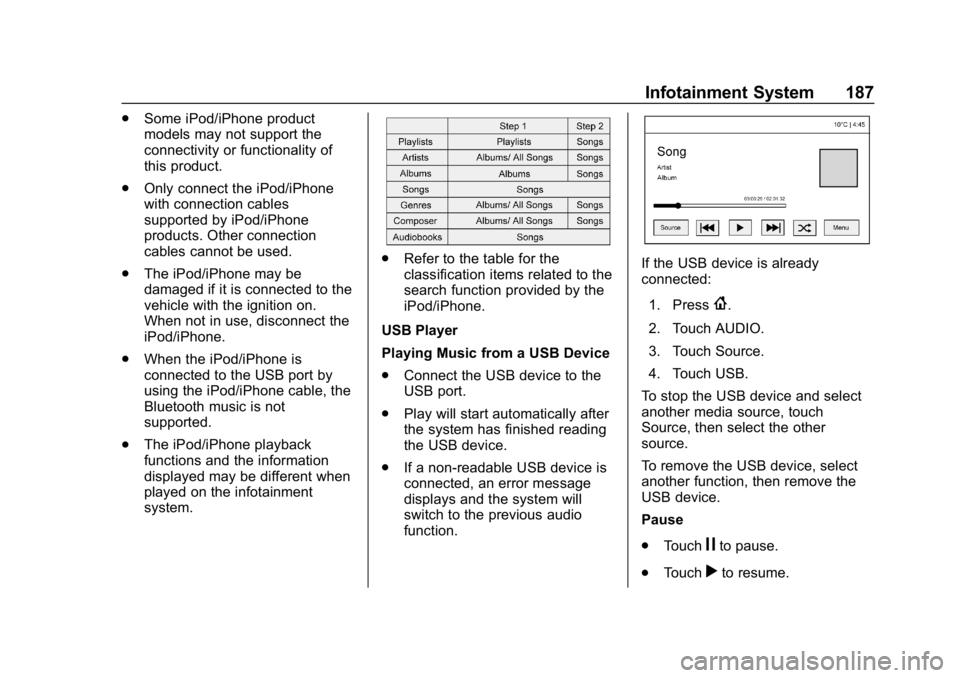
Refer to the table for the
classification items related to the
search function provided by the
iPod/iPhone.
USB Player
Playing Music from a USB Device
. Connect the USB device to the
USB port.
. Play will start automatically after
the system has finished reading
the USB device.
. If a non-readable USB device is
connected, an error message
displays and the system will
switch to the previous audio
function.If the USB device is already
connected:
1. Press
{.
2. Touch AUDIO.
3. Touch Source.
4. Touch USB.
To stop the USB device and select
another media source, touch
Source, then select the other
source.
To remove the USB device, select
another function, then remove the
USB device.
Pause
. Touch
jto pause.
. Touch
rto resume.
Page 192 of 419
Chevrolet Traverse Owner Manual (GMNA-Localizing-U.S./Canada/Mexico-
10603118) - 2018 - CRC - 1/29/18
Infotainment System 191
The auxiliary input jack is in the
center stack. The infotainment
system can play music connected
by the auxiliary device.
Play will begin when the system has
finished reading the information on
the device.
Playing Music
To play music from the device, if the
device is already connected:1. Press
{.
2. Touch AUDIO.
3. Touch Source.
4. Touch AUX.
To adjust the tone settings, see
“Tone Settings” inOperation 0178.
Phone
Bluetooth (Overview)
If equipped with Bluetooth capability,
the system can interact with many
Bluetooth phones, PDAs, or other
devices to:
.
Place and receive hands-free
calls.
. Transmit hands-free data.
. Play audio streaming files.
The device must be paired first. See
“Pairing” later in this section.
To minimize driver distraction,
before driving, and with the vehicle
parked:
. Become familiar with the
features of the cell phone.
Organize the phone book and
contact lists clearly and delete
duplicate or rarely used entries.
If possible, program speed dial
or other shortcuts.
. Review the controls and
operation of the infotainment
system. .
Pair cell phone(s) to the vehicle.
The system may not work with
all cell phones. See “Pairing”
later in this section.
{Warning
When using a cell phone, it can
be distracting to look too long or
too often at the screen of the
phone or the infotainment system.
Taking your eyes off the road too
long or too often could cause a
crash resulting in injury or death.
Focus your attention on driving.
Vehicles with a Bluetooth system
can use a Bluetooth-capable cell
phone with a Hands-Free Profile to
make and receive phone calls. The
infotainment system is used to
control the system. The system can
be used while ignition is on or in
ACC/ACCESSORY. See Ignition
Positions 0224. Not all phones
support all functions and not all
phones work with the Bluetooth
system. See www.gm.com/bluetooth
Page 203 of 419
Chevrolet Traverse Owner Manual (GMNA-Localizing-U.S./Canada/Mexico-
10603118) - 2018 - CRC - 1/29/18
202 Climate Controls
0MAX :Air is directed to the
windshield, the fan runs at a higher
speed, and the temperature of the
air is increased if not already at
maximum. This mode overrides the
previous mode selected and clears
fog or frost from the windshield
more quickly. When the button is
pressed again, the system returns
to the previous mode setting and
fan speed.
For best results, clear all snow and
ice from the windshield before
defrosting.
A/C : Press to turn the air
conditioning system on or off. If the
climate control system is turned off
or the outside temperature falls
below freezing, the air conditioner
will not run.
Pressing this button cancels
automatic air conditioning and turns
off the air conditioner. Press AUTO
to return to automatic operation and
the air conditioner runs
automatically as needed. When the
indicator light is on, the air
conditioner runs automatically to cool the air inside the vehicle or to
dry the air needed to defog the
windshield faster.
@:
Press to turn on recirculation.
An indicator light comes on. Air is
recirculated to quickly cool the
inside of the vehicle or to reduce the
entry of outside air and odors.
If selected during cool or cold
weather, the windshield and
windows may fog. Turn off
recirculation to help clear the
windshield and windows.
Auto Defog : The climate control
system may have a sensor to
automatically detect high humidity
inside the vehicle. When high
humidity is detected, the climate
control system may adjust to
outside air supply and turn on the
air conditioner. The fan speed may
slightly increase to help prevent
fogging. If the climate control
system does not detect possible
window fogging, it returns to normal
operation. To turn Auto Defog off or on, see
“Climate and Air Quality”
under
Vehicle Personalization 0154.Rear Window Defogger
K:Press to turn the rear window
defogger on or off. An indicator light
on the button comes on to show that
the rear window defogger is on. The
rear window defogger only works
when the ignition is on. The
defogger turns off when the ignition
is off or in ACC/ACCESSORY.
The rear window defogger can be
set to automatic operation. See
“Climate and Air Quality” under
Vehicle Personalization 0154.
When Auto Rear Defog is selected,
the rear window defogger turns on
automatically when the interior
temperature is cold and the outside
temperature is about 7 °C (44 °F)
and below. The auto rear defogger
turns off automatically.
If the vehicle is equipped with
heated outside mirrors, they turn on
when the rear window defogger
Page 208 of 419
Chevrolet Traverse Owner Manual (GMNA-Localizing-U.S./Canada/Mexico-
10603118) - 2018 - CRC - 1/29/18
Driving and Operating 207
Driving and
Operating
Driving Information
Distracted Driving . . . . . . . . . . . . 208
Defensive Driving . . . . . . . . . . . . . 209
Drunk Driving . . . . . . . . . . . . . . . . . 209
Control of a Vehicle . . . . . . . . . . . 209
Braking . . . . . . . . . . . . . . . . . . . . . . . 209
Steering . . . . . . . . . . . . . . . . . . . . . . 210
Off-Road Recovery . . . . . . . . . . . 210
Loss of Control . . . . . . . . . . . . . . . 211
Off-Road Driving . . . . . . . . . . . . . . 211
Driving on Wet Roads . . . . . . . . 216
Hill and Mountain Roads . . . . . 217
Winter Driving . . . . . . . . . . . . . . . . 217
If the Vehicle Is Stuck . . . . . . . . 219
Vehicle Load Limits . . . . . . . . . . . 219
Starting and Operating
New Vehicle Break-In . . . . . . . . . 223
Ignition Positions . . . . . . . . . . . . . 224
Starting the Engine . . . . . . . . . . . 225
Engine Heater . . . . . . . . . . . . . . . . 227
Retained AccessoryPower (RAP) . . . . . . . . . . . . . . . . 228
Shifting Into Park . . . . . . . . . . . . . 229
Shifting out of Park . . . . . . . . . . . 229 Parking over Things
That Burn . . . . . . . . . . . . . . . . . . . 230
Extended Parking . . . . . . . . . . . . 230
Engine Exhaust
Engine Exhaust . . . . . . . . . . . . . . 231
Running the Vehicle While Parked . . . . . . . . . . . . . . . . . . . . . . 231
Automatic Transmission
Automatic Transmission . . . . . . 232
Manual Mode . . . . . . . . . . . . . . . . . 234
Tow/Haul Mode . . . . . . . . . . . . . . . 235
Drive Systems
All-Wheel Drive . . . . . . . . . . . . . . . 235
Brakes
Antilock BrakeSystem (ABS) . . . . . . . . . . . . . . . 236
Electric Parking Brake . . . . . . . . 237
Brake Assist . . . . . . . . . . . . . . . . . . 238
Hill Start Assist (HSA) . . . . . . . . 239
Ride Control Systems
Traction Control/Electronic Stability Control . . . . . . . . . . . . . 239
Driver Mode Control . . . . . . . . . . 241
Cruise Control
Cruise Control . . . . . . . . . . . . . . . . 244
Adaptive Cruise Control . . . . . . 246
Driver Assistance Systems
Driver Assistance Systems . . . 255
Assistance Systems for Parking or Backing . . . . . . . . . . 256
Assistance Systems for Driving . . . . . . . . . . . . . . . . . . . . . . 259
Forward Collision Alert (FCA) System . . . . . . . . . . . . . . . . . . . . . . 259
Forward Automatic Braking (FAB) . . . . . . . . . . . . . . . 261
Front Pedestrian Braking (FPB) System . . . . . . . . . . . . . . . 263
Side Blind Zone Alert (SBZA) . . . . . . . . . . . . . . . . 265
Lane Change Alert (LCA) . . . . . 265
Lane Departure Warning (LDW) . . . . . . . . . . . . . 267
Lane Keep Assist (LKA) . . . . . . 267
Fuel
Fuel . . . . . . . . . . . . . . . . . . . . . . . . . . 269
California Fuel Requirements . . . . . . . . . . . . . . . 270
Fuels in Foreign Countries . . . 270
Fuel Additives . . . . . . . . . . . . . . . . 270
Filling the Tank . . . . . . . . . . . . . . . 271
Filling a Portable Fuel Container . . . . . . . . . . . . . . . . . . . 272
Page 216 of 419
Chevrolet Traverse Owner Manual (GMNA-Localizing-U.S./Canada/Mexico-
10603118) - 2018 - CRC - 1/29/18
Driving and Operating 215
Driving in Mud, Sand, Snow,
or Ice
Use a low gear when driving in mud
–the deeper the mud, the lower the
gear. Keep the vehicle moving to
avoid getting stuck.
Traction changes when driving on
sand. On loose sand, such as on
beaches or sand dunes, the tires
tend to sink into the sand. This
affects steering, accelerating, and
braking. Drive at a reduced speed
and avoid sharp turns or abrupt
maneuvers.
Traction is reduced on hard packed
snow and ice and it is easy to lose
control. Reduce vehicle speed when
driving on hard packed snow
and ice.
{Warning
Driving on frozen lakes, ponds,
or rivers can be dangerous. Ice
conditions vary greatly and the
vehicle could fall through the ice;
(Continued)
Warning (Continued)
you and your passengers could
drown. Drive your vehicle on safe
surfaces only.
Driving in Water
{Warning
Driving through rushing water can
be dangerous. Deep water can
sweep your vehicle downstream
and you and your passengers
could drown. If it is only shallow
water, it can still wash away the
ground from under your tires.
Traction could be lost, and the
vehicle could roll over. Do not
drive through rushing water.
Caution
Do not drive through standing
water if it is deep enough to cover
the wheel hubs, axles, or exhaust
pipe. Deep water can damage the
axle and other vehicle parts.
If the standing water is not too deep,
drive through it slowly. At faster
speeds, water can get into the
engine and cause it to stall. Stalling
can occur if the exhaust pipe is
under water. Do not turn off the
ignition when driving through water.
If the exhaust pipe is under water,
the engine will not start. When going
through water, the brakes get wet
and it may take longer to stop. See
Driving on Wet Roads 0216.
After Off-Road Driving
Remove any brush or debris that
has collected on the underbody or
chassis, or under the hood. These
accumulations can be a fire hazard.
Page 218 of 419
Chevrolet Traverse Owner Manual (GMNA-Localizing-U.S./Canada/Mexico-
10603118) - 2018 - CRC - 1/29/18
Driving and Operating 217
Hill and Mountain Roads
Driving on steep hills or through
mountains is different than driving
on flat or rolling terrain. Tips include:
.Keep the vehicle serviced and in
good shape.
. Check all fluid levels and brakes,
tires, cooling system, and
transmission.
. Shift to a lower gear when going
down steep or long hills.
{Warning
Using the brakes to slow the
vehicle on a long downhill slope
can cause brake overheating, can
reduce brake performance, and
could result in a loss of braking.
Shift the transmission to a lower
gear to let the engine assist the
brakes on a steep downhill slope.
{Warning
Coasting downhill in N (Neutral)
or with the ignition off is
dangerous. This can cause
overheating of the brakes and
loss of steering assist. Always
have the engine running and the
vehicle in gear.
. Drive at speeds that keep the
vehicle in its own lane. Do not
swing wide or cross the
center line.
. Be alert on top of hills;
something could be in your lane
(e.g., stalled car, accident).
. Pay attention to special road
signs (e.g., falling rocks area,
winding roads, long grades,
passing or no-passing zones)
and take appropriate action.
. Select All-Wheel Drive (AWD)
Mode. See Driver Mode Control
0 241 andAll-Wheel Drive
0 235.
Winter Driving
Driving on Snow or Ice
Snow or ice between the tires and
the road creates less traction or
grip, so drive carefully. Wet ice can
occur at about 0 °C (32 °F) when
freezing rain begins to fall. Avoid
driving on wet ice or in freezing rain
until roads can be treated.
For Slippery Road Driving:
.
Accelerate gently. Accelerating
too quickly causes the wheels to
spin and makes the surface
under the tires slick.
. Turn on Traction Control. See
Traction Control/Electronic
Stability Control 0239.
. The Antilock Brake System
(ABS) improves vehicle stability
during hard stops, but the
brakes should be applied sooner
than when on dry pavement.
See Antilock Brake System
(ABS) 0236.
Page 225 of 419
Chevrolet Traverse Owner Manual (GMNA-Localizing-U.S./Canada/Mexico-
10603118) - 2018 - CRC - 1/29/18
224 Driving and Operating
Caution (Continued)
breaking-in guideline every
time you get new brake
linings.
Following break-in, engine speed
and load can be gradually
increased.
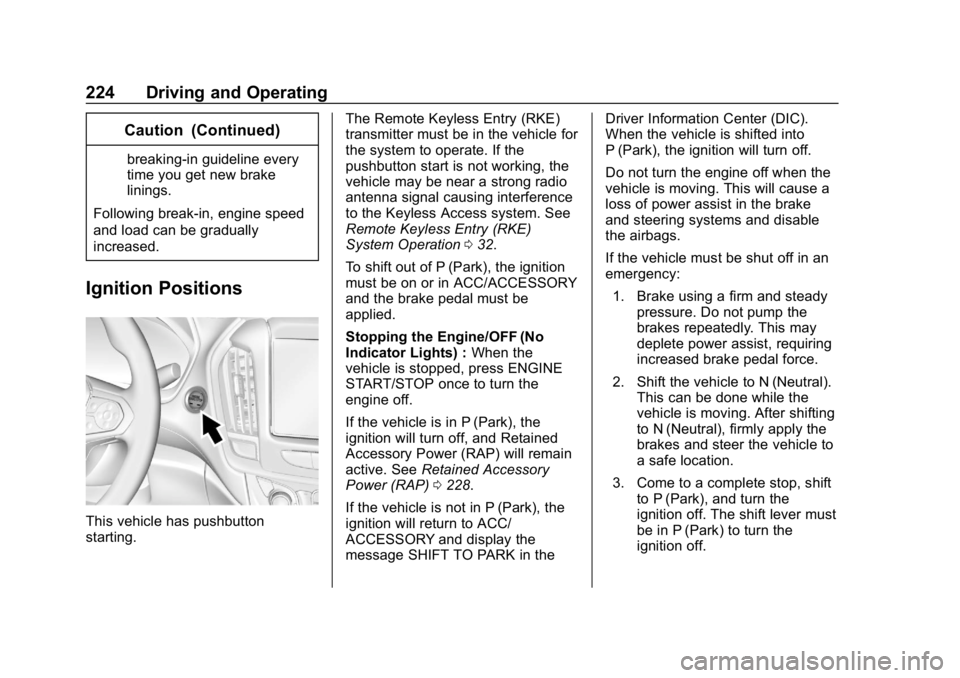
Ignition Positions
This vehicle has pushbutton
starting. The Remote Keyless Entry (RKE)
transmitter must be in the vehicle for
the system to operate. If the
pushbutton start is not working, the
vehicle may be near a strong radio
antenna signal causing interference
to the Keyless Access system. See
Remote Keyless Entry (RKE)
System Operation
032.
To shift out of P (Park), the ignition
must be on or in ACC/ACCESSORY
and the brake pedal must be
applied.
Stopping the Engine/OFF (No
Indicator Lights) : When the
vehicle is stopped, press ENGINE
START/STOP once to turn the
engine off.
If the vehicle is in P (Park), the
ignition will turn off, and Retained
Accessory Power (RAP) will remain
active. See Retained Accessory
Power (RAP) 0228.
If the vehicle is not in P (Park), the
ignition will return to ACC/
ACCESSORY and display the
message SHIFT TO PARK in the Driver Information Center (DIC).
When the vehicle is shifted into
P (Park), the ignition will turn off.
Do not turn the engine off when the
vehicle is moving. This will cause a
loss of power assist in the brake
and steering systems and disable
the airbags.
If the vehicle must be shut off in an
emergency:
1. Brake using a firm and steady pressure. Do not pump the
brakes repeatedly. This may
deplete power assist, requiring
increased brake pedal force.
2. Shift the vehicle to N (Neutral). This can be done while the
vehicle is moving. After shifting
to N (Neutral), firmly apply the
brakes and steer the vehicle to
a safe location.
3. Come to a complete stop, shift to P (Park), and turn the
ignition off. The shift lever must
be in P (Park) to turn the
ignition off.
Page 226 of 419
Chevrolet Traverse Owner Manual (GMNA-Localizing-U.S./Canada/Mexico-
10603118) - 2018 - CRC - 1/29/18
Driving and Operating 225
4. Set the parking brake. SeeElectric Parking Brake 0237.
{Warning
Turning off the vehicle while
moving may cause loss of power
assist in the brake and steering
systems and disable the airbags.
While driving, only shut the
vehicle off in an emergency.
If the vehicle cannot be pulled over,
and must be shut off while driving,
press and hold ENGINE START/
STOP for longer than two seconds,
or press twice in five seconds.
ACC/ACCESSORY (Amber
Indicator Light) : This mode allows
some electrical accessories to be
used when the engine is off.
With the ignition off, pressing the
button one time without the brake
pedal applied will place the ignition
system in ACC/ACCESSORY. The ignition will switch from ACC/
ACCESSORY to OFF after
five minutes to prevent battery
rundown.
ON/RUN/START (Green Indicator
Light) :
This mode is for driving and
starting. With the ignition off, and
the brake pedal applied, pressing
the button once will place the
ignition system in ON/RUN/START.
Once engine cranking begins,
release the button. Engine cranking
will continue until the engine starts.
See Starting the Engine 0225. The
ignition will then remain in ON/RUN.
Service Mode
This power mode is available for
service and diagnostics, and to
verify the proper operation of the
malfunction indicator lamp as may
be required for emission inspection
purposes. With the vehicle off, and
the brake pedal not applied,
pressing and holding ENGINE
START/STOP for more than
five seconds will place the vehicle in
Service Mode. The instruments and
audio systems will operate as they
do in ON/RUN, but the vehicle will not be able to be driven. The engine
will not start in Service Mode. Press
the button again to turn the
vehicle off.Starting the Engine
Move the shift lever to P (Park) or
N (Neutral). The engine will not start
in any other position. To restart the
engine when the vehicle is already
moving, use N (Neutral) only.
Caution
Do not try to shift to P (Park) if the
vehicle is moving. If you do, you
could damage the transmission.
Shift to P (Park) only when the
vehicle is stopped.
Caution
If you add electrical parts or
accessories, you could change
the way the engine operates. Any
resulting damage would not be
(Continued)
Page 227 of 419
Chevrolet Traverse Owner Manual (GMNA-Localizing-U.S./Canada/Mexico-
10603118) - 2018 - CRC - 1/29/18
226 Driving and Operating
Caution (Continued)
covered by the vehicle warranty.
SeeAdd-On Electrical Equipment
0 281.
Starting Procedure
1. With the Keyless Access
system, the RKE transmitter
must be in the vehicle. Press
ENGINE START/STOP with the
brake pedal applied. When the
engine begins cranking, let go
of the button.
The idle speed will go down as
the engine gets warm. Do not
race the engine immediately
after starting it.
If the RKE transmitter is not in
the vehicle, if there is
interference, or if the RKE
battery is low, the Driver
Information Center (DIC) will
display a message.
Caution
Cranking the engine for long
periods of time, by returning the
ignition to the START position
immediately after cranking has
ended, can overheat and damage
the cranking motor, and drain the
battery. Wait at least 15 seconds
between each try, to let the
cranking motor cool down.
2. If the engine does not start after five to 10 seconds,
especially in very cold weather
(below −18 °C or 0 °F), it could
be flooded with too much
gasoline. Try pushing the
accelerator pedal all the way to
the floor and holding it there as
you press ENGINE START/
STOP, for up to a maximum of
15 seconds. Wait at least
15 seconds between each try,
to allow the cranking motor to
cool down. When the engine
starts, let go of the button and
the accelerator. If the vehicle starts briefly but then stops
again, do the same thing. This
clears the extra gasoline from
the engine. Do not race the
engine immediately after
starting it. Operate the engine
and transmission gently until
the oil warms up and lubricates
all moving parts.
Stop/Start System
{Warning
Exiting the vehicle without first
shifting into P (Park) may cause
the vehicle to move. You or others
may be injured. Because the
vehicle may have an auto engine
Stop/Start feature, the vehicle's
engine might seem to be shut off;
however, once the brake pedal is
released, the engine will start up
again. The engine may restart
even while the brake is applied.
Shift to P (Park) and turn the
ignition off before exiting the
vehicle.