display CHEVROLET TRAVERSE 2018 Owner's Manual
[x] Cancel search | Manufacturer: CHEVROLET, Model Year: 2018, Model line: TRAVERSE, Model: CHEVROLET TRAVERSE 2018Pages: 419, PDF Size: 5.92 MB
Page 8 of 419

Chevrolet Traverse Owner Manual (GMNA-Localizing-U.S./Canada/Mexico-
10603118) - 2018 - CRC - 1/29/18
In Brief 7
1.Air Vents 0205.
2. Turn Signal Lever. See Turn
and Lane-Change Signals
0 170.
IntelliBeam
®System Button (If
Equipped). See Exterior Lamp
Controls 0166.
3. Instrument Cluster 0134.
Driver Information Center (DIC)
Display. See Driver Information
Center (DIC) 0150.
4. Windshield Wiper/Washer
0125.
Rear Window Wiper/Washer
0 126.
5. ENGINE START/STOP Button. See Ignition Positions 0224.
6. Hazard Warning Flashers
0170.
7. Light Sensor. See Automatic
Headlamp System 0169.
8. Infotainment 0175.
9. Dual Automatic Climate Control
System 0200. 10.
Heated and Ventilated Front
Seats 070 (If Equipped).
11. Power Outlets 0129.
12. Wireless Charging 0131 (If
Equipped).
13. USB Port 0184.
Auxiliary Jack. See Auxiliary
Devices 0190.
14. Traction Control/Electronic
Stability Control 0239.
Driver Mode Control Knob. See
Driver Mode Control 0241 (If
Equipped).
Lane Keep Assist (LKA) 0267
(If Equipped).
15. Electric Parking Brake 0237.
16. Shift Lever. See Automatic
Transmission 0232.
Manual Mode 0234.
17. Steering Wheel Controls 0124.
18. Horn 0125.
19. Steering Wheel Adjustment
0124 (Out of View). 20.
Cruise Control 0244.
Adaptive Cruise Control 0246
(If Equipped).
Heated Steering Wheel 0125
(If Equipped).
Forward Collision Alert (FCA)
System 0259 (If Equipped).
21. Hood Release. See Hood
0 285.
22. Fog Lamps 0170 (If
Equipped).
23. Data Link Connector (DLC) (Out of View). See Malfunction
Indicator Lamp (Check Engine
Light) 0141.
24. Exterior Lamp Controls 0166.
25. Instrument Panel Illumination
Control 0171.
Page 18 of 419
Chevrolet Traverse Owner Manual (GMNA-Localizing-U.S./Canada/Mexico-
10603118) - 2018 - CRC - 1/29/18
In Brief 17
the area behind the vehicle while
the display is off. SeeRear Camera
Mirror 055.
Steering Wheel
Adjustment
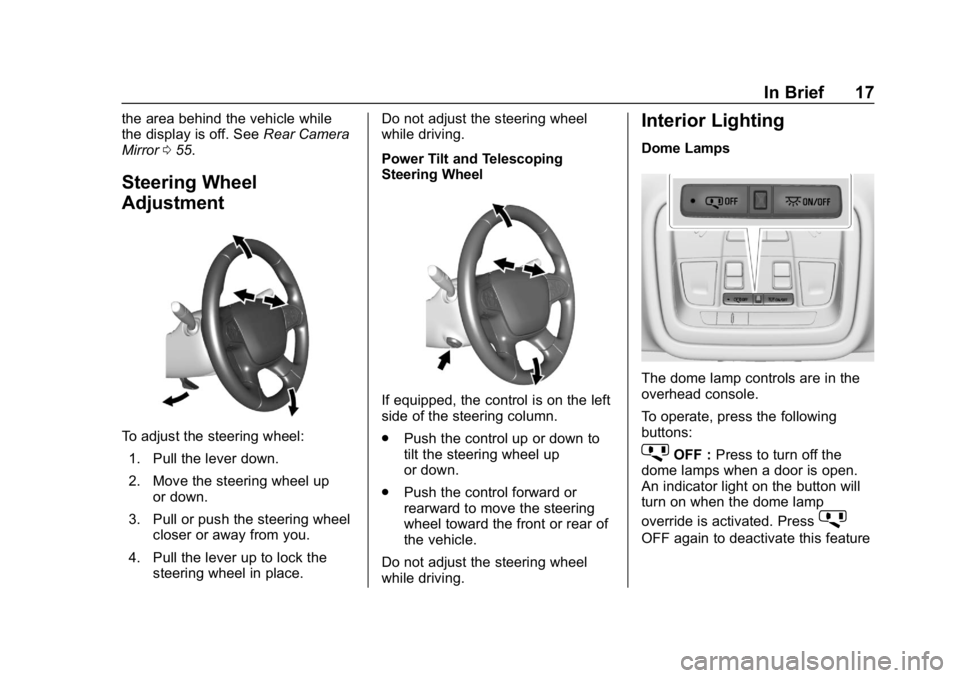
To adjust the steering wheel:
1. Pull the lever down.
2. Move the steering wheel up or down.
3. Pull or push the steering wheel closer or away from you.
4. Pull the lever up to lock the steering wheel in place. Do not adjust the steering wheel
while driving.
Power Tilt and Telescoping
Steering Wheel
If equipped, the control is on the left
side of the steering column.
.
Push the control up or down to
tilt the steering wheel up
or down.
. Push the control forward or
rearward to move the steering
wheel toward the front or rear of
the vehicle.
Do not adjust the steering wheel
while driving.
Interior Lighting
Dome Lamps
The dome lamp controls are in the
overhead console.
To operate, press the following
buttons:
jOFF : Press to turn off the
dome lamps when a door is open.
An indicator light on the button will
turn on when the dome lamp
override is activated. Press
j
OFF again to deactivate this feature
Page 21 of 419
Chevrolet Traverse Owner Manual (GMNA-Localizing-U.S./Canada/Mexico-
10603118) - 2018 - CRC - 1/29/18
20 In Brief
Climate Controls
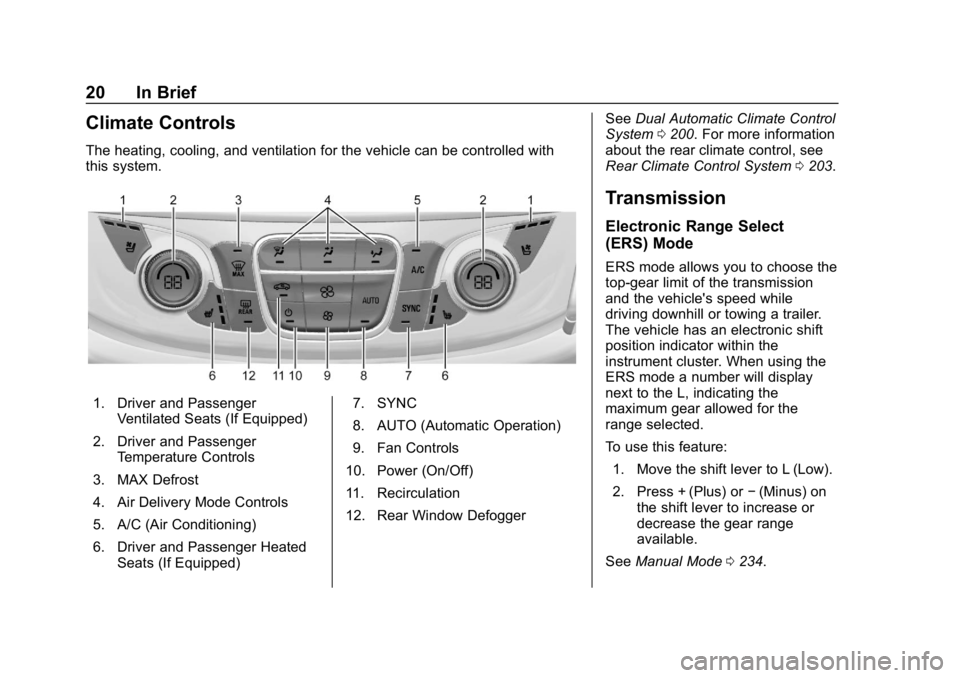
The heating, cooling, and ventilation for the vehicle can be controlled with
this system.
1. Driver and PassengerVentilated Seats (If Equipped)
2. Driver and Passenger Temperature Controls
3. MAX Defrost
4. Air Delivery Mode Controls
5. A/C (Air Conditioning)
6. Driver and Passenger Heated Seats (If Equipped) 7. SYNC
8. AUTO (Automatic Operation)
9. Fan Controls
10. Power (On/Off)
11. Recirculation
12. Rear Window Defogger See
Dual Automatic Climate Control
System 0200. For more information
about the rear climate control, see
Rear Climate Control System 0203.
Transmission
Electronic Range Select
(ERS) Mode
ERS mode allows you to choose the
top-gear limit of the transmission
and the vehicle's speed while
driving downhill or towing a trailer.
The vehicle has an electronic shift
position indicator within the
instrument cluster. When using the
ERS mode a number will display
next to the L, indicating the
maximum gear allowed for the
range selected.
To use this feature:
1. Move the shift lever to L (Low).
2. Press + (Plus) or −(Minus) on
the shift lever to increase or
decrease the gear range
available.
See Manual Mode 0234.
Page 22 of 419
Chevrolet Traverse Owner Manual (GMNA-Localizing-U.S./Canada/Mexico-
10603118) - 2018 - CRC - 1/29/18
In Brief 21
Vehicle Features
Infotainment System
Base radio information is included in
this manual. See the infotainment
manual for information on other
available infotainment systems.
Read the following pages to
become familiar with these features.
{Warning
Taking your eyes off the road for
too long or too often while using
any infotainment feature can
cause a crash. You or others
could be injured or killed. Do not
give extended attention to
infotainment tasks while driving.
Limit your glances at the vehicle
displays and focus your attention
on driving. Use voice commands
whenever possible.
The infotainment system has built-in
features intended to help avoid
distraction by disabling some functions when driving. These
functions may gray out when they
are unavailable. Many infotainment
features are also available through
the instrument cluster and steering
wheel controls.
Before driving:
.
Become familiar with the
operation, center stack controls,
and infotainment display
controls.
. Set up the audio by presetting
favorite stations, setting the
tone, and adjusting the
speakers.
. Set up phone numbers in
advance so they can be called
easily by pressing a single
control or by using a single voice
command if equipped with
Bluetooth phone capability.
. Set up your Bluetooth, CarPlay,
or Android Auto device. Some
devices will require a series of
setup steps to be taken or a
default app to be chosen prior to
using the feature. Not completing these steps could
prevent the feature from
functioning properly.
See Defensive Driving 0209.
To play the infotainment system with
the ignition off, see Retained
Accessory Power (RAP) 0228.
Radio(s)
O
:Press to turn the system on or
mute the audio. Press and hold to
turn the system off. Turn to increase
or decrease the volume.
g: Press and release to go to the
previous station, channel, or song.
Press and hold to fast seek the
previous strongest station, channel,
or song.
d: Press and release to go to the
next station, channel, or song.
Press and hold to fast seek the next
strongest station, channel, or song.
Source : Touch to choose between
available sources.
{: Press to go to the Home Page.
Page 23 of 419
Chevrolet Traverse Owner Manual (GMNA-Localizing-U.S./Canada/Mexico-
10603118) - 2018 - CRC - 1/29/18
22 In Brief
5:Press and release to access the
phone on the infotainment display,
answer an incoming call, or access
the device home screen.
See Overview 0177.
Satellite Radio
If equipped, vehicles with a
SiriusXM satellite radio tuner and a
valid SiriusXM satellite radio
subscription can receive SiriusXM
programming.
SiriusXM Satellite Radio
Service
SiriusXM is a satellite radio service
based in the 48 contiguous United
States and 10 Canadian provinces.
SiriusXM satellite radio has a wide
variety of programming and
commercial-free music, coast to
coast, and in digital-quality sound.
A fee is required to receive the
SiriusXM service.
Refer to:
.
www.siriusxm.com or call
1-888-601-6296 (U.S.). .
www.siriusxm.ca or call
1-877-438-9677 (Canada).
See Satellite Radio 0181.
Portable Audio Devices
This vehicle has USB ports in the
center stack. There is also a USB
port in the storage area behind the
radio (if equipped). External devices
such as iPods, MP3 players, and
USB storage devices may be
connected. There are also charging
only USB ports on the rear of the
center console and in the third row
seating area.
See USB Port 0184.
Bluetooth
The Bluetooth system allows users
with a Bluetooth-enabled mobile
phone to make and receive
hands-free calls using the vehicle
audio system and controls. The Bluetooth-enabled mobile
phone must be paired with the
in-vehicle Bluetooth system before it
can be used in the vehicle. Not all
phones will support all functions.
See
Bluetooth (Overview) 0191 or
Bluetooth (Infotainment Controls)
0 192.
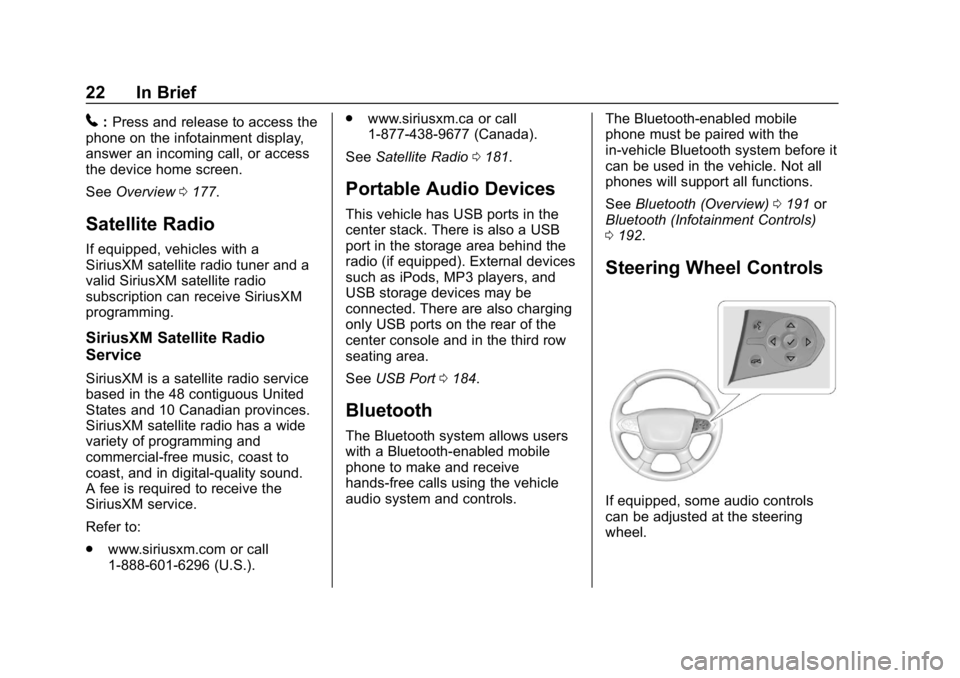
Steering Wheel Controls
If equipped, some audio controls
can be adjusted at the steering
wheel.
Page 25 of 419
Chevrolet Traverse Owner Manual (GMNA-Localizing-U.S./Canada/Mexico-
10603118) - 2018 - CRC - 1/29/18
24 In Brief
SET−:Press briefly to set the
speed and activate cruise control.
If the cruise control is already
active, use to decrease vehicle
speed.
*: Press to disengage cruise
control without erasing the set
speed from memory.
See Cruise Control 0244 or
Adaptive Cruise Control 0246 (If
Equipped).
Driver Information
Center (DIC)
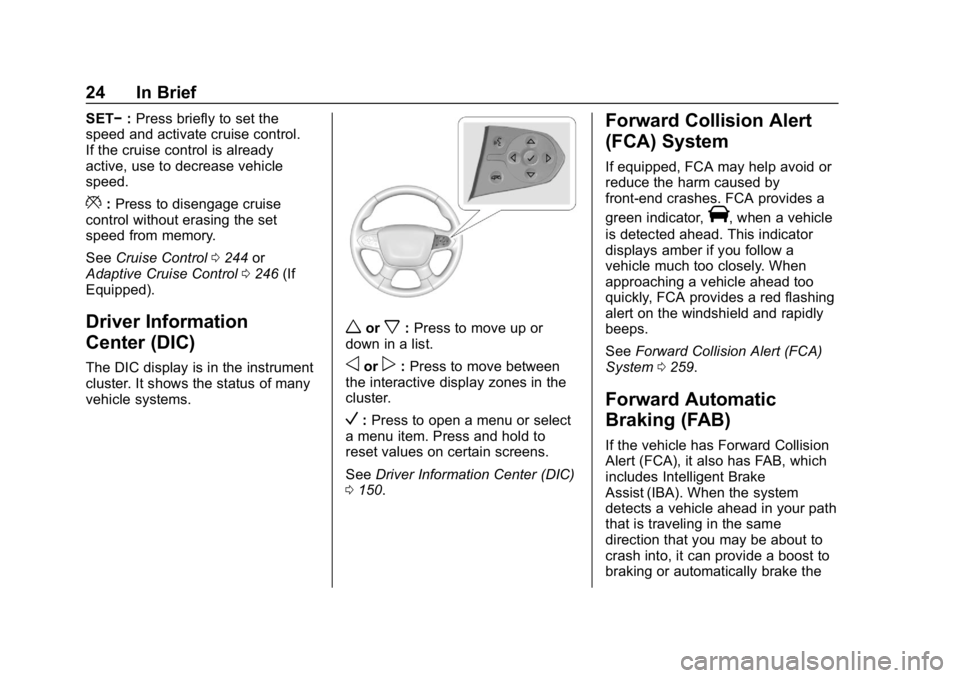
The DIC display is in the instrument
cluster. It shows the status of many
vehicle systems.
worx: Press to move up or
down in a list.
oorp: Press to move between
the interactive display zones in the
cluster.
V: Press to open a menu or select
a menu item. Press and hold to
reset values on certain screens.
See Driver Information Center (DIC)
0 150.
Forward Collision Alert
(FCA) System
If equipped, FCA may help avoid or
reduce the harm caused by
front-end crashes. FCA provides a
green indicator,
V, when a vehicle
is detected ahead. This indicator
displays amber if you follow a
vehicle much too closely. When
approaching a vehicle ahead too
quickly, FCA provides a red flashing
alert on the windshield and rapidly
beeps.
See Forward Collision Alert (FCA)
System 0259.
Forward Automatic
Braking (FAB)
If the vehicle has Forward Collision
Alert (FCA), it also has FAB, which
includes Intelligent Brake
Assist (IBA). When the system
detects a vehicle ahead in your path
that is traveling in the same
direction that you may be about to
crash into, it can provide a boost to
braking or automatically brake the
Page 26 of 419
Chevrolet Traverse Owner Manual (GMNA-Localizing-U.S./Canada/Mexico-
10603118) - 2018 - CRC - 1/29/18
In Brief 25
vehicle. This can help avoid or
lessen the severity of crashes when
driving in a forward gear.
SeeForward Automatic Braking
(FAB) 0261.
Front Pedestrian Braking
(FPB) System
If equipped, the FPB system may
help avoid or reduce the harm
caused by front-end crashes with
nearby pedestrians when driving in
a forward gear. FPB displays an
amber indicator,
~, when a nearby
pedestrian is detected directly
ahead. When approaching a
detected pedestrian too quickly,
FPB provides a red flashing alert on
the windshield and rapidly beeps.
FPB can provide a boost to braking
or automatically brake the vehicle.
See Front Pedestrian Braking (FPB)
System 0263.
Lane Keep Assist (LKA)
If equipped, LKA may help avoid
crashes due to unintentional lane
departures. It may assist by gently
turning the steering wheel if the
vehicle approaches a detected lane
marking without using a turn signal
in that direction. It may also provide
a Lane Departure Warning (LDW)
alert as the lane marking is crossed.
The system will not assist or alert if
it detects that you are actively
steering. Override LKA by turning
the steering wheel. LKA uses a
camera to detect lane markings
between 60 km/h (37 mph) and
180 km/h (112 mph).
See Lane Departure Warning (LDW)
0 267 andLane Keep Assist (LKA)
0 267.
Lane Change Alert (LCA)
If equipped, the LCA system is a
lane-changing aid that assists
drivers with avoiding lane change
crashes that occur with moving
vehicles in the side blind zone (or
spot) areas or with vehicles rapidly approaching these areas from
behind. The LCA warning display
will light up in the corresponding
outside mirror and will flash if the
turn signal is on. The Side Blind
Zone Alert (SBZA) system is
included as part of the LCA system.
See
Side Blind Zone Alert (SBZA)
0 265 andLane Change Alert (LCA)
0 265.
Surround Vision
If equipped, views around the
vehicle appear in the infotainment
display to aid with parking and
low-speed maneuvers.
See “Surround Vision” under
Assistance Systems for Parking or
Backing 0256.
Front Vision Camera
If equipped, a view of the area in
front of the vehicle appears on the
infotainment display to aid with
parking and low-speed maneuvers.
See “Front Vision Camera” under
Assistance Systems for Parking or
Backing 0256.
Page 27 of 419
Chevrolet Traverse Owner Manual (GMNA-Localizing-U.S./Canada/Mexico-
10603118) - 2018 - CRC - 1/29/18
26 In Brief
Rear Vision
Camera (RVC)
The RVC displays a view of the
area behind the vehicle on the
infotainment display when the
vehicle is shifted into R (Reverse) to
aid with parking and low-speed
backing maneuvers.
SeeAssistance Systems for Parking
or Backing 0256.
Rear Cross Traffic Alert
(RCTA) System
If equipped, the RCTA system
shows a triangle with an arrow on
the infotainment display to warn of
traffic behind your vehicle that may
cross your vehicle's path while in
R (Reverse). In addition, beeps will
sound, or the driver seat will pulse.
See Assistance Systems for Parking
or Backing 0256.
Parking Assist
If equipped, Rear Parking
Assist (RPA) uses sensors on the
rear bumper to assist with parking
and avoiding objects while in
R (Reverse). It operates at speeds
less than 8 km/h (5 mph). RPA may
show a warning triangle on the
infotainment display and a graphic
on the instrument cluster to provide
the object distance. In addition,
multiple beeps or seat pulses may
occur if very close to an object.
The vehicle may also have the Front
Parking Assist system.
See Assistance Systems for Parking
or Backing 0256.
Power Outlets
The vehicle has two 12-volt
accessory power outlets, which can
be used to plug in electrical
equipment, such as a cell phone or
MP3 player.
The power outlets are located:
.
On the center stack below the
climate controls. .
In the rear cargo area.
To use the outlets, remove the
cover.
See Power Outlets 0129.
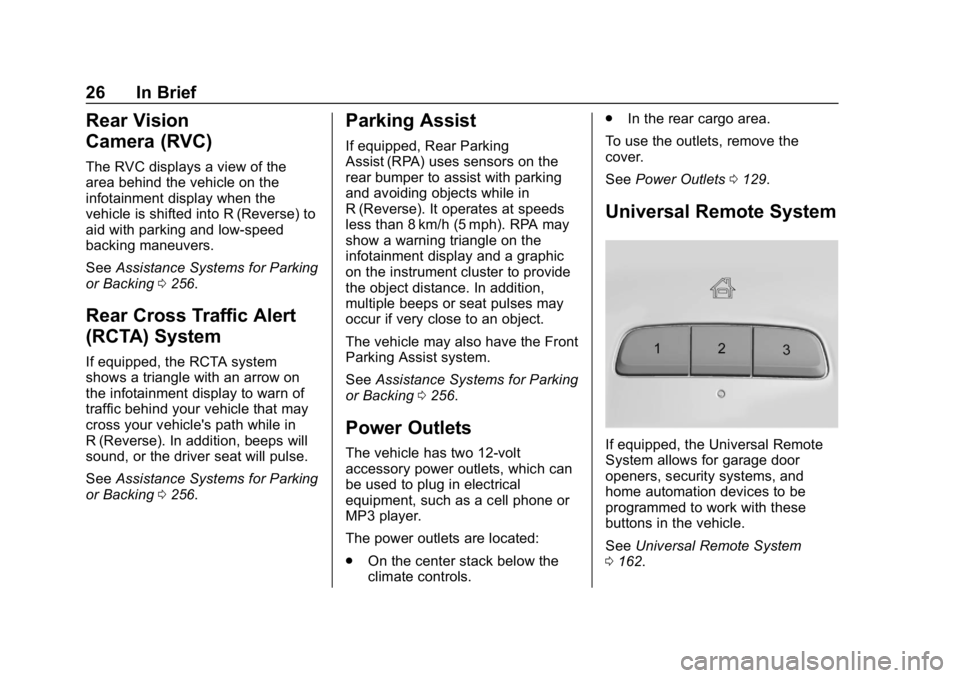
Universal Remote System
If equipped, the Universal Remote
System allows for garage door
openers, security systems, and
home automation devices to be
programmed to work with these
buttons in the vehicle.
See Universal Remote System
0 162.
Page 30 of 419
Chevrolet Traverse Owner Manual (GMNA-Localizing-U.S./Canada/Mexico-
10603118) - 2018 - CRC - 1/29/18
In Brief 29
Fuel (3.6L V6 Engine)
Regular Fuel
Use only unleaded gasoline rated
87 octane or higher in your vehicle.
Do not use gasoline with an octane
rating lower as it may result in
vehicle damage and lower fuel
economy. SeeFuel0269.
E85 or FlexFuel
No E85 or FlexFuel
Gasoline-ethanol fuel blends greater
than E15 (15% ethanol by volume),
such as E85, cannot be used in this
vehicle.
Engine Oil Life System
The engine oil life system calculates
engine oil life based on vehicle use
and displays the CHANGE ENGINE
OIL SOON message when it is time
to change the engine oil and filter.
The oil life system should be reset
to 100% only following an oil
change.
Resetting the Oil Life System
1. Display the REMAINING OIL LIFE on the DIC. See Driver
Information Center (DIC) 0150.
2. Press and hold
Von the DIC
while the Oil Life display is
active. The oil life will change
to 100%.
See Engine Oil Life System 0291.
Driving for Better Fuel
Economy
Driving habits can affect fuel
mileage. Here are some driving tips
to get the best fuel economy
possible.
.
On AWD vehicles, see Driver
Mode Control 0241.
. Avoid fast starts and accelerate
smoothly.
. Brake gradually and avoid
abrupt stops.
. Avoid idling the engine for long
periods of time.
. When road and weather
conditions are appropriate, use
cruise control.
. Always follow posted speed
limits or drive more slowly when
conditions require.
. Keep vehicle tires properly
inflated.
. Combine several trips into a
single trip.
Page 36 of 419
Chevrolet Traverse Owner Manual (GMNA-Localizing-U.S./Canada/Mexico-
10603118) - 2018 - CRC - 1/29/18
Keys, Doors, and Windows 35
transmitter inside the vehicle. Do
not leave the RKE transmitter in an
unattended vehicle.
To customize the doors to
automatically lock when exiting the
vehicle, see“Remote Lock, Unlock,
Start” under Vehicle Personalization
0 154.
Temporary Disable of Passive
Locking Feature
Temporarily disable the passive
locking by pressing and holding
K
on the interior door switch with a
door open for at least four seconds,
or until three chimes are heard.
Passive locking will then remain
disabled until
Qon the interior door
is pressed, or until the vehicle is
turned on.
Remote Left in Vehicle Alert
When the vehicle is turned off and
an RKE transmitter is left in the
vehicle, the horn will chirp three
times after all doors are closed. To
turn on or off, see Vehicle
Personalization 0154. Remote No Longer in Vehicle
If the vehicle is on with a door open,
and then all doors are closed, the
vehicle will check for RKE
transmitter(s) inside. If an RKE
transmitter is not detected, the DIC
will display NO REMOTE
DETECTED and the horn will chirp
three times. This occurs only once
each time the vehicle is driven. See
Vehicle Personalization
0154.
Keyless Liftgate Opening
Press the touch pad on the liftgate
handle to open the liftgate if the
RKE transmitter is within 1 m (3 ft).Programming Transmitters to
the Vehicle
Only RKE transmitters programmed
to the vehicle will work. If a
transmitter is lost or stolen, a
replacement can be purchased and
programmed through your dealer.
The vehicle can be reprogrammed
so that lost or stolen transmitters no
longer work. Each vehicle can have
up to eight transmitters matched
to it. Programming with Recognized
Transmitters
A new transmitter can be
programmed to the vehicle when
there are two recognized
transmitters.
To program, the vehicle must be off
and all of the transmitters, both
currently recognized and new, must
be with you.
1. Remove the key lock cylinder cap on the driver door handle.
See Door Locks 040. Place
the two recognized transmitters
in the cupholder.
2. Insert the vehicle key of the transmitter into the key lock
cylinder on the driver door
handle and turn the key,
counterclockwise, to the unlock
position five times within
10 seconds.
The Driver Information Center
(DIC) displays READY FOR
REMOTE #2, 3, 4, ETC.