key battery CHEVROLET TRAVERSE 2018 Owner's Manual
[x] Cancel search | Manufacturer: CHEVROLET, Model Year: 2018, Model line: TRAVERSE, Model: CHEVROLET TRAVERSE 2018Pages: 419, PDF Size: 5.92 MB
Page 33 of 419
Chevrolet Traverse Owner Manual (GMNA-Localizing-U.S./Canada/Mexico-
10603118) - 2018 - CRC - 1/29/18
32 Keys, Doors, and Windows
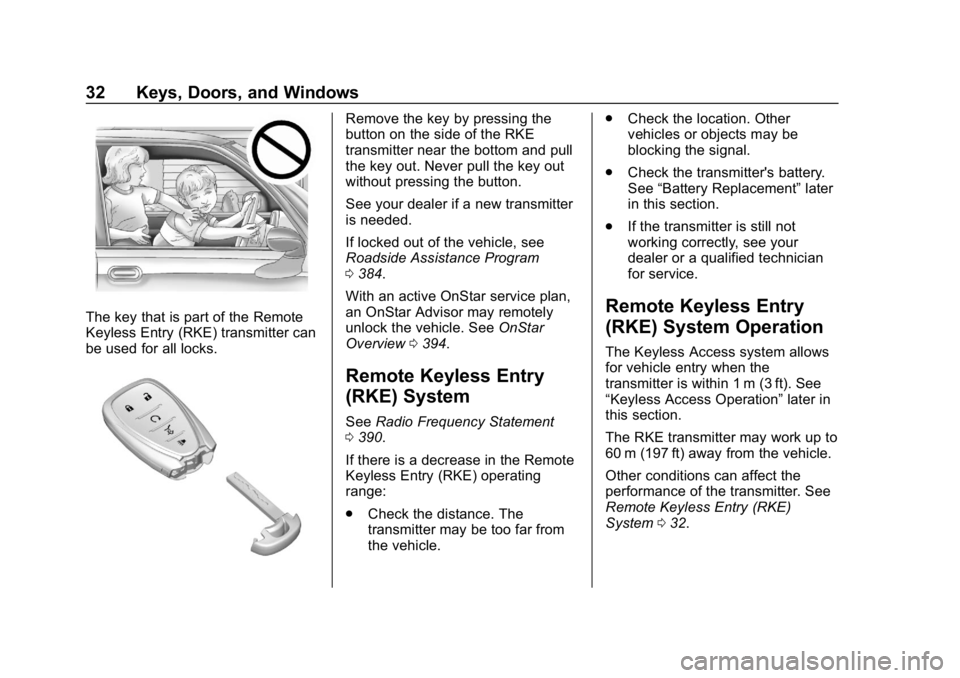
The key that is part of the Remote
Keyless Entry (RKE) transmitter can
be used for all locks.
Remove the key by pressing the
button on the side of the RKE
transmitter near the bottom and pull
the key out. Never pull the key out
without pressing the button.
See your dealer if a new transmitter
is needed.
If locked out of the vehicle, see
Roadside Assistance Program
0384.
With an active OnStar service plan,
an OnStar Advisor may remotely
unlock the vehicle. See OnStar
Overview 0394.
Remote Keyless Entry
(RKE) System
See Radio Frequency Statement
0 390.
If there is a decrease in the Remote
Keyless Entry (RKE) operating
range:
. Check the distance. The
transmitter may be too far from
the vehicle. .
Check the location. Other
vehicles or objects may be
blocking the signal.
. Check the transmitter's battery.
See “Battery Replacement” later
in this section.
. If the transmitter is still not
working correctly, see your
dealer or a qualified technician
for service.
Remote Keyless Entry
(RKE) System Operation
The Keyless Access system allows
for vehicle entry when the
transmitter is within 1 m (3 ft). See
“Keyless Access Operation” later in
this section.
The RKE transmitter may work up to
60 m (197 ft) away from the vehicle.
Other conditions can affect the
performance of the transmitter. See
Remote Keyless Entry (RKE)
System 032.
Page 38 of 419
Chevrolet Traverse Owner Manual (GMNA-Localizing-U.S./Canada/Mexico-
10603118) - 2018 - CRC - 1/29/18
Keys, Doors, and Windows 37
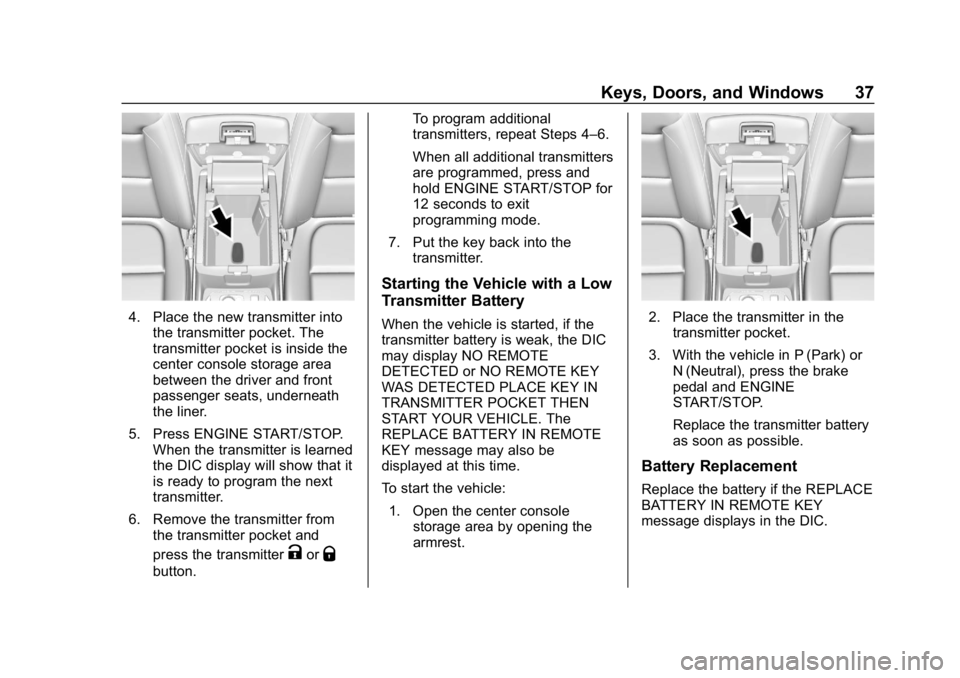
4. Place the new transmitter intothe transmitter pocket. The
transmitter pocket is inside the
center console storage area
between the driver and front
passenger seats, underneath
the liner.
5. Press ENGINE START/STOP. When the transmitter is learned
the DIC display will show that it
is ready to program the next
transmitter.
6. Remove the transmitter from the transmitter pocket and
press the transmitter
KorQ
button. To program additional
transmitters, repeat Steps 4–6.
When all additional transmitters
are programmed, press and
hold ENGINE START/STOP for
12 seconds to exit
programming mode.
7. Put the key back into the transmitter.
Starting the Vehicle with a Low
Transmitter Battery
When the vehicle is started, if the
transmitter battery is weak, the DIC
may display NO REMOTE
DETECTED or NO REMOTE KEY
WAS DETECTED PLACE KEY IN
TRANSMITTER POCKET THEN
START YOUR VEHICLE. The
REPLACE BATTERY IN REMOTE
KEY message may also be
displayed at this time.
To start the vehicle:
1. Open the center console storage area by opening the
armrest.2. Place the transmitter in thetransmitter pocket.
3. With the vehicle in P (Park) or N (Neutral), press the brake
pedal and ENGINE
START/STOP.
Replace the transmitter battery
as soon as possible.
Battery Replacement
Replace the battery if the REPLACE
BATTERY IN REMOTE KEY
message displays in the DIC.
Page 39 of 419
Chevrolet Traverse Owner Manual (GMNA-Localizing-U.S./Canada/Mexico-
10603118) - 2018 - CRC - 1/29/18
38 Keys, Doors, and Windows
Caution
When replacing the battery, do
not touch any of the circuitry on
the transmitter. Static from your
body could damage the
transmitter.
The battery is not rechargeable. To
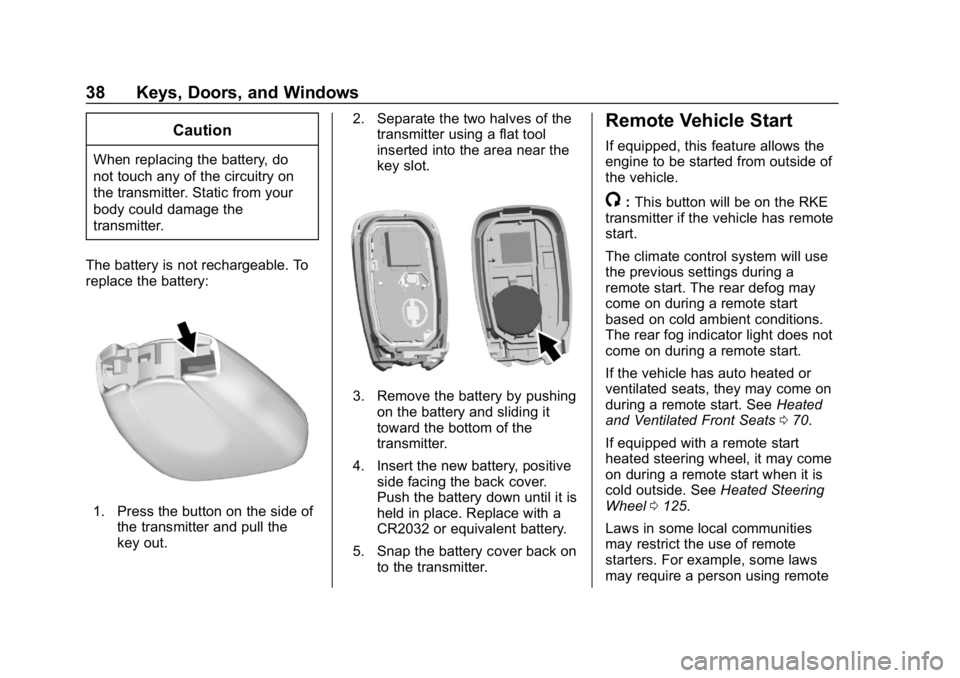
replace the battery:
1. Press the button on the side of the transmitter and pull the
key out. 2. Separate the two halves of the
transmitter using a flat tool
inserted into the area near the
key slot.
3. Remove the battery by pushing
on the battery and sliding it
toward the bottom of the
transmitter.
4. Insert the new battery, positive side facing the back cover.
Push the battery down until it is
held in place. Replace with a
CR2032 or equivalent battery.
5. Snap the battery cover back on to the transmitter.
Remote Vehicle Start
If equipped, this feature allows the
engine to be started from outside of
the vehicle.
/:This button will be on the RKE
transmitter if the vehicle has remote
start.
The climate control system will use
the previous settings during a
remote start. The rear defog may
come on during a remote start
based on cold ambient conditions.
The rear fog indicator light does not
come on during a remote start.
If the vehicle has auto heated or
ventilated seats, they may come on
during a remote start. See Heated
and Ventilated Front Seats 070.
If equipped with a remote start
heated steering wheel, it may come
on during a remote start when it is
cold outside. See Heated Steering
Wheel 0125.
Laws in some local communities
may restrict the use of remote
starters. For example, some laws
may require a person using remote
Page 42 of 419
Chevrolet Traverse Owner Manual (GMNA-Localizing-U.S./Canada/Mexico-
10603118) - 2018 - CRC - 1/29/18
Keys, Doors, and Windows 41
open. See“Keyless Access
Operation” inRemote Keyless Entry
(RKE) System Operation 032.
Driver Door Key Lock Cylinder
Access (In Case of Dead
Battery)
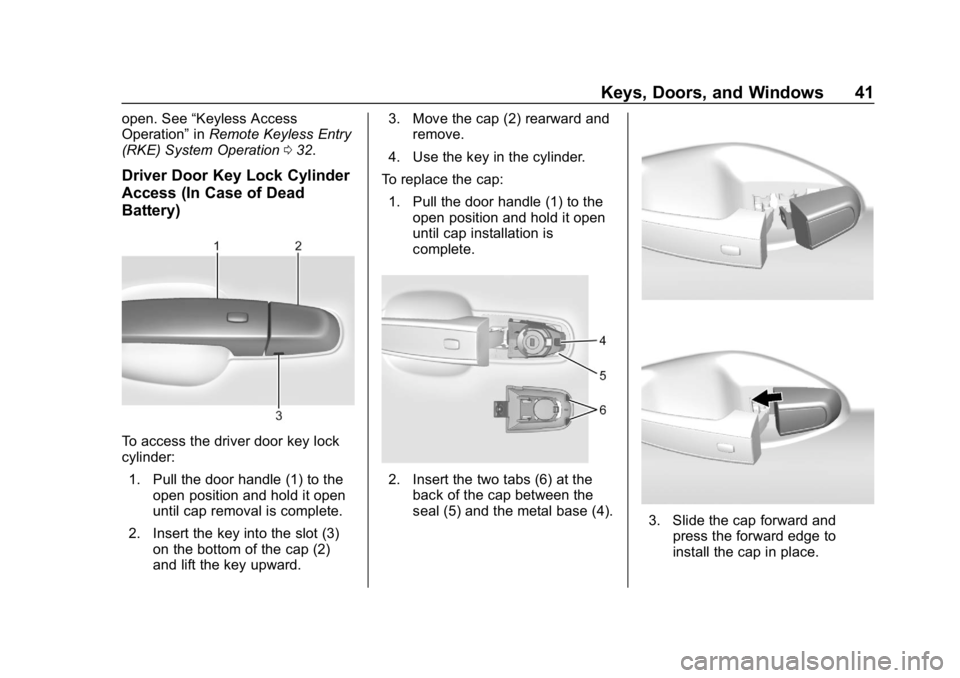
To access the driver door key lock
cylinder:
1. Pull the door handle (1) to the open position and hold it open
until cap removal is complete.
2. Insert the key into the slot (3) on the bottom of the cap (2)
and lift the key upward. 3. Move the cap (2) rearward and
remove.
4. Use the key in the cylinder.
To replace the cap: 1. Pull the door handle (1) to the open position and hold it open
until cap installation is
complete.
2. Insert the two tabs (6) at the
back of the cap between the
seal (5) and the metal base (4).
3. Slide the cap forward andpress the forward edge to
install the cap in place.
Page 46 of 419
Chevrolet Traverse Owner Manual (GMNA-Localizing-U.S./Canada/Mexico-
10603118) - 2018 - CRC - 1/29/18
Keys, Doors, and Windows 45
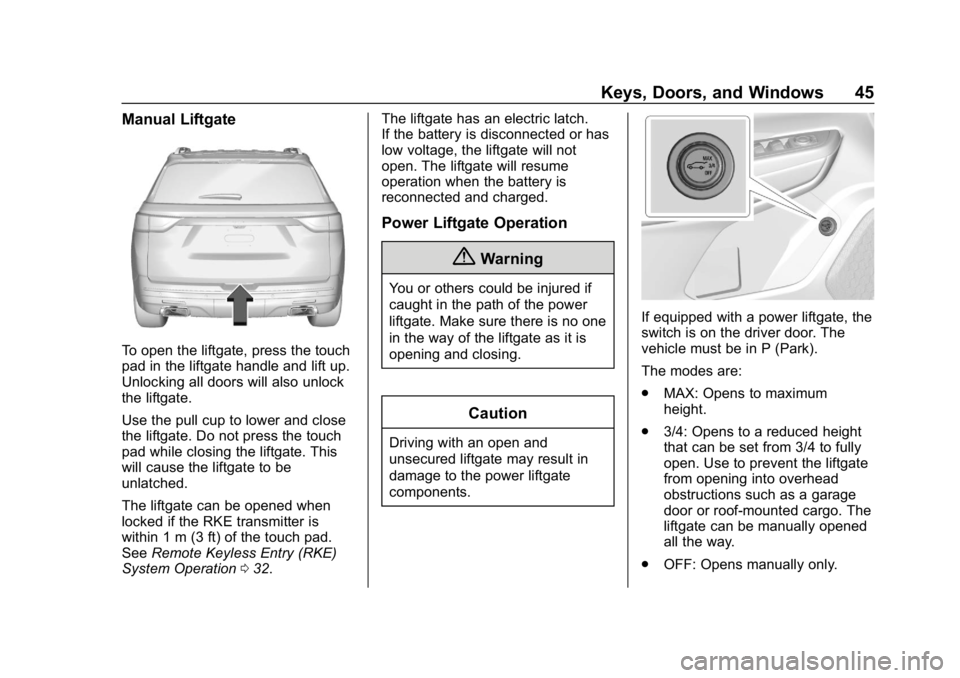
Manual Liftgate
To open the liftgate, press the touch
pad in the liftgate handle and lift up.
Unlocking all doors will also unlock
the liftgate.
Use the pull cup to lower and close
the liftgate. Do not press the touch
pad while closing the liftgate. This
will cause the liftgate to be
unlatched.
The liftgate can be opened when
locked if the RKE transmitter is
within 1 m (3 ft) of the touch pad.
SeeRemote Keyless Entry (RKE)
System Operation 032. The liftgate has an electric latch.
If the battery is disconnected or has
low voltage, the liftgate will not
open. The liftgate will resume
operation when the battery is
reconnected and charged.
Power Liftgate Operation
{Warning
You or others could be injured if
caught in the path of the power
liftgate. Make sure there is no one
in the way of the liftgate as it is
opening and closing.
Caution
Driving with an open and
unsecured liftgate may result in
damage to the power liftgate
components.
If equipped with a power liftgate, the
switch is on the driver door. The
vehicle must be in P (Park).
The modes are:
.
MAX: Opens to maximum
height.
. 3/4: Opens to a reduced height
that can be set from 3/4 to fully
open. Use to prevent the liftgate
from opening into overhead
obstructions such as a garage
door or roof-mounted cargo. The
liftgate can be manually opened
all the way.
. OFF: Opens manually only.
Page 50 of 419
Chevrolet Traverse Owner Manual (GMNA-Localizing-U.S./Canada/Mexico-
10603118) - 2018 - CRC - 1/29/18
Keys, Doors, and Windows 49
2. 2 m (6 ft) Projected LogoDetection Zone
The projected logo shows where the
kicking motion is to take place.
The projected logo will only be
available for this RKE transmitter
after it has been out of range for at
least 20 seconds.
If an RKE transmitter is again
detected within approximately 2 m
(6 ft) of the liftgate, or another
hands-free operation has been
detected, the one-minute timer will
be reset. The projected logo will not work
under these conditions:
.
The vehicle battery is low.
. The transmission is not in
P (Park).
. Hands Free Liftgate Control is
set to off in vehicle
personalization. See Vehicle
Personalization 0154.
. Power liftgate is turned off.
. The vehicle remains parked for
72 hours or more, with no RKE
transmitter use or Keyless
Access operation. To re-enable,
press any button on the RKE
transmitter or open and close a
vehicle door. The projected logo will not work for
a single RKE transmitter when a
transmitter:
.
Has been left within
approximately 5 m (15 ft) of the
liftgate for several minutes.
. Has been left inside the vehicle
and all vehicle doors are closed.
. Has approached the area
outside of the liftgate five times
within 10 minutes.
Page 51 of 419
Chevrolet Traverse Owner Manual (GMNA-Localizing-U.S./Canada/Mexico-
10603118) - 2018 - CRC - 1/29/18
50 Keys, Doors, and Windows
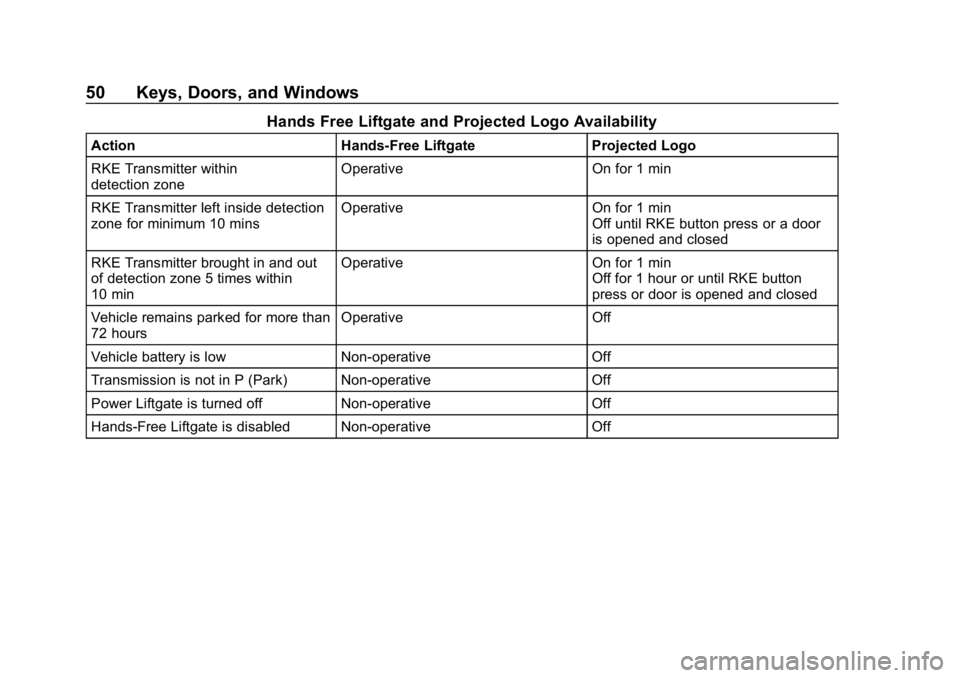
Hands Free Liftgate and Projected Logo Availability
ActionHands-Free Liftgate Projected Logo
RKE Transmitter within
detection zone Operative
On for 1 min
RKE Transmitter left inside detection
zone for minimum 10 mins Operative
On for 1 min
Off until RKE button press or a door
is opened and closed
RKE Transmitter brought in and out
of detection zone 5 times within
10 min Operative
On for 1 min
Off for 1 hour or until RKE button
press or door is opened and closed
Vehicle remains parked for more than
72 hours Operative
Off
Vehicle battery is low Non-operative Off
Transmission is not in P (Park) Non-operative Off
Power Liftgate is turned off Non-operative Off
Hands-Free Liftgate is disabled Non-operative Off
Page 59 of 419
Chevrolet Traverse Owner Manual (GMNA-Localizing-U.S./Canada/Mexico-
10603118) - 2018 - CRC - 1/29/18
58 Keys, Doors, and Windows
Window Express Movement
All windows can be opened without
holding the window switch. Press
the switch down fully and quickly
release to express open the
window.
If equipped, pull the window switch
up fully and quickly release to
express close the window.
Briefly press or pull the window
switch in the same direction to stop
that window’s express movement.
Window Automatic Reversal
System
The express-close feature will
reverse window movement if it
comes in contact with an object.
Extreme cold or ice could cause the
window to auto-reverse. The
window will operate normally after
the object or condition is removed.
Automatic Reversal System
Override
{Warning
If automatic reversal system
override is active, the window will
not reverse automatically. You or
others could be injured and the
window could be damaged.
Before using automatic reversal
system override, make sure that
all people and obstructions are
clear of the window path.
When the engine is on, override the
automatic reversal system by pulling
and holding the window switch if
conditions prevent it from closing.
Programming the Power
Windows
Programming may be necessary if
the vehicle battery has been
disconnected or discharged. If the
window is unable to express-up,
program each express-close
window: 1. Close all doors.
2. Turn the ignition on or to ACC/ ACCESSORY.
3. Partially open the window to be programmed. Then close it and
continue to pull the switch
briefly after the window has
fully closed.
4. Open the window and continue to press the switch briefly after
the window has fully opened.
Remote Window Operation
If equipped, this feature allows all
the windows to be opened remotely.
If enabled in vehicle personalization,
press and hold
Kon the RKE
transmitter. See Vehicle
Personalization 0154.
Page 174 of 419
Chevrolet Traverse Owner Manual (GMNA-Localizing-U.S./Canada/Mexico-
10603118) - 2018 - CRC - 1/29/18
Lighting 173
Lighting Features
Entry Lighting
Some exterior lamps and most of
the interior lights turn on briefly at
night, or in areas of limited lighting
when
Kis pressed on the Remote
Keyless Entry (RKE) transmitter.
See Remote Keyless Entry (RKE)
System Operation 032. When the
driver door is opened, all control
lights, Driver Information Center
(DIC) lights, and door pocket lights
turn on. After about 30 seconds the
exterior lamps turn off, then the
remaining interior lights dim to off.
Entry lighting can be disabled
manually by turning the ignition on
or to ACC/ACCESSORY, or by
pressing
Qon the RKE transmitter.
This feature can be changed. See
“Vehicle Locator Lights” under
Vehicle Personalization 0154.
Exit Lighting
Some exterior lamps and interior
lights come on at night, or in areas
with limited lighting, when the driver
door is opened after the ignition is
turned off. The dome lamp comes
on after the ignition is turned off.
The exterior lamps and dome lamp
remain on for a set amount of time,
then automatically turn off.
The exterior lamps turn off
immediately by turning the exterior
lamp control off.
This feature can be changed. See
Vehicle Personalization 0154.
Battery Load
Management
The vehicle has Electric Power
Management (EPM) that estimates
the battery's temperature and state
of charge. It then adjusts the voltage
for best performance and extended
life of the battery.
When the battery's state of charge
is low, the voltage is raised slightly
to quickly bring the charge back up. When the state of charge is high,
the voltage is lowered slightly to
prevent overcharging. If the vehicle
has a voltmeter gauge or a voltage
display on the Driver Information
Center (DIC), you may see the
voltage move up or down. This is
normal. If there is a problem, an
alert will be displayed.
The battery can be discharged at
idle if the electrical loads are very
high. This is true for all vehicles.
This is because the generator
(alternator) may not be spinning fast
enough at idle to produce all of the
power needed for very high
electrical loads.
A high electrical load occurs when
several of the following are on, such
as: headlamps, high beams, rear
window defogger, climate control fan
at high speed, heated seats, engine
cooling fans, trailer loads, and loads
plugged into accessory power
outlets.
EPM works to prevent excessive
discharge of the battery. It does this
by balancing the generator's output
and the vehicle's electrical needs.
Page 227 of 419
Chevrolet Traverse Owner Manual (GMNA-Localizing-U.S./Canada/Mexico-
10603118) - 2018 - CRC - 1/29/18
226 Driving and Operating
Caution (Continued)
covered by the vehicle warranty.
SeeAdd-On Electrical Equipment
0 281.
Starting Procedure
1. With the Keyless Access
system, the RKE transmitter
must be in the vehicle. Press
ENGINE START/STOP with the
brake pedal applied. When the
engine begins cranking, let go
of the button.
The idle speed will go down as
the engine gets warm. Do not
race the engine immediately
after starting it.
If the RKE transmitter is not in
the vehicle, if there is
interference, or if the RKE
battery is low, the Driver
Information Center (DIC) will
display a message.
Caution
Cranking the engine for long
periods of time, by returning the
ignition to the START position
immediately after cranking has
ended, can overheat and damage
the cranking motor, and drain the
battery. Wait at least 15 seconds
between each try, to let the
cranking motor cool down.
2. If the engine does not start after five to 10 seconds,
especially in very cold weather
(below −18 °C or 0 °F), it could
be flooded with too much
gasoline. Try pushing the
accelerator pedal all the way to
the floor and holding it there as
you press ENGINE START/
STOP, for up to a maximum of
15 seconds. Wait at least
15 seconds between each try,
to allow the cranking motor to
cool down. When the engine
starts, let go of the button and
the accelerator. If the vehicle starts briefly but then stops
again, do the same thing. This
clears the extra gasoline from
the engine. Do not race the
engine immediately after
starting it. Operate the engine
and transmission gently until
the oil warms up and lubricates
all moving parts.
Stop/Start System
{Warning
Exiting the vehicle without first
shifting into P (Park) may cause
the vehicle to move. You or others
may be injured. Because the
vehicle may have an auto engine
Stop/Start feature, the vehicle's
engine might seem to be shut off;
however, once the brake pedal is
released, the engine will start up
again. The engine may restart
even while the brake is applied.
Shift to P (Park) and turn the
ignition off before exiting the
vehicle.