window CHEVROLET TRAVERSE 2018 Owner's Manual
[x] Cancel search | Manufacturer: CHEVROLET, Model Year: 2018, Model line: TRAVERSE, Model: CHEVROLET TRAVERSE 2018Pages: 419, PDF Size: 5.92 MB
Page 2 of 419
Chevrolet Traverse Owner Manual (GMNA-Localizing-U.S./Canada/Mexico-
10603118) - 2018 - CRC - 1/29/18
ContentsIntroduction . . . . . . . . . . . . . . . . . . . . . . 2
In Brief . . . . . . . . . . . . . . . . . . . . . . . . . . . 5
Keys, Doors, and Windows . . . . . 31
Seats and Restraints . . . . . . . . . . . 61
Storage . . . . . . . . . . . . . . . . . . . . . . . 118
Instruments and Controls . . . . . . 123
Lighting . . . . . . . . . . . . . . . . . . . . . . . 166
Infotainment System . . . . . . . . . . 175
Climate Controls . . . . . . . . . . . . . . 200
Driving and Operating . . . . . . . . . 207
Vehicle Care . . . . . . . . . . . . . . . . . . 282
Service and Maintenance . . . . . 363
Technical Data . . . . . . . . . . . . . . . . 376
Customer Information . . . . . . . . . 380
Reporting Safety Defects . . . . . . 391
OnStar . . . . . . . . . . . . . . . . . . . . . . . . 394
Index . . . . . . . . . . . . . . . . . . . . 406
Page 6 of 419
Chevrolet Traverse Owner Manual (GMNA-Localizing-U.S./Canada/Mexico-
10603118) - 2018 - CRC - 1/29/18
In Brief 5
In Brief
Instrument Panel
Instrument Panel . . . . . . . . . . . . . . . . 6
Initial Drive Information
Initial Drive Information . . . . . . . . . . 8
Stop/Start System . . . . . . . . . . . . . . . 8
Remote Keyless Entry (RKE)System . . . . . . . . . . . . . . . . . . . . . . . . 8
Remote Vehicle Start . . . . . . . . . . . 8
Door Locks . . . . . . . . . . . . . . . . . . . . . 9
Liftgate . . . . . . . . . . . . . . . . . . . . . . . . 10
Windows . . . . . . . . . . . . . . . . . . . . . . . 10
Seat Adjustment . . . . . . . . . . . . . . . 11
Memory Features . . . . . . . . . . . . . . 12
Second Row Seats . . . . . . . . . . . . 12
Third Row Seats . . . . . . . . . . . . . . . 13
Heated and Ventilated Seats . . . 15
Head Restraint Adjustment . . . . 15
Seat Belts . . . . . . . . . . . . . . . . . . . . . 15
Passenger Sensing System . . . 16
Mirror Adjustment . . . . . . . . . . . . . . 16
Steering Wheel Adjustment . . . . 17
Interior Lighting . . . . . . . . . . . . . . . . 17
Exterior Lighting . . . . . . . . . . . . . . . 18
Windshield Wiper/Washer . . . . . . 19
Climate Controls . . . . . . . . . . . . . . . 20
Transmission . . . . . . . . . . . . . . . . . . 20
Vehicle Features
Infotainment System . . . . . . . . . . . 21
Radio(s) . . . . . . . . . . . . . . . . . . . . . . . 21
Satellite Radio . . . . . . . . . . . . . . . . . 22
Portable Audio Devices . . . . . . . . 22
Bluetooth . . . . . . . . . . . . . . . . . . . . . . 22
Steering Wheel Controls . . . . . . . 22
Cruise Control . . . . . . . . . . . . . . . . . 23
Driver Information Center (DIC) . . . . . . . . . . . . . . . . . 24
Forward Collision Alert (FCA) System . . . . . . . . . . . . . . . . . . . . . . . 24
Forward Automatic Braking (FAB) . . . . . . . . . . . . . . . . 24
Front Pedestrian Braking (FPB) System . . . . . . . . . . . . . . . . . . . . . . . 25
Lane Keep Assist (LKA) . . . . . . . 25
Lane Change Alert (LCA) . . . . . . 25
Surround Vision . . . . . . . . . . . . . . . 25
Rear Vision Camera (RVC) . . . . 26
Rear Cross Traffic Alert (RCTA) System . . . . . . . . . . . . . . . . . . . . . . . 26
Parking Assist . . . . . . . . . . . . . . . . . 26
Power Outlets . . . . . . . . . . . . . . . . . 26
Universal Remote System . . . . . 26
Sunroof . . . . . . . . . . . . . . . . . . . . . . . . 27
Performance and Maintenance
Traction Control/Electronic Stability Control . . . . . . . . . . . . . . 27
Tire Pressure Monitor . . . . . . . . . . 28
Fuel (2.0L L4 Engine) . . . . . . . . . . 28
Fuel (3.6L V6 Engine) . . . . . . . . . . 29
E85 or FlexFuel . . . . . . . . . . . . . . . . 29
Engine Oil Life System . . . . . . . . 29
Driving for Better Fuel Economy . . . . . . . . . . . . . . . . . . . . . 29
Roadside Assistance Program . . . . . . . . . . . . . . . . . . . . . . 30
Page 8 of 419

Chevrolet Traverse Owner Manual (GMNA-Localizing-U.S./Canada/Mexico-
10603118) - 2018 - CRC - 1/29/18
In Brief 7
1.Air Vents 0205.
2. Turn Signal Lever. See Turn
and Lane-Change Signals
0 170.
IntelliBeam
®System Button (If
Equipped). See Exterior Lamp
Controls 0166.
3. Instrument Cluster 0134.
Driver Information Center (DIC)
Display. See Driver Information
Center (DIC) 0150.
4. Windshield Wiper/Washer
0125.
Rear Window Wiper/Washer
0 126.
5. ENGINE START/STOP Button. See Ignition Positions 0224.
6. Hazard Warning Flashers
0170.
7. Light Sensor. See Automatic
Headlamp System 0169.
8. Infotainment 0175.
9. Dual Automatic Climate Control
System 0200. 10.
Heated and Ventilated Front
Seats 070 (If Equipped).
11. Power Outlets 0129.
12. Wireless Charging 0131 (If
Equipped).
13. USB Port 0184.
Auxiliary Jack. See Auxiliary
Devices 0190.
14. Traction Control/Electronic
Stability Control 0239.
Driver Mode Control Knob. See
Driver Mode Control 0241 (If
Equipped).
Lane Keep Assist (LKA) 0267
(If Equipped).
15. Electric Parking Brake 0237.
16. Shift Lever. See Automatic
Transmission 0232.
Manual Mode 0234.
17. Steering Wheel Controls 0124.
18. Horn 0125.
19. Steering Wheel Adjustment
0124 (Out of View). 20.
Cruise Control 0244.
Adaptive Cruise Control 0246
(If Equipped).
Heated Steering Wheel 0125
(If Equipped).
Forward Collision Alert (FCA)
System 0259 (If Equipped).
21. Hood Release. See Hood
0 285.
22. Fog Lamps 0170 (If
Equipped).
23. Data Link Connector (DLC) (Out of View). See Malfunction
Indicator Lamp (Check Engine
Light) 0141.
24. Exterior Lamp Controls 0166.
25. Instrument Panel Illumination
Control 0171.
Page 11 of 419
Chevrolet Traverse Owner Manual (GMNA-Localizing-U.S./Canada/Mexico-
10603118) - 2018 - CRC - 1/29/18
10 In Brief
Liftgate
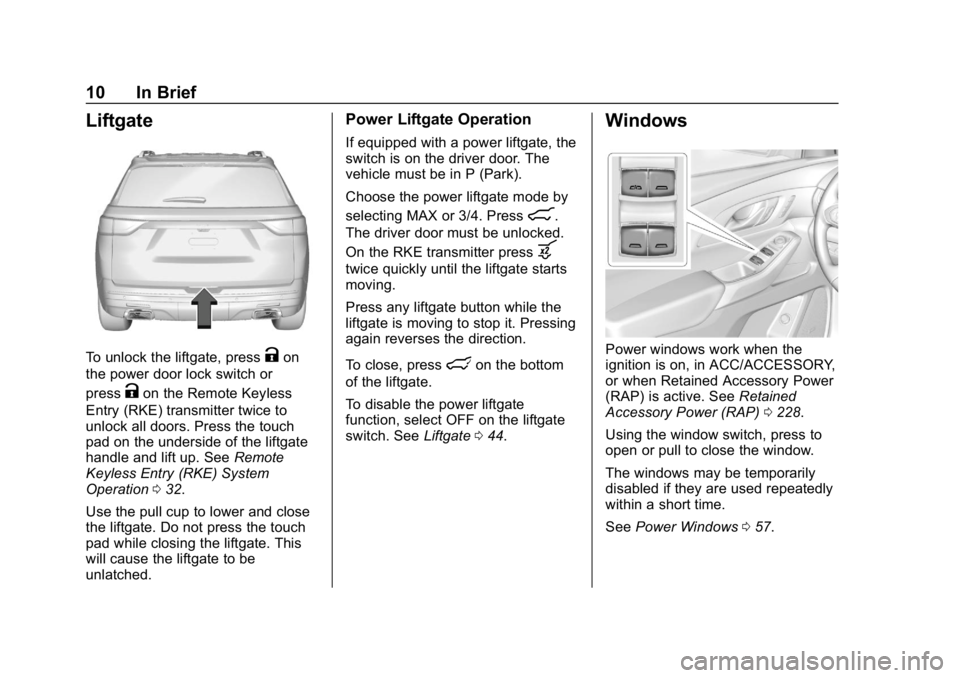
To unlock the liftgate, pressKon
the power door lock switch or
press
Kon the Remote Keyless
Entry (RKE) transmitter twice to
unlock all doors. Press the touch
pad on the underside of the liftgate
handle and lift up. See Remote
Keyless Entry (RKE) System
Operation 032.
Use the pull cup to lower and close
the liftgate. Do not press the touch
pad while closing the liftgate. This
will cause the liftgate to be
unlatched.
Power Liftgate Operation
If equipped with a power liftgate, the
switch is on the driver door. The
vehicle must be in P (Park).
Choose the power liftgate mode by
selecting MAX or 3/4. Press
8.
The driver door must be unlocked.
On the RKE transmitter press
b
twice quickly until the liftgate starts
moving.
Press any liftgate button while the
liftgate is moving to stop it. Pressing
again reverses the direction.
To close, press
lon the bottom
of the liftgate.
To disable the power liftgate
function, select OFF on the liftgate
switch. See Liftgate044.
Windows
Power windows work when the
ignition is on, in ACC/ACCESSORY,
or when Retained Accessory Power
(RAP) is active. See Retained
Accessory Power (RAP) 0228.
Using the window switch, press to
open or pull to close the window.
The windows may be temporarily
disabled if they are used repeatedly
within a short time.
See Power Windows 057.
Page 20 of 419
Chevrolet Traverse Owner Manual (GMNA-Localizing-U.S./Canada/Mexico-
10603118) - 2018 - CRC - 1/29/18
In Brief 19
;:Turns on the parking lamps
including all lamps, except the
headlamps.
5: Turns on the headlamps
together with the parking lamps and
instrument panel lights.
See:
. Exterior Lamp Controls 0166
. Daytime Running Lamps (DRL)
0168
. Fog Lamps 0170
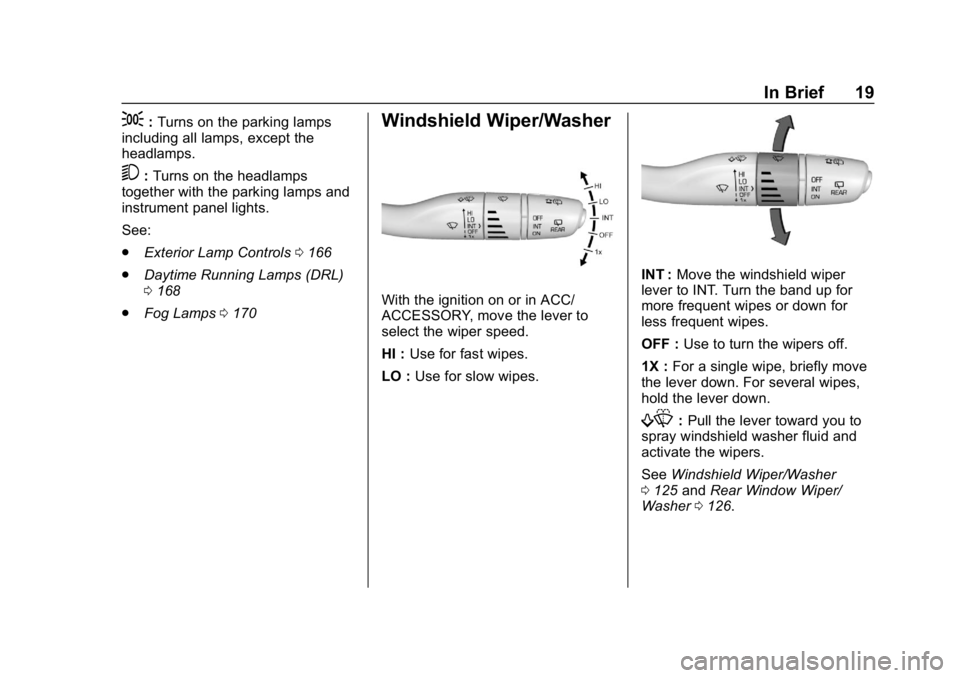
Windshield Wiper/Washer
With the ignition on or in ACC/
ACCESSORY, move the lever to
select the wiper speed.
HI : Use for fast wipes.
LO : Use for slow wipes.
INT : Move the windshield wiper
lever to INT. Turn the band up for
more frequent wipes or down for
less frequent wipes.
OFF : Use to turn the wipers off.
1X : For a single wipe, briefly move
the lever down. For several wipes,
hold the lever down.
f: Pull the lever toward you to
spray windshield washer fluid and
activate the wipers.
See Windshield Wiper/Washer
0 125 andRear Window Wiper/
Washer 0126.
Page 21 of 419
Chevrolet Traverse Owner Manual (GMNA-Localizing-U.S./Canada/Mexico-
10603118) - 2018 - CRC - 1/29/18
20 In Brief
Climate Controls
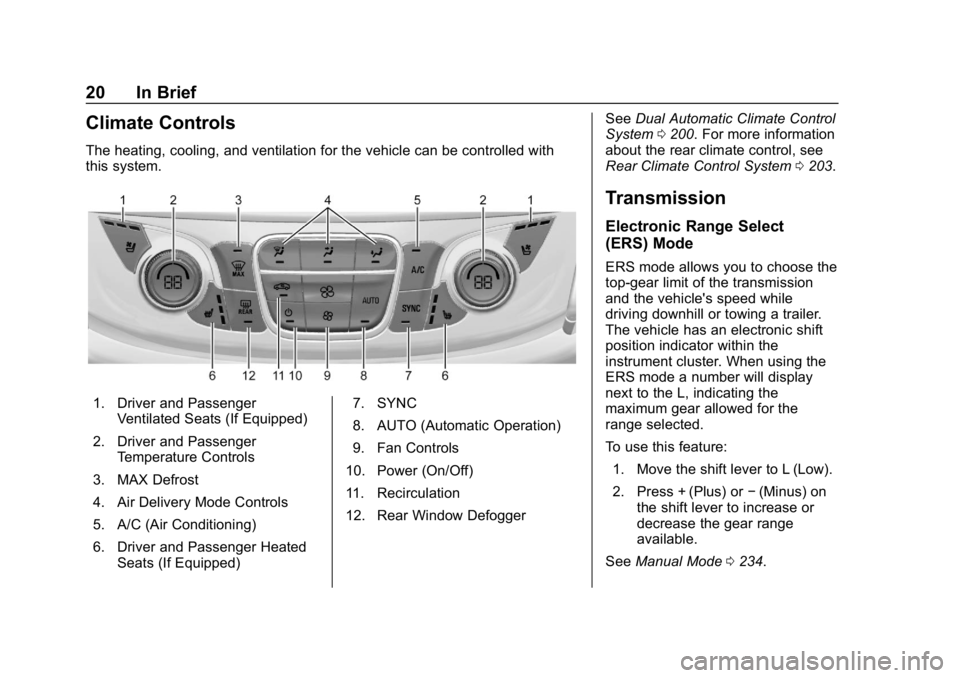
The heating, cooling, and ventilation for the vehicle can be controlled with
this system.
1. Driver and PassengerVentilated Seats (If Equipped)
2. Driver and Passenger Temperature Controls
3. MAX Defrost
4. Air Delivery Mode Controls
5. A/C (Air Conditioning)
6. Driver and Passenger Heated Seats (If Equipped) 7. SYNC
8. AUTO (Automatic Operation)
9. Fan Controls
10. Power (On/Off)
11. Recirculation
12. Rear Window Defogger See
Dual Automatic Climate Control
System 0200. For more information
about the rear climate control, see
Rear Climate Control System 0203.
Transmission
Electronic Range Select
(ERS) Mode
ERS mode allows you to choose the
top-gear limit of the transmission
and the vehicle's speed while
driving downhill or towing a trailer.
The vehicle has an electronic shift
position indicator within the
instrument cluster. When using the
ERS mode a number will display
next to the L, indicating the
maximum gear allowed for the
range selected.
To use this feature:
1. Move the shift lever to L (Low).
2. Press + (Plus) or −(Minus) on
the shift lever to increase or
decrease the gear range
available.
See Manual Mode 0234.
Page 32 of 419
Chevrolet Traverse Owner Manual (GMNA-Localizing-U.S./Canada/Mexico-
10603118) - 2018 - CRC - 1/29/18
Keys, Doors, and Windows 31
Keys, Doors, and
Windows
Keys and Locks
Keys . . . . . . . . . . . . . . . . . . . . . . . . . . . 31
Remote Keyless Entry (RKE)System . . . . . . . . . . . . . . . . . . . . . . . 32
Remote Keyless Entry (RKE) System Operation . . . . . . . . . . . . 32
Remote Vehicle Start . . . . . . . . . . 38
Door Locks . . . . . . . . . . . . . . . . . . . . 40
Power Door Locks . . . . . . . . . . . . . 42
Delayed Locking . . . . . . . . . . . . . . . 42
Automatic Door Locks . . . . . . . . . 42
Lockout Protection . . . . . . . . . . . . . 43
Safety Locks . . . . . . . . . . . . . . . . . . . 43
Doors
Liftgate . . . . . . . . . . . . . . . . . . . . . . . . 44
Vehicle Security
Vehicle Security . . . . . . . . . . . . . . . . 51
Vehicle Alarm System . . . . . . . . . 51
Immobilizer . . . . . . . . . . . . . . . . . . . . 52
Immobilizer Operation . . . . . . . . . 52
Exterior Mirrors
Convex Mirrors . . . . . . . . . . . . . . . . 53
Power Mirrors . . . . . . . . . . . . . . . . . . 53 Folding Mirrors . . . . . . . . . . . . . . . . . 53
Heated Mirrors . . . . . . . . . . . . . . . . . 54
Automatic Dimming Mirror . . . . . 54
Reverse Tilt Mirrors . . . . . . . . . . . . 54
Interior Mirrors
Interior Rearview Mirrors . . . . . . . 54
Manual Rearview Mirror . . . . . . . . 54
Automatic Dimming Rearview
Mirror . . . . . . . . . . . . . . . . . . . . . . . . . 54
Rear Camera Mirror . . . . . . . . . . . . 55
Windows
Windows . . . . . . . . . . . . . . . . . . . . . . . 56
Power Windows . . . . . . . . . . . . . . . 57
Sun Visors . . . . . . . . . . . . . . . . . . . . . 59
Roof
Sunroof . . . . . . . . . . . . . . . . . . . . . . . . 59
Keys and Locks
Keys
{Warning
Leaving children in a vehicle with
a Remote Keyless Entry (RKE)
transmitter is dangerous and
children or others could be
seriously injured or killed. They
could operate the power windows
or other controls or make the
vehicle move. The windows will
function with the RKE transmitter
in the vehicle, and children or
others could be caught in the path
of a closing window. Do not leave
children in a vehicle with an RKE
transmitter.
Page 33 of 419
Chevrolet Traverse Owner Manual (GMNA-Localizing-U.S./Canada/Mexico-
10603118) - 2018 - CRC - 1/29/18
32 Keys, Doors, and Windows
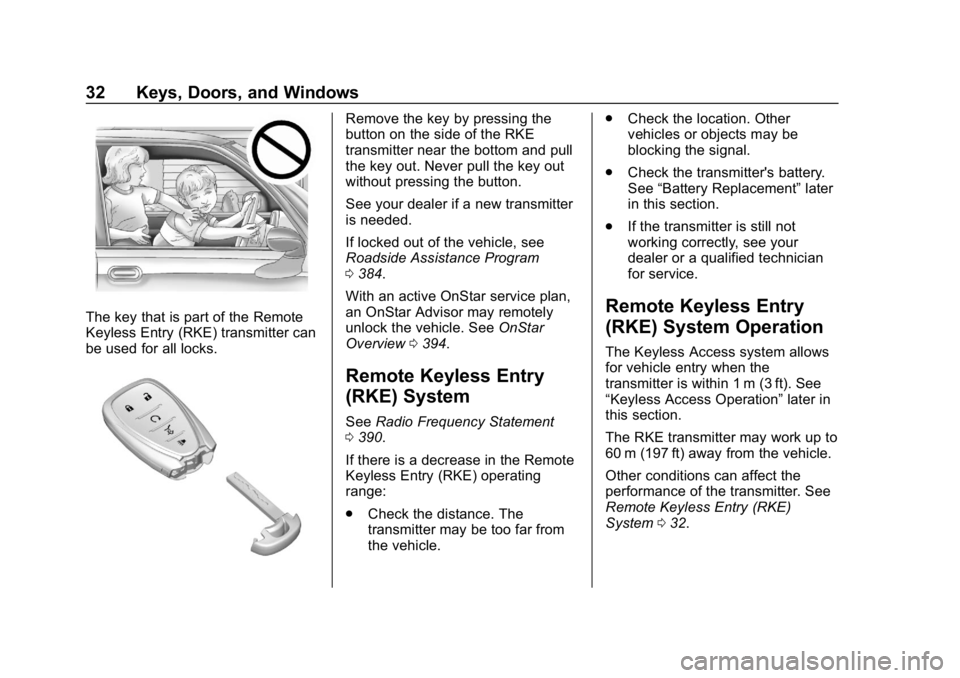
The key that is part of the Remote
Keyless Entry (RKE) transmitter can
be used for all locks.
Remove the key by pressing the
button on the side of the RKE
transmitter near the bottom and pull
the key out. Never pull the key out
without pressing the button.
See your dealer if a new transmitter
is needed.
If locked out of the vehicle, see
Roadside Assistance Program
0384.
With an active OnStar service plan,
an OnStar Advisor may remotely
unlock the vehicle. See OnStar
Overview 0394.
Remote Keyless Entry
(RKE) System
See Radio Frequency Statement
0 390.
If there is a decrease in the Remote
Keyless Entry (RKE) operating
range:
. Check the distance. The
transmitter may be too far from
the vehicle. .
Check the location. Other
vehicles or objects may be
blocking the signal.
. Check the transmitter's battery.
See “Battery Replacement” later
in this section.
. If the transmitter is still not
working correctly, see your
dealer or a qualified technician
for service.
Remote Keyless Entry
(RKE) System Operation
The Keyless Access system allows
for vehicle entry when the
transmitter is within 1 m (3 ft). See
“Keyless Access Operation” later in
this section.
The RKE transmitter may work up to
60 m (197 ft) away from the vehicle.
Other conditions can affect the
performance of the transmitter. See
Remote Keyless Entry (RKE)
System 032.
Page 34 of 419
Chevrolet Traverse Owner Manual (GMNA-Localizing-U.S./Canada/Mexico-
10603118) - 2018 - CRC - 1/29/18
Keys, Doors, and Windows 33
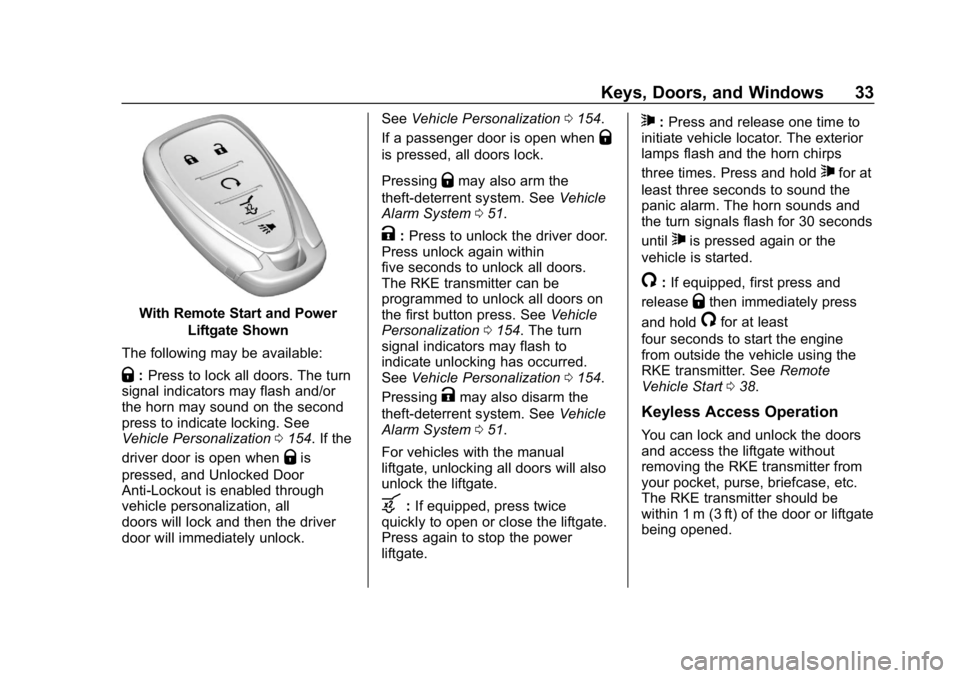
With Remote Start and PowerLiftgate Shown
The following may be available:
Q: Press to lock all doors. The turn
signal indicators may flash and/or
the horn may sound on the second
press to indicate locking. See
Vehicle Personalization 0154. If the
driver door is open when
Qis
pressed, and Unlocked Door
Anti-Lockout is enabled through
vehicle personalization, all
doors will lock and then the driver
door will immediately unlock. See
Vehicle Personalization 0154.
If a passenger door is open when
Q
is pressed, all doors lock.
Pressing
Qmay also arm the
theft-deterrent system. See Vehicle
Alarm System 051.
K:Press to unlock the driver door.
Press unlock again within
five seconds to unlock all doors.
The RKE transmitter can be
programmed to unlock all doors on
the first button press. See Vehicle
Personalization 0154. The turn
signal indicators may flash to
indicate unlocking has occurred.
See Vehicle Personalization 0154.
Pressing
Kmay also disarm the
theft-deterrent system. See Vehicle
Alarm System 051.
For vehicles with the manual
liftgate, unlocking all doors will also
unlock the liftgate.
b: If equipped, press twice
quickly to open or close the liftgate.
Press again to stop the power
liftgate.
7: Press and release one time to
initiate vehicle locator. The exterior
lamps flash and the horn chirps
three times. Press and hold
7for at
least three seconds to sound the
panic alarm. The horn sounds and
the turn signals flash for 30 seconds
until
7is pressed again or the
vehicle is started.
/: If equipped, first press and
release
Qthen immediately press
and hold
/for at least
four seconds to start the engine
from outside the vehicle using the
RKE transmitter. See Remote
Vehicle Start 038.
Keyless Access Operation
You can lock and unlock the doors
and access the liftgate without
removing the RKE transmitter from
your pocket, purse, briefcase, etc.
The RKE transmitter should be
within 1 m (3 ft) of the door or liftgate
being opened.
Page 35 of 419
Chevrolet Traverse Owner Manual (GMNA-Localizing-U.S./Canada/Mexico-
10603118) - 2018 - CRC - 1/29/18
34 Keys, Doors, and Windows
If equipped with memory seats, RKE
transmitters 1 and 2 are linked to
seating positions of memory 1 or 2.
SeeMemory Seats 067.
Keyless Access can be
programmed to unlock all doors on
the first lock/unlock press from the
driver door. See Vehicle
Personalization 0154.
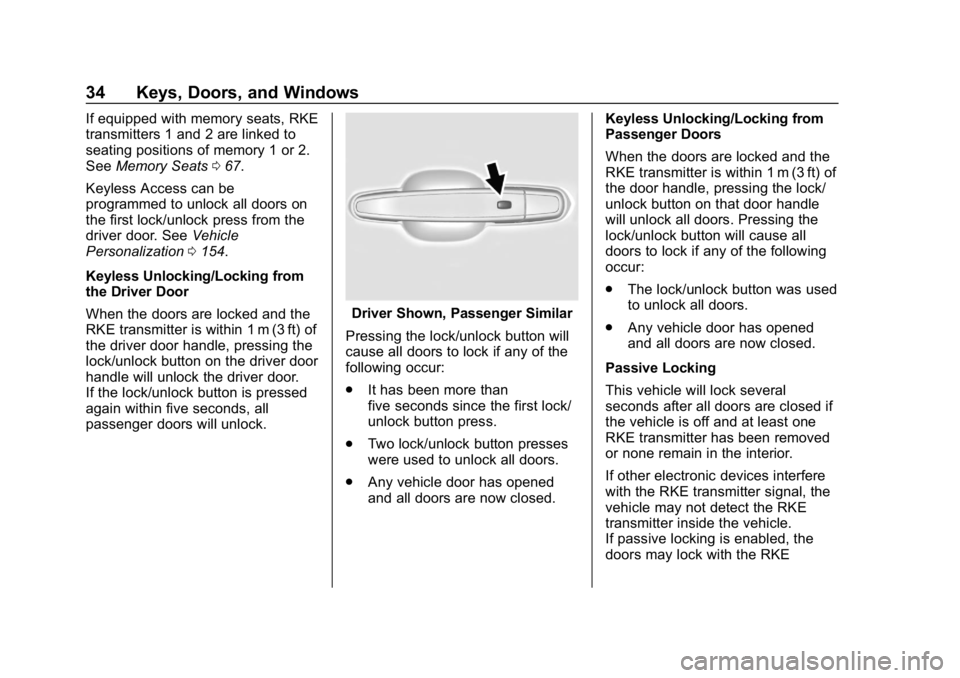
Keyless Unlocking/Locking from
the Driver Door
When the doors are locked and the
RKE transmitter is within 1 m (3 ft) of
the driver door handle, pressing the
lock/unlock button on the driver door
handle will unlock the driver door.
If the lock/unlock button is pressed
again within five seconds, all
passenger doors will unlock.
Driver Shown, Passenger Similar
Pressing the lock/unlock button will
cause all doors to lock if any of the
following occur:
. It has been more than
five seconds since the first lock/
unlock button press.
. Two lock/unlock button presses
were used to unlock all doors.
. Any vehicle door has opened
and all doors are now closed. Keyless Unlocking/Locking from
Passenger Doors
When the doors are locked and the
RKE transmitter is within 1 m (3 ft) of
the door handle, pressing the lock/
unlock button on that door handle
will unlock all doors. Pressing the
lock/unlock button will cause all
doors to lock if any of the following
occur:
.
The lock/unlock button was used
to unlock all doors.
. Any vehicle door has opened
and all doors are now closed.
Passive Locking
This vehicle will lock several
seconds after all doors are closed if
the vehicle is off and at least one
RKE transmitter has been removed
or none remain in the interior.
If other electronic devices interfere
with the RKE transmitter signal, the
vehicle may not detect the RKE
transmitter inside the vehicle.
If passive locking is enabled, the
doors may lock with the RKE