Seat CHEVROLET TRAVERSE 2019 Owner's Manual
[x] Cancel search | Manufacturer: CHEVROLET, Model Year: 2019, Model line: TRAVERSE, Model: CHEVROLET TRAVERSE 2019Pages: 428, PDF Size: 6.28 MB
Page 255 of 428
Chevrolet Traverse Owner Manual (GMNA-Localizing-U.S./Canada/Mexico-
12146157) - 2019 - CRC - 10/31/18
254 Driving and Operating
Notification to Resume ACC
ACC will maintain a follow gap
behind a detected vehicle and slow
your vehicle to a stop behind that
vehicle.
If the stopped vehicle ahead has
driven away and ACC has not
resumed, the vehicle ahead
indicator will flash and three beeps
will sound as a reminder to check
traffic ahead before proceeding. See
“Adaptive Cruise Go Notifier”in
“Collision/Detection Systems” under
Vehicle Personalization 0155.
When the vehicle ahead drives
away, press RES+ or the
accelerator pedal to resume ACC.
If stopped for more than
two minutes or if the driver door is
opened and the driver seat belt is
unbuckled, the ACC automatically
applies the Electric Parking Brake
(EPB) to hold the vehicle. The
Electric Parking Brake status light
will turn on. See Electric Parking
Brake 0238. To resume ACC and
release the EPB, press the
accelerator pedal. A DIC warning message may
display indicating to shift to P (Park)
before exiting the vehicle. See
Vehicle Messages
0154.
{Warning
If ACC has stopped the vehicle,
and if ACC is disengaged, turned
off, or canceled, the vehicle will
no longer be held at a stop. The
vehicle can move. When ACC is
holding the vehicle at a stop,
always be prepared to manually
apply the brakes.
{Warning
Leaving the vehicle without
placing it in P (Park) can be
dangerous. Do not leave the
vehicle while it is being held at a
stop by ACC. Always place the
vehicle in P (Park) and turn off
the ignition before leaving the
vehicle. ACC Override
If using the accelerator pedal while
ACC is active, the ACC indicator
turns blue on the instrument cluster.
ACC will resume operation when the
accelerator pedal is not being
pressed.
{Warning
The ACC will not automatically
apply the brakes if your foot is
resting on the accelerator pedal.
You could crash into a vehicle
ahead of you.
Curves in the Road
{Warning
On curves, ACC may not detect a
vehicle ahead in your lane. You
could be startled if the vehicle
accelerates up to the set speed,
especially when following a
vehicle exiting or entering exit
ramps. You could lose control of (Continued)
Page 271 of 428
Chevrolet Traverse Owner Manual (GMNA-Localizing-U.S./Canada/Mexico-
12146157) - 2019 - CRC - 10/31/18
270 Driving and Operating
{Warning
The LKA system does not
continuously steer the vehicle.
It may not keep the vehicle in the
lane or give a Lane Departure
Warning (LDW) alert, even if a
lane marking is detected.
The LKA and LDW systems
may not:. Provide an alert or enough
steering assist to avoid a
lane departure or crash.
. Detect lane markings under
poor weather or visibility
conditions. This can occur if
the windshield or
headlamps are blocked by
dirt, snow, or ice, if they are
not in proper condition, or if
the sun shines directly into
the camera.
. Detect road edges.
. Detect lanes on winding or
hilly roads.
(Continued)
Warning (Continued)
If LKA only detects lane markings
on one side of the road, it will
only assist or provide an LDW
alert when approaching the lane
on the side where it has detected
a lane marking. Even with LKA
and LDW, you must steer the
vehicle. Always keep your
attention on the road and
maintain proper vehicle position
within the lane, or vehicle
damage, injury, or death could
occur. Always keep the
windshield, headlamps, and
camera sensors clean and in
good repair. Do not use LKA in
bad weather conditions.
{Warning
Using LKA while towing a trailer
or on slippery roads could cause
loss of control of the vehicle and
a crash. Turn the system off.
How the System Works
The LKA camera sensor is on the
windshield ahead of the rearview
mirror.
To turn LKA on and off, press
A
on the center console.
When on,
Ais green if LKA is
available to assist and provide LDW
alerts. It may assist by gently
turning the steering wheel and
display
Aas amber if the vehicle
approaches a detected lane marking
without using a turn signal in that
direction. It may also provide an
LDW alert by flashing
Aamber
as the lane marking is crossed.
Additionally, there may be three
beeps, or the driver seat may pulse
three times, on the right or left,
depending on the lane departure
direction.
Take Steering
The LKA system does not
continuously steer the vehicle.
If LKA does not detect active driver
Page 282 of 428
Chevrolet Traverse Owner Manual (GMNA-Localizing-U.S./Canada/Mexico-
12146157) - 2019 - CRC - 10/31/18
Driving and Operating 281
4. Add the weight of all cargo inthe vehicle.
5. Add the weight of hitch hardware such as a draw bar,
ball, load equalizer bars,
or sway bars.
6. Add the weight of any accessories or aftermarket
equipment added to the
vehicle.
The resulting weight cannot exceed
the GCWR value shown on the
Trailering Information Label.
The gross combined weight can
also be confirmed by weighing the
truck and trailer on a public scale.
The truck and trailer should be
loaded for the trip with passengers
and cargo.
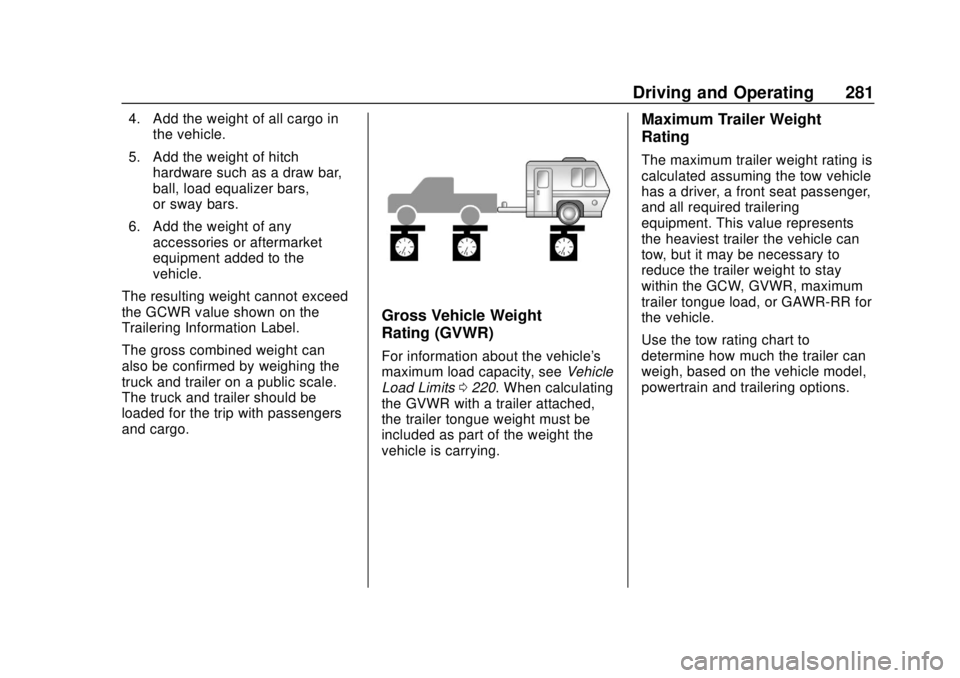
Gross Vehicle Weight
Rating (GVWR)
For information about the vehicle's
maximum load capacity, see Vehicle
Load Limits 0220. When calculating
the GVWR with a trailer attached,
the trailer tongue weight must be
included as part of the weight the
vehicle is carrying.
Maximum Trailer Weight
Rating
The maximum trailer weight rating is
calculated assuming the tow vehicle
has a driver, a front seat passenger,
and all required trailering
equipment. This value represents
the heaviest trailer the vehicle can
tow, but it may be necessary to
reduce the trailer weight to stay
within the GCW, GVWR, maximum
trailer tongue load, or GAWR-RR for
the vehicle.
Use the tow rating chart to
determine how much the trailer can
weigh, based on the vehicle model,
powertrain and trailering options.
Page 292 of 428
Chevrolet Traverse Owner Manual (GMNA-Localizing-U.S./Canada/Mexico-
12146157) - 2019 - CRC - 11/1/18
Vehicle Care 291
California Perchlorate
Materials Requirements
Certain types of automotive
applications, such as airbag
initiators, seat belt pretensioners,
and lithium batteries contained in
Remote Keyless Entry transmitters,
may contain perchlorate materials.
Special handling may be necessary.
For additional information, see
www.dtsc.ca.gov/hazardouswaste/
perchlorate.
Accessories and
Modifications
Adding non-dealer accessories or
making modifications to the vehicle
can affect vehicle performance and
safety, including such things as
airbags, braking, stability, ride and
handling, emissions systems,
aerodynamics, durability, and
electronic systems like antilock
brakes, traction control, and stability
control. These accessories or
modifications could even cause
malfunction or damage not covered
by the vehicle warranty.Damage to suspension components
caused by modifying vehicle height
outside of factory settings will not be
covered by the vehicle warranty.
Damage to vehicle components
resulting from modifications or the
installation or use of non-GM
certified parts, including control
module or software modifications, is
not covered under the terms of the
vehicle warranty and may affect
remaining warranty coverage for
affected parts.
GM Accessories are designed to
complement and function with other
systems on the vehicle. See your
dealer to accessorize the vehicle
using genuine GM Accessories
installed by a dealer technician.
Also, see
Adding Equipment to the
Airbag-Equipped Vehicle 096.
Vehicle Checks
Doing Your Own
Service Work
{Warning
It can be dangerous to work on
your vehicle if you do not have
the proper knowledge, service
manual, tools, or parts. Always
follow owner ’s manual procedures
and consult the service manual
for your vehicle before doing any
service work.
If doing some of your own service
work, use the proper service
manual. It tells you much more
about how to service the vehicle
than this manual can. To order the
proper service manual, see
Publication Ordering Information
0 398.
This vehicle has an airbag system.
Before attempting to do your own
service work, see Servicing the
Airbag-Equipped Vehicle 096.
Page 321 of 428
Chevrolet Traverse Owner Manual (GMNA-Localizing-U.S./Canada/Mexico-
12146157) - 2019 - CRC - 11/1/18
320 Vehicle Care
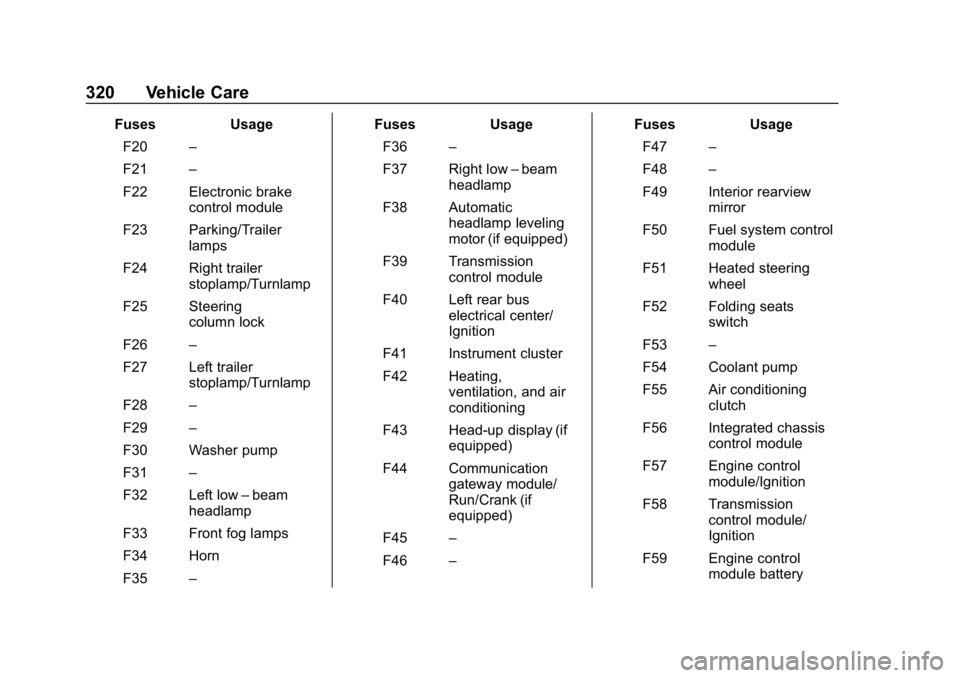
FusesUsage
F20 –
F21 –
F22 Electronic brake control module
F23 Parking/Trailer lamps
F24 Right trailer stoplamp/Turnlamp
F25 Steering column lock
F26 –
F27 Left trailer stoplamp/Turnlamp
F28 –
F29 –
F30 Washer pump
F31 –
F32 Left low –beam
headlamp
F33 Front fog lamps
F34 Horn
F35 – Fuses
Usage
F36 –
F37 Right low –beam
headlamp
F38 Automatic headlamp leveling
motor (if equipped)
F39 Transmission control module
F40 Left rear bus electrical center/
Ignition
F41 Instrument cluster
F42 Heating, ventilation, and air
conditioning
F43 Head-up display (if equipped)
F44 Communication gateway module/
Run/Crank (if
equipped)
F45 –
F46 – Fuses
Usage
F47 –
F48 –
F49 Interior rearview mirror
F50 Fuel system control module
F51 Heated steering wheel
F52 Folding seats switch
F53 –
F54 Coolant pump
F55 Air conditioning clutch
F56 Integrated chassis control module
F57 Engine control module/Ignition
F58 Transmission control module/
Ignition
F59 Engine control module battery
Page 322 of 428
Chevrolet Traverse Owner Manual (GMNA-Localizing-U.S./Canada/Mexico-
12146157) - 2019 - CRC - 11/1/18
Vehicle Care 321
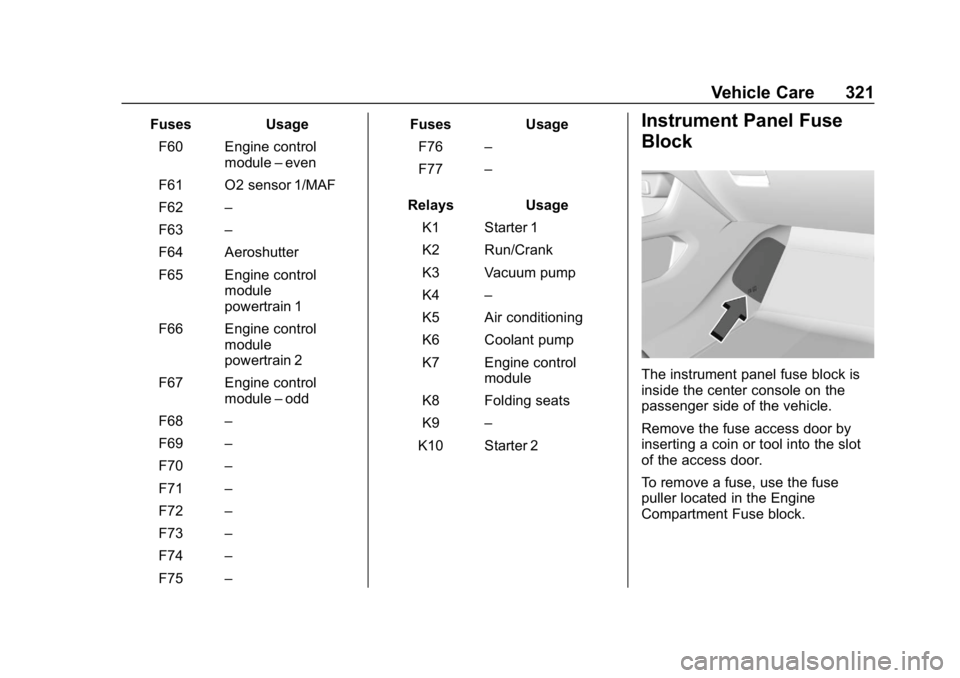
FusesUsage
F60 Engine control module–even
F61 O2 sensor 1/MAF
F62 –
F63 –
F64 Aeroshutter
F65 Engine control module
powertrain 1
F66 Engine control module
powertrain 2
F67 Engine control module–odd
F68 –
F69 –
F70 –
F71 –
F72 –
F73 –
F74 –
F75 – Fuses
Usage
F76 –
F77 –
Relays Usage
K1 Starter 1
K2 Run/Crank
K3 Vacuum pump
K4 –
K5 Air conditioning
K6 Coolant pump
K7 Engine control module
K8 Folding seats
K9 –
K10 Starter 2Instrument Panel Fuse
Block
The instrument panel fuse block is
inside the center console on the
passenger side of the vehicle.
Remove the fuse access door by
inserting a coin or tool into the slot
of the access door.
To remove a fuse, use the fuse
puller located in the Engine
Compartment Fuse block.
Page 323 of 428
Chevrolet Traverse Owner Manual (GMNA-Localizing-U.S./Canada/Mexico-
12146157) - 2019 - CRC - 11/1/18
322 Vehicle Care
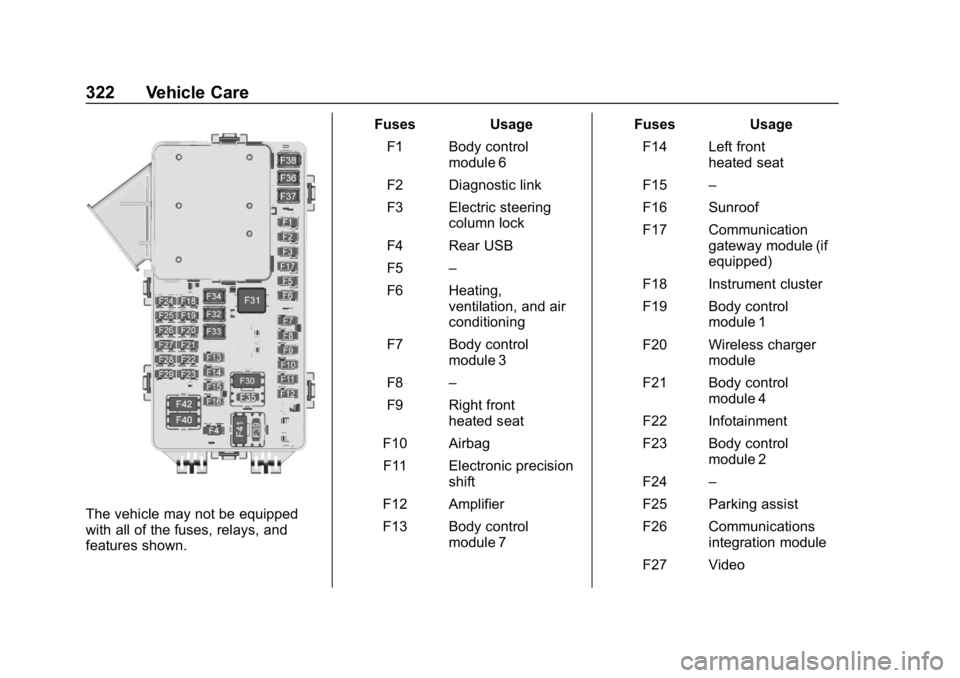
The vehicle may not be equipped
with all of the fuses, relays, and
features shown.Fuses Usage
F1 Body control module 6
F2 Diagnostic link
F3 Electric steering column lock
F4 Rear USB
F5 –
F6 Heating, ventilation, and air
conditioning
F7 Body control module 3
F8 –
F9 Right front heated seat
F10 Airbag
F11 Electronic precision shift
F12 Amplifier
F13 Body control module 7 Fuses Usage
F14 Left front heated seat
F15 –
F16 Sunroof
F17 Communication gateway module (if
equipped)
F18 Instrument cluster
F19 Body control module 1
F20 Wireless charger module
F21 Body control module 4
F22 Infotainment
F23 Body control module 2
F24 –
F25 Parking assist
F26 Communications integration module
F27 Video
Page 324 of 428
Chevrolet Traverse Owner Manual (GMNA-Localizing-U.S./Canada/Mexico-
12146157) - 2019 - CRC - 11/1/18
Vehicle Care 323
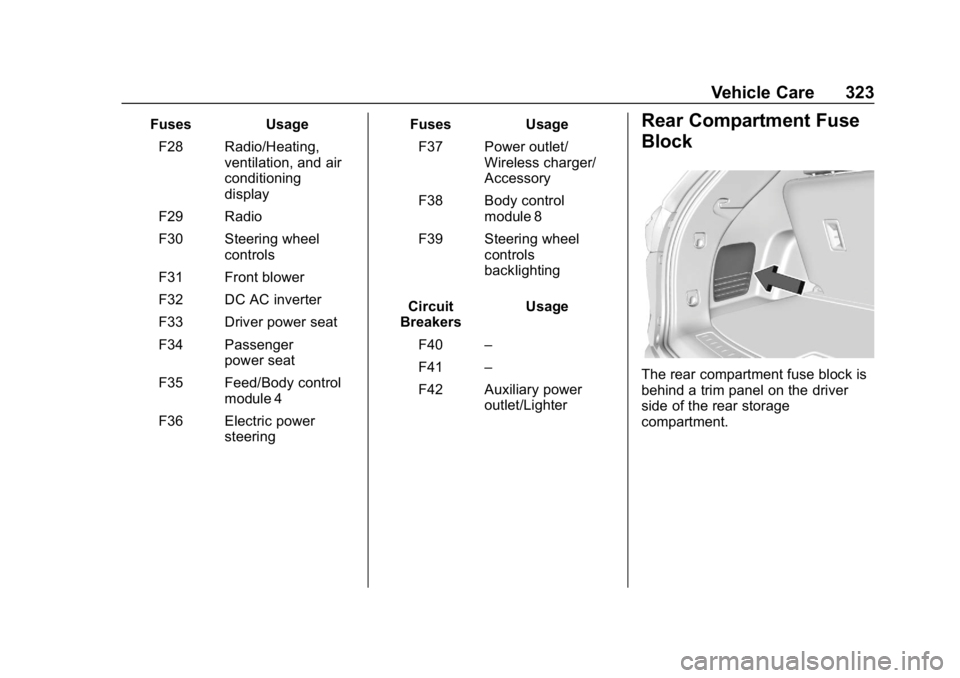
FusesUsage
F28 Radio/Heating, ventilation, and air
conditioning
display
F29 Radio
F30 Steering wheel controls
F31 Front blower
F32 DC AC inverter
F33 Driver power seat
F34 Passenger power seat
F35 Feed/Body control module 4
F36 Electric power steering Fuses
Usage
F37 Power outlet/ Wireless charger/
Accessory
F38 Body control module 8
F39 Steering wheel controls
backlighting
Circuit
Breakers Usage
F40 –
F41 –
F42 Auxiliary power outlet/LighterRear Compartment Fuse
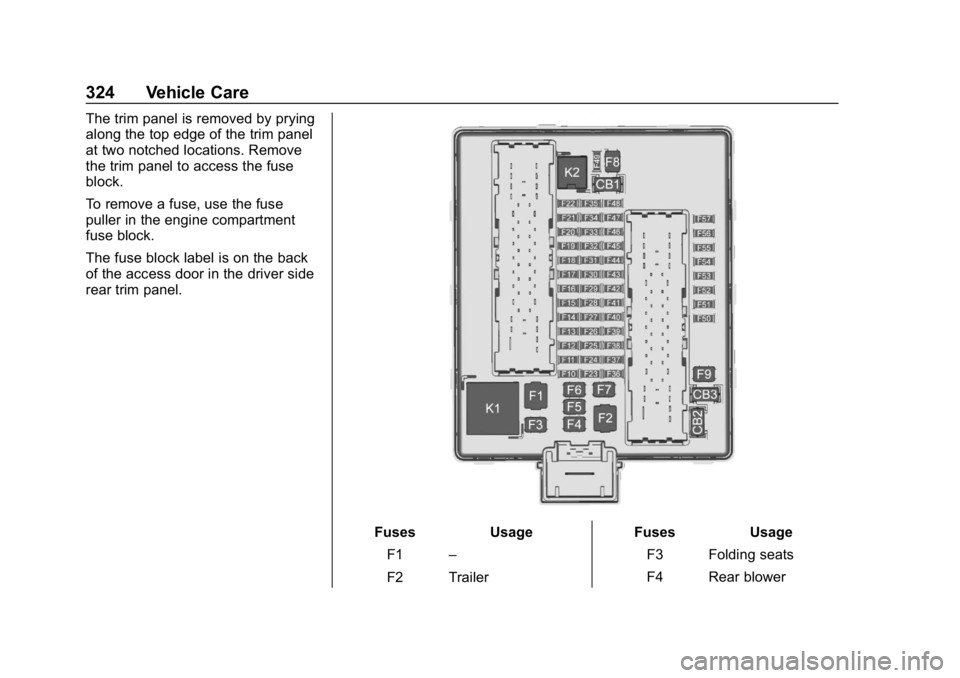
Block
The rear compartment fuse block is
behind a trim panel on the driver
side of the rear storage
compartment.
Page 325 of 428
Chevrolet Traverse Owner Manual (GMNA-Localizing-U.S./Canada/Mexico-
12146157) - 2019 - CRC - 11/1/18
324 Vehicle Care
The trim panel is removed by prying
along the top edge of the trim panel
at two notched locations. Remove
the trim panel to access the fuse
block.
To remove a fuse, use the fuse
puller in the engine compartment
fuse block.
The fuse block label is on the back
of the access door in the driver side
rear trim panel.
FusesUsage
F1 –
F2 Trailer Fuses
Usage
F3 Folding seats
F4 Rear blower
Page 326 of 428
Chevrolet Traverse Owner Manual (GMNA-Localizing-U.S./Canada/Mexico-
12146157) - 2019 - CRC - 11/1/18
Vehicle Care 325
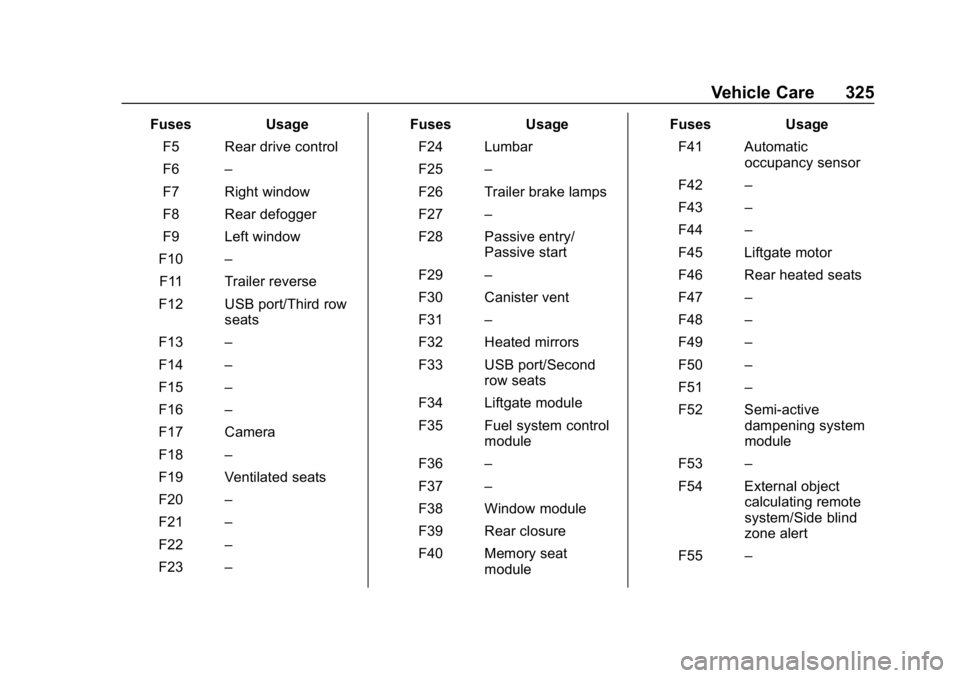
FusesUsage
F5 Rear drive control
F6 –
F7 Right window
F8 Rear defogger
F9 Left window
F10 –
F11 Trailer reverse
F12 USB port/Third row seats
F13 –
F14 –
F15 –
F16 –
F17 Camera
F18 –
F19 Ventilated seats
F20 –
F21 –
F22 –
F23 – Fuses
Usage
F24 Lumbar
F25 –
F26 Trailer brake lamps
F27 –
F28 Passive entry/ Passive start
F29 –
F30 Canister vent
F31 –
F32 Heated mirrors
F33 USB port/Second row seats
F34 Liftgate module
F35 Fuel system control module
F36 –
F37 –
F38 Window module
F39 Rear closure
F40 Memory seat module Fuses
Usage
F41 Automatic occupancy sensor
F42 –
F43 –
F44 –
F45 Liftgate motor
F46 Rear heated seats
F47 –
F48 –
F49 –
F50 –
F51 –
F52 Semi-active dampening system
module
F53 –
F54 External object calculating remote
system/Side blind
zone alert
F55 –