DC power CHEVROLET TRAVERSE 2019 User Guide
[x] Cancel search | Manufacturer: CHEVROLET, Model Year: 2019, Model line: TRAVERSE, Model: CHEVROLET TRAVERSE 2019Pages: 428, PDF Size: 6.28 MB
Page 19 of 428
Chevrolet Traverse Owner Manual (GMNA-Localizing-U.S./Canada/Mexico-
12146157) - 2019 - CRC - 10/31/18
18 In Brief
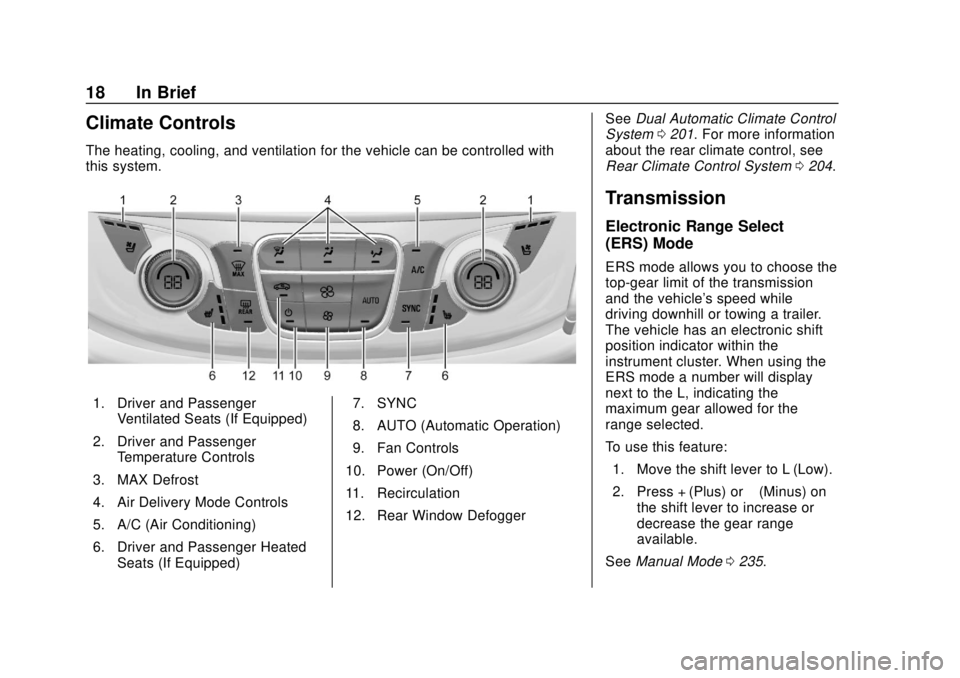
Climate Controls
The heating, cooling, and ventilation for the vehicle can be controlled with
this system.
1. Driver and PassengerVentilated Seats (If Equipped)
2. Driver and Passenger Temperature Controls
3. MAX Defrost
4. Air Delivery Mode Controls
5. A/C (Air Conditioning)
6. Driver and Passenger Heated Seats (If Equipped) 7. SYNC
8. AUTO (Automatic Operation)
9. Fan Controls
10. Power (On/Off)
11. Recirculation
12. Rear Window Defogger See
Dual Automatic Climate Control
System 0201. For more information
about the rear climate control, see
Rear Climate Control System 0204.
Transmission
Electronic Range Select
(ERS) Mode
ERS mode allows you to choose the
top-gear limit of the transmission
and the vehicle's speed while
driving downhill or towing a trailer.
The vehicle has an electronic shift
position indicator within the
instrument cluster. When using the
ERS mode a number will display
next to the L, indicating the
maximum gear allowed for the
range selected.
To use this feature:
1. Move the shift lever to L (Low).
2. Press + (Plus) or −(Minus) on
the shift lever to increase or
decrease the gear range
available.
See Manual Mode 0235.
Page 20 of 428
Chevrolet Traverse Owner Manual (GMNA-Localizing-U.S./Canada/Mexico-
12146157) - 2019 - CRC - 10/31/18
In Brief 19
Vehicle Features
Infotainment System
Base radio information is included in
this manual. See the infotainment
manual for information on other
available infotainment systems.
Read the following pages to
become familiar with these features.
{Warning
Taking your eyes off the road for
too long or too often while using
any infotainment feature can
cause a crash. You or others
could be injured or killed. Do not
give extended attention to
infotainment tasks while driving.
Limit your glances at the vehicle
displays and focus your attention
on driving. Use voice commands
whenever possible.
The infotainment system has built-in
features intended to help avoid
distraction by disabling some functions when driving. These
functions may gray out when they
are unavailable. Many infotainment
features are also available through
the instrument cluster and steering
wheel controls.
Before driving:
.
Become familiar with the
operation, center stack controls,
and infotainment display
controls.
. Set up the audio by presetting
favorite stations, setting the
tone, and adjusting the
speakers.
. Set up phone numbers in
advance so they can be called
easily by pressing a single
control or by using a single voice
command if equipped with
Bluetooth phone capability.
. Set up your Bluetooth, CarPlay,
or Android Auto device. Some
devices will require a series of
setup steps to be taken or a
default app to be chosen prior to
using the feature. Not completing these steps could
prevent the feature from
functioning properly.
See Defensive Driving 0210.
To play the infotainment system with
the ignition off, see Retained
Accessory Power (RAP) 0230.
Radio(s)
O
:Press to turn the system on or
mute the audio. Press and hold to
turn the system off. Turn to increase
or decrease the volume.
g: Press and release to go to the
previous station, channel, or song.
Press and hold to fast seek the
previous strongest station, channel,
or song.
d: Press and release to go to the
next station, channel, or song.
Press and hold to fast seek the next
strongest station, channel, or song.
Source : Touch to choose between
available sources.
{: Press to go to the Home Page.
Page 25 of 428
Chevrolet Traverse Owner Manual (GMNA-Localizing-U.S./Canada/Mexico-
12146157) - 2019 - CRC - 10/31/18
24 In Brief
Rear Vision
Camera (RVC)
The RVC displays a view of the
area behind the vehicle on the
infotainment display when the
vehicle is shifted into R (Reverse) to
aid with parking and low-speed
backing maneuvers.
SeeAssistance Systems for Parking
or Backing 0258.
Rear Cross Traffic Alert
(RCTA) System
If equipped, the RCTA system
shows a triangle with an arrow on
the infotainment display to warn of
traffic behind your vehicle that may
cross your vehicle's path while in
R (Reverse). In addition, beeps will
sound, or the driver seat will pulse.
See Assistance Systems for Parking
or Backing 0258.
Park Assist
If equipped, Rear Park Assist (RPA)
uses sensors on the rear bumper to
assist with parking and avoiding
objects while in R (Reverse).
It operates at speeds less than
8 km/h (5 mph). RPA may display a
warning triangle on the infotainment
display and a graphic on the
instrument cluster to provide the
object distance. In addition, multiple
beeps or seat pulses may occur if
very close to an object.
See Assistance Systems for Parking
or Backing 0258.
Power Outlets
The vehicle has two 12-volt
accessory power outlets, which can
be used to plug in electrical
equipment, such as a cell phone or
MP3 player.
The power outlets are located:
.
On the center stack below the
climate controls.
. In the rear cargo area. To use the outlets, lift the cover.
See
Power Outlets 0130.
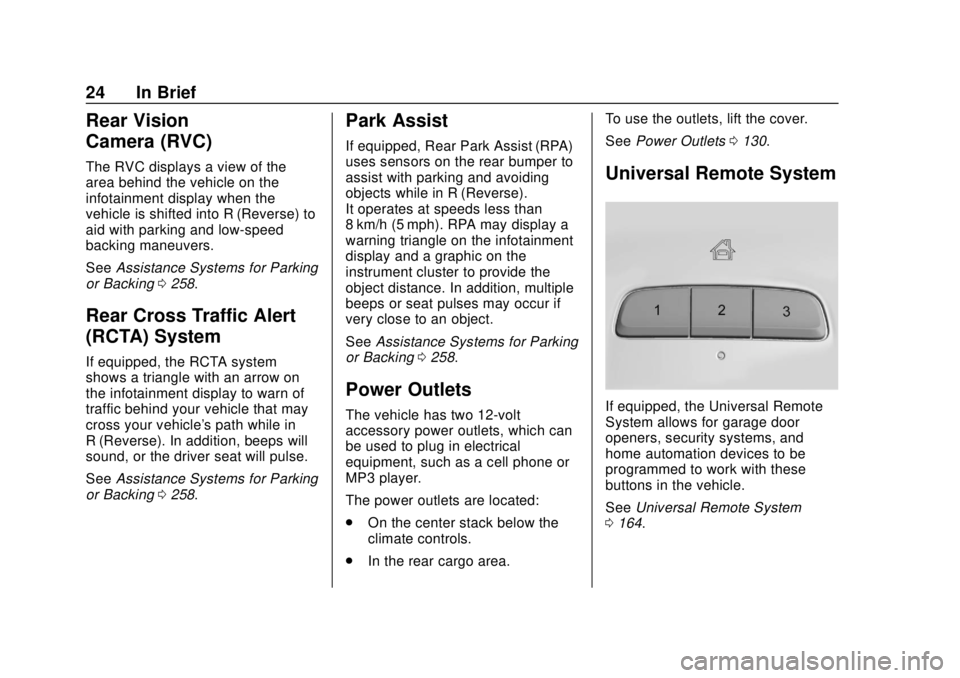
Universal Remote System
If equipped, the Universal Remote
System allows for garage door
openers, security systems, and
home automation devices to be
programmed to work with these
buttons in the vehicle.
See Universal Remote System
0 164.
Page 26 of 428
Chevrolet Traverse Owner Manual (GMNA-Localizing-U.S./Canada/Mexico-
12146157) - 2019 - CRC - 10/31/18
In Brief 25
Sunroof
If equipped, the ignition must be on
or in ACC/ACCESSORY,
or Retained Accessory Power (RAP)
must be active to operate the
sunroof. SeeIgnition Positions
0 225 andRetained Accessory
Power (RAP) 0230.
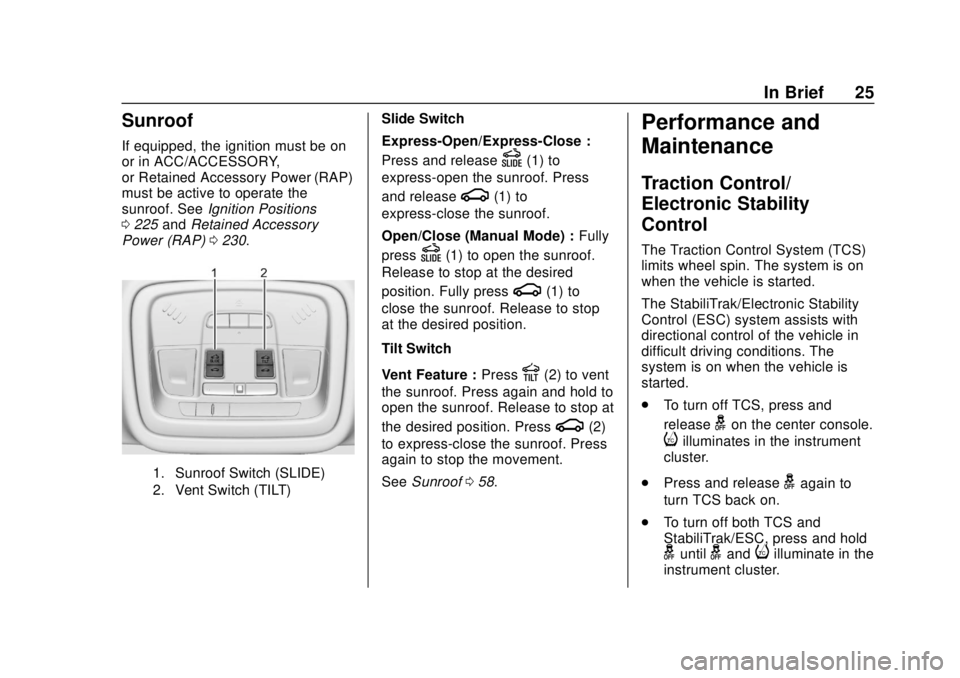
1. Sunroof Switch (SLIDE)
2. Vent Switch (TILT)
Slide Switch
Express-Open/Express-Close :
Press and release
D(1) to
express-open the sunroof. Press
and release
g(1) to
express-close the sunroof.
Open/Close (Manual Mode) : Fully
press
D(1) to open the sunroof.
Release to stop at the desired
position. Fully press
g(1) to
close the sunroof. Release to stop
at the desired position.
Tilt Switch
Vent Feature : Press
E(2) to vent
the sunroof. Press again and hold to
open the sunroof. Release to stop at
the desired position. Press
g(2)
to express-close the sunroof. Press
again to stop the movement.
See Sunroof 058.
Performance and
Maintenance
Traction Control/
Electronic Stability
Control
The Traction Control System (TCS)
limits wheel spin. The system is on
when the vehicle is started.
The StabiliTrak/Electronic Stability
Control (ESC) system assists with
directional control of the vehicle in
difficult driving conditions. The
system is on when the vehicle is
started.
.
To turn off TCS, press and
release
gon the center console.
iilluminates in the instrument
cluster.
. Press and release
gagain to
turn TCS back on.
. To turn off both TCS and
StabiliTrak/ESC, press and hold
guntilgandiilluminate in the
instrument cluster.
Page 30 of 428
Chevrolet Traverse Owner Manual (GMNA-Localizing-U.S./Canada/Mexico-
12146157) - 2019 - CRC - 10/31/18
Keys, Doors, and Windows 29
Keys, Doors, and
Windows
Keys and Locks
Keys . . . . . . . . . . . . . . . . . . . . . . . . . . . 29
Remote Keyless Entry (RKE)System . . . . . . . . . . . . . . . . . . . . . . . 30
Remote Keyless Entry (RKE) System Operation . . . . . . . . . . . . 30
Remote Vehicle Start . . . . . . . . . . 37
Door Locks . . . . . . . . . . . . . . . . . . . . 38
Power Door Locks . . . . . . . . . . . . . 41
Delayed Locking . . . . . . . . . . . . . . . 41
Automatic Door Locks . . . . . . . . . 41
Lockout Protection . . . . . . . . . . . . . 41
Safety Locks . . . . . . . . . . . . . . . . . . . 42
Doors
Liftgate . . . . . . . . . . . . . . . . . . . . . . . . 43
Vehicle Security
Vehicle Security . . . . . . . . . . . . . . . . 50
Vehicle Alarm System . . . . . . . . . 50
Immobilizer . . . . . . . . . . . . . . . . . . . . 51
Immobilizer Operation . . . . . . . . . 51
Exterior Mirrors
Convex Mirrors . . . . . . . . . . . . . . . . 52
Power Mirrors . . . . . . . . . . . . . . . . . . 52 Folding Mirrors . . . . . . . . . . . . . . . . . 52
Heated Mirrors . . . . . . . . . . . . . . . . . 53
Automatic Dimming Mirror . . . . . 53
Reverse Tilt Mirrors . . . . . . . . . . . . 53
Interior Mirrors
Interior Rearview Mirrors . . . . . . . 53
Manual Rearview Mirror . . . . . . . . 53
Automatic Dimming Rearview
Mirror . . . . . . . . . . . . . . . . . . . . . . . . . 53
Rear Camera Mirror . . . . . . . . . . . . 54
Windows
Windows . . . . . . . . . . . . . . . . . . . . . . . 55
Power Windows . . . . . . . . . . . . . . . 56
Sun Visors . . . . . . . . . . . . . . . . . . . . . 58
Roof
Sunroof . . . . . . . . . . . . . . . . . . . . . . . . 58
Keys and Locks
Keys
{Warning
Leaving children in a vehicle with
a Remote Keyless Entry (RKE)
transmitter is dangerous and
children or others could be
seriously injured or killed. They
could operate the power windows
or other controls or make the
vehicle move. The windows will
function with the RKE transmitter
in the vehicle, and children or
others could be caught in the path
of a closing window. Do not leave
children in a vehicle with an RKE
transmitter.
Page 32 of 428
Chevrolet Traverse Owner Manual (GMNA-Localizing-U.S./Canada/Mexico-
12146157) - 2019 - CRC - 10/31/18
Keys, Doors, and Windows 31
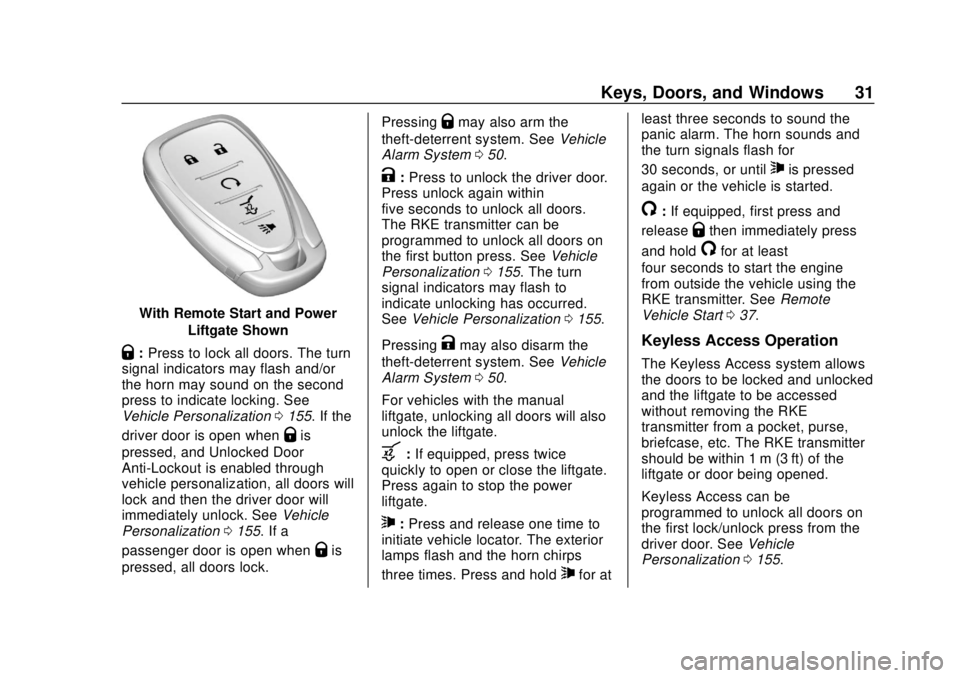
With Remote Start and PowerLiftgate Shown
Q:Press to lock all doors. The turn
signal indicators may flash and/or
the horn may sound on the second
press to indicate locking. See
Vehicle Personalization 0155. If the
driver door is open when
Qis
pressed, and Unlocked Door
Anti-Lockout is enabled through
vehicle personalization, all doors will
lock and then the driver door will
immediately unlock. See Vehicle
Personalization 0155. If a
passenger door is open when
Qis
pressed, all doors lock. Pressing
Qmay also arm the
theft-deterrent system. See Vehicle
Alarm System 050.
K:Press to unlock the driver door.
Press unlock again within
five seconds to unlock all doors.
The RKE transmitter can be
programmed to unlock all doors on
the first button press. See Vehicle
Personalization 0155. The turn
signal indicators may flash to
indicate unlocking has occurred.
See Vehicle Personalization 0155.
Pressing
Kmay also disarm the
theft-deterrent system. See Vehicle
Alarm System 050.
For vehicles with the manual
liftgate, unlocking all doors will also
unlock the liftgate.
b: If equipped, press twice
quickly to open or close the liftgate.
Press again to stop the power
liftgate.
7: Press and release one time to
initiate vehicle locator. The exterior
lamps flash and the horn chirps
three times. Press and hold
7for at least three seconds to sound the
panic alarm. The horn sounds and
the turn signals flash for
30 seconds, or until
7is pressed
again or the vehicle is started.
/: If equipped, first press and
release
Qthen immediately press
and hold
/for at least
four seconds to start the engine
from outside the vehicle using the
RKE transmitter. See Remote
Vehicle Start 037.
Keyless Access Operation
The Keyless Access system allows
the doors to be locked and unlocked
and the liftgate to be accessed
without removing the RKE
transmitter from a pocket, purse,
briefcase, etc. The RKE transmitter
should be within 1 m (3 ft) of the
liftgate or door being opened.
Keyless Access can be
programmed to unlock all doors on
the first lock/unlock press from the
driver door. See Vehicle
Personalization 0155.
Page 40 of 428
Chevrolet Traverse Owner Manual (GMNA-Localizing-U.S./Canada/Mexico-
12146157) - 2019 - CRC - 10/31/18
Keys, Doors, and Windows 39
To lock or unlock the doors from the
outside:
.Press
QorKon the Remote
Keyless Entry (RKE) transmitter.
See Remote Keyless Entry
(RKE) System Operation 030.
. Use the key in the driver door.
The key lock cylinder is covered
with a cap.
To lock or unlock the doors from the
inside:
. Press
QorKon the power door
lock switch.
. Push down on a door lock knob
to lock a door.
. Pull the door handle once to
unlock the door. Pull the handle
again to unlatch it. Keyless Access
If equipped, the RKE transmitter
must be within 1 m (3 ft) of the
liftgate or door being opened. Press
the button on the door handle to
open. See
“Keyless Access
Operation” inRemote Keyless Entry
(RKE) System Operation 030.
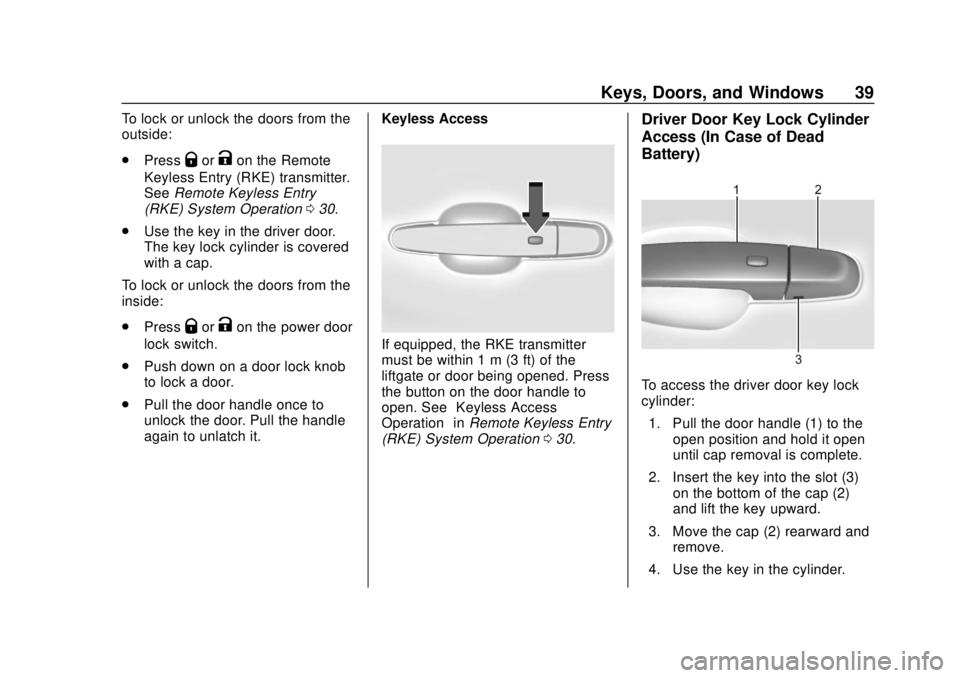
Driver Door Key Lock Cylinder
Access (In Case of Dead
Battery)
To access the driver door key lock
cylinder:
1. Pull the door handle (1) to the open position and hold it open
until cap removal is complete.
2. Insert the key into the slot (3) on the bottom of the cap (2)
and lift the key upward.
3. Move the cap (2) rearward and remove.
4. Use the key in the cylinder.
Page 42 of 428
Chevrolet Traverse Owner Manual (GMNA-Localizing-U.S./Canada/Mexico-
12146157) - 2019 - CRC - 10/31/18
Keys, Doors, and Windows 41
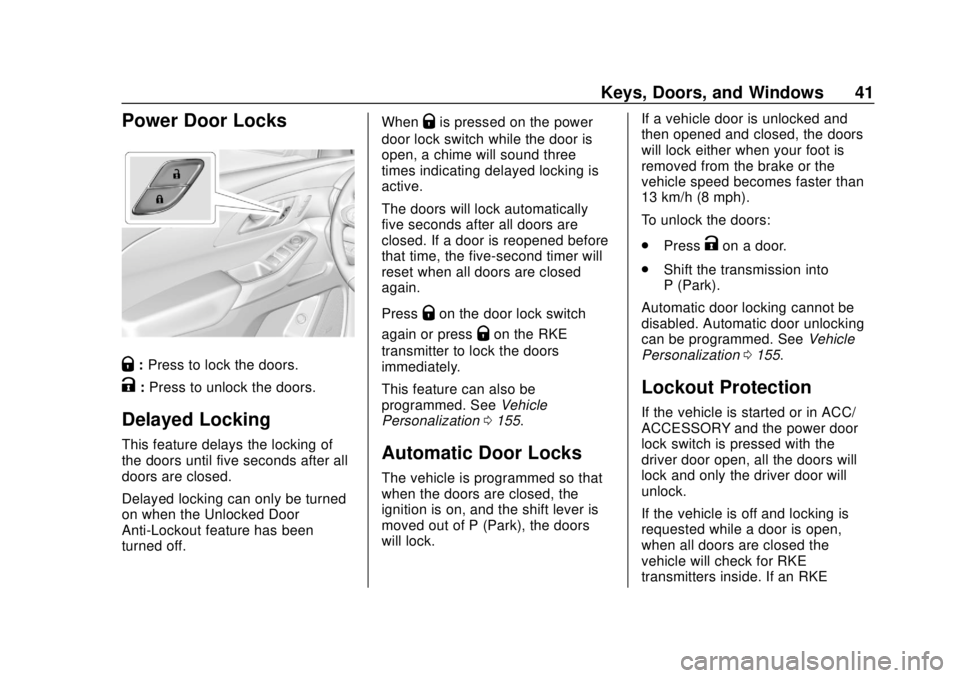
Power Door Locks
Q:Press to lock the doors.
K:Press to unlock the doors.
Delayed Locking
This feature delays the locking of
the doors until five seconds after all
doors are closed.
Delayed locking can only be turned
on when the Unlocked Door
Anti-Lockout feature has been
turned off. When
Qis pressed on the power
door lock switch while the door is
open, a chime will sound three
times indicating delayed locking is
active.
The doors will lock automatically
five seconds after all doors are
closed. If a door is reopened before
that time, the five-second timer will
reset when all doors are closed
again.
Press
Qon the door lock switch
again or press
Qon the RKE
transmitter to lock the doors
immediately.
This feature can also be
programmed. See Vehicle
Personalization 0155.
Automatic Door Locks
The vehicle is programmed so that
when the doors are closed, the
ignition is on, and the shift lever is
moved out of P (Park), the doors
will lock. If a vehicle door is unlocked and
then opened and closed, the doors
will lock either when your foot is
removed from the brake or the
vehicle speed becomes faster than
13 km/h (8 mph).
To unlock the doors:
.
Press
Kon a door.
. Shift the transmission into
P (Park).
Automatic door locking cannot be
disabled. Automatic door unlocking
can be programmed. See Vehicle
Personalization 0155.
Lockout Protection
If the vehicle is started or in ACC/
ACCESSORY and the power door
lock switch is pressed with the
driver door open, all the doors will
lock and only the driver door will
unlock.
If the vehicle is off and locking is
requested while a door is open,
when all doors are closed the
vehicle will check for RKE
transmitters inside. If an RKE
Page 43 of 428
Chevrolet Traverse Owner Manual (GMNA-Localizing-U.S./Canada/Mexico-
12146157) - 2019 - CRC - 10/31/18
42 Keys, Doors, and Windows
transmitter is detected and the
number of RKE transmitters inside
has not reduced, the driver door will
unlock and the horn will chirp three
times.
Lockout Protection can be manually
overridden with the driver door open
by pressing and holding
Qon the
power door lock switch.
Unlocked Door Anti-Lockout
If Unlocked Door Anti-Lockout is
turned on and the vehicle is off, the
driver door is open, and locking is
requested, all the doors will lock and
the driver door will remain open.
Press the button again to lock the
driver door. The Unlocked Door
Anti-Lockout feature can be turned
on or off. See Vehicle
Personalization 0155.
Safety Locks
The rear door safety locks prevent
passengers from opening the rear
doors from inside the vehicle.
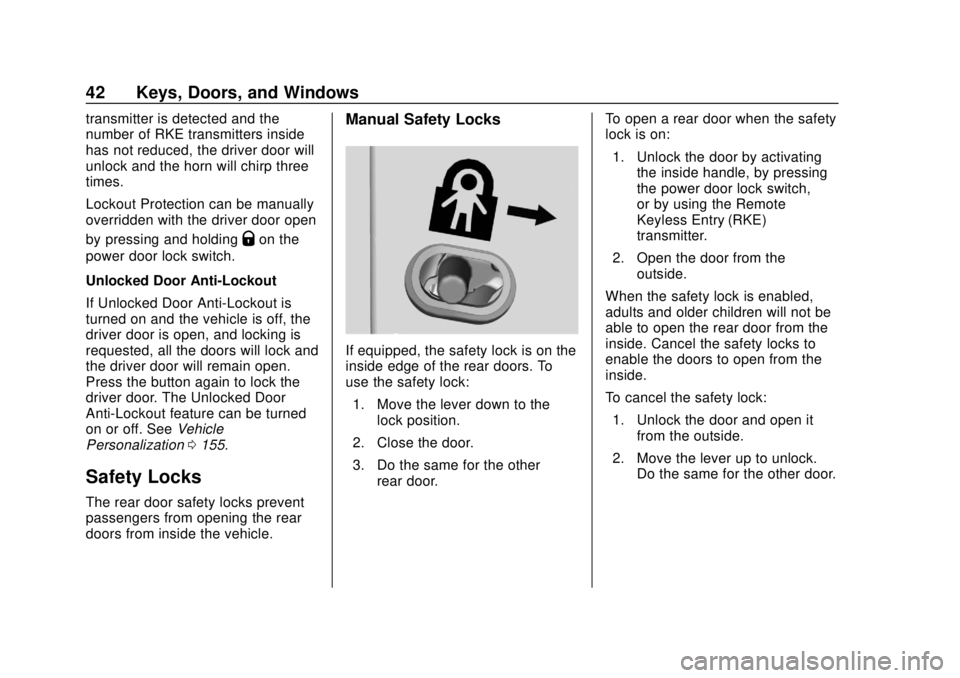
Manual Safety Locks
If equipped, the safety lock is on the
inside edge of the rear doors. To
use the safety lock:
1. Move the lever down to the lock position.
2. Close the door.
3. Do the same for the other rear door. To open a rear door when the safety
lock is on:
1. Unlock the door by activating the inside handle, by pressing
the power door lock switch,
or by using the Remote
Keyless Entry (RKE)
transmitter.
2. Open the door from the outside.
When the safety lock is enabled,
adults and older children will not be
able to open the rear door from the
inside. Cancel the safety locks to
enable the doors to open from the
inside.
To cancel the safety lock: 1. Unlock the door and open it from the outside.
2. Move the lever up to unlock. Do the same for the other door.
Page 44 of 428
Chevrolet Traverse Owner Manual (GMNA-Localizing-U.S./Canada/Mexico-
12146157) - 2019 - CRC - 10/31/18
Keys, Doors, and Windows 43
Doors
Liftgate
{Warning
Exhaust gases can enter the
vehicle if it is driven with the
liftgate or trunk/hatch open,
or with any objects that pass
through the seal between the
body and the trunk/hatch or
liftgate. Engine exhaust contains
carbon monoxide (CO) which
cannot be seen or smelled. It can
cause unconsciousness and even
death.
If the vehicle must be driven with
the liftgate or trunk/hatch open:. Close all of the windows.
. Fully open the air outlets on
or under the instrument
panel.
(Continued)
Warning (Continued)
.Adjust the climate control
system to a setting that
brings in only outside air
and set the fan speed to the
highest setting. See
“Climate Control Systems”
in the Index.
. If the vehicle is equipped
with a power liftgate, disable
the power liftgate function.
See Engine Exhaust 0232.
Caution
To avoid damage to the liftgate or
liftgate glass, make sure the area
above and behind the liftgate is
clear before opening it.
Manual Liftgate
To unlock the liftgate, pressKon
the power door lock switch or press
Kon the Remote Keyless Entry (RKE) transmitter twice within
five seconds. See
Remote Keyless
Entry (RKE) System Operation 030.
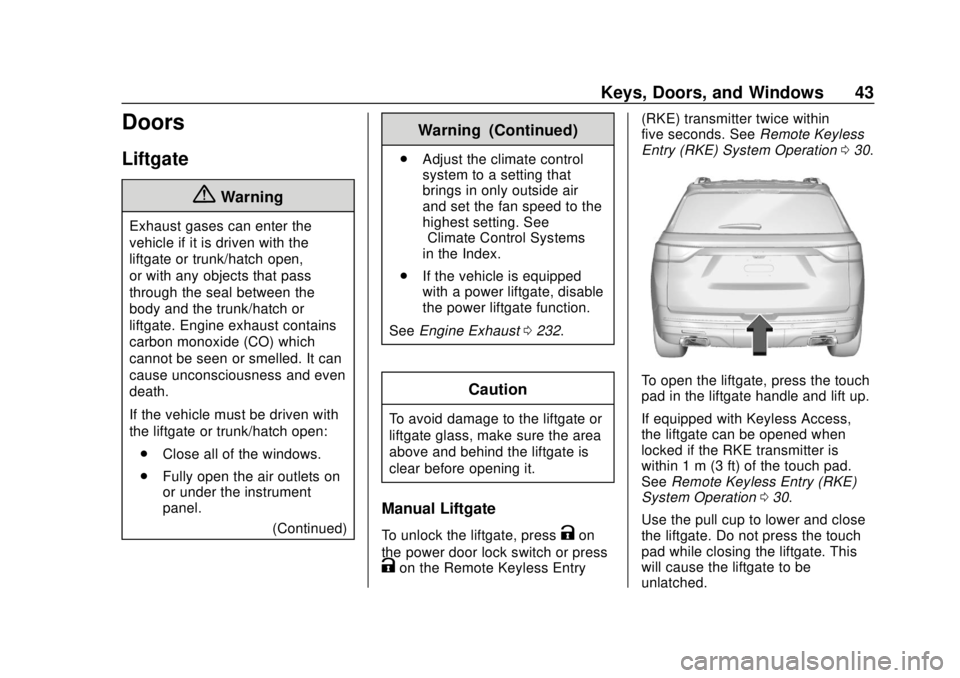
To open the liftgate, press the touch
pad in the liftgate handle and lift up.
If equipped with Keyless Access,
the liftgate can be opened when
locked if the RKE transmitter is
within 1 m (3 ft) of the touch pad.
See Remote Keyless Entry (RKE)
System Operation 030.
Use the pull cup to lower and close
the liftgate. Do not press the touch
pad while closing the liftgate. This
will cause the liftgate to be
unlatched.