Ext CHEVROLET TRAVERSE 2019 Owner's Guide
[x] Cancel search | Manufacturer: CHEVROLET, Model Year: 2019, Model line: TRAVERSE, Model: CHEVROLET TRAVERSE 2019Pages: 428, PDF Size: 6.28 MB
Page 51 of 428
Chevrolet Traverse Owner Manual (GMNA-Localizing-U.S./Canada/Mexico-
12146157) - 2019 - CRC - 10/31/18
50 Keys, Doors, and Windows
Vehicle Security
This vehicle has theft-deterrent
features; however, they do not make
the vehicle impossible to steal.
Vehicle Alarm System
This vehicle has an anti-theft alarm
system.
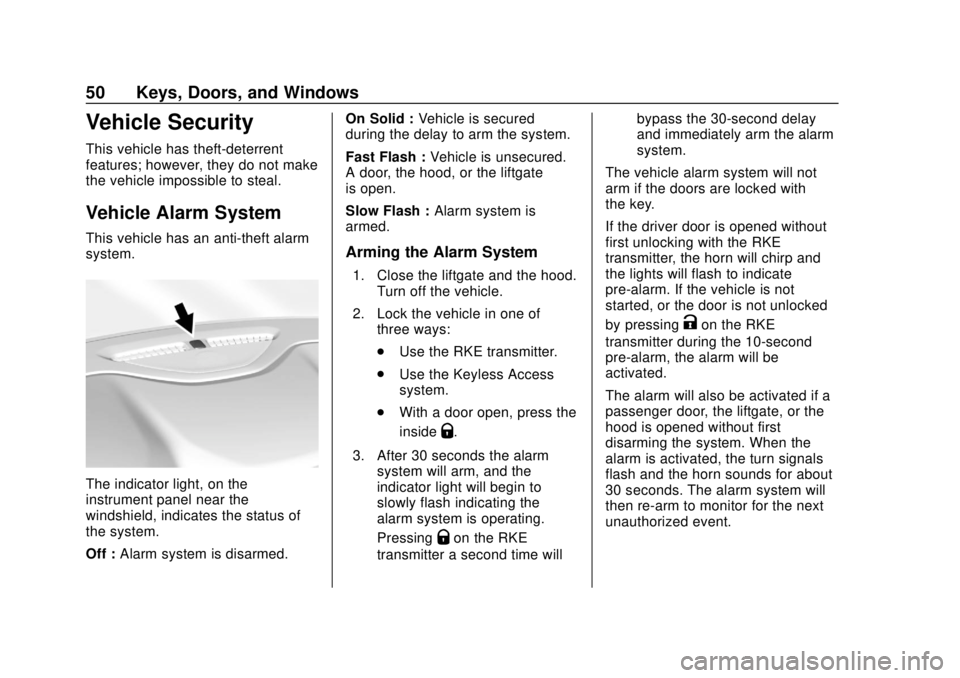
The indicator light, on the
instrument panel near the
windshield, indicates the status of
the system.
Off :Alarm system is disarmed. On Solid :
Vehicle is secured
during the delay to arm the system.
Fast Flash : Vehicle is unsecured.
A door, the hood, or the liftgate
is open.
Slow Flash : Alarm system is
armed.
Arming the Alarm System
1. Close the liftgate and the hood. Turn off the vehicle.
2. Lock the vehicle in one of three ways:
.Use the RKE transmitter.
. Use the Keyless Access
system.
. With a door open, press the
inside
Q.
3. After 30 seconds the alarm system will arm, and the
indicator light will begin to
slowly flash indicating the
alarm system is operating.
Pressing
Qon the RKE
transmitter a second time will bypass the 30-second delay
and immediately arm the alarm
system.
The vehicle alarm system will not
arm if the doors are locked with
the key.
If the driver door is opened without
first unlocking with the RKE
transmitter, the horn will chirp and
the lights will flash to indicate
pre-alarm. If the vehicle is not
started, or the door is not unlocked
by pressing
Kon the RKE
transmitter during the 10-second
pre-alarm, the alarm will be
activated.
The alarm will also be activated if a
passenger door, the liftgate, or the
hood is opened without first
disarming the system. When the
alarm is activated, the turn signals
flash and the horn sounds for about
30 seconds. The alarm system will
then re-arm to monitor for the next
unauthorized event.
Page 53 of 428
Chevrolet Traverse Owner Manual (GMNA-Localizing-U.S./Canada/Mexico-
12146157) - 2019 - CRC - 10/31/18
52 Keys, Doors, and Windows
be undamaged, try another
transmitter. Or, you may try placing
the transmitter in the cupholder in
the center console.
If the ignition mode will not change
with the other transmitter, or with the
transmitter in the cupholder, your
vehicle needs service. If the ignition
does change modes, the first
transmitter may be faulty. See your
dealer who can service the
theft-deterrent system and have a
new RKE transmitter programmed to
the vehicle.
It is possible for the immobilizer
system to learn new or replacement
RKE transmitters. Up to eight
transmitters can be programmed to
the vehicle. To program additional
transmitters, see“Programming
Transmitters to the Vehicle” under
Remote Keyless Entry (RKE)
System Operation 030.
Do not leave the key or device that
disarms or deactivates the
theft-deterrent system in the vehicle.Exterior Mirrors
Convex Mirrors
{Warning
A convex mirror can make things,
like other vehicles, look farther
away than they really are. If you
cut too sharply into the right lane,
you could hit a vehicle on the
right. Check the inside mirror or
glance over your shoulder before
changing lanes.
The passenger side mirror is convex
shaped. A convex mirror's surface is
curved so more can be seen from
the driver seat.
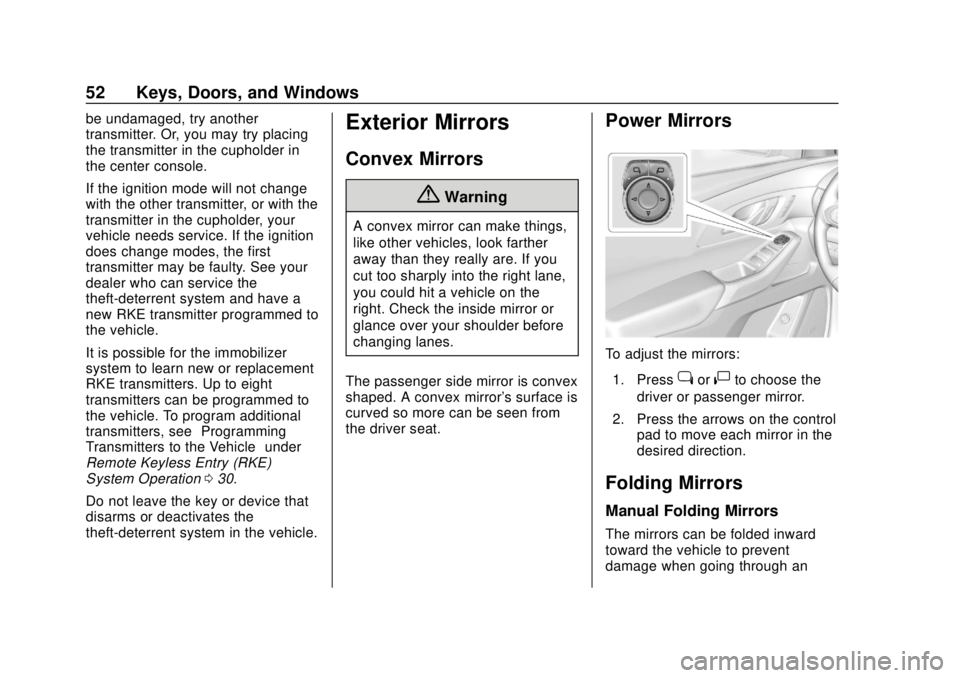
Power Mirrors
To adjust the mirrors: 1. Press
jor|to choose the
driver or passenger mirror.
2. Press the arrows on the control pad to move each mirror in the
desired direction.
Folding Mirrors
Manual Folding Mirrors
The mirrors can be folded inward
toward the vehicle to prevent
damage when going through an
Page 56 of 428
Chevrolet Traverse Owner Manual (GMNA-Localizing-U.S./Canada/Mexico-
12146157) - 2019 - CRC - 10/31/18
Keys, Doors, and Windows 55
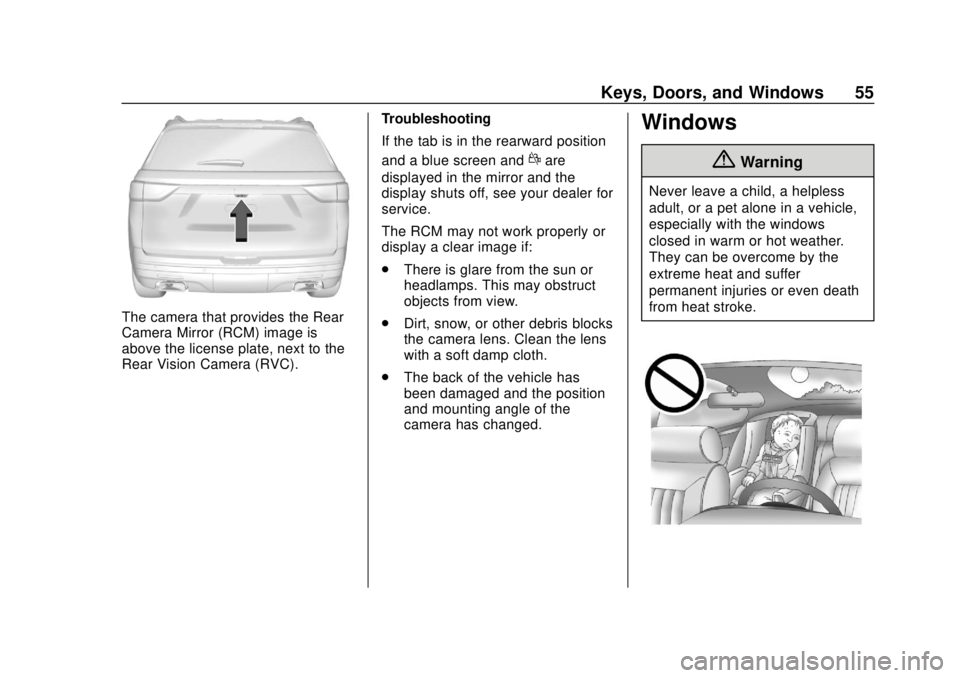
The camera that provides the Rear
Camera Mirror (RCM) image is
above the license plate, next to the
Rear Vision Camera (RVC).Troubleshooting
If the tab is in the rearward position
and a blue screen and
dare
displayed in the mirror and the
display shuts off, see your dealer for
service.
The RCM may not work properly or
display a clear image if:
. There is glare from the sun or
headlamps. This may obstruct
objects from view.
. Dirt, snow, or other debris blocks
the camera lens. Clean the lens
with a soft damp cloth.
. The back of the vehicle has
been damaged and the position
and mounting angle of the
camera has changed.
Windows
{Warning
Never leave a child, a helpless
adult, or a pet alone in a vehicle,
especially with the windows
closed in warm or hot weather.
They can be overcome by the
extreme heat and suffer
permanent injuries or even death
from heat stroke.
Page 58 of 428
Chevrolet Traverse Owner Manual (GMNA-Localizing-U.S./Canada/Mexico-
12146157) - 2019 - CRC - 10/31/18
Keys, Doors, and Windows 57
Window Express Movement
All windows can be opened without
holding the window switch. Press
the switch down fully and quickly
release to express open the
window.
If equipped, pull the window switch
up fully and quickly release to
express close the window.
Briefly press or pull the window
switch in the same direction to stop
that window’s express movement.
Window Automatic Reversal
System
The express-close feature will
reverse window movement if it
comes in contact with an object.
Extreme cold or ice could cause the
window to auto-reverse. The
window will operate normally after
the object or condition is removed.
Automatic Reversal System
Override
{Warning
If automatic reversal system
override is active, the window will
not reverse automatically. You or
others could be injured and the
window could be damaged.
Before using automatic reversal
system override, make sure that
all people and obstructions are
clear of the window path.
When the engine is on, override the
automatic reversal system by pulling
and holding the window switch if
conditions prevent it from closing.
Programming the Power
Windows
Programming may be necessary if
the vehicle battery has been
disconnected or discharged. If the
window is unable to express-up,
program each express-close
window: 1. Close all doors.
2. Turn the ignition on or to ACC/
ACCESSORY.
3. Partially open the window to be programmed. Then close it and
continue to pull the switch
briefly after the window has
fully closed.
4. Open the window and continue to press the switch briefly after
the window has fully opened.
Remote Window Operation
If equipped, this feature allows all
the windows to be opened remotely.
If enabled in vehicle personalization,
press and hold
Kon the RKE
transmitter. See Vehicle
Personalization 0155.
Page 59 of 428
Chevrolet Traverse Owner Manual (GMNA-Localizing-U.S./Canada/Mexico-
12146157) - 2019 - CRC - 10/31/18
58 Keys, Doors, and Windows
Sun Visors
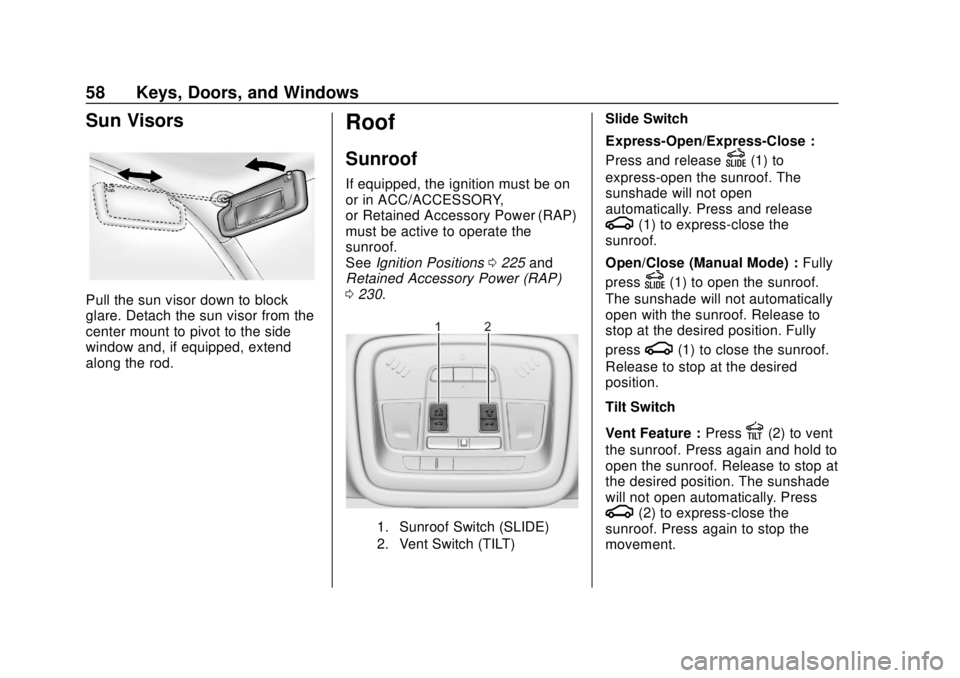
Pull the sun visor down to block
glare. Detach the sun visor from the
center mount to pivot to the side
window and, if equipped, extend
along the rod.
Roof
Sunroof
If equipped, the ignition must be on
or in ACC/ACCESSORY,
or Retained Accessory Power (RAP)
must be active to operate the
sunroof.
SeeIgnition Positions 0225 and
Retained Accessory Power (RAP)
0 230.
1. Sunroof Switch (SLIDE)
2. Vent Switch (TILT)
Slide Switch
Express-Open/Express-Close :
Press and release
D(1) to
express-open the sunroof. The
sunshade will not open
automatically. Press and release
g(1) to express-close the
sunroof.
Open/Close (Manual Mode) : Fully
press
D(1) to open the sunroof.
The sunshade will not automatically
open with the sunroof. Release to
stop at the desired position. Fully
press
g(1) to close the sunroof.
Release to stop at the desired
position.
Tilt Switch
Vent Feature : Press
E(2) to vent
the sunroof. Press again and hold to
open the sunroof. Release to stop at
the desired position. The sunshade
will not open automatically. Press
g(2) to express-close the
sunroof. Press again to stop the
movement.
Page 61 of 428
Chevrolet Traverse Owner Manual (GMNA-Localizing-U.S./Canada/Mexico-
12146157) - 2019 - CRC - 10/31/18
60 Seats and Restraints
Seats and
Restraints
Head Restraints
Head Restraints . . . . . . . . . . . . . . . 61
Front Seats
Seat Adjustment . . . . . . . . . . . . . . . 63
Power Seat Adjustment . . . . . . . . 63
Lumbar Adjustment . . . . . . . . . . . . 64
Reclining Seatbacks . . . . . . . . . . . 64
Memory Seats . . . . . . . . . . . . . . . . . 66
Heated and Ventilated FrontSeats . . . . . . . . . . . . . . . . . . . . . . . . . 69
Rear Seats
Rear Seats . . . . . . . . . . . . . . . . . . . . 70
Heated Rear Seats . . . . . . . . . . . . 73
Third Row Seats . . . . . . . . . . . . . . . 74
Seat Belts
Seat Belts . . . . . . . . . . . . . . . . . . . . . 76
How to Wear Seat BeltsProperly . . . . . . . . . . . . . . . . . . . . . . 77
Lap-Shoulder Belt . . . . . . . . . . . . . 79
Seat Belt Use During Pregnancy . . . . . . . . . . . . . . . . . . . . 83
Seat Belt Extender . . . . . . . . . . . . . 83
Safety System Check . . . . . . . . . . 83 Seat Belt Care . . . . . . . . . . . . . . . . . 84
Replacing Seat Belt System
Parts after a Crash . . . . . . . . . . . 84
Airbag System
Airbag System . . . . . . . . . . . . . . . . . 85
Where Are the Airbags? . . . . . . . 87
When Should an AirbagInflate? . . . . . . . . . . . . . . . . . . . . . . . 89
What Makes an Airbag Inflate? . . . . . . . . . . . . . . . . . . . . . . . 90
How Does an Airbag Restrain? . . . . . . . . . . . . . . . . . . . . . 90
What Will You See after an Airbag Inflates? . . . . . . . . . . . . . . 90
Passenger Sensing System . . . 92
Servicing the Airbag-Equipped Vehicle . . . . . . . . . . . . . . . . . . . . . . . 96
Adding Equipment to the Airbag-Equipped Vehicle . . . . . 96
Airbag System Check . . . . . . . . . . 97
Replacing Airbag System Parts after a Crash . . . . . . . . . . . . . . . . . 97
Child Restraints
Older Children . . . . . . . . . . . . . . . . . 98
Infants and Young Children . . . . 99
Child Restraint Systems . . . . . . 102
Where to Put the Restraint . . . 103
Lower Anchors and Tethers forChildren (LATCH System) . . . 105 Replacing LATCH System
Parts After a Crash . . . . . . . . . . 113
Securing Child Restraints (With the Seat Belt in the
Rear Seat) . . . . . . . . . . . . . . . . . . 113
Securing Child Restraints (With the Seat Belt in the
Front Seat) . . . . . . . . . . . . . . . . . . 115
Page 70 of 428
Chevrolet Traverse Owner Manual (GMNA-Localizing-U.S./Canada/Mexico-
12146157) - 2019 - CRC - 10/31/18
Seats and Restraints 69
Heated and Ventilated
Front Seats
{Warning
If temperature change or pain to
the skin cannot be felt, the seat
heater may cause burns. To
reduce the risk of burns, use care
when using the seat heater,
especially for long periods of
time. Do not place anything on
the seat that insulates against
heat, such as a blanket, cushion,
cover, or similar item. This may
cause the seat heater to
overheat. An overheated seat
heater may cause a burn or may
damage the seat.
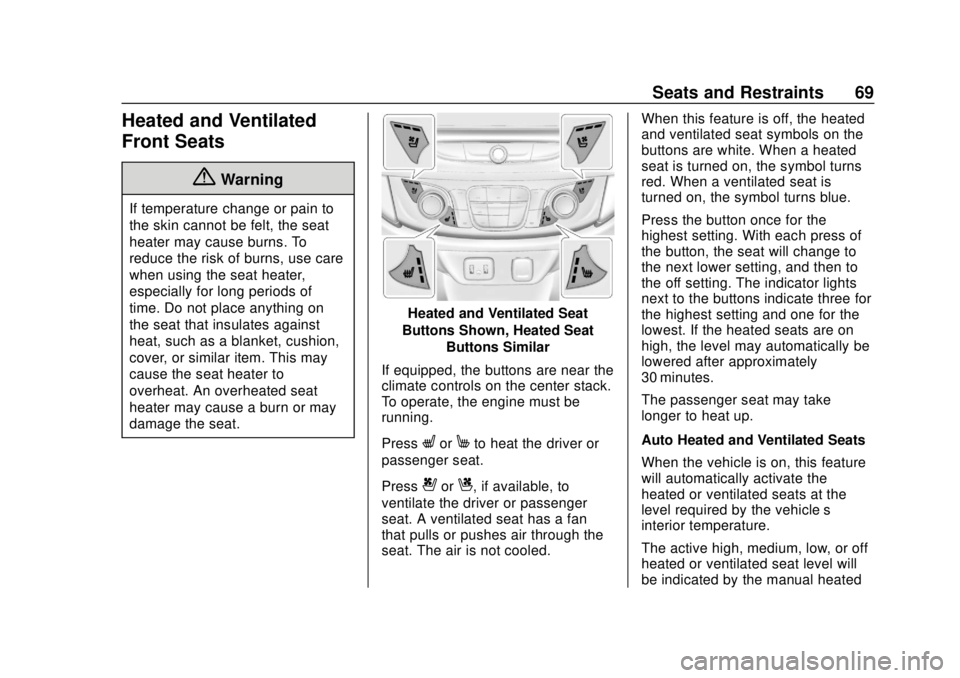
Heated and Ventilated Seat
Buttons Shown, Heated Seat Buttons Similar
If equipped, the buttons are near the
climate controls on the center stack.
To operate, the engine must be
running.
Press
LorMto heat the driver or
passenger seat.
Press
{orC, if available, to
ventilate the driver or passenger
seat. A ventilated seat has a fan
that pulls or pushes air through the
seat. The air is not cooled. When this feature is off, the heated
and ventilated seat symbols on the
buttons are white. When a heated
seat is turned on, the symbol turns
red. When a ventilated seat is
turned on, the symbol turns blue.
Press the button once for the
highest setting. With each press of
the button, the seat will change to
the next lower setting, and then to
the off setting. The indicator lights
next to the buttons indicate three for
the highest setting and one for the
lowest. If the heated seats are on
high, the level may automatically be
lowered after approximately
30 minutes.
The passenger seat may take
longer to heat up.
Auto Heated and Ventilated Seats
When the vehicle is on, this feature
will automatically activate the
heated or ventilated seats at the
level required by the vehicle’s
interior temperature.
The active high, medium, low, or off
heated or ventilated seat level will
be indicated by the manual heated
Page 75 of 428
Chevrolet Traverse Owner Manual (GMNA-Localizing-U.S./Canada/Mexico-
12146157) - 2019 - CRC - 10/31/18
74 Seats and Restraints
With the engine running, pressMor
Lto heat the left or right outboard
seat cushion. An indicator on the
climate control display appears
when this feature is on.
This feature turns on at the highest
setting. With each press of the
button, the heated seat changes to
the next lower setting, and then the
off setting. Three lights indicate the
highest setting, and one light
indicates the lowest. If the heated
seats are on high, the level may
automatically be lowered after
approximately 30 minutes.
Third Row Seats
{Warning
Using the third row seating
position while the second row is
folded, or pushed forward in the
entry position, could cause injury
in a sudden stop or crash. Be
sure to return the seat to the
(Continued)
Warning (Continued)
passenger seating position. Push
and pull on the seat to make sure
it is locked into place.
Folding the Seatback
Caution
Folding a rear seat with the seat
belts still fastened may cause
damage to the seat or the seat
belts. Always unbuckle the seat
belts and return them to their
normal stowed position before
folding a rear seat.
To fold the third row seatback: 1. Remove objects on the floor in front of or on the second row
seat, or in the seat tracks on
the floor. 2. If the second row seat is in the
full rear position, adjust it
forward to allow the third row
seat to fold fully flat.
3. Remove anything on or under the seat.
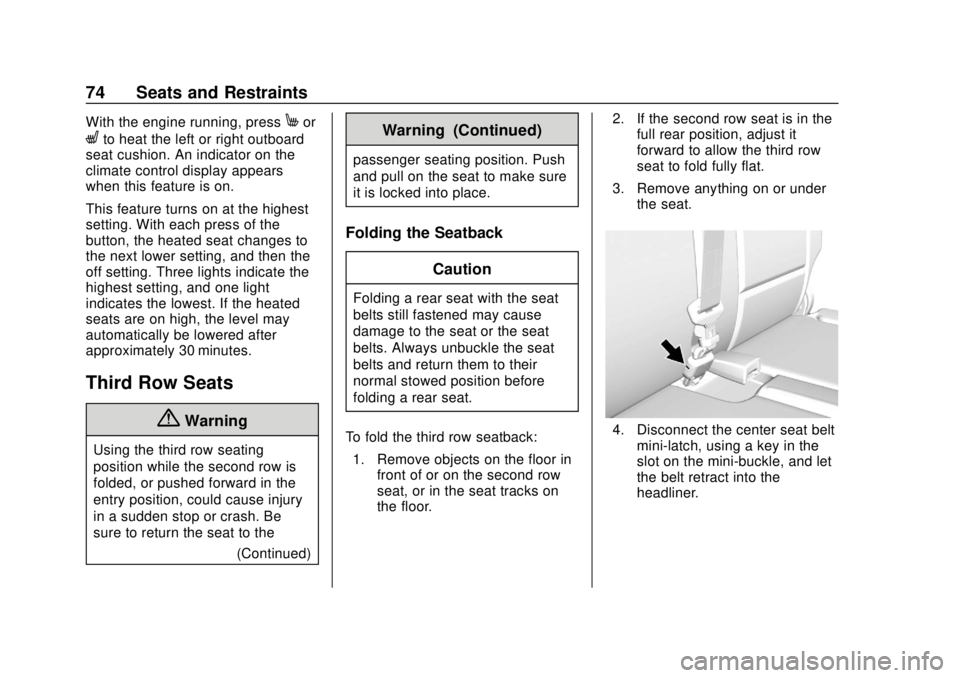
4. Disconnect the center seat beltmini-latch, using a key in the
slot on the mini-buckle, and let
the belt retract into the
headliner.
Page 77 of 428
Chevrolet Traverse Owner Manual (GMNA-Localizing-U.S./Canada/Mexico-
12146157) - 2019 - CRC - 10/31/18
76 Seats and Restraints
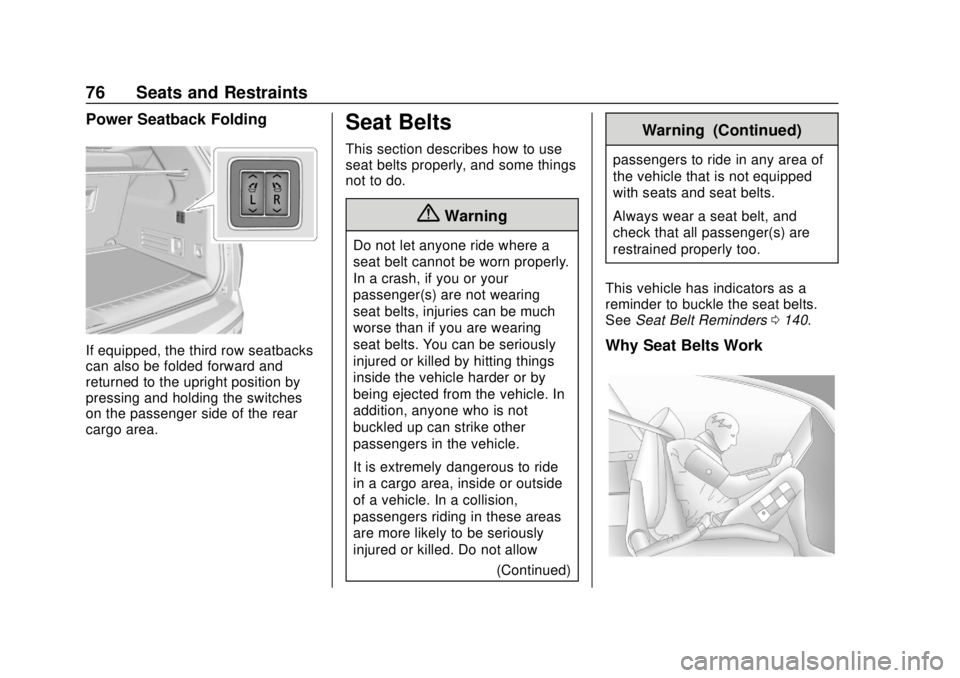
Power Seatback Folding
If equipped, the third row seatbacks
can also be folded forward and
returned to the upright position by
pressing and holding the switches
on the passenger side of the rear
cargo area.
Seat Belts
This section describes how to use
seat belts properly, and some things
not to do.
{Warning
Do not let anyone ride where a
seat belt cannot be worn properly.
In a crash, if you or your
passenger(s) are not wearing
seat belts, injuries can be much
worse than if you are wearing
seat belts. You can be seriously
injured or killed by hitting things
inside the vehicle harder or by
being ejected from the vehicle. In
addition, anyone who is not
buckled up can strike other
passengers in the vehicle.
It is extremely dangerous to ride
in a cargo area, inside or outside
of a vehicle. In a collision,
passengers riding in these areas
are more likely to be seriously
injured or killed. Do not allow(Continued)
Warning (Continued)
passengers to ride in any area of
the vehicle that is not equipped
with seats and seat belts.
Always wear a seat belt, and
check that all passenger(s) are
restrained properly too.
This vehicle has indicators as a
reminder to buckle the seat belts.
See Seat Belt Reminders 0140.
Why Seat Belts Work
Page 81 of 428
Chevrolet Traverse Owner Manual (GMNA-Localizing-U.S./Canada/Mexico-
12146157) - 2019 - CRC - 10/31/18
80 Seats and Restraints
Engaging the child restraint
locking feature in the front
outboard seating position may
affect the passenger sensing
system. SeePassenger
Sensing System 092.
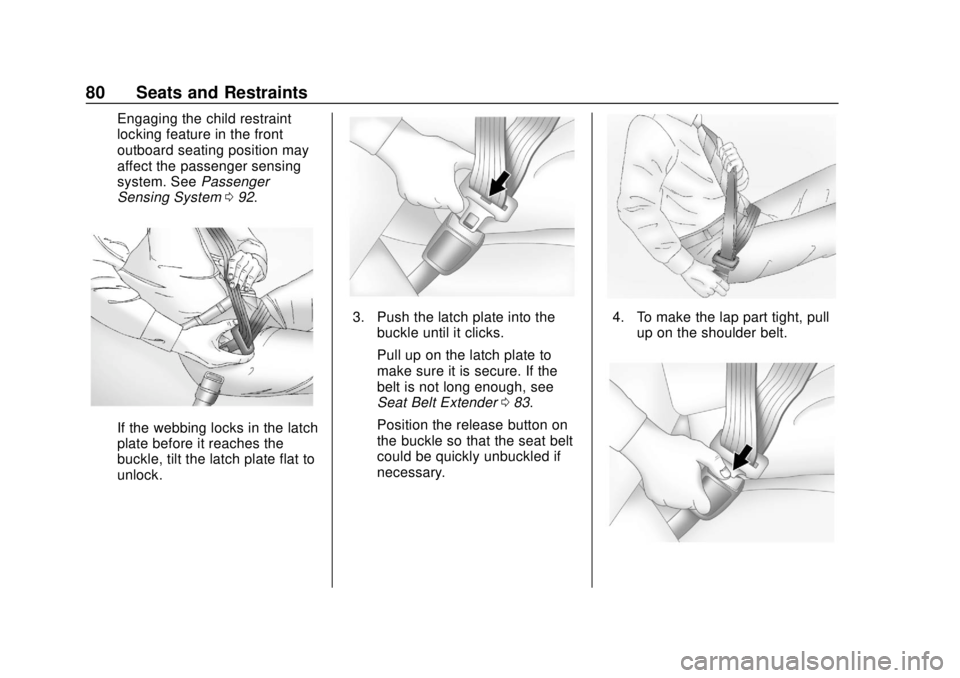
If the webbing locks in the latch
plate before it reaches the
buckle, tilt the latch plate flat to
unlock.
3. Push the latch plate into the
buckle until it clicks.
Pull up on the latch plate to
make sure it is secure. If the
belt is not long enough, see
Seat Belt Extender 083.
Position the release button on
the buckle so that the seat belt
could be quickly unbuckled if
necessary.4. To make the lap part tight, pull up on the shoulder belt.