Antenna CHEVROLET TRAVERSE 2019 Owner's Manual
[x] Cancel search | Manufacturer: CHEVROLET, Model Year: 2019, Model line: TRAVERSE, Model: CHEVROLET TRAVERSE 2019Pages: 428, PDF Size: 6.28 MB
Page 130 of 428
Chevrolet Traverse Owner Manual (GMNA-Localizing-U.S./Canada/Mexico-
12146157) - 2019 - CRC - 10/31/18
Instruments and Controls 129
System (GPS) antenna, StabiliTrak/
Electronic Stability Control (ESC),
and vehicle speed information.
The compass system is designed to
operate for a certain number of
miles or degrees of turn before
needing a signal from the GPS
satellites. When the compass
display shows CAL, drive the
vehicle for a short distance in an
open area where it can receive a
GPS signal. The compass system
will automatically determine when a
GPS signal is restored and provide
a heading again.
Clock
Base Radio
The infotainment system controls
are used to access the time and
date settings through the menu
system. SeeOperation0179 on
how to use the menu system.
Setting the Time and Date
When Auto Set is enabled the time
cannot be manually set. 1. Press
{, then touch
SETTINGS.
2. Touch Time and Date, then Set Time or Set Date.
3. Touch + or −to adjust the
value.
4. Touch
RorQto adjust AM or
PM for 12 hour format.
5. Touch
0.
Auto Set
Auto Set requires an active OnStar
or connected service plan.
If auto set is on, the time displayed
on the clock may not update
immediately when driving into a new
time zone.
1. Press
{, then touch
SETTINGS.
2. Touch Time and Date, then Auto Set.
3. Choose from the available selections.
4. Touch
0.
Setting the 12/24 Hour Format
1. Press{, then touch
SETTINGS.
2. Touch Time and Date, then select 12h or 24h format.
3. Touch
0.
Setting the Month and Day
Format
1. Press{, then touch
SETTINGS.
2. Touch Time and Date, then Set Date Format.
3. Select DD/MM/YYYY (day/ month/year), MM/DD/YYYY
(month/day/year), or YYYY/
MM/DD (year/month/day)
format.
4. Touch
0.
Uplevel Radio
The infotainment system controls
are used to access the time and
date settings through the menu
Page 177 of 428
Chevrolet Traverse Owner Manual (GMNA-Localizing-U.S./Canada/Mexico-
12146157) - 2019 - CRC - 10/31/18
176 Infotainment System
Infotainment
System
Introduction
Infotainment . . . . . . . . . . . . . . . . . . 176
Theft-Deterrent Feature . . . . . . 177
Overview . . . . . . . . . . . . . . . . . . . . . 178
Home Page . . . . . . . . . . . . . . . . . . 179
Operation . . . . . . . . . . . . . . . . . . . . . 179
Software Updates . . . . . . . . . . . . 180
Radio
AM-FM Radio . . . . . . . . . . . . . . . . 181
Satellite Radio . . . . . . . . . . . . . . . . 182
Radio Reception . . . . . . . . . . . . . . 184
Antenna . . . . . . . . . . . . . . . . . . . . . . 185
Multi-Band Antenna . . . . . . . . . . 185
Audio Players
Avoiding Untrusted MediaDevices . . . . . . . . . . . . . . . . . . . . . 185
USB Port . . . . . . . . . . . . . . . . . . . . . 185
Auxiliary Devices . . . . . . . . . . . . . 191
Phone
Bluetooth (Overview) . . . . . . . . . 192
Bluetooth (Infotainment
Controls) . . . . . . . . . . . . . . . . . . . . 193
Apple CarPlay and Android Auto . . . . . . . . . . . . . . . . 197
Hands-Free Phone . . . . . . . . . . . 198
Trademarks and License
Agreements
Trademarks and License Agreements . . . . . . . . . . . . . . . . . 200
Introduction
Infotainment
Base radio information is included in
this manual. See the infotainment
manual for information on other
available infotainment systems.
Read the following pages to
become familiar with these features.
{Warning
Taking your eyes off the road for
too long or too often while using
any infotainment feature can
cause a crash. You or others
could be injured or killed. Do not
give extended attention to
infotainment tasks while driving.
Limit your glances at the vehicle
displays and focus your attention
on driving. Use voice commands
whenever possible.
Page 186 of 428
Chevrolet Traverse Owner Manual (GMNA-Localizing-U.S./Canada/Mexico-
12146157) - 2019 - CRC - 10/31/18
Infotainment System 185
Cell Phone Usage
Cell phone usage, such as making
or receiving phone calls, charging,
or just having the phone on may
cause static interference in the
radio. Unplug the phone or turn it off
if this happens.
Antenna
The AM-FM antenna is integrated in
the liftgate spoiler and the liftgate
window defogger.
No maintenance or adjustments are
needed. Do not place loads on the
spoiler.
If the spoiler is replaced, be sure it
is replaced with the correct GM
parts for the best AM and FM
reception.Do not scratch the inside surface or
damage the lines in the glass. If the
inside surface is damaged, it could
interfere with radio reception.
If attaching a cell phone antenna to
the glass, attach it between the grid
lines.
Multi-Band Antenna
The multi-band antenna is on the
roof of the vehicle. The antenna is
used for OnStar, the SiriusXM
Satellite Radio Service System, and
GPS (Global Positioning System),
if the vehicle has these features.
Keep the antenna clear of
obstructions for clear reception.
If the vehicle has a sunroof, and it is
open, reception can also be
affected.
Audio Players
Avoiding Untrusted Media
Devices
When using media devices such as
CDs, DVDs, Blu-ray Discs, SD
cards, USB devices, and mobile
devices, consider the source.
Untrusted media devices could
contain files that affect system
operation or performance. Avoid use
if the content or origin cannot be
trusted.
USB Port
Using the USB Port
The infotainment system can play
music by connecting an auxiliary
device to the USB port.
USB Support
The USB ports are on the center
stack, and use the USB 2.0
standard. There is also a USB port
in the storage area behind the radio.
There are also charging only USB
Page 226 of 428
Chevrolet Traverse Owner Manual (GMNA-Localizing-U.S./Canada/Mexico-
12146157) - 2019 - CRC - 10/31/18
Driving and Operating 225
Caution (Continued)
breaking-in guideline every
time you get new brake
linings.
Following break-in, engine speed
and load can be gradually
increased.
Ignition Positions
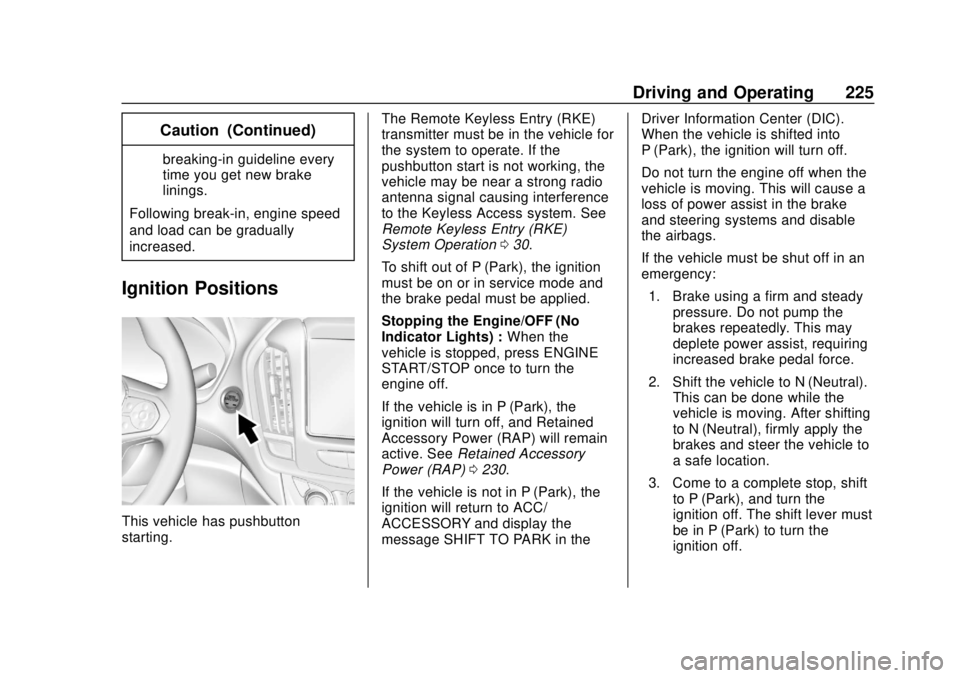
This vehicle has pushbutton
starting. The Remote Keyless Entry (RKE)
transmitter must be in the vehicle for
the system to operate. If the
pushbutton start is not working, the
vehicle may be near a strong radio
antenna signal causing interference
to the Keyless Access system. See
Remote Keyless Entry (RKE)
System Operation
030.
To shift out of P (Park), the ignition
must be on or in service mode and
the brake pedal must be applied.
Stopping the Engine/OFF (No
Indicator Lights) : When the
vehicle is stopped, press ENGINE
START/STOP once to turn the
engine off.
If the vehicle is in P (Park), the
ignition will turn off, and Retained
Accessory Power (RAP) will remain
active. See Retained Accessory
Power (RAP) 0230.
If the vehicle is not in P (Park), the
ignition will return to ACC/
ACCESSORY and display the
message SHIFT TO PARK in the Driver Information Center (DIC).
When the vehicle is shifted into
P (Park), the ignition will turn off.
Do not turn the engine off when the
vehicle is moving. This will cause a
loss of power assist in the brake
and steering systems and disable
the airbags.
If the vehicle must be shut off in an
emergency:
1. Brake using a firm and steady pressure. Do not pump the
brakes repeatedly. This may
deplete power assist, requiring
increased brake pedal force.
2. Shift the vehicle to N (Neutral). This can be done while the
vehicle is moving. After shifting
to N (Neutral), firmly apply the
brakes and steer the vehicle to
a safe location.
3. Come to a complete stop, shift to P (Park), and turn the
ignition off. The shift lever must
be in P (Park) to turn the
ignition off.
Page 408 of 428
Chevrolet Traverse Owner Manual (GMNA-Localizing-U.S./Canada/Mexico-
12146157) - 2019 - CRC - 11/1/18
OnStar 407
Languages
The vehicle can be programmed to
respond in multiple languages.
Press
Qand ask for an Advisor.
Advisors are available in English,
Spanish, and French. Available
languages may vary by country.
Potential Issues
OnStar cannot perform Remote
Door Unlock or Stolen Vehicle
Assistance after the vehicle has
been off continuously for 10 days
without an ignition cycle. If the
vehicle has not been started for
10 days, OnStar can contact
Roadside Assistance or a locksmith
to help gain access to the vehicle.
Global Positioning
System (GPS)
. Obstruction of the GPS can
occur in a large city with tall
buildings; in parking garages;
around airports; in tunnels and
underpasses; or in an area with
very dense trees. If GPS signals
are not available, the OnStar
system should still operate to call OnStar. However, OnStar
could have difficulty identifying
the exact location.
. In emergency situations, OnStar
can use the last stored GPS
location to send to emergency
responders.
A temporary loss of GPS can cause
loss of the ability to send a
Turn-by-Turn Navigation route. The
Advisor may give a verbal route or
may ask for a call back after the
vehicle is driven into an open area.
Cellular and GPS Antennas
Cellular reception is required for
OnStar to send remote signals to
the vehicle. Do not place items over
or near the antenna to prevent
blocking cellular and GPS signal
reception.
Unable to Connect to OnStar
Message
If there is limited cellular coverage
or the cellular network has reached
maximum capacity, this message may come on. Press
Qto try the
call again or try again after driving a
few miles into another cellular area.
Vehicle and Power Issues
OnStar services require a vehicle
electrical system, wireless service,
and GPS satellite technologies to be
available and operating for features
to function properly. These systems
may not operate if the battery is
discharged or disconnected.
Add-on Electrical Equipment
The OnStar system is integrated
into the electrical architecture of the
vehicle. Do not add any electrical
equipment. See Add-On Electrical
Equipment 0288. Added electrical
equipment may interfere with the
operation of the OnStar system and
cause it to not operate.
Vehicle Software Updates
OnStar or GM may remotely deliver
software updates or changes to the
vehicle without further notice or
consent. These updates or changes
may enhance or maintain safety,
Page 416 of 428

Chevrolet Traverse Owner Manual (GMNA-Localizing-U.S./Canada/Mexico-
12146157) - 2019 - CRC - 10/31/18
Index 415
IndexA
Accessories andModifications . . . . . . . . . . . . . . . . . . 291
Accessory Power . . . . . . . . . . . . . . . 230
Adaptive Cruise Control . . . . . . . . 248
Add-On Electrical Equipment . . . 288
Additional Information OnStar . . . . . . . . . . . . . . . . . . . . . . . 405
Additional Maintenance and Care . . . . . . . . . . . . . . . . . . . . . . 379
Adjustments Lumbar, Front Seats . . . . . . . . . . . . 64
Agreements Trademarks and License . . . . . 200
Air Cleaner/Filter, Engine . . . . . . . 300
Air Conditioning . . . . . . . . . . . 201, 204
Air Filter, Passenger Compartment . . . . . . . . . . . . . . . . . 207
Air Vents . . . . . . . . . . . . . . . . . . . . . . . 206
Airbag System
Check . . . . . . . . . . . . . . . . . . . . . . . . . . 97
How Does an AirbagRestrain? . . . . . . . . . . . . . . . . . . . . . 90
Passenger Sensing System . . . . 92
What Makes an Airbag
Inflate? . . . . . . . . . . . . . . . . . . . . . . . . 90
What Will You See after an Airbag Inflates? . . . . . . . . . . . . . . . 90 Airbag System (cont'd)
When Should an Airbag
Inflate? . . . . . . . . . . . . . . . . . . . . . . . . 89
Where Are the Airbags? . . . . . . . . 87
Airbags Adding Equipment to theVehicle . . . . . . . . . . . . . . . . . . . . . . . . 96
Passenger Status Indicator . . . 141
Readiness Light . . . . . . . . . . . . . . 141
Servicing Airbag-Equipped Vehicles . . . . . . . . . . . . . . . . . . . . . . . 96
System Check . . . . . . . . . . . . . . . . . . 85
Alarm Vehicle Security . . . . . . . . . . . . . . . . 50
Alert Lane Change . . . . . . . . . . . . . . . . . 267
Side Blind Zone (SBZA) . . . . . . 267
All-Season Tires . . . . . . . . . . . . . . . . 327
All-Wheel Drive . . . . . . . . . . . . 237, 310
AM-FM Radio . . . . . . . . . . . . . . . . . . . 181
Antenna . . . . . . . . . . . . . . . . . . . . . . . . 185
Multi-band . . . . . . . . . . . . . . . . . . . . 185
Antilock Brake System (ABS) . . . 237
Warning Light . . . . . . . . . . . . . . . . . 145
Appearance Care Exterior . . . . . . . . . . . . . . . . . . . . . . . 362
Interior . . . . . . . . . . . . . . . . . . . . . . . . 366
Page 422 of 428

Chevrolet Traverse Owner Manual (GMNA-Localizing-U.S./Canada/Mexico-
12146157) - 2019 - CRC - 10/31/18
Index 421
Lights (cont'd)Lane Keep Assist . . . . . . . . . . . . . 146
Low Fuel Warning . . . . . . . . . . . . 149
Seat Belt Reminders . . . . . . . . . . 140
Security . . . . . . . . . . . . . . . . . . . . . . 149
Service Electric Parking
Brake . . . . . . . . . . . . . . . . . . . . . . . 145
StabiliTrak OFF . . . . . . . . . . . . . . . 147
Tire Pressure . . . . . . . . . . . . . . . . . 148
Traction Control System (TCS)/StabiliTrak . . . . . . . . . . . . 147
Traction Off . . . . . . . . . . . . . . . . . . . 146
Locks Automatic Door . . . . . . . . . . . . . . . . . 41
Delayed Locking . . . . . . . . . . . . . . . . 41
Door . . . . . . . . . . . . . . . . . . . . . . . . . . . . 38
Lockout Protection . . . . . . . . . . . . . . 41
Power Door . . . . . . . . . . . . . . . . . . . . . 41
Safety . . . . . . . . . . . . . . . . . . . . . . . . . . 42
Loss of Control . . . . . . . . . . . . . . . . . 212
Low Fuel Warning Light . . . . . . . . . 149
Lower Anchors and Tethers for Children (LATCH
System) . . . . . . . . . . . . . . . . . . . . . . . 105
Lumbar Adjustment . . . . . . . . . . . . . . 64 Front Seats . . . . . . . . . . . . . . . . . . . . . 64M
MaintenanceRecords . . . . . . . . . . . . . . . . . . . . . . 384
Maintenance and Care Additional . . . . . . . . . . . . . . . . . . . . . 379
Maintenance Schedule . . . . . . . . . 373 Recommended Fluids andLubricants . . . . . . . . . . . . . . . . . . . 382
Malfunction Indicator Lamp . . . . . 142
Manual Mode . . . . . . . . . . . . . . . . . . . 235
Media Avoiding Untrusted Devices . . 185
Memory Features . . . . . . . . . . . . . . . . 12
Memory Seats . . . . . . . . . . . . . . . . . . . 66
Messages Engine Power . . . . . . . . . . . . . . . . 154
Vehicle . . . . . . . . . . . . . . . . . . . . . . . 154
Vehicle Speed . . . . . . . . . . . . . . . . 155
Mirror
Rear Camera . . . . . . . . . . . . . . . . . . . 54
Mirrors Automatic Dimming . . . . . . . . . . . . . 53
Automatic DimmingRearview . . . . . . . . . . . . . . . . . . . . . . 53
Convex . . . . . . . . . . . . . . . . . . . . . . . . . 52
Folding . . . . . . . . . . . . . . . . . . . . . . . . . 52
Heated . . . . . . . . . . . . . . . . . . . . . . . . . 53
Manual Rearview . . . . . . . . . . . . . . . 53 Mirrors (cont'd)
Power . . . . . . . . . . . . . . . . . . . . . . . . . . 52
Tilt in Reverse . . . . . . . . . . . . . . . . . . 53
Mirrors, Interior Rearview . . . . . . . . 53
Mode . . . . . . . . . . . . . . . . . . . . . . . . . . . 242
Driver Control . . . . . . . . . . . . . . . . . 242
Monitor System, Tire Pressure . . . . . . . . . . . . . . . . . . . . . . 335
Multi-band Antenna . . . . . . . . . . . . . 185
N
Navigation
Connected Services . . . . . . . . . . .411
New Vehicle Break-In . . . . . . . . . . . 224
O
Odometer . . . . . . . . . . . . . . . . . . . . . . . 138
Trip . . . . . . . . . . . . . . . . . . . . . . . . . . . 138
Off-Road . . . . . . . . . . . . . . . . . . . . . . . 212 Driving . . . . . . . . . . . . . . . . . . . . . . . . 212
Recovery . . . . . . . . . . . . . . . . . . . . . .211
Oil Engine . . . . . . . . . . . . . . . . . . . . . . . . 296
Engine Oil Life System . . . . . . . 298
Pressure Light . . . . . . . . . . . . . . . . 148
Older Children, Restraints . . . . . . . 98
Online Owner Center . . . . . . . . . . . 392
OnStar . . . . . . . . . . . . . . . . . . . . . . . . . 402