vent CHEVROLET TRAVERSE 2019 Owner's Manual
[x] Cancel search | Manufacturer: CHEVROLET, Model Year: 2019, Model line: TRAVERSE, Model: CHEVROLET TRAVERSE 2019Pages: 428, PDF Size: 6.28 MB
Page 6 of 428
Chevrolet Traverse Owner Manual (GMNA-Localizing-U.S./Canada/Mexico-
12146157) - 2019 - CRC - 10/31/18
In Brief 5
In Brief
Instrument Panel
Instrument Panel . . . . . . . . . . . . . . . . 6
Initial Drive Information
Initial Drive Information . . . . . . . . . . 8
Stop/Start System . . . . . . . . . . . . . . . 8
Remote Keyless Entry (RKE)System . . . . . . . . . . . . . . . . . . . . . . . . 8
Remote Vehicle Start . . . . . . . . . . . 9
Door Locks . . . . . . . . . . . . . . . . . . . . . 9
Liftgate . . . . . . . . . . . . . . . . . . . . . . . . 10
Windows . . . . . . . . . . . . . . . . . . . . . . . 11
Seat Adjustment . . . . . . . . . . . . . . . 11
Memory Features . . . . . . . . . . . . . . 12
Heated and Ventilated Seats . . . 13
Head Restraint Adjustment . . . . 13
Seat Belts . . . . . . . . . . . . . . . . . . . . . 14
Passenger Sensing System . . . 14
Mirror Adjustment . . . . . . . . . . . . . . 14
Steering Wheel Adjustment . . . . 15
Interior Lighting . . . . . . . . . . . . . . . . 16
Exterior Lighting . . . . . . . . . . . . . . . 17
Windshield Wiper/Washer . . . . . . 17
Climate Controls . . . . . . . . . . . . . . . 18
Transmission . . . . . . . . . . . . . . . . . . 18
Vehicle Features
Infotainment System . . . . . . . . . . . 19
Radio(s) . . . . . . . . . . . . . . . . . . . . . . . 19
Satellite Radio . . . . . . . . . . . . . . . . . 20
Portable Audio Devices . . . . . . . . 20
Bluetooth . . . . . . . . . . . . . . . . . . . . . . 20
Steering Wheel Controls . . . . . . . 20
Cruise Control . . . . . . . . . . . . . . . . . 21
Driver Information Center (DIC) . . . . . . . . . . . . . . . . . 22
Forward Collision Alert (FCA) System . . . . . . . . . . . . . . . . . . . . . . . 22
Forward Automatic Braking (FAB) . . . . . . . . . . . . . . . . 22
Front Pedestrian Braking (FPB) System . . . . . . . . . . . . . . . . . . . . . . . 23
Lane Keep Assist (LKA) . . . . . . . 23
Lane Change Alert (LCA) . . . . . . 23
Surround Vision . . . . . . . . . . . . . . . 23
Rear Vision Camera (RVC) . . . . 24
Rear Cross Traffic Alert (RCTA) System . . . . . . . . . . . . . . . . . . . . . . . 24
Park Assist . . . . . . . . . . . . . . . . . . . . 24
Power Outlets . . . . . . . . . . . . . . . . . 24
Universal Remote System . . . . . 24
Sunroof . . . . . . . . . . . . . . . . . . . . . . . . 25
Performance and Maintenance
Traction Control/Electronic Stability Control . . . . . . . . . . . . . . 25 Tire Pressure Monitor . . . . . . . . . . 26
Fuel (2.0L L4 Engine) . . . . . . . . . . 26
Fuel (3.6L V6 Engine) . . . . . . . . . . 26
E85 or FlexFuel . . . . . . . . . . . . . . . . 27
Engine Oil Life System . . . . . . . . 27
Driving for Better Fuel
Economy . . . . . . . . . . . . . . . . . . . . . 27
Roadside Assistance Program . . . . . . . . . . . . . . . . . . . . . . 28
Page 8 of 428

Chevrolet Traverse Owner Manual (GMNA-Localizing-U.S./Canada/Mexico-
12146157) - 2019 - CRC - 10/31/18
In Brief 7
1.Air Vents 0206.
2. Turn Signal Lever. See Turn
and Lane-Change Signals
0 171.
IntelliBeam
®System Button (If
Equipped). See Exterior Lamp
Controls 0167.
3. Instrument Cluster 0135.
Driver Information Center (DIC)
Display. See Driver Information
Center (DIC) 0151.
4. Windshield Wiper/Washer
0127.
Rear Window Wiper/Washer
0 128.
5. ENGINE START/STOP Button. See Ignition Positions 0225.
6. Hazard Warning Flashers
0171.
7. Light Sensor. See Automatic
Headlamp System 0170.
8. Infotainment 0176.
9. Dual Automatic Climate Control
System 0201. 10.
Heated and Ventilated Front
Seats 069 (If Equipped).
11. Power Outlets 0130.
12. Wireless Charging 0132 (If
Equipped).
13. USB Port 0185.
Auxiliary Jack. See Auxiliary
Devices 0191.
14. Traction Control/Electronic
Stability Control 0241.
Driver Mode Control Knob. See
Driver Mode Control 0242 (If
Equipped).
Lane Keep Assist (LKA) 0269
(If Equipped).
15. Electric Parking Brake 0238.
16. Shift Lever. See Automatic
Transmission 0233.
Manual Mode 0235.
17. Steering Wheel Controls 0125.
18. Horn 0126.
19. Steering Wheel Adjustment
0125 (Out of View). 20.
Cruise Control 0246.
Adaptive Cruise Control 0248
(If Equipped).
Heated Steering Wheel 0126
(If Equipped).
Forward Collision Alert (FCA)
System 0261 (If Equipped).
21. Hood Release. See Hood
0 292.
22. Fog Lamps 0172 (If
Equipped).
23. Data Link Connector (DLC) (Out of View). See Malfunction
Indicator Lamp (Check Engine
Light) 0142.
24. Exterior Lamp Controls 0167.
25. Instrument Panel Illumination
Control 0172.
Page 14 of 428
Chevrolet Traverse Owner Manual (GMNA-Localizing-U.S./Canada/Mexico-
12146157) - 2019 - CRC - 10/31/18
In Brief 13
Heated and Ventilated
Seats
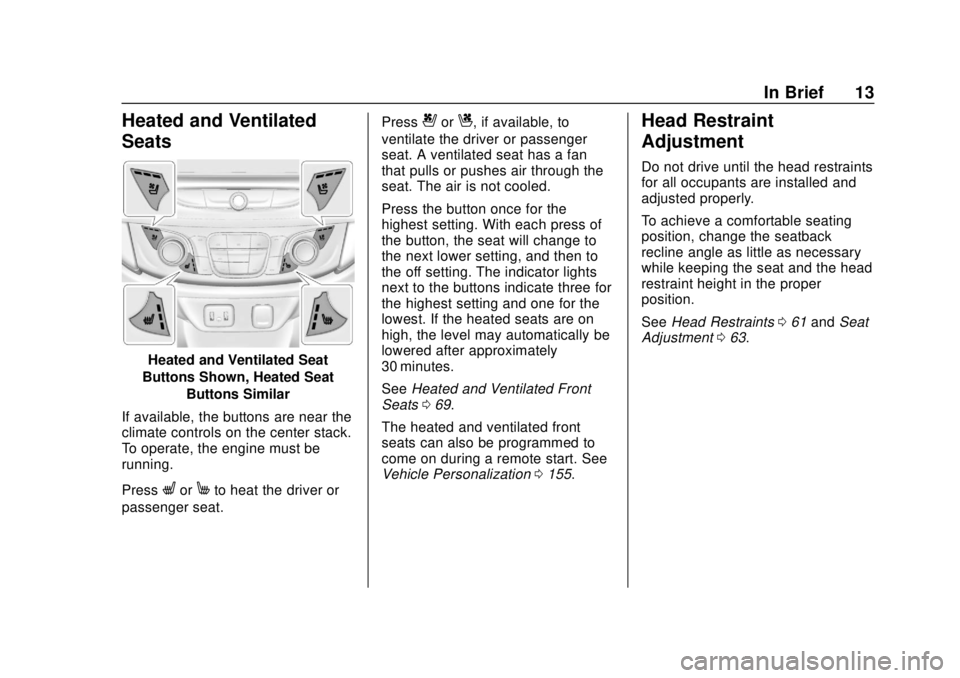
Heated and Ventilated Seat
Buttons Shown, Heated Seat Buttons Similar
If available, the buttons are near the
climate controls on the center stack.
To operate, the engine must be
running.
Press
LorMto heat the driver or
passenger seat. Press
{orC, if available, to
ventilate the driver or passenger
seat. A ventilated seat has a fan
that pulls or pushes air through the
seat. The air is not cooled.
Press the button once for the
highest setting. With each press of
the button, the seat will change to
the next lower setting, and then to
the off setting. The indicator lights
next to the buttons indicate three for
the highest setting and one for the
lowest. If the heated seats are on
high, the level may automatically be
lowered after approximately
30 minutes.
See Heated and Ventilated Front
Seats 069.
The heated and ventilated front
seats can also be programmed to
come on during a remote start. See
Vehicle Personalization 0155.Head Restraint
Adjustment
Do not drive until the head restraints
for all occupants are installed and
adjusted properly.
To achieve a comfortable seating
position, change the seatback
recline angle as little as necessary
while keeping the seat and the head
restraint height in the proper
position.
See Head Restraints 061 and Seat
Adjustment 063.
Page 19 of 428
Chevrolet Traverse Owner Manual (GMNA-Localizing-U.S./Canada/Mexico-
12146157) - 2019 - CRC - 10/31/18
18 In Brief
Climate Controls
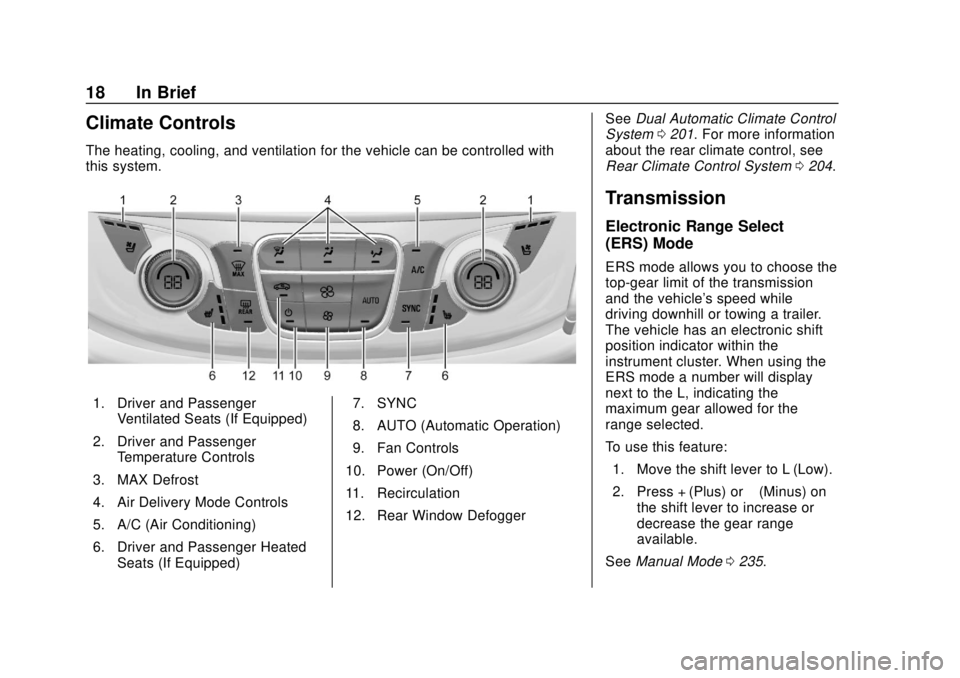
The heating, cooling, and ventilation for the vehicle can be controlled with
this system.
1. Driver and PassengerVentilated Seats (If Equipped)
2. Driver and Passenger Temperature Controls
3. MAX Defrost
4. Air Delivery Mode Controls
5. A/C (Air Conditioning)
6. Driver and Passenger Heated Seats (If Equipped) 7. SYNC
8. AUTO (Automatic Operation)
9. Fan Controls
10. Power (On/Off)
11. Recirculation
12. Rear Window Defogger See
Dual Automatic Climate Control
System 0201. For more information
about the rear climate control, see
Rear Climate Control System 0204.
Transmission
Electronic Range Select
(ERS) Mode
ERS mode allows you to choose the
top-gear limit of the transmission
and the vehicle's speed while
driving downhill or towing a trailer.
The vehicle has an electronic shift
position indicator within the
instrument cluster. When using the
ERS mode a number will display
next to the L, indicating the
maximum gear allowed for the
range selected.
To use this feature:
1. Move the shift lever to L (Low).
2. Press + (Plus) or −(Minus) on
the shift lever to increase or
decrease the gear range
available.
See Manual Mode 0235.
Page 20 of 428
Chevrolet Traverse Owner Manual (GMNA-Localizing-U.S./Canada/Mexico-
12146157) - 2019 - CRC - 10/31/18
In Brief 19
Vehicle Features
Infotainment System
Base radio information is included in
this manual. See the infotainment
manual for information on other
available infotainment systems.
Read the following pages to
become familiar with these features.
{Warning
Taking your eyes off the road for
too long or too often while using
any infotainment feature can
cause a crash. You or others
could be injured or killed. Do not
give extended attention to
infotainment tasks while driving.
Limit your glances at the vehicle
displays and focus your attention
on driving. Use voice commands
whenever possible.
The infotainment system has built-in
features intended to help avoid
distraction by disabling some functions when driving. These
functions may gray out when they
are unavailable. Many infotainment
features are also available through
the instrument cluster and steering
wheel controls.
Before driving:
.
Become familiar with the
operation, center stack controls,
and infotainment display
controls.
. Set up the audio by presetting
favorite stations, setting the
tone, and adjusting the
speakers.
. Set up phone numbers in
advance so they can be called
easily by pressing a single
control or by using a single voice
command if equipped with
Bluetooth phone capability.
. Set up your Bluetooth, CarPlay,
or Android Auto device. Some
devices will require a series of
setup steps to be taken or a
default app to be chosen prior to
using the feature. Not completing these steps could
prevent the feature from
functioning properly.
See Defensive Driving 0210.
To play the infotainment system with
the ignition off, see Retained
Accessory Power (RAP) 0230.
Radio(s)
O
:Press to turn the system on or
mute the audio. Press and hold to
turn the system off. Turn to increase
or decrease the volume.
g: Press and release to go to the
previous station, channel, or song.
Press and hold to fast seek the
previous strongest station, channel,
or song.
d: Press and release to go to the
next station, channel, or song.
Press and hold to fast seek the next
strongest station, channel, or song.
Source : Touch to choose between
available sources.
{: Press to go to the Home Page.
Page 26 of 428
Chevrolet Traverse Owner Manual (GMNA-Localizing-U.S./Canada/Mexico-
12146157) - 2019 - CRC - 10/31/18
In Brief 25
Sunroof
If equipped, the ignition must be on
or in ACC/ACCESSORY,
or Retained Accessory Power (RAP)
must be active to operate the
sunroof. SeeIgnition Positions
0 225 andRetained Accessory
Power (RAP) 0230.
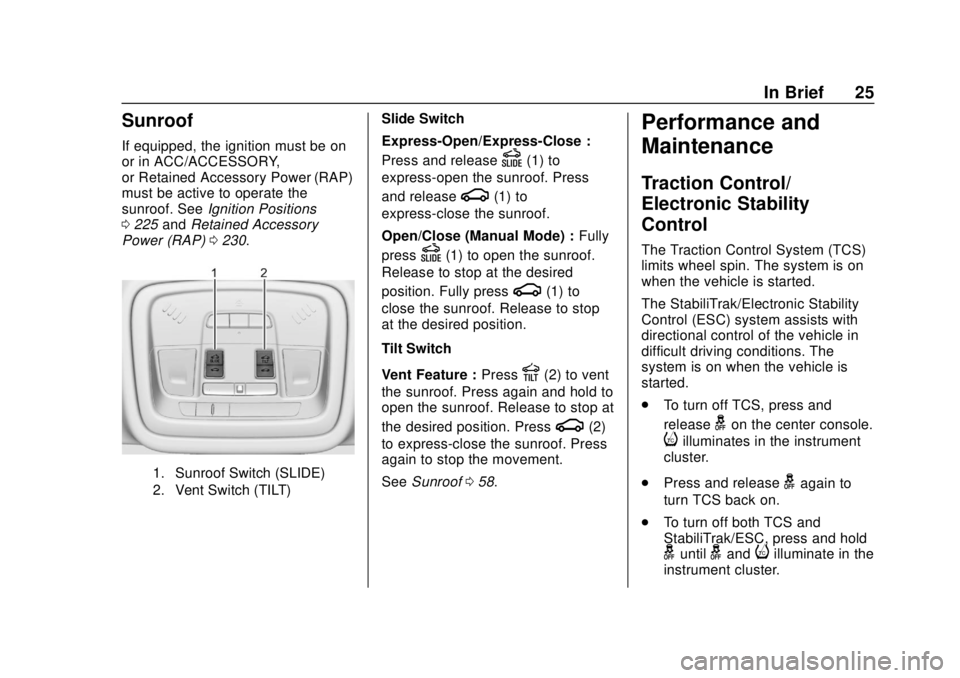
1. Sunroof Switch (SLIDE)
2. Vent Switch (TILT)
Slide Switch
Express-Open/Express-Close :
Press and release
D(1) to
express-open the sunroof. Press
and release
g(1) to
express-close the sunroof.
Open/Close (Manual Mode) : Fully
press
D(1) to open the sunroof.
Release to stop at the desired
position. Fully press
g(1) to
close the sunroof. Release to stop
at the desired position.
Tilt Switch
Vent Feature : Press
E(2) to vent
the sunroof. Press again and hold to
open the sunroof. Release to stop at
the desired position. Press
g(2)
to express-close the sunroof. Press
again to stop the movement.
See Sunroof 058.
Performance and
Maintenance
Traction Control/
Electronic Stability
Control
The Traction Control System (TCS)
limits wheel spin. The system is on
when the vehicle is started.
The StabiliTrak/Electronic Stability
Control (ESC) system assists with
directional control of the vehicle in
difficult driving conditions. The
system is on when the vehicle is
started.
.
To turn off TCS, press and
release
gon the center console.
iilluminates in the instrument
cluster.
. Press and release
gagain to
turn TCS back on.
. To turn off both TCS and
StabiliTrak/ESC, press and hold
guntilgandiilluminate in the
instrument cluster.
Page 38 of 428
Chevrolet Traverse Owner Manual (GMNA-Localizing-U.S./Canada/Mexico-
12146157) - 2019 - CRC - 10/31/18
Keys, Doors, and Windows 37
4. Insert the new battery, positiveside facing the back cover.
Push the battery down until it is
held in place. Replace with a
CR2032 or equivalent battery.
5. Snap the battery cover back on to the transmitter.
Remote Vehicle Start
If equipped, this feature allows the
engine to be started from outside of
the vehicle.
/:This button will be on the RKE
transmitter if the vehicle has remote
start.
The climate control system will use
the previous settings during a
remote start. The rear defog may
come on during a remote start
based on cold ambient conditions.
The rear fog indicator light does not
come on during a remote start.
If the vehicle has auto heated or
ventilated seats, they may come on
during a remote start. See Heated
and Ventilated Front Seats 069. If equipped with a remote start
heated steering wheel, it may
come on during a remote start when
it is cold outside, if enabled.
See
Heated Steering Wheel 0126
and Vehicle Personalization 0155.
Laws in some local communities
may restrict the use of remote
starters. For example, some laws
may require a person using remote
start to have the vehicle in view.
Check local regulations for any
requirements.
Do not use the remote start feature
if the vehicle is low on fuel. The
vehicle could run out of fuel.
Other conditions can affect the
performance of the transmitter. See
Remote Keyless Entry (RKE)
System 030.
Starting the Engine Using Remote
Start
1. Press and release
Qon the
RKE transmitter.
2. Immediately press and hold
/
for at least four seconds or until
the turn signal lamps flash. The turn signal lamps flashing
confirms the request to remote
start the vehicle has been
received.
During the remote start the
doors will be locked and the
parking lamps will remain on as
long as the engine is running.
The engine will shut off after
15 minutes unless a time
extension is done or the
vehicle is started.
3. With the RKE transmitter in the vehicle, press the brake pedal
and start the vehicle to drive.
Extending Engine Run Time
The engine run time can also be
extended by another 15 minutes,
if during the first 15 minutes
Steps 1 and 2 are repeated while
the engine is still running. An
extension can be requested
30 seconds after starting. This
provides a total of 30 minutes.
The remote start can only be
extended once.
Page 39 of 428
Chevrolet Traverse Owner Manual (GMNA-Localizing-U.S./Canada/Mexico-
12146157) - 2019 - CRC - 10/31/18
38 Keys, Doors, and Windows
When the remote start is extended,
the second 15-minute period is
added on to the first 15 minutes for
a total of 30 minutes.
A maximum of two remote starts,
or a remote start with an extension,
are allowed between ignition cycles.
The ignition must be turned on and
then off before the remote start
procedure can be used again.
Canceling a Remote Start
To cancel a remote start, do any of
the following:
.Press and hold
/until the
parking lamps turn off.
. Turn on the hazard warning
flashers.
. Turn the vehicle on and then off.
Conditions in Which Remote Start
Will Not Work
The remote start will not operate if
any of the following occur:
. An RKE transmitter is in the
vehicle.
. The hood is not closed. .
The ignition is in any mode other
than off.
. The hazard warning flashers
are on.
. There is an emission control
system malfunction.
. The engine coolant temperature
is too high.
. The oil pressure is low.
. Two remote vehicle starts or a
start with an extension have
already been used.
. The vehicle is not in P (Park).
Door Locks
{Warning
Unlocked doors can be
dangerous.
. Passengers, especially
children, can easily open
the doors and fall out of a
moving vehicle. The doors
can be unlocked and
(Continued)
Warning (Continued)
opened while the vehicle is
moving. The chance of
being thrown out of the
vehicle in a crash is
increased if the doors are
not locked. So, all
passengers should wear
seat belts properly and the
doors should be locked
whenever the vehicle is
driven.
. Young children who get into
unlocked vehicles may be
unable to get out. A child
can be overcome by
extreme heat and can suffer
permanent injuries or even
death from heat stroke.
Always lock the vehicle
whenever leaving it.
. Outsiders can easily enter
through an unlocked door
when you slow down or stop
the vehicle. Locking the
doors can help prevent this
from happening.
Page 41 of 428
Chevrolet Traverse Owner Manual (GMNA-Localizing-U.S./Canada/Mexico-
12146157) - 2019 - CRC - 10/31/18
40 Keys, Doors, and Windows
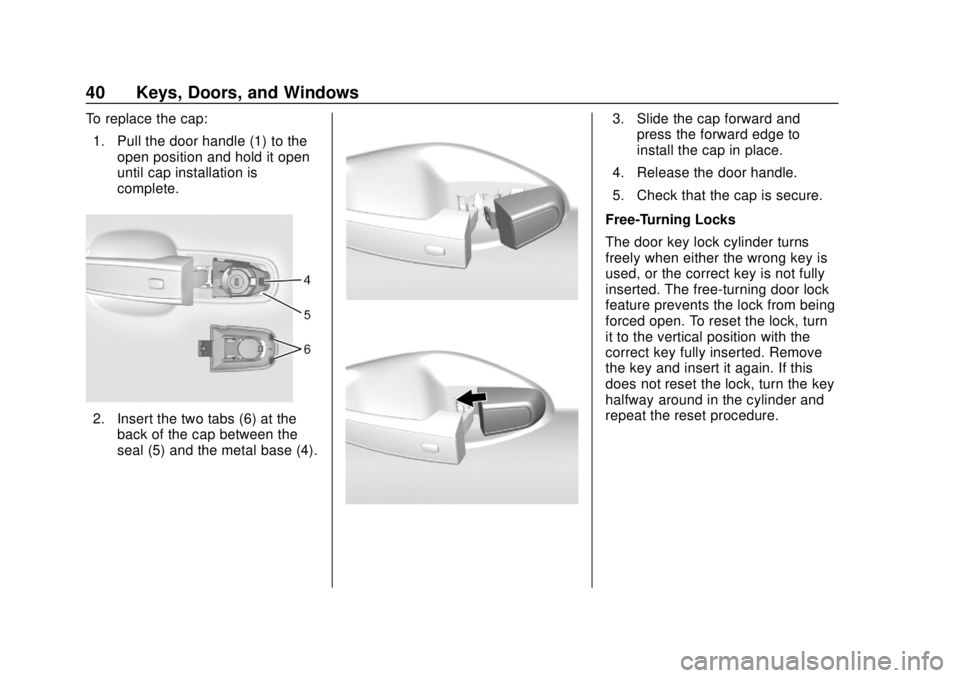
To replace the cap:1. Pull the door handle (1) to the open position and hold it open
until cap installation is
complete.
2. Insert the two tabs (6) at theback of the cap between the
seal (5) and the metal base (4).
3. Slide the cap forward andpress the forward edge to
install the cap in place.
4. Release the door handle.
5. Check that the cap is secure.
Free-Turning Locks
The door key lock cylinder turns
freely when either the wrong key is
used, or the correct key is not fully
inserted. The free-turning door lock
feature prevents the lock from being
forced open. To reset the lock, turn
it to the vertical position with the
correct key fully inserted. Remove
the key and insert it again. If this
does not reset the lock, turn the key
halfway around in the cylinder and
repeat the reset procedure.
Page 43 of 428
Chevrolet Traverse Owner Manual (GMNA-Localizing-U.S./Canada/Mexico-
12146157) - 2019 - CRC - 10/31/18
42 Keys, Doors, and Windows
transmitter is detected and the
number of RKE transmitters inside
has not reduced, the driver door will
unlock and the horn will chirp three
times.
Lockout Protection can be manually
overridden with the driver door open
by pressing and holding
Qon the
power door lock switch.
Unlocked Door Anti-Lockout
If Unlocked Door Anti-Lockout is
turned on and the vehicle is off, the
driver door is open, and locking is
requested, all the doors will lock and
the driver door will remain open.
Press the button again to lock the
driver door. The Unlocked Door
Anti-Lockout feature can be turned
on or off. See Vehicle
Personalization 0155.
Safety Locks
The rear door safety locks prevent
passengers from opening the rear
doors from inside the vehicle.
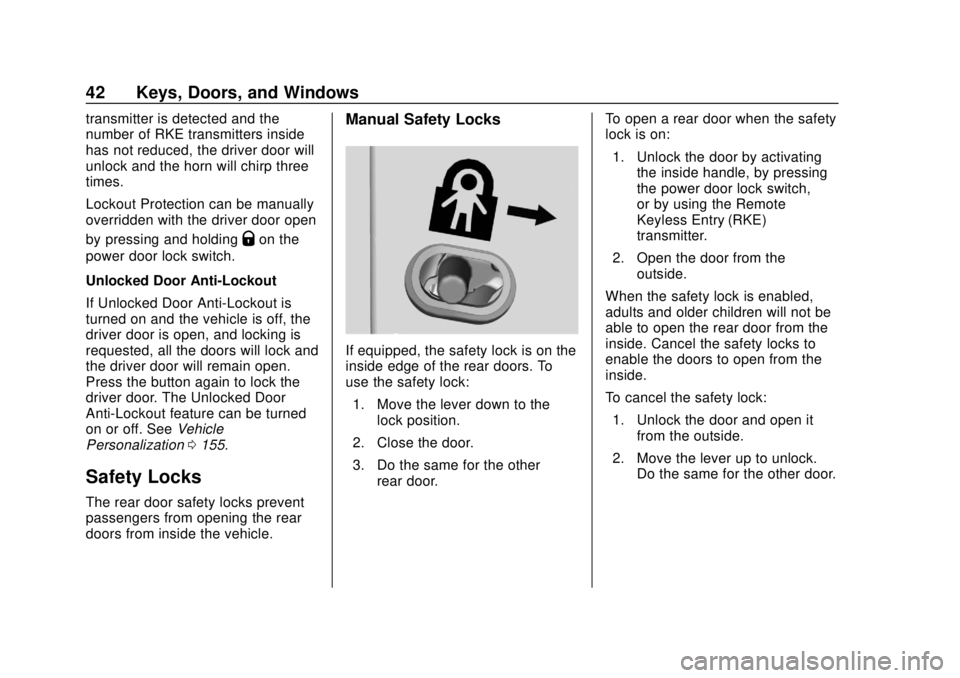
Manual Safety Locks
If equipped, the safety lock is on the
inside edge of the rear doors. To
use the safety lock:
1. Move the lever down to the lock position.
2. Close the door.
3. Do the same for the other rear door. To open a rear door when the safety
lock is on:
1. Unlock the door by activating the inside handle, by pressing
the power door lock switch,
or by using the Remote
Keyless Entry (RKE)
transmitter.
2. Open the door from the outside.
When the safety lock is enabled,
adults and older children will not be
able to open the rear door from the
inside. Cancel the safety locks to
enable the doors to open from the
inside.
To cancel the safety lock: 1. Unlock the door and open it from the outside.
2. Move the lever up to unlock. Do the same for the other door.