steering CHEVROLET TRAVERSE 2020 Owner's Manual
[x] Cancel search | Manufacturer: CHEVROLET, Model Year: 2020, Model line: TRAVERSE, Model: CHEVROLET TRAVERSE 2020Pages: 382, PDF Size: 5.87 MB
Page 135 of 382
Chevrolet Traverse Owner Manual (GMNA-Localizing-U.S./Canada/Mexico-
13527526) - 2020 - CRC - 9/5/19
134 Instruments and Controls
Information Displays
Driver Information
Center (DIC)
The DIC displays are shown in the
center of the instrument cluster in
the Info app. SeeInstrument Cluster
(Uplevel) 0115 or
Instrument Cluster (Base Level)
0 118. The displays show the status
of many vehicle systems. The
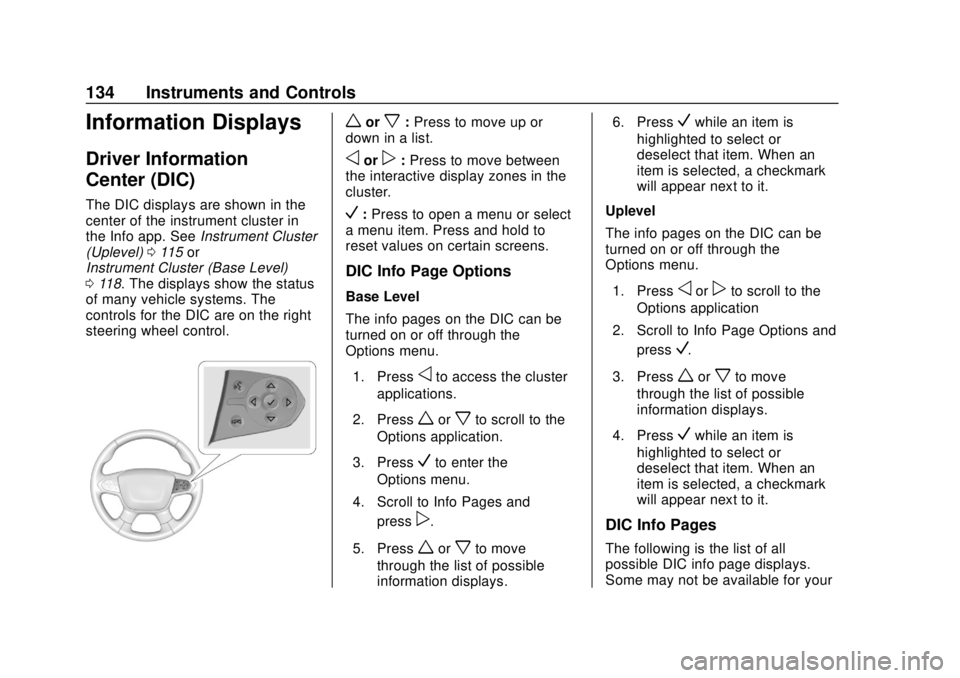
controls for the DIC are on the right
steering wheel control.
worx: Press to move up or
down in a list.
oorp: Press to move between
the interactive display zones in the
cluster.
V: Press to open a menu or select
a menu item. Press and hold to
reset values on certain screens.
DIC Info Page Options
Base Level
The info pages on the DIC can be
turned on or off through the
Options menu.
1. Press
oto access the cluster
applications.
2. Press
worxto scroll to the
Options application.
3. Press
Vto enter the
Options menu.
4. Scroll to Info Pages and press
p.
5. Press
worxto move
through the list of possible
information displays. 6. Press
Vwhile an item is
highlighted to select or
deselect that item. When an
item is selected, a checkmark
will appear next to it.
Uplevel
The info pages on the DIC can be
turned on or off through the
Options menu.
1. Press
oorpto scroll to the
Options application
2. Scroll to Info Page Options and press
V.
3. Press
worxto move
through the list of possible
information displays.
4. Press
Vwhile an item is
highlighted to select or
deselect that item. When an
item is selected, a checkmark
will appear next to it.
DIC Info Pages
The following is the list of all
possible DIC info page displays.
Some may not be available for your
Page 138 of 382

Chevrolet Traverse Owner Manual (GMNA-Localizing-U.S./Canada/Mexico-
13527526) - 2020 - CRC - 9/5/19
Instruments and Controls 137
Off Road Page :This page shows
the traction, four wheel drive, and
steering angle states. When the
front or rear axles are locked, a lock
icon is displayed.
Blank Page : Shows no
information.Vehicle Messages
Messages displayed on the DIC
indicate the status of the vehicle or
some action that may be needed to
correct a condition. Multiple
messages may appear one after
another.
The messages that do not require
immediate action can be
acknowledged and cleared by
pressing
V. The messages that
require immediate action cannot be
cleared until that action is
performed.
All messages should be taken
seriously; clearing the message
does not correct the problem.
If a SERVICE message appears,
see your dealer.
Follow the instructions given in the
messages. The system displays
messages regarding the following
topics:
. Service Messages
. Fluid Levels
. Vehicle Security .
Brakes
. Steering
. Ride Control Systems
. Driver Assistance Systems
. Cruise Control
. Lighting and Bulb Replacement
. Wiper/Washer Systems
. Doors and Windows
. Seat Belts
. Airbag Systems
. Engine and Transmission
. Tire Pressure
. Battery
Engine Power Messages
ENGINE POWER IS REDUCED
This message displays when the
vehicle's propulsion power is
reduced. A reduction in propulsion
power can affect the vehicle's ability
to accelerate. If this message is on,
but there is no observed reduction
in performance, proceed to your
destination. The performance may
Page 140 of 382
Chevrolet Traverse Owner Manual (GMNA-Localizing-U.S./Canada/Mexico-
13527526) - 2020 - CRC - 9/5/19
Instruments and Controls 139
Auto Cooled Seats
This setting automatically turns on
and regulates the ventilated seats
when the cabin temperature is
warm. SeeHeated and Ventilated
Front Seats 048.
Touch Off or On.
Auto Heated Seats
This setting automatically turns on
and regulates the heated seats
when the cabin temperature is cool.
The auto heated seats can be
turned off by using the heated seat
buttons on the center stack. See
Heated and Ventilated Front Seats
0 48.
If equipped with Auto Heated
Steering Wheel, this feature will turn
on when the Auto Heated Seats
turn on.
Touch Off or On.
Auto Defog
This setting automatically turns the
front defogger on when the engine
is started.
Touch Off or On. Auto Rear Defog
This setting automatically turns the
rear defogger on when the engine is
started.
Touch Off or On.
Collision / Detection Systems
Touch and the following may
display:
.
Forward Collision System
. Front Pedestrian Detection
. Park Assist
. Rear Cross Traffic Alert
. Adaptive Cruise Go Notifier
. Lane Change Alert
Forward Collision System
This setting controls the vehicle
response when detecting a vehicle
ahead of you. The Off setting
disables all FCA and AEB functions.
With the Alert and Brake setting,
both FCA and AEB are available.
The Alert setting disables AEB. See
Automatic Emergency Braking
(AEB) 0221. Touch Off, Alert, or Alert and Brake.
Front Pedestrian Detection
This feature may help avoid or
reduce the harm caused by
front-end crashes with nearby
pedestrians.
See
Front Pedestrian Braking (FPB)
System 0223.
Touch Off, Alert, or Alert and Brake.
Park Assist
If equipped, this allows the feature
to be turned on or off. See
Assistance Systems for Parking or
Backing 0215.
Touch Off or On.
Rear Cross Traffic Alert
This setting specifies if an alert will
display when the vehicle detects
approaching rear cross traffic when
in R (Reverse). See Assistance
Systems for Parking or Backing
0 215.
Touch Off or On.
Page 143 of 382
Chevrolet Traverse Owner Manual (GMNA-Localizing-U.S./Canada/Mexico-
13527526) - 2020 - CRC - 9/5/19
142 Instruments and Controls
SeeHeated and Ventilated Front
Seats 048 and
Remote Vehicle Start 016.
If equipped with Auto Heated
Steering Wheel, this feature will turn
on when the Remote Start Auto
Heated Seats turn on.
Touch Off or On.
Remote Window Operation
If equipped, this feature enables
remote operation of the windows
with the RKE transmitter. See
Remote Keyless Entry (RKE)
System Operation 08.
Touch Off or On.
Passive Door Unlock
This setting specifies which doors
unlock when using the button on the
driver door handle to unlock the
vehicle.
Touch Off, All Doors or Driver
Door Only. Passive Door Lock
This setting specifies if the vehicle
will automatically lock, or lock and
provide an alert after all the doors
are closed, and you walk away from
the vehicle with the RKE transmitter.
See
Remote Keyless Entry (RKE)
System Operation 08.
Touch Off, On with Horn
Chirp, or On.
Remote Left in Vehicle Alert
This feature sounds an alert when
the RKE transmitter is left in the
vehicle. This menu also enables
Remote No Longer in Vehicle Alert.
Touch Off or On.
Seating Position
Touch and the following may
display:
. Seat Entry Memory
. Seat Exit Memory
Seat Entry Memory
This feature automatically recalls
the previously stored 1 or 2 button
positions when the ignition is changed from off to on or ACC/
ACCESSORY. See
Memory Seats
0 45.
Touch Off or On.
Seat Exit Memory
This feature automatically recalls
the previously stored exit button
positions when the ignition is
changed from on or ACC/
ACCESSORY to off if the driver
door is open or opened. See
Memory Seats 045.
Touch Off or On.
Teen Driver
See “Teen Driver” under“Settings”
in the infotainment manual.
Valet Mode
This will lock the infotainment
system and steering wheel controls.
It may also limit access to vehicle
storage locations, if equipped.
To enable valet mode:
1. Enter a four-digit code on the keypad.
Page 148 of 382
Chevrolet Traverse Owner Manual (GMNA-Localizing-U.S./Canada/Mexico-
13527526) - 2020 - CRC - 9/5/19
Lighting 147
Lighting
Exterior Lighting
Exterior Lamp Controls . . . . . . . 147
Headlamp High/Low-BeamChanger . . . . . . . . . . . . . . . . . . . . 149
Flash-to-Pass . . . . . . . . . . . . . . . . 149
Daytime Running Lamps (DRL) . . . . . . . . . . . . . . . 149
Automatic Headlamp System . . . . . . . . . . . . . . . . . . . . . . 150
Hazard Warning Flashers . . . . . 151
Turn and Lane-Change Signals . . . . . . . . . . . . . . . . . . . . . . 151
Fog Lamps . . . . . . . . . . . . . . . . . . . 151
Interior Lighting
Instrument Panel Illumination Control . . . . . . . . . . . . . . . . . . . . . . 152
Courtesy Lamps . . . . . . . . . . . . . . 152
Dome Lamps . . . . . . . . . . . . . . . . . 152
Reading Lamps . . . . . . . . . . . . . . 153
Lighting Features
Entry Lighting . . . . . . . . . . . . . . . . 154
Exit Lighting . . . . . . . . . . . . . . . . . . 154
Battery Load Management . . . 154
Battery Power Protection . . . . . 155 Exterior Lighting Battery
Saver . . . . . . . . . . . . . . . . . . . . . . . 155
Exterior Lighting
Exterior Lamp Controls
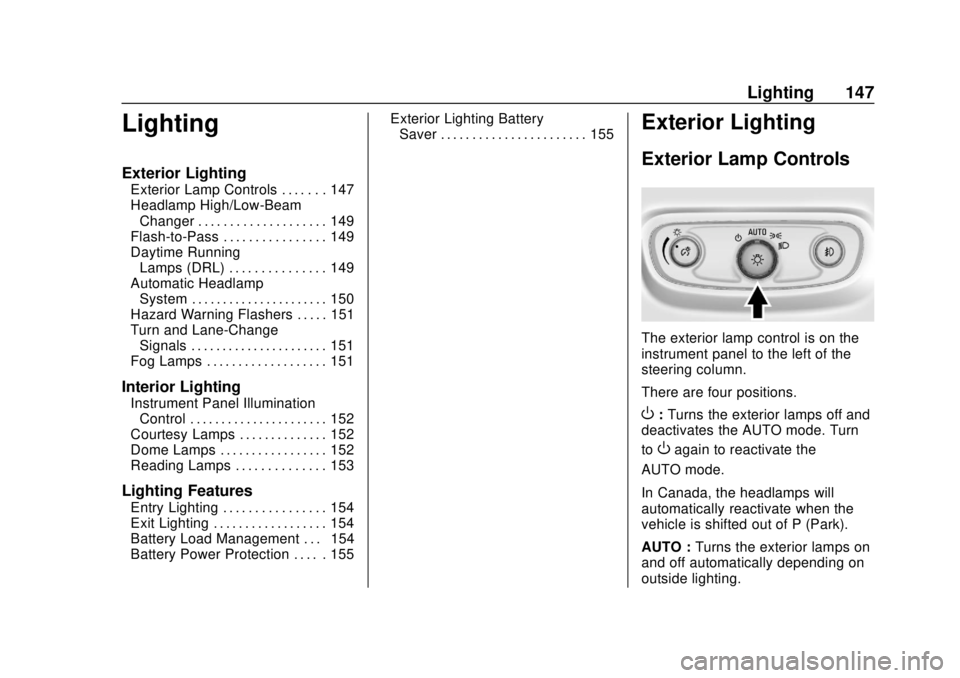
The exterior lamp control is on the
instrument panel to the left of the
steering column.
There are four positions.
O: Turns the exterior lamps off and
deactivates the AUTO mode. Turn
to
Oagain to reactivate the
AUTO mode.
In Canada, the headlamps will
automatically reactivate when the
vehicle is shifted out of P (Park).
AUTO : Turns the exterior lamps on
and off automatically depending on
outside lighting.
Page 152 of 382
Chevrolet Traverse Owner Manual (GMNA-Localizing-U.S./Canada/Mexico-
13527526) - 2020 - CRC - 9/5/19
Lighting 151
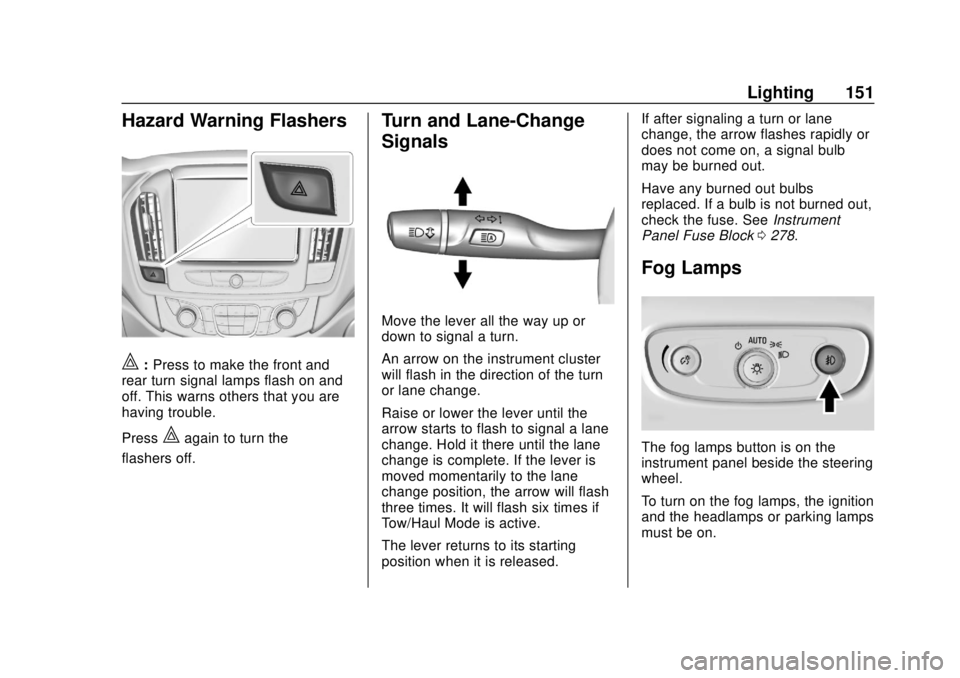
Hazard Warning Flashers
|:Press to make the front and
rear turn signal lamps flash on and
off. This warns others that you are
having trouble.
Press
|again to turn the
flashers off.
Turn and Lane-Change
Signals
Move the lever all the way up or
down to signal a turn.
An arrow on the instrument cluster
will flash in the direction of the turn
or lane change.
Raise or lower the lever until the
arrow starts to flash to signal a lane
change. Hold it there until the lane
change is complete. If the lever is
moved momentarily to the lane
change position, the arrow will flash
three times. It will flash six times if
Tow/Haul Mode is active.
The lever returns to its starting
position when it is released. If after signaling a turn or lane
change, the arrow flashes rapidly or
does not come on, a signal bulb
may be burned out.
Have any burned out bulbs
replaced. If a bulb is not burned out,
check the fuse. See
Instrument
Panel Fuse Block 0278.
Fog Lamps
The fog lamps button is on the
instrument panel beside the steering
wheel.
To turn on the fog lamps, the ignition
and the headlamps or parking lamps
must be on.
Page 153 of 382
Chevrolet Traverse Owner Manual (GMNA-Localizing-U.S./Canada/Mexico-
13527526) - 2020 - CRC - 9/5/19
152 Lighting
#:If equipped, press to turn on or
off. An indicator light on the
instrument cluster comes on when
the fog lamps are on.
Some localities have laws that
require the headlamps to be on
along with the fog lamps.Interior Lighting
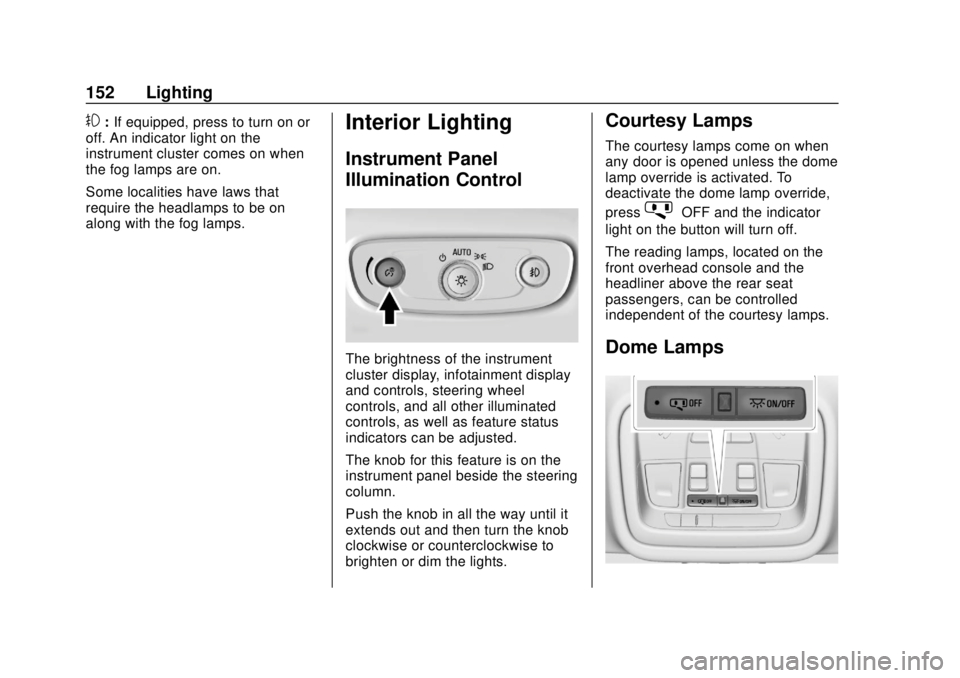
Instrument Panel
Illumination Control
The brightness of the instrument
cluster display, infotainment display
and controls, steering wheel
controls, and all other illuminated
controls, as well as feature status
indicators can be adjusted.
The knob for this feature is on the
instrument panel beside the steering
column.
Push the knob in all the way until it
extends out and then turn the knob
clockwise or counterclockwise to
brighten or dim the lights.
Courtesy Lamps
The courtesy lamps come on when
any door is opened unless the dome
lamp override is activated. To
deactivate the dome lamp override,
press
jOFF and the indicator
light on the button will turn off.
The reading lamps, located on the
front overhead console and the
headliner above the rear seat
passengers, can be controlled
independent of the courtesy lamps.
Dome Lamps
Page 162 of 382
Chevrolet Traverse Owner Manual (GMNA-Localizing-U.S./Canada/Mexico-
13527526) - 2020 - CRC - 9/5/19
Climate Controls 161
{orC:If equipped, press{or
Cto ventilate the driver or
passenger seat. See Heated and
Ventilated Front Seats 048.
Remote Start Climate Control
Operation : If equipped with remote
start, the climate control system
may run when the vehicle is started
remotely. The system will use the
defrost setting if it is cold outside or
turn on using the coldest settings if
it is hot outside. The rear defog may
come on during remote start based
on cold ambient conditions. The
rear defog indicator light does not
come on during a remote start.
If equipped, the heated seats will
turn on if it is cold outside or the
ventilated seats will turn on if it is
hot outside. The heated and
ventilated seat indicator lights may
not come on during a remote start.
If equipped, the heated steering
wheel will come on in a remote start
if it is cold outside. The heated steering wheel indicator light may
not come on. See
Vehicle
Personalization 0138, Remote
Vehicle Start 016, and Heated and
Ventilated Front Seats 048.
Sensor
The solar sensor, on top of the
instrument panel near the
windshield, monitors the solar heat.
The climate control system uses the
sensor information to adjust the
temperature, fan speed,
recirculation, and air delivery mode
for best comfort.
Do not cover the sensor; otherwise
the automatic climate control system
may not work properly.
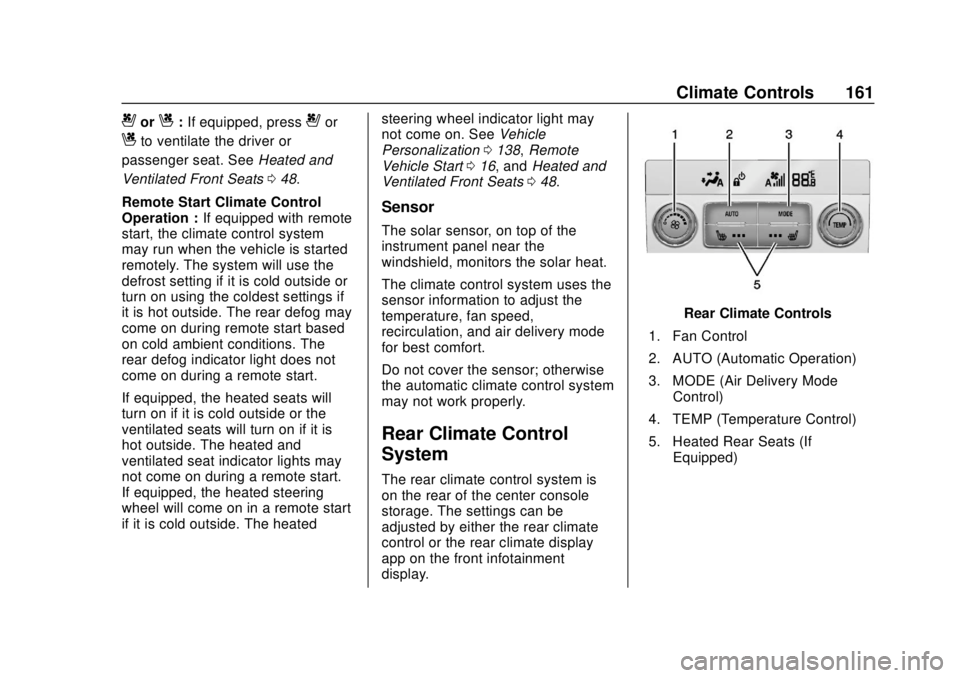
Rear Climate Control
System
The rear climate control system is
on the rear of the center console
storage. The settings can be
adjusted by either the rear climate
control or the rear climate display
app on the front infotainment
display.
Rear Climate Controls
1. Fan Control
2. AUTO (Automatic Operation)
3. MODE (Air Delivery Mode Control)
4. TEMP (Temperature Control)
5. Heated Rear Seats (If Equipped)
Page 166 of 382
Chevrolet Traverse Owner Manual (GMNA-Localizing-U.S./Canada/Mexico-
13527526) - 2020 - CRC - 9/5/19
Driving and Operating 165
Driving and
Operating
Driving Information
Driving for Better FuelEconomy . . . . . . . . . . . . . . . . . . . . 166
Distracted Driving . . . . . . . . . . . . 166
Defensive Driving . . . . . . . . . . . . . 167
Drunk Driving . . . . . . . . . . . . . . . . . 167
Control of a Vehicle . . . . . . . . . . . 168
Braking . . . . . . . . . . . . . . . . . . . . . . . 168
Steering . . . . . . . . . . . . . . . . . . . . . . 168
Off-Road Recovery . . . . . . . . . . . 169
Loss of Control . . . . . . . . . . . . . . . 169
Off-Road Driving . . . . . . . . . . . . . 170
Driving on Wet Roads . . . . . . . . 174
Hill and Mountain Roads . . . . . 175
Winter Driving . . . . . . . . . . . . . . . . 176
If the Vehicle Is Stuck . . . . . . . . 177
Vehicle Load Limits . . . . . . . . . . . 178
Starting and Operating
New Vehicle Break-In . . . . . . . . . 182
Ignition Positions . . . . . . . . . . . . . 182
Starting the Engine . . . . . . . . . . . 184
Stop/Start System . . . . . . . . . . . . 185
Engine Heater . . . . . . . . . . . . . . . . 186 Retained Accessory
Power (RAP) . . . . . . . . . . . . . . . . 187
Shifting Into Park . . . . . . . . . . . . . 188
Shifting out of Park . . . . . . . . . . . 189
Parking over Things That Burn . . . . . . . . . . . . . . . . . . . 189
Extended Parking . . . . . . . . . . . . 189
Engine Exhaust
Engine Exhaust . . . . . . . . . . . . . . 190
Running the Vehicle While Parked . . . . . . . . . . . . . . . . . . . . . . 190
Automatic Transmission
Automatic Transmission . . . . . . 191
Manual Mode . . . . . . . . . . . . . . . . . 193
Tow/Haul Mode . . . . . . . . . . . . . . . 194
Drive Systems
All-Wheel Drive . . . . . . . . . . . . . . . 194
Brakes
Antilock BrakeSystem (ABS) . . . . . . . . . . . . . . . 195
Electric Parking Brake . . . . . . . . 196
Brake Assist . . . . . . . . . . . . . . . . . . 197
Hill Start Assist (HSA) . . . . . . . . 197
Ride Control Systems
Traction Control/Electronic Stability Control . . . . . . . . . . . . . 198
Driver Mode Control . . . . . . . . . . 200
Cruise Control
Cruise Control . . . . . . . . . . . . . . . . 203
Adaptive Cruise Control . . . . . . 205
Driver Assistance Systems
Driver Assistance Systems . . . 213
Assistance Systems for
Parking or Backing . . . . . . . . . . 215
Assistance Systems for Driving . . . . . . . . . . . . . . . . . . . . . . 219
Forward Collision Alert (FCA) System . . . . . . . . . . . . . . . . . . . . . . 219
Automatic Emergency Braking (AEB) . . . . . . . . . . . . . . . 221
Front Pedestrian Braking (FPB) System . . . . . . . . . . . . . . . 223
Side Blind Zone Alert (SBZA) . . . . . . . . . . . . . . . . 225
Lane Change Alert (LCA) . . . . . 225
Lane Keep Assist (LKA) . . . . . . 227
Fuel
Top Tier Fuel . . . . . . . . . . . . . . . . . 229
Recommended Fuel . . . . . . . . . . 230
Prohibited Fuels . . . . . . . . . . . . . . 230
Fuels in Foreign Countries . . . 230
Fuel Additives . . . . . . . . . . . . . . . . 230
Filling the Tank . . . . . . . . . . . . . . . 231
Filling a Portable Fuel Container . . . . . . . . . . . . . . . . . . . 232
Page 167 of 382
Chevrolet Traverse Owner Manual (GMNA-Localizing-U.S./Canada/Mexico-
13527526) - 2020 - CRC - 9/5/19
166 Driving and Operating
Trailer Towing
General TowingInformation . . . . . . . . . . . . . . . . . . 233
Driving Characteristics and Towing Tips . . . . . . . . . . . . . . . . . 233
Trailer Towing . . . . . . . . . . . . . . . . 237
Towing Equipment . . . . . . . . . . . . 241
Trailer Sway Control (TSC) . . . 244
Conversions and Add-Ons
Add-On Electrical
Equipment . . . . . . . . . . . . . . . . . . 246
Driving Information
Driving for Better Fuel
Economy
Driving habits can affect fuel
mileage. Here are some driving tips
to get the best fuel economy
possible.
. Set the climate controls to the
desired temperature after the
engine is started, or turn them
off when not required.
. On AWD vehicles, see Driver
Mode Control 0200.
. Avoid fast starts and accelerate
smoothly.
. Brake gradually and avoid
abrupt stops.
. Avoid idling the engine for long
periods of time.
. When road and weather
conditions are appropriate, use
cruise control.
. Always follow posted speed
limits or drive more slowly when
conditions require. .
Keep vehicle tires properly
inflated.
. Combine several trips into a
single trip.
. Replace the vehicle's tires with
the same TPC Spec number
molded into the tire's sidewall
near the size.
. Follow recommended scheduled
maintenance.
Distracted Driving
Distraction comes in many forms
and can take your focus from the
task of driving. Exercise good
judgment and do not let other
activities divert your attention away
from the road. Many local
governments have enacted laws
regarding driver distraction. Become
familiar with the local laws in
your area.
To avoid distracted driving, keep
your eyes on the road, keep your
hands on the steering wheel, and
focus your attention on driving.