ignition CHEVROLET TRAVERSE 2021 Service Manual
[x] Cancel search | Manufacturer: CHEVROLET, Model Year: 2021, Model line: TRAVERSE, Model: CHEVROLET TRAVERSE 2021Pages: 369, PDF Size: 8.12 MB
Page 207 of 369
Chevrolet Traverse Owner Manual (GMNA-Localizing-U.S./Canada/Mexico-
14637844) - 2021 - CRC - 3/26/21
206 Driving and Operating
.Sunroof (during RAP this functionality will
be lost when any door is opened)
.Auxiliary Power Outlet
.Audio System
.OnStar System
Shifting Into Park
1. Hold the brake pedal down and set theparking brake. See Electric Parking Brake
0 212.
2. Move the shift lever into P (Park) by holding in the button on the shift lever
and pushing the shift lever all the way
toward the front of the vehicle.
3. Turn the ignition off.
Leaving the Vehicle with the Engine
Running
{Warning
It can be dangerous to leave the vehicle
with the engine running. It could
overheat and catch fire.
It is dangerous to get out of the vehicle
if the shift lever is not fully in P (Park)
with the parking brake firmly set. The
vehicle can roll. (Continued)
Warning (Continued)
Do not leave the vehicle when the engine
is running. If you have left the engine
running, the vehicle can move suddenly.
You or others could be injured. To be
sure the vehicle will not move, even
when you are on fairly level ground,
always set the parking brake and move
the shift lever to P (Park). SeeShifting
Into Park 0206. If you are towing a
trailer, see Driving Characteristics and
Towing Tips 0244.
If you have to leave the vehicle with the
engine running, be sure the vehicle is in
P (Park) and the parking brake is set before
you leave it. After you have moved the shift
lever into P (Park), hold the regular brake
pedal down. Then, see if you can move the
shift lever away from P (Park) without first
pressing the button.
If you can, it means that the shift lever was
not fully locked in P (Park).
Torque Lock
Torque lock is when the weight of the
vehicle puts too much force on the parking
pawl in the transmission. This happens when parking on a hill and shifting the
transmission into P (Park) is not done
properly and then it is difficult to shift out
of P (Park). To prevent torque lock, set the
parking brake and then shift into P (Park). To
find out how, see
“Shifting Into Park” listed
previously.
If torque lock does occur, your vehicle may
need to be pushed uphill by another vehicle
to relieve the parking pawl pressure, so you
can shift out of P (Park).
Shifting out of Park
The vehicle is equipped with an electronic
shift lock release system. The shift lock
release is designed to prevent movement of
the shift lever out of P (Park), unless the
ignition is on or in Service Mode and the
regular brake pedal is applied.
The shift lock release is always functional
except in the case of an uncharged or low
voltage (less than 9-volt) battery.
If the vehicle has an uncharged battery or a
battery with low voltage, try charging or
jump starting the battery. See Jump Starting
- North America 0309.
To shift out of P (Park): 1. Turn the ignition on.
Page 209 of 369

Chevrolet Traverse Owner Manual (GMNA-Localizing-U.S./Canada/Mexico-
14637844) - 2021 - CRC - 3/26/21
208 Driving and Operating
Warning (Continued)
If unusual fumes are detected or if it is
suspected that exhaust is coming into the
vehicle:
.Drive it only with the windows
completely down.
.Have the vehicle repaired immediately.
Never park the vehicle with the engine
running in an enclosed area such as a
garage or a building that has no fresh air
ventilation.
Running the Vehicle While Parked
It is better not to park with the engine
running.
If the vehicle is left with the engine running,
follow the proper steps to be sure the
vehicle will not move. See Shifting Into Park
0 206 and
Engine Exhaust 0207.
If parking on a hill and pulling a trailer, see
Driving Characteristics and Towing Tips
0 244.
Automatic Transmission
P : This position locks the drive wheels. Use
P (Park) when starting the engine because
the vehicle cannot move easily.
{Warning
It is dangerous to get out of the vehicle
if the shift lever is not fully in P (Park)
with the parking brake firmly set. The
vehicle can roll.
Do not leave the vehicle when the engine
is running. If you have left the engine
running, the vehicle can move suddenly.
You or others could be injured. To be
(Continued)
Warning (Continued)
sure the vehicle will not move, even
when you are on fairly level ground,
always set the parking brake and move
the shift lever to P (Park). SeeShifting
Into Park 0206 and
Driving Characteristics and Towing Tips
0 244.
Make sure the shift lever is fully in P (Park)
before starting the engine. The vehicle has
an automatic transmission shift lock control
system. With the ignition on, fully apply the
regular brake, then press the button on the
shift lever before shifting from P (Park).
If you cannot shift out of P (Park), ease
pressure on the shift lever, then push the
shift lever all the way into P (Park) as you
maintain brake application. Then press the
shift lever button and move the shift lever
into another gear. See Shifting out of Park
0 206.
R : Use this gear to back up.
Page 214 of 369
Chevrolet Traverse Owner Manual (GMNA-Localizing-U.S./Canada/Mexico-
14637844) - 2021 - CRC - 3/26/21
Driving and Operating 213
EPB Release
To release the EPB:1. Turn the ignition on or to ACC/ ACCESSORY.
2. Apply and hold the brake pedal.
3. Press the EPB switch momentarily.
The EPB is released when the red parking
brake status light is off.
If the amber service parking brake warning
light is on, release the EPB by pressing and
holding the EPB switch. Continue to hold the
switch until the red parking brake status
light is off. If either light stays on after
release is attempted, see your dealer.
Caution
Driving with the parking brake on can
overheat the brake system and cause
premature wear or damage to brake
system parts. Make sure that the parking
brake is fully released and the brake
warning light is off before driving.
If you are towing a trailer and parking on a
hill, see Driving Characteristics and Towing
Tips 0244.
Automatic EPB Release
The EPB will automatically release if the
vehicle is running, placed into gear, and an
attempt is made to drive away. Avoid rapid
acceleration when the EPB is applied, to
preserve parking brake lining life.
Brake Assist
Brake Assist detects rapid brake pedal
applications due to emergency braking
situations and provides additional braking to
activate the Antilock Brake System (ABS) if
the brake pedal is not pushed hard enough
to activate ABS normally. Minor noise, brake
pedal pulsation, and/or pedal movement
during this time may occur. Continue to
apply the brake pedal as the driving
situation dictates. Brake Assist disengages
when the brake pedal is released.
Hill Start Assist (HSA)
{Warning
Do not rely on the HSA feature. HSA does
not replace the need to pay attention
and drive safely. You may not hear or
feel alerts or warnings provided by this
system. Failure to use proper care when
(Continued)
Warning (Continued)
driving may result in injury, death,
or vehicle damage. SeeDefensive Driving
0 189.
When the vehicle is stopped on a grade, Hill
Start Assist (HSA) prevents the vehicle from
rolling in an unintended direction during the
transition from brake pedal release to
accelerator pedal apply. The brakes release
when the accelerator pedal is applied. If the
accelerator pedal is not applied within a few
minutes, the Electric Parking Brake will
apply. The brakes may also release under
other conditions. Do not rely on HSA to hold
the vehicle.
HSA is available when the vehicle is facing
uphill in a forward gear, or when facing
downhill in R (Reverse). The vehicle must
come to a complete stop on a grade for HSA
to activate.
Page 217 of 369
Chevrolet Traverse Owner Manual (GMNA-Localizing-U.S./Canada/Mexico-
14637844) - 2021 - CRC - 3/26/21
216 Driving and Operating
Rotate the Driver Mode Control knob to
make a mode selection. The icons on the
knob will illuminate to indicate which mode
is active. A Driver Information Center (DIC)
message will indicate that the mode is on
when switching to different modes.
5(AWD Only) orq(FWD Only) :
Vehicle is in either Front-Wheel Drive for
non AWD vehicles, or Two-Wheel Drive for
AWD vehicles. This mode will remain active
through future ignition cycles. This setting
either puts the vehicle in Two-Wheel Drive
(AWD vehicles) or is the normal drive mode
(FWD vehicles). Use this mode for normal
driving conditions. This is the most fuel
efficient drive mode. See Driving for Better
Fuel Economy 0189.
4(AWD Only) : Vehicle is in AWD Mode.
This mode will remain active through future
ignition cycles. AWD Mode provides drive
torque to all four wheels. Use this mode for
driving conditions that require improved
traction such as gravel, sand, wet pavement,
snow, and ice. AWD may turn off and
display a message on the DIC in instances of
extensive use or overheating. When in AWD Mode, the AWD Mode
indicator will be on. For more information
on AWD Mode, see
All-Wheel Drive0211.
6(FWD Only) : Vehicle is in Snow Mode.
This mode will not remain active through
future ignition cycles. The vehicle will be in
Front-Wheel Drive when the engine is
restarted. Snow Mode improves vehicle
acceleration on snow and ice covered roads.
The accelerator pedal will be more sensitive
to provide finer control of the torque at the
wheels in slippery conditions.
7(AWD Only) : Vehicle is in Off-Road
Mode. This mode will not remain active
through future ignition cycles. The vehicle
will be in Two-Wheel Drive when the engine
is restarted. This mode will automatically
activate AWD. The accelerator pedal will be
more sensitive to provide finer control of
the torque at the wheels. StabiliTrak/ESC,
ABS, and TCS will change for optimal
off-road performance. Use this mode for
public off-road recreational driving. See
Off-Road Driving 0192.
_Tow/Haul : Vehicle is in Tow/Haul
Mode. This mode will not remain active
through future ignition cycles. The vehicle
will be in Front-Wheel Drive or Two-Wheel
Drive when the engine is restarted. This
mode will automatically activate AWD. See
All-Wheel Drive 0211. The transmission holds
lower gears longer before shifting to provide
more torque necessary when towing heavy
loads. This will also increase fuel
consumption. Use this mode to assist in
maintaining desired vehicle speeds when
driving on downhill grades by using the
engine and transmission to slow the vehicle.
This helps prevent the brakes from
overheating. For more information, see Tow/
Haul Mode 0210.
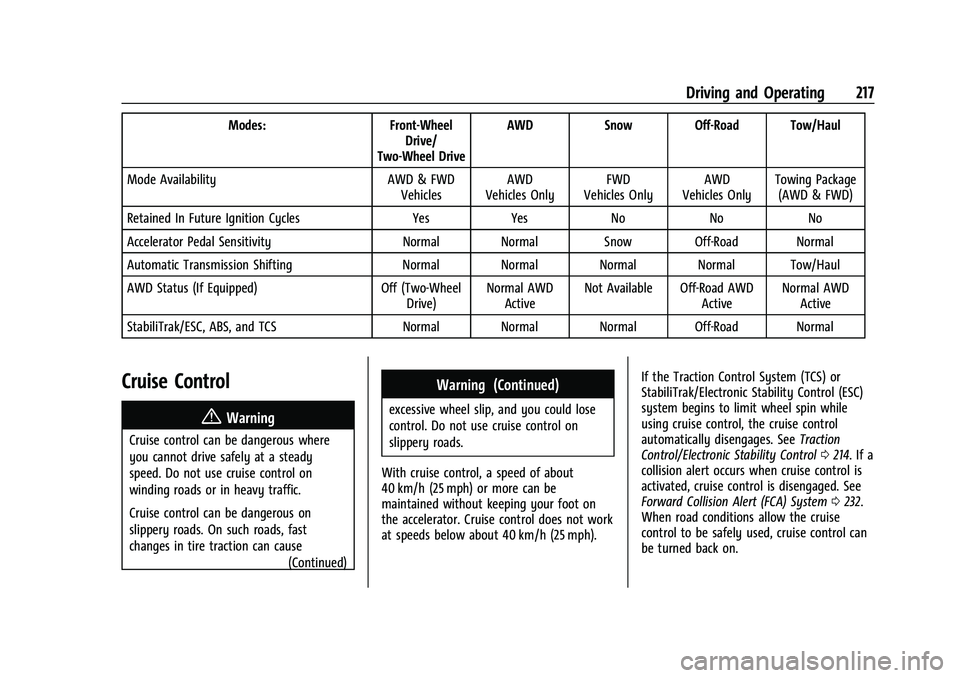
The following table shows how the different
modes affect the various subsystem
functions that may be on the vehicle.
Page 218 of 369
Chevrolet Traverse Owner Manual (GMNA-Localizing-U.S./Canada/Mexico-
14637844) - 2021 - CRC - 3/26/21
Driving and Operating 217
Modes:Front-Wheel
Drive/
Two-Wheel Drive AWD
Snow Off-Road Tow/Haul
Mode Availability AWD & FWD
Vehicles AWD
Vehicles Only FWD
Vehicles Only AWD
Vehicles Only Towing Package
(AWD & FWD)
Retained In Future Ignition Cycles YesYes NoNoNo
Accelerator Pedal Sensitivity Normal Normal Snow Off-Road Normal
Automatic Transmission Shifting Normal Normal Normal Normal Tow/Haul
AWD Status (If Equipped) Off (Two-Wheel
Drive) Normal AWD
Active Not Available Off-Road AWD
ActiveNormal AWD
Active
StabiliTrak/ESC, ABS, and TCS Normal Normal Normal Off-Road Normal
Cruise Control
{
Warning
Cruise control can be dangerous where
you cannot drive safely at a steady
speed. Do not use cruise control on
winding roads or in heavy traffic.
Cruise control can be dangerous on
slippery roads. On such roads, fast
changes in tire traction can cause (Continued)
Warning (Continued)
excessive wheel slip, and you could lose
control. Do not use cruise control on
slippery roads.
With cruise control, a speed of about
40 km/h (25 mph) or more can be
maintained without keeping your foot on
the accelerator. Cruise control does not work
at speeds below about 40 km/h (25 mph). If the Traction Control System (TCS) or
StabiliTrak/Electronic Stability Control (ESC)
system begins to limit wheel spin while
using cruise control, the cruise control
automatically disengages. See
Traction
Control/Electronic Stability Control 0214. If a
collision alert occurs when cruise control is
activated, cruise control is disengaged. See
Forward Collision Alert (FCA) System 0232.
When road conditions allow the cruise
control to be safely used, cruise control can
be turned back on.
Page 220 of 369
Chevrolet Traverse Owner Manual (GMNA-Localizing-U.S./Canada/Mexico-
14637844) - 2021 - CRC - 3/26/21
Driving and Operating 219
The speedometer reading can be displayed
in either English or metric units. See
Instrument Cluster (Uplevel)099 or
Instrument Cluster (Base Level) 097. The
increment value used depends on the units
displayed.
Passing Another Vehicle While Using Cruise
Control
Use the accelerator pedal to increase the
vehicle speed. When you take your foot off
the pedal, the vehicle will slow down to the
previous set cruise speed.
While pressing the accelerator pedal or
shortly following the release to override
cruise, briefly applying SET− will result in
cruise set to the current vehicle speed.
Using Cruise Control on Hills
How well the cruise control will work on
hills depends upon the vehicle speed, load,
and the steepness of the hills. When going
up steep hills, you might have to step on
the accelerator pedal to maintain your
speed. While on a hill, the transmission may
downshift in order to use engine braking to
slow the vehicle and maintain the set speed.
Also, you may have to brake or shift to a lower gear to keep your speed down. If the
brake pedal is applied, cruise control
disengages.
Ending Cruise Control
There are four ways to end cruise control:
.Step lightly on the brake pedal.
.Press*.
.Shift the transmission to N (Neutral).
.PressJ.
Erasing Speed Memory
The cruise control set speed is erased from
memory if
Jis pressed or if the ignition is
turned off.
Adaptive Cruise Control
(Advanced)
If equipped with Adaptive Cruise Control
(ACC), it allows the driver to select the
cruise control set speed and following gap.
Read this entire section before using this
system. The following gap is the following
time between your vehicle and a vehicle
detected directly ahead in your path,
moving in the same direction. If no vehicle
is detected in your path, ACC works like regular cruise control. ACC uses camera and
radar sensors. See
Radio Frequency
Statement 0346.
If a vehicle is detected in your path, ACC can
apply acceleration or limited, moderate
braking to maintain the selected following
gap. To disengage ACC, apply the brake.
If ACC is controlling your vehicle speed
when the Traction Control System (TCS) or
StabiliTrak/Electronic Stability Control (ESC)
system activates, the ACC may automatically
disengage. See Traction Control/Electronic
Stability Control 0214. When road
conditions allow ACC to be safely used, the
ACC can be turned back on.
Disabling the TCS or StabiliTrak/ESC system
will disengage and prevent engagement
of ACC.
ACC can reduce the need for you to
frequently brake and accelerate, especially
when used on expressways, freeways, and
interstate highways. When used on other
roads, you may need to take over the
control of braking or acceleration more
often.
Page 226 of 369
Chevrolet Traverse Owner Manual (GMNA-Localizing-U.S./Canada/Mexico-
14637844) - 2021 - CRC - 3/26/21
Driving and Operating 225
A DIC warning message may display
indicating to shift to P (Park) before exiting
the vehicle. SeeVehicle Messages 0114.
{Warning
If ACC has stopped the vehicle, and if ACC
is disengaged, turned off, or canceled, the
vehicle will no longer be held at a stop.
The vehicle can move. When ACC is
holding the vehicle at a stop, always be
prepared to manually apply the brakes.
{Warning
Leaving the vehicle without placing it in
P (Park) can be dangerous. Do not leave
the vehicle while it is being held at a
stop by ACC. Always place the vehicle in
P (Park) and turn off the ignition before
leaving the vehicle.
ACC Override
If using the accelerator pedal while ACC is
active, the ACC indicator turns blue on the
instrument cluster. ACC will resume
operation when the accelerator pedal is not
being pressed.
{Warning
The ACC will not automatically apply the
brakes if your foot is resting on the
accelerator pedal. You could crash into a
vehicle ahead of you.
Curves in the Road
{Warning
On curves, ACC may not detect a vehicle
ahead in your lane. You could be startled
if the vehicle accelerates up to the set
speed, especially when following a vehicle
exiting or entering exit ramps. You could
lose control of the vehicle or crash. Do
not use ACC while driving on an entrance
or exit ramp. Always be ready to use the
brakes if necessary.
{Warning
On curves, ACC may respond to a vehicle
in another lane, or may not have time to
react to a vehicle in your lane. You could
crash into a vehicle ahead of you, or lose
control of your vehicle. Give extra (Continued)
Warning (Continued)
attention in curves and be ready to use
the brakes if necessary. Select an
appropriate speed while driving in curves.
ACC may operate differently in a sharp
curve. It may reduce the vehicle speed if the
curve is too sharp.
ACC automatically slows the vehicle down
while navigating the curve and may increase
speed out of the curve, but will not exceed
the set speed.
When following a vehicle and entering a
curve, ACC may not detect the vehicle ahead
and accelerate to the set speed. When this
happens, the vehicle ahead indicator will not
appear.
Page 227 of 369
Chevrolet Traverse Owner Manual (GMNA-Localizing-U.S./Canada/Mexico-
14637844) - 2021 - CRC - 3/26/21
226 Driving and Operating
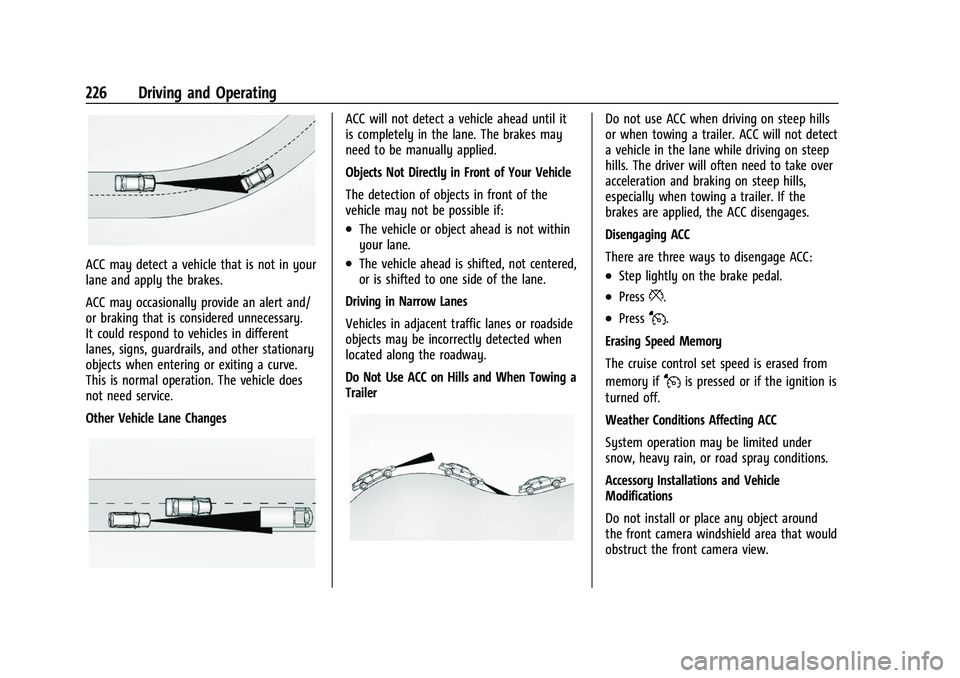
ACC may detect a vehicle that is not in your
lane and apply the brakes.
ACC may occasionally provide an alert and/
or braking that is considered unnecessary.
It could respond to vehicles in different
lanes, signs, guardrails, and other stationary
objects when entering or exiting a curve.
This is normal operation. The vehicle does
not need service.
Other Vehicle Lane Changes
ACC will not detect a vehicle ahead until it
is completely in the lane. The brakes may
need to be manually applied.
Objects Not Directly in Front of Your Vehicle
The detection of objects in front of the
vehicle may not be possible if:
.The vehicle or object ahead is not within
your lane.
.The vehicle ahead is shifted, not centered,
or is shifted to one side of the lane.
Driving in Narrow Lanes
Vehicles in adjacent traffic lanes or roadside
objects may be incorrectly detected when
located along the roadway.
Do Not Use ACC on Hills and When Towing a
Trailer
Do not use ACC when driving on steep hills
or when towing a trailer. ACC will not detect
a vehicle in the lane while driving on steep
hills. The driver will often need to take over
acceleration and braking on steep hills,
especially when towing a trailer. If the
brakes are applied, the ACC disengages.
Disengaging ACC
There are three ways to disengage ACC:
.Step lightly on the brake pedal.
.Press*.
.PressJ.
Erasing Speed Memory
The cruise control set speed is erased from
memory if
Jis pressed or if the ignition is
turned off.
Weather Conditions Affecting ACC
System operation may be limited under
snow, heavy rain, or road spray conditions.
Accessory Installations and Vehicle
Modifications
Do not install or place any object around
the front camera windshield area that would
obstruct the front camera view.
Page 280 of 369
Chevrolet Traverse Owner Manual (GMNA-Localizing-U.S./Canada/Mexico-
14637844) - 2021 - CRC - 3/26/21
Vehicle Care 279
FusesUsage
F22 Electronic brake control module
F23 Parking/Trailer lamps
F24 Right trailer stoplamp/ Turnlamp
F25 Steering column lock
F26 –
F27 Left trailer stoplamp/ Turnlamp
F28 –
F29 –
F30 Washer pump F31 –
F32 Left low –beam
headlamp
F33 Daylight running lamps
F34 Horn F35 –
F36 –
F37 Right low –beam
headlamp Fuses
Usage
F38 Automatic headlamp leveling motor
F39 Transmission control module
F40 Left rear bus electrical center/Ignition
F41 Instrument cluster
F42 Heating, ventilation, and air conditioning
F43 Head-up display/ Reflective light auxiliary
display
F44 Communication gateway module/Run/
Crank
F45 –
F46 –
F47 –
F48 –
F49 Interior rearview mirror F50 Fuel system control module/Shifter interface
board/Run/Crank Fuses
Usage
F51 Heated steering wheel
F52 Folding seats switch
F53 Coolant pump
F54 –
F55 Air conditioning clutch
F56 –
F57 Engine control module/ Ignition
F58 Transmission control module/Ignition
F59 Engine control module battery
F60 Engine control module–even
F61 O2 sensor 1/Air flow
F62 –
F63 O2 sensor 2/Canister/ Engine oil/Turbo
F64 Aeroshutter F65 Engine control module powertrain 1
Page 294 of 369
Chevrolet Traverse Owner Manual (GMNA-Localizing-U.S./Canada/Mexico-
14637844) - 2021 - CRC - 3/26/21
Vehicle Care 293
TPMS from functioning properly. Always
check the TPMS malfunction telltale after
replacing one or more tires or wheels on
your vehicle to ensure that the replacement
or alternate tires and wheels allow the
TPMS to continue to function properly.
SeeTire Pressure Monitor Operation 0293.
See Radio Frequency Statement 0346.
Tire Pressure Monitor Operation
This vehicle may have a Tire Pressure
Monitor System (TPMS). The TPMS is
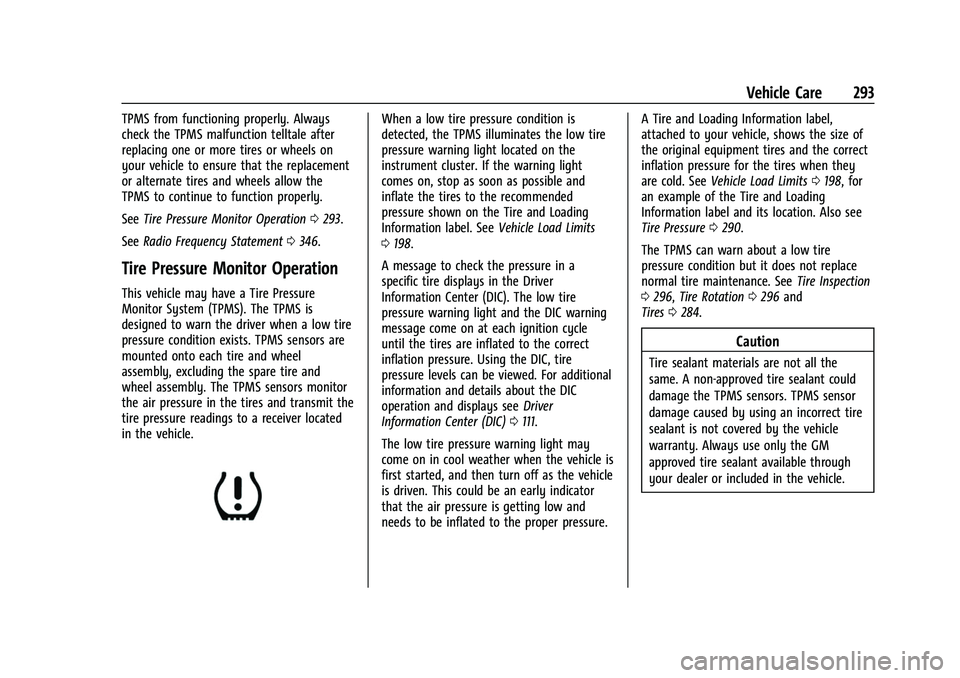
designed to warn the driver when a low tire
pressure condition exists. TPMS sensors are
mounted onto each tire and wheel
assembly, excluding the spare tire and
wheel assembly. The TPMS sensors monitor
the air pressure in the tires and transmit the
tire pressure readings to a receiver located
in the vehicle.
When a low tire pressure condition is
detected, the TPMS illuminates the low tire
pressure warning light located on the
instrument cluster. If the warning light
comes on, stop as soon as possible and
inflate the tires to the recommended
pressure shown on the Tire and Loading
Information label. See Vehicle Load Limits
0 198.
A message to check the pressure in a
specific tire displays in the Driver
Information Center (DIC). The low tire
pressure warning light and the DIC warning
message come on at each ignition cycle
until the tires are inflated to the correct
inflation pressure. Using the DIC, tire
pressure levels can be viewed. For additional
information and details about the DIC
operation and displays see Driver
Information Center (DIC) 0111.
The low tire pressure warning light may
come on in cool weather when the vehicle is
first started, and then turn off as the vehicle
is driven. This could be an early indicator
that the air pressure is getting low and
needs to be inflated to the proper pressure. A Tire and Loading Information label,
attached to your vehicle, shows the size of
the original equipment tires and the correct
inflation pressure for the tires when they
are cold. See
Vehicle Load Limits 0198, for
an example of the Tire and Loading
Information label and its location. Also see
Tire Pressure 0290.
The TPMS can warn about a low tire
pressure condition but it does not replace
normal tire maintenance. See Tire Inspection
0 296, Tire Rotation 0296 and
Tires 0284.
Caution
Tire sealant materials are not all the
same. A non-approved tire sealant could
damage the TPMS sensors. TPMS sensor
damage caused by using an incorrect tire
sealant is not covered by the vehicle
warranty. Always use only the GM
approved tire sealant available through
your dealer or included in the vehicle.