charging CHEVROLET TRAVERSE 2021 Owner's Manual
[x] Cancel search | Manufacturer: CHEVROLET, Model Year: 2021, Model line: TRAVERSE, Model: CHEVROLET TRAVERSE 2021Pages: 369, PDF Size: 8.12 MB
Page 6 of 369
Chevrolet Traverse Owner Manual (GMNA-Localizing-U.S./Canada/Mexico-
14637844) - 2021 - CRC - 3/26/21
Introduction 5
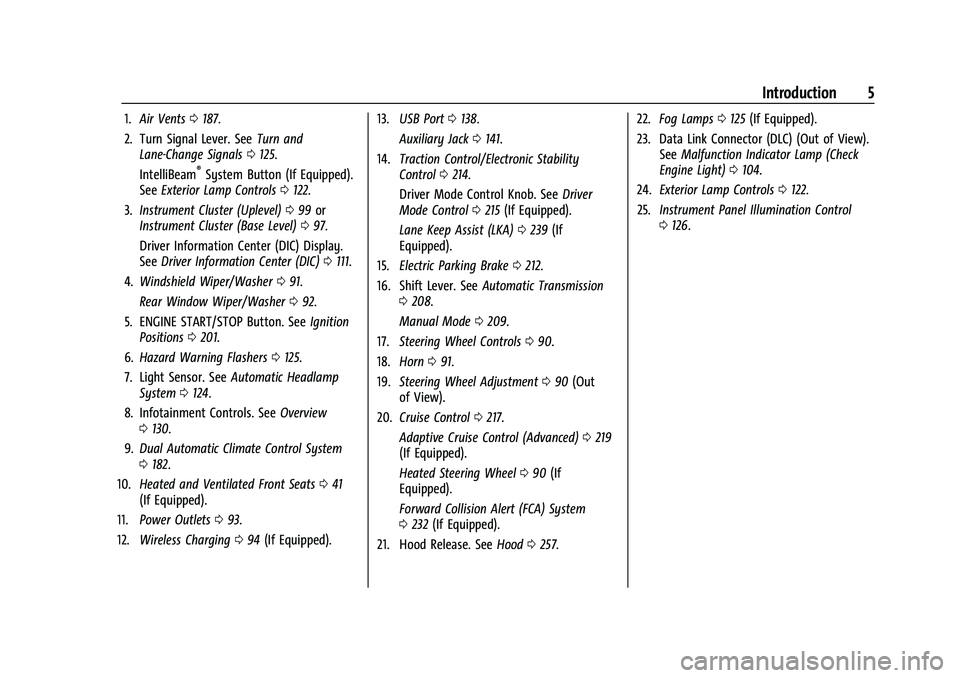
1.Air Vents 0187.
2. Turn Signal Lever. See Turn and
Lane-Change Signals 0125.
IntelliBeam
®System Button (If Equipped).
See Exterior Lamp Controls 0122.
3. Instrument Cluster (Uplevel) 099 or
Instrument Cluster (Base Level) 097.
Driver Information Center (DIC) Display.
See Driver Information Center (DIC) 0111.
4. Windshield Wiper/Washer 091.
Rear Window Wiper/Washer 092.
5. ENGINE START/STOP Button. See Ignition
Positions 0201.
6. Hazard Warning Flashers 0125.
7. Light Sensor. See Automatic Headlamp
System 0124.
8. Infotainment Controls. See Overview
0 130.
9. Dual Automatic Climate Control System
0182.
10. Heated and Ventilated Front Seats 041
(If Equipped).
11. Power Outlets 093.
12. Wireless Charging 094 (If Equipped). 13.
USB Port 0138.
Auxiliary Jack 0141.
14. Traction Control/Electronic Stability
Control 0214.
Driver Mode Control Knob. See Driver
Mode Control 0215 (If Equipped).
Lane Keep Assist (LKA) 0239 (If
Equipped).
15. Electric Parking Brake 0212.
16. Shift Lever. See Automatic Transmission
0 208.
Manual Mode 0209.
17. Steering Wheel Controls 090.
18. Horn 091.
19. Steering Wheel Adjustment 090 (Out
of View).
20. Cruise Control 0217.
Adaptive Cruise Control (Advanced) 0219
(If Equipped).
Heated Steering Wheel 090 (If
Equipped).
Forward Collision Alert (FCA) System
0 232 (If Equipped).
21. Hood Release. See Hood0257. 22.
Fog Lamps 0125 (If Equipped).
23. Data Link Connector (DLC) (Out of View). SeeMalfunction Indicator Lamp (Check
Engine Light) 0104.
24. Exterior Lamp Controls 0122.
25. Instrument Panel Illumination Control
0126.
Page 86 of 369
Chevrolet Traverse Owner Manual (GMNA-Localizing-U.S./Canada/Mexico-
14637844) - 2021 - CRC - 3/26/21
Storage 85
Storage
Storage Compartments
Storage Compartments . . . . . . . . . . . . . . . . . 85
Instrument Panel Storage . . . . . . . . . . . . . . 85
Glove Box . . . . . . . . . . . . . . . . . . . . . . . . . . . . . . 85
Center Console Storage . . . . . . . . . . . . . . . . . 85
Additional Storage Features
Cargo Management System . . . . . . . . . . . . 86
Roof Rack System
Roof Rack System . . . . . . . . . . . . . . . . . . . . . . 87
Storage Compartments{
Warning
Do not store heavy or sharp objects in
storage compartments. In a crash, these
objects may cause the cover to open and
could result in injury.
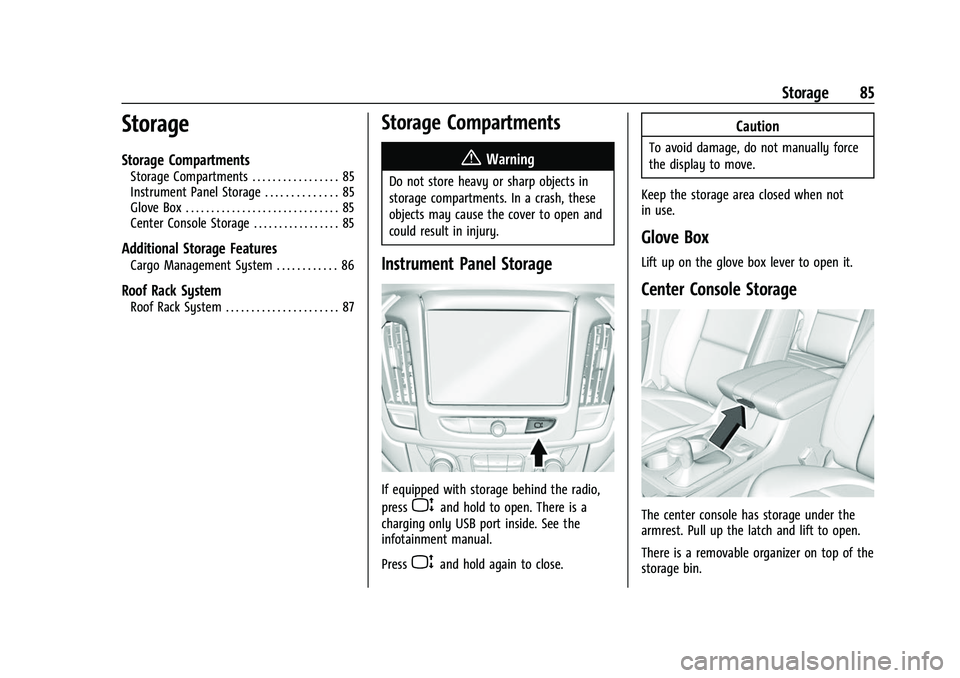
Instrument Panel Storage
If equipped with storage behind the radio,
press
Pand hold to open. There is a
charging only USB port inside. See the
infotainment manual.
Press
Pand hold again to close.
Caution
To avoid damage, do not manually force
the display to move.
Keep the storage area closed when not
in use.
Glove Box
Lift up on the glove box lever to open it.
Center Console Storage
The center console has storage under the
armrest. Pull up the latch and lift to open.
There is a removable organizer on top of the
storage bin.
Page 87 of 369
Chevrolet Traverse Owner Manual (GMNA-Localizing-U.S./Canada/Mexico-
14637844) - 2021 - CRC - 3/26/21
86 Storage
The center console also has the following:
.A forward bin
.An open storage bin on the back of the
console
.If equipped, wireless charging in the front
storage bin
There are also charging only USB ports on
the rear of the center console and in the
third row seating area. See Power Outlets
0 93 and the infotainment manual.
Additional Storage Features
Cargo Management System
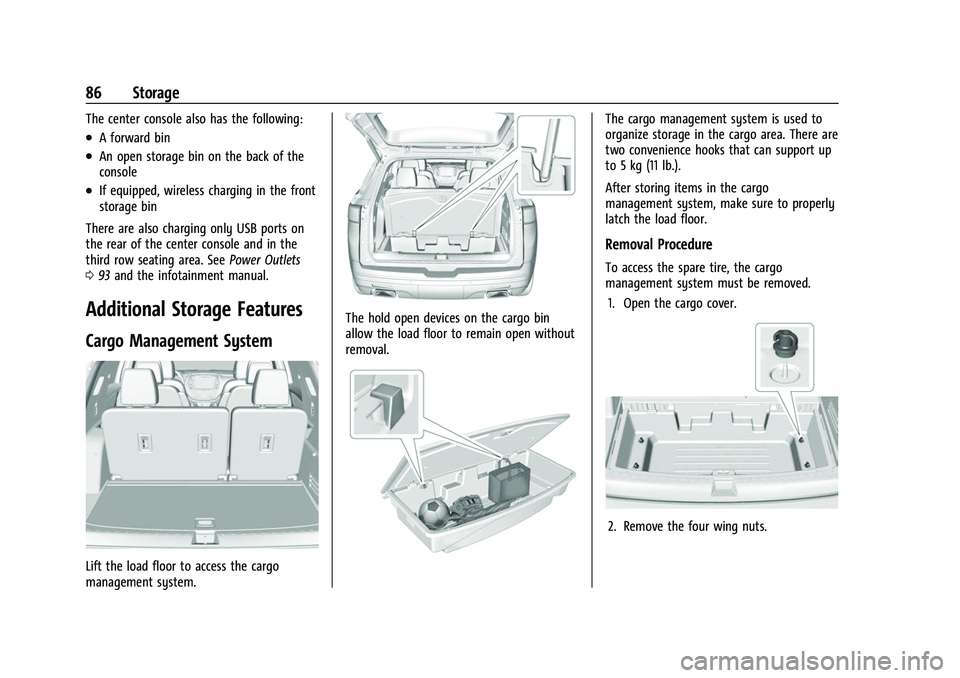
Lift the load floor to access the cargo
management system.
The hold open devices on the cargo bin
allow the load floor to remain open without
removal.
The cargo management system is used to
organize storage in the cargo area. There are
two convenience hooks that can support up
to 5 kg (11 lb.).
After storing items in the cargo
management system, make sure to properly
latch the load floor.
Removal Procedure
To access the spare tire, the cargo
management system must be removed.
1. Open the cargo cover.
2. Remove the four wing nuts.
Page 90 of 369
Chevrolet Traverse Owner Manual (GMNA-Localizing-U.S./Canada/Mexico-
14637844) - 2021 - CRC - 3/26/21
Instruments and Controls 89
Instruments and Controls
Controls
Steering Wheel Adjustment . . . . . . . . . . . . 90
Steering Wheel Controls . . . . . . . . . . . . . . . 90
Heated Steering Wheel . . . . . . . . . . . . . . . . 90
Horn . . . . . . . . . . . . . . . . . . . . . . . . . . . . . . . . . . . . 91
Windshield Wiper/Washer . . . . . . . . . . . . . . 91
Rear Window Wiper/Washer . . . . . . . . . . . 92
Compass . . . . . . . . . . . . . . . . . . . . . . . . . . . . . . . 93
Clock . . . . . . . . . . . . . . . . . . . . . . . . . . . . . . . . . . . 93
Power Outlets . . . . . . . . . . . . . . . . . . . . . . . . . . 93
Wireless Charging . . . . . . . . . . . . . . . . . . . . . . 94
Warning Lights, Gauges, and Indicators
Warning Lights, Gauges, andIndicators . . . . . . . . . . . . . . . . . . . . . . . . . . . . 96
Instrument Cluster (Base Level) . . . . . . . . . 97
Instrument Cluster (Uplevel) . . . . . . . . . . . 99
Speedometer . . . . . . . . . . . . . . . . . . . . . . . . . . 101
Odometer . . . . . . . . . . . . . . . . . . . . . . . . . . . . . . 101
Trip Odometer . . . . . . . . . . . . . . . . . . . . . . . . . 101
Tachometer . . . . . . . . . . . . . . . . . . . . . . . . . . . . 101
Fuel Gauge . . . . . . . . . . . . . . . . . . . . . . . . . . . . 101
Engine Coolant Temperature Gauge . . . 102
Seat Belt Reminders . . . . . . . . . . . . . . . . . . . 102
Airbag Readiness Light . . . . . . . . . . . . . . . . 103
Passenger Airbag Status Indicator . . . . . 103
Charging System Light . . . . . . . . . . . . . . . . 104 Malfunction Indicator Lamp (Check
Engine Light) . . . . . . . . . . . . . . . . . . . . . . . . 104
Brake System Warning Light . . . . . . . . . . 106
Electric Parking Brake Light . . . . . . . . . . . . 106
Service Electric Parking Brake Light . . . . 106
Antilock Brake System (ABS) Warning Light . . . . . . . . . . . . . . . . . . . . . . . . . . . . . . . . . 107
Tow/Haul Mode Light . . . . . . . . . . . . . . . . . 107
Lane Keep Assist (LKA) Light . . . . . . . . . . . 107
Vehicle Ahead Indicator . . . . . . . . . . . . . . . 107
Pedestrian Ahead Indicator . . . . . . . . . . . . 108
Traction Off Light . . . . . . . . . . . . . . . . . . . . . 108
StabiliTrak OFF Light . . . . . . . . . . . . . . . . . . 108
Traction Control System (TCS)/ StabiliTrak Light . . . . . . . . . . . . . . . . . . . . . 108
Tire Pressure Light . . . . . . . . . . . . . . . . . . . . 109
Engine Oil Pressure Light . . . . . . . . . . . . . . 109
Low Fuel Warning Light (Base Level) . . . 110
Low Fuel Warning Light (Uplevel) . . . . . . 110
Security Light . . . . . . . . . . . . . . . . . . . . . . . . . . 110
High-Beam On Light . . . . . . . . . . . . . . . . . . . 110
Front Fog Lamp Light . . . . . . . . . . . . . . . . . . . 111
Lamps On Reminder . . . . . . . . . . . . . . . . . . . . 111
Cruise Control Light . . . . . . . . . . . . . . . . . . . . 111
Door Ajar Light . . . . . . . . . . . . . . . . . . . . . . . . . 111
Information Displays
Driver Information Center (DIC) . . . . . . . . 111
Vehicle Messages
Vehicle Messages . . . . . . . . . . . . . . . . . . . . . . 114 Engine Power Messages . . . . . . . . . . . . . . . 114
Vehicle Speed Messages . . . . . . . . . . . . . . . 115
Vehicle Personalization
Vehicle Personalization . . . . . . . . . . . . . . . . . 115
Universal Remote System
Universal Remote System . . . . . . . . . . . . . . 119
Universal Remote System
Programming . . . . . . . . . . . . . . . . . . . . . . . . 119
Universal Remote System Operation . . . 121
Page 94 of 369
Chevrolet Traverse Owner Manual (GMNA-Localizing-U.S./Canada/Mexico-
14637844) - 2021 - CRC - 3/26/21
Instruments and Controls 93
Compass
The vehicle may have a compass display on
the Driver Information Center (DIC). The
compass receives its heading and other
information from the Global Positioning
System (GPS) antenna, StabiliTrak/Electronic
Stability Control (ESC), and vehicle speed
information.
The compass system is designed to operate
for a certain number of miles or degrees of
turn before needing a signal from the GPS
satellites. When the compass display shows
CAL, drive the vehicle for a short distance in
an open area where it can receive a GPS
signal. The compass system will
automatically determine when a GPS signal
is restored and provide a heading again.
Clock
Set the time and date using the
infotainment system. See "Time / Date"
underSettings 0165.
Power Outlets
Power Outlets 12-Volt Direct Current
The vehicle has two 12-volt outlets that can
be used to plug in electrical equipment, such
as a cell phone or MP3 player. The power outlets are located:
.On the center stack below the climate
controls.
.In the rear cargo area.
Lift the cover to access the outlet and
replace when not in use.
There are also charging only USB ports on
the rear of the center console and in the
third row seating area.
{Warning
Power is always supplied to the rear
cargo power outlet. Do not leave
electrical equipment plugged in when the
vehicle is not in use because the vehicle
could catch fire and cause injury or
death.
Caution
Leaving electrical equipment plugged in
for an extended period of time while the
ignition is in LOCK/OFF will drain the
battery. Always unplug electrical
equipment when not in use and do not
plug in equipment that exceeds the
maximum 15 ampere rating. Certain accessory plugs may not be
compatible with the accessory power outlet
and could overload vehicle and adapter
fuses. If a problem is experienced, see your
dealer.
When adding electrical equipment, be sure
to follow the proper installation instructions
included with the equipment. See
Add-On
Electrical Equipment 0254.
Caution
Hanging heavy equipment from the
power outlet can cause damage not
covered by the vehicle warranty. The
power outlets are designed for accessory
power plugs only, such as cell phone
charge cords.
Power Outlet 110V/120V Alternating
Current
If equipped with this power outlet it can be
used to plug in electrical equipment that
uses a maximum limit of 150 watts.
Page 95 of 369
Chevrolet Traverse Owner Manual (GMNA-Localizing-U.S./Canada/Mexico-
14637844) - 2021 - CRC - 3/26/21
94 Instruments and Controls
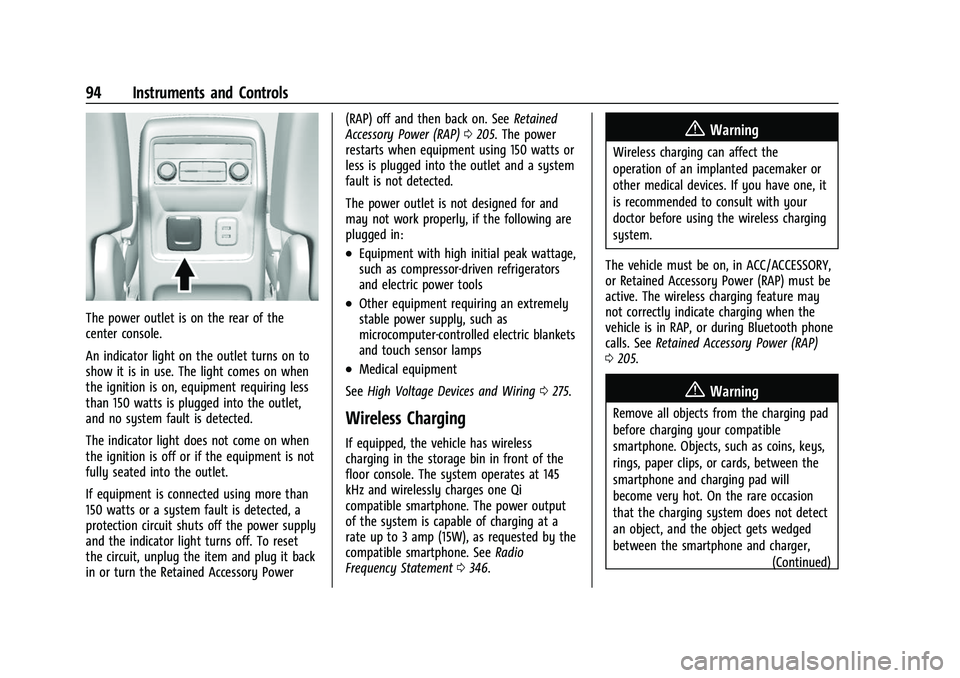
The power outlet is on the rear of the
center console.
An indicator light on the outlet turns on to
show it is in use. The light comes on when
the ignition is on, equipment requiring less
than 150 watts is plugged into the outlet,
and no system fault is detected.
The indicator light does not come on when
the ignition is off or if the equipment is not
fully seated into the outlet.
If equipment is connected using more than
150 watts or a system fault is detected, a
protection circuit shuts off the power supply
and the indicator light turns off. To reset
the circuit, unplug the item and plug it back
in or turn the Retained Accessory Power(RAP) off and then back on. See
Retained
Accessory Power (RAP) 0205. The power
restarts when equipment using 150 watts or
less is plugged into the outlet and a system
fault is not detected.
The power outlet is not designed for and
may not work properly, if the following are
plugged in:
.Equipment with high initial peak wattage,
such as compressor-driven refrigerators
and electric power tools
.Other equipment requiring an extremely
stable power supply, such as
microcomputer-controlled electric blankets
and touch sensor lamps
.Medical equipment
See High Voltage Devices and Wiring 0275.
Wireless Charging
If equipped, the vehicle has wireless
charging in the storage bin in front of the
floor console. The system operates at 145
kHz and wirelessly charges one Qi
compatible smartphone. The power output
of the system is capable of charging at a
rate up to 3 amp (15W), as requested by the
compatible smartphone. See Radio
Frequency Statement 0346.
{Warning
Wireless charging can affect the
operation of an implanted pacemaker or
other medical devices. If you have one, it
is recommended to consult with your
doctor before using the wireless charging
system.
The vehicle must be on, in ACC/ACCESSORY,
or Retained Accessory Power (RAP) must be
active. The wireless charging feature may
not correctly indicate charging when the
vehicle is in RAP, or during Bluetooth phone
calls. See Retained Accessory Power (RAP)
0 205.
{Warning
Remove all objects from the charging pad
before charging your compatible
smartphone. Objects, such as coins, keys,
rings, paper clips, or cards, between the
smartphone and charging pad will
become very hot. On the rare occasion
that the charging system does not detect
an object, and the object gets wedged
between the smartphone and charger,
(Continued)
Page 96 of 369
Chevrolet Traverse Owner Manual (GMNA-Localizing-U.S./Canada/Mexico-
14637844) - 2021 - CRC - 3/26/21
Instruments and Controls 95
Warning (Continued)
remove the smartphone and allow the
object to cool before removing it from
the charging pad, to prevent burns.
The operating temperature is −20 °C (−4 °F)
to 60 °C (140 °F) for the charging system
and 0 °C (32 °F) to 35 °C (95 °F) for the
smartphone.
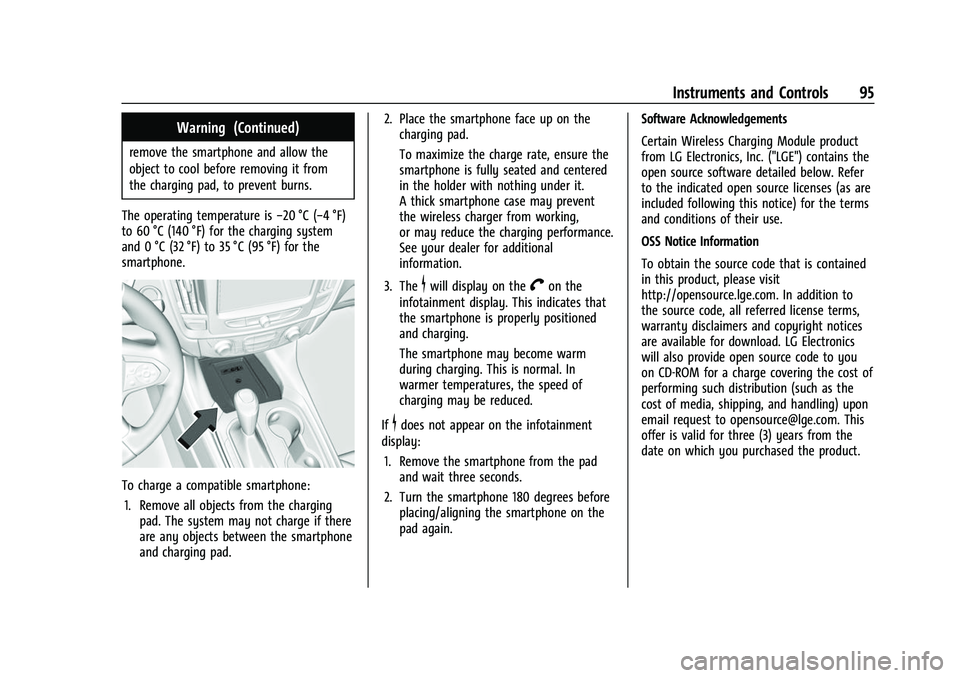
To charge a compatible smartphone:
1. Remove all objects from the charging pad. The system may not charge if there
are any objects between the smartphone
and charging pad. 2. Place the smartphone face up on the
charging pad.
To maximize the charge rate, ensure the
smartphone is fully seated and centered
in the holder with nothing under it.
A thick smartphone case may prevent
the wireless charger from working,
or may reduce the charging performance.
See your dealer for additional
information.
3. The
$will display on theVon the
infotainment display. This indicates that
the smartphone is properly positioned
and charging.
The smartphone may become warm
during charging. This is normal. In
warmer temperatures, the speed of
charging may be reduced.
If
$does not appear on the infotainment
display:
1. Remove the smartphone from the pad and wait three seconds.
2. Turn the smartphone 180 degrees before placing/aligning the smartphone on the
pad again. Software Acknowledgements
Certain Wireless Charging Module product
from LG Electronics, Inc. ("LGE") contains the
open source software detailed below. Refer
to the indicated open source licenses (as are
included following this notice) for the terms
and conditions of their use.
OSS Notice Information
To obtain the source code that is contained
in this product, please visit
http://opensource.lge.com. In addition to
the source code, all referred license terms,
warranty disclaimers and copyright notices
are available for download. LG Electronics
will also provide open source code to you
on CD-ROM for a charge covering the cost of
performing such distribution (such as the
cost of media, shipping, and handling) upon
email request to [email protected]. This
offer is valid for three (3) years from the
date on which you purchased the product.
Page 105 of 369
Chevrolet Traverse Owner Manual (GMNA-Localizing-U.S./Canada/Mexico-
14637844) - 2021 - CRC - 3/26/21
104 Instruments and Controls
If the word OFF, and the off symbol, are lit
on the passenger airbag status indicator, it
means that the passenger sensing system
has turned off the front outboard passenger
frontal airbag.
If, after several seconds, both status
indicator lights remain on, or if there are no
lights at all, there may be a problem with
the lights or the passenger sensing system.
See your dealer for service.
{Warning
If the airbag readiness light ever comes
on and stays on, it means that
something may be wrong with the airbag
system. To help avoid injury to yourself
or others, have the vehicle serviced right
away. SeeAirbag Readiness Light 0103
for more information, including important
safety information.
Charging System Light
The charging system light comes on briefly
when the ignition is turned on, but the
engine is not running, as a check to show
the light is working. It should go out when
the engine is started.
If the light stays on, or comes on while
driving, there may be a problem with the
electrical charging system. Have it checked
by your dealer. Driving while this light is on
could drain the battery.
When this light comes on, or is flashing, the
Driver Information Center (DIC) also displays
a message.
If a short distance must be driven with the
light on, be sure to turn off all accessories,
such as the radio and air conditioner. Find a
safe place to stop the vehicle.
Malfunction Indicator Lamp
(Check Engine Light)
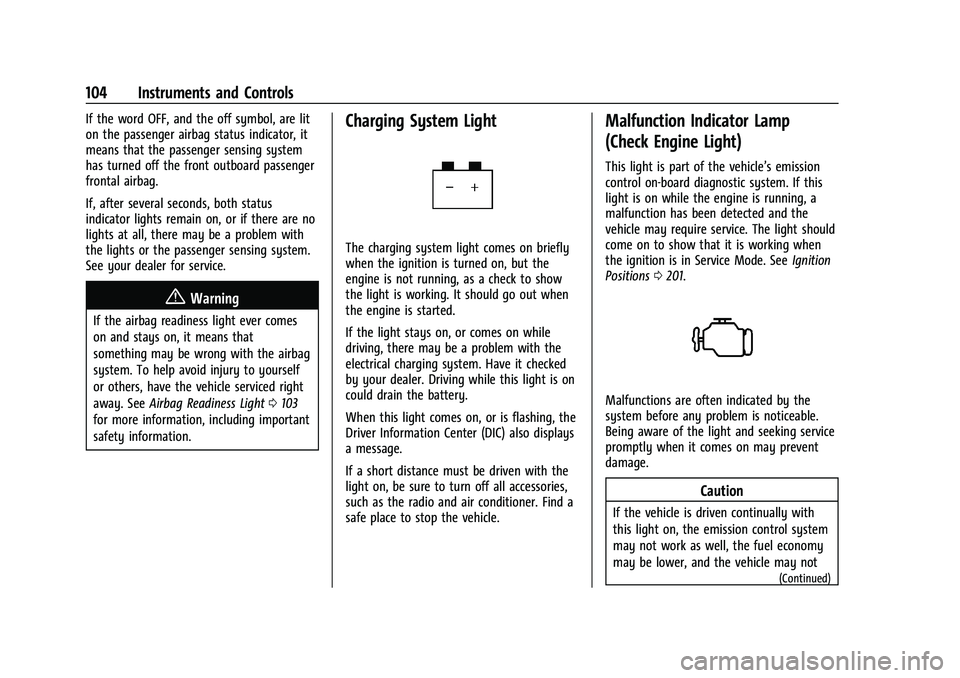
This light is part of the vehicle’s emission
control on-board diagnostic system. If this
light is on while the engine is running, a
malfunction has been detected and the
vehicle may require service. The light should
come on to show that it is working when
the ignition is in Service Mode. See Ignition
Positions 0201.
Malfunctions are often indicated by the
system before any problem is noticeable.
Being aware of the light and seeking service
promptly when it comes on may prevent
damage.
Caution
If the vehicle is driven continually with
this light on, the emission control system
may not work as well, the fuel economy
may be lower, and the vehicle may not
(Continued)
Page 115 of 369
Chevrolet Traverse Owner Manual (GMNA-Localizing-U.S./Canada/Mexico-
14637844) - 2021 - CRC - 3/26/21
114 Instruments and Controls
Timer :This display can be used as a timer.
To start the timer, press
Vwhile this
display is active. The display will show the
amount of time that has passed since the
timer was last reset. To stop the timer,
press
Vbriefly while this display is active
and the timer is running. To reset the timer
to zero, press and hold
Vwhile this display
is active, or press
pand select reset.
Battery Voltage : Displays the current
battery voltage, if equipped. Battery voltage
changes are normal while driving. See
Charging System Light 0104. If there is a
problem with the battery charging system,
the DIC will display a message.
Transmission Fluid Temperature : Shows the
temperature of the automatic transmission
fluid in either degrees Celsius (°C) or degrees
Fahrenheit (°F).
Off Road Page : This page shows the
traction, four wheel drive, and steering
angle states. When the front or rear axles
are locked, a lock icon is displayed.
Blank Page : Shows no information.
Vehicle Messages
Messages displayed on the DIC indicate the
status of the vehicle or some action that
may be needed to correct a condition.
Multiple messages may appear one after
another.
The messages that do not require
immediate action can be acknowledged and
cleared by pressing
V. The messages that
require immediate action cannot be cleared
until that action is performed.
All messages should be taken seriously;
clearing the message does not correct the
problem.
If a SERVICE message appears, see your
dealer.
Follow the instructions given in the
messages. The system displays messages
regarding the following topics:
.Service Messages
.Fluid Levels
.Vehicle Security
.Brakes
.Steering
.Ride Control Systems
.Driver Assistance Systems
.Cruise Control
.Lighting and Bulb Replacement
.Wiper/Washer Systems
.Doors and Windows
.Seat Belts
.Airbag Systems
.Engine and Transmission
.Tire Pressure
.Battery
Engine Power Messages
ENGINE POWER IS REDUCED
This message displays when the vehicle's
propulsion power is reduced. A reduction in
propulsion power can affect the vehicle's
ability to accelerate. If this message is on,
but there is no observed reduction in
performance, proceed to your destination.
Under certain conditions the performance
may be reduced the next time the vehicle is
driven. The vehicle may be driven while this
message is on, but maximum acceleration
and speed may be reduced. Anytime this
message stays on, or displays repeatedly,
the vehicle should be taken to your dealer
for service as soon as possible.
Page 128 of 369
Chevrolet Traverse Owner Manual (GMNA-Localizing-U.S./Canada/Mexico-
14637844) - 2021 - CRC - 3/26/21
Lighting 127
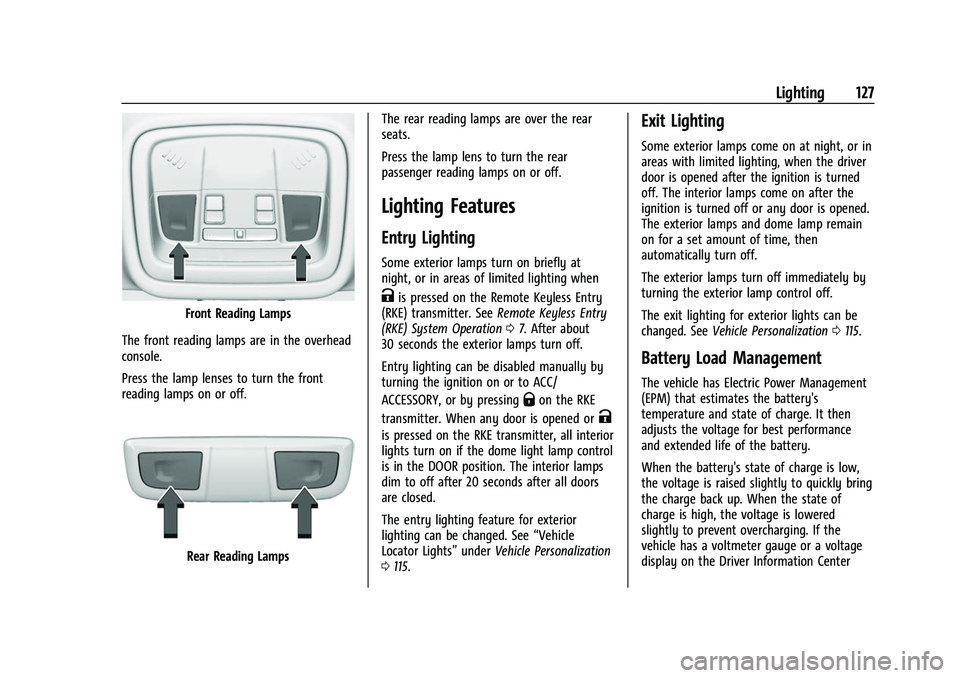
Front Reading Lamps
The front reading lamps are in the overhead
console.
Press the lamp lenses to turn the front
reading lamps on or off.
Rear Reading Lamps The rear reading lamps are over the rear
seats.
Press the lamp lens to turn the rear
passenger reading lamps on or off.
Lighting Features
Entry Lighting
Some exterior lamps turn on briefly at
night, or in areas of limited lighting when
Kis pressed on the Remote Keyless Entry
(RKE) transmitter. See Remote Keyless Entry
(RKE) System Operation 07. After about
30 seconds the exterior lamps turn off.
Entry lighting can be disabled manually by
turning the ignition on or to ACC/
ACCESSORY, or by pressing
Qon the RKE
transmitter. When any door is opened or
K
is pressed on the RKE transmitter, all interior
lights turn on if the dome light lamp control
is in the DOOR position. The interior lamps
dim to off after 20 seconds after all doors
are closed.
The entry lighting feature for exterior
lighting can be changed. See “Vehicle
Locator Lights” underVehicle Personalization
0 115.
Exit Lighting
Some exterior lamps come on at night, or in
areas with limited lighting, when the driver
door is opened after the ignition is turned
off. The interior lamps come on after the
ignition is turned off or any door is opened.
The exterior lamps and dome lamp remain
on for a set amount of time, then
automatically turn off.
The exterior lamps turn off immediately by
turning the exterior lamp control off.
The exit lighting for exterior lights can be
changed. See Vehicle Personalization 0115.
Battery Load Management
The vehicle has Electric Power Management
(EPM) that estimates the battery's
temperature and state of charge. It then
adjusts the voltage for best performance
and extended life of the battery.
When the battery's state of charge is low,
the voltage is raised slightly to quickly bring
the charge back up. When the state of
charge is high, the voltage is lowered
slightly to prevent overcharging. If the
vehicle has a voltmeter gauge or a voltage
display on the Driver Information Center