keyless entry CHEVROLET TRAVERSE 2022 User Guide
[x] Cancel search | Manufacturer: CHEVROLET, Model Year: 2022, Model line: TRAVERSE, Model: CHEVROLET TRAVERSE 2022Pages: 382, PDF Size: 5.87 MB
Page 46 of 382
Chevrolet Traverse Owner Manual (GMNA-Localizing-U.S./Canada/Mexico-
13527526) - 2020 - CRC - 9/5/19
Seats and Restraints 45
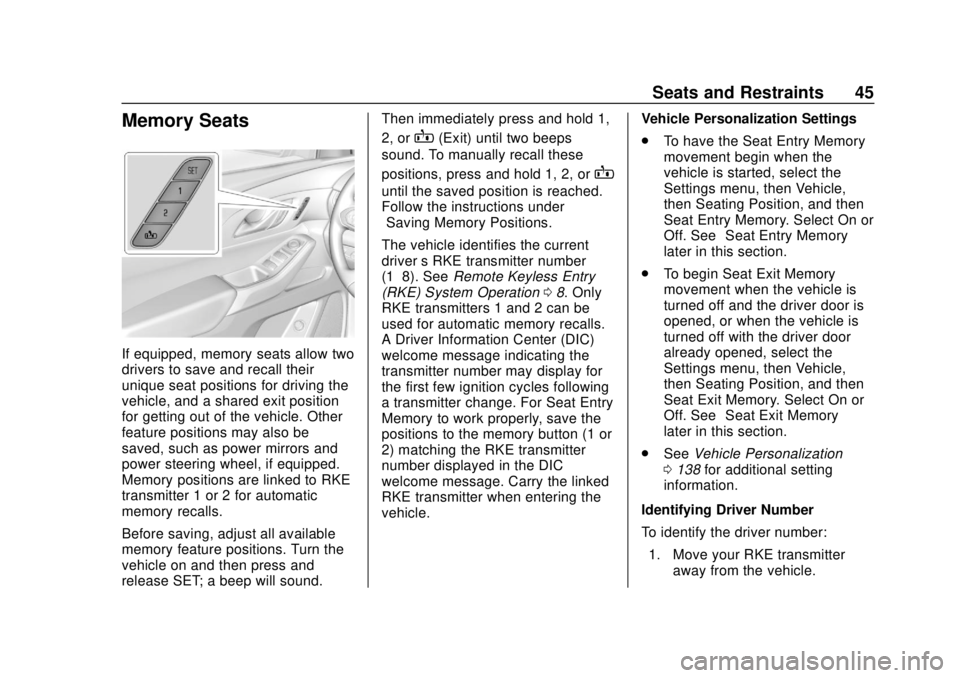
Memory Seats
If equipped, memory seats allow two
drivers to save and recall their
unique seat positions for driving the
vehicle, and a shared exit position
for getting out of the vehicle. Other
feature positions may also be
saved, such as power mirrors and
power steering wheel, if equipped.
Memory positions are linked to RKE
transmitter 1 or 2 for automatic
memory recalls.
Before saving, adjust all available
memory feature positions. Turn the
vehicle on and then press and
release SET; a beep will sound.Then immediately press and hold 1,
2, or
B(Exit) until two beeps
sound. To manually recall these
positions, press and hold 1, 2, or
B
until the saved position is reached.
Follow the instructions under
“Saving Memory Positions.”
The vehicle identifies the current
driver ’s RKE transmitter number
(1–8). See Remote Keyless Entry
(RKE) System Operation 08. Only
RKE transmitters 1 and 2 can be
used for automatic memory recalls.
A Driver Information Center (DIC)
welcome message indicating the
transmitter number may display for
the first few ignition cycles following
a transmitter change. For Seat Entry
Memory to work properly, save the
positions to the memory button (1 or
2) matching the RKE transmitter
number displayed in the DIC
welcome message. Carry the linked
RKE transmitter when entering the
vehicle. Vehicle Personalization Settings
.
To have the Seat Entry Memory
movement begin when the
vehicle is started, select the
Settings menu, then Vehicle,
then Seating Position, and then
Seat Entry Memory. Select On or
Off. See “Seat Entry Memory”
later in this section.
. To begin Seat Exit Memory
movement when the vehicle is
turned off and the driver door is
opened, or when the vehicle is
turned off with the driver door
already opened, select the
Settings menu, then Vehicle,
then Seating Position, and then
Seat Exit Memory. Select On or
Off. See “Seat Exit Memory”
later in this section.
. See Vehicle Personalization
0 138 for additional setting
information.
Identifying Driver Number
To identify the driver number: 1. Move your RKE transmitter away from the vehicle.
Page 47 of 382
Chevrolet Traverse Owner Manual (GMNA-Localizing-U.S./Canada/Mexico-
13527526) - 2020 - CRC - 9/5/19
46 Seats and Restraints
2. Start the vehicle with anotherkey or RKE transmitter. The
DIC should display the driver
number for the other RKE
transmitter. Turn the vehicle off
and remove the key or RKE
transmitter from the vehicle.
3. Start the vehicle with the initial key or RKE transmitter. The
DIC should display the driver
number of your RKE
transmitter.
Saving Memory Positions
Read these instructions completely
before saving memory positions.
To save preferred driving positions
1 and 2: 1. Turn the vehicle on or to ACC/ ACCESSORY.
A DIC welcome message may
indicate driver number 1 or 2.
2. Adjust all available memory features to the desired driving
position.
3. Press and release SET; a beep will sound. 4. Immediately press and hold the
1 or 2 memory button matching
the above DIC welcome
message until two beeps
sound.
If too much time passes
between releasing SET and
pressing 1, the memory
position will not be saved and
two beeps will not sound.
Repeat Steps 3 and 4.
1 or 2 corresponds to the driver
number. See “Identifying Driver
Number” previously in this
section.
5. Repeat Steps 1–4 for a second driver using 1 or 2.
To save the position for
Band
Seat Exit Memory features, repeat
Steps 1–4 using
B. This saves the
position for getting out of the
vehicle.
Save preferred memory feature
positions to both 1 and 2 if you are
the only driver. Manually Recalling Memory
Positions
Press and hold 1, 2, or
Bto recall
the previously saved memory
positions if you are driver 1 or 2
identified in the DIC welcome
message. RKE transmitters 3–8 will
not recall memory positions.
To stop Manual Memory recall
movement, release 1, 2, or
Bor
press any of the following controls:
. Power seat
. Memory SET
. Power mirror, with the driver or
passenger side mirror selected
. Power steering wheel,
if equipped
Seat Entry Memory
The vehicle identifies the number of
the current driver ’s RKE transmitter
(1–8). See Remote Keyless Entry
(RKE) System Operation 08. If the
RKE transmitter is 1 or 2, and Seat
Entry Memory is enabled in vehicle
personalization, the positions saved
to the same memory button number
Page 141 of 382

Chevrolet Traverse Owner Manual (GMNA-Localizing-U.S./Canada/Mexico-
13527526) - 2020 - CRC - 9/5/19
140 Instruments and Controls
Adaptive Cruise Go Notifier
This setting determines if an alert
will appear when Adaptive Cruise
Control brings the vehicle to a
complete stop and the vehicle
ahead of you starts moving again.
SeeAdaptive Cruise Control 0205.
Touch Off or On.
Lane Change Alert
This setting specifies if an alert will
display on the outside mirror to help
you avoid crashing into a vehicle in
your blind spot, or rapidly
approaching your blind spot, during
a lane change maneuver. See Lane
Change Alert (LCA) 0225.
When Lane Change Alert is
disabled, Side Blind Zone Alert is
also disabled.
Touch Off or On.
Comfort and Convenience
Touch and the following may
display:
. Chime Volume
. Hands Free Liftgate Control .
Reverse Tilt Mirror
. Auto Wipe in Reverse Gear
Chime Volume
This setting determines the chime
volume level.
Touch the controls on the
infotainment display to adjust the
volume.
Hands Free Liftgate Control
The liftgate may be operated with a
kicking motion under the left corner
of the rear bumper. See Liftgate
0 22.
Touch Off, On-Open and Close,
or On-Open Only.
Reverse Tilt Mirror
When on, both the driver and
passenger, driver, or passenger
outside mirrors will tilt downward
when the vehicle is shifted to
R (Reverse) to improve visibility of
the ground near the rear wheels.
They will return to their previous
driving position when the vehicle is shifted out of R (Reverse) or the
engine is turned off. See
Reverse
Tilt Mirrors 032.
Touch Off, On - Driver and
Passenger, On - Driver, or On -
Passenger.
Auto Wipe in Reverse Gear
When on and the front wiper is on,
the rear wiper will automatically
activate when the vehicle is shifted
to R (Reverse).
Touch Off or On.
Lighting
Touch and the following may
display:
. Vehicle Locator Lights
. Exit Lighting
Vehicle Locator Lights
This setting flashes the headlamps
of your vehicle when you press
K
on the Remote Keyless Entry (RKE)
transmitter.
Touch Off or On.
Page 143 of 382
Chevrolet Traverse Owner Manual (GMNA-Localizing-U.S./Canada/Mexico-
13527526) - 2020 - CRC - 9/5/19
142 Instruments and Controls
SeeHeated and Ventilated Front
Seats 048 and
Remote Vehicle Start 016.
If equipped with Auto Heated
Steering Wheel, this feature will turn
on when the Remote Start Auto
Heated Seats turn on.
Touch Off or On.
Remote Window Operation
If equipped, this feature enables
remote operation of the windows
with the RKE transmitter. See
Remote Keyless Entry (RKE)
System Operation 08.
Touch Off or On.
Passive Door Unlock
This setting specifies which doors
unlock when using the button on the
driver door handle to unlock the
vehicle.
Touch Off, All Doors or Driver
Door Only. Passive Door Lock
This setting specifies if the vehicle
will automatically lock, or lock and
provide an alert after all the doors
are closed, and you walk away from
the vehicle with the RKE transmitter.
See
Remote Keyless Entry (RKE)
System Operation 08.
Touch Off, On with Horn
Chirp, or On.
Remote Left in Vehicle Alert
This feature sounds an alert when
the RKE transmitter is left in the
vehicle. This menu also enables
Remote No Longer in Vehicle Alert.
Touch Off or On.
Seating Position
Touch and the following may
display:
. Seat Entry Memory
. Seat Exit Memory
Seat Entry Memory
This feature automatically recalls
the previously stored 1 or 2 button
positions when the ignition is changed from off to on or ACC/
ACCESSORY. See
Memory Seats
0 45.
Touch Off or On.
Seat Exit Memory
This feature automatically recalls
the previously stored exit button
positions when the ignition is
changed from on or ACC/
ACCESSORY to off if the driver
door is open or opened. See
Memory Seats 045.
Touch Off or On.
Teen Driver
See “Teen Driver” under“Settings”
in the infotainment manual.
Valet Mode
This will lock the infotainment
system and steering wheel controls.
It may also limit access to vehicle
storage locations, if equipped.
To enable valet mode:
1. Enter a four-digit code on the keypad.
Page 155 of 382
Chevrolet Traverse Owner Manual (GMNA-Localizing-U.S./Canada/Mexico-
13527526) - 2020 - CRC - 9/5/19
154 Lighting
Lighting Features
Entry Lighting
Some exterior lamps and most of
the interior lights turn on briefly at
night, or in areas of limited lighting
when
Kis pressed on the Remote
Keyless Entry (RKE) transmitter.
See Remote Keyless Entry (RKE)
System Operation 08. When the
driver door is opened, all control
lights, Driver Information Center
(DIC) lights, and door pocket lights
turn on. After about 30 seconds the
exterior lamps turn off, then the
remaining interior lights dim to off.
Entry lighting can be disabled
manually by turning the ignition on
or to ACC/ACCESSORY, or by
pressing
Qon the RKE transmitter.
This feature can be changed. See
“Vehicle Locator Lights” under
Vehicle Personalization 0138.
Exit Lighting
Some exterior lamps and interior
lights come on at night, or in areas
with limited lighting, when the driver
door is opened after the ignition is
turned off. The dome lamp comes
on after the ignition is turned off.
The exterior lamps and dome lamp
remain on for a set amount of time,
then automatically turn off.
The exterior lamps turn off
immediately by turning the exterior
lamp control off.
This feature can be changed. See
Vehicle Personalization 0138.
Battery Load
Management
The vehicle has Electric Power
Management (EPM) that estimates
the battery's temperature and state
of charge. It then adjusts the voltage
for best performance and extended
life of the battery.
When the battery's state of charge
is low, the voltage is raised slightly
to quickly bring the charge back up. When the state of charge is high,
the voltage is lowered slightly to
prevent overcharging. If the vehicle
has a voltmeter gauge or a voltage
display on the Driver Information
Center (DIC), you may see the
voltage move up or down. This is
normal. If there is a problem, an
alert will be displayed.
The battery can be discharged at
idle if the electrical loads are very
high. This is true for all vehicles.
This is because the generator
(alternator) may not be spinning fast
enough at idle to produce all of the
power needed for very high
electrical loads.
A high electrical load occurs when
several of the following are on, such
as: headlamps, high beams, rear
window defogger, climate control fan
at high speed, heated seats, engine
cooling fans, trailer loads, and loads
plugged into accessory power
outlets.
EPM works to prevent excessive
discharge of the battery. It does this
by balancing the generator's output
and the vehicle's electrical needs.
Page 184 of 382
Chevrolet Traverse Owner Manual (GMNA-Localizing-U.S./Canada/Mexico-
13527526) - 2020 - CRC - 9/5/19
Driving and Operating 183
The Remote Keyless Entry (RKE)
transmitter must be in the vehicle for
the system to operate. If the
pushbutton start is not working, the
vehicle may be near a strong radio
antenna signal causing interference
to the Keyless Access system. See
Remote Keyless Entry (RKE)
System Operation08.
To shift out of P (Park), the ignition
must be on or in service mode and
the brake pedal must be applied.
Stopping the Engine/OFF (No
Indicator Lights) : When the
vehicle is stopped, press ENGINE
START/STOP once to turn the
engine off.
If the vehicle is in P (Park), the
ignition will turn off, and Retained
Accessory Power (RAP) will remain
active. See Retained Accessory
Power (RAP) 0187.
If the vehicle is not in P (Park), the
ignition will return to ACC/
ACCESSORY and display the
message SHIFT TO PARK in the Driver Information Center (DIC).
When the vehicle is shifted into
P (Park), the ignition will turn off.
Do not turn the engine off when the
vehicle is moving. This will cause a
loss of power assist in the brake
and steering systems and disable
the airbags.
If the vehicle must be shut off in an
emergency:
1. Brake using a firm and steady pressure. Do not pump the
brakes repeatedly. This may
deplete power assist, requiring
increased brake pedal force.
2. Shift the vehicle to N (Neutral). This can be done while the
vehicle is moving. After shifting
to N (Neutral), firmly apply the
brakes and steer the vehicle to
a safe location.
3. Come to a complete stop, shift to P (Park), and turn the
ignition off. The shift lever must
be in P (Park) to turn the
ignition off. 4. Set the parking brake. See
Electric Parking Brake 0196.
{Warning
Turning off the vehicle while
moving may cause loss of power
assist in the brake and steering
systems and disable the airbags.
While driving, only shut the
vehicle off in an emergency.
If the vehicle cannot be pulled over,
and must be shut off while driving,
press and hold ENGINE START/
STOP for longer than two seconds,
or press twice in five seconds.
ACC/ACCESSORY (Amber
Indicator Light) : This mode allows
some electrical accessories to be
used when the engine is off.
With the ignition off, pressing the
button one time without the brake
pedal applied will place the ignition
system in ACC/ACCESSORY.
Page 376 of 382

Chevrolet Traverse Owner Manual (GMNA-Localizing-U.S./Canada/Mexico-
13527526) - 2020 - CRC - 9/5/19
Index 375
How to Wear Seat BeltsProperly . . . . . . . . . . . . . . . . . . . . . . . . 57
HVAC . . . . . . . . . . . . . . . . . . . . . . 157, 161
I
Ignition Positions . . . . . . . . . . . . . . . 182
Immobilizer . . . . . . . . . . . . . . . . . . . . . . 30
Indicator Pedestrian Ahead . . . . . . . . . . . . 129
Vehicle Ahead . . . . . . . . . . . . . . . . 129
Infants and Young Children, Restraints . . . . . . . . . . . . . . . . . . . . . . 79
Information Publication Ordering . . . . . . . . . . 354
Infotainment . . . . . . . . . . . . . . . . . . . . 156
Infotainment System . . . . . . . . . . . . 358
Instrument Cluster . . . . . . . . . 115, 118
Instrument Panel Storage Area . . . . . . . . . . . . . . . . . 100
Instrument Panel Overview . . . . . . . 5
Interior Rearview Mirrors . . . . . . . . . 32
Introduction . . . . . . . . . . . . . . . . . . . . . . . 2
J
Jump Starting - North America . . . . . . . . . . . . . . . . . . . . . . . 312
K
Keyless EntryRemote (RKE) System . . . . . . . . . . 8
Keys . . . . . . . . . . . . . . . . . . . . . . . . . . . . . . 7
L
Labeling, Tire Sidewall . . . . . . . . . . 284
Lamps Courtesy . . . . . . . . . . . . . . . . . . . . . . 152
Daytime Running (DRL) . . . . . . 149
Dome . . . . . . . . . . . . . . . . . . . . . . . . . 152
Exterior Controls . . . . . . . . . . . . . . 147
Exterior Lighting BatterySaver . . . . . . . . . . . . . . . . . . . . . . . 155
License Plate . . . . . . . . . . . . . . . . . 272
Malfunction Indicator
(Check Engine) . . . . . . . . . . . . . 125
On Reminder . . . . . . . . . . . . . . . . . 133
Reading . . . . . . . . . . . . . . . . . . . . . . 153
Lane Change Alert (LCA) . . . . . . . 225
Lane Keep Assist (LKA) . . . . . . . . 227
Lane Keep Assist Light . . . . . . . . . 128
Lap-Shoulder Belt . . . . . . . . . . . . . . . 59
LATCH System
Replacing Parts after aCrash . . . . . . . . . . . . . . . . . . . . . . . . . 94
LATCH, Lower Anchors and Tethers for Children . . . . . . . . . . . . 84 LED Lighting . . . . . . . . . . . . . . . . . . . . 271
Liftgate . . . . . . . . . . . . . . . . . . . . . . . . . . 22
Lighting
Entry . . . . . . . . . . . . . . . . . . . . . . . . . 154
Exit . . . . . . . . . . . . . . . . . . . . . . . . . . . 154
Illumination Control . . . . . . . . . . . 152
LED . . . . . . . . . . . . . . . . . . . . . . . . . . 271
Lights Airbag Readiness . . . . . . . . . . . . . 123
Antilock Brake System(ABS) Warning . . . . . . . . . . . . . . 128
Brake System Warning . . . . . . . 127
Charging System . . . . . . . . . . . . . 124
Check Engine (Malfunction Indicator) . . . . . . . . . . . . . . . . . . . . 125
Cruise Control . . . . . . . . . . . . . . . . 133
Door Ajar . . . . . . . . . . . . . . . . . . . . . 133
Electric Parking Brake . . . . . . . . 127
Engine Oil Pressure . . . . . . . . . . 131
Flash-to-Pass . . . . . . . . . . . . . . . . . 149
Front Fog Lamp . . . . . . . . . . . . . . 132
High-Beam On . . . . . . . . . . . . . . . . 132
High/Low Beam Changer . . . . . 149
Lane Keep Assist . . . . . . . . . . . . . 128
Low Fuel Warning . . . . . . . 131, 132
Seat Belt Reminders . . . . . . . . . . 122
Security . . . . . . . . . . . . . . . . . . . . . . 132
Page 378 of 382

Chevrolet Traverse Owner Manual (GMNA-Localizing-U.S./Canada/Mexico-
13527526) - 2020 - CRC - 9/5/19
Index 377
OutletsPower . . . . . . . . . . . . . . . . . . . . . . . . .110
Overheating, Engine . . . . . . . . . . . . 262
Overview Instrument Panel . . . . . . . . . . . . . . . . 5
P
ParkShifting Out of . . . . . . . . . . . . . . . . 189
Park Assist . . . . . . . . . . . . . . . . . . . . . 215
Parking Brake and P (Park)
Mechanism Check . . . . . . . . . . 267
Extended . . . . . . . . . . . . . . . . . . . . . 189
Over Things That Burn . . . . . . . 189
Parking or Backing Assistance Systems . . . . . . . . . . 215
Passenger Airbag Status Indicator . . . . . . . . . . . . . . . . . . . . . . 123
Passenger Compartment Air Filter . . . . . . . . . . . . . . . . . . . . . . . . . . 164
Passenger Sensing System . . . . . 71
Pedestrian Ahead Indicator . . . . . 129
Perchlorate Materials Requirements, California . . . . . . 249
Personalization
Vehicle . . . . . . . . . . . . . . . . . . . . . . . 138 Power
Door Locks . . . . . . . . . . . . . . . . . . . . . 20
Mirrors . . . . . . . . . . . . . . . . . . . . . . . . . . 31
Outlets . . . . . . . . . . . . . . . . . . . . . . . .110
Protection, Battery . . . . . . . . . . . . 155
Retained Accessory (RAP) . . . 187
Seat Adjustment . . . . . . . . . . . . . . . . 42
Windows . . . . . . . . . . . . . . . . . . . . . . . 35
Pregnancy, Using Seat Belts . . . . 62
Privacy Vehicle Data Recording . . . . . . . 357
Program Courtesy Transportation . . . . . . 351
Prohibited Fuels . . . . . . . . . . . . . . . . 230
Proposition 65 Warning,
California . . . . . . . . . . . .248, 266, 312,
Back Cover
Publication Ordering Information . . . . . . . . . . . . . . . . . . . . 354
R
Radio Frequency Statement . . . . 355
Reading Lamps . . . . . . . . . . . . . . . . . 153
Rear Camera Mirror . . . . . . . . . . . . . 33
Rear Climate Control System . . . 161
Rear Seats . . . . . . . . . . . . . . . . . . . . . . 49Heated . . . . . . . . . . . . . . . . . . . . . . . . . 52 Rear Vision Camera (RVC) . . . . . 215
Rear Window Washer/Wiper . . . . 108
Rearview Mirrors . . . . . . . . . . . . . . . . 32
Automatic Dimming . . . . . . . . . . . . . 32
Reclining Seatbacks . . . . . . . . . . . . . 43
Recommended Fuel . . . . . . . . . . . . . . . . . . . . . . . . . . 230
Recommended Fluids and Lubricants . . . . . . . . . . . . . . . . . . . . . 338
Records Maintenance . . . . . . . . . . . . . . . . . . 340
Recreational Vehicle Towing . . . . 315
Reimbursement Program, GM Mobility . . . . . . . . . . . . . . . . . . . 349
Remote Keyless Entry (RKE) System . . . . . . . . . . . . . . . . . . . . . . . . . . 8
Remote Vehicle Start . . . . . . . . . . . . 16
Replacement Parts Airbags . . . . . . . . . . . . . . . . . . . . . . . . . 77
Maintenance . . . . . . . . . . . . . . . . . . 339
Replacing Airbag System . . . . . . . . 77
Replacing LATCH System
Parts after a Crash . . . . . . . . . . . . . 94
Replacing Seat Belt System Parts after a Crash . . . . . . . . . . . . . 64
Reporting Safety Defects Canadian Government . . . . . . . . 356
General Motors . . . . . . . . . . . . . . . 356