manual radio set CHEVROLET TRAVERSE 2023 User Guide
[x] Cancel search | Manufacturer: CHEVROLET, Model Year: 2023, Model line: TRAVERSE, Model: CHEVROLET TRAVERSE 2023Pages: 369, PDF Size: 16.89 MB
Page 184 of 369
Chevrolet Traverse Owner Manual (GMNA-Localizing-U.S./Canada/Mexico-
16411537) - 2023 - CRC - 3/28/22
Climate Controls 183
Rear Window Defogger
K:Press to turn the rear window defogger
on or off. An indicator light on the button
comes on to show that the rear window
defogger is on. The rear window defogger
only works when the vehicle is on. The
defogger turns off when the vehicle is off or
in accessory mode.
To turn Auto Defog off or on, select Settings
> Climate and Air Quality > Auto Rear Defog
> Select ON or OFF. When Auto Rear Defog
is selected, the rear window defogger turns
on automatically when the interior
temperature is cold and the outside
temperature is about 7 °C (44 °F) and below.
The auto rear defogger turns off
automatically.
If the vehicle is equipped with heated
outside mirrors, they turn on when the rear
window defogger button is on and help to
clear fog or frost from the surface of the
mirror. See Heated Mirrors 028.
Caution
Do not try to clear frost or other material
from the inside of the front windshield
and rear window with a razor blade or
(Continued)
Caution (Continued)
anything else that is sharp. This may
damage the rear window defogger grid
and affect the radio's ability to pick up
stations clearly. The repairs would not be
covered by the vehicle warranty.
LorM:If equipped, pressLorMto
heat the driver or passenger seat. See
Heated and Ventilated Front Seats 042.
{orC:If equipped, press{orCto
ventilate the driver or passenger seat. See
Heated and Ventilated Front Seats 042.
Remote Start Climate Control Operation :
If equipped with remote start, the climate
control system may run when the vehicle is
started remotely. The system will use the
defrost setting if it is cold outside or turn
on using the coldest settings if it is hot
outside. The rear defog may come on during
remote start based on cold ambient
conditions. The rear defog indicator light
does not come on during a remote start.
If equipped, the heated seats will turn on if
it is cold outside or the ventilated seats will
turn on if it is hot outside. The heated and
ventilated seat indicator lights may not
come on during a remote start. If equipped, the heated steering wheel will come on in a
remote start if it is cold outside. The heated
steering wheel indicator light may not come
on. See
Remote Vehicle Start 014 and
Heated and Ventilated Front Seats 042.
Sensor
The solar sensor, on top of the instrument
panel near the windshield, monitors the
solar heat.
The climate control system uses the sensor
information to adjust the temperature, fan
speed, recirculation, and air delivery mode
for best comfort.
Do not cover the sensor; otherwise the
automatic climate control system may not
work properly.
Afterblow Feature
If equipped, under certain conditions, the
fan may stay on or may turn on and off
several times after you turn off and lock the
vehicle. This is normal.
Page 188 of 369
Chevrolet Traverse Owner Manual (GMNA-Localizing-U.S./Canada/Mexico-
16411537) - 2023 - CRC - 3/28/22
Driving and Operating 187
Trailer Towing
General Towing Information . . . . . . . . . . . 245
Driving Characteristics andTowing Tips . . . . . . . . . . . . . . . . . . . . . . . . . 245
Trailer Towing . . . . . . . . . . . . . . . . . . . . . . . . . 248
Towing Equipment . . . . . . . . . . . . . . . . . . . . 252
Trailer Sway Control (TSC) . . . . . . . . . . . . . 255
Conversions and Add-Ons
Add-On Electrical Equipment . . . . . . . . . . . 256
Driving Information
Driving for Better Fuel Economy
Driving habits can affect fuel mileage. Here
are some driving tips to get the best fuel
economy possible.
.Set the climate controls to the desired
temperature after the engine is started,
or turn them off when not required.
.On AWD vehicles, see Driver Mode Control
0 214.
.Avoid fast starts and accelerate smoothly.
.Brake gradually and avoid abrupt stops.
.Avoid idling the engine for long periods
of time.
.When road and weather conditions are
appropriate, use cruise control.
.Always follow posted speed limits or
drive more slowly when conditions
require.
.Keep vehicle tires properly inflated.
.Combine several trips into a single trip.
.Replace the vehicle's tires with the same
TPC Spec number molded into the tire's
sidewall near the size.
.Follow recommended scheduled
maintenance.
Distracted Driving
Distraction comes in many forms and can
take your focus from the task of driving.
Exercise good judgment and do not let other
activities divert your attention away from
the road. Many local governments have
enacted laws regarding driver distraction.
Become familiar with the local laws in
your area.
To avoid distracted driving, keep your eyes
on the road, keep your hands on the
steering wheel, and focus your attention on
driving.
.Do not use a phone in demanding driving
situations. Use a hands-free method to
place or receive necessary phone calls.
.Watch the road. Do not read, take notes,
or look up information on phones or
other electronic devices.
.Designate a front seat passenger to
handle potential distractions.
.Become familiar with vehicle features
before driving, such as programming
favorite radio stations and adjusting
climate control and seat settings. Program
all trip information into any navigation
device prior to driving.
Page 219 of 369
Chevrolet Traverse Owner Manual (GMNA-Localizing-U.S./Canada/Mexico-
16411537) - 2023 - CRC - 3/28/22
218 Driving and Operating
downshift in order to use engine braking to
slow the vehicle and maintain the set speed.
Also, you may have to brake or shift to a
lower gear to keep your speed down. If the
brake pedal is applied, cruise control
disengages.
Ending Cruise Control
There are four ways to end cruise control:
.Step lightly on the brake pedal.
.Press*.
.Shift the transmission to N (Neutral).
.PressJ.
Erasing Speed Memory
The cruise control set speed is erased from
memory if
Jis pressed or if the ignition is
turned off.
Adaptive Cruise Control
(Advanced)
If equipped with Adaptive Cruise Control
(ACC), it allows the driver to select the
cruise control set speed and following gap.
Read this entire section before using this
system. The following gap is the following
time between your vehicle and a vehicle
detected directly ahead in your path,
moving in the same direction. If no vehicle is detected in your path, ACC works like
regular cruise control. ACC uses camera and
radar sensors. See
Radio Frequency
Statement 0346.
If a vehicle is detected in your path, ACC can
apply acceleration or limited, moderate
braking to maintain the selected following
gap. To disengage ACC, apply the brake.
If ACC is controlling your vehicle speed
when the Traction Control System (TCS) or
StabiliTrak/Electronic Stability Control (ESC)
system activates, the ACC may automatically
disengage. See Traction Control/Electronic
Stability Control 0212. When road
conditions allow ACC to be safely used, the
ACC can be turned back on.
Disabling the TCS or StabiliTrak/ESC system
will disengage and prevent engagement
of ACC.
ACC can reduce the need for you to
frequently brake and accelerate, especially
when used on expressways, freeways, and
interstate highways. When used on other
roads, you may need to take over the
control of braking or acceleration more
often. ACC automatically slows the vehicle down
while navigating the curve and may increase
speed out of the curve, but will not exceed
the set speed.
{Warning
ACC has limited braking ability and may
not have time to slow the vehicle down
enough to avoid a collision with another
vehicle you are following. This can occur
when vehicles suddenly slow or stop
ahead, or enter your lane. Also see
“Alerting the Driver”
in this section.
Complete attention is always required
while driving and you should be ready to
take action and apply the brakes. See
Defensive Driving 0188.
Page 228 of 369
Chevrolet Traverse Owner Manual (GMNA-Localizing-U.S./Canada/Mexico-
16411537) - 2023 - CRC - 3/28/22
Driving and Operating 227
Warning (Continued)
Complete attention is always required
while driving, and you should be ready to
take action and apply the brakes and/or
steer the vehicle to avoid crashes.
Audible or Safety Alert Seat
Some driver assistance features alert the
driver of obstacles by beeping. To view
available settings for this feature, touch the
Settings icon on the infotainment home
page. Select “Vehicle”to display the list of
available options and select “Comfort and
Convenience”.
If equipped with the Safety Alert Seat, the
driver seat cushion may provide a vibrating
pulse alert instead of beeping. To view
available settings for this feature, touch the
Settings icon on the infotainment home
page. Select “Vehicle”to display the list of
available options and select “Collision/
Detection Systems”.
Cleaning
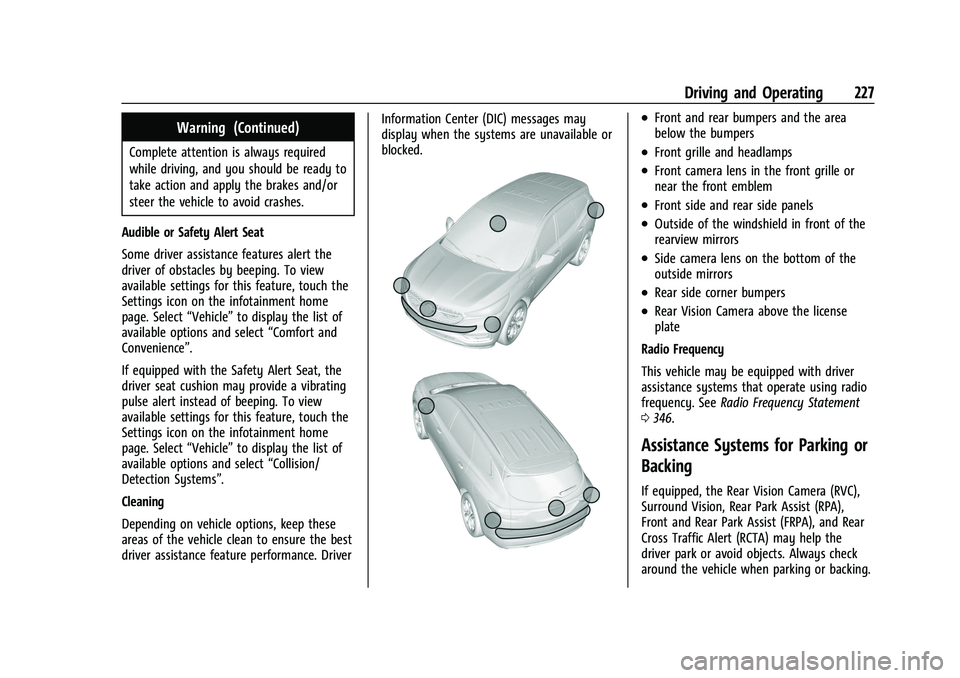
Depending on vehicle options, keep these
areas of the vehicle clean to ensure the best
driver assistance feature performance. Driver Information Center (DIC) messages may
display when the systems are unavailable or
blocked.
.Front and rear bumpers and the area
below the bumpers
.Front grille and headlamps
.Front camera lens in the front grille or
near the front emblem
.Front side and rear side panels
.Outside of the windshield in front of the
rearview mirrors
.Side camera lens on the bottom of the
outside mirrors
.Rear side corner bumpers
.Rear Vision Camera above the license
plate
Radio Frequency
This vehicle may be equipped with driver
assistance systems that operate using radio
frequency. See Radio Frequency Statement
0 346.
Assistance Systems for Parking or
Backing
If equipped, the Rear Vision Camera (RVC),
Surround Vision, Rear Park Assist (RPA),
Front and Rear Park Assist (FRPA), and Rear
Cross Traffic Alert (RCTA) may help the
driver park or avoid objects. Always check
around the vehicle when parking or backing.
Page 241 of 369
Chevrolet Traverse Owner Manual (GMNA-Localizing-U.S./Canada/Mexico-
16411537) - 2023 - CRC - 3/28/22
240 Driving and Operating
from the infotainment screen, touch Settings
> Vehicle > Collision/Detection Systems.
If LCA is disabled by the driver, the LCA
mirror displays will not light up.
When the System Does Not Seem to
Work Properly
The LCA system requires some driving for
the system to calibrate to maximum
performance. This calibration may occur
more quickly if the vehicle is driving on a
straight highway road with traffic and
roadside objects (e.g., guardrails, barriers).
LCA displays may not come on when
passing a vehicle quickly, for a stopped
vehicle, or when towing a trailer. The LCA
detection zones that extend back from the
side of the vehicle do not move further back
when a trailer is towed. Use caution while
changing lanes when towing a trailer. LCA
may alert to objects attached to the vehicle,
such as a trailer, bicycle, or object extending
out to either side of the vehicle. Attached
objects may also interfere with the
detection of vehicles. This is normal system
operation; the vehicle does not need service.
LCA may not always alert the driver to
vehicles in the next lane over, especially in
wet conditions or when driving on sharpcurves. The system does not need to be
serviced. The system may light up due to
guardrails, signs, trees, shrubs, and other
non-moving objects. This is normal system
operation; the vehicle does not need service.
LCA may not operate when the LCA sensors
in the left or right corners of the rear
bumper are covered with mud, dirt, snow,
ice, or slush, or in heavy rainstorms. For
cleaning instructions, see "Washing the
Vehicle" under
Exterior Care0317. If the DIC
still displays the system unavailable
message after cleaning both sides of the
vehicle toward the rear corners of the
vehicle, see your dealer.
If the LCA displays do not light up when
moving vehicles are in the side blind zone or
are rapidly approaching this zone and the
system is clean, the system may need
service. Take the vehicle to your dealer.
Radio Frequency Information
See Radio Frequency Statement 0346.
Lane Keep Assist (LKA)
If equipped, LKA may help avoid crashes due
to unintentional lane departures. This
system uses a camera to detect lane
markings. The LKA system can be ready to assist at speeds between approximately
60 km/h (37 mph) and 180 km/h (112 mph).
On some vehicles, the system will instead
operate above 50 km/h (31 mph). LKA may
assist by gently turning the steering wheel
if the vehicle approaches a detected lane
marking. It may also provide a Lane
Departure Warning (LDW) alert if the vehicle
crosses a detected lane marking. This system
is not intended to keep the vehicle centered
in the lane. LKA will not assist and alert if
the turn signal is active in the direction of
lane departure, or if it detects that you are
accelerating, braking or actively steering.
LKA can be overridden by turning the
steering wheel. If the system detects you
are steering intentionally across a lane
marker, the LDW will not be given. Do not
expect the LDW to occur when you are
intentionally crossing a lane marker.
{Warning
The LKA system does not continuously
steer the vehicle. It may not keep the
vehicle in the lane or give a Lane
Departure Warning (LDW) alert, even if a
lane marking is detected.
(Continued)
Page 297 of 369
Chevrolet Traverse Owner Manual (GMNA-Localizing-U.S./Canada/Mexico-
16411537) - 2023 - CRC - 3/28/22
296 Vehicle Care
stays on for the remainder of the ignition
cycle. A DIC warning message also displays.
The malfunction light and DIC warning
message come on at each ignition cycle
until the problem is corrected. Some of the
conditions that can cause these to come
on are:
.One of the road tires has been replaced
with the spare tire. The spare tire does
not have a TPMS sensor. The malfunction
light and DIC message should go off after
the road tire is replaced and the sensor
matching process is performed
successfully. See“TPMS Sensor Matching
Process” later in this section.
.The TPMS sensor matching process was
not done or not completed successfully
after rotating the tires. The malfunction
light and the DIC message should go off
after successfully completing the sensor
matching process. See "TPMS Sensor
Matching Process" later in this section.
.One or more TPMS sensors are missing or
damaged. The malfunction light and the
DIC message should go off when the
TPMS sensors are installed and the sensor
matching process is performed
successfully. See your dealer for service.
.Replacement tires or wheels do not match
the original equipment tires or wheels.
Tires and wheels other than those
recommended could prevent the TPMS
from functioning properly. See Buying
New Tires 0300.
.Operating electronic devices or being near
facilities using radio wave frequencies
similar to the TPMS could cause the TPMS
sensors to malfunction.
If the TPMS is not functioning properly it
cannot detect or signal a low tire pressure
condition. See your dealer for service if the
TPMS malfunction light and DIC message
come on and stay on.
Tire Fill Alert (If Equipped)
This feature provides visual and audible
alerts outside the vehicle to help when
inflating an underinflated tire to the
recommended cold tire pressure.
When the low tire pressure warning light
comes on: 1. Park the vehicle in a safe, level place.
2. Set the parking brake firmly.
3. Place the vehicle in P (Park).
4. Add air to the tire that is underinflated. The turn signal lamp will flash. When the recommended pressure is
reached, the horn sounds once and the
turn signal lamp will stop flashing and
briefly turn solid.
Repeat these steps for all underinflated tires
that have illuminated the low tire pressure
warning light.
{Warning
Overinflating a tire could cause the tire
to rupture and you or others could be
injured. Do not exceed the maximum
pressure listed on the tire sidewall. See
Tire Sidewall Labeling 0287 and
Vehicle Load Limits 0196.
If the tire is overinflated by more than
35 kPa (5 psi), the horn will sound multiple
times and the turn signal lamp will continue
to flash for several seconds after filling
stops. To release and correct the pressure,
while the turn signal lamp is still flashing,
briefly press the center of the valve stem.
When the recommended pressure is reached,
the horn sounds once.
If the turn signal lamp does not flash within
15 seconds after starting to inflate the tire,
the tire fill alert has not been activated or is
not working.
Page 348 of 369
Chevrolet Traverse Owner Manual (GMNA-Localizing-U.S./Canada/Mexico-
16411537) - 2023 - CRC - 3/28/22
Customer Information 347
and notify General Motors of Canada
Company. Call Transport Canada at
1-800-333-0510; go to:
www.tc.gc.ca/recalls (English)
www.tc.gc.ca/rappels (French)
or write to:
Transport Canada
Motor Vehicle Safety Directorate
Defect Investigations and Recalls
Division
80 Noel Street
Gatineau
,QC J8Z 0A1
Reporting Safety Defects to
General Motors
In addition to notifying NHTSA (or Transport
Canada) in a situation like this, notify
General Motors.
In the U.S., call 1-800-222-1020, or write:
Chevrolet Motor Division
Chevrolet Customer Assistance Center
P.O. Box 33170
Detroit, MI 48232-5170
In Canada, call 1-800-263-3777 (English) or
1-800-263-7854 (French), or write:Customer Care Centre
General Motors of Canada Company
500 Wentworth Street W
Oshawa, ON L1J 0C5
In Mexico, call 800-466-0811 or
800-508-0000.
In other Central America and Caribbean
Countries, call 52-555-901-2369.
Vehicle Data Recording and
Privacy
The vehicle has a number of computers that
record information about the vehicle’s
performance and how it is driven or used.
For example, the vehicle uses computer
modules to monitor and control engine and
transmission performance, to monitor the
conditions for airbag deployment and
deploy them in a crash, and, if equipped, to
provide antilock braking to help the driver
control the vehicle. These modules may
store data to help the dealer technician
service the vehicle or to help GM improve
safety or features. Some modules may also
store data about how the vehicle is
operated, such as rate of fuel consumption
or average speed. These modules may retain
personal preferences, such as radio presets,
seat positions, and temperature settings.
Cybersecurity
GM collects information about the use of
your vehicle including operational and safety
related information. We collect this
information to provide, evaluate, improve,
and troubleshoot our products and services
and to develop new products and services.
The protection of vehicle electronics systems
and customer data from unauthorized
outside electronic access or control is
important to GM. GM maintains appropriate
security standards, practices, guidelines and
controls aimed at defending the vehicle and
the vehicle service ecosystem against
unauthorized electronic access, detecting
possible malicious activity in related
networks, and responding to suspected
cybersecurity incidents in a timely,
coordinated and effective manner. Security
incidents could impact your safety or
compromise your private data. To minimize
security risks, please do not connect your
vehicle electronic systems to unauthorized
devices or connect your vehicle to any
unknown or untrusted networks (such as
Bluetooth, WIFI or similar technology). In
Page 352 of 369
Chevrolet Traverse Owner Manual (GMNA-Localizing-U.S./Canada/Mexico-
16411537) - 2023 - CRC - 3/28/22
OnStar 351
OnStar Additional
Information
In-Vehicle Audio Messages
Audio messages may play important
information at the following times:
.Prior to vehicle purchase. PressQto set
up an account.
.After change in ownership and at
90 days.
Transferring Service
PressQto request account transfer
eligibility information. The Advisor can
cancel or change account information.
Selling/Transferring the Vehicle
Call 1-888-4ONSTAR (1-888-466-7827)
immediately to terminate your OnStar or
connected services if the vehicle is disposed
of, sold, transferred, or if the lease ends.
Reactivation for Subsequent Owners
PressQand follow the prompts to speak to
an Advisor as soon as possible. The Advisor
will update vehicle records and explain
OnStar or connected service options.
How OnStar Service Works
Automatic Crash Response, Emergency
Services, Crisis Assist, Stolen Vehicle
Assistance, Remote Services, and Roadside
Assistance are available on most vehicles.
Not all OnStar services are available
everywhere or on all vehicles. For more
information, a full description of OnStar
services, system limitations, and OnStar User
Terms, Privacy Statement, and Software
Terms:
.Call 1-888-4ONSTAR (1-888-466-7827).
.See www.onstar.com (U.S.).
.See www.onstar.ca (Canada).
.Call TTY 1-877-248-2080.
.PressQto speak with an Advisor.
OnStar or connected services cannot work
unless the vehicle is in a place where OnStar
has an agreement with a wireless service
provider for service in that area. The
wireless service provider must also have
coverage, network capacity, reception, and
technology compatible with OnStar or
connected services. Service involving location
information about the vehicle cannot work
unless GPS signals are available,
unobstructed, and compatible with the
OnStar hardware. OnStar or connected services may not work if the OnStar
equipment is not properly installed or it has
not been properly maintained. If equipment
or software is added, connected,
or modified, OnStar or connected services
may not work. Other problems beyond the
control of OnStar
—such as hills, tall
buildings, tunnels, weather, electrical system
design and architecture of the vehicle,
damage to the vehicle in a crash, or wireless
phone network congestion or jamming —
may prevent service.
See Radio Frequency Statement 0346.
Services for People with Disabilities
Advisors provide services to help with
physical disabilities and medical conditions.
Press
Qto help:
.Locate a gas station with an attendant to
pump gas.
.Find a hotel, restaurant, etc., that meets
accessibility needs.
.Provide directions to the closest hospital
or pharmacy in urgent situations.
Page 354 of 369
Chevrolet Traverse Owner Manual (GMNA-Localizing-U.S./Canada/Mexico-
16411537) - 2023 - CRC - 3/28/22
OnStar 353
Vehicle and Power Issues
OnStar services require a vehicle electrical
system, wireless service, and GPS satellite
technologies to be available and operating
for features to function properly. These
systems may not operate if the battery is
discharged or disconnected.
Add-on Electrical Equipment
The OnStar system is integrated into the
electrical architecture of the vehicle. Do not
add any electrical equipment. SeeAdd-On
Electrical Equipment 0256. Added electrical
equipment may interfere with the operation
of the OnStar system and cause it to not
operate.
Vehicle Software Updates
OnStar or GM may remotely deliver
software updates or changes to the vehicle
without further notice or consent. These
updates or changes may enhance or
maintain safety, security, or the operation
of the vehicle or the vehicle systems.
Software updates or changes may affect or
erase data or settings that are stored in the
vehicle, such as saved navigation
destinations or pre-set radio stations.
Neither OnStar nor GM is responsible for
any affected or erased data or settings. These updates or changes may also collect
personal information. Such collection is
described in the OnStar privacy statement or
separately disclosed at the time of
installation. These updates or changes may
also cause a system to automatically
communicate with GM servers to collect
information about vehicle system status,
identify whether updates or changes are
available, or deliver updates or changes. An
active OnStar agreement constitutes consent
to these software updates or changes and
agreement that either OnStar or GM may
remotely deliver them to the vehicle.
Privacy
The complete OnStar Privacy Statement may
be found at www.onstar.com (U.S.),
or www.onstar.ca (Canada). We recommend
that you review it. If you have any
questions, call 1-888-4ONSTAR
(1-888-466-7827) or press
Qto speak with
an Advisor. Users of wireless
communications are cautioned that the
privacy of any information sent via wireless
cellular communications cannot be assured.
Third parties may unlawfully intercept or
access transmissions and private
communications without consent.
OnStar - Software Acknowledgements
To obtain the source code under GPL, LGPL,
MPL, and other open source licenses, that is
contained in this product, please visit
https://opensource.lge.com. In addition to
the source code, all referred license terms,
warranty disclaimers, and copyright notices
are available for download. This offer is valid
for a period of three years after our last
shipment of this product. This offer is valid
to anyone in receipt of this information.
*Provided through LG Electronics Inc., who is
solely responsible for provisions of related
OSS compliance.
Page 366 of 369
Chevrolet Traverse Owner Manual (GMNA-Localizing-U.S./Canada/Mexico-
16411537) - 2023 - CRC - 3/28/22
Index 365
Retained Accessory Power (RAP) . . . . . . . . . 204
Reverse Tilt Mirrors . . . . . . . . . . . . . . . . . . . . . . . 28
RoadsDriving, Wet . . . . . . . . . . . . . . . . . . . . . . . . . . . 193
Roadside Assistance Program . . . . . . . . . . . . .341
Roof Rack System . . . . . . . . . . . . . . . . . . . . . . . . . . . . 87
Sunroof . . . . . . . . . . . . . . . . . . . . . . . . . . . . . . . . . 33
Rotation, Tires . . . . . . . . . . . . . . . . . . . . . . . . . . . 298
Routing, Engine Drive Belt . . . . . . . . . . . . . . . 337
Running the Vehicle While Parked . . . . . . . 207
S
Safety Locks . . . . . . . . . . . . . . . . . . . . . . . . . . . . . . . . . . . 18
Safety Defects Reporting Canadian Government . . . . . . . . . . . . . . . . . 346
General Motors . . . . . . . . . . . . . . . . . . . . . . . . 347
U.S. Government . . . . . . . . . . . . . . . . . . . . . . . 346
Safety System Check . . . . . . . . . . . . . . . . . . . . . 54
Satellite Radio . . . . . . . . . . . . . . . . . . . . . . . . . . . 140
Scheduling Appointments . . . . . . . . . . . . . . . . 342
Seat Belts . . . . . . . . . . . . . . . . . . . . . . . . . . . . . . . . . 48 Buckle To Drive . . . . . . . . . . . . . . . . . . . . . . . . . 49
Care . . . . . . . . . . . . . . . . . . . . . . . . . . . . . . . . . . . . 55
Extender . . . . . . . . . . . . . . . . . . . . . . . . . . . . . . . . 54
How to Wear Seat Belts Properly . . . . . . . 49
Lap-Shoulder Belt . . . . . . . . . . . . . . . . . . . . . . . . 51 Seat Belts (cont'd)
Reminders . . . . . . . . . . . . . . . . . . . . . . . . . . . . . 107
Replacing after a Crash . . . . . . . . . . . . . . . . . 55
Use During Pregnancy . . . . . . . . . . . . . . . . . . 54
Seats Adjustment, Front . . . . . . . . . . . . . . . . . . . . . . 37
Head Restraints . . . . . . . . . . . . . . . . . . . . . . . . . 35
Heated and Ventilated, Front . . . . . . . . . . . 42
Heated, Rear . . . . . . . . . . . . . . . . . . . . . . . . . . . . 46
Lumbar Adjustment, Front . . . . . . . . . . . . . . 39
Memory . . . . . . . . . . . . . . . . . . . . . . . . . . . . . . . . 39
Power Adjustment, Front . . . . . . . . . . . . . . . 37
Rear . . . . . . . . . . . . . . . . . . . . . . . . . . . . . . . . . . . . 43
Reclining Seatbacks . . . . . . . . . . . . . . . . . . . . . 38
Third Row Seat . . . . . . . . . . . . . . . . . . . . . . . . . 46
Securing Child Restraints . . . . . . . . . . . . . . . 79, 81
Security
Light . . . . . . . . . . . . . . . . . . . . . . . . . . . . . . . . . . . . 115
OnStar . . . . . . . . . . . . . . . . . . . . . . . . . . . . . . . . . 350
Vehicle . . . . . . . . . . . . . . . . . . . . . . . . . . . . . . . . . 25
Vehicle Alarm . . . . . . . . . . . . . . . . . . . . . . . . . . . 25
Service . . . . . . . . . . . . . . . . . . . . . . . . . . . . . . . . . . . .185 Accessories and Modifications . . . . . . . . . 258
Doing Your Own Work . . . . . . . . . . . . . . . . . 258
Electric Parking Brake Light . . . . . . . . . . . . . 111
Maintenance Records . . . . . . . . . . . . . . . . . . 333
Maintenance, General Information . . . . . 326
Parts Identification . . . . . . . . . . . . . . . . . . . . . 334 Service (cont'd)
Scheduling Appointments . . . . . . . . . . . . . . 342
Services Special Application . . . . . . . . . . . . . . . . . . . . . 330
Servicing System . . . . . . . . . . . . . . . . . . . . . . . . . 155
Servicing the Airbag . . . . . . . . . . . . . . . . . . . . . . 64
Settings . . . . . . . . . . . . . . . . . . . . . . . . . . . . . . . . . . 166
Shifting Into Park . . . . . . . . . . . . . . . . . . . . . . . . . . . . . . 205
Out of Park . . . . . . . . . . . . . . . . . . . . . . . . . . . . 205
Side Blind Zone Alert (SBZA) . . . . . . . . . . . . . 238
Signals, Turn and Lane-Change . . . . . . . . . . . .128
Software Updates . . . . . . . . . . . . . . . . . . . . . . . . .138
Spare Tire Compact . . . . . . . . . . . . . . . . . . . . . . . . . . . . . . . 310
Special Application Services . . . . . . . . . . . . . . 330
Specifications and Capacities . . . . . . . . . . . . . 335
Speedometer . . . . . . . . . . . . . . . . . . . . . . . . . . . . 104
StabiliTrak
OFF Light . . . . . . . . . . . . . . . . . . . . . . . . . . . . . . . 113
Start Assist, Hill . . . . . . . . . . . . . . . . . . . . . . . . . . . 212
Start Vehicle, Remote . . . . . . . . . . . . . . . . . . . . . .14
Starting the Engine . . . . . . . . . . . . . . . . . . . . . . 201
Steering . . . . . . . . . . . . . . . . . . . . . . . . . . . . . . . . . 189
Heated Wheel . . . . . . . . . . . . . . . . . . . . . . . . . . 90
Wheel Adjustment . . . . . . . . . . . . . . . . . . . . . . 90
Wheel Controls . . . . . . . . . . . . . . . . . . . . . . . . 134
Stop/Start System . . . . . . . . . . . . . . . . . . . . . . . 202