Storage CHEVROLET TRAVERSE 2023 Owners Manual
[x] Cancel search | Manufacturer: CHEVROLET, Model Year: 2023, Model line: TRAVERSE, Model: CHEVROLET TRAVERSE 2023Pages: 369, PDF Size: 16.89 MB
Page 2 of 369
Chevrolet Traverse Owner Manual (GMNA-Localizing-U.S./Canada/Mexico-
16411537) - 2023 - CRC - 3/28/22
Contents
Introduction . . . . . . . . . . . . . . . . . . . . . . . . . . . . . . 1
Keys, Doors, and Windows . . . . . . . . . . . . . . . 6
Seats and Restraints . . . . . . . . . . . . . . . . . . . . . 35
Storage . . . . . . . . . . . . . . . . . . . . . . . . . . . . . . . . . 84
Instruments and Controls . . . . . . . . . . . . . . . 89
Lighting . . . . . . . . . . . . . . . . . . . . . . . . . . . . . . . . . 125
Infotainment System . . . . . . . . . . . . . . . . . . . 132
Climate Controls . . . . . . . . . . . . . . . . . . . . . . . 180
Driving and Operating . . . . . . . . . . . . . . . . . . 186
Vehicle Care . . . . . . . . . . . . . . . . . . . . . . . . . . . . 257
Service and Maintenance . . . . . . . . . . . . . . . 326
Technical Data . . . . . . . . . . . . . . . . . . . . . . . . . 334
Customer Information . . . . . . . . . . . . . . . . . . 338
Reporting Safety Defects . . . . . . . . . . . . . . . 346
OnStar . . . . . . . . . . . . . . . . . . . . . . . . . . . . . . . . . 349
Connected Services . . . . . . . . . . . . . . . . . . . . . 354
Index . . . . . . . . . . . . . . . . . . . . . . . . . . . 357
Introduction
California Proposition 65 Warning
Litho in U.S.A.
Part No. 84999704 A First Printing©2022 General Motors LLC. All Rights Reserved.
Page 12 of 369

Chevrolet Traverse Owner Manual (GMNA-Localizing-U.S./Canada/Mexico-
16411537) - 2023 - CRC - 3/28/22
Keys, Doors, and Windows 11
4. Place the new remote key into theremote key pocket. The remote key
pocket is inside the center console
storage area between the driver and
front passenger seats, underneath the
liner.
5. Press ENGINE START/STOP. When the remote key is learned the DIC display
will show that it is ready to program the
next remote key.
6. Remove the remote key from the remote key pocket and press the remote key
K
orQbutton.
To program additional remote keys,
repeat Steps 3–5. When all additional remote keys are
programmed, press and hold ENGINE
START/STOP for 12 seconds to exit
programming mode.
7. Put the key back into the remote key.
8. Replace the key lock cylinder cap. See Door Locks 015.
Programming without Recognized
Remote Keys
If two currently recognized remote keys are
not available, follow this procedure to
program up to eight remote keys. This
feature is not available in Canada. This
procedure will take approximately
30 minutes to complete. The vehicle must
be off and all of the remote keys you wish
to program must be with you. 1. Remove the key by pressing the button on the side of the remote key near the
bottom and pull the key out. Never pull
the key out without pressing the button.
2. Remove the key lock cylinder cap on the driver door handle. See Door Locks015.
Insert the vehicle key of the remote key
into the key lock cylinder on the driver
door handle and turn the key,
counterclockwise, to the unlock position
five times within 10 seconds. The DIC displays REMOTE LEARN
PENDING, PLEASE WAIT.
3. Wait for 10 minutes until the DIC displays PRESS ENGINE START BUTTON TO
LEARN and then press ENGINE
START/STOP.
The DIC will again display REMOTE LEARN
PENDING, PLEASE WAIT.
4. Repeat Step 2 two additional times. After the third time all previously known
remote keys will no longer work with
the vehicle. Remaining remote keys can
be relearned during the next steps.
The DIC display should now show READY
FOR REMOTE # 1.
Page 13 of 369

Chevrolet Traverse Owner Manual (GMNA-Localizing-U.S./Canada/Mexico-
16411537) - 2023 - CRC - 3/28/22
12 Keys, Doors, and Windows
5. Place the new remote key into theremote key pocket. The remote key
pocket is inside the center console
storage area between the driver and
front passenger seats, underneath the
liner.
6. Press ENGINE START/STOP. When the remote key is learned the DIC display
will show that it is ready to program the
next remote key.
7. Remove the remote key from the remote key pocket and press the remote key
K
orQbutton.
To program additional remote keys,
repeat Steps 4–6.
When all additional remote keys are
programmed, press and hold ENGINE
START/STOP for 12 seconds to exit
programming mode.
8. Put the key back into the remote key.
9. Replace the key lock cylinder cap. See Door Locks 015.
Starting the Vehicle with a Low Remote
Key Battery
When starting the vehicle, if the remote key
battery is depleted, there is signal
interference, or the remote key has been idle for a while, the DIC may display NO
REMOTE DETECTED or NO REMOTE KEY WAS
DETECTED PLACE KEY IN TRANSMITTER
POCKET THEN START YOUR VEHICLE. For
improved vehicle security, the remote key is
equipped with a motion sensor. Move the
remote key slightly and try starting the
vehicle. If the vehicle still does not start,
and the DIC displays the same warnings
above, follow the steps shown below.
To start the vehicle:
1. Open the center console storage area by opening the armrest.2. Place the remote key in the remote keypocket. 3. With the vehicle in P (Park) or
N (Neutral), press the brake pedal and
ENGINE START/STOP.
Replace the remote key battery as soon
as possible.
Battery Replacement
{Warning
Never allow children to play with the
remote key. The remote key contains a
small battery, which can be a choking
hazard. If swallowed, internal burns can
occur, resulting in severe injury or death.
Seek medical attention immediately if a
battery is swallowed.
{Warning
To avoid personal injury, do not touch
metal surfaces on the remote key when
it has been exposed to extreme heat.
These surfaces can be hot to the touch at
temperatures above 59 °C (138 °F).
Page 85 of 369
Chevrolet Traverse Owner Manual (GMNA-Localizing-U.S./Canada/Mexico-
16411537) - 2023 - CRC - 3/28/22
84 Storage
Storage
Storage Compartments
Storage Compartments . . . . . . . . . . . . . . . . . 84
Instrument Panel Storage . . . . . . . . . . . . . . 84
Glove Box . . . . . . . . . . . . . . . . . . . . . . . . . . . . . . 84
Center Console Storage . . . . . . . . . . . . . . . . . 84
Additional Storage Features
Cargo Management System . . . . . . . . . . . . 85
Warning Triangle . . . . . . . . . . . . . . . . . . . . . . . 87
Roof Rack System
Roof Rack System . . . . . . . . . . . . . . . . . . . . . . 87
Storage Compartments{
Warning
Do not store heavy or sharp objects in
storage compartments. In a crash, these
objects may cause the cover to open and
could result in injury.
Instrument Panel Storage
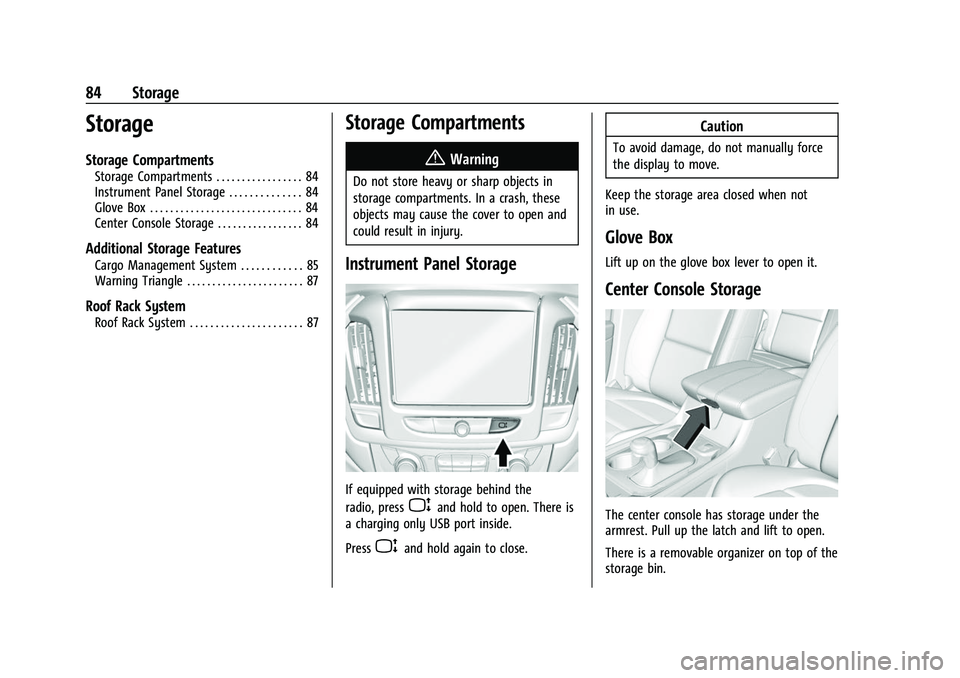
If equipped with storage behind the
radio, press
Pand hold to open. There is
a charging only USB port inside.
Press
Pand hold again to close.
Caution
To avoid damage, do not manually force
the display to move.
Keep the storage area closed when not
in use.
Glove Box
Lift up on the glove box lever to open it.
Center Console Storage
The center console has storage under the
armrest. Pull up the latch and lift to open.
There is a removable organizer on top of the
storage bin.
Page 86 of 369
Chevrolet Traverse Owner Manual (GMNA-Localizing-U.S./Canada/Mexico-
16411537) - 2023 - CRC - 3/28/22
Storage 85
The center console also has the following:
.A forward bin
.An open storage bin on the back of the
console
.If equipped, wireless charging in the front
storage bin
There are also charging only USB ports on
the rear of the center console and in the
third row seating area. See Power Outlets
0 93.
Additional Storage Features
Cargo Management System
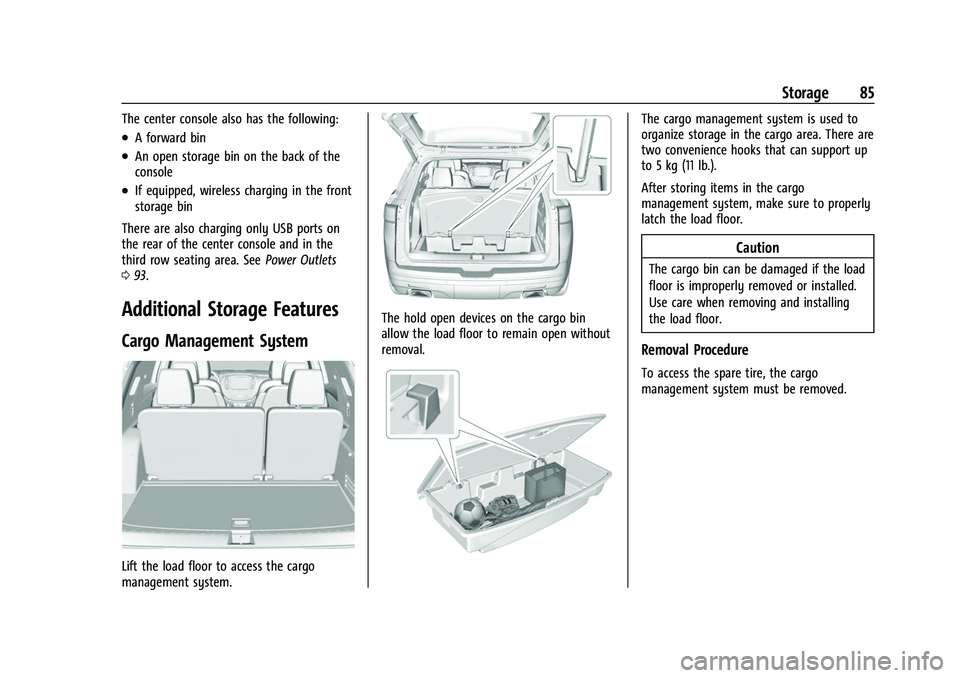
Lift the load floor to access the cargo
management system.
The hold open devices on the cargo bin
allow the load floor to remain open without
removal.
The cargo management system is used to
organize storage in the cargo area. There are
two convenience hooks that can support up
to 5 kg (11 lb.).
After storing items in the cargo
management system, make sure to properly
latch the load floor.
Caution
The cargo bin can be damaged if the load
floor is improperly removed or installed.
Use care when removing and installing
the load floor.
Removal Procedure
To access the spare tire, the cargo
management system must be removed.
Page 87 of 369
Chevrolet Traverse Owner Manual (GMNA-Localizing-U.S./Canada/Mexico-
16411537) - 2023 - CRC - 3/28/22
86 Storage
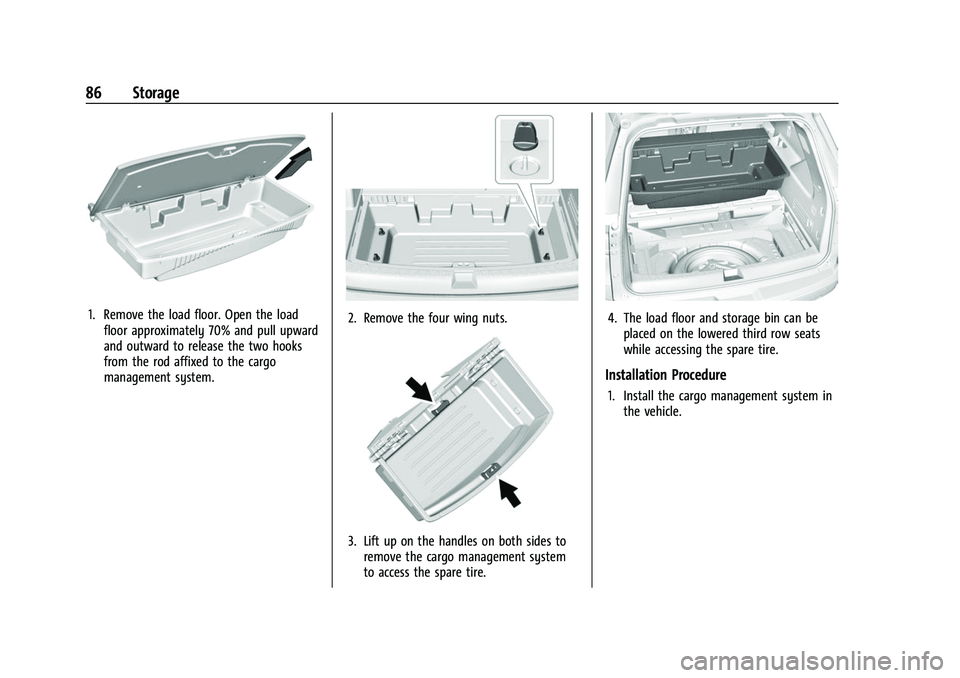
1. Remove the load floor. Open the loadfloor approximately 70% and pull upward
and outward to release the two hooks
from the rod affixed to the cargo
management system.2. Remove the four wing nuts.
3. Lift up on the handles on both sides toremove the cargo management system
to access the spare tire.
4. The load floor and storage bin can beplaced on the lowered third row seats
while accessing the spare tire.
Installation Procedure
1. Install the cargo management system inthe vehicle.
Page 88 of 369
Chevrolet Traverse Owner Manual (GMNA-Localizing-U.S./Canada/Mexico-
16411537) - 2023 - CRC - 3/28/22
Storage 87
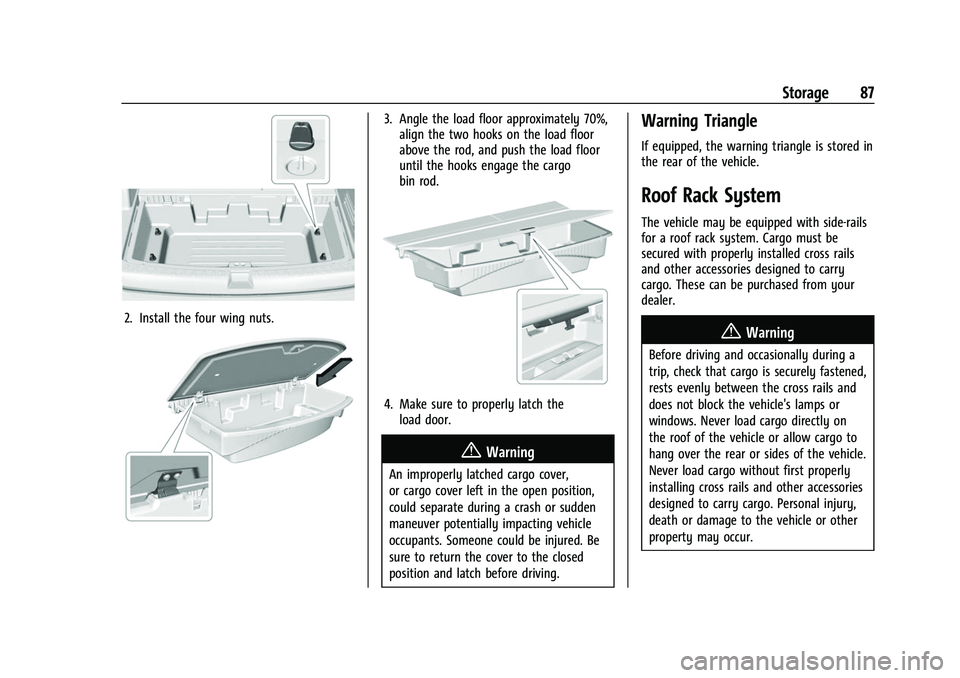
2. Install the four wing nuts.
3. Angle the load floor approximately 70%,align the two hooks on the load floor
above the rod, and push the load floor
until the hooks engage the cargo
bin rod.
4. Make sure to properly latch theload door.
{Warning
An improperly latched cargo cover,
or cargo cover left in the open position,
could separate during a crash or sudden
maneuver potentially impacting vehicle
occupants. Someone could be injured. Be
sure to return the cover to the closed
position and latch before driving.
Warning Triangle
If equipped, the warning triangle is stored in
the rear of the vehicle.
Roof Rack System
The vehicle may be equipped with side-rails
for a roof rack system. Cargo must be
secured with properly installed cross rails
and other accessories designed to carry
cargo. These can be purchased from your
dealer.
{Warning
Before driving and occasionally during a
trip, check that cargo is securely fastened,
rests evenly between the cross rails and
does not block the vehicle's lamps or
windows. Never load cargo directly on
the roof of the vehicle or allow cargo to
hang over the rear or sides of the vehicle.
Never load cargo without first properly
installing cross rails and other accessories
designed to carry cargo. Personal injury,
death or damage to the vehicle or other
property may occur.
Page 89 of 369
Chevrolet Traverse Owner Manual (GMNA-Localizing-U.S./Canada/Mexico-
16411537) - 2023 - CRC - 3/28/22
88 Storage
If driving for a long distance, on rough
roads, or at high speeds, occasionally stop
the vehicle to make sure the cargo remains
in its place.
Cargo Weight Limits
Do not exceed the maximum cargo weight
for the roof rack system, including the
weight of the cross rails and any other
accessories used to carry the cargo such as
bike racks or roof boxes. The maximum
cargo weight that can be loaded onto the
roof rack system is 100 kg (220 lb) or the
weight designated in the instructions that
came with the cross rails or other roof rack
accessories, whichever is less.
{Warning
Never load the roof rack with more
weight than specified in this section.
Loading cargo on the roof rack will make
the vehicle's center of gravity higher. To
avoid losing control of the vehicle, avoid
overloading, high speeds, sudden starts,
sharp turns, sudden braking, or abrupt
maneuvers when carrying cargo on the
roof rack.The weight of any cargo carried on the roof
rack system must be included in calculating
the loaded weight of the vehicle. Do not
exceed the maximum vehicle capacity when
loading the vehicle, including cargo carried
on the roof rack system and passengers and
cargo carried in the vehicle. For more
information on vehicle capacity and loading,
see
Vehicle Load Limits 0196.
Page 95 of 369
Chevrolet Traverse Owner Manual (GMNA-Localizing-U.S./Canada/Mexico-
16411537) - 2023 - CRC - 3/28/22
94 Instruments and Controls
Certain accessory plugs may not be
compatible with the accessory power outlet
and could overload vehicle and adapter
fuses. If a problem is experienced, see your
dealer.
When adding electrical equipment, be sure
to follow the proper installation instructions
included with the equipment. SeeAdd-On
Electrical Equipment 0256.
Caution
Hanging heavy equipment from the
power outlet can cause damage not
covered by the vehicle warranty. The
power outlets are designed for accessory
power plugs only, such as cell phone
charge cords.
Power Outlet 110V/120V Alternating
Current
If equipped with this power outlet it can be
used to plug in electrical equipment that
uses a maximum limit of 150 watts.
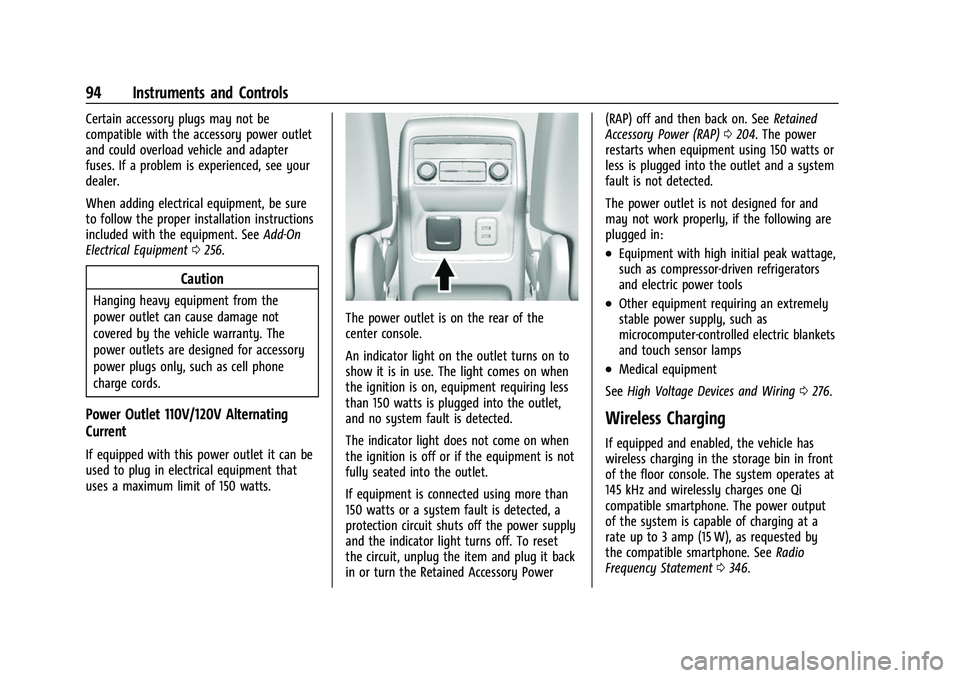
The power outlet is on the rear of the
center console.
An indicator light on the outlet turns on to
show it is in use. The light comes on when
the ignition is on, equipment requiring less
than 150 watts is plugged into the outlet,
and no system fault is detected.
The indicator light does not come on when
the ignition is off or if the equipment is not
fully seated into the outlet.
If equipment is connected using more than
150 watts or a system fault is detected, a
protection circuit shuts off the power supply
and the indicator light turns off. To reset
the circuit, unplug the item and plug it back
in or turn the Retained Accessory Power (RAP) off and then back on. See
Retained
Accessory Power (RAP) 0204. The power
restarts when equipment using 150 watts or
less is plugged into the outlet and a system
fault is not detected.
The power outlet is not designed for and
may not work properly, if the following are
plugged in:
.Equipment with high initial peak wattage,
such as compressor-driven refrigerators
and electric power tools
.Other equipment requiring an extremely
stable power supply, such as
microcomputer-controlled electric blankets
and touch sensor lamps
.Medical equipment
See High Voltage Devices and Wiring 0276.
Wireless Charging
If equipped and enabled, the vehicle has
wireless charging in the storage bin in front
of the floor console. The system operates at
145 kHz and wirelessly charges one Qi
compatible smartphone. The power output
of the system is capable of charging at a
rate up to 3 amp (15 W), as requested by
the compatible smartphone. See Radio
Frequency Statement 0346.
Page 134 of 369
Chevrolet Traverse Owner Manual (GMNA-Localizing-U.S./Canada/Mexico-
16411537) - 2023 - CRC - 3/28/22
Infotainment System 133
.Set up the audio by presetting favorite
stations, setting the tone, and adjusting
the speakers.
.Set up phone numbers in advance so they
can be called easily by pressing a single
control or by using a single voice
command.
See Distracted Driving 0187.
Active Noise Cancellation (ANC)
If equipped, ANC reduces engine noise in the
vehicle’s interior. ANC requires the
factory-installed audio system, radio,
speakers, amplifier (if equipped), induction
system, and exhaust system to work
properly. Deactivation is required by your
dealer if related aftermarket equipment is
installed.
Overview
Infotainment System
The infotainment system is controlled by
using the infotainment display, controls on
the center stack, steering wheel controls,
and voice recognition.
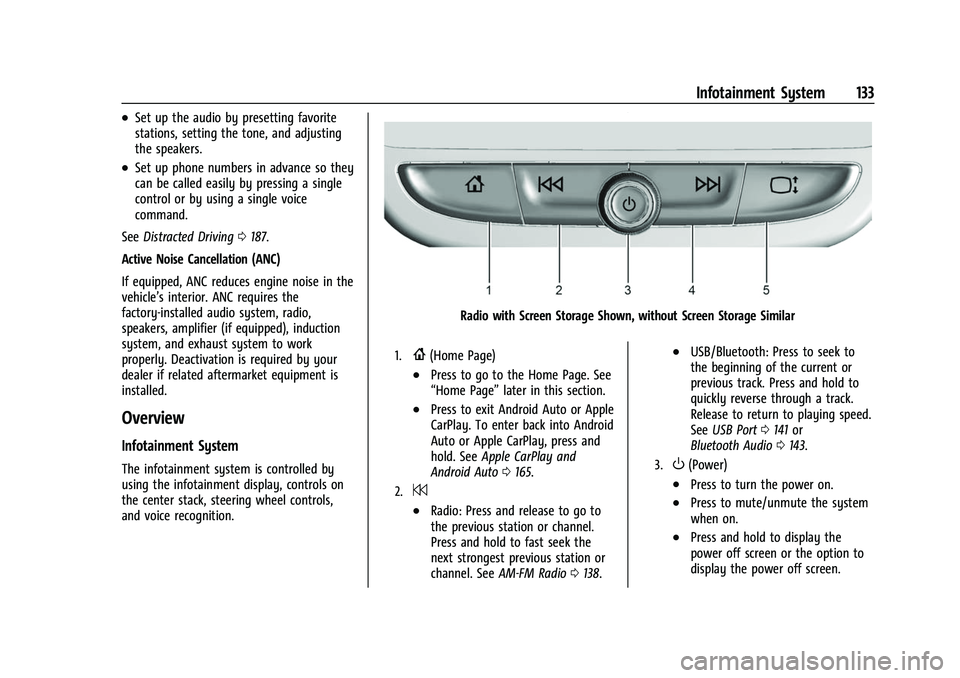
Radio with Screen Storage Shown, without Screen Storage Similar
1.{(Home Page)
.Press to go to the Home Page. See
“Home Page” later in this section.
.Press to exit Android Auto or Apple
CarPlay. To enter back into Android
Auto or Apple CarPlay, press and
hold. SeeApple CarPlay and
Android Auto 0165.
2.7
.Radio: Press and release to go to
the previous station or channel.
Press and hold to fast seek the
next strongest previous station or
channel. See AM-FM Radio 0138.
.USB/Bluetooth: Press to seek to
the beginning of the current or
previous track. Press and hold to
quickly reverse through a track.
Release to return to playing speed.
See USB Port 0141 or
Bluetooth Audio 0143.
3.O(Power)
.Press to turn the power on.
.Press to mute/unmute the system
when on.
.Press and hold to display the
power off screen or the option to
display the power off screen.