phone CHEVROLET TRAX 2013 1.G Service Manual
[x] Cancel search | Manufacturer: CHEVROLET, Model Year: 2013, Model line: TRAX, Model: CHEVROLET TRAX 2013 1.GPages: 408, PDF Size: 6.59 MB
Page 204 of 408
Black plate (52,1)Chevrolet TRAX Owner Manual - 2013 - CRC - 3/6/13
7-52 Infotainment System
Stitcher Menus
The Stitcher Station menu displays
available station data from the
Stitcher server.
1. Press MENU. The StitcherStation menu is displayed.
2. Press
QorRto scroll through
the list. Select the desired
station.
Tone Settings
1. Press MENU. The Stitcher menu is displayed.
2. Press tone settings. The tone settings menu is displayed. See
“Tone Settings” under“Radio
Controls With Touchscreen” in
Operation on page 7‑8.
Bluetooth Phone/
Devices
Pictures and Movies
(Audio System)
The infotainment system can play
the music files contained in the USB
storage device or iPod/iPhone
products.
Audio System Information
Using MP3/WMA/OGG/WAV Files
.Music files with .mp3, .wma,
.ogg, and .wav file name
extensions can be played.
.MP3 files that can be played are:
Bit rate: 8 kbps ~ 320 kbps -
Sampling frequency: 48 kHz,
44.1 kHz, 32 kHz, 24 kHz,
22.05 kHz, and 16 kHz.
.Files with a bit rate above
128 kbps will result in higher
quality sound.
.ID3 Tag information for MP3
files, such as the album name
and the artist, can be played.
.To display album title, track title,
and artist information, the file
should be compatible with the
ID3 Tag V1 and V2 formats.
Using USB Storage Devices and
iPod/iPhone
.Use a USB or flash memory type
storage device. Do not connect
using a USB adaptor.
.Do not connect and reconnect
the USB device repeatedly in a
short time, as this may cause
static electricity and problems
using the device.
.Use a USB device with a metal
connecting terminal.
.Connection with i-Stick Type
USB storage devices may be
faulty due to vehicle vibration.
.Do not to touch the USB
connecting terminal.
Page 205 of 408

Black plate (53,1)Chevrolet TRAX Owner Manual - 2013 - CRC - 3/6/13
Infotainment System 7-53
.Only USB storage devices
formatted in FAT16/32, exFAT
file system are recognized.
NTFS and other file systems are
not recognized.
.The time it takes to process files
will depend on the USB storage
device type and capacity, and
the type of files stored.
.Some USB storage device files
may not be compatible.
.Up to two USB devices and one
iPod can be played through a
USB hub. All devices may not be
supported, depending on the
performance of the USB hub.
If there is not enough power
supply, it may not operate
normally.
.Do not disconnect the USB
storage device while it is playing.
This may cause damage to the
product or affect the
performance of the USB device.
.Disconnect the USB storage
device when the ignition is
turned off. If the ignition is turnedon while the USB device is
connected, the USB device may
be damaged or may not operate
normally.
.USB storage devices can only
be connected for playing music/
movies, viewing photo files,
or upgrading.
.Do not use the USB terminal to
charge USB accessory
equipment. The heat generated
may cause performance issues
or damage.
.Store files in the top-level drive
of the USB storage device.
When the logical drive is
separated from the device, only
the USB music files from the
top-level logical drive can be
played. Music files stored on
USB storage devices may not
play normally if an application is
loaded by partitioning a separate
drive.
.Music files to which Digital Right
Management (DRM) is applied
cannot be played.
.USB storage device capacity
limit is 2,500 music files,
2500 photo files, 250 movie files,
2,500 folders, and 10 stages of
folder structure. The iPod/iPhone
can play all music files
supported, but will only display
up to 2,500 files on the screen in
alphabetical order.
.The following iPod/iPhone
product models are supported:
‐
iPod 2G nano
®/iPod 3G nano/
iPod 4G and 5G nano
‐ iPod 120GB and 160GB
classic
®
‐iPod 1G, 2G, and 3G touch®
‐iPhone 3G and 3GS
‐ iPhone 4/4S
.Only connect the iPod/iPhone
with connection cables
supported by iPod/iPhone
products. Other connection
cables cannot be used.
Page 206 of 408
Black plate (54,1)Chevrolet TRAX Owner Manual - 2013 - CRC - 3/6/13
7-54 Infotainment System
.The iPod/iPhone may be
damaged if the ignition is turned
off when it is connected to the
vehicle. When not in use,
disconnect the iPod/iPhone.
.When the iPod/iPhone is
connected to the USB port by
using the iPod/iPhone cable, the
Bluetooth music is not
supported.
.Connect the iPod/iPhone to the
USB port by using the iPod/
iPhone cable to play the music
files. When the iPod/iPhone is
connected to the AUX input
terminal, the music file will
not play.
.The iPod/iPhone playback
functions and the information
displayed may be different when
played on the infotainment
system.
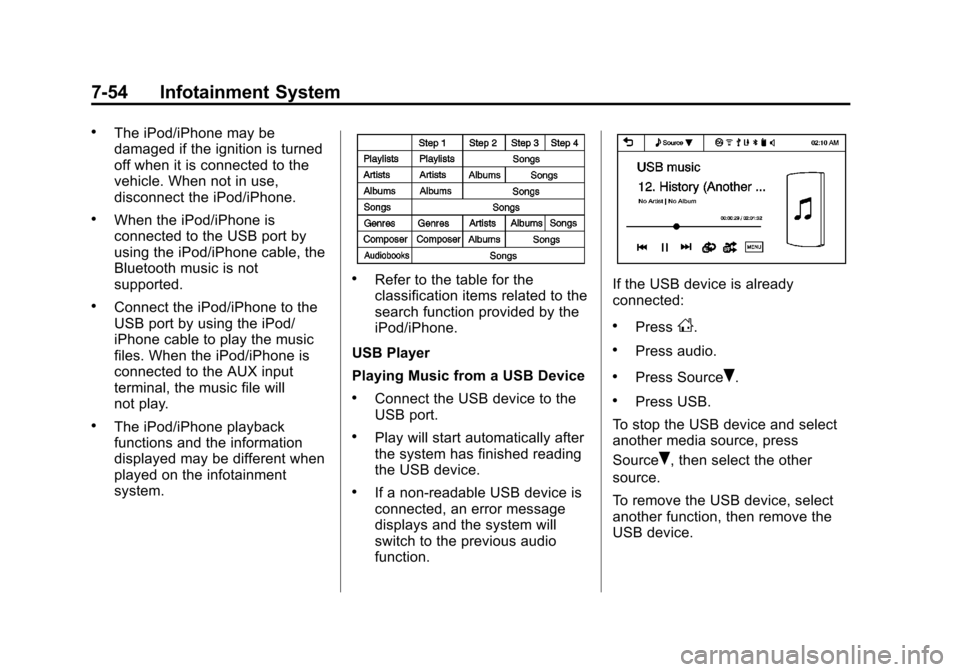
.Refer to the table for the
classification items related to the
search function provided by the
iPod/iPhone.
USB Player
Playing Music from a USB Device
.Connect the USB device to the
USB port.
.Play will start automatically after
the system has finished reading
the USB device.
.If a non-readable USB device is
connected, an error message
displays and the system will
switch to the previous audio
function.
If the USB device is already
connected:
.PressD.
.Press audio.
.Press SourceR.
.Press USB.
To stop the USB device and select
another media source, press
Source
R, then select the other
source.
To remove the USB device, select
another function, then remove the
USB device.
Page 208 of 408
Black plate (56,1)Chevrolet TRAX Owner Manual - 2013 - CRC - 3/6/13
7-56 Infotainment System
Tone Settings
1. Press
R.
2. Press tone settings. The Tone Settings menu is displayed. See
“Tone Settings” under“Radio
Controls with Touchscreen” in
Operation on page 7‑8.
iPod/iPhone player
This feature is limited to models
supporting the iPod/iPhone
connection.
Playing Music Files
.Connect the iPod/iPhone to the
USB port.
.Play will start from the previously
played point after the system
has finished reading the USB
device.
.If a non-readable USB device is
connected, an error message
displays and the system will
switch to the previous audio
function. If the iPod/iPhone is already
connected:
.PressD.
.Press audio.
.Press SourceR.
.Press iPod.
To stop the device and select
another media source, press
Source
R, then select the other
source.
To remove the device, select
another function, then remove the
device.
Pause
.Pressjto pause.
.Pressrto resume.
Changing to Next/Previous Song
.Presslto change to the
next song.
.Pressgwithin two seconds of
the playback time to play the
previous file.
Returning to the Beginning of the
Current File
Press
gafter two seconds of the
playback time.
Scanning Forward or Backward
Press and hold
gorlduring
playback to rewind or fast-forward.
Release the button to resume
playback at normal speed.
Playing a File Repeatedly
Press
vduring playback.
.1: Plays the current file
repeatedly.
.ALL: Plays all files repeatedly.
.OFF: Returns to normal
playback.
Page 213 of 408
Black plate (61,1)Chevrolet TRAX Owner Manual - 2013 - CRC - 3/6/13
Infotainment System 7-61
Trademarks and
License Agreements
FCC Information
SeeRadio Frequency Statement
(Canada) on page 13‑18 regarding
Part 15 of the Federal
Communications Commission (FCC)
rules and with Industry Canada
Standards RSS-GEN/210/220/310.
Bluetooth
®
The Bluetooth word mark and logos
are owned by the Bluetooth®SIG,
Inc. and any use of such marks by
General Motors is under license.
Other trademarks and trade names
are those of their respective owners.
DivX Certified®to play DivX®video,
including premium content. Covered by one or more of the
following U.S. patents: 7,295,673;
7,460,668; 7,515,710; 7,519,274.
DivX
®, DivX Certified®and
associated logos are trademarks of
Rovi Corporation or its subsidiaries
and are used under license.
“Made for iPod” and“Made for
iPhone” mean that an electronic
accessory has been designed to
connect specifically to iPod or
iPhone and has been certified by
the developer to meet Apple
performance standards.
iPod and iPhone are trademarks of
Apple Computer, Inc., registered in
the U.S. and other countries.
Fees and Taxes: Subscription fee,
taxes, one time activation fee, and
other fees may apply. Subscription
fee is consumer only. All fees and
programming subject to change.
Subscriptions subject to Customer
Agreement available at
www.siriusxm.com. SiriusXM
®
service only available in the
48 contiguous United States and
Canada.
In Canada: Some deterioration of
service may occur in extreme
northern latitudes. This is beyond
the control of SiriusXM
®Satellite
Radio.
Page 222 of 408
Black plate (2,1)Chevrolet TRAX Owner Manual - 2013 - CRC - 3/6/13
9-2 Driving and Operating
Object Detection Systems
Ultrasonic Parking Assist . . . . 9-36
Rear VisionCamera (RVC) . . . . . . . . . . . . . 9-37
Fuel
Fuel . . . . . . . . . . . . . . . . . . . . . . . . . 9-40
Recommended Fuel . . . . . . . . . 9-40
Gasoline Specifications . . . . . . 9-40
California FuelRequirements . . . . . . . . . . . . . . 9-40
Fuels in Foreign Countries . . . 9-41
Fuel Additives . . . . . . . . . . . . . . . 9-41
Filling the Tank . . . . . . . . . . . . . . 9-42
Filling a Portable Fuel Container . . . . . . . . . . . . . . . . . . . 9-43
Towing
General TowingInformation . . . . . . . . . . . . . . . . . 9-44
Conversions and Add-Ons
Add-On ElectricalEquipment . . . . . . . . . . . . . . . . . 9-44
Driving Information
Distracted Driving
Distraction comes in many forms
and can take your focus from the
task of driving. Exercise good
judgment and do not let other
activities divert your attention away
from the road. Many local
governments have enacted laws
regarding driver distraction. Become
familiar with the local laws in
your area.
To avoid distracted driving, always
keep your eyes on the road, hands
on the wheel, and mind on the drive.
.Do not use a phone in
demanding driving situations.
Use a hands-free method to
place or receive necessary
phone calls.
.Watch the road. Do not read,
take notes, or look up
information on phones or other
electronic devices.
.Designate a front seat
passenger to handle potential
distractions.
.Become familiar with vehicle
features before driving, such as
programming favorite radio
stations and adjusting climate
control and seat settings.
Program all trip information into
any navigation device prior to
driving.
.Wait until the vehicle is parked
to retrieve items that have fallen
to the floor.
.Stop or park the vehicle to tend
to children.
.Keep pets in an appropriate
carrier or restraint.
.Avoid stressful conversations
while driving, whether with a
passenger or on a cell phone.
Page 223 of 408
Black plate (3,1)Chevrolet TRAX Owner Manual - 2013 - CRC - 3/6/13
Driving and Operating 9-3
{WARNING
Taking your eyes off the road too
long or too often could cause a
crash resulting in injury or death.
Focus your attention on driving.
Refer to the infotainment section for
more information on using that
system, including pairing and using
a cell phone.
If equipped, refer to the navigation
manual for information on that
system, including pairing and using
a cell phone.
Defensive Driving
Defensive driving means “always
expect the unexpected.” The first
step in driving defensively is to wear
the safety belt. See Safety Belts on
page 3‑13.
.Assume that other road users
(pedestrians, bicyclists, and
other drivers) are going to be careless and make mistakes.
Anticipate what they might do
and be ready.
.Allow enough following distance
between you and the driver in
front of you.
.Focus on the task of driving.
Drunk Driving
Death and injury associated with
drinking and driving is a global
tragedy.
{WARNING
Drinking and then driving is very
dangerous. Your reflexes,
perceptions, attentiveness, and
judgment can be affected by even
a small amount of alcohol. You
can have a serious
—or even
fatal —collision if you drive after
drinking.
(Continued)
WARNING (Continued)
Do not drink and drive or ride with
a driver who has been drinking.
Ride home in a cab; or if you are
with a group, designate a driver
who will not drink.
Control of a Vehicle
Braking, steering, and accelerating
are important factors in helping to
control a vehicle while driving.
Braking
Braking action involves perception
time and reaction time. Deciding to
push the brake pedal is perception
time. Actually doing it is
reaction time.
Average driver reaction time is
about three-quarters of a second.
In that time, a vehicle moving at
100 km/h (60 mph) travels 20 m
(66 ft), which could be a lot of
distance in an emergency.
Page 369 of 408
Black plate (1,1)Chevrolet TRAX Owner Manual - 2013 - CRC - 3/6/13
Customer Information 13-1
Customer
Information
Customer Information
Customer SatisfactionProcedure (Canada) . . . . . . . . 13-1
Customer Satisfaction Procedure (Mexico) . . . . . . . . 13-3
Customer Assistance Offices (Canada) . . . . . . . . . . . . . . . . . . . 13-4
Customer Assistance Offices (Mexico) . . . . . . . . . . . . . . . . . . . . 13-4
Customer Assistance for Text Telephone (TTY) Users
(Canada) . . . . . . . . . . . . . . . . . . . 13-4
Online Owner Center (Canada) . . . . . . . . . . . . . . . . . . . 13-5
GM Mobility Reimbursement Program (Canada) . . . . . . . . . 13-5
Roadside Assistance Program (Canada) . . . . . . . . . . . . . . . . . . . 13-5
Roadside Assistance Program (Mexico) . . . . . . . . . . . . . . . . . . . . 13-7
Scheduling Service Appointments (Canada) . . . 13-11 Courtesy Transportation
Program (Canada) . . . . . . . . 13-11
Collision Damage Repair (Canada) . . . . . . . . . . . . . . . . . . 13-12
Service Publications
Ordering Information . . . . . . 13-15Reporting Safety Defects
Reporting Safety Defects tothe Canadian
Government . . . . . . . . . . . . . . . 13-16
Reporting Safety Defects to General Motors . . . . . . . . . . . 13-16
Vehicle Data Recording and
Privacy
Vehicle Data Recording andPrivacy . . . . . . . . . . . . . . . . . . . . 13-16
Event Data Recorders . . . . . . 13-17
OnStar
®(Canada) . . . . . . . . . . 13-18
Radio Frequency Identification (RFID) . . . . . . . 13-18
Radio Frequency Statement (Canada) . . . . . . . . . . . . . . . . . . 13-18
Customer Information
Customer Satisfaction
Procedure (Canada)
Your satisfaction and goodwill are
important to your dealer and to
Chevrolet. Normally, any concerns
with the sales transaction or the
operation of the vehicle will be
resolved by your dealer's sales or
service departments. Sometimes,
however, despite the best intentions
of all concerned, misunderstandings
can occur. If your concern has not
been resolved to your satisfaction,
the following steps should be taken:
STEP ONE: Discuss your concern
with a member of dealership
management. Normally, concerns
can be quickly resolved at that level.
If the matter has already been
reviewed with the sales, service,
or parts manager, contact the owner
of your dealership or the general
manager.
Page 371 of 408
Black plate (3,1)Chevrolet TRAX Owner Manual - 2013 - CRC - 3/6/13
Customer Information 13-3
Customer Satisfaction
Procedure (Mexico)
Did you get the Warranty Extension
Plan? This plan is recommended by
General Motors to supplement the
warranty included with the new
vehicle purchase.
See your dealer for details.
Customer Assistance
Procedure
Owner satisfaction and goodwill are
very important to your dealer and
General Motors.
Normally, any problem with the
transaction, sale, or usage of the
vehicle must be handled by your
dealer sales or service departments.
However, we recognize that despitethe good intentions of all parties
involved, sometimes a
misunderstanding may occur.
If you have a problem that has not
been satisfactorily handled through
the normal means, we suggest the
following steps:
STEP ONE
Explain your case to your dealer
service agent, service manager,
dealer sales agent, or sales
manager, depending on your case.
Make sure that they have all
necessary information. They are
interested in your continual
satisfaction.
STEP TWO
If you are not satisfied, please
contact the general manager or your
dealership owner to ask for their
help. If they are not able to resolve
your case, ask them to contact the
right people at General Motors for
support, if needed.
STEP THREE
If your case is not resolved in a
reasonable amount of time by your
dealer, please call the General
Motors Customer Assistance
Center (CAC) and provide the
following information:
.Name
.Address
.Phone number
.Model year
.Brand
.Vehicle Identification
Number (VIN)
.Mileage
.Delivery date
.Description of the problem
.Dealership name
.Dealership address
See Customer Assistance Offices
(Canada) on page 13‑4 orCustomer
Assistance Offices (Mexico) on
page 13‑4.
Page 372 of 408
Black plate (4,1)Chevrolet TRAX Owner Manual - 2013 - CRC - 3/6/13
13-4 Customer Information
Customer Assistance
Offices (Canada)
Chevrolet encourages customers to
call the toll-free number for
assistance. However, if a customer
wishes to write or e-mail Chevrolet,
the letter should be addressed to:
General Motors of Canada Limited
Customer Care Centre,
Mail Code: CA1-163-005
1908 Colonel Sam Drive
Oshawa, Ontario L1H 8P7
www.gm.ca
1-800-263-3777 (English)
1-800-263-7854 (French)
1-800-263-3830 (For Text
Telephone devices (TTYs))
Roadside Assistance:
1-800-268-6800
Overseas
Please contact the local General
Motors Business Unit.
Customer Assistance
Offices (Mexico)
To contact the Customer Assistance
Center (CAC), use the phone
numbers listed in this section.
Customer assistance is available
Monday through Friday, 08:00 to
20:00 hours, and Saturdays from
08:00 to 15:00 hours.
All e-mail inquiries to the Customer
Assistance Center (CAC) should be
sent to: [email protected].
Mexico
From Mexico City
5329-0811
From Other Mexico Locations
01-800-466-0811
United States and Canada
1-866-466-8190
Costa Rica
00-800-052-1005
Guatemala
1-800-999-5252
Panama
00-800-052-0001
Dominican Republic
1-888-751-5301
El Salvador
800-6273
Honduras
800-0122-6101
Customer Assistance for
Text Telephone (TTY)
Users (Canada)
To assist customers who are deaf,
hard of hearing, or speech-impaired
and who use Text Telephones
(TTYs), Chevrolet has TTY
equipment available at its Customer
Care Center. Any TTY user can
communicate with Chevrolet by
dialing: 1-800-263-3830.