mirror CHEVROLET TRAX 2013 1.G Owners Manual
[x] Cancel search | Manufacturer: CHEVROLET, Model Year: 2013, Model line: TRAX, Model: CHEVROLET TRAX 2013 1.GPages: 408, PDF Size: 6.59 MB
Page 1 of 408

Black plate (1,1)Chevrolet TRAX Owner Manual - 2013 - CRC - 3/6/13
2013 Chevrolet TRAX Owner ManualM
In Brief. . . . . . . . . . . . . . . . . . . . . . . . 1-1
Instrument Panel . . . . . . . . . . . . . . 1-2
Initial Drive Information . . . . . . . . 1-4
Vehicle Features . . . . . . . . . . . . . 1-14
Performance and Maintenance . . . . . . . . . . . . . . . . 1-19
Keys, Doors, and Windows . . . . . . . . . . . . . . . . . . . . 2-1
Keys and Locks . . . . . . . . . . . . . . . 2-1
Doors . . . . . . . . . . . . . . . . . . . . . . . . . . 2-8
Vehicle Security . . . . . . . . . . . . . . . . 2-9
Exterior Mirrors . . . . . . . . . . . . . . . 2-11
Interior Mirrors . . . . . . . . . . . . . . . . 2-13
Windows . . . . . . . . . . . . . . . . . . . . . 2-13
Roof . . . . . . . . . . . . . . . . . . . . . . . . . . 2-16
Seats and Restraints . . . . . . . . . 3-1
Head Restraints . . . . . . . . . . . . . . . 3-2
Front Seats . . . . . . . . . . . . . . . . . . . . 3-3
Rear Seats . . . . . . . . . . . . . . . . . . . . 3-9
Safety Belts . . . . . . . . . . . . . . . . . . 3-13
Airbag System . . . . . . . . . . . . . . . . 3-22
Child Restraints . . . . . . . . . . . . . . 3-38 Storage
. . . . . . . . . . . . . . . . . . . . . . . 4-1
Storage Compartments . . . . . . . . 4-1
Additional Storage Features . . . 4-3
Roof Rack System . . . . . . . . . . . . . 4-4
Instruments and Controls . . . . 5-1
Controls . . . . . . . . . . . . . . . . . . . . . . . 5-2
Warning Lights, Gauges, and
Indicators . . . . . . . . . . . . . . . . . . . . 5-8
Information Displays . . . . . . . . . . 5-24
Vehicle Messages . . . . . . . . . . . . 5-27
Vehicle Personalization . . . . . . . 5-27
Lighting . . . . . . . . . . . . . . . . . . . . . . . 6-1
Exterior Lighting . . . . . . . . . . . . . . . 6-1
Interior Lighting . . . . . . . . . . . . . . . . 6-5
Lighting Features . . . . . . . . . . . . . . 6-6
Infotainment System . . . . . . . . . 7-1
Introduction . . . . . . . . . . . . . . . . . . . . 7-2
Radio . . . . . . . . . . . . . . . . . . . . . . . . . 7-11
Audio Players . . . . . . . . . . . . . . . . 7-18
Navigation . . . . . . . . . . . . . . . . . . . . 7-26
Phone . . . . . . . . . . . . . . . . . . . . . . . . 7-28
Downloadable Applications . . . 7-47 Bluetooth Phone/Devices . . . . . 7-52
Trademarks and License
Agreements . . . . . . . . . . . . . . . . . 7-61
Climate Controls . . . . . . . . . . . . . 8-1
Climate Control Systems . . . . . . 8-1
Air Vents . . . . . . . . . . . . . . . . . . . . . . . 8-4
Maintenance . . . . . . . . . . . . . . . . . . . 8-5
Driving and Operating . . . . . . . . 9-1
Driving Information . . . . . . . . . . . . . 9-2
Starting and Operating . . . . . . . 9-14
Engine Exhaust . . . . . . . . . . . . . . 9-22
Automatic Transmission . . . . . . 9-23
Manual Transmission . . . . . . . . . 9-26
Drive Systems . . . . . . . . . . . . . . . . 9-27
Brakes . . . . . . . . . . . . . . . . . . . . . . . 9-28
Ride Control Systems . . . . . . . . 9-30
Cruise Control . . . . . . . . . . . . . . . . 9-34
Object Detection Systems . . . . 9-36
Fuel . . . . . . . . . . . . . . . . . . . . . . . . . . 9-40
Towing . . . . . . . . . . . . . . . . . . . . . . . 9-44
Conversions and Add-Ons . . . 9-44
Page 7 of 408
Black plate (1,1)Chevrolet TRAX Owner Manual - 2013 - CRC - 3/6/13
In Brief 1-1
In Brief
Instrument Panel
Instrument Panel . . . . . . . . . . . . . . 1-2
Initial Drive Information
Initial Drive Information . . . . . . . . 1-4
Remote Keyless Entry (RKE)System . . . . . . . . . . . . . . . . . . . . . . 1-4
Remote Vehicle Start . . . . . . . . . 1-4
Door Locks . . . . . . . . . . . . . . . . . . . 1-5
Liftgate . . . . . . . . . . . . . . . . . . . . . . . . 1-5
Windows . . . . . . . . . . . . . . . . . . . . . . 1-6
Seat Adjustment . . . . . . . . . . . . . . 1-6
Second Row Seats . . . . . . . . . . . 1-8
Heated Seats . . . . . . . . . . . . . . . . . 1-8
Head Restraint Adjustment . . . . 1-8
Safety Belts . . . . . . . . . . . . . . . . . . . 1-9
Passenger Sensing System (Canada) . . . . . . . . . . . . . . . . . . . . 1-9 Mirror Adjustment . . . . . . . . . . . . . 1-9
Steering Wheel
Adjustment . . . . . . . . . . . . . . . . . 1-10
Interior Lighting . . . . . . . . . . . . . . 1-10
Exterior Lighting . . . . . . . . . . . . . 1-11
Windshield Wiper/Washer . . . . 1-12
Climate Controls . . . . . . . . . . . . . 1-12
Transmission . . . . . . . . . . . . . . . . 1-13
Vehicle Features
Radio(s) . . . . . . . . . . . . . . . . . . . . . 1-14
Satellite Radio . . . . . . . . . . . . . . . 1-15
Portable Audio Devices . . . . . . 1-15
Bluetooth
®. . . . . . . . . . . . . . . . . . . 1-16
Steering Wheel Controls . . . . . 1-16
Cruise Control . . . . . . . . . . . . . . . 1-17
Driver Information Center (DIC) . . . . . . . . . . . . . . . 1-17
Rear Vision Camera (RVC) . . . . . . . . . . . . . 1-17 Ultrasonic Parking Assist . . . . 1-18
Power Outlets . . . . . . . . . . . . . . . 1-18
Sunroof . . . . . . . . . . . . . . . . . . . . . . 1-18
Performance and Maintenance
Traction Control
System (TCS) . . . . . . . . . . . . . . 1-19
StabiliTrak
®System . . . . . . . . . 1-19
Tire Pressure Monitor . . . . . . . . 1-19
Engine Oil Life System . . . . . . 1-20
Driving for Better Fuel Economy . . . . . . . . . . . . . . . . . . . 1-20
Roadside Assistance Program . . . . . . . . . . . . . . . . . . . . 1-21
OnStar
®. . . . . . . . . . . . . . . . . . . . . 1-21
Page 15 of 408
Black plate (9,1)Chevrolet TRAX Owner Manual - 2013 - CRC - 3/6/13
In Brief 1-9
Safety Belts
Refer to the following sections for
important information on how to use
safety belts properly:
.Safety Belts on page 3‑13.
.How to Wear Safety Belts
Properly on page 3‑14.
.Lap-Shoulder Belt on page 3‑15.
.Lower Anchors and Tethers for
Children (LATCH System) on
page 3‑45.
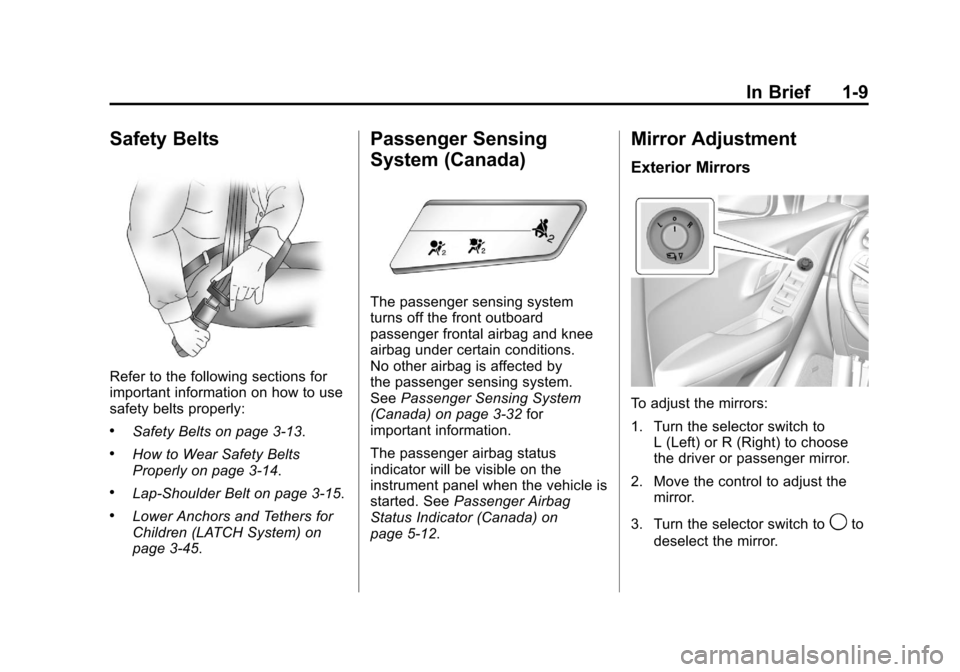
Passenger Sensing
System (Canada)
The passenger sensing system
turns off the front outboard
passenger frontal airbag and knee
airbag under certain conditions.
No other airbag is affected by
the passenger sensing system.
SeePassenger Sensing System
(Canada) on page 3‑32 for
important information.
The passenger airbag status
indicator will be visible on the
instrument panel when the vehicle is
started. See Passenger Airbag
Status Indicator (Canada) on
page 5‑12.
Mirror Adjustment
Exterior Mirrors
To adjust the mirrors:
1. Turn the selector switch to L (Left) or R (Right) to choose
the driver or passenger mirror.
2. Move the control to adjust the mirror.
3. Turn the selector switch to
9to
deselect the mirror.
Page 16 of 408
Black plate (10,1)Chevrolet TRAX Owner Manual - 2013 - CRC - 3/6/13
1-10 In Brief
Interior Mirror
Adjustment
Hold the rearview mirror in the
center and move it to view the area
behind the vehicle.
Manual Rearview Mirror
For vehicles with a manual rearview
mirror, push the tab forward for
daytime use and pull it for nighttime
use to avoid glare from the
headlamps from behind. See
Manual Rearview Mirror on
page 2‑13.
Automatic Dimming Rearview
Mirror
For vehicles with an automatic
dimming rearview mirror. The mirror
will automatically reduce the glare
from the headlamps from behind.
The dimming feature comes on
when the vehicle is started.
SeeAutomatic Dimming Rearview
Mirror on page 2‑13.
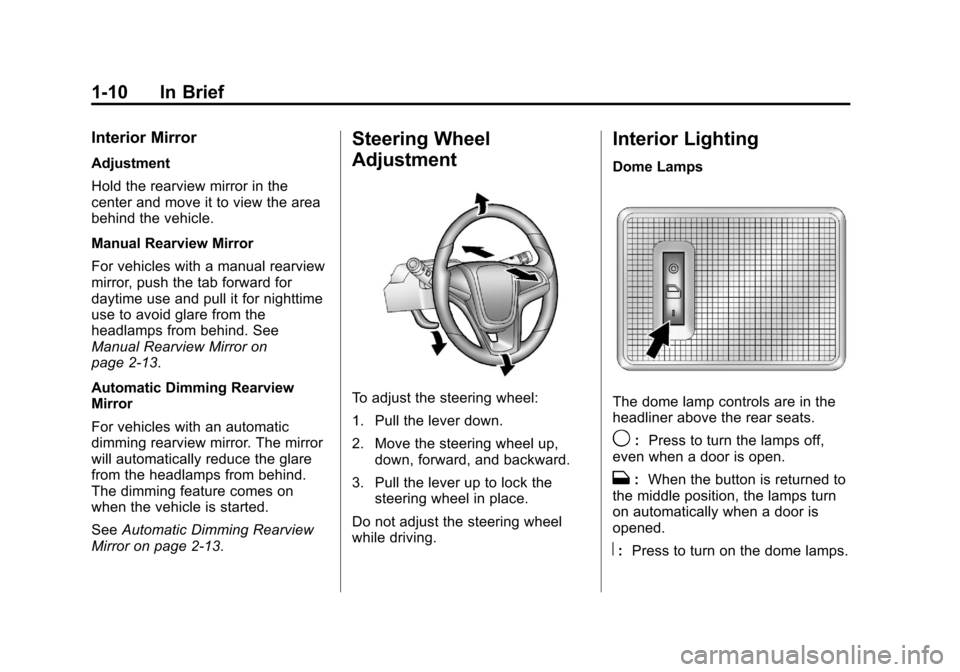
Steering Wheel
Adjustment
To adjust the steering wheel:
1. Pull the lever down.
2. Move the steering wheel up, down, forward, and backward.
3. Pull the lever up to lock the steering wheel in place.
Do not adjust the steering wheel
while driving.
Interior Lighting
Dome Lamps
The dome lamp controls are in the
headliner above the rear seats.
9: Press to turn the lamps off,
even when a door is open.
H: When the button is returned to
the middle position, the lamps turn
on automatically when a door is
opened.
R: Press to turn on the dome lamps.
Page 29 of 408
Black plate (1,1)Chevrolet TRAX Owner Manual - 2013 - CRC - 3/6/13
Keys, Doors, and Windows 2-1
Keys, Doors, and
Windows
Keys and Locks
Keys . . . . . . . . . . . . . . . . . . . . . . . . . . 2-1
Remote Keyless Entry (RKE)System . . . . . . . . . . . . . . . . . . . . . . 2-3
Remote Keyless Entry (RKE) System Operation . . . . . . . . . . . 2-3
Remote Vehicle Start . . . . . . . . . 2-5
Door Locks . . . . . . . . . . . . . . . . . . . 2-6
Power Door Locks . . . . . . . . . . . . 2-7
Automatic Door Locks . . . . . . . . . 2-7
Safety Locks . . . . . . . . . . . . . . . . . . 2-8
Doors
Liftgate . . . . . . . . . . . . . . . . . . . . . . . . 2-8
Vehicle Security
Vehicle Security . . . . . . . . . . . . . . . 2-9
Vehicle Alarm System . . . . . . . . . 2-9
Immobilizer . . . . . . . . . . . . . . . . . . 2-10
Immobilizer Operation . . . . . . . 2-10
Exterior Mirrors
Convex Mirrors . . . . . . . . . . . . . . 2-11
Power Mirrors . . . . . . . . . . . . . . . . 2-12
Folding Mirrors . . . . . . . . . . . . . . . 2-12
Folding Mirrors . . . . . . . . . . . . . . . 2-12
Heated Mirrors . . . . . . . . . . . . . . . 2-12
Interior Mirrors
Manual Rearview Mirror . . . . . . 2-13
Automatic Dimming Rearview Mirror . . . . . . . . . . . . . . . . . . . . . . . 2-13
Windows
Windows . . . . . . . . . . . . . . . . . . . . . 2-13
Power Windows . . . . . . . . . . . . . 2-14
Sun Visors . . . . . . . . . . . . . . . . . . . 2-15
Roof
Sunroof . . . . . . . . . . . . . . . . . . . . . . 2-16
Keys and Locks
Keys
{WARNING
Leaving children in a vehicle with
the ignition key is dangerous and
children or others could be
seriously injured or killed. They
could operate the power windows
or other controls or make the
vehicle move. The windows will
function with the keys in the
ignition, and children or others
could be caught in the path of a
closing window. Do not leave
children in a vehicle with the
ignition key.
Page 39 of 408
Black plate (11,1)Chevrolet TRAX Owner Manual - 2013 - CRC - 3/6/13
Keys, Doors, and Windows 2-11
The system is automatically
disarmed when the vehicle is
started with the correct key. The key
uses a transponder that matches an
immobilizer control unit in the
vehicle and automatically disarms
the system. Only an authorized key
starts the vehicle. The vehicle may
not start if the key is damaged.
The security light in the instrument
cluster comes on if there is a
problem with arming or disarming
the theft-deterrent system.
When trying to start the vehicle, the
security light comes on briefly when
the ignition is turned on.If the engine does not start and the
security light stays on, there is a
problem with the system. Turn the
ignition off and try again.
If the engine still does not start, and
the key appears to be undamaged
or the light continues to stay on, try
another ignition key. If the engine
does not start with the other key, the
vehicle needs service. If the vehicle
does start, the first key may be
damaged. See your dealer who can
service the theft-deterrent system
and have a new key made.
Do not leave the key or device that
disarms or deactivates the
theft-deterrent system in the vehicle.
Exterior Mirrors
Convex Mirrors
{WARNING
A convex mirror can make things,
like other vehicles, look farther
away than they really are. If you
cut too sharply into the right lane,
you could hit a vehicle on the
right. Check the inside mirror or
glance over your shoulder before
changing lanes.
The passenger side mirror is convex
shaped. A convex mirror's surface is
curved so more can be seen from
the driver seat.
Page 40 of 408
Black plate (12,1)Chevrolet TRAX Owner Manual - 2013 - CRC - 3/6/13
2-12 Keys, Doors, and Windows
Power Mirrors
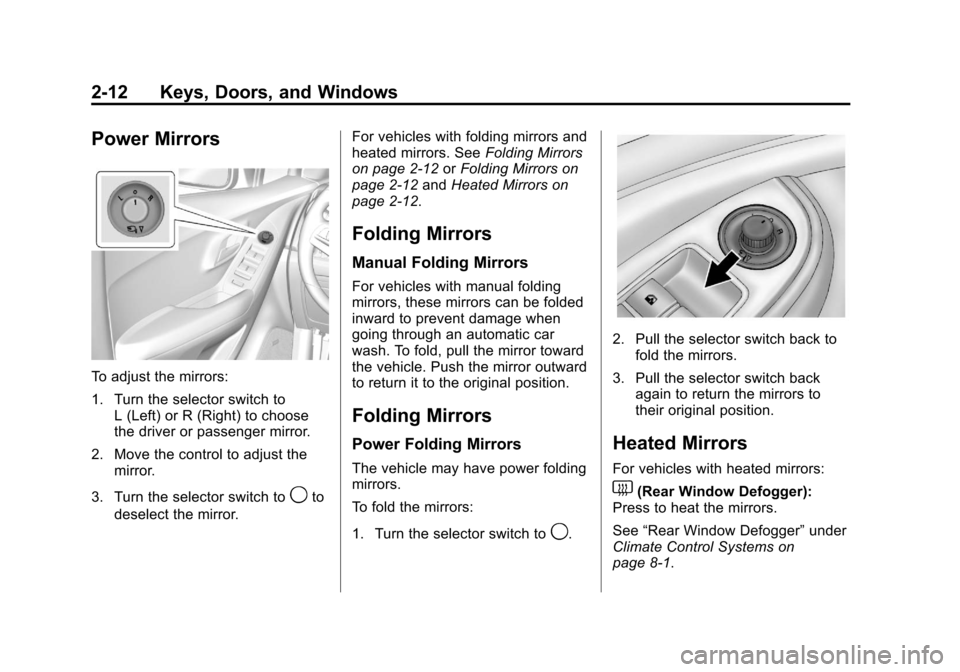
To adjust the mirrors:
1. Turn the selector switch toL (Left) or R (Right) to choose
the driver or passenger mirror.
2. Move the control to adjust the mirror.
3. Turn the selector switch to
9to
deselect the mirror. For vehicles with folding mirrors and
heated mirrors. See
Folding Mirrors
on page 2‑12 orFolding Mirrors on
page 2‑12 andHeated Mirrors on
page 2‑12.
Folding Mirrors
Manual Folding Mirrors
For vehicles with manual folding
mirrors, these mirrors can be folded
inward to prevent damage when
going through an automatic car
wash. To fold, pull the mirror toward
the vehicle. Push the mirror outward
to return it to the original position.
Folding Mirrors
Power Folding Mirrors
The vehicle may have power folding
mirrors.
To fold the mirrors:
1. Turn the selector switch to
9.
2. Pull the selector switch back to fold the mirrors.
3. Pull the selector switch back again to return the mirrors to
their original position.
Heated Mirrors
For vehicles with heated mirrors:
1(Rear Window Defogger):
Press to heat the mirrors.
See “Rear Window Defogger” under
Climate Control Systems on
page 8‑1.
Page 41 of 408
Black plate (13,1)Chevrolet TRAX Owner Manual - 2013 - CRC - 3/6/13
Keys, Doors, and Windows 2-13
Interior Mirrors
Manual Rearview Mirror
Hold the rearview mirror in the
center and move it to view the area
behind the vehicle.
For vehicles with a manual rearview
mirror, push the tab forward for
daytime use and pull it for nighttime
use to avoid glare from the
headlamps from behind.
Vehicles with OnStar have three
control buttons at the bottom of the
mirror. See your dealer for more
information about OnStar and how
to subscribe to it. SeeOnStar
Overview on page 14‑1.
Automatic Dimming
Rearview Mirror
To adjust the inside rearview mirror,
hold the rearview mirror in the
center and move it to view the area
behind the vehicle.
For vehicles with an automatic
dimming rearview mirror, the mirror
will automatically reduce the glare
from the headlamps from behind.
The dimming feature and the
indicator light come on when the
vehicle is started.
Vehicles with OnStar have three
control buttons at the bottom of the
mirror. See your dealer for more
information about OnStar and how
to subscribe to it. See OnStar
Overview on page 14‑1.
Cleaning the Mirror
Do not spray glass cleaner directly
on the mirror. Use a soft towel
dampened with water.
Windows
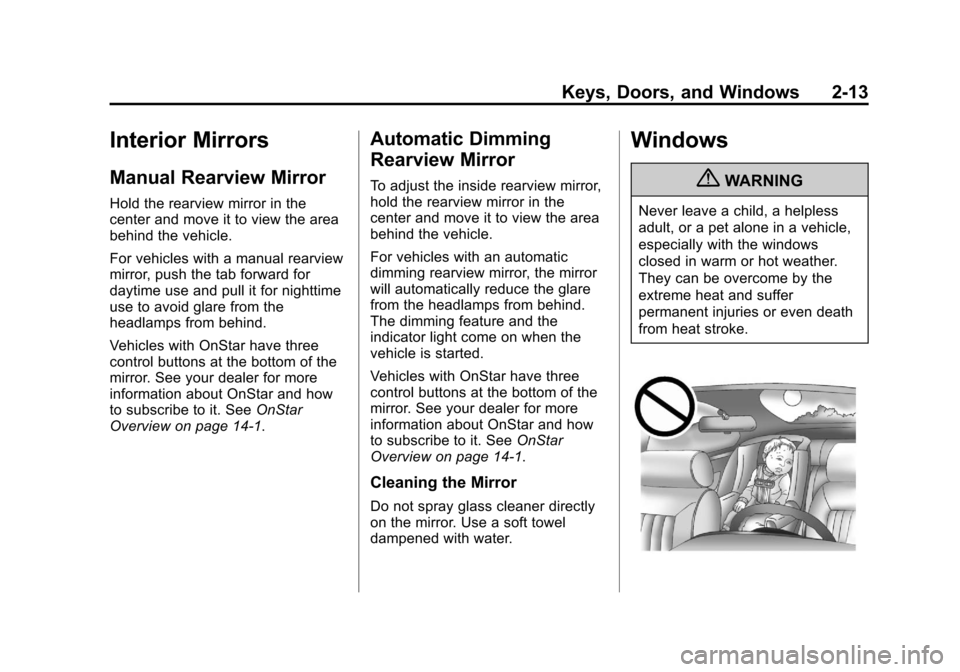
{WARNING
Never leave a child, a helpless
adult, or a pet alone in a vehicle,
especially with the windows
closed in warm or hot weather.
They can be overcome by the
extreme heat and suffer
permanent injuries or even death
from heat stroke.
Page 138 of 408
Black plate (34,1)Chevrolet TRAX Owner Manual - 2013 - CRC - 3/6/13
5-34 Instruments and Controls
Remote Start Auto Seat Cool
When on, this feature will turn the
cooled seats on when using the
remote start on hot days.
Press Remote Start Auto Seat Cool
when highlighted and open the
menu. Select On or Off. Press
4.
Remote Start Heated Seats
When on, this feature will turn the
heated seats on when using the
remote start on cold days.
Press Remote Start Heated Seats
when highlighted. Select On or Off.
Press
4.
Cluster Display Info
Select the Cluster Display Info
menu and the following may be
displayed:
.Cluster Eco Telltale
Cluster Eco Telltale
This allows eco telltale information
display to be turned on or off. Press Cluster Eco Telltale when
highlighted. Select On or Off or turn.
Press
4.
Comfort and Convenience
Select the Comfort and
Convenience menu and the
following may be displayed:
.Chime Volume
.Easy Exit Steering Column
.Easy Exit Driver Seat
.Auto Parking Mirror Tilt
.Personalization By Driver
.Auto Wipe in Reverse Gear
Chime Volume
This allows selection of the chime
volume level.
Press Chime Volume when
highlighted. Select Normal or High.
Press
4. Easy Exit Steering Column
This allows the selection of the
Easy Exit Steering Column position
when exiting the vehicle.
Press Easy Exit Steering Column
when highlighted. Select Off,
On-Column In, On-Column Up,
On-Column In & Up. Press
4.
Easy Exit Driver Seat
This will move the seat back to
make it easier to exit the vehicle.
Press Easy Exit Driver Seat when
highlighted. Select On or Off.
Press
4.
Auto Parking Mirror Tilt
This allows the selection of the
reverse tilt mirror feature on or off.
When on, both the driver and
passenger mirrors will tilt downward
when vehicle is shifted to
R (Reverse) to improve visibility of
the ground near the rear wheels.
They will return to their previous
driving position when the vehicle is
Page 139 of 408
Black plate (35,1)Chevrolet TRAX Owner Manual - 2013 - CRC - 3/6/13
Instruments and Controls 5-35
shifted out of R (Reverse), the
ignition is turned to OFF, or the
vehicle is left in reverse.
Press Auto Parking Mirror when
highlighted. Select On or Off.
Press
4.
Personalization By Driver
This allows the Personalization by
Driver feature to be turned on or off.
Press Personalization By Driver
when highlighted and open the
menu. Select On or Off. Press
4.
Auto Wipe in Reverse Gear
This allows selection of the Auto
Wipe in Reverse Gear feature to be
turned on or off. When on, and the
front wipers are on, the rear window
wiper will turn on automatically
when the vehicle is shifted into
R♦(Reverse).
Press Auto Wipe in Reverse Gear
when highlighted. Select On or Off.
Press
4.
Collision/Detection Systems
Select the Collision/Detection
Systems menu and the following
may be displayed:
.Park Assist
.Towbar Attached
.Side Blind Zone Alert
Park Assist
This allows the Ultrasonic Parking
Assist feature, audible only, to be
turned on or off.
Press Park Assist when highlighted.
Select On or Off. Press
4.
Towbar Attached
This allows the towbar feature to be
turned on or off .
Press Towbar Attached when
highlighted. Select Off, On,
or Towbar Attached. Press
4.
Side Blind Zone Alert
This allows the Side Blind Zone
Alert feature to be turned on or off. Press Side Blind Zone Alert when
highlighted. Select On or Off.
Press
4.
Lighting
Select the Lighting menu and the
following may be displayed:
.Vehicle Locator Lights
.Exit Lighting
Vehicle Locator Lights
This allows the vehicle locator lights
to be turned on or off. The vehicle
locator lights come on when
unlocking the vehicle with the
RKE transmitter.
Press Vehicle Locator Lights when
highlighted. Select Off, 30 Sec,
60 Sec, or 120 Sec. Press
4.
Exit Lighting
This allows selection of how long
the exterior lamps stay on when
leaving the vehicle and it is dark
outside.