tow CHEVROLET TRAX 2013 1.G Owners Manual
[x] Cancel search | Manufacturer: CHEVROLET, Model Year: 2013, Model line: TRAX, Model: CHEVROLET TRAX 2013 1.GPages: 408, PDF Size: 6.59 MB
Page 1 of 408

Black plate (1,1)Chevrolet TRAX Owner Manual - 2013 - CRC - 3/6/13
2013 Chevrolet TRAX Owner ManualM
In Brief. . . . . . . . . . . . . . . . . . . . . . . . 1-1
Instrument Panel . . . . . . . . . . . . . . 1-2
Initial Drive Information . . . . . . . . 1-4
Vehicle Features . . . . . . . . . . . . . 1-14
Performance and Maintenance . . . . . . . . . . . . . . . . 1-19
Keys, Doors, and Windows . . . . . . . . . . . . . . . . . . . . 2-1
Keys and Locks . . . . . . . . . . . . . . . 2-1
Doors . . . . . . . . . . . . . . . . . . . . . . . . . . 2-8
Vehicle Security . . . . . . . . . . . . . . . . 2-9
Exterior Mirrors . . . . . . . . . . . . . . . 2-11
Interior Mirrors . . . . . . . . . . . . . . . . 2-13
Windows . . . . . . . . . . . . . . . . . . . . . 2-13
Roof . . . . . . . . . . . . . . . . . . . . . . . . . . 2-16
Seats and Restraints . . . . . . . . . 3-1
Head Restraints . . . . . . . . . . . . . . . 3-2
Front Seats . . . . . . . . . . . . . . . . . . . . 3-3
Rear Seats . . . . . . . . . . . . . . . . . . . . 3-9
Safety Belts . . . . . . . . . . . . . . . . . . 3-13
Airbag System . . . . . . . . . . . . . . . . 3-22
Child Restraints . . . . . . . . . . . . . . 3-38 Storage
. . . . . . . . . . . . . . . . . . . . . . . 4-1
Storage Compartments . . . . . . . . 4-1
Additional Storage Features . . . 4-3
Roof Rack System . . . . . . . . . . . . . 4-4
Instruments and Controls . . . . 5-1
Controls . . . . . . . . . . . . . . . . . . . . . . . 5-2
Warning Lights, Gauges, and
Indicators . . . . . . . . . . . . . . . . . . . . 5-8
Information Displays . . . . . . . . . . 5-24
Vehicle Messages . . . . . . . . . . . . 5-27
Vehicle Personalization . . . . . . . 5-27
Lighting . . . . . . . . . . . . . . . . . . . . . . . 6-1
Exterior Lighting . . . . . . . . . . . . . . . 6-1
Interior Lighting . . . . . . . . . . . . . . . . 6-5
Lighting Features . . . . . . . . . . . . . . 6-6
Infotainment System . . . . . . . . . 7-1
Introduction . . . . . . . . . . . . . . . . . . . . 7-2
Radio . . . . . . . . . . . . . . . . . . . . . . . . . 7-11
Audio Players . . . . . . . . . . . . . . . . 7-18
Navigation . . . . . . . . . . . . . . . . . . . . 7-26
Phone . . . . . . . . . . . . . . . . . . . . . . . . 7-28
Downloadable Applications . . . 7-47 Bluetooth Phone/Devices . . . . . 7-52
Trademarks and License
Agreements . . . . . . . . . . . . . . . . . 7-61
Climate Controls . . . . . . . . . . . . . 8-1
Climate Control Systems . . . . . . 8-1
Air Vents . . . . . . . . . . . . . . . . . . . . . . . 8-4
Maintenance . . . . . . . . . . . . . . . . . . . 8-5
Driving and Operating . . . . . . . . 9-1
Driving Information . . . . . . . . . . . . . 9-2
Starting and Operating . . . . . . . 9-14
Engine Exhaust . . . . . . . . . . . . . . 9-22
Automatic Transmission . . . . . . 9-23
Manual Transmission . . . . . . . . . 9-26
Drive Systems . . . . . . . . . . . . . . . . 9-27
Brakes . . . . . . . . . . . . . . . . . . . . . . . 9-28
Ride Control Systems . . . . . . . . 9-30
Cruise Control . . . . . . . . . . . . . . . . 9-34
Object Detection Systems . . . . 9-36
Fuel . . . . . . . . . . . . . . . . . . . . . . . . . . 9-40
Towing . . . . . . . . . . . . . . . . . . . . . . . 9-44
Conversions and Add-Ons . . . 9-44
Page 2 of 408

Black plate (2,1)Chevrolet TRAX Owner Manual - 2013 - CRC - 3/6/13
2013 Chevrolet TRAX Owner ManualM
Vehicle Care. . . . . . . . . . . . . . . . . 10-1
General Information . . . . . . . . . . 10-2
Vehicle Checks . . . . . . . . . . . . . . . 10-4
Headlamp Aiming . . . . . . . . . . . 10-28
Bulb Replacement . . . . . . . . . . 10-28
Electrical System . . . . . . . . . . . . 10-32
Wheels and Tires . . . . . . . . . . . 10-40
Jump Starting . . . . . . . . . . . . . . . 10-68
Towing . . . . . . . . . . . . . . . . . . . . . . 10-71
Appearance Care . . . . . . . . . . . 10-74
Service and Maintenance . . . 11-1
General Information . . . . . . . . . . 11-1
Maintenance Schedule . . . . . . . 11-3
Special Application
Services . . . . . . . . . . . . . . . . . . . . 11-9
Additional Maintenance
and Care . . . . . . . . . . . . . . . . . . . . 11-9
Recommended Fluids, Lubricants, and Parts . . . . . . 11-13
Maintenance Records . . . . . . . 11-16 Technical Data
. . . . . . . . . . . . . . . 12-1
Vehicle Identification . . . . . . . . . 12-1
Vehicle Data . . . . . . . . . . . . . . . . . . 12-2
Customer Information . . . . . . . 13-1
Customer Information . . . . . . . . 13-1
Reporting Safety Defects . . . . 13-16
Vehicle Data Recording and
Privacy . . . . . . . . . . . . . . . . . . . . 13-16
OnStar . . . . . . . . . . . . . . . . . . . . . . . 14-1
OnStar Overview . . . . . . . . . . . . . 14-1
OnStar Services . . . . . . . . . . . . . . 14-2
OnStar Additional Information . . . . . . . . . . . . . . . . . . 14-5
Index . . . . . . . . . . . . . . . . . . . . . i-1
Page 11 of 408
Black plate (5,1)Chevrolet TRAX Owner Manual - 2013 - CRC - 3/6/13
In Brief 1-5
When the engine starts, the parking
lamps will turn on and remain on as
long as the engine is running. The
doors will be locked and the climate
control system may come on.
The engine will continue to run for
10 minutes. Repeat the steps for a
10-minute time extension. Remote
start can be extended only once.
Canceling a Remote Start
To cancel a remote start, do one of
the following:
.Aim the RKE transmitter at the
vehicle and press and hold
/
until the parking lamps turn off.
.Turn on the hazard warning
flashers.
.Turn the vehicle on and then off.
See Remote Vehicle Start on
page 2‑5.
Door Locks
To lock or unlock a door manually:
.From the inside, to lock the door,
use the lock knob on the top of
the door panel.
.From the outside, turn the key
toward the front or rear of the
vehicle, or press
KorQon the
Remote Keyless Entry (RKE)
transmitter.
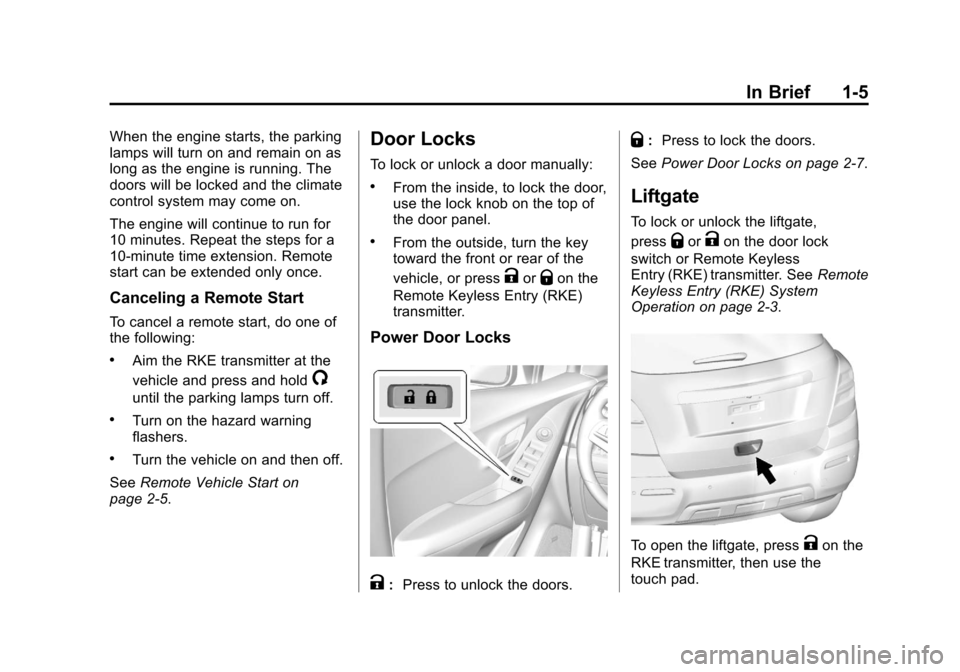
Power Door Locks
K: Press to unlock the doors.
Q:Press to lock the doors.
See Power Door Locks on page 2‑7.
Liftgate
To lock or unlock the liftgate,
press
QorKon the door lock
switch or Remote Keyless
Entry (RKE) transmitter. See Remote
Keyless Entry (RKE) System
Operation on page 2‑3.
To open the liftgate, pressKon the
RKE transmitter, then use the
touch pad.
Page 18 of 408
Black plate (12,1)Chevrolet TRAX Owner Manual - 2013 - CRC - 3/6/13
1-12 In Brief
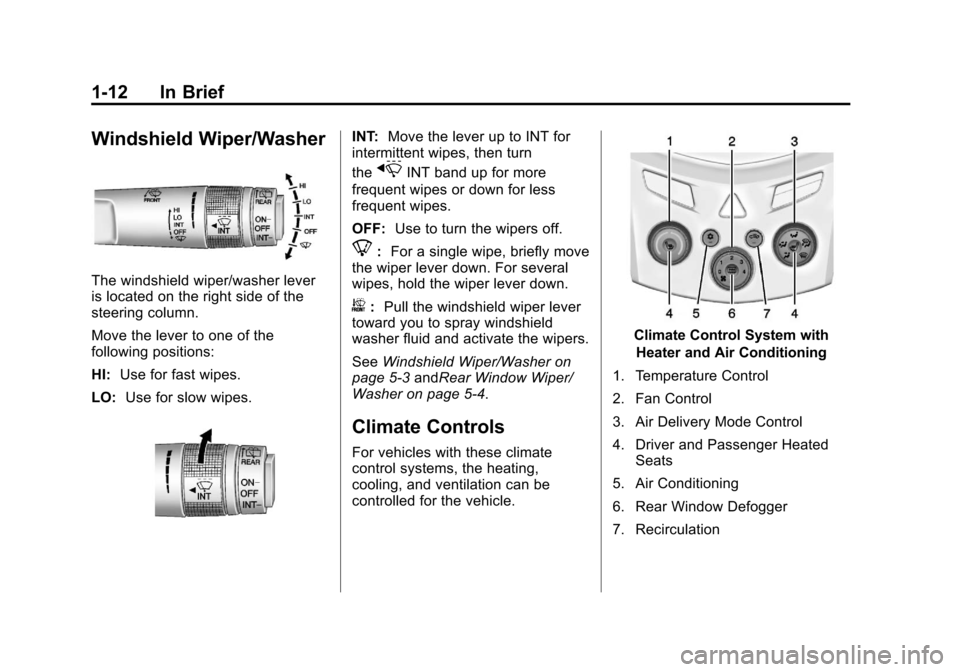
Windshield Wiper/Washer
The windshield wiper/washer lever
is located on the right side of the
steering column.
Move the lever to one of the
following positions:
HI:Use for fast wipes.
LO: Use for slow wipes.
INT: Move the lever up to INT for
intermittent wipes, then turn
the
xINT band up for more
frequent wipes or down for less
frequent wipes.
OFF: Use to turn the wipers off.
8:For a single wipe, briefly move
the wiper lever down. For several
wipes, hold the wiper lever down.
b: Pull the windshield wiper lever
toward you to spray windshield
washer fluid and activate the wipers.
See Windshield Wiper/Washer on
page 5‑3 andRear Window Wiper/
Washer on page 5‑4.
Climate Controls
For vehicles with these climate
control systems, the heating,
cooling, and ventilation can be
controlled for the vehicle.
Climate Control System with
Heater and Air Conditioning
1. Temperature Control
2. Fan Control
3. Air Delivery Mode Control
4. Driver and Passenger Heated Seats
5. Air Conditioning
6. Rear Window Defogger
7. Recirculation
Page 32 of 408
Black plate (4,1)Chevrolet TRAX Owner Manual - 2013 - CRC - 3/6/13
2-4 Keys, Doors, and Windows
The turn signal indicators may flash
and/or the horn may sound to
indicate unlocking. See“Unlock
Feedback” underVehicle
Personalization on page 5‑27.
Pressing
Kwill disarm the
theft-deterrent system. See Vehicle
Alarm System on page 2‑9.
7(Vehicle Locator/Panic
Alarm): For vehicles with this
feature, press and hold briefly to
initiate vehicle locator. The exterior
lamps flash and the horn chirps
three times.
Press and hold
7for at least
three seconds to sound the panic
alarm. The horn sounds and the
turn signals flash for 30 seconds,
or until
7is pressed again or the
key is placed in the ignition and
turned to ACC/ACCESSORY or
ON/RUN.
/(Remote Vehicle Start): For
vehicles with this feature, press
Q
and then press and hold/to start
the engine from outside the vehicle
using the RKE transmitter. See
Remote Vehicle Start on page 2‑5.
The buttons on the keys are
disabled when there is a key in
the ignition.
Programming Transmitters to
the Vehicle
Only RKE transmitters programmed
to this vehicle will work. If a
transmitter is lost or stolen, a
replacement can be purchased and
programmed through your dealer.
When the replacement transmitter is
programmed to this vehicle, all
remaining transmitters must also be
reprogrammed. Any lost or stolen
transmitters will no longer work
once the new transmitter is
programmed.
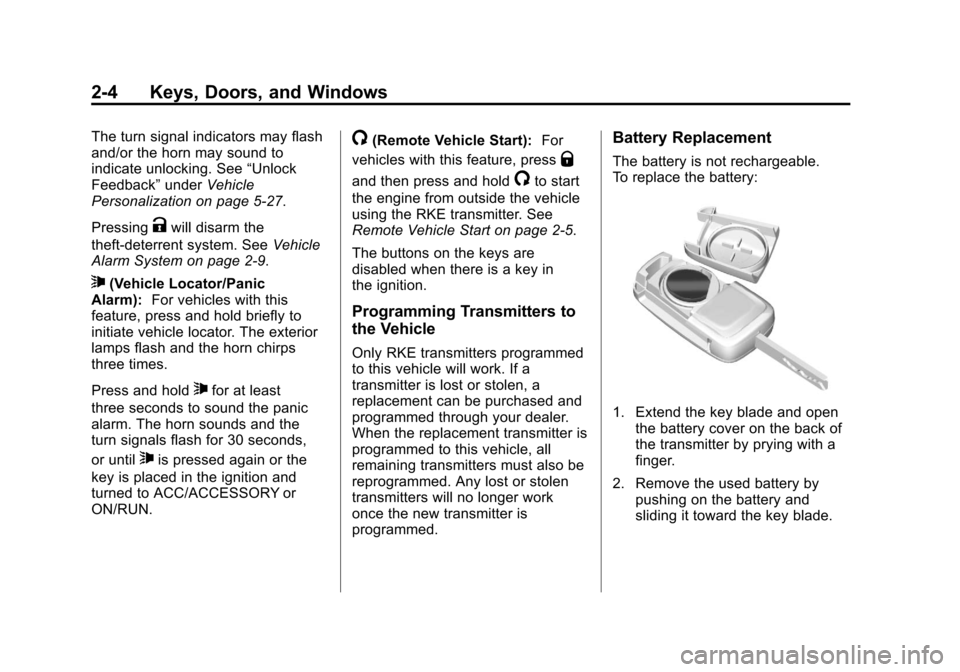
Battery Replacement
The battery is not rechargeable.
To replace the battery:
1. Extend the key blade and open the battery cover on the back of
the transmitter by prying with a
finger.
2. Remove the used battery by pushing on the battery and
sliding it toward the key blade.
Page 35 of 408
Black plate (7,1)Chevrolet TRAX Owner Manual - 2013 - CRC - 3/6/13
Keys, Doors, and Windows 2-7
WARNING (Continued)
injuries or even death from
heat stroke. Always lock the
vehicle whenever leaving it.
.Outsiders can easily enter
through an unlocked door
when you slow down or stop
the vehicle. Locking the doors
can help prevent this from
happening.
To lock or unlock a door manually:
.From the inside, to lock the door,
use the lock knob on the top of
the door panel.
.From the outside, turn the key
toward the front or rear of the
vehicle, or press
KorQon the
Remote Keyless Entry (RKE)
transmitter.
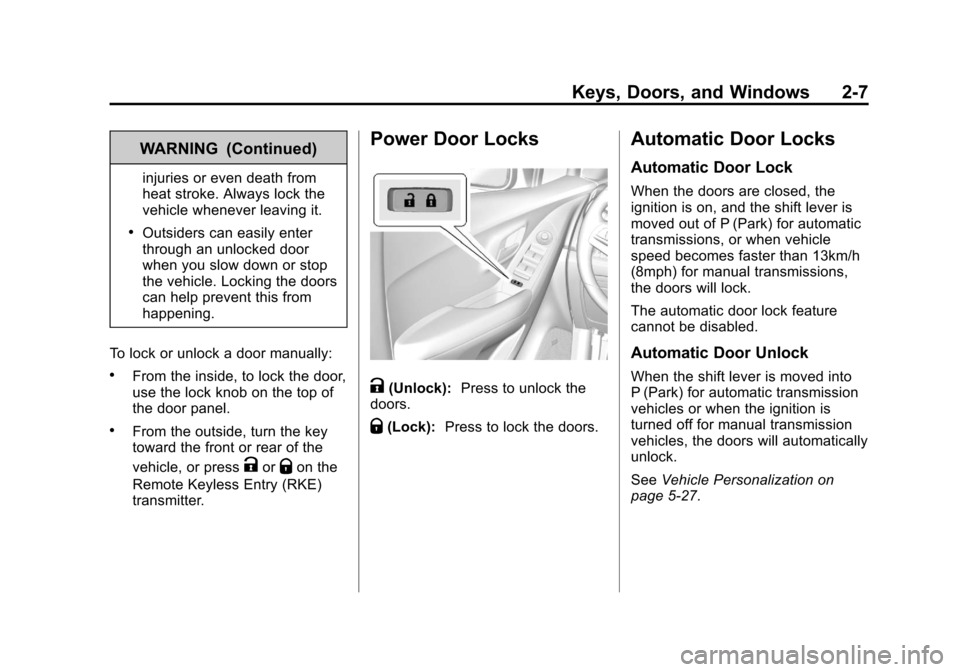
Power Door Locks
K(Unlock): Press to unlock the
doors.
Q(Lock): Press to lock the doors.
Automatic Door Locks
Automatic Door Lock
When the doors are closed, the
ignition is on, and the shift lever is
moved out of P (Park) for automatic
transmissions, or when vehicle
speed becomes faster than 13km/h
(8mph) for manual transmissions,
the doors will lock.
The automatic door lock feature
cannot be disabled.
Automatic Door Unlock
When the shift lever is moved into
P (Park) for automatic transmission
vehicles or when the ignition is
turned off for manual transmission
vehicles, the doors will automatically
unlock.
SeeVehicle Personalization on
page 5‑27.
Page 40 of 408
Black plate (12,1)Chevrolet TRAX Owner Manual - 2013 - CRC - 3/6/13
2-12 Keys, Doors, and Windows
Power Mirrors
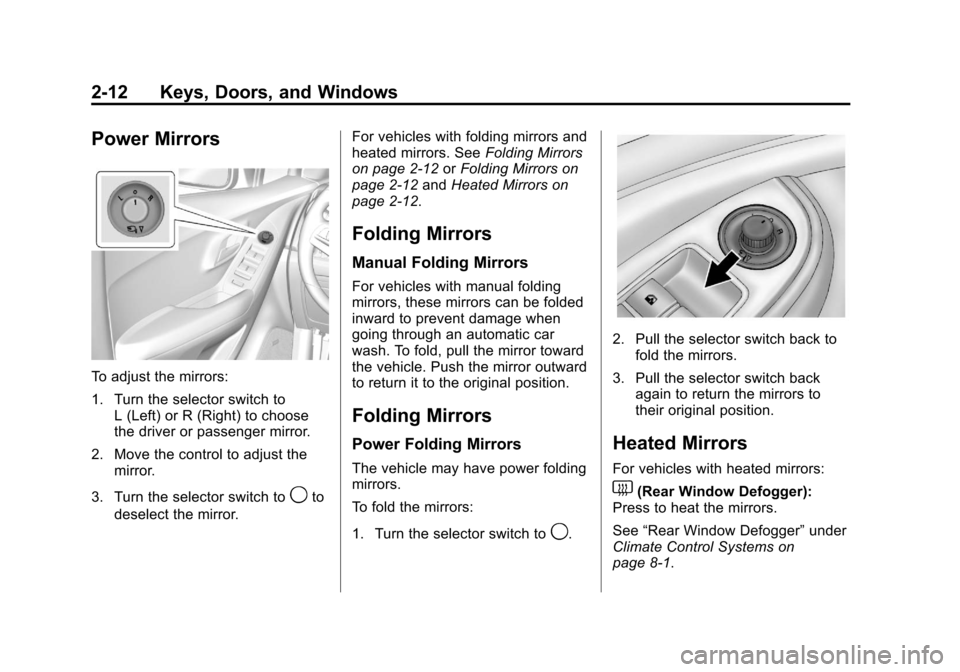
To adjust the mirrors:
1. Turn the selector switch toL (Left) or R (Right) to choose
the driver or passenger mirror.
2. Move the control to adjust the mirror.
3. Turn the selector switch to
9to
deselect the mirror. For vehicles with folding mirrors and
heated mirrors. See
Folding Mirrors
on page 2‑12 orFolding Mirrors on
page 2‑12 andHeated Mirrors on
page 2‑12.
Folding Mirrors
Manual Folding Mirrors
For vehicles with manual folding
mirrors, these mirrors can be folded
inward to prevent damage when
going through an automatic car
wash. To fold, pull the mirror toward
the vehicle. Push the mirror outward
to return it to the original position.
Folding Mirrors
Power Folding Mirrors
The vehicle may have power folding
mirrors.
To fold the mirrors:
1. Turn the selector switch to
9.
2. Pull the selector switch back to fold the mirrors.
3. Pull the selector switch back again to return the mirrors to
their original position.
Heated Mirrors
For vehicles with heated mirrors:
1(Rear Window Defogger):
Press to heat the mirrors.
See “Rear Window Defogger” under
Climate Control Systems on
page 8‑1.
Page 41 of 408
Black plate (13,1)Chevrolet TRAX Owner Manual - 2013 - CRC - 3/6/13
Keys, Doors, and Windows 2-13
Interior Mirrors
Manual Rearview Mirror
Hold the rearview mirror in the
center and move it to view the area
behind the vehicle.
For vehicles with a manual rearview
mirror, push the tab forward for
daytime use and pull it for nighttime
use to avoid glare from the
headlamps from behind.
Vehicles with OnStar have three
control buttons at the bottom of the
mirror. See your dealer for more
information about OnStar and how
to subscribe to it. SeeOnStar
Overview on page 14‑1.
Automatic Dimming
Rearview Mirror
To adjust the inside rearview mirror,
hold the rearview mirror in the
center and move it to view the area
behind the vehicle.
For vehicles with an automatic
dimming rearview mirror, the mirror
will automatically reduce the glare
from the headlamps from behind.
The dimming feature and the
indicator light come on when the
vehicle is started.
Vehicles with OnStar have three
control buttons at the bottom of the
mirror. See your dealer for more
information about OnStar and how
to subscribe to it. See OnStar
Overview on page 14‑1.
Cleaning the Mirror
Do not spray glass cleaner directly
on the mirror. Use a soft towel
dampened with water.
Windows
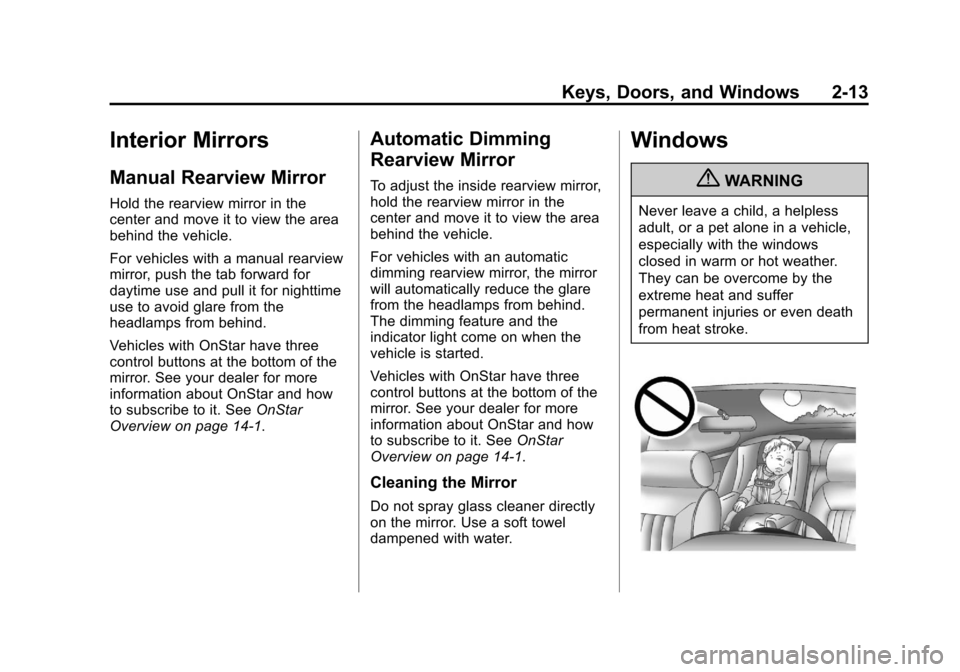
{WARNING
Never leave a child, a helpless
adult, or a pet alone in a vehicle,
especially with the windows
closed in warm or hot weather.
They can be overcome by the
extreme heat and suffer
permanent injuries or even death
from heat stroke.
Page 52 of 408
Black plate (8,1)Chevrolet TRAX Owner Manual - 2013 - CRC - 3/6/13
3-8 Seats and Restraints
Remote Start Heated Seats
If available, the heated seats can be
turned on automatically during a
remote start when it is cold outside.
The heated seats will be canceled
when the ignition is turned on. Press
the control to use the heated seats
after the vehicle is started.
The heated seat indicator lights do
not turn on during a remote start.
The temperature performance of an
unoccupied seat may be reduced.
This is normal.
The heated seats will not turn on
during a remote start unless the
heated seat feature is enabled in
the vehicle personalization menu.
SeeRemote Vehicle Start on
page 2‑5 andVehicle
Personalization on page 5‑27.
Folding Seatback
The front passenger seatback may
fold flat.
{WARNING
If you fold the seatback forward to
carry longer objects, such as skis,
be sure any such cargo is not
near an airbag. In a crash, an
inflating airbag might force that
object toward a person. This
could cause severe injury or even
death. Secure objects away from
the area in which an airbag would
inflate. For more information, see
Where Are the Airbags? (Canada)
on page 3‑26 orWhere Are the
Airbags? (Mexico) on page 3‑27
and Vehicle Load Limits on
page 9‑10.
{WARNING
Things you put on this seatback
can strike and injure people in a
sudden stop or turn, or in a crash.
Remove or secure all items
before driving.
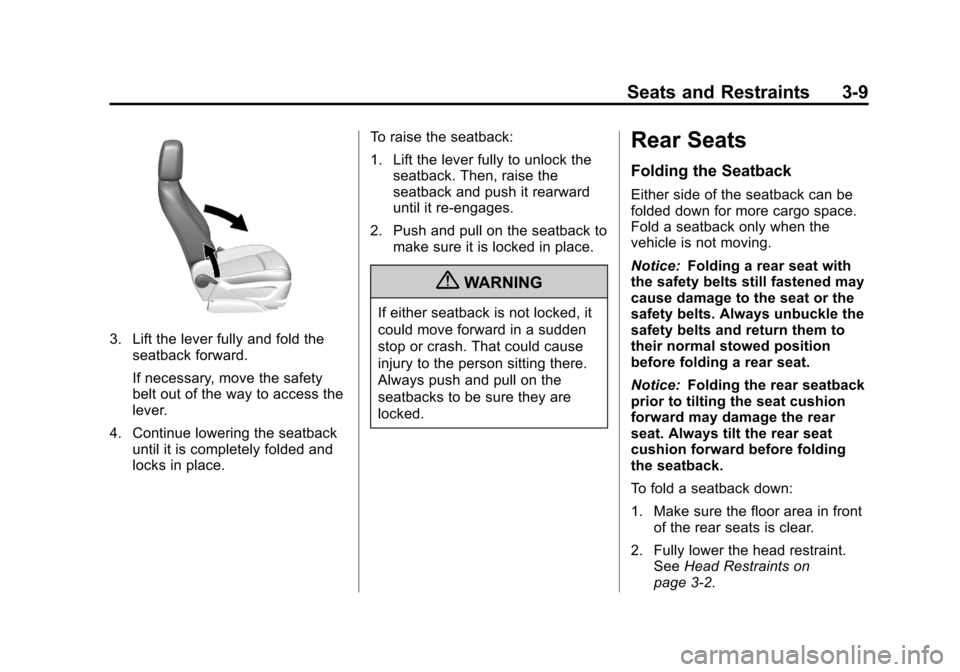
To fold the seatback:
1. Lower the head restraint all the way. See Head Restraints on
page 3‑2.
2. Move the seat as far back as possible. See Seat Adjustment
on page 3‑3.
Page 53 of 408
Black plate (9,1)Chevrolet TRAX Owner Manual - 2013 - CRC - 3/6/13
Seats and Restraints 3-9
3. Lift the lever fully and fold theseatback forward.
If necessary, move the safety
belt out of the way to access the
lever.
4. Continue lowering the seatback until it is completely folded and
locks in place. To raise the seatback:
1. Lift the lever fully to unlock the
seatback. Then, raise the
seatback and push it rearward
until it re-engages.
2. Push and pull on the seatback to make sure it is locked in place.
{WARNING
If either seatback is not locked, it
could move forward in a sudden
stop or crash. That could cause
injury to the person sitting there.
Always push and pull on the
seatbacks to be sure they are
locked.
Rear Seats
Folding the Seatback
Either side of the seatback can be
folded down for more cargo space.
Fold a seatback only when the
vehicle is not moving.
Notice: Folding a rear seat with
the safety belts still fastened may
cause damage to the seat or the
safety belts. Always unbuckle the
safety belts and return them to
their normal stowed position
before folding a rear seat.
Notice: Folding the rear seatback
prior to tilting the seat cushion
forward may damage the rear
seat. Always tilt the rear seat
cushion forward before folding
the seatback.
To fold a seatback down:
1. Make sure the floor area in front of the rear seats is clear.
2. Fully lower the head restraint. See Head Restraints on
page 3‑2.