lock CHEVROLET TRAX 2016 1.G Owners Manual
[x] Cancel search | Manufacturer: CHEVROLET, Model Year: 2016, Model line: TRAX, Model: CHEVROLET TRAX 2016 1.GPages: 358, PDF Size: 5.07 MB
Page 4 of 358
Chevrolet TRAX Owner Manual (GMNA-Localizing-U.S./Canada/Mexico-
9159371) - 2016 - crc - 5/21/15
Introduction 3
About Driving the Vehicle
As with other vehicles of this type,
failure to operate this vehicle
correctly may result in loss of
control or an accident. Be sure to
read the driving guidelines in this
manual in the section called“Driving
and Operating” and specifically
Driver Behavior 0192, Driving
Environment 0192, and Vehicle
Design 0192.
Danger, Warning, and
Caution
Warning messages found on vehicle
labels and in this manual describe
hazards and what to do to avoid or
reduce them.
{Danger
Danger indicates a hazard with a
high level of risk which will result
in serious injury or death.
{Warning
Warning indicates a hazard that
could result in injury or death.
Caution
Caution indicates a hazard that
could result in property or vehicle
damage.
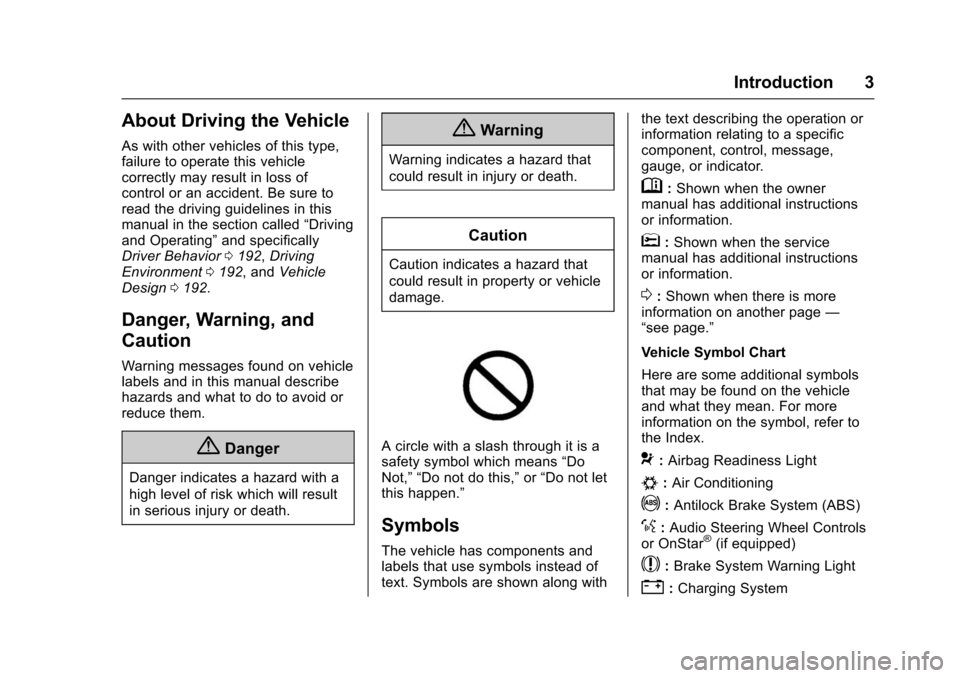
A circle with a slash through it is a
safety symbol which means “Do
Not,” “Do not do this,” or“Do not let
this happen.”
Symbols
The vehicle has components and
labels that use symbols instead of
text. Symbols are shown along with the text describing the operation or
information relating to a specific
component, control, message,
gauge, or indicator.
M:
Shown when the owner
manual has additional instructions
or information.
*: Shown when the service
manual has additional instructions
or information.
0: Shown when there is more
information on another page —
“see page.”
Vehicle Symbol Chart
Here are some additional symbols
that may be found on the vehicle
and what they mean. For more
information on the symbol, refer to
the Index.
9: Airbag Readiness Light
#:Air Conditioning
!:Antilock Brake System (ABS)
%:Audio Steering Wheel Controls
or OnStar®(if equipped)
$: Brake System Warning Light
":Charging System
Page 6 of 358
Chevrolet TRAX Owner Manual (GMNA-Localizing-U.S./Canada/Mexico-
9159371) - 2016 - crc - 5/21/15
In Brief 5
In Brief
Instrument Panel
Instrument Panel . . . . . . . . . . . . . . . . 6
Initial Drive Information
Initial Drive Information . . . . . . . . . . 7
Remote Keyless Entry (RKE)System . . . . . . . . . . . . . . . . . . . . . . . . 7
Remote Vehicle Start . . . . . . . . . . . 8
Door Locks . . . . . . . . . . . . . . . . . . . . . 8
Liftgate . . . . . . . . . . . . . . . . . . . . . . . . . . 9
Windows . . . . . . . . . . . . . . . . . . . . . . . . 9
Seat Adjustment . . . . . . . . . . . . . . . . 9
Second Row Seats . . . . . . . . . . . . 11
Heated Seats . . . . . . . . . . . . . . . . . . 11
Head Restraint Adjustment . . . . 11
Safety Belts . . . . . . . . . . . . . . . . . . . . 12
Passenger Sensing System . . . 12
Mirror Adjustment . . . . . . . . . . . . . . 12
Steering Wheel Adjustment . . . . 13
Interior Lighting . . . . . . . . . . . . . . . . 13
Exterior Lighting . . . . . . . . . . . . . . . 14
Windshield Wiper/Washer . . . . . . 15
Climate Controls . . . . . . . . . . . . . . . 15
Transmission . . . . . . . . . . . . . . . . . . 16
Vehicle Features
Radio(s) . . . . . . . . . . . . . . . . . . . . . . . 17
Satellite Radio . . . . . . . . . . . . . . . . . 18 Portable Audio Devices . . . . . . . . 19
Bluetooth
®. . . . . . . . . . . . . . . . . . . . . 19
Steering Wheel Controls . . . . . . . 19
Cruise Control . . . . . . . . . . . . . . . . . 20
Driver Information Center (DIC) . . . . . . . . . . . . . . . . . 20
Rear Vision Camera (RVC) . . . . 21
Parking Assist . . . . . . . . . . . . . . . . . 21
Power Outlets . . . . . . . . . . . . . . . . . 21
Sunroof . . . . . . . . . . . . . . . . . . . . . . . . 21
Performance and Maintenance
Traction Control/Electronic Stability Control . . . . . . . . . . . . . . 22
Tire Pressure Monitor . . . . . . . . . . 22
Engine Oil Life System . . . . . . . . 22
Driving for Better Fuel Economy . . . . . . . . . . . . . . . . . . . . . 23
Roadside Assistance Program . . . . . . . . . . . . . . . . . . . . . . 23
Page 9 of 358
Chevrolet TRAX Owner Manual (GMNA-Localizing-U.S./Canada/Mexico-
9159371) - 2016 - crc - 5/21/15
8 In Brief
Press the key release button to
extend the key blade. The key can
be used for the ignition and all
locks.
K:Press to unlock the driver door,
all doors, or, if equipped, the locking
fuel door. The hazard warning
flashers may flash.
Q: Press to lock the doors, or,
if equipped, the locking fuel door.
Lock and unlock feedback can be
personalized. See Vehicle
Personalization 0114.
7:If equipped, press and hold
briefly to initiate vehicle locator.
Press and hold for at least
three seconds to sound the panic
alarm. Press again to cancel the
panic alarm.
See Keys 024 and Remote Keyless
Entry (RKE) System Operation 026.
Remote Vehicle Start
If equipped, the engine can be
started from outside of the vehicle.
Starting the Vehicle
1. Press and releaseQon the
RKE transmitter.
2. Immediately press and hold
/
for at least four seconds or until
the turn signal lamps flash.
3. Start the vehicle normally after entering.
When the vehicle starts, the parking
lamps will turn on.
Remote start can be extended.
Canceling a Remote Start
To cancel a remote start, do one of
the following:
. Press and hold
/until the
parking lamps turn off.
. Turn on the hazard warning
flashers.
. Turn the vehicle on and then off.
See Remote Vehicle Start 028.
Door Locks
To lock or unlock a door manually:
.
From the inside, to lock the door,
use the lock knob on the top of
the door panel.
. From the outside, turn the key
toward the front or rear of the
vehicle, or press
KorQon the
Remote Keyless Entry (RKE)
transmitter.
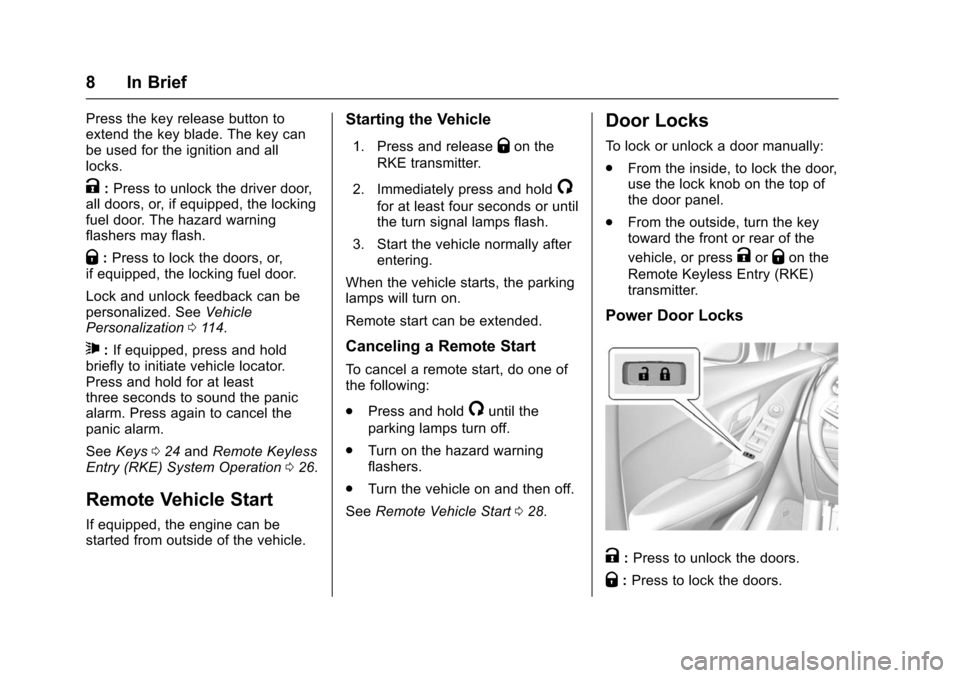
Power Door Locks
K: Press to unlock the doors.
Q: Press to lock the doors.
Page 10 of 358
Chevrolet TRAX Owner Manual (GMNA-Localizing-U.S./Canada/Mexico-
9159371) - 2016 - crc - 5/21/15
In Brief 9
SeePower Door Locks 030.
Liftgate
To open the liftgate, pressKon the
door lock switch or on the Remote
Keyless Entry (RKE) transmitter to
unlock all doors, then use the touch
pad on the trunk.
Press
Qon the door lock switch or
on the RKE transmitter to lock the
liftgate.
See Remote Keyless Entry (RKE)
System Operation 026.
See Liftgate 032.
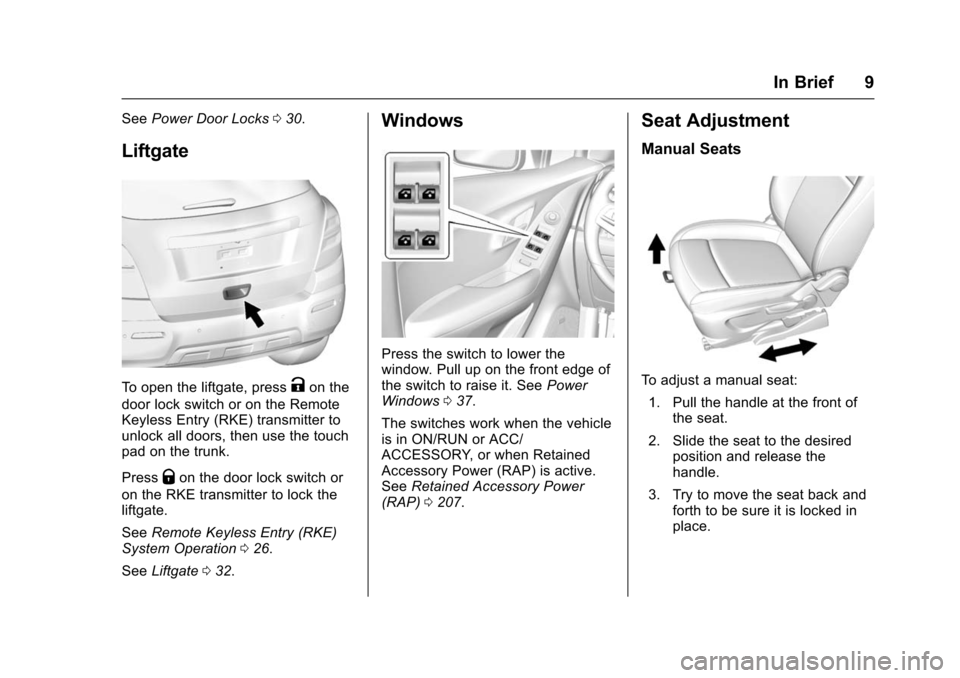
Windows
Press the switch to lower the
window. Pull up on the front edge of
the switch to raise it. See Power
Windows 037.
The switches work when the vehicle
is in ON/RUN or ACC/
ACCESSORY, or when Retained
Accessory Power (RAP) is active.
See Retained Accessory Power
(RAP) 0207.
Seat Adjustment
Manual Seats
To adjust a manual seat:
1. Pull the handle at the front of the seat.
2. Slide the seat to the desired position and release the
handle.
3. Try to move the seat back and forth to be sure it is locked in
place.
Page 12 of 358
Chevrolet TRAX Owner Manual (GMNA-Localizing-U.S./Canada/Mexico-
9159371) - 2016 - crc - 5/21/15
In Brief 11
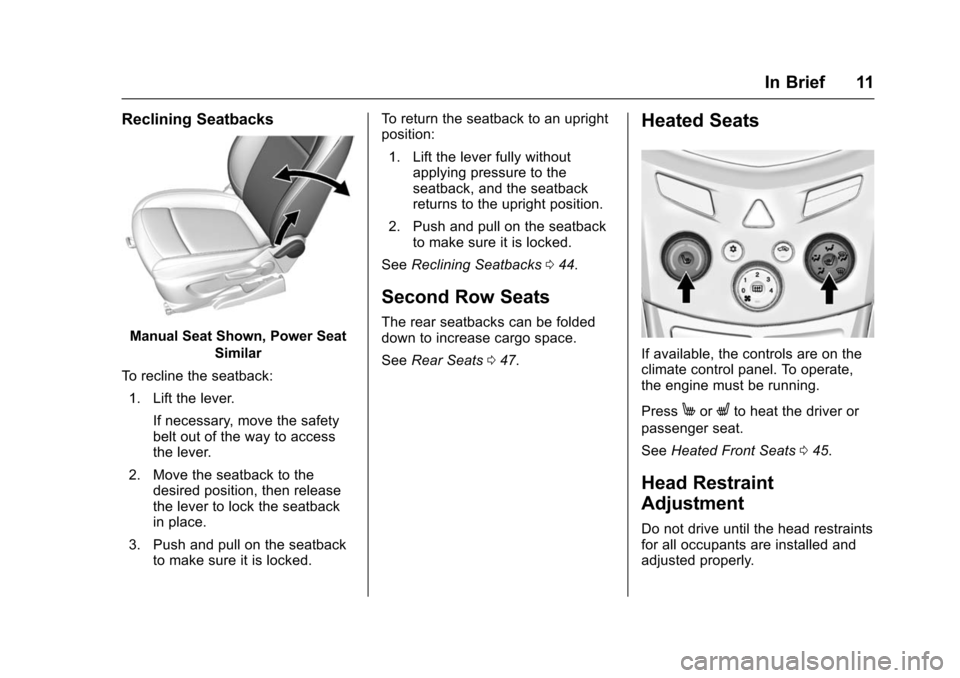
Reclining Seatbacks
Manual Seat Shown, Power SeatSimilar
To recline the seatback: 1. Lift the lever. If necessary, move the safety
belt out of the way to access
the lever.
2. Move the seatback to the desired position, then release
the lever to lock the seatback
in place.
3. Push and pull on the seatback to make sure it is locked. To return the seatback to an upright
position:
1. Lift the lever fully without applying pressure to the
seatback, and the seatback
returns to the upright position.
2. Push and pull on the seatback to make sure it is locked.
See Reclining Seatbacks 044.
Second Row Seats
The rear seatbacks can be folded
down to increase cargo space.
See Rear Seats 047.
Heated Seats
If available, the controls are on the
climate control panel. To operate,
the engine must be running.
Press
MorLto heat the driver or
passenger seat.
See Heated Front Seats 045.
Head Restraint
Adjustment
Do not drive until the head restraints
for all occupants are installed and
adjusted properly.
Page 14 of 358
Chevrolet TRAX Owner Manual (GMNA-Localizing-U.S./Canada/Mexico-
9159371) - 2016 - crc - 5/21/15
In Brief 13
2. Move the control to adjust themirror.
3. Turn the selector switch to
(
to deselect the mirror.
Interior Mirror
Adjustment
Adjust the rearview mirror to get a
clear view of the area behind the
vehicle.
Manual Rearview Mirror
If equipped, push the tab forward for
daytime use and pull it for nighttime
use to avoid the glare of headlamps
from behind. See Manual Rearview
Mirror 036.
Automatic Dimming Rearview
Mirror
If equipped, automatic dimming
reduces the glare of headlamps
from behind. The dimming feature
comes on when the vehicle is
started.
See Automatic Dimming Rearview
Mirror 036.
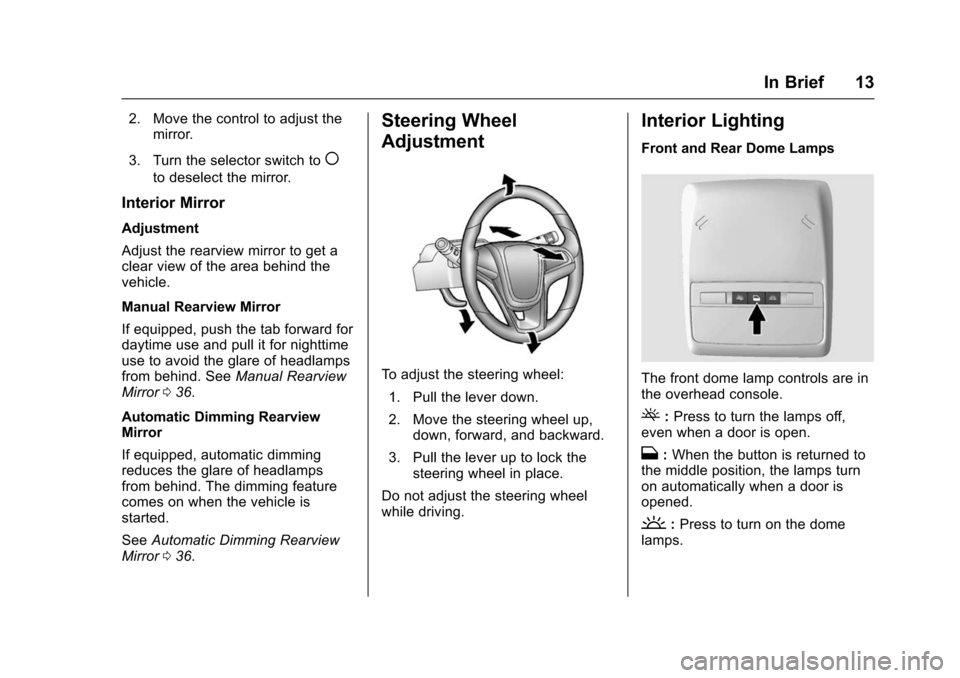
Steering Wheel
Adjustment
To adjust the steering wheel:
1. Pull the lever down.
2. Move the steering wheel up, down, forward, and backward.
3. Pull the lever up to lock the steering wheel in place.
Do not adjust the steering wheel
while driving.
Interior Lighting
Front and Rear Dome Lamps
The front dome lamp controls are in
the overhead console.
(: Press to turn the lamps off,
even when a door is open.
H: When the button is returned to
the middle position, the lamps turn
on automatically when a door is
opened.
': Press to turn on the dome
lamps.
Page 19 of 358
Chevrolet TRAX Owner Manual (GMNA-Localizing-U.S./Canada/Mexico-
9159371) - 2016 - crc - 5/21/15
18 In Brief
stored in each favorite page and the
number of available favorite pages
can be set.
To store the station to a position in
the list, press the corresponding
button 1−6 until a beep is heard.
See“Storing a Station as a
Favorite” inAM-FM Radio 0139.
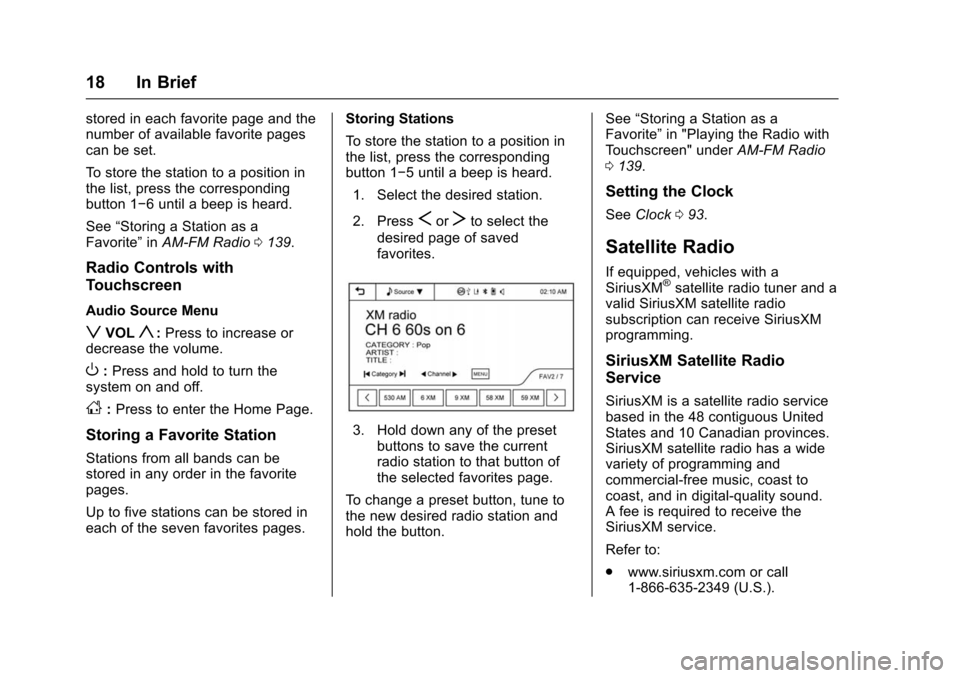
Radio Controls with
Touchscreen
Audio Source Menu
zVOLy:Press to increase or
decrease the volume.
O: Press and hold to turn the
system on and off.
D: Press to enter the Home Page.
Storing a Favorite Station
Stations from all bands can be
stored in any order in the favorite
pages.
Up to five stations can be stored in
each of the seven favorites pages. Storing Stations
To store the station to a position in
the list, press the corresponding
button 1−5 until a beep is heard.
1. Select the desired station.
2. Press
SorTto select the
desired page of saved
favorites.
3. Hold down any of the preset buttons to save the current
radio station to that button of
the selected favorites page.
To change a preset button, tune to
the new desired radio station and
hold the button. See
“Storing a Station as a
Favorite” in "Playing the Radio with
Touchscreen" under AM-FM Radio
0 139.
Setting the Clock
See Clock 093.
Satellite Radio
If equipped, vehicles with a
SiriusXM®satellite radio tuner and a
valid SiriusXM satellite radio
subscription can receive SiriusXM
programming.
SiriusXM Satellite Radio
Service
SiriusXM is a satellite radio service
based in the 48 contiguous United
States and 10 Canadian provinces.
SiriusXM satellite radio has a wide
variety of programming and
commercial-free music, coast to
coast, and in digital-quality sound.
A fee is required to receive the
SiriusXM service.
Refer to:
. www.siriusxm.com or call
1-866-635-2349 (U.S.).
Page 25 of 358
Chevrolet TRAX Owner Manual (GMNA-Localizing-U.S./Canada/Mexico-
9159371) - 2016 - crc - 5/21/15
24 Keys, Doors, and Windows
Keys, Doors, and
Windows
Keys and Locks
Keys . . . . . . . . . . . . . . . . . . . . . . . . . . . 24
Remote Keyless Entry (RKE)System . . . . . . . . . . . . . . . . . . . . . . . 26
Remote Keyless Entry (RKE) System Operation . . . . . . . . . . . . 26
Remote Vehicle Start . . . . . . . . . . 28
Door Locks . . . . . . . . . . . . . . . . . . . . 29
Power Door Locks . . . . . . . . . . . . . 30
Delayed Locking . . . . . . . . . . . . . . . 30
Automatic Door Locks . . . . . . . . . 31
Safety Locks . . . . . . . . . . . . . . . . . . . 31
Doors
Liftgate . . . . . . . . . . . . . . . . . . . . . . . . 32
Vehicle Security
Vehicle Security . . . . . . . . . . . . . . . . 33
Vehicle Alarm System . . . . . . . . . 33
Immobilizer . . . . . . . . . . . . . . . . . . . . 34
Immobilizer Operation . . . . . . . . . 34
Exterior Mirrors
Convex Mirrors . . . . . . . . . . . . . . . . 35
Power Mirrors . . . . . . . . . . . . . . . . . . 35
Folding Mirrors . . . . . . . . . . . . . . . . . 35 Heated Mirrors . . . . . . . . . . . . . . . . . 35
Interior Mirrors
Interior Rearview Mirrors . . . . . . . 36
Manual Rearview Mirror . . . . . . . . 36
Automatic Dimming Rearview
Mirror . . . . . . . . . . . . . . . . . . . . . . . . . 36
Windows
Windows . . . . . . . . . . . . . . . . . . . . . . . 36
Power Windows . . . . . . . . . . . . . . . 37
Sun Visors . . . . . . . . . . . . . . . . . . . . . 38
Roof
Sunroof . . . . . . . . . . . . . . . . . . . . . . . . 38
Keys and Locks
Keys
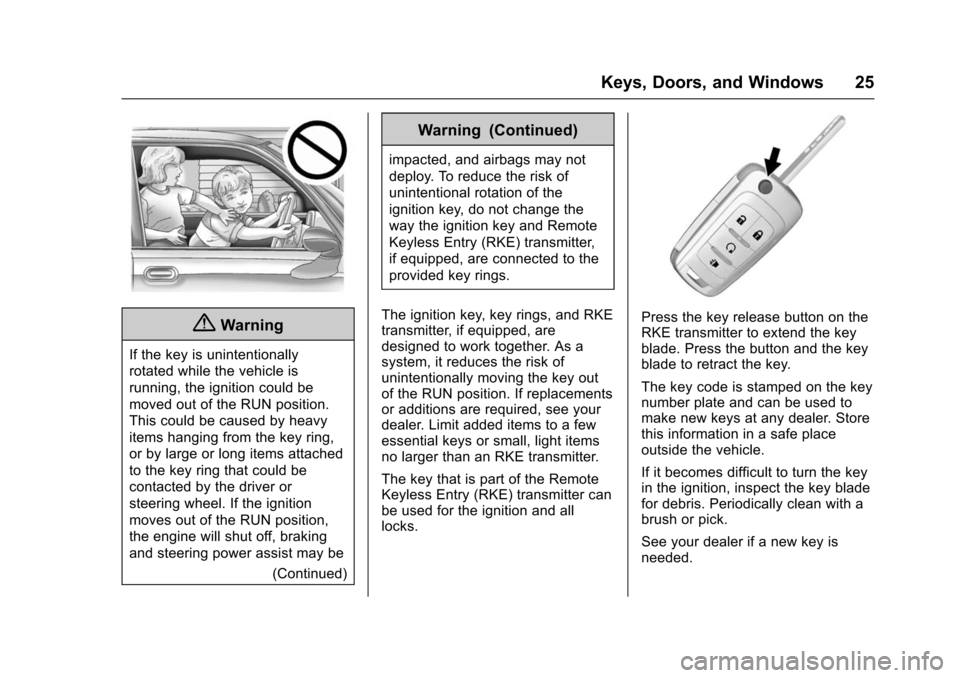
{Warning
Leaving children in a vehicle with
the ignition key is dangerous and
children or others could be
seriously injured or killed. They
could operate the power windows
or other controls or make the
vehicle move. The windows will
function with the keys in the
ignition, and children or others
could be caught in the path of a
closing window. Do not leave
children in a vehicle with the
ignition key.
Page 26 of 358
Chevrolet TRAX Owner Manual (GMNA-Localizing-U.S./Canada/Mexico-
9159371) - 2016 - crc - 5/21/15
Keys, Doors, and Windows 25
{Warning
If the key is unintentionally
rotated while the vehicle is
running, the ignition could be
moved out of the RUN position.
This could be caused by heavy
items hanging from the key ring,
or by large or long items attached
to the key ring that could be
contacted by the driver or
steering wheel. If the ignition
moves out of the RUN position,
the engine will shut off, braking
and steering power assist may be(Continued)
Warning (Continued)
impacted, and airbags may not
deploy. To reduce the risk of
unintentional rotation of the
ignition key, do not change the
way the ignition key and Remote
Keyless Entry (RKE) transmitter,
if equipped, are connected to the
provided key rings.
The ignition key, key rings, and RKE
transmitter, if equipped, are
designed to work together. As a
system, it reduces the risk of
unintentionally moving the key out
of the RUN position. If replacements
or additions are required, see your
dealer. Limit added items to a few
essential keys or small, light items
no larger than an RKE transmitter.
The key that is part of the Remote
Keyless Entry (RKE) transmitter can
be used for the ignition and all
locks.
Press the key release button on the
RKE transmitter to extend the key
blade. Press the button and the key
blade to retract the key.
The key code is stamped on the key
number plate and can be used to
make new keys at any dealer. Store
this information in a safe place
outside the vehicle.
If it becomes difficult to turn the key
in the ignition, inspect the key blade
for debris. Periodically clean with a
brush or pick.
See your dealer if a new key is
needed.
Page 27 of 358
Chevrolet TRAX Owner Manual (GMNA-Localizing-U.S./Canada/Mexico-
9159371) - 2016 - crc - 5/21/15
26 Keys, Doors, and Windows
If locked out of the vehicle, see
Roadside Assistance Program
0327.
With an active OnStar subscription,
an OnStar Advisor may remotely
unlock the vehicle. See OnStar
Overview 0337.
Remote Keyless Entry
(RKE) System
See Radio Frequency Statement
0 333.
If there is a decrease in the RKE
operating range:
. Check the distance. The
transmitter may be too far from
the vehicle.
. Check the location. Other
vehicles or objects may be
blocking the signal.
. Check the transmitter's battery.
See “Battery Replacement” later
in this section.
. If the transmitter is still not
working correctly, see your
dealer or a qualified technician
for service.
Remote Keyless Entry
(RKE) System Operation
The RKE transmitter may work up to
30 m (98 ft) away from the vehicle.
Other conditions can affect the
performance of the transmitter. See
Remote Keyless Entry (RKE)
System 026.
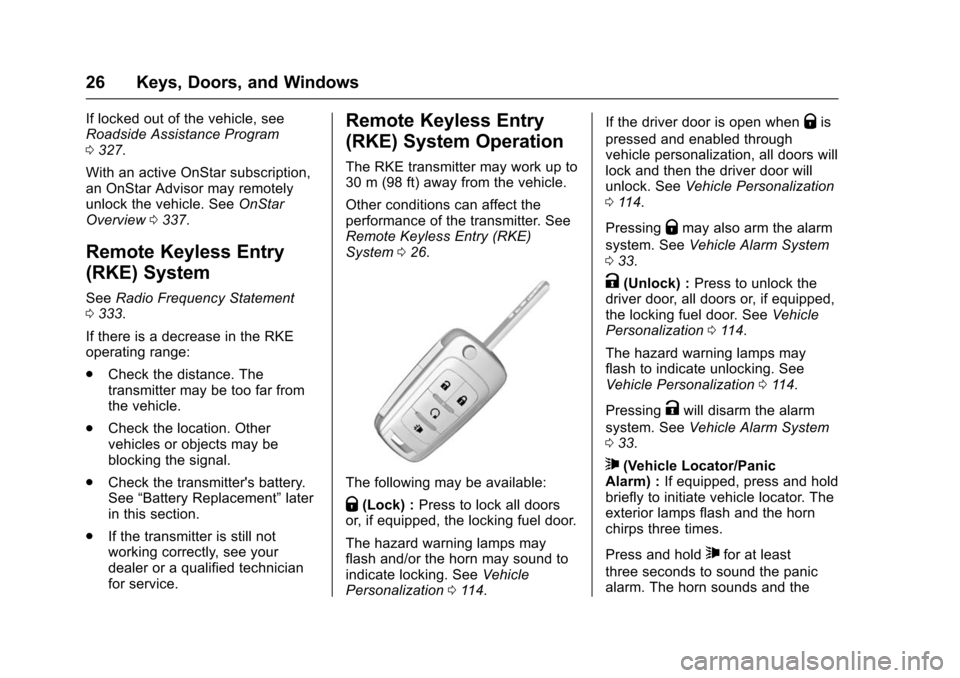
The following may be available:
Q(Lock) : Press to lock all doors
or, if equipped, the locking fuel door.
The hazard warning lamps may
flash and/or the horn may sound to
indicate locking. See Vehicle
Personalization 0114. If the driver door is open when
Qis
pressed and enabled through
vehicle personalization, all doors will
lock and then the driver door will
unlock. See Vehicle Personalization
0 114.
Pressing
Qmay also arm the alarm
system. See Vehicle Alarm System
0 33.
K(Unlock) : Press to unlock the
driver door, all doors or, if equipped,
the locking fuel door. See Vehicle
Personalization 0114.
The hazard warning lamps may
flash to indicate unlocking. See
Vehicle Personalization 0114.
Pressing
Kwill disarm the alarm
system. See Vehicle Alarm System
0 33.
7(Vehicle Locator/Panic
Alarm) : If equipped, press and hold
briefly to initiate vehicle locator. The
exterior lamps flash and the horn
chirps three times.
Press and hold
7for at least
three seconds to sound the panic
alarm. The horn sounds and the