power CHEVROLET TRAX 2017 1.G User Guide
[x] Cancel search | Manufacturer: CHEVROLET, Model Year: 2017, Model line: TRAX, Model: CHEVROLET TRAX 2017 1.GPages: 373, PDF Size: 6.53 MB
Page 39 of 373
Chevrolet TRAX Owner Manual (GMNA-Localizing-U.S./Canada/Mexico-
10122735) - 2017 - crc - 7/12/16
38 Keys, Doors, and Windows
Warning (Continued)
doors should be locked
whenever the vehicle is
driven.
. Young children who get into
unlocked vehicles may be
unable to get out. A child
can be overcome by
extreme heat and can suffer
permanent injuries or even
death from heat stroke.
Always lock the vehicle
whenever leaving it.
. Outsiders can easily enter
through an unlocked door
when you slow down or stop
the vehicle. Locking the
doors can help prevent this
from happening.
To lock or unlock the doors from the
outside:
. Press
KorQon the Remote
Keyless Entry (RKE) transmitter. See
Remote Keyless Entry
(RKE) System Operation
(Keyless Access) 031 or
Remote Keyless Entry (RKE)
System Operation (Key
Access) 028.
. Use the key in the driver door.
Keyless Access
The RKE transmitter must be within
1 m (3 ft) of the door being opened.
Press the button on the door handle
to open. See “Keyless Access
Operation” underRemote Keyless
Entry (RKE) System Operation
(Keyless Access) 031 orRemote
Keyless Entry (RKE) System
Operation (Key Access) 028.
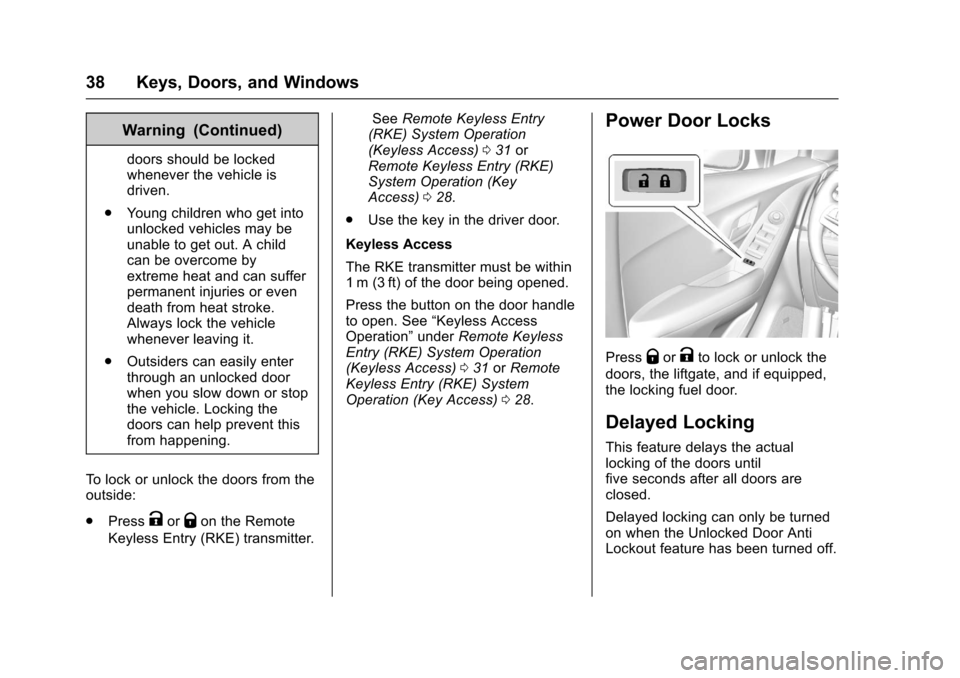
Power Door Locks
PressQorKto lock or unlock the
doors, the liftgate, and if equipped,
the locking fuel door.
Delayed Locking
This feature delays the actual
locking of the doors until
five seconds after all doors are
closed.
Delayed locking can only be turned
on when the Unlocked Door Anti
Lockout feature has been turned off.
Page 40 of 373
Chevrolet TRAX Owner Manual (GMNA-Localizing-U.S./Canada/Mexico-
10122735) - 2017 - crc - 7/12/16
Keys, Doors, and Windows 39
WhenQis pressed on the power
door lock switch with the door open,
a chime will sound three times
indicating that delayed locking is
active.
The doors will then lock
automatically five seconds after all
doors are closed. If a door is
reopened before five seconds have
elapsed, the five-second timer will
reset once all the doors are closed
again.
Press
Qon the door lock switch
again, or press
Qon the RKE
transmitter, to override this feature
and lock the doors immediately.
Delayed locking can be
programmed through the Driver
Information Center (DIC). See
Vehicle Personalization 0137.
Automatic Door Locks
When the doors are closed, the
ignition is on, and the shift lever is
moved out of P (Park) for automatic
transmissions, or when vehicle speed becomes faster than 13 km/h
(8 mph) for manual transmissions,
the doors will lock.
To unlock the doors:
.
Press
Kon the power door lock
switch.
. Shift the transmission into
P (Park) for an automatic
transmission.
. Remove the key from the
ignition for a manual
transmission.
Automatic door locking cannot be
disabled. Automatic door unlocking
can be programmed. See Vehicle
Personalization 0137.
Lockout Protection
Key Access : When locking is
requested with the driver door open
and the key in the ignition, all the
doors will lock and then the driver
door will unlock.
This can be manually overridden by
pressing and holding
Qon the
power door lock switch. Keyless Access :
When locking is
requested with the driver door open
and the vehicle is in ACC/
ACCESSORY or ON/RUN/START,
all the doors will lock and then the
driver door will unlock.
If the vehicle is off and locking is
requested while a door is open,
when all doors are closed the
vehicle will check for RKE
transmitters inside. If an RKE
transmitter is detected and the
number of RKE transmitters inside
has not reduced, the driver door will
unlock and the horn will sound three
times.
This can be manually overridden by
pressing and holding
Qon the
power door lock switch.
Unlocked Door Anti-Lockout
If Unlocked Door Anti-Lockout is
turned on and the vehicle is off, the
driver door is open, and locking is
selected, all the doors will lock and
only the driver door will unlock.
Unlocked Door Anti-Lockout can be
Page 41 of 373
Chevrolet TRAX Owner Manual (GMNA-Localizing-U.S./Canada/Mexico-
10122735) - 2017 - crc - 7/12/16
40 Keys, Doors, and Windows
turned on or off in vehicle
personalization. SeeVehicle
Personalization 0137.
Safety Locks
The rear door safety locks prevent
passengers from opening the rear
doors from inside the vehicle.
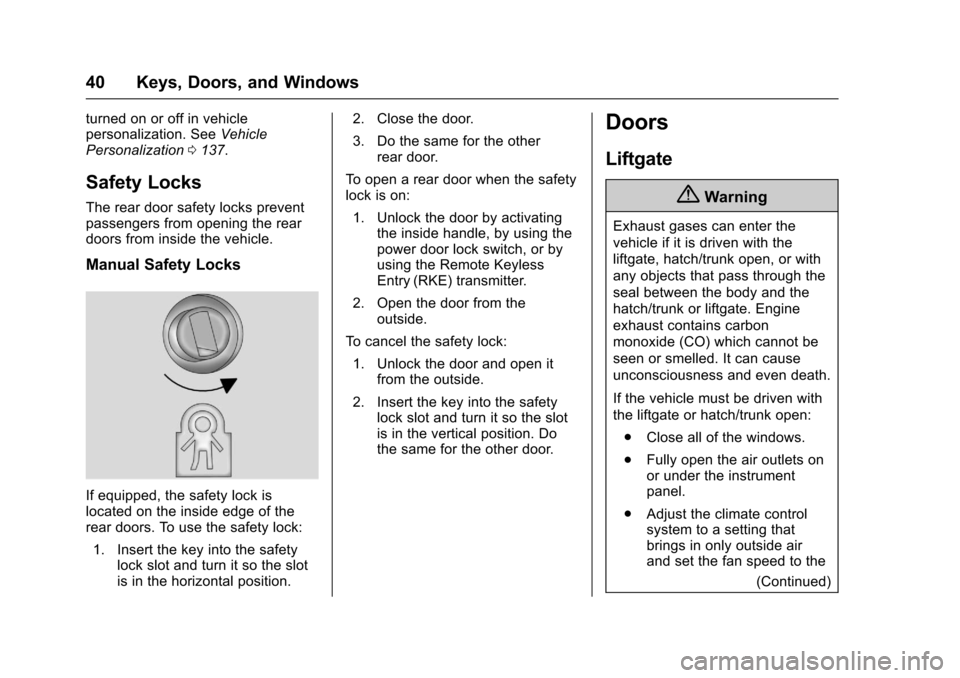
Manual Safety Locks
If equipped, the safety lock is
located on the inside edge of the
rear doors. To use the safety lock:
1. Insert the key into the safety lock slot and turn it so the slot
is in the horizontal position. 2. Close the door.
3. Do the same for the other
rear door.
To open a rear door when the safety
lock is on: 1. Unlock the door by activating the inside handle, by using the
power door lock switch, or by
using the Remote Keyless
Entry (RKE) transmitter.
2. Open the door from the outside.
To cancel the safety lock:
1. Unlock the door and open it from the outside.
2. Insert the key into the safety lock slot and turn it so the slot
is in the vertical position. Do
the same for the other door.
Doors
Liftgate
{Warning
Exhaust gases can enter the
vehicle if it is driven with the
liftgate, hatch/trunk open, or with
any objects that pass through the
seal between the body and the
hatch/trunk or liftgate. Engine
exhaust contains carbon
monoxide (CO) which cannot be
seen or smelled. It can cause
unconsciousness and even death.
If the vehicle must be driven with
the liftgate or hatch/trunk open:
. Close all of the windows.
. Fully open the air outlets on
or under the instrument
panel.
. Adjust the climate control
system to a setting that
brings in only outside air
and set the fan speed to the
(Continued)
Page 42 of 373
Chevrolet TRAX Owner Manual (GMNA-Localizing-U.S./Canada/Mexico-
10122735) - 2017 - crc - 7/12/16
Keys, Doors, and Windows 41
Warning (Continued)
highest setting. See
“Climate Control Systems”
in the Index.
. If the vehicle is equipped
with a power liftgate, disable
the power liftgate function.
For more information about
carbon monoxide, see Engine
Exhaust 0213.
Caution
To avoid damage to the liftgate or
liftgate glass, make sure the area
above and behind the liftgate is
clear before opening it.
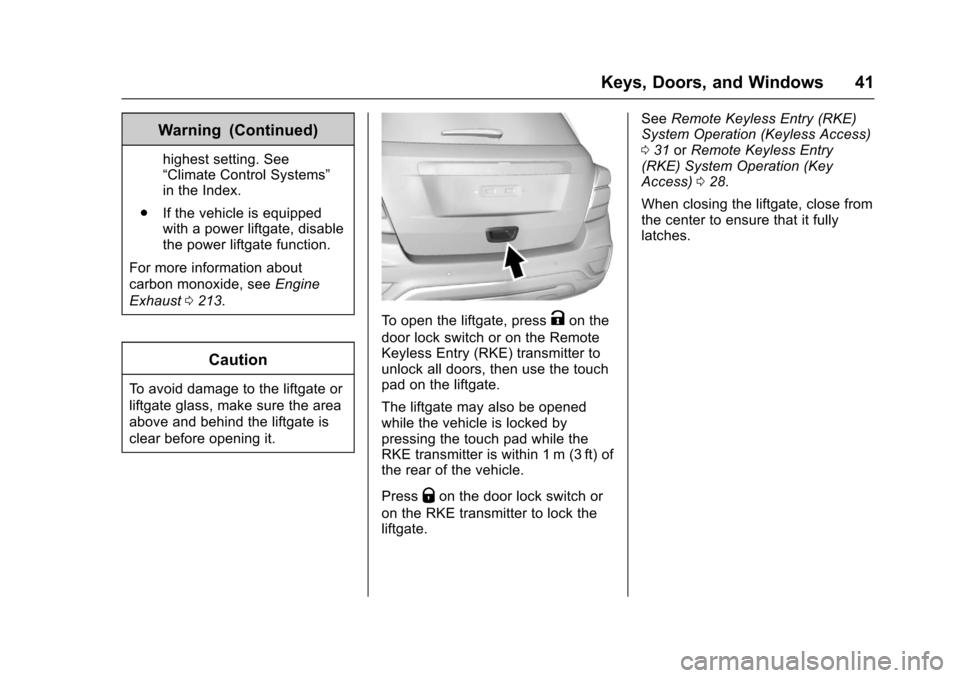
To open the liftgate, pressKon the
door lock switch or on the Remote
Keyless Entry (RKE) transmitter to
unlock all doors, then use the touch
pad on the liftgate.
The liftgate may also be opened
while the vehicle is locked by
pressing the touch pad while the
RKE transmitter is within 1 m (3 ft) of
the rear of the vehicle.
Press
Qon the door lock switch or
on the RKE transmitter to lock the
liftgate. See
Remote Keyless Entry (RKE)
System Operation (Keyless Access)
0 31 orRemote Keyless Entry
(RKE) System Operation (Key
Access) 028.
When closing the liftgate, close from
the center to ensure that it fully
latches.
Page 46 of 373
Chevrolet TRAX Owner Manual (GMNA-Localizing-U.S./Canada/Mexico-
10122735) - 2017 - crc - 7/12/16
Keys, Doors, and Windows 45
Exterior Mirrors
Convex Mirrors
{Warning
A convex mirror can make things,
like other vehicles, look farther
away than they really are. If you
cut too sharply into the right lane,
you could hit a vehicle on the
right. Check the inside mirror or
glance over your shoulder before
changing lanes.
The passenger side mirror is convex
shaped. A convex mirror's surface is
curved so more can be seen from
the driver seat.
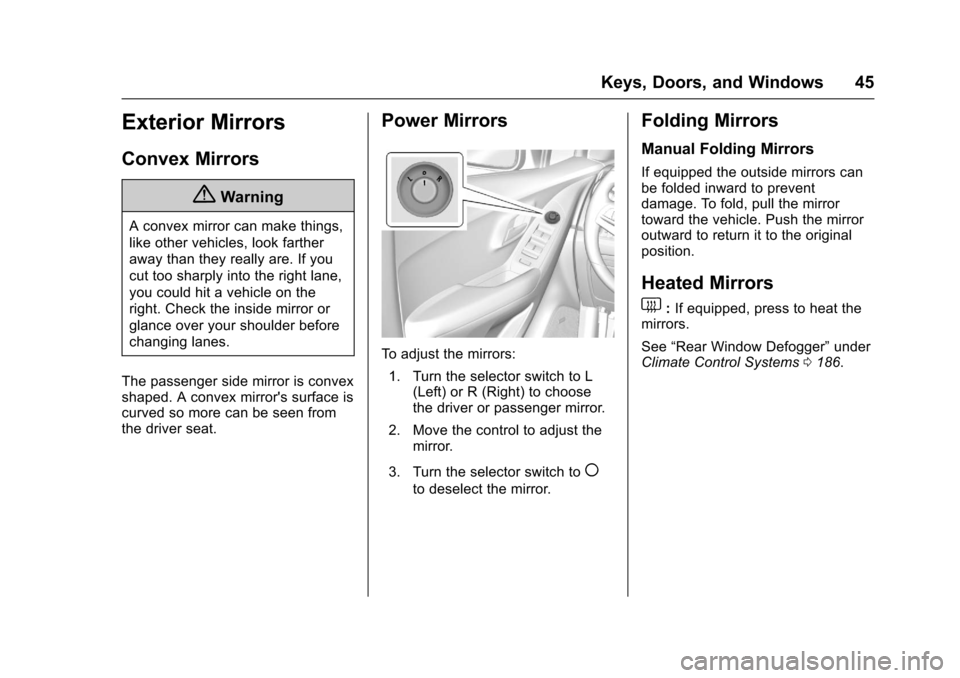
Power Mirrors
To adjust the mirrors: 1. Turn the selector switch to L (Left) or R (Right) to choose
the driver or passenger mirror.
2. Move the control to adjust the mirror.
3. Turn the selector switch to
(
to deselect the mirror.
Folding Mirrors
Manual Folding Mirrors
If equipped the outside mirrors can
be folded inward to prevent
damage. To fold, pull the mirror
toward the vehicle. Push the mirror
outward to return it to the original
position.
Heated Mirrors
1
: If equipped, press to heat the
mirrors.
See “Rear Window Defogger” under
Climate Control Systems 0186.
Page 48 of 373
Chevrolet TRAX Owner Manual (GMNA-Localizing-U.S./Canada/Mexico-
10122735) - 2017 - crc - 7/12/16
Keys, Doors, and Windows 47
pulsing sound when either rear
window is down and the front
windows are up. To reduce the
sound, open either a front window
or the sunroof, if equipped.
Power Windows
{Warning
Children could be seriously
injured or killed if caught in the
path of a closing window. Never
leave keys in a vehicle with
children. When there are children
in the rear seat, use the window
lockout button to prevent
operation of the windows. See
Keys (Keyless Access)027 or
Keys (Key Access) 025.
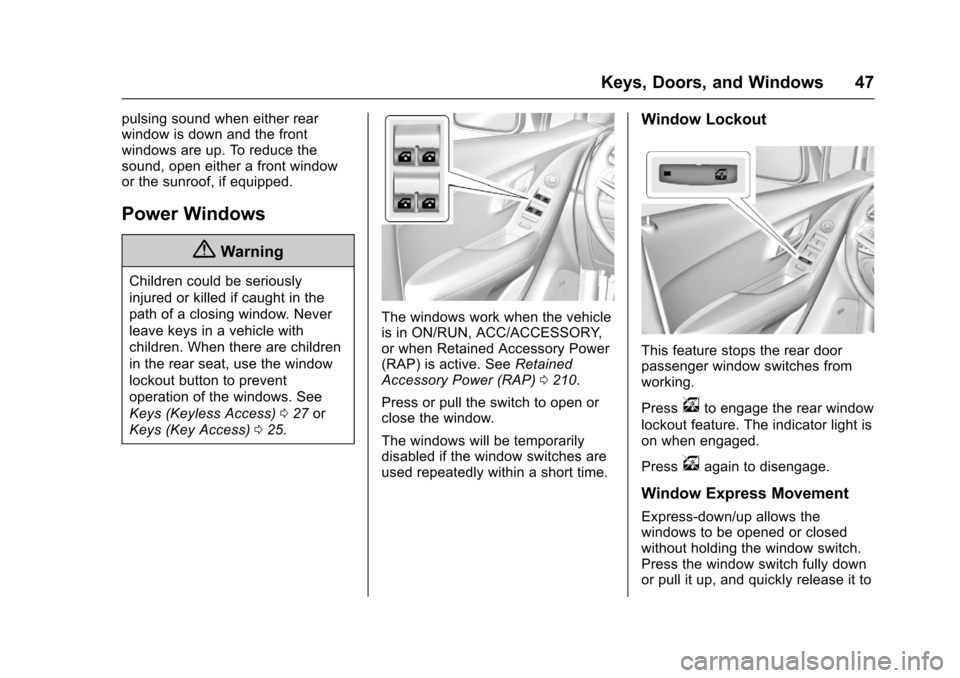
The windows work when the vehicle
is in ON/RUN, ACC/ACCESSORY,
or when Retained Accessory Power
(RAP) is active. See Retained
Accessory Power (RAP) 0210.
Press or pull the switch to open or
close the window.
The windows will be temporarily
disabled if the window switches are
used repeatedly within a short time.
Window Lockout
This feature stops the rear door
passenger window switches from
working.
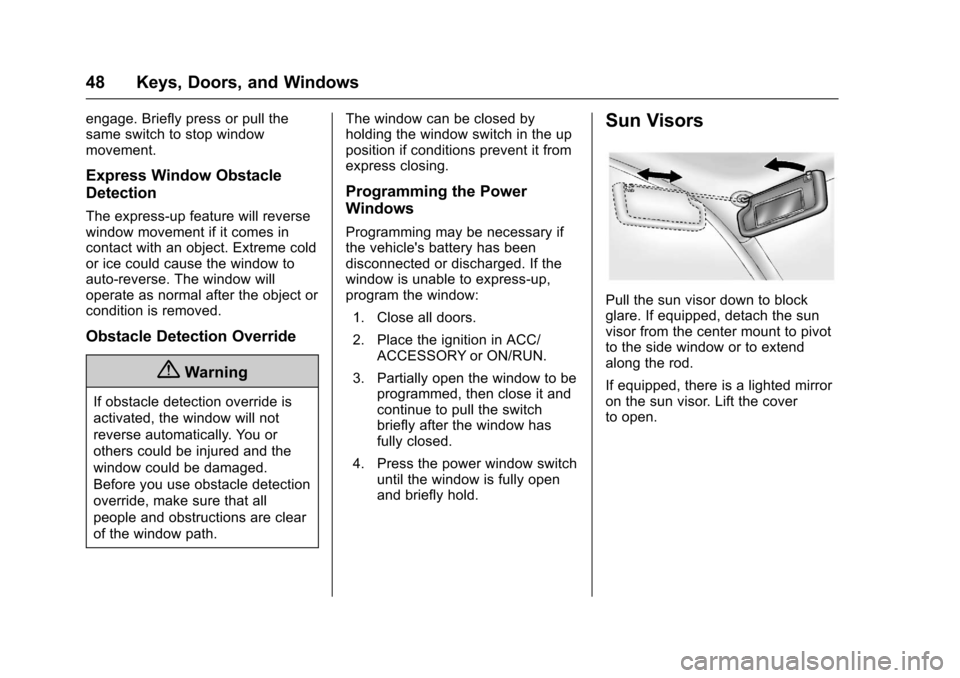
Press
vto engage the rear window
lockout feature. The indicator light is
on when engaged.
Press
vagain to disengage.
Window Express Movement
Express-down/up allows the
windows to be opened or closed
without holding the window switch.
Press the window switch fully down
or pull it up, and quickly release it to
Page 49 of 373
Chevrolet TRAX Owner Manual (GMNA-Localizing-U.S./Canada/Mexico-
10122735) - 2017 - crc - 7/12/16
48 Keys, Doors, and Windows
engage. Briefly press or pull the
same switch to stop window
movement.
Express Window Obstacle
Detection
The express-up feature will reverse
window movement if it comes in
contact with an object. Extreme cold
or ice could cause the window to
auto-reverse. The window will
operate as normal after the object or
condition is removed.
Obstacle Detection Override
{Warning
If obstacle detection override is
activated, the window will not
reverse automatically. You or
others could be injured and the
window could be damaged.
Before you use obstacle detection
override, make sure that all
people and obstructions are clear
of the window path.The window can be closed by
holding the window switch in the up
position if conditions prevent it from
express closing.
Programming the Power
Windows
Programming may be necessary if
the vehicle's battery has been
disconnected or discharged. If the
window is unable to express-up,
program the window:
1. Close all doors.
2. Place the ignition in ACC/ ACCESSORY or ON/RUN.
3. Partially open the window to be programmed, then close it and
continue to pull the switch
briefly after the window has
fully closed.
4. Press the power window switch until the window is fully open
and briefly hold.
Sun Visors
Pull the sun visor down to block
glare. If equipped, detach the sun
visor from the center mount to pivot
to the side window or to extend
along the rod.
If equipped, there is a lighted mirror
on the sun visor. Lift the cover
to open.
Page 50 of 373
Chevrolet TRAX Owner Manual (GMNA-Localizing-U.S./Canada/Mexico-
10122735) - 2017 - crc - 7/12/16
Keys, Doors, and Windows 49
Roof
Sunroof
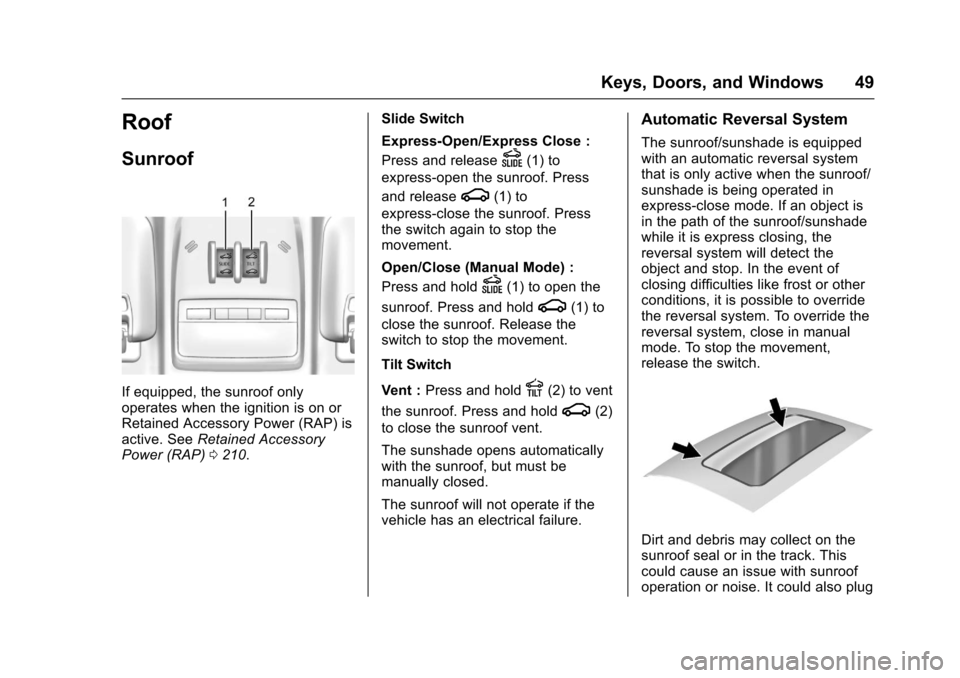
If equipped, the sunroof only
operates when the ignition is on or
Retained Accessory Power (RAP) is
active. SeeRetained Accessory
Power (RAP) 0210. Slide Switch
Express-Open/Express Close :
Press and release
D(1) to
express-open the sunroof. Press
and release
g(1) to
express-close the sunroof. Press
the switch again to stop the
movement.
Open/Close (Manual Mode) :
Press and hold
D(1) to open the
sunroof. Press and hold
g(1) to
close the sunroof. Release the
switch to stop the movement.
Tilt Switch
Vent : Press and hold
E(2) to vent
the sunroof. Press and hold
g(2)
to close the sunroof vent.
The sunshade opens automatically
with the sunroof, but must be
manually closed.
The sunroof will not operate if the
vehicle has an electrical failure.
Automatic Reversal System
The sunroof/sunshade is equipped
with an automatic reversal system
that is only active when the sunroof/
sunshade is being operated in
express-close mode. If an object is
in the path of the sunroof/sunshade
while it is express closing, the
reversal system will detect the
object and stop. In the event of
closing difficulties like frost or other
conditions, it is possible to override
the reversal system. To override the
reversal system, close in manual
mode. To stop the movement,
release the switch.
Dirt and debris may collect on the
sunroof seal or in the track. This
could cause an issue with sunroof
operation or noise. It could also plug
Page 52 of 373
Chevrolet TRAX Owner Manual (GMNA-Localizing-U.S./Canada/Mexico-
10122735) - 2017 - crc - 7/12/16
Seats and Restraints 51
Seats and
Restraints
Head Restraints
Head Restraints . . . . . . . . . . . . . . . 52
Front Seats
Seat Adjustment . . . . . . . . . . . . . . . 53
Power Seat Adjustment . . . . . . . . 54
Lumbar Adjustment . . . . . . . . . . . . 54
Reclining Seatbacks . . . . . . . . . . . 55
Front Seat Armrest . . . . . . . . . . . . 56
Heated Front Seats . . . . . . . . . . . . 56
Folding Seatback . . . . . . . . . . . . . . 57
Rear Seats
Rear Seats . . . . . . . . . . . . . . . . . . . . 58
Rear Seat Armrest . . . . . . . . . . . . . 61
Safety Belts
Safety Belts . . . . . . . . . . . . . . . . . . . . 61
How to Wear Safety BeltsProperly . . . . . . . . . . . . . . . . . . . . . . 62
Lap-Shoulder Belt . . . . . . . . . . . . . 63
Safety Belt Use During Pregnancy . . . . . . . . . . . . . . . . . . . . 66
Safety Belt Extender . . . . . . . . . . . 66
Safety System Check . . . . . . . . . . 66
Safety Belt Care . . . . . . . . . . . . . . . 67 Replacing Safety Belt System
Parts after a Crash . . . . . . . . . . . 67
Airbag System
Airbag System . . . . . . . . . . . . . . . . . 68
Where Are the Airbags? . . . . . . . 69
When Should an AirbagInflate? . . . . . . . . . . . . . . . . . . . . . . . 71
What Makes an Airbag Inflate? . . . . . . . . . . . . . . . . . . . . . . . 72
How Does an Airbag Restrain? . . . . . . . . . . . . . . . . . . . . . 72
What Will You See after an Airbag Inflates? . . . . . . . . . . . . . . 72
Passenger Sensing System . . . 74
Servicing the Airbag-Equipped Vehicle . . . . . . . . . . . . . . . . . . . . . . . 77
Adding Equipment to the Airbag-Equipped Vehicle . . . . . 78
Airbag System Check . . . . . . . . . . 79
Replacing Airbag System Parts after a Crash . . . . . . . . . . . . . . . . . 79
Child Restraints
Older Children . . . . . . . . . . . . . . . . . 79
Infants and Young Children . . . . 81
Child Restraint Systems . . . . . . . 83
Where to Put the Restraint . . . . . 85
Lower Anchors and Tethers forChildren (LATCH System) . . . . 86 Replacing LATCH System Parts
After a Crash . . . . . . . . . . . . . . . . . 93
Securing Child Restraints (With the Safety Belt in the
Rear Seat) . . . . . . . . . . . . . . . . . . . 93
Securing Child Restraints (With the Safety Belt in the
Front Seat) . . . . . . . . . . . . . . . . . . . 95
Page 55 of 373
Chevrolet TRAX Owner Manual (GMNA-Localizing-U.S./Canada/Mexico-
10122735) - 2017 - crc - 7/12/16
54 Seats and Restraints
1. Pull the handle at the front ofthe seat.
2. Slide the seat to the desired position and release the
handle.
3. Try to move the seat back and forth to be sure it is locked in
place.
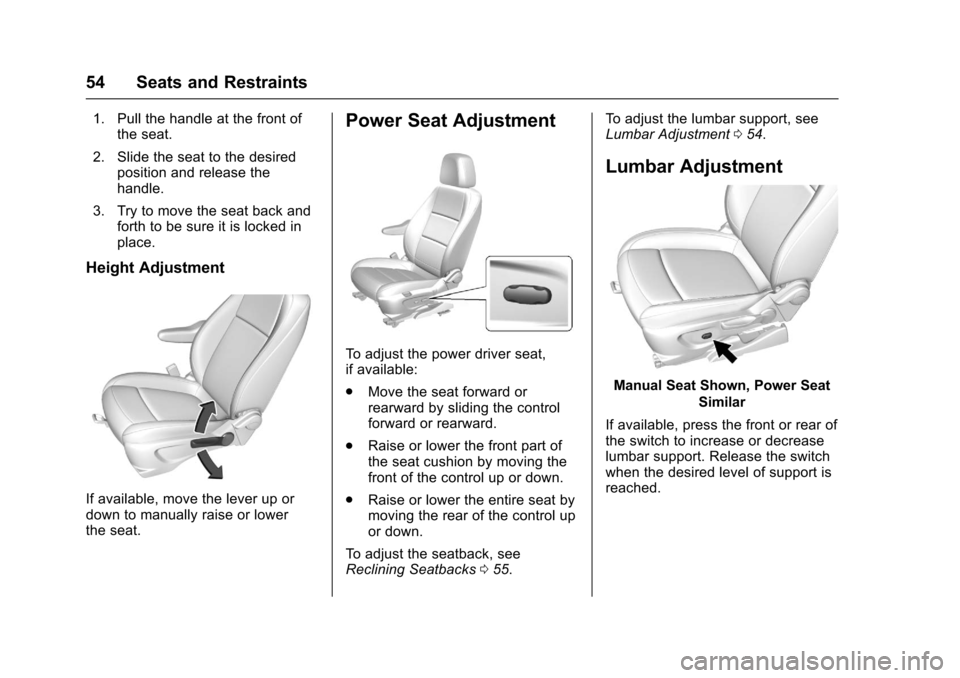
Height Adjustment
If available, move the lever up or
down to manually raise or lower
the seat.
Power Seat Adjustment
To adjust the power driver seat,
if available:
.Move the seat forward or
rearward by sliding the control
forward or rearward.
. Raise or lower the front part of
the seat cushion by moving the
front of the control up or down.
. Raise or lower the entire seat by
moving the rear of the control up
or down.
To adjust the seatback, see
Reclining Seatbacks 055. To adjust the lumbar support, see
Lumbar Adjustment
054.
Lumbar Adjustment
Manual Seat Shown, Power Seat
Similar
If available, press the front or rear of
the switch to increase or decrease
lumbar support. Release the switch
when the desired level of support is
reached.