service indicator CHEVROLET TRAX 2017 1.G User Guide
[x] Cancel search | Manufacturer: CHEVROLET, Model Year: 2017, Model line: TRAX, Model: CHEVROLET TRAX 2017 1.GPages: 373, PDF Size: 6.53 MB
Page 122 of 373
Chevrolet TRAX Owner Manual (GMNA-Localizing-U.S./Canada/Mexico-
10122735) - 2017 - crc - 7/12/16
Instruments and Controls 121
If the TCS is off, wheel spin is not
limited. Adjust driving accordingly.
SeeTraction Control/Electronic
Stability Control 0221.
StabiliTrak®OFF Light
If equipped, this light comes on
briefly while starting the engine. If it
does not, have the vehicle serviced
by your dealer.
This light comes on when the
StabiliTrak system is turned off.
If StabiliTrak is off, the Traction
Control System (TCS) is also off.
If the TCS is off, the system does
not assist in controlling the vehicle.
Turn on the TCS and the StabiliTrak
systems and the warning light
turns off.
See Traction Control/Electronic
Stability Control 0221.
Traction Control System
(TCS)/StabiliTrak®Light
If equipped, the StabiliTrak or TCS
indicator/warning light comes on
briefly when the engine is started.
If the light does not come on, have
the vehicle serviced by your dealer.
If the system is working normally,
the indicator light turns off.
If the light is on and not flashing, the
TCS, and potentially the StabiliTrak
system have been disabled. A DIC
message may display. Check the
DIC messages to determine which
feature is not functioning and
whether the vehicle requires
service.
If the indicator/warning light is on
and flashing, the TCS and/or the
StabiliTrak system is actively
working. See
Traction Control/Electronic
Stability Control 0221.
Engine Coolant
Temperature Warning
Light
This light comes on briefly while
starting the vehicle.
If it does not, have the vehicle
serviced by your dealer. If the
system is working normally the
indicator light goes off.
Caution
The engine coolant temperature
warning light indicates that the
vehicle has overheated. Driving
with this light on can damage the
(Continued)
Page 124 of 373
Chevrolet TRAX Owner Manual (GMNA-Localizing-U.S./Canada/Mexico-
10122735) - 2017 - crc - 7/12/16
Instruments and Controls 123
Low Fuel Warning Light
This light comes on briefly when the
engine is started. If it does not come
on have the vehicle serviced by
your dealer.
If the system is working normally,
the indicator light then goes off.
This light comes on when the
vehicle is low on fuel. When fuel is
added the light should go off. If it
does not, have your vehicle
serviced.
SeeFilling the Tank 0234.
Immobilizer Light
The immobilizer light should come
on briefly as the engine is started.
If it does not come on, have the
vehicle serviced by your dealer.
If the system is working normally,
the indicator light turns off.
If the light stays on and the engine
does not start, there could be a
problem with the immobilizer
system. See Immobilizer Operation
(Key Access) 043 orImmobilizer
Operation (Keyless Access) 044.
Reduced Engine Power
Light
The reduced engine power light
should come on briefly as the
engine is started. If it does not come
on, have the vehicle serviced by
your dealer.
This light, along with the malfunction
indicator lamp, displays when a
noticeable reduction in the vehicle's
performance occurs.
The vehicle can be driven at a
reduced speed when the reduced
engine power light is on but
acceleration and speed might be
reduced. If this light stays on, see
your dealer as soon as possible for
diagnosis and repair.
Page 131 of 373
Chevrolet TRAX Owner Manual (GMNA-Localizing-U.S./Canada/Mexico-
10122735) - 2017 - crc - 7/12/16
130 Instruments and Controls
10 :Brakes Overheated
15 : Check High Mounted
Brake Lamp
16 : Check Brake Lamps
17 : Headlamp Leveling Malfunction
— Contact Service
18 : Left Low Beam Failure
20 : Right Low Beam Failure
21 : Check Left Position Lamp
22 : Check Right Position Lamp
23 : Reversing Lamp Failure
24 : License Plate Lamp Failure
25 : Left Front Turn Indicator Failure
26 : Left Rear Turn Indicator Failure
27 : Right Front Turn Indicator
Failure
28 : Right Rear Turn Indicator
Failure
35 : Replace Battery In Remote Key
49 : Lane Departure Warning
Unavailable
52 : Change Timing Belt –See
Owner ’s Manual 53 :
Tighten Gas Cap
59 : Open, Then Close Driver
Window
65 : Theft Attempted
66 : Service Theft Alarm
67 : Service Steering Column Lock
68 : Service Power Steering, Drive
with Care
77 : Service Front Camera
79 : Engine Oil Low –Add Oil
81 : Service Transmission
84 : Engine Power Is Reduced
88 : Use Transmitter Pocket to Start
89 : Service Vehicle Soon
91 : No Remote Detected
92 : No Remote Detected, Press
Brake To Restart
93 : Press Button Again To Turn
Engine Off
94 : Shift to Park
95 : Service Airbag
174 : Low Battery
258 : Park Assist OffEngine Oil Messages
:% CHANGE
This message displays when the
engine oil needs to be changed.
When changing the engine oil, be
sure to reset the Oil Life System.
See Engine Oil Life System 0248,
Engine Oil 0246, and Maintenance
Schedule 0322.
Vehicle Messages
(Uplevel)
Messages displayed on the DIC
indicate the status of the vehicle or
some action that may be needed to
correct a condition. Multiple
messages may display one after the
other.
The messages that do not require
immediate action can be
acknowledged and cleared by
pressing SET/CLR. The messages
that require immediate action cannot
be cleared until that action is
performed. All messages should be
taken seriously and clearing the
messages does not correct the
problem.
Page 205 of 373
Chevrolet TRAX Owner Manual (GMNA-Localizing-U.S./Canada/Mexico-
10122735) - 2017 - crc - 7/12/16
204 Driving and Operating
If the vehicle must be shut off in an
emergency:1. Brake using a firm and steady pressure. Do not pump the
brakes repeatedly. This may
deplete power assist, requiring
increased brake pedal force.
2. Shift the vehicle to N (Neutral). This can be done while the
vehicle is moving. After shifting
to N (Neutral), firmly apply the
brakes and steer the vehicle to
a safe location.
3. Come to a complete stop. Shift to P (Park) with an automatic
transmission, or Neutral with a
manual transmission. Turn the
ignition to LOCK/OFF.
4. Set the parking brake. See Parking Brake 0219.
{Warning
Turning off the vehicle while
moving may cause loss of power
assist in the brake and steering
(Continued)
Warning (Continued)
systems and disable the airbags.
While driving, only shut the
vehicle off in an emergency.
If the vehicle cannot be pulled over,
and must be shut off while driving,
turn the ignition to ACC/
ACCESSORY.
Caution
Using a tool to force the key to
turn in the ignition could cause
damage to the switch or break the
key. Use the correct key, make
sure it is all the way in, and turn it
only with your hand. If the key
cannot be turned by hand, see
your dealer.
1 (ACC/ACCESSORY) : This is the
position in which you can operate
things like the radio and the
windshield wipers when the engine
is off. 2 (ON/RUN) :
This position can be
used to operate the electrical
accessories and to display some
instrument cluster warning and
indicator lights. This position can
also be used for service and
diagnostics, and to verify the proper
operation of the malfunction
indicator lamp as may be required
for emission inspection purposes.
The switch stays in this position
when the engine is running.
If you leave the key in the ACC/
ACCESSORY or ON/RUN position
with the engine off, the battery could
be drained. You may not be able to
start the vehicle if the battery is
allowed to drain for an extended
period of time.
3 (START) : This is the position that
starts the engine. When the engine
starts, release the key. The ignition
switch returns to ON/RUN for
driving.
A warning tone will sound when the
driver door is opened, the ignition is
in ACC/ACCESSORY or LOCK/
OFF, and the key is in the ignition.
Page 207 of 373
Chevrolet TRAX Owner Manual (GMNA-Localizing-U.S./Canada/Mexico-
10122735) - 2017 - crc - 7/12/16
206 Driving and Operating
{Warning
Turning off the vehicle while
moving may cause loss of power
assist in the brake and steering
systems and disable the airbags.
While driving, only shut the
vehicle off in an emergency.
If the vehicle cannot be pulled over,
and must be shut off while driving,
press and hold ENGINE START/
STOP for longer than two seconds,
or press twice in five seconds.
ACC/ACCESSORY (Amber
Indicator Light) : This mode allows
you to use some electrical
accessories when the engine is off.
With the ignition off, pressing
ENGINE START/STOP one time
without the brake pedal applied will
place the ignition system in ACC/
ACCESSORY.
The ignition will switch from ACC/
ACCESSORY to OFF after
five minutes to prevent battery
rundown. ON/RUN/START (Green Indicator
Light) :
This mode is for driving and
starting. With the ignition off, and
the brake pedal applied, pressing
ENGINE START/STOP once will
place the ignition system in ON/
RUN/Start.
Once engine cranking begins,
release ENGINE START/STOP.
Engine cranking will continue until
the engine starts. See Starting the
Engine 0206.
The engine will then remain in
ON/RUN.
Service Only Mode : This power
mode is available for service and
diagnostics, and to verify the proper
operation of the malfunction
indicator lamp as may be required
for emission inspection purposes.
With the vehicle off, and the brake
pedal not applied, pressing and
holding ENGINE START/STOP for
more than five seconds will place
the vehicle in Service Only Mode. The instruments and audio system
will operate as they do in ON/RUN,
but the vehicle will not be able to be
driven. The engine will not start in
Service Only Mode.
Press ENGINE START/STOP again
to turn the vehicle off.
Starting the Engine
Place the transmission in the
proper gear.
Caution
If you add electrical parts or
accessories, you could change
the way the engine operates. Any
resulting damage would not be
covered by the vehicle warranty.
See
Add-On Electrical
Equipment 0237.
Page 238 of 373
Chevrolet TRAX Owner Manual (GMNA-Localizing-U.S./Canada/Mexico-
10122735) - 2017 - crc - 7/12/16
Driving and Operating 237
Conversions and
Add-Ons
Add-On Electrical
Equipment
{Warning
The Data Link Connector (DLC) is
used for vehicle service and
Emission Inspection/Maintenance
testing. SeeMalfunction Indicator
Lamp (Check Engine Light) 0116.
A device connected to the DLC —
such as an aftermarket fleet or
driver-behavior tracking device —
may interfere with vehicle
systems. This could affect vehicle
operation and cause a crash.
Such devices may also access
information stored in the vehicle’s
systems.
Caution
Some electrical equipment can
damage the vehicle or cause
components to not work and
would not be covered by the
vehicle warranty. Always check
with your dealer before adding
electrical equipment.
Add-on equipment can drain the
vehicle's 12-volt battery, even if the
vehicle is not operating.
The vehicle has an airbag system.
Before attempting to add anything
electrical to the vehicle, see
Servicing the Airbag-Equipped
Vehicle 077 and Adding Equipment
to the Airbag-Equipped
Vehicle 078.
Page 256 of 373
Chevrolet TRAX Owner Manual (GMNA-Localizing-U.S./Canada/Mexico-
10122735) - 2017 - crc - 7/12/16
Vehicle Care 255
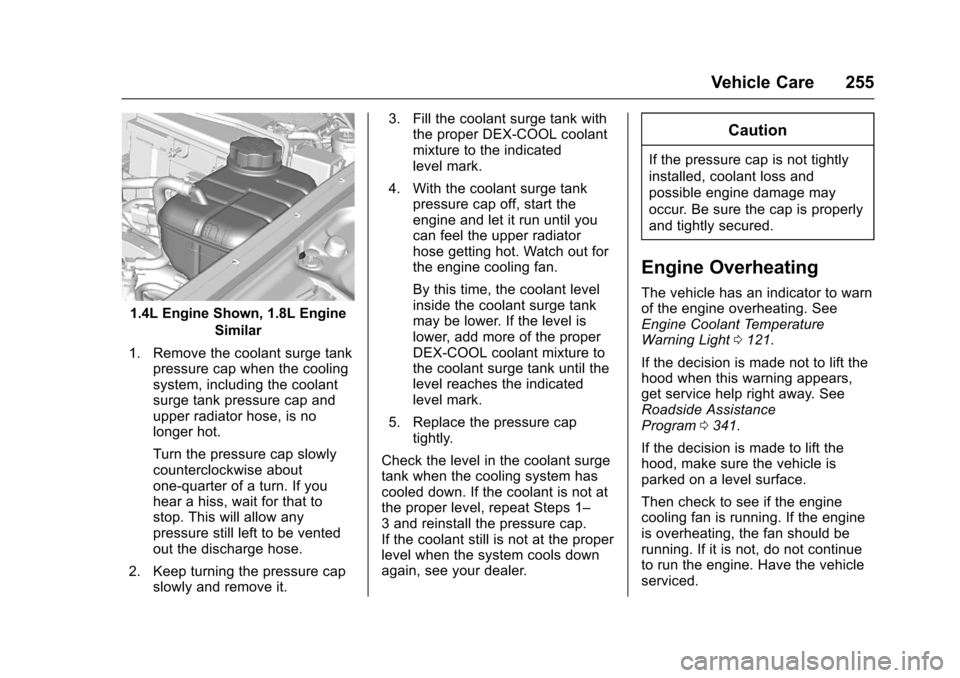
1.4L Engine Shown, 1.8L EngineSimilar
1. Remove the coolant surge tank pressure cap when the cooling
system, including the coolant
surge tank pressure cap and
upper radiator hose, is no
longer hot.
Turn the pressure cap slowly
counterclockwise about
one-quarter of a turn. If you
hear a hiss, wait for that to
stop. This will allow any
pressure still left to be vented
out the discharge hose.
2. Keep turning the pressure cap slowly and remove it. 3. Fill the coolant surge tank with
the proper DEX-COOL coolant
mixture to the indicated
level mark.
4. With the coolant surge tank pressure cap off, start the
engine and let it run until you
can feel the upper radiator
hose getting hot. Watch out for
the engine cooling fan.
By this time, the coolant level
inside the coolant surge tank
may be lower. If the level is
lower, add more of the proper
DEX-COOL coolant mixture to
the coolant surge tank until the
level reaches the indicated
level mark.
5. Replace the pressure cap tightly.
Check the level in the coolant surge
tank when the cooling system has
cooled down. If the coolant is not at
the proper level, repeat Steps 1–
3 and reinstall the pressure cap.
If the coolant still is not at the proper
level when the system cools down
again, see your dealer.
Caution
If the pressure cap is not tightly
installed, coolant loss and
possible engine damage may
occur. Be sure the cap is properly
and tightly secured.
Engine Overheating
The vehicle has an indicator to warn
of the engine overheating. See
Engine Coolant Temperature
Warning Light 0121.
If the decision is made not to lift the
hood when this warning appears,
get service help right away. See
Roadside Assistance
Program 0341.
If the decision is made to lift the
hood, make sure the vehicle is
parked on a level surface.
Then check to see if the engine
cooling fan is running. If the engine
is overheating, the fan should be
running. If it is not, do not continue
to run the engine. Have the vehicle
serviced.
Page 259 of 373
Chevrolet TRAX Owner Manual (GMNA-Localizing-U.S./Canada/Mexico-
10122735) - 2017 - crc - 7/12/16
258 Vehicle Care
use. If operating the vehicle in an
area where the temperature may fall
below freezing, use a fluid that has
sufficient protection against
freezing.
Adding Washer Fluid
Open the cap with the washer
symbol on it. Add washer fluid until
the tank is full. SeeEngine
Compartment Overview 0243 for
reservoir location.
Caution
. Do not use washer fluid that
contains any type of water
repellent coating. This can
cause the wiper blades to
chatter or skip.
(Continued)
Caution (Continued)
.Do not use engine coolant
(antifreeze) in the
windshield washer. It can
damage the windshield
washer system and paint.
. Do not mix water with
ready-to-use washer fluid.
Water can cause the
solution to freeze and
damage the washer fluid
tank and other parts of the
washer system.
. When using concentrated
washer fluid, follow the
manufacturer instructions for
adding water.
. Fill the washer fluid tank
only three-quarters full when
it is very cold. This allows
for fluid expansion if
freezing occurs, which could
damage the tank if it is
completely full.
Brakes
Disc brake pads have built-in wear
indicators that make a high-pitched
warning sound when the brake pads
are worn and new pads are needed.
The sound can come and go or can
be heard all the time when the
vehicle is moving, except when
applying the brake pedal firmly.
{Warning
The brake wear warning sound
means that soon the brakes will
not work well. That could lead to
a crash. When the brake wear
warning sound is heard, have the
vehicle serviced.
Caution
Continuing to drive with worn-out
brake pads could result in costly
brake repair.
Page 330 of 373
Chevrolet TRAX Owner Manual (GMNA-Localizing-U.S./Canada/Mexico-
10122735) - 2017 - crc - 7/12/16
Service and Maintenance 329
of leaking, blown seals,
or damage, and can advise
when service is needed.
Tires
Tires need to be properly inflated,
rotated, and balanced. Maintaining
the tires can save money and fuel,
and can reduce the risk of tire
failure.
. Signs that the tires need to be
replaced include three or more
visible treadwear indicators; cord
or fabric showing through the
rubber; cracks or cuts in the
tread or sidewall; or a bulge or
split in the tire.
. Trained dealer technicians can
inspect and recommend the right
tires. Your dealer can also
provide tire/wheel balancing
services to ensure smooth
vehicle operation at all speeds.
Your dealer sells and services
name brand tires.
Vehicle Care
To help keep the vehicle looking like
new, vehicle care products are
available from your dealer. For information on how to clean and
protect the vehicle’s interior and
exterior, see
Interior Care 0315 and
Exterior Care 0311.
Wheel Alignment
Wheel alignment is critical for
ensuring that the tires deliver
optimal wear and performance.
. Signs that the alignment may
need to be adjusted include
pulling, improper vehicle
handling, or unusual tire wear.
. Your dealer has the required
equipment to ensure proper
wheel alignment.
Windshield
For safety, appearance, and the
best viewing, keep the windshield
clean and clear.
. Signs of damage include
scratches, cracks, and chips.
. Trained dealer technicians can
inspect the windshield and
recommend proper replacement
if needed. Wiper Blades
Wiper blades need to be cleaned
and kept in good condition to
provide a clear view.
.
Signs of wear include streaking,
skipping across the windshield,
and worn or split rubber.
. Trained dealer technicians can
check the wiper blades and
replace them when needed.
Page 364 of 373

Chevrolet TRAX Owner Manual (GMNA-Localizing-U.S./Canada/Mexico-
10122735) - 2017 - crc - 7/12/16
Index 363
CheckIgnition Transmission Lock . . . 262
Malfunction Indicator
Engine Light . . . . . . . . . . . . . . . . .116
Child Restraints Infants and Young Children . . . . . 81
Lower Anchors and Tethersfor Children . . . . . . . . . . . . . . . . . . . 86
Older Children . . . . . . . . . . . . . . . . . . 79
Securing . . . . . . . . . . . . . . . . . . . . 93, 95
Systems . . . . . . . . . . . . . . . . . . . . . . . . 83
Circuit Breakers . . . . . . . . . . . . . . . . 272
Cleaning Exterior Care . . . . . . . . . . . . . . . . . .311
Interior Care . . . . . . . . . . . . . . . . . . 315
Climate Control Systems . . . . . . . 186
Air Conditioning . . . . . . . . . . . . . . 186
Heating . . . . . . . . . . . . . . . . . . . . . . . 186
Clock . . . . . . . . . . . . . . . . . . . . . . . . . . . 107
Cluster, Instrument . . . . . . . . . . . . . 111
Clutch, Hydraulic . . . . . . . . . . . . . . . 250
Collision Damage Repair . . . . . . . 344
Compact Spare Tire . . . . . . . . . . . . 304
Compartments Storage . . . . . . . . . . . . . . . . . . . . . . . . . 99
Compass . . . . . . . . . . . . . . . . . . . . . . . 107 Messages . . . . . . . . . . . . . . . . . . . . 131 Connections
OnStar®. . . . . . . . . . . . . . . . . . . . . . 353
Control Traction and ElectronicStability . . . . . . . . . . . . . . . . . . . . . 221
Control of a Vehicle . . . . . . . . . . . . . 193
Convenience Net . . . . . . . . . . . . . . . 101
Convex Mirrors . . . . . . . . . . . . . . . . . . 45
Coolant Engine . . . . . . . . . . . . . . . . . . . . . . . . 253
Engine TemperatureWarning Light . . . . . . . . . . . . . . . 121
Cooling . . . . . . . . . . . . . . . . . . . . . . . . . 186
Cooling System . . . . . . . . . . . . . . . . . 251 Engine Messages . . . . . . . . . . . . 132
Courtesy Lamps . . . . . . . . . . . . . . . . 149
Courtesy Transportation
Program . . . . . . . . . . . . . . . . . . . . . . . 343
Cover Cargo . . . . . . . . . . . . . . . . . . . . . . . . . 100
Cruise Control . . . . . . . . . . . . . . . . . . 223
Light . . . . . . . . . . . . . . . . . . . . . . . . . . 124
Messages . . . . . . . . . . . . . . . . . . . . 131
Cupholders . . . . . . . . . . . . . . . . . . . . . . 99
Customer Assistance . . . . . . . . . . . 340 Offices . . . . . . . . . . . . . . . . . . . . . . . . 339
Text Telephone (TTY)Users . . . . . . . . . . . . . . . . . . . . . . . 340 Customer Information
Service Publications
Ordering Information . . . . . . . . 346
Customer Satisfaction Procedure . . . . . . . . . . . . . . . . . . . . . 337
D
Damage Repair, Collision . . . . . . . 344
Danger, Warning, and Caution . . . . 3
Data CollectionOnStar . . . . . . . . . . . . . . . . . . . . . . . 349
Data Recorders, Event . . . . . . . . . 349
Daytime Running
Lamps (DRL) . . . . . . . . . . . . . . . . . . 147
Defensive Driving . . . . . . . . . . . . . . . 193
Delayed Locking . . . . . . . . . . . . . . . . . 38
Devices Auxiliary . . . . . . . . . . . . . . . . . . . . . . 171
Diagnostics OnStar
®. . . . . . . . . . . . . . . . . . . . . . 355
Distracted Driving . . . . . . . . . . . . . . . 192
Dome Lamps . . . . . . . . . . . . . . . . . . . 149
Door
Ajar Light . . . . . . . . . . . . . . . . . . . . . 124
Ajar Messages . . . . . . . . . . . . . . . 131
Delayed Locking . . . . . . . . . . . . . . . . 38
Locks . . . . . . . . . . . . . . . . . . . . . . . . . . . 37
Power Locks . . . . . . . . . . . . . . . . . . . . 38
Drive Belt Routing, Engine . . . . . . 336