horn CHEVROLET TRAX 2017 1.G Owners Manual
[x] Cancel search | Manufacturer: CHEVROLET, Model Year: 2017, Model line: TRAX, Model: CHEVROLET TRAX 2017 1.GPages: 373, PDF Size: 6.53 MB
Page 8 of 373

Chevrolet TRAX Owner Manual (GMNA-Localizing-U.S./Canada/Mexico-
10122735) - 2017 - crc - 7/12/16
In Brief 7
1.Air Vents 0188.
2. Turn Signal Lever. See Turn
and Lane-Change
Signals 0148.
Headlamp High/Low-Beam
Changer 0146.
3. Instrument Cluster 0111.
4. Windshield Wiper/
Washer 0105.
Rear Window Wiper/
Washer 0106.
5. Light Sensor. See Automatic
Headlamp System 0147.
6. Infotainment 0152.
7. Lane Departure Warning
(LDW) 0231 (If Equipped).
8. Hazard Warning
Flashers 0148.
9. Power Outlets 0109.
10. Passenger Safety Belt Reminder Light. See Safety
Belt Reminders 0114.
11. Shift Lever. See Automatic
Transmission 0214 orManual
Transmission 0216. 12.
Parking Brake 0219.
13. USB Port 0165.
14. Climate Control
Systems 0186.
15. Traction Control/Electronic Stabilty Control Button. See
Traction Control/Electronic
Stability Control 0221.
16. Ignition Positions (Key Access)
0203 orIgnition Positions
(Keyless Access) 0205.
17. Steering Wheel Controls 0104.
18. Horn 0105.
19. Steering Wheel
Adjustment 0104.
20. Cruise Control 0223 (If
Equipped).
Forward Collision Alert (FCA)
System 0228 (If Equipped).
21. Instrument Panel Storage 099
(If Equipped).
22. Data Link Connector (DLC) (Out of View). See Malfunction
Indicator Lamp (Check Engine
Light) 0116. 23. Hood Release. See
Hood 0241.
24. Exterior Lamp Controls 0146.
Instrument Panel Illumination
Control 0149.
Front Fog Lamps 0148 (If
Equipped).
Page 29 of 373
Chevrolet TRAX Owner Manual (GMNA-Localizing-U.S./Canada/Mexico-
10122735) - 2017 - crc - 7/12/16
28 Keys, Doors, and Windows
The key code is stamped on the key
number plate and can be used to
make new keys at any dealer. Store
this information in a safe place
outside the vehicle.
See your dealer if a new key is
needed.
If locked out of the vehicle, see
Roadside Assistance
Program0341.
With an active OnStar subscription,
an OnStar Advisor may remotely
unlock the vehicle. See OnStar
Overview 0351.
Remote Keyless Entry
(RKE) System
See Radio Frequency
Statement 0347.
If there is a decrease in the Remote
Keyless Entry (RKE) operating
range:
. Check the distance. The
transmitter may be too far from
the vehicle. .
Check the location. Other
vehicles or objects may be
blocking the signal.
. Check the transmitter's battery.
See “Battery Replacement” later
in this section.
. If the transmitter is still not
working correctly, see your
dealer or a qualified technician
for service.
Remote Keyless Entry
(RKE) System Operation
(Key Access)
The RKE transmitter may work up to
30 m (98 ft) away from the vehicle.
Other conditions can affect the
performance of the transmitter. See
Remote Keyless Entry (RKE)
System 028.
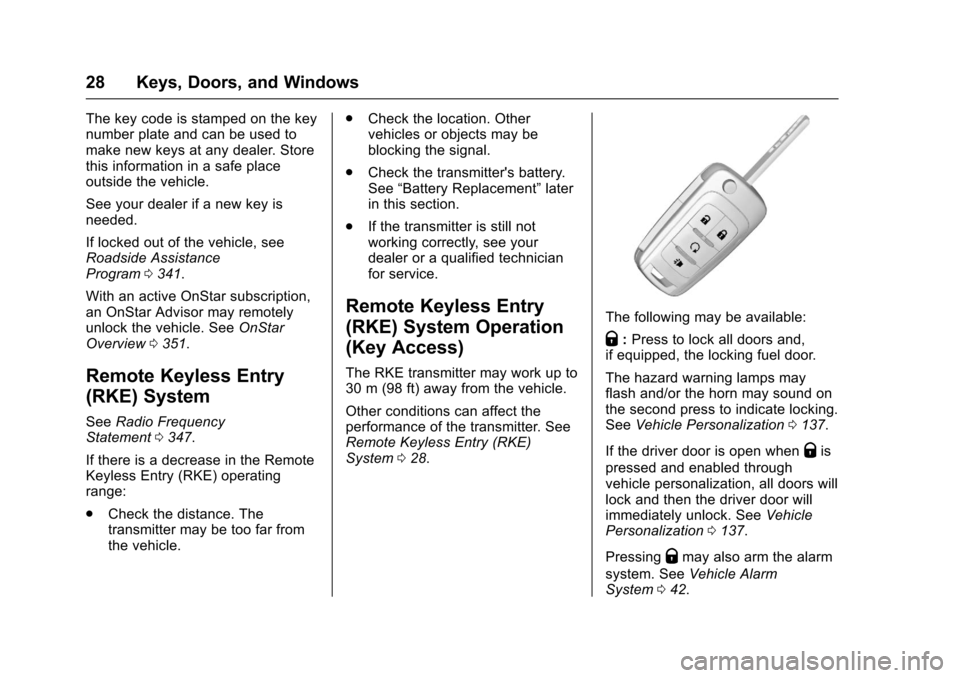
The following may be available:
Q:Press to lock all doors and,
if equipped, the locking fuel door.
The hazard warning lamps may
flash and/or the horn may sound on
the second press to indicate locking.
See Vehicle Personalization 0137.
If the driver door is open when
Qis
pressed and enabled through
vehicle personalization, all doors will
lock and then the driver door will
immediately unlock. See Vehicle
Personalization 0137.
Pressing
Qmay also arm the alarm
system. See Vehicle Alarm
System 042.
Page 30 of 373
Chevrolet TRAX Owner Manual (GMNA-Localizing-U.S./Canada/Mexico-
10122735) - 2017 - crc - 7/12/16
Keys, Doors, and Windows 29
K:Press to unlock the driver door.
Press again within five seconds to
unlock all doors.The RKE
transmitter can be programmed to
unlock all doors on the first button
press. See Vehicle
Personalization 0137.
The hazard warning lamps may
flash to indicate unlocking. See
Vehicle Personalization 0137.
Pressing
Kwill disarm the alarm
system. See Vehicle Alarm System
0 42. If equipped, pressing
Kwill
also unlock the fuel door.
7: If equipped, press and hold
briefly to initiate vehicle locator. The
exterior lamps flash and the horn
chirps three times.
Press and hold
7for at least
three seconds to sound the panic
alarm. The horn sounds and the
turn signals flash for 30 seconds,
or until
7is pressed again or the
key is placed in the ignition and
turned to ACC/ACCESSORY or
ON/RUN.
/: If equipped, pressQand then
press and hold
/to start the
engine from outside the vehicle
using the RKE transmitter. See
Remote Vehicle Start 036.
The RKE transmitter buttons will not
operate when the key is in the
ignition.
Programming Keys to the
Vehicle
Only RKE keys programmed to this
vehicle will work. If a key is lost or
stolen, a replacement can be
purchased and programmed through
your dealer. When the replacement
key is programmed to this vehicle,
all remaining keys must also be
reprogrammed. Any lost or stolen
keys will no longer work once the
new key is programmed.
Programming with Two
Recognized Keys
To program a new key: 1. Insert the original, already programmed key in the ignition
and turn the key to the ON/
RUN position. 2. Turn the key to LOCK/OFF and
remove the key.
3. Quickly, within five seconds, insert the second original
already programmed key in the
ignition and turn the key to the
ON/RUN position.
4. Turn the key to LOCK/OFF, and remove the key.
5. Insert the new key to be programmed and turn it to the
ON/RUN position within
five seconds.
The security light will turn off
once the key has been
programmed.
6. Repeat Steps 1–5 if additional keys are to be programmed.
If a key is lost or damaged, see your
dealer to have a new key made.
Programming without Two
Recognized Keys
Program a new key to the vehicle
when a recognized key is not
available. Canadian regulations
require that owners see their dealer.
Page 32 of 373
Chevrolet TRAX Owner Manual (GMNA-Localizing-U.S./Canada/Mexico-
10122735) - 2017 - crc - 7/12/16
Keys, Doors, and Windows 31
Remote Keyless Entry
(RKE) System Operation
(Keyless Access)
The Keyless Access system allows
for vehicle entry when the
transmitter is within 1 m (3 ft). See
“Keyless Access Operation”later in
this section.
The RKE transmitter may work up to
30 m (98 ft) away from the vehicle.
Other conditions can affect the
performance of the transmitter. See
Remote Keyless Entry (RKE)
System 028.
With Remote Start Shown
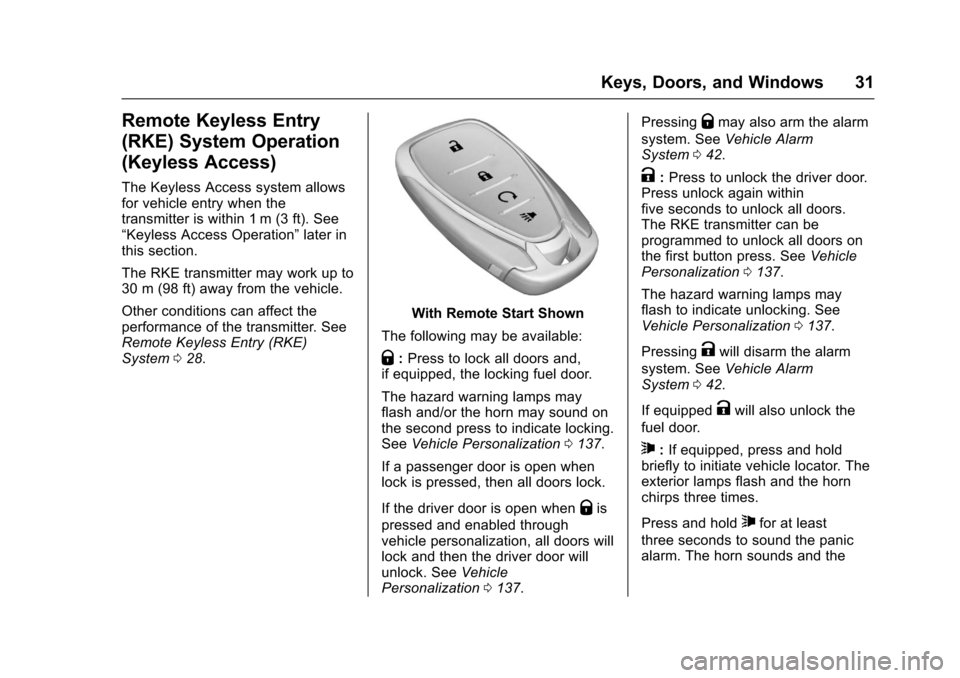
The following may be available:
Q: Press to lock all doors and,
if equipped, the locking fuel door.
The hazard warning lamps may
flash and/or the horn may sound on
the second press to indicate locking.
See Vehicle Personalization 0137.
If a passenger door is open when
lock is pressed, then all doors lock.
If the driver door is open when
Qis
pressed and enabled through
vehicle personalization, all doors will
lock and then the driver door will
unlock. See Vehicle
Personalization 0137. Pressing
Qmay also arm the alarm
system. See Vehicle Alarm
System 042.
K:Press to unlock the driver door.
Press unlock again within
five seconds to unlock all doors.
The RKE transmitter can be
programmed to unlock all doors on
the first button press. See Vehicle
Personalization 0137.
The hazard warning lamps may
flash to indicate unlocking. See
Vehicle Personalization 0137.
Pressing
Kwill disarm the alarm
system. See Vehicle Alarm
System 042.
If equipped
Kwill also unlock the
fuel door.
7: If equipped, press and hold
briefly to initiate vehicle locator. The
exterior lamps flash and the horn
chirps three times.
Press and hold
7for at least
three seconds to sound the panic
alarm. The horn sounds and the
Page 34 of 373
Chevrolet TRAX Owner Manual (GMNA-Localizing-U.S./Canada/Mexico-
10122735) - 2017 - crc - 7/12/16
Keys, Doors, and Windows 33
Passive Locking
If equipped with Keyless Access,
the vehicle will lock several seconds
after all doors are closed if the
vehicle is off and at least one
transmitter has been removed or
none remain in the vehicle.
If equipped with a locking fuel door,
the fuel door will also lock at
this time.
If other electronic devices interfere
with the RKE transmitter signal, the
vehicle may not detect the RKE
transmitter inside the vehicle.
If passive locking is enabled, the
doors may lock with the RKE
transmitter inside the vehicle. Do
not leave the RKE transmitter in an
unattended vehicle.
Remote Left in Vehicle Alert
When the vehicle is turned off and a
remote is left in the vehicle, the horn
will chirp three times after all doors
are closed.
To turn on or off seeVehicle
Personalization 0137. Temporary Disable of the Passive
Locking Feature
Temporarily disable passive locking
by pressing and holding
Kon the
interior door switch with a door open
for several seconds, or until three
chimes are heard. Passive locking
will then remain disabled until
Qon
the interior door is pressed, or until
the vehicle is turned on.
To customize the doors to
automatically lock when exiting the
vehicle, see Vehicle
Personalization 0137.
Programming Transmitters to
the Vehicle
Only RKE transmitters programmed
to the vehicle will work. If a
transmitter is lost or stolen, a
replacement can be purchased and
programmed through your dealer.
The vehicle can be reprogrammed
so that lost or stolen transmitters no
longer work. Any remaining
transmitters will need to be
reprogrammed. Each vehicle can
have up to eight transmitters
matched to it. Programming with Recognized
Transmitters
A new transmitter can be
programmed to the vehicle when
there are two recognized
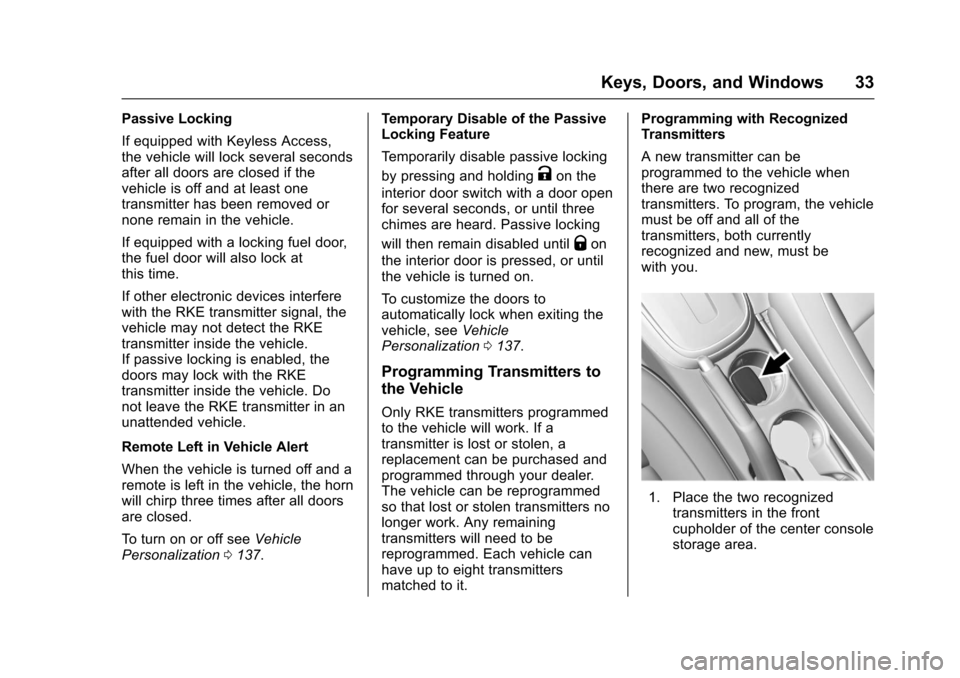
transmitters. To program, the vehicle
must be off and all of the
transmitters, both currently
recognized and new, must be
with you.
1. Place the two recognized
transmitters in the front
cupholder of the center console
storage area.
Page 40 of 373
Chevrolet TRAX Owner Manual (GMNA-Localizing-U.S./Canada/Mexico-
10122735) - 2017 - crc - 7/12/16
Keys, Doors, and Windows 39
WhenQis pressed on the power
door lock switch with the door open,
a chime will sound three times
indicating that delayed locking is
active.
The doors will then lock
automatically five seconds after all
doors are closed. If a door is
reopened before five seconds have
elapsed, the five-second timer will
reset once all the doors are closed
again.
Press
Qon the door lock switch
again, or press
Qon the RKE
transmitter, to override this feature
and lock the doors immediately.
Delayed locking can be
programmed through the Driver
Information Center (DIC). See
Vehicle Personalization 0137.
Automatic Door Locks
When the doors are closed, the
ignition is on, and the shift lever is
moved out of P (Park) for automatic
transmissions, or when vehicle speed becomes faster than 13 km/h
(8 mph) for manual transmissions,
the doors will lock.
To unlock the doors:
.
Press
Kon the power door lock
switch.
. Shift the transmission into
P (Park) for an automatic
transmission.
. Remove the key from the
ignition for a manual
transmission.
Automatic door locking cannot be
disabled. Automatic door unlocking
can be programmed. See Vehicle
Personalization 0137.
Lockout Protection
Key Access : When locking is
requested with the driver door open
and the key in the ignition, all the
doors will lock and then the driver
door will unlock.
This can be manually overridden by
pressing and holding
Qon the
power door lock switch. Keyless Access :
When locking is
requested with the driver door open
and the vehicle is in ACC/
ACCESSORY or ON/RUN/START,
all the doors will lock and then the
driver door will unlock.
If the vehicle is off and locking is
requested while a door is open,
when all doors are closed the
vehicle will check for RKE
transmitters inside. If an RKE
transmitter is detected and the
number of RKE transmitters inside
has not reduced, the driver door will
unlock and the horn will sound three
times.
This can be manually overridden by
pressing and holding
Qon the
power door lock switch.
Unlocked Door Anti-Lockout
If Unlocked Door Anti-Lockout is
turned on and the vehicle is off, the
driver door is open, and locking is
selected, all the doors will lock and
only the driver door will unlock.
Unlocked Door Anti-Lockout can be
Page 43 of 373
Chevrolet TRAX Owner Manual (GMNA-Localizing-U.S./Canada/Mexico-
10122735) - 2017 - crc - 7/12/16
42 Keys, Doors, and Windows
Vehicle Security
This vehicle has theft-deterrent
features; however, they do not make
the vehicle impossible to steal.
Vehicle Alarm System
This vehicle may be equipped with
an alarm system.
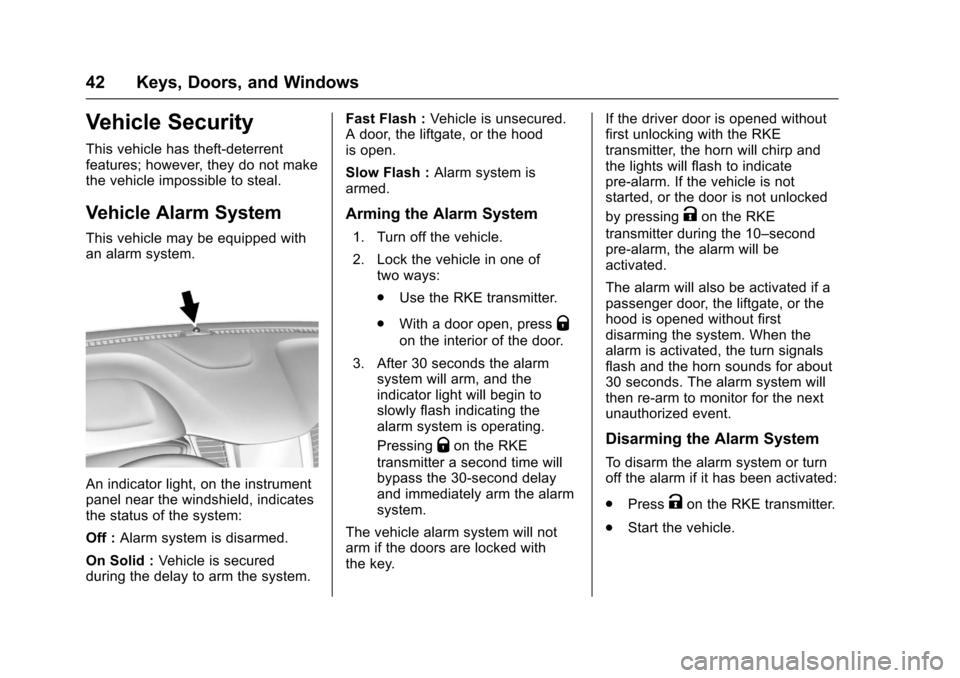
An indicator light, on the instrument
panel near the windshield, indicates
the status of the system:
Off :Alarm system is disarmed.
On Solid : Vehicle is secured
during the delay to arm the system. Fast Flash :
Vehicle is unsecured.
A door, the liftgate, or the hood
is open.
Slow Flash : Alarm system is
armed.
Arming the Alarm System
1. Turn off the vehicle.
2. Lock the vehicle in one of two ways:
.Use the RKE transmitter.
. With a door open, press
Q
on the interior of the door.
3. After 30 seconds the alarm system will arm, and the
indicator light will begin to
slowly flash indicating the
alarm system is operating.
Pressing
Qon the RKE
transmitter a second time will
bypass the 30-second delay
and immediately arm the alarm
system.
The vehicle alarm system will not
arm if the doors are locked with
the key. If the driver door is opened without
first unlocking with the RKE
transmitter, the horn will chirp and
the lights will flash to indicate
pre-alarm. If the vehicle is not
started, or the door is not unlocked
by pressing
Kon the RKE
transmitter during the 10–second
pre-alarm, the alarm will be
activated.
The alarm will also be activated if a
passenger door, the liftgate, or the
hood is opened without first
disarming the system. When the
alarm is activated, the turn signals
flash and the horn sounds for about
30 seconds. The alarm system will
then re-arm to monitor for the next
unauthorized event.
Disarming the Alarm System
To disarm the alarm system or turn
off the alarm if it has been activated:
. Press
Kon the RKE transmitter.
. Start the vehicle.
Page 44 of 373
Chevrolet TRAX Owner Manual (GMNA-Localizing-U.S./Canada/Mexico-
10122735) - 2017 - crc - 7/12/16
Keys, Doors, and Windows 43
Avoid setting off the alarm by
accident by locking the vehicle after
all occupants have left the vehicle
and all doors are closed.
To avoid setting off the alarm by
accident:
.Lock the vehicle after all
occupants have exited.
. Always unlock the vehicle with
the RKE transmitter.
Unlocking the driver door with the
key will not disarm the system or
turn off the alarm.
How to Detect a Tamper
Condition
IfKis pressed on the RKE
transmitter and the horn chirps and
the lights flash three times, an alarm
occurred previously while the
system was armed.
Immobilizer
See Radio Frequency
Statement 0347.
Immobilizer Operation
(Key Access)
This vehicle has a passive
theft-deterrent system.
The system does not have to be
manually armed or disarmed.
The vehicle is automatically
immobilized when the key is
removed from the ignition.
The system is automatically
disarmed when the vehicle is
started with the correct key. The key
uses a transponder that matches an
immobilizer control unit in the
vehicle and automatically disarms
the system. Only an authorized key
starts the vehicle. The vehicle may
not start if the key is damaged.
The security light in the instrument
cluster comes on if there is a
problem with arming or disarming
the theft-deterrent system.
When trying to start the vehicle, the
security light comes on briefly when
the ignition is turned on.
If the engine does not start and the
security light stays on, there is a
problem with the system. Turn the
ignition off and try again.
If the engine still does not start, and
the key appears to be undamaged
or the light continues to stay on, try
another ignition key. If the engine
does not start with the other key, the
vehicle needs service. If the vehicle
does start, the first key may be
damaged. See your dealer who can
service the theft-deterrent system
and have a new key made.
Do not leave the key or device that
disarms or deactivates the
theft-deterrent system in the vehicle.
Page 104 of 373
Chevrolet TRAX Owner Manual (GMNA-Localizing-U.S./Canada/Mexico-
10122735) - 2017 - crc - 7/12/16
Instruments and Controls 103
Instruments and
Controls
Controls
Steering Wheel Adjustment . . . 104
Steering Wheel Controls . . . . . . 104
Horn . . . . . . . . . . . . . . . . . . . . . . . . . . 105
Windshield Wiper/Washer . . . . 105
Rear Window Wiper/Washer . . . . . . . . . . . . . . . . . . . . . 106
Compass . . . . . . . . . . . . . . . . . . . . . 107
Clock . . . . . . . . . . . . . . . . . . . . . . . . . 107
Power Outlets . . . . . . . . . . . . . . . . 109
Warning Lights, Gauges, and
Indicators
Warning Lights, Gauges, and Indicators . . . . . . . . . . . . . . . . . . . 110
Instrument Cluster . . . . . . . . . . . . 111
Speedometer . . . . . . . . . . . . . . . . . 113
Odometer . . . . . . . . . . . . . . . . . . . . . 113
Trip Odometer . . . . . . . . . . . . . . . . 113
Tachometer . . . . . . . . . . . . . . . . . . . 113
Fuel Gauge . . . . . . . . . . . . . . . . . . . 113
Safety Belt Reminders . . . . . . . . 114
Airbag Readiness Light . . . . . . . 114
Passenger Airbag Status Indicator . . . . . . . . . . . . . . . . . . . . . 115
Charging System Light . . . . . . . 116 Malfunction Indicator Lamp
(Check Engine Light) . . . . . . . . 116
Service Vehicle Soon Light . . . 118
Owner Manual Indicator . . . . . . 118
Brake System Warning Light . . . . . . . . . . . . . . . . . . . . . . . . 118
Antilock Brake System (ABS) Warning Light . . . . . . . . . . . . . . . 119
Operate Pedal Light . . . . . . . . . . 119
Up-Shift Light . . . . . . . . . . . . . . . . . 119
Power Steering Warning Light . . . . . . . . . . . . . . . . . . . . . . . . 119
Lane Departure Warning (LDW) Light . . . . . . . . . . . . . . . . . 120
Vehicle Ahead Indicator . . . . . . 120
Ultrasonic Parking Sensor Light . . . . . . . . . . . . . . . . . . . . . . . . 120
Traction Off Light . . . . . . . . . . . . . 120
StabiliTrak®OFF Light . . . . . . . . 121
Traction Control System (TCS)/ StabiliTrak
®Light . . . . . . . . . . . 121
Engine Coolant Temperature Warning Light . . . . . . . . . . . . . . . 121
Tire Pressure Light . . . . . . . . . . . 122
Engine Oil Pressure Light . . . . 122
Low Fuel Warning Light . . . . . . 123
Immobilizer Light . . . . . . . . . . . . . 123
Reduced Engine Power Light . . . . . . . . . . . . . . . . . . . . . . . . 123
High-Beam On Light . . . . . . . . . . 124
Front Fog Lamp Light . . . . . . . . . 124 Lamps On Reminder . . . . . . . . . 124
Cruise Control Light . . . . . . . . . . 124
Door Ajar Light . . . . . . . . . . . . . . . 124
Information Displays
Driver Information
Center (DIC) . . . . . . . . . . . . . . . . 125
Vehicle Messages
Vehicle Messages (BaseLevel) . . . . . . . . . . . . . . . . . . . . . . . 129
Vehicle Messages (Uplevel) . . . . . . . . . . . . . . . . . . . . 130
Battery Voltage and Charging Messages . . . . . . . . . . . . . . . . . . . 131
Brake System Messages . . . . . 131
Compass Messages . . . . . . . . . . 131
Cruise Control Messages . . . . . 131
Door Ajar Messages . . . . . . . . . . 131
Engine Cooling System Messages . . . . . . . . . . . . . . . . . . . 132
Engine Oil Messages . . . . . . . . . 132
Engine Power Messages . . . . . 132
Fuel System Messages . . . . . . . 133
Key and Lock Messages . . . . . 133
Lamp Messages . . . . . . . . . . . . . . 133
Object Detection System Messages . . . . . . . . . . . . . . . . . . . 134
Ride Control System
Messages . . . . . . . . . . . . . . . . . . . 135
Security Messages . . . . . . . . . . . 135
Page 106 of 373
Chevrolet TRAX Owner Manual (GMNA-Localizing-U.S./Canada/Mexico-
10122735) - 2017 - crc - 7/12/16
Instruments and Controls 105
$/i:Press to decline an
incoming call, to end speech
recognition, or to end a current call.
Press to silence the vehicle
speakers while using the
infotainment system. Press again to
turn the sound on.
For vehicles with OnStar or
Bluetooth systems, press to reject
an incoming call or end a
current call.
_SRC^: Press to select an audio
source.
Toggle up or down to select the next
or previous favorite radio station,
CD/MP3 track, USB file, iPod/
iPhone song or Bluetooth music.
Toggle and hold up or down to fast
forward or reverse the radio
stations, CD/MP3 tracks, USB files,
iPod/iPhone songs, or Bluetooth
music.
+
x− :Press + or −to increase or
decrease the volume.
Horn
Pressaon the steering wheel pad
to sound the horn.
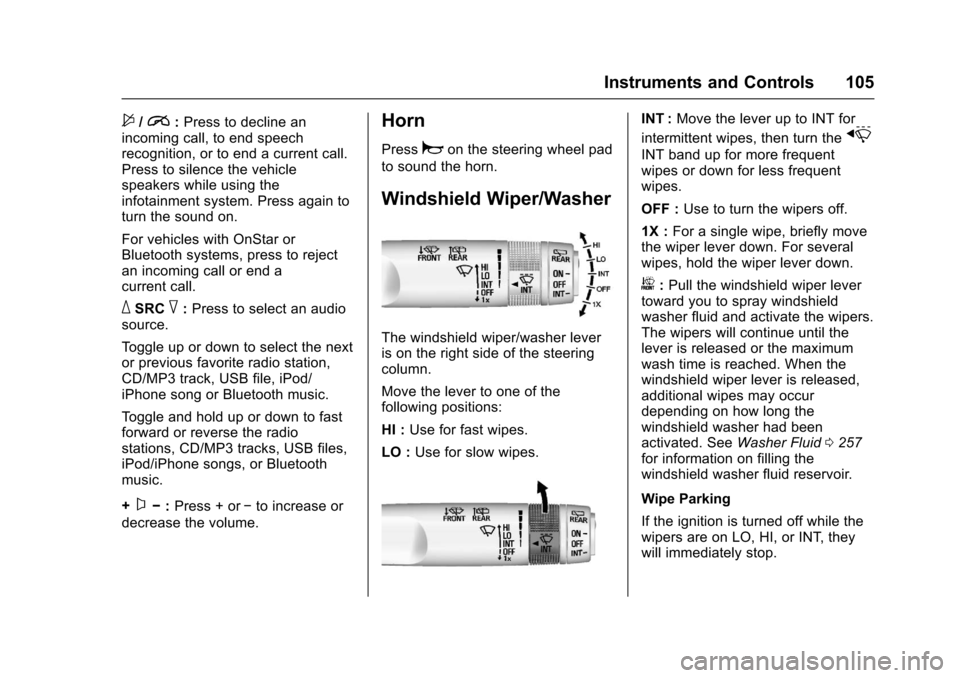
Windshield Wiper/Washer
The windshield wiper/washer lever
is on the right side of the steering
column.
Move the lever to one of the
following positions:
HI : Use for fast wipes.
LO : Use for slow wipes.
INT : Move the lever up to INT for
intermittent wipes, then turn the
x
INT band up for more frequent
wipes or down for less frequent
wipes.
OFF : Use to turn the wipers off.
1X : For a single wipe, briefly move
the wiper lever down. For several
wipes, hold the wiper lever down.
b: Pull the windshield wiper lever
toward you to spray windshield
washer fluid and activate the wipers.
The wipers will continue until the
lever is released or the maximum
wash time is reached. When the
windshield wiper lever is released,
additional wipes may occur
depending on how long the
windshield washer had been
activated. See Washer Fluid0257
for information on filling the
windshield washer fluid reservoir.
Wipe Parking
If the ignition is turned off while the
wipers are on LO, HI, or INT, they
will immediately stop.